
.png.e799f9ae86d7547185d8fa4b14f5f0b6.png)
Kaucsenta
-
Posts
239 -
Joined
-
Last visited
-
Days Won
1
Content Type
Profiles
Warranty Claims
Downloads
Forums
Store
Services
Downloads Plus Support
DOWNLOADS EXTRA
Reels
Everything posted by Kaucsenta
-
 Requested feature added.
 -
Hey, I think i try something out on the weekend, and if it is positive, i let you know.
-
 Hi, i check the possibilities regarding this, sorry somehow i didn't get a notification about the message :S
- 30 comments
-
- 1
-

-
- #durability
- #rust
- (and 7 more)
-
Version 1.0.0
49 downloads
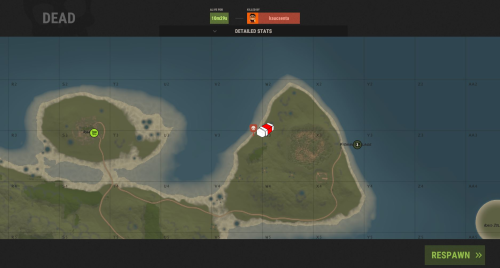
This plugin is about to hide the death marker upon death or after re-spawn, up to the given permission. It is perfect to make the players life a bit harder or make your server a bit hardcore . Permissions deathmarkerremover.hidedeath- Permission to hide death marker after the player was re-spawned. deathmarkerremover.skipdeathscreen- Permission to hide death marker as soon as the player died and the death screen come up.$2.00 -
Changed Status from Pending to Closed
-
Changed Status from Pending to Can't Reproduce Changed Fixed In to 1.2.0
-
Changed Status from Pending to Can't Reproduce Changed Fixed In to 1.2.0
-
There was no problem so far with the order, and we also use truepve... any other maybe on your end?
-
Here i suspect then some other plugin dependecy and order. What other plugins you have what can have effect on armor/damage?
-
Hello Pinky20053, Sorry, but don't get the issue. I have an active server, where the plugin is working as expected. Please define your problem exactly.
-
Hello, This feature was added as part of 1.2.0, hope you was notified about it
-

Version 1.1.0
147 downloads
This plugin give the possibility to restore the very last corpse via chat or console command, and teleport the lootbag from a corpse back to the player, independently from the location. Only the content of the corpse, dropped tool/weapon is not supported, if not stick to the corpse. If the player die repeatedly, the previous corpses can't be restored, only the last. Permissions restorecorpse.allow - Permission to use the plugin feature via Chat command. Configuration SecurityStringAgainstF1use - used as additional protection, if the players knows the console command, and want to try the console command, without the restorecorpse.allow permission, to bypass it, for example if you want to put this console call into your shop as a buy-able feature. RestoreCommand and RestoreCommandConsole - Manually set-able commands for Chat and Console Usage. EnableReminder - Send reminder to the player, that there is a feature to restore the corpse, after death and weak-up. Example Configuration: { "SecurityStringAgainstF1use": "Abc123", "RestoreCommand": "restorecorpse", "RestoreCommandConsole": "restorecorpseconsole", "EnableReminder": true } Commands /restorecorpse - (If you set it as RestoreCommand) - Chat command, restore the last, still active corpse content and teleport the lootbag under the player. restorecorpseconsole Abc123 usersteamID - Console command, restore the last, still active corpse content and teleport the lootbag under the player, without the Security password, it is restricted. Localization English language file generated by default, texts supported by the language files.$12.00 -
Version 2.0.0
59 downloads
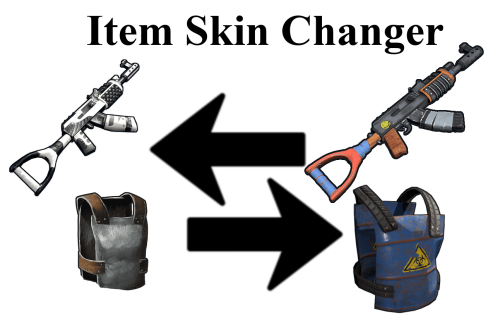
This plugin is quite unique compared to the other skin plugins (at least based on my and my partners opinion ). The main difference is, that you can browse the items from the Rust workshop itself first, then you can apply any skin ID right after on your selected item in your hand. This prevent the misunderstanding based on the small in-game pictures, and always manually look for the right skin for the given item. The plugin has the opportunity to prevent items to be able to skin, to prevent for example the inappropriate pictures on rugs, door, etc... But it has also the option to give permission to the restricted items anyway (one-by-one), so like VIP or trust-able players can use those items as well, as an idea. All skins are applicable, what are present in the workshop (allowed, not allowed), and correctly created, for example, if the SMG item has Jackhammer tag, then it will not fit for the SMG. The plugin has an additional item-applicable check, to prevent user error, to apply door on the rock ... Hazmat suit is currently not supported, since no created skin present, just the buy-able item. Permissions itemskinchanger.admin - Admin bypass the restrictions. itemskinchanger.use - Permission to use the skin feature. itemskinchanger.allow_[restricted_item_name] - Additional permission to bypass the restricted items. (Only available, if AddRestrictedItemPermission configuration is true ) Configuration AddRestrictedItemPermission - To add separate permissions for the restricted items, otherwise they can't be bypassed. Example Configuration: { "AddRestrictedItemPermission": true, "UseClan": false, "UseFriends": false, "RestrictedItems": [ "door.hinged.wood", "door.double.hinged.wood", "door.hinged.metal", "door.double.hinged.metal", "wall.frame.garagedoor", "door.hinged.toptier", "door.double.hinged.toptier", "rug" ], "BypassItems": [ "researchpaper", "bottle.vodka", "ducttape", "glue" ] } Commands /skinitem [skinID from workshop] - example: /skinitem 1402412287 and the corresponding item is in your hand as an active item. /skintarget [skinID from workshop] - example: /skintarget 1402412287 and the corresponding item before you. /checkname - give back the shortname of the item in your hand, to support the configuration. Example Item list and naming conventions are provided next to the *.cs file as txt file. Localization English language file generated by default, texts supported by the language files.$7.50 -

Version 1.2.0
345 downloads
About TC Limiter This plugin prevent the abuse use of the ToolCupboards, if limitations are set. Also extra TCs can be added based on permission and players also can bypass the configuration. I recommend to use the plugin only from the start of the wipe, otherwise it will have no effect on the previously placed TC-s and only track from the newly placed ones. Permissions tclimiter.admin - Permission for admins or other players to bypass the TC limit. tclimiter.clearpermissions - For wipe usage, you can clear the previously set EXTRA permissions with the combination of the "/wipetc" chat command. tclimiter.extra_* - Based on the configured extra allowed TC, additional permissions will be created. Configuration The settings and options for this plugin can be configured in the TCLimiter.json file under the oxide/config directory. The use of a JSON editor or validation site such as jsonlint.com is recommended to avoid formatting issues and syntax errors. Example Configuration: { "minimum_allowed_TC": 1, "extra_TC_to_allow": 2 } Commands /tclist - list available TC number /wipetc - use it for clear up the given EXTRA permission before/after wipe. Localization English language file generated by default, texts supported by the language files.$10.00 -
Changed Status from Pending to Can't Reproduce
-
I was able to do a short check on my updated local server. This seems working as intended. What version do you use? May the players somehow got protection permission to bypass the item durability loss? Contact me on Discord and we can do a short discuss: Kaucsenta#8175
-
Hello, Today afternoon i check up on this as well. Thanks for the information.
-
Not unload it for all the time, just simple setup a timed server command to unload the plugin before purge event, or on purge days
-
Hello, interesting idea, may i can add something like that, until that, as alternative, simply unload it with a simply server command?
-
Changed Status from Pending to Closed
-
 Hello @KingSizeKevin It has already economics update with the latest patch, but forget to update the description Thanks for the question.
- 22 comments
-
- 1
-
-
- #sniper
- #challenge
- (and 8 more)
-
The give of these rewards are hard coded based on the dinamically choosen event reward. I have the API-s for these Plugins, what can be used from another plugin. It not run rcon commands
-
I don't see the possibility to support this, sorry.
-
I like this idea, looking forward some implementation may in the upcoming days. Until that check my profile, there are some challenge based plugin already. One of them will be updated with the fishing if possible to add it anyway
-
Hello @Covfefe, The goal of this to run by it is own and it don't need any further action from the console or rcon. I didn't plan to add this possibilitie yet, since this need was not considered before the implementation. Which part is confusing? I was try to describe it as easy as possible. It has two mode. 1. Dynamic_event set to false, minimum time set to for example 12 hour. - >Every server used to have a timed restart once or twice a day. The event is start right after the server is started (5min) and run until the server is not restarted and give out the reward when the plugin is unloaded by the restart. The minimum time is an extra condition to avoid "free first places" in case of server issues with recent restart. 2. Dynamic_event set to true and event long is set to for example 6. - >As soon as the server start(5min), a 6 hour long event is started. After the 6 hour it is finished, give the rewards then a New 6 hour long event is started.
.thumb.png.8fb9cb5db33376288eba94beb961d0c6.png)
