
CupsOhJoe
-
Posts
365 -
Joined
-
Last visited
Content Type
Profiles
Warranty Claims
Downloads
Forums
Store
Services
Downloads Plus Support
DOWNLOADS EXTRA
Reels
Everything posted by CupsOhJoe
-
I'm still waiting, he's been busy
-
The log is asked to be safed like this: $(date +'%Y-%m-%d-%H%M').log and it literally gets saved like that
-
This may a good conversation to bring up to Raul, I know carbon is more detrimental with null checks. I'll see what Raul says.
-
Failed to call internal hook 'OnLootSpawn' on plugin 'BagOfHolding v1.9.7' [767976070] (Object reference not set to an instance of an object) at void Oxide.Plugins.BagOfHolding.OnLootSpawn(LootContainer lootContainer) in /home/container/carbon/plugins/BagOfHolding.cs:line 1140 at object Oxide.Plugins.BagOfHolding.InternalCallHook(uint hook, object[] args) in BagOfHolding.cs/Internal:line 967 Failed to call internal hook 'OnLootSpawn' on plugin 'BagOfHolding v1.9.7' [767976070] (Object reference not set to an instance of an object) at void Oxide.Plugins.BagOfHolding.OnLootSpawn(LootContainer lootContainer) in /home/container/carbon/plugins/BagOfHolding.cs:line 1140 at object Oxide.Plugins.BagOfHolding.InternalCallHook(uint hook, object[] args) in BagOfHolding.cs/Internal:line 967 Failed to call internal hook 'OnLootSpawn' on plugin 'BagOfHolding v1.9.7' [767976070] (Object reference not set to an instance of an object) at void Oxide.Plugins.BagOfHolding.OnLootSpawn(LootContainer lootContainer) in /home/container/carbon/plugins/BagOfHolding.cs:line 1140 at object Oxide.Plugins.BagOfHolding.InternalCallHook(uint hook, object[] args) in BagOfHolding.cs/Internal:line 967
-
Any plans to update the plugin for Carbon?
-
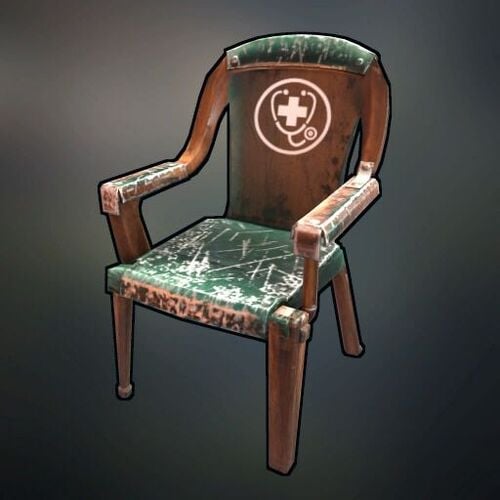
Version 1.5.2
18 downloads
Makes those useless chairs around your server actually worth a damn. Set up RP positions (like doctors, police, whatever) where players earn points for sitting their ass down and doing their job. Features: Works with ServerRewards (or tracks points itself) Makes chairs show up on the map when someone's sitting in them Kicks out AFK players with a simple Q&A check Server broadcasts when someone takes their post ("Doctor is in at B10") Permission-based so random nakeds can't play doctor Customize rewards, timers, and messages per chair type in the config Added with 1.4.0 + NEW - Radius mode allows players to move around within a defined area while still earning RP NEW - Visual radius boundary shows players exactly how far they can move NEW - Admin-placed chairs can only be removed by admins with proper permissions NEW - Admin commands for easy chair placement and management NEW - Configurable radius sizes per chair type Commands: (internal only, when Server Rewards not active on server) /checkrp - See how many points you've got /clearrp - Admin command to reset someone's points NEW COMMANDS (1.4.0+) /placerpchair [chair name] - Admin command to place a configured RP chair /removerpchair - Admin command to remove an RP chair you're looking at /listrpchairs - Admin command to list all placed RP chairs /gotorpchair [chair name] - Admin command to teleport to a specific RP chair /testradiussize [value] - Admin command to test different radius sizes Player Commands /rpradius - Check your current radius status This plugin is perfect for RP servers where you're sick of empty medical bays and police stations. Makes players actually staff positions to earn their rewards. Setup: Add chair types to the config (skinID, name, permissions) NEW! Set different radius sizes for each chair type NEW! Place the chairs in-game using admin commands Watch as players actually staff positions and move around realistically within defined areas Works great with RP plugins like ServerRewards. Credits: Thank to @Chill Roleplay for the idea/testing. Questions? Post in the comments or DM me on Discord https://discord.gg/M4dMtbWUt5 Please select Plugin Support and Send a ticket$9.99 -
Version 1.3.6
899 downloads
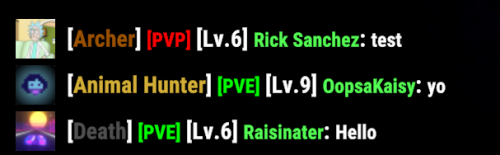
Track your server's top players and reward them with custom chat tags! What Does It Do? PlayerStatTags keeps track of who's dominating your server in different ways and gives them special tags in chat so everyone knows who the top players are. Someone racking up tons of PVP kills? They'll get a [Killer] tag. Another player sniping from incredible distances? They get the [Sharp Shooter] tag. The plugin handles everything automatically - tracking stats, determining who's on top, and assigning tags. Players can only wear one tag at a time, so the system makes sure they get their most prestigious one. Key Features Automatically tracks over 40 different player stats (kills, headshots, resources gathered, etc.) Assigns unique chat tags to your server's top performers Works with BetterChat or can display tags on its own Fully customizable tags and priorities - decide what achievements matter most Admin commands to manage everything Option to reset stats on map wipes Ability to customize all tags through config NEW 1.2.7: Exclude specific players (like admins or owners) from stat tracking <Info at the bottom> NEW 1.3.3: Hardcore Mode! Reset player stats completely on death/suicide (optional) What Gets Tracked? Pretty much everything! PVP kills, headshots, resources gathered, structures built, bullets fired, animals hunted, helicopters downed... if players can do it in Rust, this plugin probably tracks it. Commands For Admins /playerstattag debug on/off - Turn debug mode on or off /clearstats all - Wipe all player stats /clearstats <steamid> - Clear a specific player's stats /purgedata - Clean up the database Testing & Viewing Stats /tagstest list - See who has which tags /tagstest player <name> - Check a specific player's tag /tagstest stats <name> - View all of a player's stats /tagstest config - Browse your tag configuration /tagstest tag <category> - Look up details about a specific tag Permissions playerstattags.admin - Full admin access playerstattags.test - Just for viewing tags and stats Works Great With BetterChat (optional) - For seamless tag integration NEW: Player Exclusion Enable the SteamID Exclusion feature in the config and add the SteamIDs of players you want to exclude from stat tracking. Perfect for admins, moderators, or anyone you don't want participating in the competitive stats. This ensures your tags are given to legitimate players! "Enable SteamID Exclusion": true, "Excluded SteamIDs (Players who will be excluded from stat tracking)": [ 76561198012345678, 76561198087654321 ]Free -
Would love to see compatibility with razors animalfarm plugin. Seems that it's allowing the removal of their custom entity.
-
PVE plugin will allow players to kill your animals, and the BuildTools allows you to remove single fences.
-
 Change all the players groups to pvp
 -
i mean if true is true it does equals true. Lol
-
@Death wondering if the poll questions should be "Do you agree with us rejecting FULLY AI-generated submissions?"
-
Ok really concerned you know that
-
I'm assuming that the free or cheap versions aren't going to get you much luck in making good plugins. ChatGPT is 200 a month, Gemini Code Assist is like 23 per use, at the point you pay this much why even bother.
-
AI is useful if you get stuck, but shouldn't be relied on to create the full plugin (I mean, I guess it can make complete smallish non complex plugin, but why). As I learn more and more, i have noticed the less reliance on AI to help, it's just as easy to ask your follow developers for assistance. They probably will have better and more efficient ways, AI will most likely just spit out code it thinks is correct unless you are paying for it, but again if you pay $200+ (who the hell has that monthly) for AI to create plugins what's the point, just pay another dev to do it at least you would be contributing to that developer..
-
Changed Status from Pending to Can't Reproduce Changed Fixed In to 1.0.4
-
Also please submit a ticket on the discord so I can assist better.
-
Working here:
-
You have to keep in mind that the delay is from the initial start, so if you start with delay 5 and duration 10 thats a 15 second total run time the second command you want to start say 5 seconds after the first Command you need to take into consideration the 15 seconds already used so you would start the second delay as 20 (15+5) and the duration for 10 seconds, etc Below is what it should look like. { "exists": true, "ccommand": "runcmd", "TheCommands": [ { "commandName": "Command1", "enabled": true, "isNewPlayer": false, "singleCast": false, "theCommand": "say hi1 {player}", "endCommand": "say hi2 {player}", "theDelay": 5.0, "theDuration": 10.0 }, { "commandName": "Command2", "enabled": true, "isNewPlayer": true, "singleCast": true, "theCommand": "say hi2 {player}", "endCommand": "", "theDelay": 20.0, "theDuration": 10.0 }, { "commandName": "Command3", "enabled": true, "isNewPlayer": true, "singleCast": false, "theCommand": "say hi3 {player}", "endCommand": "", "theDelay": 35.0, "theDuration": 10.0 }, { "commandName": "Command4", "enabled": true, "isNewPlayer": false, "singleCast": true, "theCommand": "say hi4 {player}", "endCommand": "", "theDelay": 50.0, "theDuration": 10.0 } ] }