Jump to content

Iftebinjan

Creator
  • Posts

    838
  • Joined

  • Last visited

  • Days Won

    1

Everything posted by Iftebinjan

  1. working on it
  2. Iftebinjan

    Maze

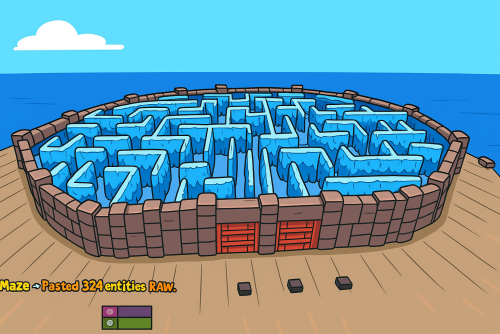
    Yes it has support for that plugin Maze New Update V1.0.3 Added support for FClan Bug Fixes Fixed where you can't do command when the event is ended Fixed participants count not showing accurately Fixed discord messages not sending properly Fixed where players still counted in the arena list after his death and before respawn Fixed where it waits for shrink time event winner is found
  3. Iftebinjan

    FClan

    Is this clan plugin has api? Or Api same as the other clans plugin?
  4. Iftebinjan

    Maze

    Version 2.1.2

    327 downloads

    The Maze plugin adds intensive pvp combat within a maze environment. Players navigate through the maze, engaging in intense battles to eliminate opponents and be on top Key Features Easy to setup Automation of maze arena Includes Free 2 Maze Arena with pre-setuped arenas Door Animation Multiple arena setup Easy configurable Setup winning rewards Discord Webhook support Need help setting up the arena or customization? Knock me on Discord Commands Setup Commands /maze create <ArenaName> - Create a maze arena where you are standing /maze edit <ArenaName> - Select an arena to edit /maze radius <Number> - Change arena radius /maze wallradius <Number> - Change arena wall radius which is your arena walls radius from center /maze meshheight <Number> - Change arena mesh height is top and bottom from corner mesh /maze location - Change arena location to where you are standing /maze setcorner - Set corner location to where you are standing /maze showmesh - Show created mesh after setting corners /maze copywalls - Copy all the walls in the arena radius and store them /maze pastewalls - Copy all the walls in the arena radius and store them /maze setspawn - Set spawn postion for arena players to teleport /maze spawnclear - Clear all spawn points /maze adddoor - Place an arena door to your standing location /maze removedoor - Remove arena door to your standing location (Radius 5f) /maze cleandoors <ArenaName> - Remove all the arena doors from the arena /maze list - Show all arena and its settings /maze cleanarena - Clears the entire arena /maze delete/remove <ArenaName> - Remove or deletes an arena /maze start <ArenaName> - Starts a Maze(For Testing) Start Commands /maze_setup - Starts Automatic Maze setup if arena available also a console command /mazestart - Starts a random maze from the config if available /mazestart <ArenaName> - Starts the specific arena /mazestop - Stops the running maze event Permissions Maze.admin - To use all maze available commands Video Showcase Configuration { "Maze Automatic Event": false, "Maze Automatic Event Interval Minimum (In Seconds)": 3600, "Maze Automatic Event Interval Maximum (In Seconds)": 7200, "Maze Minimum player requires to starts Auto": 2, "Maze Automatic Event Random From List": [ "mazeareana", "maze2areana" ], "Maze Event Player Teleport Timer (In Seconds)": 15, "Maze Event Before Notification (In Seconds)": 300, "Maze Event Door Opening Notification (In Seconds)": 300, "Maze Event Door Closing In (In Seconds)": 600, "Maze Event Removing Walls Radius": 10, "Maze Event Shrink Amount": 3, "Maze Event Removing Walls Timer (In Seconds)": 15, "Show Kill Streak Messages": true, "Maze Event Door Prefab": "assets/content/structures/interactive_garage_door/sliding_blast_door.prefab", "Maze Walls Item List": [ "assets/prefabs/building/wall.external.high.stone/wall.external.high.stone.prefab", "assets/prefabs/misc/xmas/icewalls/wall.external.high.ice.prefab", "assets/prefabs/misc/xmas/icewalls/icewall.prefab", "assets/prefabs/deployable/barricades/brarricade.cover.wood_double.prefab" ], "Maze Event Blocked items": [ "grenade.beancan", "grenade.f1", "rock", "rocket.launcher", "ammo.rocket.basic", "ammo.rocket.smoke", "ammo.rocket.hv", "ammo.rocket.seeker", "ammo.rocket.fire", "explosive.satchel", "explosive.timed", "ammo.grenadelauncher.smoke", "ammo.grenadelauncher.buckshot", "ammo.grenadelauncher.he", "grenade.flashbang", "grenade.molotov", "multiplegrenadelauncher", "grenade.smoke" ], "Maze Event Blocked Commands": [ "kit", "trade", "remove", "tpa", "home", "shop", "clan" ], "Maze Map Marker Setting": { "Display Name": "Maze", "Marker Radius": 0.4, "Marker Transparency": 0.75, "Marker Color": "#FFFF00" }, "Maze Rewards": { "Give commmands rewards upon winning the event": true, "Rewards player with higest kill from winning clan": true, "Rewards upon winning({PLAYER})": [ "inventory.giveto {PLAYER} supply.signal 1" ], "Spawn loot boxes in the arena": true, "Loot boxes time in seconds": 300 }, "Maze Chat Setting": { "Chat Avatar Icon": 0, "Chat Prefix": "<color=#FFFF00>Maze</color> -> ", "Winner Message": [ "<color=#FFD700>Maze Results:</color>", "\n", "Winner -> <color=#FFFF00>{WinningClanName}</color>", "", "{PlayerStats}", "", "<color=#FFD700>Totals:</color> Kills: {ClanTotalKills}, Deaths: {ClanTotalDeaths}, KDR: {ClanTotalKDR}", "Damage: {ClanTotalDamage}, Headshots: {ClanTotalHeadshots}", "", "<color=#FFD700>Aggregate Maze Totals:</color>", "- Total Kills: <color=#FFD700>{TotalKills}</color>", "- Total Damage: <color=#FFD700>{TotalDamages}</color>", "- Number of Participants: <color=#FFD700>{Participents}</color>" ], "Participents Message": [ "<color=#FFD700>Personal Stats</color>", "Kills: <color=#FFD700>{Kills}</color>, Deaths: <color=#FFD700>{Deaths}</color>, KDR: <color=#FFD700>{KDR}</color>, Total Damage: <color=#FFD700>{Damages}</color>, HeadShots: <color=#FFD700>{Headshots}</color>", "Shooting Accuracy: <color=#FFD700>{Accuracy}%</color>, HeadShot Accuracy: <color=#FFD700>{HeadshotAccuracy}%</color>" ], "Maze Event Top Bar Message": [ "<size=25><color=#FFFF00><b>MAZE</b></color></size>", "<size=15><color=#FFFF00><b>{DYNAMIC_TIMER}</b></color></size>", "", "<size=15><color=#FFFF00>{TotalTeams}</color><b> TEAMS REMAINING</b></size>", "<size=15><color=#FFFF00>{TotalPlayers}</color><b> PLAYERS REMAINING</b></size>" ] }, "Discord Setting": { "Enable Discord Webhook": false, "Discord Webhook URL": "", "Discord Webhook Message": [ "**MAZE ARENA**", "", "**Details**", "Total Kills: `{TotalKills}`", "Total Teams: `{TotalTeams}`", "Total Players: `{Participents}`", "", "**Winners**", "**{WinnerClanName}**", " Kills: `{ClanKills}` Deaths: `{ClanDeaths}`", " Headshots: `{ClanHeadshots}` Damages: `{ClanDamages}`", "", "**Members**", "{MembersStats}" ] }, "Auto Maze Arena Setup": { "Start Maze Arena Setup": true, "Auto Arena Setup": { "AutoMaze1": { "Maze Center Item": "skullspikes.candles", "Maze Arena Locate Radius": 100.0, "Maze Arena Wall Radius": 40.0, "Maze Arena Mesh Top & Bottom Height": 50.0, "Maze Spawn Points Item": "woodbox_deployed", "Maze Door Item": "workbench1.deployed", "Maze Corner Item": "mailbox" } } } } API & Hooks OnMazeStarts(string ArenaName, DateTime timeNow) OnMazeWinnerAnnounce(HashSet<ulong> winnerList, DateTime timeNow) Support
    $40.00
  5. will be checking this. Updates coming soon
  6. Version 1.0.1

    486 downloads

    The "PlaytimeCommands" plugin for Rust allows server administrators to automate the execution of commands when players achieve specific playtime milestones. Upon initialization, it checks players' playtime at regular intervals and triggers configured commands when certain hour goals are reached. (This plugin requires PlaytimeTracker or PlayTimeRewards plugin to work.) Features Easy config, add unlimited playtime goals and their rewards Light plugin, no performance issues Saved PlayerData to ensure they don't get repeat rewards Reset PlayerData when editing config values Commands /prc reset - Reset all player data(Requires 'PlaytimeCommands.admin' permission to use this command in chat.) Console Commands prc reset - Reset all player data. Config { "Check how often it checks for playtime and execute commands?(In Seconds)": 1800, //Timer interval, set a higer value for timer check "Execute command upon playtime hour completation": { "20": [ //Playtime Minute number "oxide.usergroup add {UserID} chads", //commands - Placeholders are {UserID} & {Name} which will replace with SteamID and Player Name "chat user add {UserID} chads" //commands ], "30": [ //Playtime Minute number "sr add {Name} 1000", //commands "sr take {UserID} 100", "oxide.usergroup add {UserID} veteran" ] } }
    Free
  7. Iftebinjan

    SimplePVE

    yes it has loot protection also has backpack support from Version 1.2.1 which was updated recently.
  8. Iftebinjan

    SimplePVE

    Use can disable "Use Loot Protection": true, which will not use the loot protection from this plugin then use the PreventLooting plugin for the loot protection which doesn't have Backpack support yet
  9. Iftebinjan

    SimplePVE

    Updating in a few hours.
  10. Version 2.0.6

    260 downloads

    As soon as the event starts, several troops (NPCs) are spawned to defend an hackable crate that will be delivered by the CH47. This crate may contain a lot of loot, so the troops have the duty to defend it. For this purpose, there is a variety of troops such as snipers, close-range shooters, and long-range shooters. If a player manages to initiate the hacking of the crate, all the airfield troops will be relocated to a combat position. In other words, all troops that you haven't seen yet or that are hidden will be moved to the center of the airfield to defend the crate. After a few minutes, a plane will be sent with supply drops containing weapons to assist the troops in defense. However, airborne troops will also be dispatched from the plane to parachute down and aid in defending the crate. If the crate is looted, all troops will be destroyed, leaving only the crates, supply drops, and bodies to be looted by intruders. Commands /ma start to start the event /ma stop to stop the event /ma position to get the current position based in the airfield monument (used to config) Permissions militaryairfield.admin to access all commands API & Hooks private void OnMilitaryAirfieldEventStarted(); - // Called when the event starts private void OnMilitaryAirfieldEventEnded(BasePlayer? lootedBy); - // Called when the event ends Configurations Support
    $14.99
  11. Hello, I can help create your server to fully complete the server setup. I have been doing this for 2 years now on Fiverr. LINK I will configure Rust game server with everything you need I will do Rust game Discord server setup I will create Rust game plugin for your Rust server Please get in touch with me if you need any of these services. Thanks
  12. @LaserHydra is this purchasable anytime soon?
  13. We fixed it on discord. No update needed here
  14. Iftebinjan

    SimplePVE

    It has inbuilt PVE/PVP status
  15. Iftebinjan

    NPC Bands

    Version 1.1.0

    64 downloads

    HOW TO ADD A TRACK? If you have already created your own track file, skip the first 3 steps. To add a new track, it’s very easy, follow the steps below: 1 ° Have the midi file (.mid) you want to add ready. 2 ° Goto the https://npcbands.vercel.app 3 ° Upload your file and click in the DOWNLOAD button 4 ° Move the downloaded file to oxide/data/NPCBands/Notes/ Now, the track name to add to the configuration file will be the file name without the .json extension. AVAILABLE INSTRUMENTS Guitar Trumpet Flute Sousaphone Canbourine Jerry Can Guitar Shovel Bass Piano Drumkit Xylophone FEATURES ■ª Create multiple bands ■ª Clean music controls UI ■ª Spawn unlimited bands ■ª Create a song-notes filter for each NPC ■ª Add custom clothing for each NPC ■ª Use of deployable instruments ■ª Fully customizable UI ■ª 2 band-mode (automatic and proximity) ■ª Unlimited NPCs for the same band ■ª All NPCs will play the notes that the instrument allows (can be filtered) ■ª Interval between songs ■ª Permission to use controls ■ª High performance, no server lag ■ª Option to force immediate stop ■ª Easily convert your midi files using the npcbands website ■ª 1 file for each track to avoid a large configuration/data file ■ª Delete all bands automatically when clearing the map ■ª Destroy all NPCs automatically when unloading the plugin ■ª Delete all NPCs on the plugin load in case of possible server crash ■ª Custom chat command ■ª Custom band radius ■ª Notifies you when you enter the band area COMMANDS /npcbands spawn <band_key> to spawn a new band /npcbands remove <band_id> to remove an existing band /npcbands list [page] to list all existing bands PERMISSIONS npcbands.admin - Permission for chat commands & music control npcbands.control - Permission for the music control only CONFIGURATION FILE NPCBands.json
    $20.00
  16. Iftebinjan

    TC Levels

    Version 1.3.5

    237 downloads

    Reduce the decay damage by tick; Upgrade the authorizations limit; Upgrade the building grade limit; Upgrade the storage capacity of the cupboard; Unlock some deployable items; Upgrade the stack size limit of the cupboard; Set a default building grade for the server; Modify the default decay; Keep the cupboard attributes when remove; Make your server fun ^u^ The plugin has a unique permission, which allows the player to use the cupboard upgrade: tclevels.use F.A.Q How many items can be blocked? and which? You can block unlimited items and all items must be deployable or they will not be blocked. Which area will be checked when I place my cupboard? The entire privilege area will be checked. But you can also disable checks in the configuration file. Could it cause conflict with any plugin? Yes, but i am providing an API for the plugin so that other developers can integrate with it, so if there is a conflict, just go to the developer's plugin support and ask them to integrate it. Also if it is possible for me to integrate it from my plugin, i will do so without any problem.
    $20.00
  17. Iftebinjan

    SimplePVE

    you only need to put this on the server and remove the other PVE plugins. No extra work is needed then you can customize it as you want
  18. Iftebinjan

    SimplePVE

    You don't need to use truepve with this. Just install this one and make schedules
  19. Version 2.6.5

    2,322 downloads

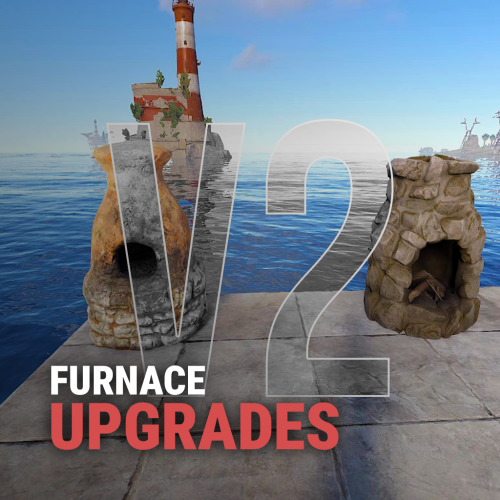
    Upgrades your furnaces, ovens, refinery, mixing table & etc to beyond. Key Features Upgrade each attribute of your furnace; Supports different oven types; It is possible to define default attributes for all ovens on the server; You can set a default value for all base ovens (replacing quicksmelt); You can enable/disable any features you want; Option to keep attributes when removing the furnace; Option to auto split ores; Automatic fuel calc based on the upraded oven attributes; Now BBQ and Campfire can also be improved; Option so that only the furnace owner can upgrade it; Option so that only owner's teammates can upgrade it; A new completely redesigned UI; NEW Supports Mixing Table Video Showcase Permissions furnaceupgrades.use - This is the unique permission. required for all players to upgrade furnaces Configuration Support
    $14.99
  20. Iftebinjan

    Toastify

    Version 2.0.2

    617 downloads

    WHAT IS IT FOR? This is a tool that creates temporary notifications on the user's screen, used to facilitate messages between plugins and server users. CONSOLE COMMANDS toastify [toast_id] [player] [message] - to send a toast notification for a specific player toastify.global [toast_id] [message] - to send a toast notification for everyone PERMISSION toastify.use- the permission to access the toastify commands API </> // Send a toast notification for the target player // Returns the ID of the toast to destroy it if necessary // @deprecated string SendToast(BasePlayer player, string toastId, string message, float? duration); // Use this new one instead of the above: string SendToast(BasePlayer player, string toastId, string title, string message, float? duration); // Destroy a toast notification void DestroyToast(BasePlayer player, string toastId); GOOD WAY TO IMPLEMENT If you want to integrate your plugin with Toastify, I recommend that you add an option in the configuration file of your plugin that the user can link their notification ID with the notifications you will use, you can see an example of how this was implemented in the FurnaceUpgrades or TCLevels configuration file. CONFIGURATION The default configuration file of the plugin: SCREENSHOT
    Free
  21. please join my discord server and open a a ticket there https://discord.gg/9PUMfsTyhR
  22. Install ImageLibrary from https://umod.org/plugins/image-library then reload the stats plugin. Sorry it doesnt have any configuration. I am planing to add it later on.
  23. Version 1.0.5

    95 downloads

    DangerZones is a plugin that creates a bombing zone event, just like in Battle Royale games! Demonstration video: Auto spawn Danger Zones; Custom map marker; Custom zone radius; Can modify rockets damage; Can modify rockets ground distance; Can modify rockets speed; Chat command to spawn danger zones; Multiple danger zones at the same time; Can modify the interval between rockets; You can modify the number of rockets that will be launched at the same time; Custom status label with the SimpleStatus plugin; Fully customizable UI toast notifications; Enable/disable damage to structures; Enable/disable damage to NPC's & Animals; The default configuration file:
    $4.99
  24. Version 1.0.0

    27 downloads

    What differentiates our plugins from others is the ability to create votes for customized server events in addition to our exclusive and modern design, making it stand out among other servers! A modern and elegant interface inspired by the design of the game League of Legends; Fully customizable interface; Multiple chat commands; Different permission for each sub command; Different cooldown for each event; Plugin default events; Option to enable/disable events without deleting them; Customized icon for each event; Can I assign a price to run the command? Yes, you can set the option "Cost" in the config file to use the Economics plugin and add a cost to the command. Can I give specific event permissions only to VIPs? Yes, you can create specific permission for each sub command and only give it to the users or groups you prefer! You can see the default config of the plugin above:
    $13.00
  25. Version 1.0.7

    398 downloads

    SimpleStatsUI is a sleek and user-friendly statistics interface designed to enhance the gaming experience by providing comprehensive insights into player and clan performance. Beautiful User-Interface Shows leaderboards of TOP 10 Players in the server & TOP 10 Clans Counts Player Kills, Deaths, KDR, HeadShots, HeadShot.Accuracy, Shooting Accuracy /stats - Opens UI interface Leaderboard (For Players) /show_kdr - Enable or disable KDR UI (For Players) /enable_kdr - Enable or disable KDR UI for the server (For Admin) /reset_players - Reset all player stats (For Admin) /reset_clans - Reset all clan stats (For Admin) simplestatsui.admin - Requires admin permission to reset stats { "Settings": { "Count NPC": true, "Count Suicides": true, "Reset Player Stats On Wipe": true, "Reset Clan Stats On Wipe": true }, "KDR UI Setting": { "Enable KDR UI": true, "Anchor Min": "0.5 0", "Anchor Max": "0.5 0", "Offset Min": "-305.2 17.999", "Offset Max": "-205.2 77.98", "Kills UI": { "Text": "{kills} Kills", "BackGround Color": { "Hexa Color(#FFFFFF,100)": "#3D4B27,100" }, "Icon ImageURL": "https://i.postimg.cc/nLj1yJ0L/target.png", "Icon Color": { "Hexa Color(#FFFFFF,100)": "#A6CD63,100" }, "Text Color": { "Hexa Color(#FFFFFF,100)": "#A6CD63,100" } }, "Deaths UI": { "Text": "{deaths} Deaths", "BackGround Color": { "Hexa Color(#FFFFFF,100)": "#962F20,100" }, "Icon ImageURL": "https://i.postimg.cc/s2CkmnwL/skull.png", "Icon Color": { "Hexa Color(#FFFFFF,100)": "#C79897,100" }, "Text Color": { "Hexa Color(#FFFFFF,100)": "#C79897,100" } }, "KDR UI": { "Text": "{kdr} KDR", "BackGround Color": { "Hexa Color(#FFFFFF,100)": "#1D425F,100" }, "Icon ImageURL": "https://i.postimg.cc/d14y9dWg/market.png", "Icon Color": { "Hexa Color(#FFFFFF,100)": "#489AD4,100" }, "Text Color": { "Hexa Color(#FFFFFF,100)": "#489AD4,100" } } } }
    $9.99

About Us

Codefling is the largest marketplace for plugins, maps, tools, and more, making it easy for customers to discover new content and for creators to monetize their work.

Downloads
2.4m
Total downloads
Customers
10.8k
Customers served
Files Sold
156.1k
Marketplace sales
Payments
3.3m
Processed total
×
×
  • Create New...

Important Information

We have placed cookies on your device to help make this website better. You can adjust your cookie settings, otherwise we'll assume you're okay to continue.