.thumb.gif.629f3cf0f35f0b36244b72d6fb72788d.gif)
About Custom Wheel Menu
Custom Wheel Menu
Transform your server's most frequently used chat commands into a sophisticated wheel menu.
Each player can create their own custom command shortcut wheel.
Both the wheel system and the Pie system are available, allowing you to switch modes to suit your play style.
Wheel Mode : No selection function on mouseover. The first click displays a command summary, and the second click executes the command.
Pie UI Mode : Works with mouseover functionality, just like the official RUST system.
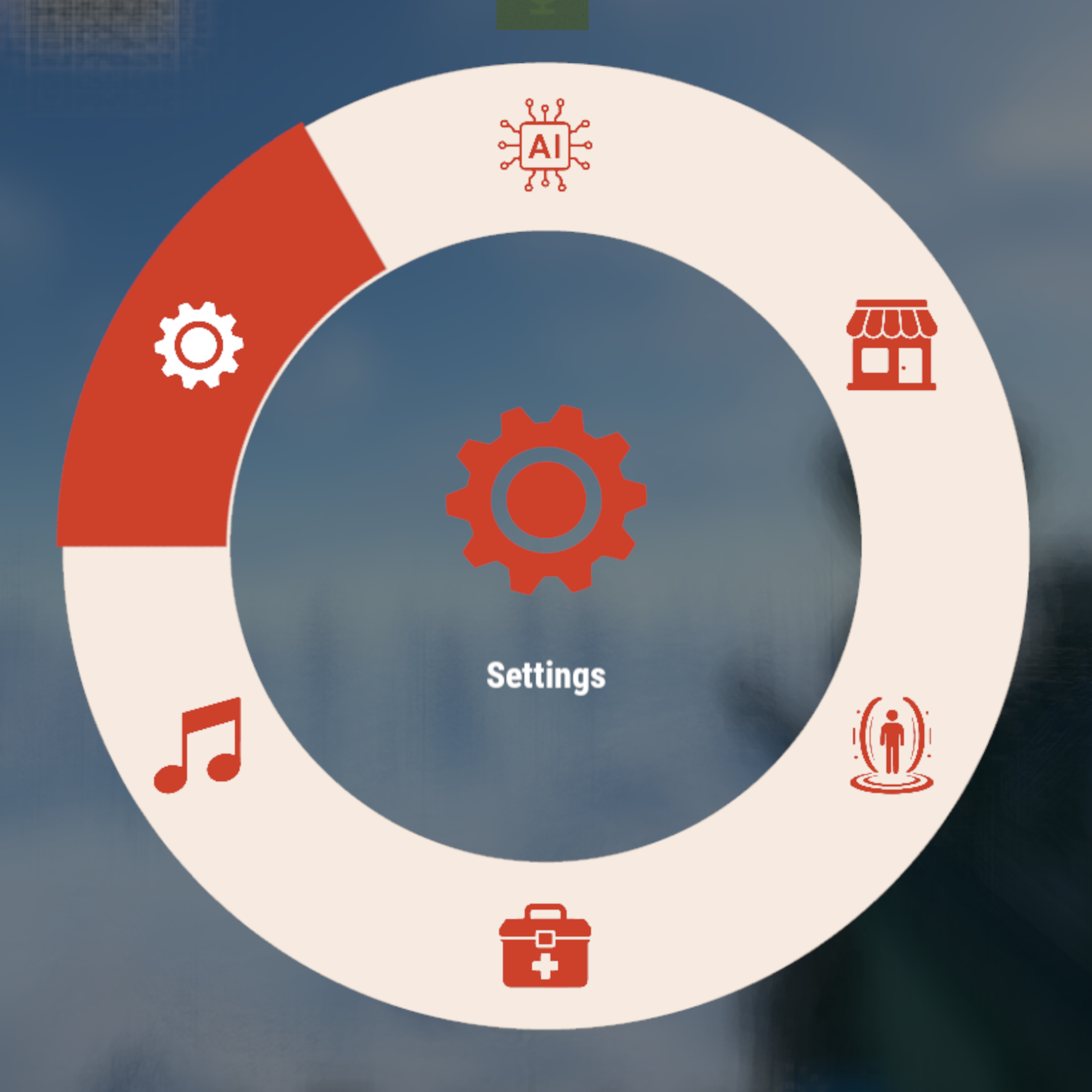

wheel UI
Both the wheel system and the Pie system are available, allowing you to switch modes to suit your play style.
The mode can be switched from the wheel settings.
Wheel Mode : No selection function on mouseover. The first click displays a command summary, and the second click executes the command. Better animation and design than Pie UI; the UI closes when clicked outside the button area. Requires double-clicking each time an action is executed.
Pie UI Mode : Works with mouseover functionality, just like the official RUST system. Clicking outside the button area executes the selected command. Requires clicking the × button each time to close.
5 assignable slots + 1 settings slot
A 6-slot wheel: 5 slots players can freely assign, plus a dedicated settings slot to manage them.
Per-player customization
Each player picks which command goes in which slot. Assignments are saved to a data file and persist across server restarts.
Card-based settings panel
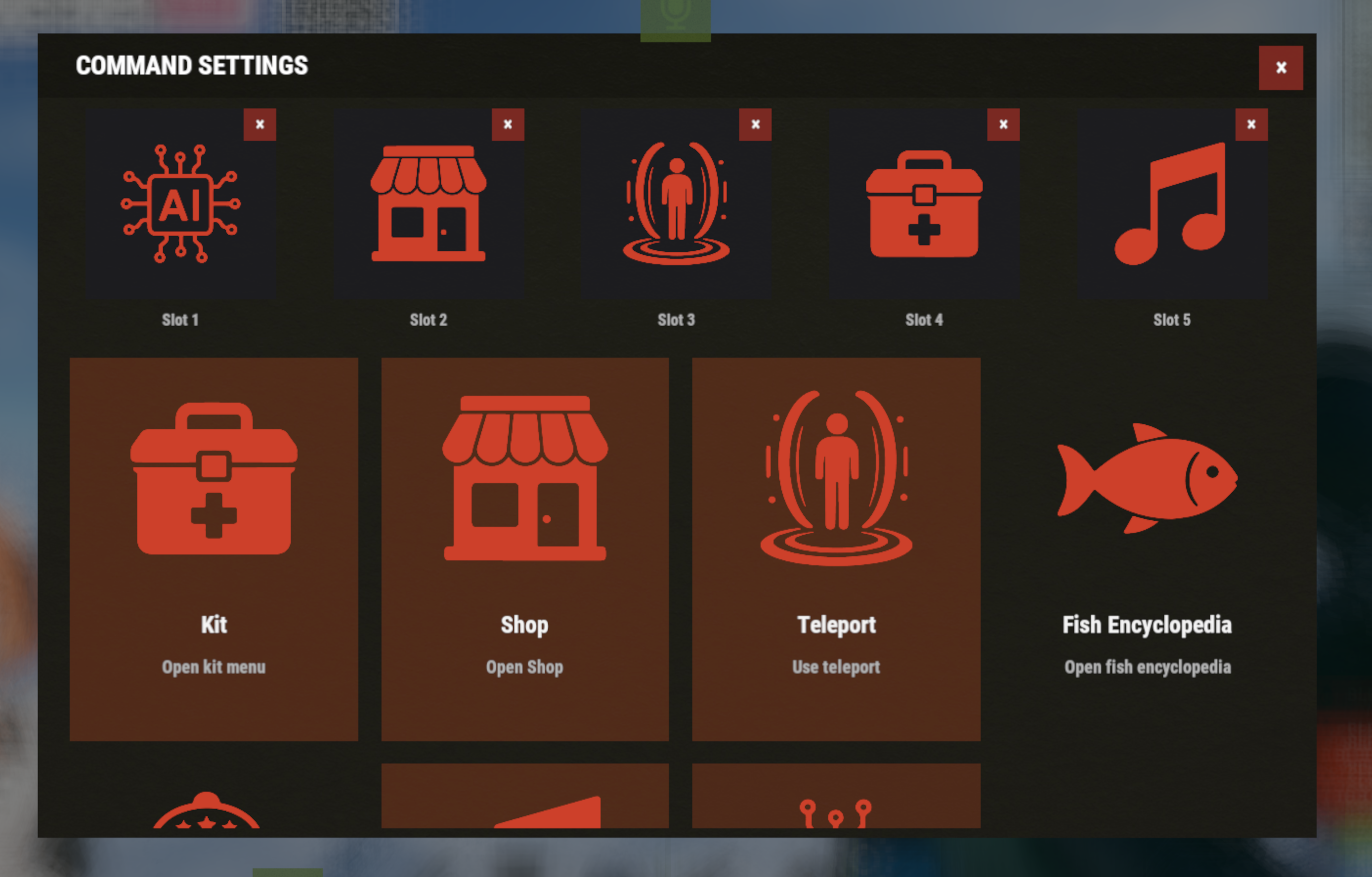
All admin-configured commands are displayed as icon + name + description cards in a scrollable 4-column grid. Empty slots show a clear "+" indicator.
Fully configurable
- Wheel center image, selection indicator, settings icon, and settings background — all set via external image URLs
- Unlimited command entries, each with a display name, executed command, icon URL, and description
Built to work as a hub
Any chat command from any plugin can be registered.
Multi-language out of the box
English, Japanese, Russian, Ukrainian, French, and Traditional Chinese UI strings included, auto-matching your server's language setting.
How to use wheel menu
1. By typing "/cw" in chat or the F1 console command "cwmenu", the wheel will appear in the center of the screen.
2. Move the mouse to highlight a slot, then select it again (or confirm) to run the command assigned to it. There is no function to select while hovering. The first click displays a summary of the command, and the second click executes it.
How to setting slot
S.electing the 6th slot (the gear icon) opens the settings panel.
2. In the settings panel, click one of the 5 slots at the bottom to select it, then click a command card above to assign it to that slot.
- Clicking the same command again unassigns it.
- The small "×" button on each slot clears it directly.
3. Use the back button to return to the wheel, or click the close button / outside the wheel to close the menu.

Chat Command
/cw - Open Custom Whell Menu
F1 Console Command
cwmenu - Open Custom Whell Menu
If you frequently use this wheel menu, we recommend binding the command "cwmenu" to a key.
To do this, open the F1 console and enter the following:
Example: bind [key] cwmenu
- Bind to the B key: bind b cwmenu
- Bind to the N key: bind n cwmenu
This setting must be configured by each individual player.

The default configuration is an example. After installing the plugin, you will need to configure the commands you use and their corresponding icon images. Several icon samples are included with the plugin download, and you can use those as well.
If you are creating your own original icon, it needs to be a square, white icon with a transparent background, and in PNG format.
{
  "WheelImageUrl": "https://i.imgur.com/zmZ5NCC.png",
  "IndicatorImageUrl": "https://i.imgur.com/8v9Xz6y.png",
  "SettingsIconUrl": "https://i.imgur.com/BZYRfsG.png",
  "SettingsBackgroundUrl": "https://i.imgur.com/WMefGKk.jpg",
  "Commands": [
    {
      "DisplayName": "Kit",
      "Command": "/kit",
      "IconUrl": "https://i.imgur.com/ln8rfJm.png",
      "Description": "Open kit menu"
    },
    {
      "DisplayName": "Shop",
      "Command": "/sp",
      "IconUrl": "https://i.imgur.com/YKUQvRg.png",
      "Description": "Open Shop"
    },
    {
      "DisplayName": "Teleport",
      "Command": "/tp",
      "IconUrl": "https://i.imgur.com/9f9PiKs.png",
      "Description": "Use teleport"
    },
    {
      "DisplayName": "Fish Encyclopedia",
      "Command": "/fish",
      "IconUrl": "https://i.imgur.com/KI6nEai.png",
      "Description": "Open fish encyclopedia"
    },
    {
      "DisplayName": "Casino Slot",
      "Command": "/slot",
      "IconUrl": "https://i.imgur.com/TRaBdjD.png",
      "Description": "Play casino slot game"
    },
    {
      "DisplayName": "Music Player",
      "Command": "/snd",
      "IconUrl": "https://i.imgur.com/G7ZMwoy.png",
      "Description": "Open Music Player"
    },
    {
      "DisplayName": "AI Support",
      "Command": "/ai",
      "IconUrl": "https://i.imgur.com/p6OhM1C.png",
      "Description": "Use AI server support"
    }
  ]
}

 VOID / NINJA WORKS
DISCORD : https://discord.gg/U8uxePjSyA
 MADE IN JAPAN

.thumb.gif.85db1086c3a89ac3c74d631b5eb77942.gif)