
igraes's Wishlist
-
$29.99
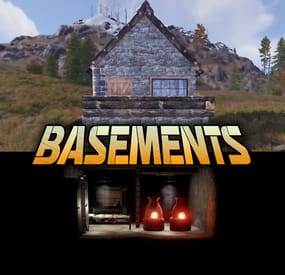
Basements
Basements lets players build underground rooms beneath their bases. Place a hatch on your foundation and dig straight down into a hidden basement with walls, ceilings, and full building privileges. Great for stashing loot, setting up secret bunkers, or just adding extra space.
Readme Link - Click Here for Instruction and Documentation
👆Highly recommend reading the FAQ section!
BUILD
Build basements easily from your tool cupboard. Just place an entrance to get started.
EXPAND
Expand your basement by drilling underground. But don't forget to bring a headlamp - its dark down there!
TRAVERSE
Place multiple entryways, building out your labyrinth of tunnels beneath your base.
DECORATE
All deployables, electricity, and storage items can be placed in your basement. Take advantage of your new space!
RAID
Nothing is safe in Rust, including your basement. If all the entrances are destroyed, then the basement is too. Any loot below will float to the surface. Protect the entrance at all costs!
API METHODS (For Plugin Developers)
// Returns true if the given entityId is part of a basement. bool IsBasementEntity(ulong entityId) // Returns the building ids of the basements connected to a given surface building id. uint[] GetBasementBuildingIds(uint surfaceBuildingId) // Returns the building ids of the surface buildings connected to a given basement building id. uint[] GetSurfaceBuildingIds(uint basementBuildingId) Extension Plugins
These are free plugins that add additional functionality to Basements.
BasementsManager
Provides a UI for admins to view and manage the basements on the server. Useful for debugging & fixing issues. Use with the /bm command, requires the basements.admin permission to use.
BasementsManager.cs
-
$32.99
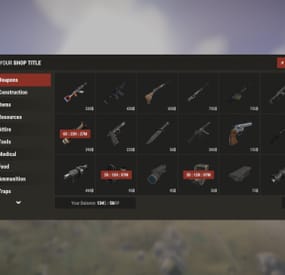
Shop UI
Well rounded shop, with various features. It's standalone plugin which is compatible with WelcomePanel, HumanNpc.
This plugin also supports selling commands, wipe block, no escape, sales, permission access.
Multi-currency support
Use different currencies for different items. Economics and ServerRewards (RP) is supported as well as scrap or any other ingame item.
Restrictions
Combat, raid, spawn and building block supported alongside with basic cooldowns and wipe block. NoEscape is required for combat and raid block.
Appearance
Simple and clean design to ensure smooth user experience for your players. Additionally Shop can be inserted into WelcomePanel to achieve "all in" server panel.
Customization
Widely customizable and feature rich Shop which will fit all needs of your community.
Field Tested
Plugin made by experienced developer, tested by hundreds of server owners and used by some big organizations.
Discord
Customer support available on discord,
Installation
- unzip downloaded package and place Shop.cs file into your plugin folder.
- after succesfuly loading the plugin, data folder oxide/data/Shop will be generated
- take data files provided in plugin package and drop them into your Shop data folder
After finishing these steps your shop is ready to used.
Server Currency
If you don't wish to use ingame items as currency make sure you use either Economics or ServerRewards as you currency management as only those two plugins are compatible with Shop. Default currency setting is Economics ("eco"), if you wish to change it navigate to "oxide/data/Shop/Items.json", open this file in some text editor (VSC recommended) and simply select "eco" and mass replace for desired value. (video here)
"eco" for Economics
"rp" for ServerRewards
"scrap" or any other ingame item
Shop Categories
To remove, change or add new categories open "oxide/data/Shop/Categories.json" file. There you will find all categories alongside with items lists. If you wish to remove certain items from category, just head over to item list and delete from there.
Items
Changing prices
In "oxide/data/Shop/Items.json" you will find every item with their properties, to quick search for specific items press "CTRL + F". By leaving BuyPrice or SellPrice at 0 you will disable selling or buying of said item. Due to multi-currency support prices can be set only in whole numbers, no decimals. To offset for this, you can set minimal amount requirement. For example instead of selling one piece of wood for 0.01$ you can set minimal amount of 100x wood for 1$.
Removing items
If you wish to remove some items from Shop, you can do that directly in "data/Shop/Categories.json" file. Removing items from "Items.json" is not needed as they have no effect unless they are listed in some category.
Adding new items
To add new item you must first head over to "Items.json" data file and create new entry by copy pasting some of the existing ones. Once done with that you can add the item into category. To add multiple versions of same item can be created by simply adding unique tag behind shortname, for example "rifle.ak{1}", "rifle.ak{2}", etc...
Commands
Adding new commands
Commands can be create at "data/Shop/Commands.json". Plugin can only run server side console commands and then parse steam id or player name with tags {steamid} and {playername}. There are two examples shown in default data file. Server side console commands are common thing and almost all plugins utilize them.
Listing commands in categories
Simply type in one of your command names into category item list like this "cmd/yourCommandName". Slash cmd in front of command name is there to make difference between ingame item and command.
Cooldowns
These are very basic, cooldown is triggered when buy/sell action is triggered. By using minimal amount requirement for items you can manage how much player buy and how often. Cooldowns are managed in "data/Shop/Cooldowns.json". Default data file contains two example of cooldowns but it's simply shortname and amount of seconds.
Restrictions
Raid and Combat Block
Managed by NoEscape plugin, option to enable these two block can be found in config file.
Building Block
Prevents players from using shop while they are building block, option can be found in config file.
Spawn Block
Prevents players from using shop after they respawn, amount of seconds can be set in config file, 0 = disabled.
Wipe Block
Prevents players from buying specific items after wipe. Settings are located in "data/Shop/ItemsWipeBlock.json", similar as cooldowns.
Sales
By Permission (config file)
Discount on every item in the shop assigned by permission, multiple permission can be created with their own discount values.
By Category (categories data file)
Discount for every item within specified category.
By Item
Discount for specific item in the shop. If item is already in discounted category, higher discount will be applied.
WelcomePanel integration
To integrate this plugin into WelcomePanel simply use one of the four configs included in download package. These config were premade for each WelcomePanel template (goes from 1 to 4). In case you have own highly customized layout for WelcomePanel you will have to adjust "Layout Container" in Shop config file by yourself.
-
.thumb.gif.fc74e311f14ad09b7090d8bb39d1827e.gif)
$49.90
Atlanta: The Walking Dead
The world has changed. The island in the ocean has become a haven for evil spirits, the surviving inhabitants call them the Walking Dead. Once the blooming and fragrant city of Atlanta was the center of this island, now it is a dead city with its inhabitants. There are very few people left who are opposed by the walking dead, but every day there are more and more of them, the dead people turn into zombies and there is no stopping it. I present to your attention my new map with incredible detail of monuments and their features, the plug-ins included will give even more atmosphere of the lost world of the zombie apocalypse. On the map you will find a large number of roads, railways, tunnels and rivers. You will also love the many unique places to build bases for your players. I tried very hard to create this map, I hope you like it, Thank you. Good luck surviving in Atlanta!
Attention: The Train Home plugin shown in the video does not come with the map, it is sold separately
Features:
Prefab Count: ~71к prefabs Size: 4500 A lot of interesting locations to explore Marketplaces, Helicopter Salesman and recycler have been added to fishing villages Railway A large number of places for the construction of foundations in the form of unusual rocks, caves, landscape, underwater and icebergs Custom ways to overcome distances on boats and tugboat Custom plugin Event Prison Alert (by KpuctaJL) Custom plugin Map Skinner (by Adem) Custom plugin Npc Moving Control (by Adem) Realistic zombies on the map The atmosphere of the zombie apocalypse This map is constantly supported and updated for the current version of the game with all updates!
How can I view the map?
You can do this in our Discord server by submitting a request for an invitation to our servers. There you will be given the rights of an "administrator” and without any difficulties you will be able to fly around the map and fully familiarize yourself with it.
Custom Monuments:
Atlanta City Alexandria Woodbury Prison Police Department Harrison Hospital Railway Depot Herschel Farm Hilltop Strange Swamp Lonely Wandered Nomads Camp Gang of Survivors Convoy Desert Gas Station Ore Mine Farmers Camp Laundry Motel Old Cave Monument Train Home Custom point Zipline interesting places to build a base marked X Monument Facepunch:
Apartment Complex Launch Site Ferry Terminal Missile Silo Junkyard Harbor 1 and 2 Arctic Research Base Satellite Dish Airfield Bandit Camp Outpost Giant Excavator Pit Water Treatment Military Tunnel The Dome Ranch Fishing Village 1,2,3 (Modified version) Lighthouse Underwater Lab Railway HQM, Sulfur, Stone Quarry Roadside Monument RadTown Water Well -
$4.99
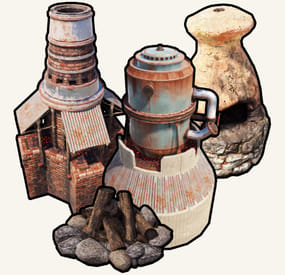
Portable Furnaces
By Raul-Sorin Sorban in Plugins
Portable Furnaces provides you and your server's population a whole new level of fun and experience. Use any furaces from any spot on the map!
FEATURES
Use /furnace (by default, can modify in the config) to open up your private furnace. Use /setfurnace (by default, can modify in the config) to change your private furnace type. Group-based cooldown support in the config. Friendly integration with NoEscape by Calytic with configurable rules of behavior. Chat message custom icon Steam ID. 4 different types of ovens: Campfire, Furnace, Large Furnace and Small Oil Refinery. Phrase support.
PERMISSIONS
PortableFurnaces.use: To allow anyone to open up their furnace.
COMMANDS (CONFIGURABLE)
Following commands are chat and console commands.
furnaces: Prints currently selected furnace and the according indexes for the furnaces to use setfurnace with. furnace: Opens up your current portable furnace. setfurnace: Removes and drops all previous furnace items before setting the type to
ROADMAP
All done. If you have any suggestions, please let me know in the Discussions tab or interact with me directly on my Discord server:
CONFIG
DISCLAIMER
The yellow and green buttons while using the Furnaces in the GIF, does not come with the plugin.
That's another plugin called Quick Sort by MONaH.
-

$11.99
Item Perks: Legendary Items
By imthenewguy in Plugins
Item Perks: Legendary items is a plugin that allows you to create and fully customize legendary named items on your rust server.
It uses the perk sets available from the Item Perks plugin, allowing for the creation of some very unique items in Rust.
The fields for creating a new item are:
Name: Give the item a unique name that captures it's essence Skin: Assign a skin that matches what the item does. Description/Story: Add some flavor to the item and write a short blurb or backstory for the item, which will display when the player mouses over the ownership banner, along with the buffs. Buffs: Add as many or as few ItemPerk buffs as you would like, with any amount of buff values. Restrict enhancement: Prevent or allow enhancement kits to affect each Legendary item. Global chat announcement: Announce in chat when a player finds a really rare or powerful item. Amour slots: Set the amount of armor slots the item spawns with (if applicable).
There are a number of drop sources that can be selected for your legendary items to drop. Along with the source, you can specify which item/prefab shortname you want to restrict the drop to, or which shortnames you want it to exclude.
The shortname will depend on the loot source. Loot sources with the type "Prefab" will need to use the prefab shortname, where as those with the "Item" type will need to use item shortnames.
Type: Prefab
Example: crate_normal_2, heli_crate, crate_elite.
Type: Prefab
Example: loot-barrel-2, loot-barrel-1
Type: Boss name
Example: scarecrow the destroyer.
Type: Event name
Supports:
Harbor Event: "Harbor" Junkyard Event: "Junkyard" Satellite Dish Event: "SatDish" Water Event: "Water" Air Event: "Air" Arctive Base Event: "Arctic" Gas Station Event: "GasStation" Sputnik Event: "Sputnik" Shipwreck Event: "Shipwreck" Triangulation Event: "Triangulation" Supermarket Event: "Supermarket" Caravan Event: "Caravan" Powerplant Event: "Powerplant" Armored Train Event: "ArmoredTrain" Convoy Event: "Convoy" Ferry Terminal Event: "FerryTerminal" SurvivalArena: "SurvivalArena"
Type: Prefab
Example: scientistnpc_arena, scientistnpc_heavy.
Type: Prefab
Example: npc_tunneldweller, npc_underwaterdweller.
Type: Npc name
Example: military defenders.
Type: Prefab
Example: oak_b, swamp_tree_a, pine_dead_snow_c.
Type: Prefab
Example: stone-ore, sulfur-ore, metal-ore.
Type: Prefab
Example: chicken.corpse, shark.corpse, player_corpse.
Type: Prefab
Example: hemp-collectable, berry-red-collectable, corn-collectable.
Type: Prefab
Example: hemp.entity, pumpkin.entity, wheat.entity.
Type: Item
Example: rifle.ak, axe.salvaged, icepick.salvaged.