
ELF's Wishlist
-

$3.00
APErrorNotify
APErrorNotify is a Rust server plugin that monitors the loading status of other plugins and sends notifications to Discord if any plugins fail to load. With support for multiple languages (English, Russian, Ukrainian, and Polish), this plugin lets users select their preferred notification language. APErrorNotify automatically scans all server plugins on startup or reload, identifies those that failed to load, and sends detailed messages, including error descriptions if enabled, as an embedded Discord message via Webhook.
Key Features:
Multi-language notification support (English, Russian, Ukrainian, Polish).
Automatic notifications of plugin load failures on server startup and plugin reload.
Configurable embed color for Discord notifications.
Option to enable/disable error description in messages.
Console command:
aperro.scan — manual plugin scan and Discord report.
Permission:
aperro.notify.scan (also available to admins and server console).
Configuration:
{ "EmbedColor": 16711680, "IncludeErrorDescription": true, "Language": "en", "NotifyOnPluginLoadFail": true, "Translations": { "en": { "DefaultMessage": "APErrorNotify detected plugin load errors", "PluginReloadTitle": "Plugin Reload: Plugins Failed to Load", "ServerStartTitle": "Server Started: Plugins Failed to Load" }, "pl": { "DefaultMessage": "APErrorNotify wykrył błędy ładowania pluginów", "PluginReloadTitle": "Przeładowanie pluginu: Błąd ładowania pluginów", "ServerStartTitle": "Serwer uruchomiony: Błąd ładowania pluginów" }, "ru": { "DefaultMessage": "APErrorNotify обнаружил ошибки загрузки плагинов", "PluginReloadTitle": "Перезагрузка плагина: Ошибка загрузки плагинов", "ServerStartTitle": "Сервер запущен: Ошибка загрузки плагинов" }, "uk": { "DefaultMessage": "APErrorNotify виявив помилки завантаження плагінів", "PluginReloadTitle": "Перезавантаження плагіна: Помилка завантаження плагінів", "ServerStartTitle": "Сервер запущено: Помилка завантаження плагінів" } }, "WebhookUrl": "" }
- #error
- #error fix
- (and 24 more)
-
$4.49
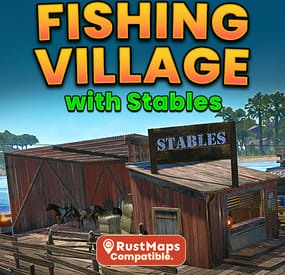
Improved Fishing Village A,B,C - Stables, Drone Marketplace, Airwolf & Much More
What is Improved Fishing Villages:
Improved Fishing Villages upgrades all 3 fishing villages with useful additions to the default version, combining everything into one seamless, fully functional update. This monument adds a safe trading zone, Stables and an Airwolf vendor, recyclers with chairs, an oil refinery, a drone marketplace, and much more. Designed for all Rust servers, it’s a perfect addition for your players.
⚠️ Custom Map Saddle Vendor Fix - Needed if you want the stables vendor to work, get it from rustmaps, 3rd Link under dependencies.
What does Improved Fishing Village Feature:
Fishing Village A - Total prefabs: 145
Drone Marketplace Stables with 4 Horse spawns and a Vendor Airwolf vendor with custom helipad 3 Recyclers with chairs 1 Oil Refinery 1 Workbench T1 Seating area with hobo barrel Gambling Wheel with plenty of seats. 2 BBQ's 1 Repair Bench 1 Trading Area 4 Slot Machines 1 Research Table
Fishing Village B - Total prefabs: 145
Drone Marketplace Stables with 4 Horse spawns and a Vendor Airwolf vendor with custom helipad 2 Recyclers with chairs 1 Oil Refinery with a chair 1 Workbench T1 Seating area with hobo barrel Gambling Wheel with plenty of seats. 1 BBQ 1 Repair Bench 2 Chairs for fishing 1 Trading Area 2 Slot Machines 1 Research Table
Fishing Village C - Total prefabs: 130
Drone Marketplace Stables with 4 Horse spawns and a Vendor Airwolf vendor with custom helipad 1 Recyclers with chairs 1 Oil Refinery 1 Workbench T1 Seating Area with hobo barreal Gambling Wheel with plenty of seats. 1 BBQ 1 Repair Bench 1 Trading Area 2 Slot Machines 1 Research Table
Total Prefabs:
Fishing Village A - 145 Fishing Village B - 145 Fishing Village C - 130 Combined Total Prefabs: - 420
The installation guide is provided in the README file included with the .zip file. If you need any help, message me on Codefling and I’ll get back to you as soon as possible. If you enjoy my work, please leave a 5* review. Thank you!*
- #fishingvillage
- #fishing villages
- (and 25 more)
-
$7.99
Tunnel Road Arena (1v1-3v3)
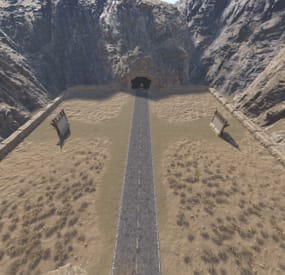
Tunnel Road is a compact desert canyon PvP arena designed for fast-paced small team fights (1v1 to 3v3). The layout is very symmetrical and focused, which makes it ideal for aim training, duels, or controlled skirmishes.
Map Overview
A single straight road runs down the exact centre of the map, leading directly into a tunnel entrance carved into the mountain.
The arena is enclosed by steep rock canyon walls, giving it a claustrophobic “killbox” feel with very limited escape routes.
Low stone barriers/walls line both sides, subtly defining the playable space while keeping visibility open.
Gameplay Feel
- Direct engagements
- Minimal distractions
- Clear sightlines
- Mechanical skill practice
-
.thumb.png.0f37a26fb154a8fe5ce782d1da20b96f.png)
$5.00
Low Poly RUST
This prefab arena remake of the classic COD map RUST offers a unique twist, where players navigate between four distinct regions, reminiscent of the popular 4-square game. The design aims to captivate players with its vibrant colors, directing their focus towards the intense PvP gameplay rather than intricate environmental details, making it ideal for a high-energy experience.
Designed specifically for PvP arena and minigame servers, these structures can be seamlessly integrated using RUST Edit. The simplified aesthetics not only enhance visual clarity but also contribute to improved performance, catering to players on a range of PC specifications.
Dive into the nostalgia and excitement of RUST - In Rust!
Should you encounter any issues or have inquiries, feel free to connect with me on Discord: potato_sheep
-
$40.00
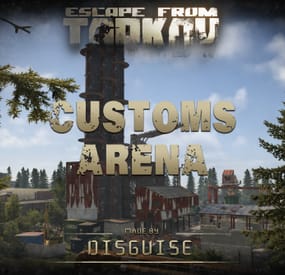
Customs | Escape from Tarkov | Arena
By Phoenix Design in Arenas
A high-intensity, tactical combat monument designed to transform your server into a competitive battleground.
Gameplay
Custom Arena - Every prefab is placed by hand
Built for competitive fights & events - Recommended players in the arena is 35-40
Not 1/1 the same as in EFT - Artistic choices were made
Designed for woodland and CQB
Balanced sightlines and flank routes
Build Quality
Optimized for performance (12443 prefabs)
Detailed indoor and outdoor environments
Realistic monument layout
Runs on a potato 🥔
Events & Arena Ready
TDM / Gun Game / CTF / Clan Wars / FFA / Loot Arena
Plug-and-Play Friendly
Drag & Drop ready (some alpha-channel adjustments need to be done around some of the buildings)
Supports custom spawn points and loot crates
Customization Options
Editable loot crates can be placed in any room
Can be divided to multiple arenas
Night-vision battle ready
Drag & Drop the custom prefab Apply the heights, splat, topology and alpha map Adjust the alpha map where it's needed (boiler building, sewer, new gas station, old gas station, skeleton) Apply the road map Reload the map and you're done
Redesigns are expected.
Monument and standalone prefabs are coming!
- #escape from tarkov
- #eft
- (and 11 more)