
ARobinhood's Wishlist
-

$7.99
ServerBridge – Server Switching
ServerBridge makes it quick and easy for players to join other Rust servers using an intuitive in-game UI.
Players can use a server list that is customizable by the admin.
Due to Rust's own Nexus system, players can be connected smoothly to the server they want without having to disconnect and connect manually.
🧭 Player Command: /servers — opens the server list
🔧 Admin Command: /serverbridge — opens the admin panel
• ServerBridge.use – access the server list • ServerBridge.admin – manage servers via admin panel
All edits of this file can be done with the /serverbridge Admin Panel
{ "Server with Domain & no Port": { "Name": "Server with Domain & no Port", "IP": "mycool-rustserver.com", "Port": null, "Description": "I disabled the Port with -1 in the Port field!", "ImageUrl": "" }, "Server with IP Address & Port": { "Name": "Server with IP Address & Port", "IP": "192.168.2.1", "Port": 28015, "Description": "This is my cool Rust Server!", "ImageUrl": "" } }
{ "ui.serverlist.title": "SERVER LIST", "ui.admin.title": "SERVER MANAGEMENT", "ui.addserver.title": "ADD NEW SERVER", "ui.editserver.title": "EDIT SERVER", "ui.button.connect": "CONNECT", "ui.button.add": "ADD", "ui.button.save": "SAVE", "ui.button.addserver": "ADD NEW SERVER", "ui.form.servername": "SERVER NAME", "ui.form.ipaddress": "IP ADDRESS OR DOMAIN", "ui.form.port": "PORT", "ui.form.description": "DESCRIPTION", "ui.table.server": "SERVER", "ui.table.address": "ADDRESS", "ui.table.actions": "ACTIONS", "msg.noperm.serverlist": "You don't have permission to open the server list.", "msg.noperm.admin": "You don't have permission for this command.", "msg.server.notfound": "Server '{0}' not found.", "msg.server.redirect": "You are being redirected to server '{0}'...", "msg.server.noname": "No server name specified.", "msg.server.deleted": "Server '{0}' has been deleted.", "msg.server.fillfields": "Please fill in all required fields.", "msg.server.exists": "A server with the name '{0}' already exists.", "msg.server.invalidport": "Invalid port. Please enter a number between 1 and 65535.", "msg.server.added": "Server '{0}' has been added.", "msg.server.updated": "Server '{0}' has been updated.", "msg.connection.redirect": "Connecting to {0} - Have fun!", "ui.button.nextpage": "NEXT →", "ui.button.prevpage": "← PREV", "ui.pagination.info": "PAGE {0} OF {1}" }
- #serverswitch
- #serverportal
- (and 12 more)
-

$5.00
Team Gather Bonus
You receive more resources when you're farming close to a team member
Permissions
teamgatherbonus.use: Is required to get first config setting. teamgatherbonus.vip: Is required to get vip config setting.
Configuration
{ "Distance between a team member (in feet)": 32.0, "Bonus percentage Default": 10, "Bonus percentage Vip": 50, "Enable Fish Trap": true, "Enable Fishing Pole": true, "Enable On Collectible Pickup": true, "Enable On Dispenser Gather": true }
Localization
Supports 10 Languages out of the box!
English French Swedish Dutch Korean Catalan Simplified Chinese Portuguese Brazil German Russian -

$19.99
JetPack
Take your players to new heights in the game of Rust, and get a few laughs watching people try to fly one for the first time! Introducing Jetpack! A plugin that allows your players to soar around like never before in the game of Rust. Grab this plugin and give your players something to talk about! Many functions have already been implemented like the ability to shoot while piloting a jetpack, and the plugin will continue to expand and grow with the community.
You'll find the configuration covers almost anything you can think of, and you'll see a breakdown of the configuration file in the description below. By default you can simply press the middle mouse wheel to equip and remove the jetpack quickly, you can't run around once you've equipped it. You can customize loot crates the jetpack might appear in, and all of the stats from thrust to rotation and all of the other controls. Be sure to check the permission section and feel free to use the command creatively to give jetpacks as an award for completing other tasks on your server using the commands provided. Make sure you have some lowgrade handy, let's take to the skies!
Сontrols
Space bar - thrust W/S keys - pitch axis A/D keys - yaw axis
Chat commands (check config for permissions)
/jet - toggle jetpack on & off /givejetpack - give a jetpack to yourself
Console commands (admin only)
givejetpack - give a jetpack to yourself givejetpack SteamID - give a jetpack to player using their SteamID
Plugin config
en – example of plugin configuration in English
ru – example of plugin configuration in Russian
Check out the rest of my work: Adem's Codefling Library
You can reach out to me in Discord: Adem's Discord Profile
Thanks to Jbird for writing, translation, & support: Jbird's Discord Profile
Join the Mad Mappers Discord!
-

$5.00
Roleplay Police Station
A fully-featured police station for your RP server!
It’s highly optimized with just 628 prefabs, ensuring great performance.
Note: This prefab does not include terrain, splat, or topology — you’ll need to paint those yourself after placement.
-
$28.99
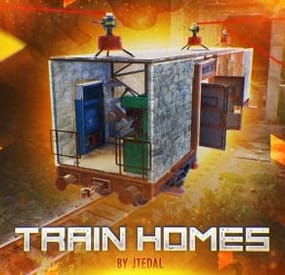
Train Homes
Live in one place? It's not interesting. Live in a camping car module? Too small. Have a full-fledged mobile home? That's what you need!
Video
How does it work?
You cannot build a base on a wagon while the wagon is on the rails. In order to place something on the wagon, you need to move it to your base, which has at least 7x3 foundations. Everything is shown in more detail in this video.:
With this plugin, your players will be able to build their own small base on the wagon and wander around the server with it. Or you can even assemble a whole train of such wagons.
Chat Command (For admins)
/showfreewagons - Writes the number of available wagons to the console, and also shows their location on the server. (Permission is required for use)
/givewagon <amount> <SteamID or Name> - gives the specified player an item for the spawn of the wagon in the amount that you specify (Permission is required for use)
Chat Command (For Player)
/thinstruction - instructions on some features of the plugin
/removewagon - take a hammer in your hands, write a command and hit the wagon
Console Command (RCON only)
clearallwagons - clears the server of all custom wagons. Be careful! The action is irreversible and players will lose all their items and resources. It should be used only before you want to turn off the plugin from the server, because after unloading, custom wagons can be created on the server.
givewagon <amount> <SteamID or Name> - gives the specified player an item for the spawn of the wagon in the amount that you specify
Plugin Config
https://pastebin.com/jbsateCv Permissions
trainhomes.givewagon - gives permission to use the chat command /givewagon
trainhomes.showfreewagons - gives permission to view the location of free wagons
Hooks
private bool OnWagonSpawn(BasePlayer player) API
private bool IsEntityFromBaseWagon(ulong netIdValue) Returns true if the netId of the object belongs to the wagon
private bool IsBaseWagon(ulong netIdValue) Returns true if the netId belongs to a wagon on the base
private bool IsTrainHomes(ulong netIdValue) Returns true if the netId belongs to a wagon on the track
private bool IsFreeWagon(ulong netIdValue) Returns true if the netId belongs to a free wagon on the track
Check out more of my work here JTedal's library.
Come see our whole teams work Mad Mapper Library.
- #jtedal
- #mad mappers
- (and 10 more)