
-
Posts
2,498 -
Joined
-
Last visited
-
Days Won
10
Content Type
Profiles
Warranty Claims
Downloads
Forums
Store
Services
Downloads Plus Support
DOWNLOADS EXTRA
Reels
Everything posted by IIIaKa
-
Hi. What plugins do you have?
-
Changed Status from Pending to Closed Changed Fixed In to 0.1.2
-
Please try updating both plugins. I've done everything except for displaying the bar when the in-game HUD is turned off.
-
Indeed, as I understand it, the plugin does not track the addition of crafted items. I will do my best to address this as soon as possible. Thanks again
-
 I've noticed that individuals who have purchased the Bundle are not showing up in the lists of buyers on the plugin page. This could potentially cause inconvenience and hinder the tracking of user purchases. It might be worth taking a closer look at this issue and taking necessary steps to rectify the situation. I would appreciate updates or additional information on this matter.
-
If you want to use item icons, it is better to use ImageLibrary. Set "Status.Image - URL" to the short name of the item(explosive.timed). Set "Status.Image - Is raw image" to true. List of aviable Sprites: https://github.com/OrangeWulf/Rust-Docs/blob/master/Extended/UI.md#imagesicons In terms of personalizing the bar's shutdown, I believe it is possible. I will try to add this feature in the next update. In regards to the crafting bar overlay, could you please ask players to give more information about it, and what they are crafting? As for displaying the bar when the HUD is turned off, I've taken note of that. I'll look into what can be done about it. Thank you for reaching out. Feel free to ask any additional questions or suggest further additions as well.
-
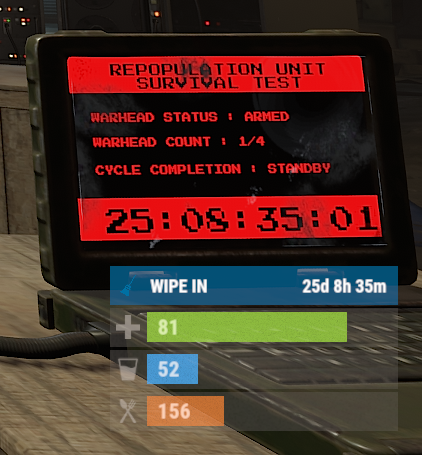 This plugin is created for showing the time until the wipe. I don't quite understand what commands you would like to execute at the moment of the wipe. Please tell me what you want. If possible, I will try to add it or create another plugin according to your requests.
 -
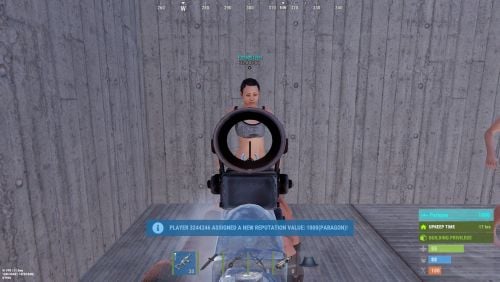
Version 0.1.6
89 downloads
Adds a reputation system, similar to the well-known Infestation Survivor Stories(The WarZ). More information on how the plugin works can be found at the bottom in the "Principle of work" section. The ability to create an unlimited number of reputations. The only condition is that their value ranges must not overlap; The ability to flexibly customize the bar for each reputation; The ability to automatically reset reputations upon detecting a wipe; The ability to set a prefix for reputations; The ability to show your reputation by waving to players; The ability to see a player's reputation when aiming at them with scope items. Unfortunately, the reputation will also be displayed if a player is in certain bushes; The ability to see the reputation of all players in the bandit zone; The ability to prohibit players with a certain reputation from entering safe zones (except for the bandit zone). Also, notifying players about it; The ability to set fake reputations to confuse players. reputationmaster.vip - Provides the ability to set a fake rank value. reputationmaster.admin - Provides the ability to set or reset reputation value to other players. { "Chat command": "rep", "Is it worth enabling GameTips for messages?": true, "Is it worth using the AdvancedStatus plugin?": true, "List of language keys for creating language files": [ "en" ], "Is it worth using ddraw to display reputation? NOTE: To use, an administrator flag is required, which is granted before rendering and revoked immediately after issuing the command": true, "Is it worth displaying reputation when aiming at a player with a scope(ddraw should be enabled)? NOTE: The player's reputation may be displayed in certain bushes": true, "Is it worth resetting reputations upon detecting a wipe?": true, "Is it worth forbidding bandits from visiting safe zones(except for Banditcamp)?": true, "The time in seconds during which a bandit can stay in the safe zone(except for Banditcamp) before being killed, making their loot available to everyone": 10.0, "The prefab name for the effect when a bandit is killed in the safe zone. An empty string disables the effect": "assets/prefabs/misc/xmas/advent_calendar/effects/open_advent.prefab", "Assigning reputation for NPCs(Disabled, ForVanilla, ForAll)": "ForAll", "Minimum random reputation value for NPCs": -1000.0, "Maximum random reputation value for NPCs": 1000.0, "Is it worth enabling self-defense for NPCs?": false, "The time in seconds during which self-defense will be active for a lawman after being attacked by another lawman": 900, "The minimum value limit for fake reputation": -10000.0, "The maximum value limit for fake reputation": 10000.0, "UI. Position - Left to Right": true, "UI. Position - AnchorMin": "1 0.9", "UI. Position - AnchorMax": "1 0.9", "UI. Position - OffsetMin": "-208 -15", "UI. Position - OffsetMax": "-16 15", "UI. Reputation Positive Value Image - URL": "https://gitlab.com/IIIaKa/images/-/raw/main/ReputationMaster/ReputationMaster_Positive.png", "UI. Reputation Negative Value Image - URL": "https://gitlab.com/IIIaKa/images/-/raw/main/ReputationMaster/ReputationMaster_Negative.png", "UI. Added Value Sound - Prefab Name. An empty string disables the effect": "assets/bundled/prefabs/fx/notice/item.select.fx.prefab", "Wipe ID": null, "Version": { "Major": 0, "Minor": 1, "Patch": 6 } } Note: To use ddraw, an administrator flag is required, which is granted before rendering and revoked immediately after issuing the command. The player's reputation may be displayed in certain bushes. [ { "Name": "Assassin", "Prefix": "⁎✧⁎ ", "MinValue": -3.40282347E+38, "MaxValue": -1000.0, "Reward": 20.0, "LawmanPenalty": 0.0, "AllowSafeZone": false, "BarSettings": { "Text_Transparency": 1.0, "SubText_Transparency": 1.0, "Order": 20, "Height": 26, "Main_Color(Hex or RGBA)": "#FF341E", "Main_Transparency": 0.6, "Main_Material": "", "Image_Url": "https://gitlab.com/IIIaKa/images/-/raw/main/ReputationMaster/ReputationMaster_Assassin.png", "Image_Local(Leave empty to use Image_Url)": "ReputationMaster_Assassin", "Image_Sprite(Leave empty to use Image_Local or Image_Url)": "", "Image_IsRawImage": false, "Image_Color(Hex or RGBA)": "#FF341E", "Image_Transparency": 1.0, "Image_Outline_Color(Hex or RGBA)": "0.1 0.3 0.8 0.9", "Image_Outline_Transparency": 0.0, "Image_Outline_Distance(Leave empty to disable). Example '0.75 0.75'": null, "Text_Size": 14, "Text_Color(Hex or RGBA)": "#FF341E", "Text_Font(https://umod.org/guides/rust/basic-concepts-of-gui#fonts)": "RobotoCondensed-Bold.ttf", "Text_Offset_Horizontal": 0, "Text_Outline_Color(Hex or RGBA)": "#000000", "Text_Outline_Transparency": 1.0, "Text_Outline_Distance(Leave empty to disable)": null, "SubText_Size": 12, "SubText_Color(Hex or RGBA)": "#FF341E", "SubText_Font": "RobotoCondensed-Bold.ttf", "SubText_Outline_Color(Hex or RGBA)": "0.5 0.6 0.7 0.5", "SubText_Outline_Transparency": 0.0, "SubText_Outline_Distance(Leave empty to disable)": null } }, ... { "Name": "Civilian", "Prefix": "", "MinValue": -4.99, "MaxValue": 9.99, "Reward": 1.0, "LawmanPenalty": -1.0, "AllowSafeZone": true, "BarSettings": { "Text_Transparency": 1.0, "SubText_Transparency": 1.0, "Order": 20, "Height": 26, "Main_Color(Hex or RGBA)": "#5EC0CA", "Main_Transparency": 0.6, "Main_Material": "", "Image_Url": "https://gitlab.com/IIIaKa/images/-/raw/main/ReputationMaster/ReputationMaster_Civilian.png", "Image_Local(Leave empty to use Image_Url)": "ReputationMaster_Civilian", "Image_Sprite(Leave empty to use Image_Local or Image_Url)": "", "Image_IsRawImage": false, "Image_Color(Hex or RGBA)": "#5EC0CA", "Image_Transparency": 1.0, "Image_Outline_Color(Hex or RGBA)": "0.1 0.3 0.8 0.9", "Image_Outline_Transparency": 0.0, "Image_Outline_Distance(Leave empty to disable). Example '0.75 0.75'": null, "Text_Size": 14, "Text_Color(Hex or RGBA)": "#5EC0CA", "Text_Font(https://umod.org/guides/rust/basic-concepts-of-gui#fonts)": "RobotoCondensed-Bold.ttf", "Text_Offset_Horizontal": 0, "Text_Outline_Color(Hex or RGBA)": "#000000", "Text_Outline_Transparency": 1.0, "Text_Outline_Distance(Leave empty to disable)": null, "SubText_Size": 12, "SubText_Color(Hex or RGBA)": "#5EC0CA", "SubText_Font": "RobotoCondensed-Bold.ttf", "SubText_Outline_Color(Hex or RGBA)": "0.5 0.6 0.7 0.5", "SubText_Outline_Transparency": 0.0, "SubText_Outline_Distance(Leave empty to disable)": null } }, ... { "Name": "Paragon", "Prefix": "⋆☆⋆ ", "MinValue": 1000.0, "MaxValue": 3.40282347E+38, "Reward": 20.0, "LawmanPenalty": -125.0, "AllowSafeZone": true, "BarSettings": { "Text_Transparency": 1.0, "SubText_Transparency": 1.0, "Order": 20, "Height": 26, "Main_Color(Hex or RGBA)": "#0AFBFB", "Main_Transparency": 0.6, "Main_Material": "", "Image_Url": "https://gitlab.com/IIIaKa/images/-/raw/main/ReputationMaster/ReputationMaster_Paragon.png", "Image_Local(Leave empty to use Image_Url)": "ReputationMaster_Paragon", "Image_Sprite(Leave empty to use Image_Local or Image_Url)": "", "Image_IsRawImage": false, "Image_Color(Hex or RGBA)": "#0AFBFB", "Image_Transparency": 1.0, "Image_Outline_Color(Hex or RGBA)": "0.1 0.3 0.8 0.9", "Image_Outline_Transparency": 0.0, "Image_Outline_Distance(Leave empty to disable). Example '0.75 0.75'": null, "Text_Size": 14, "Text_Color(Hex or RGBA)": "#0AFBFB", "Text_Font(https://umod.org/guides/rust/basic-concepts-of-gui#fonts)": "RobotoCondensed-Bold.ttf", "Text_Offset_Horizontal": 0, "Text_Outline_Color(Hex or RGBA)": "#000000", "Text_Outline_Transparency": 1.0, "Text_Outline_Distance(Leave empty to disable)": null, "SubText_Size": 12, "SubText_Color(Hex or RGBA)": "#0AFBFB", "SubText_Font": "RobotoCondensed-Bold.ttf", "SubText_Outline_Color(Hex or RGBA)": "0.5 0.6 0.7 0.5", "SubText_Outline_Transparency": 0.0, "SubText_Outline_Distance(Leave empty to disable)": null } } ] MinRange, MaxRange - Range of values for the group rank; Name - Name of the rank; Reward - Reward for killing or reviving(divided by 2) a player in this rank. If the initiating player has IsLawman = true, the value will be positive, otherwise, it will be negative; LawmanPenalty - Penalty for a peaceful player of this rank, for killing another peaceful player. If the target did not initiate this pvp first; AllowSafeZone - Is this rank allowed to visit Safe Zones (except Bandit Camp)? The "Forbid bandits from visiting the SafeZone (except for Banditcamp)" config should be set to true. Path: *SERVER*\oxide\data\ReputationMaster\ReputationRanks.json EN: { "CmdNotAllowed": "You do not have permissions to use this command!", "CmdPlayerNotFound": "Player '{0}' not found! You must provide the player's name or Id.", "CmdNpcNotFound": "Npc '{0}' not found or has an invalid entity type! You must provide the npc's network Id.", "CmdEntityNotFound": "Entity not found! Try getting closer to the entity.", "CmdMultiplePlayers": "Multiple players found: {0}", "CmdAdmin": "Available admin commands:\n\n<color=#D1CBCB>/rep</color> <color=#D1AB9A>netId</color> - Get the netId of the entity you are looking at.\n<color=#D1CBCB>/rep</color> <color=#D1AB9A>set *floatValue* *nameOrId*</color> - Set reputation for the specified player.\n<color=#D1CBCB>/rep</color> <color=#D1AB9A>set *floatValue* self</color> - Set reputation for yourself.\n<color=#D1CBCB>/rep</color> <color=#D1AB9A>set *floatValue* npc *netId* force(optional)</color> - Set reputation for the specified npc. The last argument controls forced assignment.\n<color=#D1CBCB>/rep</color> <color=#D1AB9A>fake *floatValue* *nameOrId*</color> - Set fake reputation for the specified player.\n<color=#D1CBCB>/rep</color> <color=#D1AB9A>fake *floatValue* self</color> - Set fake reputation for yourself.\n<color=#D1CBCB>/rep</color> <color=#D1AB9A>fake *floatValue* npc *netId* force(optional)</color> - Set fake reputation for the specified npc. The last argument controls forced assignment.\n<color=#D1CBCB>/rep</color> <color=#D1AB9A>info *nameOrId*</color> - Show full reputation information for the specified player.\n<color=#D1CBCB>/rep</color> <color=#D1AB9A>info self</color> - Show full reputation information for yourself.\n<color=#D1CBCB>/rep</color> <color=#D1AB9A>reset *nameOrId*</color> - Reset reputation for the specified player.\n<color=#D1CBCB>/rep</color> <color=#D1AB9A>reset self</color> - Reset your reputation.\n<color=#D1CBCB>/rep</color> <color=#D1AB9A>reset all</color> - Reset reputation for all players.\n\n--------------------------------------------------", "CmdMain": "Available commands:\n\n<color=#D1CBCB>/rep</color> <color=#D1AB9A>fake *floatValue*</color> - Set fake reputation for yourself.\n\n--------------------------------------------------", "CmdSetNpcFailed": "Failed to set reputation for npc '{0}'! Try adding the 'force' argument for forced assignment.", "CmdSetNpc": "Npc '{0}' has received a new reputation value: {1}({2})!", "CmdSetPlayer": "Player '{0}' has received a new reputation value: {1}({2})!", "CmdFakeNpcFailed": "Failed to set fake reputation for npc '{0}'! Try adding the 'force' argument for forced assignment.", "CmdFakeNpc": "Npc '{0}' has received a new fake reputation value: {1}({2})!", "CmdFakeSelf": "A new fake reputation value has been successfully set: {0}({1})!", "CmdFakePlayer": "Player '{0}' has received a new fake reputation value: {1}({2})!", "CmdNetId": "The NetID of the entity you are looking at: '{0}'({1}).", "CmdInfoPlayer": "Player '{0}' reputation:\n<color=#D1AB9A>Reputation:</color> {1} ({2})\n<color=#D1AB9A>Fake Reputation:</color> {3} ({4})\n<color=#D1AB9A>Last Helper:</color> {5}\n\n--------------------------------------------------", "CmdInfoNPC": "NPC '{0}' reputation:\n<color=#D1AB9A>Reputation:</color> {1}({2})\n<color=#D1AB9A>Fake Reputation:</color> {3}({4})\n<color=#D1AB9A>Last Helper:</color> {5}\n\n--------------------------------------------------", "CmdResetTarget": "{0}'s reputation has been successfully reset!", "CmdResetSelf": "Your reputation has been successfully reset!", "CmdResetAll": "{0} reputations have been successfully reset!", "MsgReputation": "Reputation", "MsgShowPlayerReputation": "Player '{0}' reputation: {1}({2})", "MsgNewReputation": "Congratulations! You have received the reputation '{0}'!", "MsgSelfDefense": "You attacked a peaceful player '{0}'({1}) first. If they kill you within {2} minutes, they will not receive a penalty", "MsgSelfDefenseNoPenalty": "You killed a peaceful player '{0}'({1}). However, since they attacked you first, you will not be penalized", "MsgLawmanEnterBanditZone": "You have entered the Bandit Camp! Stay vigilant, this place is full of thugs!", "MsgLawmanLeaveBanditZone": "You have left the Bandit Camp! We recommend avoiding this area!", "MsgBanditEnterBanditZone": "Welcome to the Bandit Camp! We are glad to have you back!", "MsgBanditLeaveBanditZone": "You have left the Bandit Camp! We hope to see you again soon!", "MsgBanditEnterSafeZone": "You are not welcome here! If you do not leave this place, you will be killed in {0} seconds!", "MsgBanditLeaveSafeZone": "Do not come back here! People like you belong in the Bandit Camp!" } RU: { "CmdNotAllowed": "У вас недостаточно прав для использования этой команды!", "CmdPlayerNotFound": "Игрок '{0}' не найден! Вы должны указать имя или ID игрока.", "CmdNpcNotFound": "Нпц '{0}' не найден, либо не верный тип сущности! Вы должны указать Id нпц.", "CmdEntityNotFound": "Сущность не найдена! Попробуйте подойти ближе к объекту.", "CmdMultiplePlayers": "Найдено несколько игроков: {0}", "CmdAdmin": "Доступные админ команды:\n\n<color=#D1CBCB>/rep</color> <color=#D1AB9A>netId</color> - Получить netId сущности, на которую вы смотрите.\n<color=#D1CBCB>/rep</color> <color=#D1AB9A>set *дробноеЗначение* *имяИлиАйди*</color> - Установить репутацию указанному игроку.\n<color=#D1CBCB>/rep</color> <color=#D1AB9A>set *дробноеЗначение* self</color> - Установить репутацию себе.\n<color=#D1CBCB>/rep</color> <color=#D1AB9A>set *дробноеЗначение* npc *netId* force(опционально)</color> - Установить репутацию указанному npc. Последний аргумент принудительно задаёт значение.\n<color=#D1CBCB>/rep</color> <color=#D1AB9A>fake *дробноеЗначение* *имяИлиАйди*</color> - Установить ложную репутацию указанному игроку.\n<color=#D1CBCB>/rep</color> <color=#D1AB9A>fake *дробноеЗначение* self</color> - Установить себе ложную репутацию.\n<color=#D1CBCB>/rep</color> <color=#D1AB9A>fake *дробноеЗначение* npc *netId* force(опционально)</color> - Установить ложную репутацию указанному npc. Последний аргумент принудительно задаёт значение.\n<color=#D1CBCB>/rep</color> <color=#D1AB9A>info *имяИлиАйди*</color> - Показать полную информацию о репутации указанного игрока.\n<color=#D1CBCB>/rep</color> <color=#D1AB9A>info self</color> - Показать полную информацию о своей репутации.\n<color=#D1CBCB>/rep</color> <color=#D1AB9A>reset *имяИлиАйди*</color> - Сбросить репутацию указанному игроку.\n<color=#D1CBCB>/rep</color> <color=#D1AB9A>reset self</color> - Сбросить свою репутацию.\n<color=#D1CBCB>/rep</color> <color=#D1AB9A>reset all</color> - Сбросить репутацию всем игрокам.\n\n--------------------------------------------------", "CmdMain": "Доступные команды:\n\n<color=#D1CBCB>/rep</color> <color=#D1AB9A>fake *дробноеЗначение*</color> - Установить себе ложную репутацию.\n\n--------------------------------------------------", "CmdSetNpcFailed": "Не удалось установить репутацию нпц '{0}'! Попробуйте добавить аргумент 'force' для принудительной установки.", "CmdSetNpc": "Нпц '{0}' получил новое значение репутации: {1}({2})!", "CmdSetPlayer": "Игрок '{0}' получил новое значение репутации: {1}({2})!", "CmdFakeNpcFailed": "Не удалось установить ложную репутацию нпц '{0}'! Попробуйте добавить аргумент 'force' для принудительной установки.", "CmdFakeNpc": "Нпц '{0}' получил новое значение ложной репутации: {1}({2})!", "CmdFakeSelf": "Новое значение ложной репутации успешно установлено: {0}({1})!", "CmdFakePlayer": "Игрок '{0}' получил новое значение ложной репутации: {1}({2})!", "CmdNetId": "NetID сущности, на которую вы смотрите: '{0}'({1}).", "CmdInfoPlayer": "Репутация игрока '{0}':\n<color=#D1AB9A>Репутация:</color> {1}({2})\n<color=#D1AB9A>Ложная репутация:</color> {3}({4})\n<color=#D1AB9A>Последний помощник:</color> {5}\n\n--------------------------------------------------", "CmdInfoNPC": "Репутация нпц '{0}':\n<color=#D1AB9A>Репутация:</color> {1}({2})\n<color=#D1AB9A>Ложная репутация:</color> {3}({4})\n<color=#D1AB9A>Последний помощник:</color> {5}\n\n--------------------------------------------------", "CmdResetTarget": "Репутация '{0}' успешно сброшена!", "CmdResetSelf": "Ваша репутация успешно сброшена!", "CmdResetAll": "Успешно сброшено {0} репутаций!", "MsgReputation": "Репутация", "MsgShowPlayerReputation": "Репутация игрока '{0}': {1}({2})", "MsgNewReputation": "Поздравляем! Вы получили репутацию '{0}'!", "MsgSelfDefense": "Вы первым атаковали мирного игрока '{0}'({1}). Если он вас убьет в течении {2} минут, то не получит штрафа", "MsgSelfDefenseNoPenalty": "Вы убили мирного игрока '{0}'({1}). Но так как он первым вас атаковал, вас не накажут", "MsgLawmanEnterBanditZone": "Вы пришли в Лагерь Бандитов! Будьте бдительны, здесь полно разных отморозков!", "MsgLawmanLeaveBanditZone": "Вы покинули Лагерь Бандитов! Советуем обходить это место!", "MsgBanditEnterBanditZone": "Добро пожаловать в Лагерь Бандитов! Мы рады вашему возвращению!", "MsgBanditLeaveBanditZone": "Вы покинули Лагерь Бандитов! Надеемся на скорое ваше возвращение!", "MsgBanditEnterSafeZone": "Вам здесь не рады! Если вы не покинете это место, то вас убьет через {0} секунд!", "MsgBanditLeaveSafeZone": "Больше сюда не возвращайтесь! Таким как вы место в Лагере Бандитов!" } fake *floatValue* - Set a fake reputation. Permission "reputationmaster.vip" required; netId - Get the netId of the entity you are looking at. Permission "reputationmaster.admin" required; set *floatValue* *nameOrId* - Set reputation for the specified player. Permission "reputationmaster.admin" required; set *floatValue* self - Set reputation for yourself. Permission "reputationmaster.admin" required; set *floatValue* npc *netId* force(optional) - Set reputation for the specified npc. The last argument controls forced assignment. Permission "reputationmaster.admin" required; fake *floatValue* *nameOrId* - Set fake reputation for the specified player. Permission "reputationmaster.admin" required; fake *floatValue* self - Set fake reputation for yourself. Permission "reputationmaster.admin" required; fake *floatValue* npc *netId* force(optional) - Set fake reputation for the specified npc. The last argument controls forced assignment. Permission "reputationmaster.admin" required; info *nameOrId* - Show full reputation information for the specified player. Permission "reputationmaster.admin" required; info self - Show full reputation information for yourself. Permission "reputationmaster.admin" required; reset *nameOrId* - Reset reputation for the specified player. Permission "reputationmaster.admin" required; reset self - Reset your reputation. Permission "reputationmaster.admin" required; reset all - Reset reputation for all players. Permission "reputationmaster.admin" required. Example: /rep fake 150 /rep fake -40 iiiaka /rep set 23 iiiaka /rep set npc 64 4032 ReputationValueUpdated: Called after the player's reputation value has changed. Works only for players that are not NPCs. void ReputationValueUpdated(ulong userID, string repName, float repValue) { Puts($"{userID} updated a reputation value to {repValue}. Current reputation rank is {repName}."); } ReputationUpdated: Called after the player receives a new reputation rank. Works only for players that are not NPCs. void ReputationUpdated(ulong userID, string oldRep, string newRep, bool isLawman, bool allowSafeZone, float repValue) { Puts($"{userID} has updated their rank from {oldRep} to {newRep}. Is peaceful: {isLawman}\nSafe Zones: {allowSafeZone}\nReputation Value: {repValue}"); } [PluginReference] private Plugin ReputationMaster; There are 4 api methods: GetReputationValue: Used to retrieve the reputation value, real or fake. Returns null on failure. To call the GetReputationValue method, you need to pass 2 parameters: userID as a ulong; realRep as a bool. What reputation value to get, real or fake? This parameter is optional. (float)(ReputationMaster?.Call("GetReputationValue", player.userID, true) ?? 0f); GetReputationName: Used to retrieve the reputation name, real or fake. Returns an empty string on failure. To call the GetReputationName method, you need to pass 2 parameters: userID as a ulong; realRep as a bool. What reputation name to get, real or fake? This parameter is optional. (string)(ReputationMaster?.Call("GetReputationName", player.userID, true) ?? string.Empty); SetReputationValue: Used to retrieve the reputation name, real or fake. Returns a false on failure. To call the SetReputationValue method, you need to pass 3 parameters: Available options: userID as a ulong or a string; player as a BasePlayer. newValue as float; realRep as a bool. What reputation value to get, real or fake? This parameter is optional. (bool)(ReputationMaster?.Call("SetReputationValue", player.UserIDString, 150f, true) ?? false);//(string)userID (bool)(ReputationMaster?.Call("SetReputationValue", player.userID, 150f, true) ?? false);//(ulong)userID (bool)(ReputationMaster?.Call("SetReputationValue", player, 150f, true) ?? false);//(BasePlayer)player ***recommended option*** SetReputationValues: Used to retrieve the reputation name, real or fake. Returns a false on failure. To call the SetReputationValues method, you need to pass 3 parameters: Available options: userID as a ulong or a string; player as a BasePlayer. value as float; fakeValue as a float. (bool)(ReputationMaster?.Call("SetReputationValues", player.UserIDString, 150f, 50f) ?? false);//(string)userID (bool)(ReputationMaster?.Call("SetReputationValues", player.userID, 150f, 50f) ?? false);//(ulong)userID (bool)(ReputationMaster?.Call("SetReputationValues", player, 150f, 50f) ?? false);//(BasePlayer)player ***recommended option*** You can create as many reputation ranks as you want, but there are only two main groups: Lawmen(peaceful or civilians); Outlaws(bandits). Each kill has a different scores depending of the reputation rank of the victim and attacker. For exampe, if you are a Civilian, you will receive: Paragon: -20 Vigilant: -15 Guardian: -10 Lawman: -4 Deputy: -3 Constable: -2 Civillian: -1 Thug: +2 Outlaw: +3 Bandit: +4 Hitman: +10 Villain: +15 Assassin: +20 Reviving: For reviving a player, you will receive a reward divided by 2. If the target is a lawman, the reward will be positive, else if a target is a bandit, it will be negative. Also, this is the only way out of bandit rank for bandits. Outlaw: When you reach the outlaw reputation, you have no more back! Except for reviving a peaceful player. You can kill other bandits but still counting as negative reputation! So, after you reach the outlaw reputation rank, scores by killing a player of a certain reputation will be as follows(negative reward value) : Paragon: -20 Vigilant: -15 Guardian: -10 Lawman: -4 Deputy: -3 Constable: -2 Civillian: -1 Thug: -2 Outlaw: -3 Bandit: -4 Hitman: -10 Villain: -15 Assassin: -20 Lawman: The scores will be as follows for each kill a outlaw reputation ranks(positive reward value) : Assassin: +20 Villain: +15 Hitman: +10 Bandit: +4 Outlaw: +3 Thug: +2 But for killing a peaceful player, you will receive penalties based on your rank. A list of penalties for each reputation rank: Paragon: -125 Vigilante: -60 Guardian: -40 Lawman: -15 Deputy: -2 Constable: -1 Civilian: -1 There is also a self-defense system that works as follows: If a peaceful player initiates an attack on another peaceful player, a timer of 15 minutes(sets from config) is activated, during which the victim can kill the attacker without penalties. So, it's very hard to become a lawman, and it's very easy to get out from lawman.$4.99- 6 comments
-
- 1
-

-
- #rust
- #reputation
- (and 25 more)
-
Changed Status from Pending to Not a Bug
-
Changed Status from Pending to Not a Bug
-
Hello. I have granted you access to the AdvanceStatus.
-
1) https://github.com/OrangeWulf/Rust-Docs/blob/master/Extended/Materials.md 2-3) It is possible to do that, I will try to add it in the next update.
-
Based on the list, it feels like it could indeed be from NPCs. But I don't understand why NPCs would need 14k planners? xD
-
Have you checked the items count on the fresh server? Is such a large number typical for every wipe? Is the map custom? If the map is custom, could the map maker have added them? xD
-
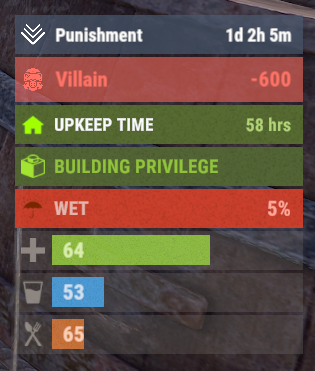 Everyone has their own preferences. I'll put it this way: I had to write this plugin for my Reputation Master plugin, because I didn't like how Custom Status Bar works, especially when its bar overlaps with other in-game status messages. And it's much easier and more convenient for me to use my own plugin. P.S. You can buy any of my plugins that work with Advanced Status plugin, and get Advanced Status for free.
 -
Version 0.1.10
1,345 downloads
The plugin displays the time until the next wipe in the status bar. Depends on AdvancedStatus plugin. The ability to display the remaining time until the wipe: If there are N days left. Configurable in the configuration file; If player is in a safe zone or building privilege zone; The option to choose between a server wipe and a manually specified wipe; The ability to automatically generate language files for different languages(filled in English); The ability to customize the status bar for each of wipes; The ability to specify the order of the bar; The ability to change the height of the bar; The abillity to customize the color and transparency of the background; The ability to set a material for the background; The ability to switch between CuiRawImageComponent and CuiImageComponent for the image; The ability to get images from the local folder(*SERVER*\oxide\data\AdvancedStatus\Images); The abillity to set own image and customize the color and transparency of the image; The abillity to set sprite instead of the image; The ability to customize the color, size, font and outline of the text. wipestatus.admin - Provides the ability to set custom date of wipe. { "Chat command": "wipe", "Is it worth enabling GameTips for messages?": true, "List of language keys for creating language files": [ "en" ], "Is it worth displaying the wipe timer only when players in the safe zone or building privilege?": false, "The number of days before the wipe when the status bar will start to display. A value of 0 enables constant display": 0, "Bar settings key for a vanilla wipe": "_default", "Custom wipe dates list. Format: yyyy-MM-dd HH:mm. Example: 2025-12-25 13:30": {}, "List of status bar settings. Leave empty or null to recreate the default list": { "_default": { "Progress_Main_Color(Hex or RGBA)": "1 1 1 0.15", "Progress_Main_Transparency": 0.15, "BarType(TimeProgressCounter or TimeCounter)": "TimeCounter", "Order": 10, "Height": 26, "Main_Color(Hex or RGBA)": "#0370A4", "Main_Transparency": 0.7, "Main_Material(empty to disable)": "", "Image_Url": "https://i.imgur.com/FKrFYN5.png", "Image_Local(Leave empty to use Image_Url)": "WipeStatus_Default", "Image_Sprite(Leave empty to use Image_Local or Image_Url)": "", "Image_IsRawImage": false, "Image_Color(Hex or RGBA)": "#0370A4", "Image_Transparency": 1.0, "Is it worth enabling an outline for the image?": false, "Image_Outline_Color(Hex or RGBA)": "0.1 0.3 0.8 0.9", "Image_Outline_Transparency": 1.0, "Image_Outline_Distance": "0.75 0.75", "TextKey": "Bar_default", "Text_Size": 12, "Text_Color(Hex or RGBA)": "#FFFFFF", "Text_Font(https://umod.org/guides/rust/basic-concepts-of-gui#fonts)": "RobotoCondensed-Bold.ttf", "Text_Offset_Horizontal": 0, "Is it worth enabling an outline for the text?": false, "Text_Outline_Color(Hex or RGBA)": "#000000", "Text_Outline_Transparency": 1.0, "Text_Outline_Distance": "0.75 0.75", "SubText_Size": 12, "SubText_Color(Hex or RGBA)": "#FFFFFF", "SubText_Font": "RobotoCondensed-Bold.ttf", "Is it worth enabling an outline for the sub text?": false, "SubText_Outline_Color(Hex or RGBA)": "0.5 0.6 0.7 0.5", "SubText_Outline_Transparency": 1.0, "SubText_Outline_Distance": "0.75 0.75", "Progress_Reverse": false, "Progress_Color(Hex or RGBA)": "#0370A4", "Progress_Transparency": 0.7, "Progress_OffsetMin": "0 0", "Progress_OffsetMax": "0 0" } }, "Version": { "Major": 0, "Minor": 1, "Patch": 10 } } EN: { "CmdMainAdmin": "Available admin commands:\n\n<color=#D1CBCB>/wipe</color> <color=#D1AB9A>bar</color> <color=#D1CBCB>*booleanValue*(optional)</color> - Toggle the wipe bar display\n<color=#D1CBCB>/wipe</color> <color=#D1AB9A>time</color> - Current time based on server's timezone\n<color=#D1CBCB>/wipe</color> <color=#D1AB9A>add</color> <color=#D1CBCB>*wipeDate* *barId*(optional) *numericValue*(optional) *numericValue*(optional)</color> - Add a custom wipe date. Optionally, you can specify the style of the status bar, interval/spacing between wipes, and the number of intervals. Date format: yyyy-MM-dd HH:mm\n<color=#D1CBCB>/wipe</color> <color=#D1AB9A>add bar</color> <color=#D1CBCB>*wipeDate* *barID*(optional) *newBarId*(optional) *targetBarId*(optional)</color> - Add new status bar settings. Optionally, specify the ID of an existing bar to copy from\n<color=#D1CBCB>/wipe</color> <color=#D1AB9A>update</color> <color=#D1CBCB>*wipeDate* *newBarId*</color> - Update the status bar settings key for the specified custom wipe date. Use 'vanilla' instead of a wipe date to select the vanilla wipe\n<color=#D1CBCB>/wipe</color> <color=#D1AB9A>clear</color> - Clear all custom wipe dates\n\n--------------------------------------------------", "CmdMain": "Available commands:\n\n<color=#D1CBCB>/wipe</color> <color=#D1AB9A>bar</color> <color=#D1CBCB>*booleanValue*</color>(optional) - Toggle the wipe bar display\n\n--------------------------------------------------", "CmdServerTime": "Current real server time: '{0}'", "CmdNewDateAdded": "The new date '{0}' has been successfully added!", "CmdNewDateRangeAdded": "The list of dates was successfully added!", "CmdNewDateAddFailed": "Invalid format or the date is earlier than the current one. Example: '{0}'", "CmdUpdateFailed": "Failed to add/update status bar settings for '{0}'!", "CmdClearDates": "Custom dates list has been successfully cleared!", "CmdBarEnabled": "Displaying the wipe bar is enabled!", "CmdBarDisabled": "Displaying the wipe bar is disabled!", "Bar_default": "WIPE IN" } RU: { "CmdMainAdmin": "Доступные админ команды:\n\n<color=#D1CBCB>/wipe</color> <color=#D1AB9A>bar</color> <color=#D1CBCB>*булевоеЗначение*(опционально)</color> - Переключение отображения вайп бара\n<color=#D1CBCB>/wipe</color> <color=#D1AB9A>time</color> - Текущее время по часовому поясу сервера\n<color=#D1CBCB>/wipe</color> <color=#D1AB9A>add</color> <color=#D1CBCB>*датаВайпа* *айдиБара*(опционально) *числовоеЗначение*(опционально) *числовоеЗначение*(опционально)</color> - Добавление кастомной даты вайпа. Опционально можно указать стиль статус бара, интервал/отступ между вайпами и кол-во интервалов. Формат даты: yyyy-MM-dd HH:mm\n<color=#D1CBCB>/wipe</color> <color=#D1AB9A>add bar</color> <color=#D1CBCB>*айдиНовогоБара* *айдиЦелевогоБара*(опционально)</color> - Добавление новых настроек статус бара. Опционально можно указать айди исходного статус бара для копирования\n<color=#D1CBCB>/wipe</color> <color=#D1AB9A>update</color> <color=#D1CBCB>*датаВайпа* *новоеАйдиБара*</color> - Обновление ключа настроек статус бара для указанной даты вайпа. Используйте 'vanilla' вместо даты вайпа для выбора ванильного вайпа\n<color=#D1CBCB>/wipe</color> <color=#D1AB9A>clear</color> - Очистка всех кастомных дат вайпа\n\n--------------------------------------------------", "CmdMain": "Доступные команды:\n\n<color=#D1CBCB>/wipe</color> <color=#D1AB9A>bar</color> <color=#D1CBCB>*булевоеЗначение*</color>(опционально) - Переключение отображения вайп бара\n\n--------------------------------------------------", "CmdServerTime": "Текущее реальное серверное время: '{0}'", "CmdNewDateAdded": "Новая дата '{0}' успешно добавлена!", "CmdNewDateRangeAdded": "Список дат был успешно добавлен!", "CmdNewDateAddFailed": "Не верный формат или дата меньше текущей. Пример: '{0}'", "CmdUpdateFailed": "Не удалось добавить/обновить настройки статус бара для '{0}'!", "CmdClearDates": "Список дат был успешно очищен!", "CmdBarEnabled": "Отображение вайп бара включено!", "CmdBarDisabled": "Отображение вайп бара выключено!", "Bar_default": "ВАЙП ЧЕРЕЗ" } bar *booleanValue*(optional) - Toggle wipe bar visibility; time - Current time based on server's timezone. Permission "wipestatus.admin" required; add *wipeDate* *barID*(optional) *numberValue*(optional) *numberValue*(optional) - Add a custom wipe date. Optionally, you can specify the style of the status bar, interval/spacing between wipes, and the number of intervals. Date format: yyyy-MM-dd HH:mm. Permission "wipestatus.admin" required; add bar *wipeDate* *barID*(optional) *newBarId*(optional) *targetBarId*(optional) - Add new status bar settings. Optionally, specify the ID of an existing bar to copy from. Permission "wipestatus.admin" required; update *wipeDate* *newBarId* - Update the status bar settings key for the specified custom wipe date. Use 'vanilla' instead of a wipe date to select the vanilla wipe. Permission "wipestatus.admin" required; clear - Clear all custom wipe dates. Permission "wipestatus.admin" required. Example: /wipe add "2023-12-28 15:16" /wipe add bar "test" "_default" /wipe add "2024-07-16 19:00" "test" 7 20 - Starting from the date 2024-07-16 19:00, 7 days will be added 20 times, with "test" status bar style. /wipe update "vanilla" "test" /wipe update "2025-12-25 13:30" "test"$3.99 -
Version 0.1.26
9,309 downloads
A useful API plugin that mimics in-game status bars and allows the addition of custom ones. Note: AdvancedStatus does not display any bars on its own. This is done by other plugins that work with it. An example plugin demonstrating interaction with AdvancedStatus. The ability to specify the frequency of calculating the number of bars; The ability to specify the order of the bar; The ability to change the height of the bar; The abillity to customize the color and transparency of the background; The ability to set a material for the background; The ability to switch between CuiRawImageComponent and CuiImageComponent for the image; The ability to get images from the local folder(*SERVER*\oxide\data\AdvancedStatus\Images); The abillity to set own image and customize the color and transparency of the image; The abillity to set sprite instead of the image; The ability to specify custom text; The ability to customize the color, size and font of the text; No need to pass all parameters; No need to manually delete your bar when unloading your plugin. advancedstatus.admin - Grants access to the chat command(by default /bar). { "Chat command": "bar", "Is it worth enabling console notifications for the successful loading of local images?": false, "Interval(in seconds) for counting in-game status bars": 0.5, "Interval(in seconds) for counting Building Privileges status bars. Note: Calculating Building Privileges is resource-intensive": 1.0, "Is it worth counting Vehicle Privilege? Useful if you don't have a Tugboat or PlayerBoat": true, "Is it worth counting Entity Privilege? Useful if you don't have a Legacy Shelter": true, "Ui layer for displaying bars. For button bars, it is recommended to use the 'Hud' layer(https://umod.org/guides/rust/basic-concepts-of-gui#layers)": "Under", "Is it worth displaying bar components left to right?": true, "Vertical spacing between bars": 2, "The height of the bar by default": 26, "The background color of the bar by default": "#505F75", "The background transparency of the bar by default": 0.7, "The background material of the bar by default, leave empty to disable": "", "The image of the bar by default": "AdvancedStatus_Default", "The color of the bar image by default": "#6B7E95", "The transparency of the bar image by default": 1.0, "The outline color of the bar image by default": "#000000", "The outline transparency of the bar image by default": 1.0, "The outline distance of the bar image by default. Example '0.75 0.75'": "", "The size of the bar text by default": 12, "The color of the bar text by default": "#FFFFFF", "The transparency of the bar text by default": 1.0, "The font of the bar text by default(https://umod.org/guides/rust/basic-concepts-of-gui#fonts)": "RobotoCondensed-Bold.ttf", "The horizontal offset of the bar text by default": 0, "The outline color of the bar text by default": "#000000", "The outline transparency of the bar text by default": 1.0, "The outline distance of the bar text by default": "", "The size of the bar subtext by default": 12, "The color of the bar subtext by default": "#FFFFFF", "The transparency of the bar subtext by default": 1.0, "The font of the bar subtext by default": "RobotoCondensed-Bold.ttf", "The outline color of the bar subtext by default": "#000000", "The outline transparency of the bar subtext by default": 1.0, "The outline distance of the bar subtext by default": "", "The color of the bar progress by default": "#89B840", "The transparency of the bar progress by default": 0.7, "The OffsetMin of the bar progress by default": "25 2.5", "The OffsetMax of the bar progress by default": "-3.5 -3.5", "Version": { "Major": 0, "Minor": 1, "Patch": 25 } } EN: { "MsgDays": "d", "MsgHours": "h", "MsgMinutes": "m", "MsgSeconds": "s" } RU: { "MsgDays": "д", "MsgHours": "ч", "MsgMinutes": "м", "MsgSeconds": "я" } images reload *ImageName* - Reloads the specified image from the image folder; all - Reloads all local images from the image folder. Example: /bar images reload all Note: To access the commands, the player must be an admin(console or owner) or have the advancedstatus.admin permission. OnAdvancedStatusLoaded: Called after the AdvancedStatus plugin is fully loaded and ready. OnPlayerGainedBuildingPrivilege: Called after the player enters their building privilege. OnPlayerLostBuildingPrivilege: Called after the player exits their building privilege. void OnAdvancedStatusLoaded() { Puts("The AdvancedStatus plugin is loaded and ready to go!"); } void OnPlayerGainedBuildingPrivilege(BasePlayer player) { Puts($"{player.displayName} entered the authorized building privilege zone."); } void OnPlayerLostBuildingPrivilege(BasePlayer player) { Puts($"{player.displayName} exited the authorized building privilege zone."); } [PluginReference] private Plugin AdvancedStatus; There are 15 methods: IsReady CreateBar UpdateContent DeleteBar DeleteCategory DeleteAllBars GetTotalClientBars GetTotalPlayerBars LoadImages LoadImage CopyImage DeleteImages DeleteImage BarExists InBuildingPrivilege There are 5 types of bar: Default - A simple bar that displays the provided information. Does not update the value of SubText by itself; Timed - Similar to the default bar, but it automatically disappears after the specified time in the TimeStamp parameter; TimeCounter - The SubText shows the remaining time until TimeStamp. Also automatically removed upon expiration of the TimeStamp; TimeProgress - Similar to the Timed bar, but additionally features an automatically filling progress bar; TimeProgressCounter - Similar to the TimeCounter bar, but additionally features an automatically filling progress bar. IsReady: Used to check if the AdvancedStatus plugin is loaded and ready to work. The IsReady method returns true if it is ready, or null if it is not. (bool)AdvancedStatus?.Call("IsReady");//Calling the IsReady method. If the result is not null(bool true), the plugin is ready. CreateBar: Used to create a bar or update bar values for a player. To call the CreateBar method, you need to pass 2 parameters. The first one is BasePlayer or <ulong>playerID. The second one is a dictionary with the parameters you need. In the CreateBar method, all parameters are optional, except for two: Id; Plugin. Parameters not specified when creating a new bar will use the values set in the AdvancedStatus plugin's configuration file. Parameters not specified during bar update will retain the values they had before the update. Note: The plugin does not update values automatically, you need to manually send new values. Dictionary<string, object> parameters = new Dictionary<string, object> { { "Id", "AdvancedStatusDemo_1" }, //<string>Unique identifier for the bar in your plugin. ***This is a required field. { "BarType", "Default" }, //<string>Type of the bar. There are 4 types: Default, Timed, TimeCounter and TimeProgress. { "Plugin", "AdvancedStatusDemo" }, //<string>Name of your plugin. ***This is a required field. { "Category", "Default" }, //<string>Internal plugin category of the bar. { "Order", 10 }, //<int>The position of your bar relative to others. Order is determined by increasing values(ASC). { "Height", 26 }, //<int>The height of your bar. A standard bar is 26 pixels. { "Main_Color", "#505F75" }, //<string>HTML Hex color of the bar background. { "Main_Transparency", 0.7f }, //<float>Transparency of the bar background. { "Main_Material", "assets/content/ui/uibackgroundblur.mat" }, //<string>Material of the bar background(empty to disable). { "Image", "scrap" }, //<string>Name of the image saved in the ImageLibrary or a direct link to the image if ImageLibrary is not used. { "Image_Local", "AdvancedStatusDemo_Scrap" }, //<string>The name of the image file(without its extension) located in *SERVER*\data\AdvancedStatus\Images. Leave empty to use Image. { "Image_Sprite", "" }, //<string>Sprite image of the bar. Leave empty to use Image_Local or Image. { "Is_RawImage", true }, //<bool>Which type of image will be used? True - CuiRawImageComponent. False - CuiImageComponent. { "Image_Color", "#6B7E95" }, //<string>HTML Hex color of the bar image. { "Image_Transparency", 1.0f }, //<float>Transparency of the image. { "Text", "Scrap" }, //<string>Main text. { "Text_Size", 12 }, //<int>Size of the main text. { "Text_Color", "#FFFFFF" }, //<string>HTML Hex color of the main text. { "Text_Font", "RobotoCondensed-Bold.ttf" }, //<string>Font of the main text. { "Text_Offset_Horizontal", 0 }, //<int>Horizontal offset for the main text. { "SubText", "35" }, //<string>Sub text. { "SubText_Size", 12 }, //<int>Size of the sub text. { "SubText_Color", "#FFFFFF" }, //<string>HTML Hex color of the sub text. { "SubText_Font", "RobotoCondensed-Bold.ttf" }, //<string>Font of the sub text. { "TimeStampStart", Network.TimeEx.currentTimestamp }, //<double>Responsible for specifying the start point of the time reference and 0% for TimeProgress and TimeProgressCounter bars. Used if the bar type is Timed, TimeCounter, TimeProgress or TimeProgressCounter. { "TimeStamp", Network.TimeEx.currentTimestamp + 6 }, //<double>Specifies the end time point after which the bar will be destroyed and 100% for TimeProgress and TimeProgressCounter bars. Used if the bar type is Timed, TimeCounter, TimeProgress or TimeProgressCounter. { "TimeStampDestroy", Network.TimeEx.currentTimestamp + 3 }, //<double>If TimeStampDestroy is specified and it is less than TimeStamp, the bar will be destroyed by TimeStampDestroy. Used if the bar type is Timed, TimeCounter, TimeProgress or TimeProgressCounter. { "Progress", (float)35 / 100f }, //<float>Progress. From 0.0 to 1.0. { "Progress_Reverse", false }, //<bool>Progress reverse. A value of false means that the progress will increase. Used if the bar type is TimeProgress or TimeProgressCounter. { "Progress_Color", "#89B840" }, //<string>Progress color. { "Progress_Transparency", 1f }, //<float>Progress transparency. { "Progress_OffsetMin", "25 2.5" }, //<string>Progress OffsetMin: "*left* *bottom*". { "Progress_OffsetMax", "-3.5 -3.5" }, //<string>Progress OffsetMax: "*right* *top*". { "Command", "kit" } //<string>If the field is not empty, the bar becomes clickable, and the specified command is executed upon clicking. Note: the command must be covalence. }; AdvancedStatus?.Call("CreateBar", player.userID.Get(), parameters); //Calling the CreateBar method with the passing of BasePlayer/playerID and a dictionary containing the required parameters. UpdateContent: Used to update only the content of an existing status bar. To call the UpdateContent method, you need to pass 2 parameters. The first one is BasePlayer or <ulong>playerID. The second one is a dictionary with the parameters you need. In the UpdateBar method, all parameters are optional, except for two: Id; Plugin. var parameters = new Dictionary<string, object> { { "Id", "MyID" }, //<string>Unique identifier for the bar in your plugin. ***This is a required field. { "Plugin", Name }, //<string>Name of your plugin. ***This is a required field. { "Text", "MyText" }, //<string>Main text. { "SubText", "MyText" }, //<string>Sub text. { "Progress", (float)amount / 100f }, //<float>Progress. From 0.0 to 1.0. }; AdvancedStatus?.Call("UpdateContent", player.userID.Get(), parameters); //Calling the UpdateContent method with the passing of BasePlayer/playerID and a dictionary containing the required parameters. DeleteBar: Used to remove the bar for a player. There are two methods for removing a bar by ID: with specifying a particular player; To call this method, you need to pass 3 parameters. The first one is BasePlayer or <ulong>playerID. The second one is Id of your bar and the third one is name of your plugin. without specifying a particular player (which removes it for all players) To call this method, you need to pass 2 parameters. The first one is Id of your bar and the second one is name of your plugin. AdvancedStatus?.Call("DeleteBar", player.userID.Get(), barID, Name); //Calling the DeleteBar method with the passing of BasePlayer/playerID, ID of the bar and the name of your plugin. AdvancedStatus?.Call("DeleteBar", barID, Name); //Calling the DeleteBar method with the passing of ID of the bar and the name of your plugin. If you try to delete a bar that doesn't exist, nothing bad will happen. So feel free to delete the bar without checking its existence. P.S. When unloading your plugin, there is no need to manually delete bars for players, AdvancedStatus will handle it automatically. DeleteCategory: Used to remove all bars associated with the plugin's category. To call the DeleteCategory method, you need to pass 2 parameters. The first one is category and the second one is name of your plugin. AdvancedStatus?.Call("DeleteCategory", "Default", Name);//Calling the DeleteCategory method by passing the category and name of your plugin DeleteAllBars: Used to remove all bars associated with the plugin. To call the DeleteAllBars method, you need to pass only 1 parameter. It is name of your plugin. AdvancedStatus?.Call("DeleteAllBars", Name);//Calling the DeleteAllBars method, passing the name of your plugin GetTotalClientBars: Used to get the number of client bars for the player. To call the GetTotalClientBars method, you need to pass only 1 parameter. It is BasePlayer or <ulong>playerID. (int)AdvancedStatus?.Call("GetTotalClientBars", player.userID.Get());//Calling the GetTotalClientBars method, passing the name of BasePlayer/playerID GetTotalPlayerBars: Used to get the number of active custom bars for the player. To call the GetTotalPlayerBars method, you need to pass only 1 parameter. It is BasePlayer or <ulong>playerID. (int)AdvancedStatus?.Call("GetTotalPlayerBars", player.userID.Get());//Calling the GetTotalPlayerBars method, passing the name of BasePlayer/playerID LoadImages: Used to check if the local images specified in the list are loaded. If any of the images are not loaded but their files exist in the images folder, the plugin will load them. To call the LoadImages method, you need to pass only 2 parameters. The first one is the <List<string>>list of image's name and the second one(optional) is <bool>force, which, if set to true, will force reload the image even if it already exists. AdvancedStatus?.Call("LoadImages", list, false);//Calling the LoadImages method, passing a list of image names LoadImage: Used to check if the local image is loaded. If the file is not loaded and exists in the images folder, the plugin will load it. To call the LoadImage method, you need to pass 2 parameters. The first one is the <string>image's name and the second one(optional) is <bool>force, which, if set to true, will force reload the image even if it already exists. AdvancedStatus?.Call("LoadImage", imgName, false);//Calling the LoadImage method, passing an image's name CopyImage: Used to create and load a copy of an existing image. To call the CopyImage method, you need to pass 3 parameters. The first parameter is the <string>source image's name, the second parameter is the <string>new image's name and the third one(optional) is <bool>force, which, if set to true, will force copy and reload the image even if it already exists. AdvancedStatus?.Call("CopyImage", "ZoneStatus_Default", "ZoneStatus_NewZone", false);//Calling CopyImage, passing the source image name and the new image name. DeleteImages: Used to delete a list of images and their files. To call the DeleteImages method, you need to pass 2 parameters. The first one is the <List<string>>list of image's name and the second one(optional) parameter is <bool>deleteFile, which, if set to true, will delete image's file too. AdvancedStatus?.Call("DeleteImages", list, true);//Calling DeleteImages, passing a list of image names. DeleteImage: Used for removing the image and the image file. To call the DeleteImage method, you need to pass 2 parameters. The first parameter is the <string>image's name and the second one(optional) parameter is <bool>deleteFile, which, if set to true, will delete image's file too. AdvancedStatus?.Call("DeleteImage", "ZoneStatus_NewZone", true);//Calling DeleteImage, passing the image name. BarExists: Used to check if the specified bar exists. To call the BarExists method, you need to pass 3 parameters. The first one is BasePlayer or <ulong>playerID. The second one is Id of your bar. And the third one is name of your plugin. (bool)AdvancedStatus?.Call("BarExists", player.userID.Get(), barID, Name);//Calling the BarExists method with the passing of BasePlayer/playerID, ID of the bar and name of your plugin. InBuildingPrivilege: Used to check if the player has authorized building privileges. To call the InBuildingPrivilege method, you need to pass BasePlayer or <ulong>playerID. (bool)AdvancedStatus?.Call("InBuildingPrivilege", player.userID.Get());//Checking if the player has Building Privilege.$1.99 -
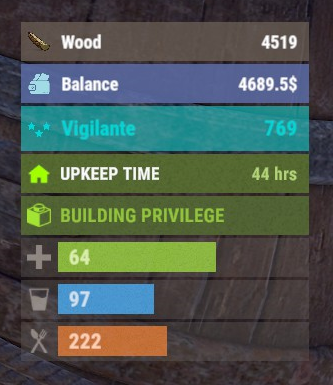
Version 0.1.8
387 downloads
The plugin displays the player's balance in the status bar. Depends on AdvancedStatus plugin. The ability to add and modify any economic plugins; The ability to automatically generate code for balance update hooks; The ability to automatically generate language files for different languages(filled in English); The ability to display the status bar to everyone or only based on permissions; The ability to display the status bar always or only in safe zones and building privileges; The ability to display the status bar via a command for a short period if permanent display is disabled; The ability to display the status bar when the balance is non-zero; The ability to display all or part of the bars simultaneously; The ability to customize the bar for each plugin; The ability to specify the currency symbol; The ability to specify the display side of the currency symbol; The ability to display text if the balance exceeds a specified value(useful for very large balances); The ability to specify the order of the bar; The ability to change the height of the bar; The abillity to customize the color and transparency of the background; The ability to set a material for the background; The ability to switch between CuiRawImageComponent and CuiImageComponent for the image; The ability to get images from the local folder(*SERVER*\oxide\data\AdvancedStatus\Images); The abillity to set own image and customize the color, transparency and outline of the image; The abillity to set sprite instead of the image; The ability to customize the color, size, font and outline of the text. balancebar.use - Grants the right to display the status bar if display is enabled only for permissions. { "Chat command": "balances", "Is it worth enabling GameTips for messages?": true, "Is it worth generating update hooks? 0 - disabled, 1 - one-time activation, 2 - always enabled": 2, "Is it worth displaying the status bar only when players are in the safe zone or have building privilege?": true, "Is it worth displaying the status bar at a 0 balance?": true, "Is it worth displaying the status bar without permission?": true, "Value after which text will be displayed instead of balance": 1000000000.0, "List of language keys for creating language files": [ "en" ], "The list of economy plugins for displaying the balance bar. Note: After modifying hooks, do not forget to toggle hook generation": [ { "Plugin's name": "Economics", "Is it worth enabling the plugin for display?": true, "Language key for the main text": "BarEconomics", "Balance format": "${0}", "Language key for the subtext when the balance is high": "BarEconomicsOverLimit", "API method for retrieving the balance": "Balance", "Hook that triggers on balance update": "OnEconomicsBalanceUpdated", "List of argument types in the hook in order": [ "string", "double" ], "BarSettings": { "Order": 20, "Height": 26, "BackgroundColor(HEX or RGBA)": "#6375B3", "BackgroundTransparency": 0.8, "BackgroundMaterial(leave empty to disable)": "", "ImageUrl": "https://i.imgur.com/jKeUqSD.png", "ImageLocal(leave empty to use URL)": "BalanceBar_Default", "ImageSprite(leave empty to use local or URL)": "", "IsRawImage": false, "ImageColor": "#A1DBE6", "ImageTransparency": 1.0, "ImageOutlineColor": "0.1 0.3 0.8 0.9", "ImageOutlineTransparency": 1.0, "ImageOutlineDistance(leave empty to disable). Example '0.75 0.75'": "", "TextSize": 12, "TextColor": "#FFFFFF", "TextTransparency": 1.0, "TextFont(https://umod.org/guides/rust/basic-concepts-of-gui#fonts)": "RobotoCondensed-Bold.ttf", "TextOffsetHorizontal": 0, "TextOutlineColor": "#000000", "TextOutlineTransparency": 1.0, "TextOutlineDistance": "", "SubTextSize": 12, "SubTextColor": "#FFFFFF", "SubTextTransparency": 1.0, "SubTextFont": "RobotoCondensed-Bold.ttf", "SubTextOutlineColor": "0.5 0.6 0.7 0.5", "SubTextOutlineTransparency": 1.0, "SubTextOutlineDistance": "" } }, { "Plugin's name": "ServerRewards", "Is it worth enabling the plugin for display?": true, "Language key for the main text": "BarServerRewards", "Balance format": "{0} RP", "Language key for the subtext when the balance is high": "BarServerRewardsOverLimit", "API method for retrieving the balance": "CheckPoints", "Hook that triggers on balance update": "OnPointsUpdated", "List of argument types in the hook in order": [ "ulong", "int" ], "BarSettings": { "Order": 20, "Height": 26, "BackgroundColor(HEX or RGBA)": "#6375B3", "BackgroundTransparency": 0.8, "BackgroundMaterial(leave empty to disable)": "", "ImageUrl": "https://i.imgur.com/jKeUqSD.png", "ImageLocal(leave empty to use URL)": "BalanceBar_Default", "ImageSprite(leave empty to use local or URL)": "", "IsRawImage": false, "ImageColor": "#A1DBE6", "ImageTransparency": 1.0, "ImageOutlineColor": "0.1 0.3 0.8 0.9", "ImageOutlineTransparency": 1.0, "ImageOutlineDistance(leave empty to disable). Example '0.75 0.75'": "", "TextSize": 12, "TextColor": "#FFFFFF", "TextTransparency": 1.0, "TextFont(https://umod.org/guides/rust/basic-concepts-of-gui#fonts)": "RobotoCondensed-Bold.ttf", "TextOffsetHorizontal": 0, "TextOutlineColor": "#000000", "TextOutlineTransparency": 1.0, "TextOutlineDistance": "", "SubTextSize": 12, "SubTextColor": "#FFFFFF", "SubTextTransparency": 1.0, "SubTextFont": "RobotoCondensed-Bold.ttf", "SubTextOutlineColor": "0.5 0.6 0.7 0.5", "SubTextOutlineTransparency": 1.0, "SubTextOutlineDistance": "" } }, { "Plugin's name": "BankSystem", "Is it worth enabling the plugin for display?": true, "Language key for the main text": "BarBankSystem", "Balance format": "${0}", "Language key for the subtext when the balance is high": "BarBankSystemOverLimit", "API method for retrieving the balance": "Balance", "Hook that triggers on balance update": "OnBalanceChanged", "List of argument types in the hook in order": [ "ulong", "int" ], "BarSettings": { "Order": 20, "Height": 26, "BackgroundColor(HEX or RGBA)": "#6375B3", "BackgroundTransparency": 0.8, "BackgroundMaterial(leave empty to disable)": "", "ImageUrl": "https://i.imgur.com/jKeUqSD.png", "ImageLocal(leave empty to use URL)": "BalanceBar_Default", "ImageSprite(leave empty to use local or URL)": "", "IsRawImage": false, "ImageColor": "#A1DBE6", "ImageTransparency": 1.0, "ImageOutlineColor": "0.1 0.3 0.8 0.9", "ImageOutlineTransparency": 1.0, "ImageOutlineDistance(leave empty to disable). Example '0.75 0.75'": "", "TextSize": 12, "TextColor": "#FFFFFF", "TextTransparency": 1.0, "TextFont(https://umod.org/guides/rust/basic-concepts-of-gui#fonts)": "RobotoCondensed-Bold.ttf", "TextOffsetHorizontal": 0, "TextOutlineColor": "#000000", "TextOutlineTransparency": 1.0, "TextOutlineDistance": "", "SubTextSize": 12, "SubTextColor": "#FFFFFF", "SubTextTransparency": 1.0, "SubTextFont": "RobotoCondensed-Bold.ttf", "SubTextOutlineColor": "0.5 0.6 0.7 0.5", "SubTextOutlineTransparency": 1.0, "SubTextOutlineDistance": "" } }, { "Plugin's name": "IQEconomic", "Is it worth enabling the plugin for display?": true, "Language key for the main text": "BarIQEconomic", "Balance format": "${0}", "Language key for the subtext when the balance is high": "BarIQEconomicOverLimit", "API method for retrieving the balance": "API_GET_BALANCE", "Hook that triggers on balance update": "OnBalanceUpdated", "List of argument types in the hook in order": [ "BasePlayer", "int" ], "BarSettings": { "Order": 20, "Height": 26, "BackgroundColor(HEX or RGBA)": "#6375B3", "BackgroundTransparency": 0.8, "BackgroundMaterial(leave empty to disable)": "", "ImageUrl": "https://i.imgur.com/jKeUqSD.png", "ImageLocal(leave empty to use URL)": "BalanceBar_Default", "ImageSprite(leave empty to use local or URL)": "", "IsRawImage": false, "ImageColor": "#A1DBE6", "ImageTransparency": 1.0, "ImageOutlineColor": "0.1 0.3 0.8 0.9", "ImageOutlineTransparency": 1.0, "ImageOutlineDistance(leave empty to disable). Example '0.75 0.75'": "", "TextSize": 12, "TextColor": "#FFFFFF", "TextTransparency": 1.0, "TextFont(https://umod.org/guides/rust/basic-concepts-of-gui#fonts)": "RobotoCondensed-Bold.ttf", "TextOffsetHorizontal": 0, "TextOutlineColor": "#000000", "TextOutlineTransparency": 1.0, "TextOutlineDistance": "", "SubTextSize": 12, "SubTextColor": "#FFFFFF", "SubTextTransparency": 1.0, "SubTextFont": "RobotoCondensed-Bold.ttf", "SubTextOutlineColor": "0.5 0.6 0.7 0.5", "SubTextOutlineTransparency": 1.0, "SubTextOutlineDistance": "" } } ], "Version": { "Major": 0, "Minor": 1, "Patch": 8 } } EN: { "CmdMain": "Available commands:\n\n<color=#D1CBCB>/balances</color> <color=#D1AB9A>show *seconds*(optional)</color> - Temporarily display the balance bar with an optional duration(1-10 seconds)\n<color=#D1CBCB>/balances</color> <color=#D1AB9A>toggle</color> - Toggle the balance bar display\n<color=#D1CBCB>/balances</color> <color=#D1AB9A>ignore</color> - Toggle ignoring balance bar display zones\n\n--------------------------------------------------", "CmdDisplayEnabled": "Balance bar display enabled!", "CmdDisplayDisabled": "Balance bar display disabled!", "CmdIgnoreZonesEnabled": "Ignoring balance bar display zones enabled!", "CmdIgnoreZonesDisabled": "Ignoring balance bar display zones disabled!", "BarEconomics": "Balance", "BarEconomicsOverLimit": "> $1kkk", "BarServerRewards": "Points", "BarServerRewardsOverLimit": "> 1kkk RP", "BarBankSystem": "Balance", "BarBankSystemOverLimit": "> $1kkk", "BarIQEconomic": "Balance", "BarIQEconomicOverLimit": "> $1kkk" } RU: { "CmdMain": "Доступные команды:\n\n<color=#D1CBCB>/balances</color> <color=#D1AB9A>show *секунды*(опционально)</color> - Временно отобразить баланс бар с возможностью указать время отображения(1-10 секунд)\n<color=#D1CBCB>/balances</color> <color=#D1AB9A>toggle</color> - Переключить отображение баланс бара\n<color=#D1CBCB>/balances</color> <color=#D1AB9A>ignore</color> - Переключить игнорирование зон отображения баланс бара\n\n--------------------------------------------------", "CmdDisplayEnabled": "Отображение баланс бара включено!", "CmdDisplayDisabled": "Отображение баланс бара выключено!", "CmdIgnoreZonesEnabled": "Игнорирование зон отображения баланс бара включено!", "CmdIgnoreZonesDisabled": "Игнорирование зон отображения баланс бара выключено!", "BarEconomics": "Баланс", "BarEconomicsOverLimit": "> $1 млрд", "BarServerRewards": "Очки", "BarServerRewardsOverLimit": "> 1 млрд RP", "BarBankSystem": "Баланс", "BarBankSystemOverLimit": "> $1 млрд", "BarIQEconomic": "Баланс", "BarIQEconomicOverLimit": "> $1 млрд" } show *seconds*(optional) - Temporarily display the balance bar with an optional duration(1-10 seconds) ; toggle - Toggle the balance bar display; ignore - Toggle ignoring balance bar display zones. Example: /balances show 5 /balances toggle /balances ignore$3.99 -
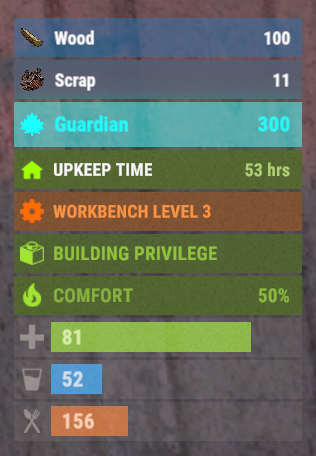
Version 0.1.4
792 downloads
This plugin demonstrates the integration with the AdvancedStatus plugin. It displays the amount of a specific item in the player's inventory in the status bar. In this case, it's Scrap, to track a different item, replace the itemID value on line 47 with the ID of the desired item. This plugin can be downloaded by plugin developers as a reference to understanding how to work with the AdvancedStatus and by server owners to easily display desired items in the status bar.Free -
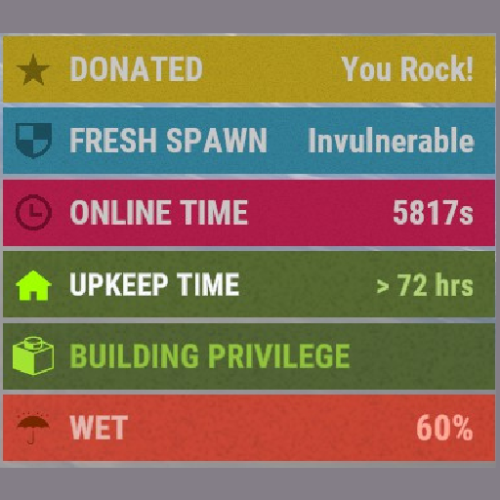 Hi! I wanted to give to users ability to choose to use your plugin to display some of my plugin's infomation but I face with couple problems. Also if i pick up or get some items, 1st item draws under this status. https://imgur.com/a/x1Qrfk6 https://imgur.com/a/2w3qeW5
 -
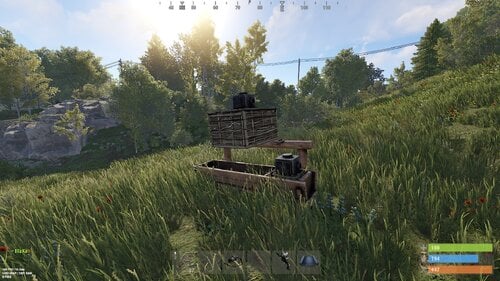 Hi! The plugin includes 3 permissions for players, in which you can set limits of the number of modified entities. Config file: "Max ammount of modified HitchTroughs": { "industrialdung.one": 10, "industrialdung.two": 20, "industrialdung.three": 30 }, "Max ammount of modified Composters": { "industrialdung.one": 2, "industrialdung.two": 5, "industrialdung.three": 10 }
- 76 comments
-
- 1
-

-
- #rust
- #industrial
- (and 26 more)
-
Changed Status from Pending to Not a Bug