-
Posts
2,192 -
Joined
-
Last visited
-
Days Won
25
Content Type
Profiles
Warranty Claims
Downloads
Forums
Store
Services
Downloads Plus Support
DOWNLOADS EXTRA
Reels
Everything posted by Scalbox
-
Changed Status from Pending to Closed
-
Hi, it's not possible due to the way Rust handles Mininq Quarries.
-
Changed Status from Pending to Work in Progress
-
hi sorry for delay, today i make some test
-

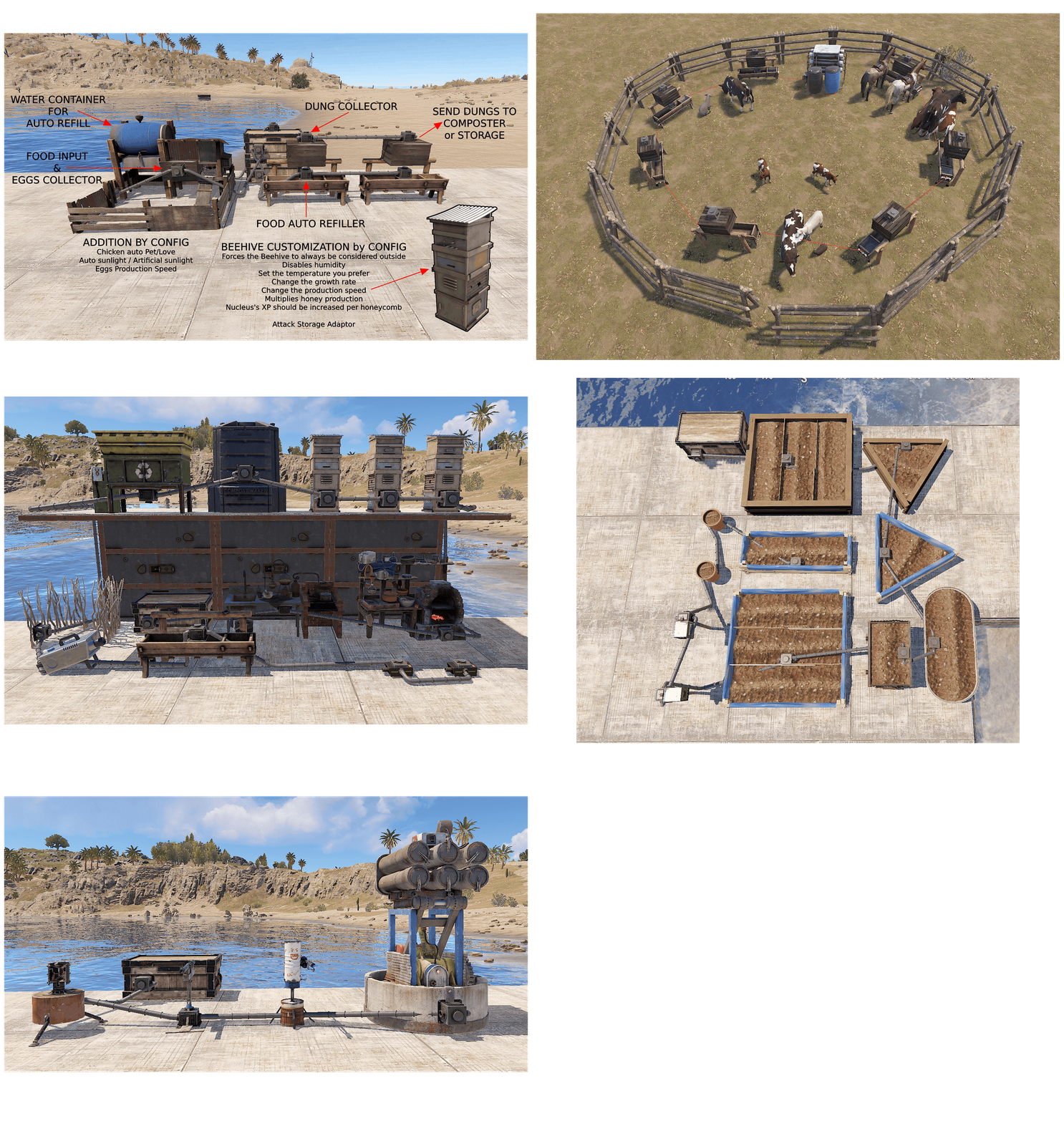 NEW UPDATE - ANIMAL The new Livestock Automation update will be released in a few hours. Added: Automated Hitch & Troughs now come with two fluid splitters, so water can be passed from one trough to the next in series. They cannot be picked up and their hoses cannot be disconnected Added: Water is shared evenly among automated Hitch & Troughs on the same water network, so the troughs further down the line no longer stay empty Fixed: Removing the automation from a Hitch & Trough could also delete storage attached to it that the plugin had not added Added: Livestock (Cow, Bull, Calf, Sheep, Ram, Lamb) linked to an automated Hitch & Trough now drop their dung into its storage, like horses Added: Automated Hitch & Troughs can keep food from spoiling in the trough and in its storage, either as a fridge (food is refrigerated) or simply without spoilage Added: Livestock linked to an automated Hitch & Trough are now milked (Cow) and sheared (Sheep, Ram) automatically, and the milk and wool go into its storage Added: Livestock genetics for automated Hitch & Troughs (Allow Genetic modification): the owner picks each gene from the trough UI, and the livestock linked to it take those genes Added: New Livestock Settings for automated Hitch & Troughs: production multiplier and production rate for dung, milk and wool, maximum livestock per trough, maximum age, no food, water or personal space required, minimum Overall condition Added: With No Food Required, nearby livestock are linked automatically to the nearest automated Hitch & Trough that still has room Added: Livestock Settings: Minimum trust with the trough owner, so linked livestock can always be led and produce dung (300), or also breed (900)
 -
NEW UPDATE - ANIMAL The update for the new animals is almost ready, it will be released in 3-4 days. These things are already ready at the moment. Added: Automated Hitch & Trough now come with two fluid splitters, so water can be passed from one trough to the next in series. They cannot be picked up and their hoses cannot be disconnected Added: Water is shared evenly among automated Hitch & Troughs on the same water network, so the troughs further down the line no longer stay empty Fixed: Removing the automation from a Hitch & Trough could also delete storage attached to it that the plugin had not added Added: Livestock (Cow, Bull, Calf, Sheep, Ram, Lamb) that feed from an automated Hitch & Trough now drop their dung into its storage, like horses Added: Livestock that feed from an automated Hitch & Trough are now milked (Cow) and sheared (Sheep, Ram) automatically, and the milk and wool go into its storage Added: New Livestock Settings for automated Hitch & Troughs: production multiplier and production rate for dung, milk and wool, no food or water required, minimum personal space, minimum Overall condition I'm finishing creating the genetic modification part.
-
You must add it to the group you're using. If you use the default group, add it there. If you use the VIP group, add it there. If you have any doubts, set it to all groups.
-
set limit to -1 in configuration file
-
Changed Status from Pending to Closed
-
read announce
-
hi in the next weeks
-
hi, send your configuration file and screeshot of problem
-
Work in Progress
-
NEW ANIMALS New animals will be added and integrated into the plugin approximately 1 or 2 weeks after the forced wipe (October 1, 2026).
- 324 comments
-
- 1
-

-
- #industrial storage adaptor
- #expand storage adaptor
- (and 52 more)
-
Changed Status from Pending to Closed
-
I'm glad everything's working now . If you like, leave a review; it helps me a lot. If you have any other problems, please open another ticket. Thanks
-
solved?
-
You must add all the plugins found in the folder, load ScalboxCore, and then UltimateIndustrialFarm.
-
Changed Status from Not a Bug to Fixed Changed Fixed In to 1.6.7
-
plugin updated
-
Changed Status from Work in Progress to Fixed Changed Fixed In to 1.6.7