.thumb.png.bcb832e22f0a48b6833fee517e444bff.png)
.thumb.png.fe4bc12fbacdc606fbd58215acabe3fd.png)
.thumb.png.38adc2498eceb1cb50dc9522122404f3.png)
.thumb.png.ce3d57a6afa63cee05409e3d1a80c04c.png)
.thumb.png.52b2277c25b0f6234ab5367d536bd61b.png)
.thumb.png.f85ebd90f8792cd0046337a00f7e17dd.png)
.thumb.png.cd41fb859d85a7c16ac6243a494947b4.png)
.thumb.png.293cac7ffb4286c4cf9cef076ac23144.png)

Works with
Compatible add-ons, packages, or tools that pair well with this resource.
-
 Image Library Optional
 -
 GUIAnnouncements Optional
 -
 Wipe Schedule Optional
 -
 Multi Events Optional
 -
 OPERATION FORTRESS Optional
About Events Manager
Meet EventsManager: the unified command center for your Rust server. Seamlessly orchestrate both official Facepunch events and custom plugin activities through a single, pixel-perfect in-game interface. Ditch the clunky, scattered timers—build dynamic event rotations and fine-tune your wipe schedules with a fluid, human-centric design that keeps your players consistently engaged.

 Features of Events Manager
- Multi-Event Support: Seamlessly manage multiple events, each with customizable settings.
- Customizable Display: Assign distinct names, commands, and colors for UI buttons to each event.
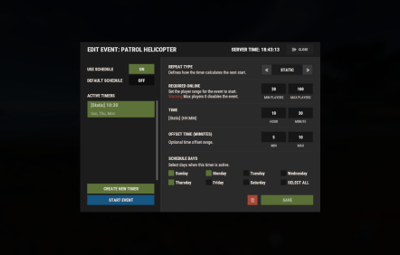
- Scheduling Flexibility: Schedule events to run on specific days and at designated hours.
- Administrative Control: Utilize commands to launch events, providing server admins with ultimate flexibility.
- Enhanced Player Experience: Introduce regular events to boost player engagement within the Rust environment.
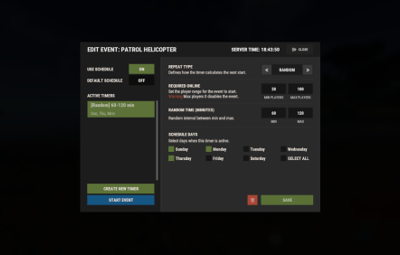
- Random Event Start: Introduce surprise elements by allowing the plugin to randomly select events from a pool.
- Integration of Facepunch Events: Enjoy a dynamic gameplay experience with popular Facepunch events now included in the plugin.
 Commands
- /em: Set up events, including start time and day.
- eventmanager.convert.v2: Migrates V2 data to V3 (console only)
 Permissions
- eventsmanager.use: This permission allows users to access the event management features and open the menu.
 Video Overview
 FAQ
FAQ
Q: Where can I see an example of a config?
A: Config
Q: Do I need to configure anything special for events?
A: Yes, it's important to disable autostart in your events when using EventsManager. The plugin handles the scheduling and starting of events, so having autostart enabled could cause conflicts or unexpected behavior.




(1).thumb.png.d56d18605bed9090caa8ebd3d3539349.png)
.thumb.gif.4707aef13cba7c3b9ad410f5f982b71c.gif)