Jump to content

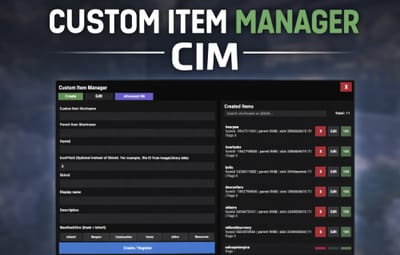
Custom Item Manager 1.0.4

$8.99 $7.99
   (1 review)

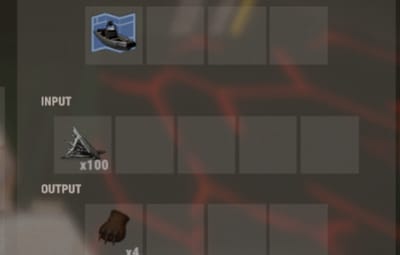
5 Screenshots

  • 2.5k
  • 130
  • 82.13 kB
  • Update details
    v1.0.4
    Released
    Download size82.13 kB
    Total versions4
    Time between versions 9 days
    Typical update pace About every 22 days
    Freshness 6 days ago

This area is for discussion and questions. Please use the support area for reporting issues or getting help.

Recommended Comments

ChardaZAR

Posted

Holy heck. This is great! Would love to get this!

My rust server is basically littered with custom skinned items
This would make my life so much easier

So quick question:
How difficult would it be to add existing custom items into the manager?

  • Like 1
Brad Copp

Posted

6 hours ago, ChardaZAR said:

Holy heck. This is great! Would love to get this!

My rust server is basically littered with custom skinned items
This would make my life so much easier

So quick question:
How difficult would it be to add existing custom items into the manager?

Hey @ChardaZAR 👋 

Not difficult at all. If you have all your custom SkinIDs to hand, maybe 1 minute to add each item.

tl;dr for a basic item:
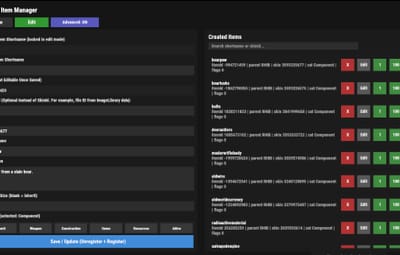
open the item manager, 
input a shortname you would like that item to have
input the parent item it will be based on (for non usable items, recommend shortname RHIB)
Populate the SkinID, Displayname, Description

Screenshot-2026-01-15-125030.png


If you use these items in any lootables (e.g. loot from events), you'd need to update it there to use the new simpler format (only shortname). Example from a loot table:

Loot format before changing to your new custom items:
 

        "List of items": [
          {
            "ShortName": "sticks",
            "Minimum": 1,
            "Maximum": 2,
            "Chance [0.0-100.0]": 5.0,
            "Is this a blueprint? [true/false]": false,
            "SkinID (0 - default)": 4535234653,
            "Name (empty - default)": "Screwdriver"
          },
          {
            "ShortName": "sticks",
            "Minimum": 1,
            "Maximum": 2,
            "Chance [0.0-100.0]": 5.0,
            "Is this a blueprint? [true/false]": false,
            "SkinID (0 - default)": 453342345,
            "Name (empty - default)": "Screws"
          },
        ]


Loot format after changing to your new custom items: (now only need to put in the shortname which you've configured)


        "List of items": [
          {
            "ShortName": "screwdriver",
            "Minimum": 1,
            "Maximum": 2,
            "Chance [0.0-100.0]": 5.0,
            "Is this a blueprint? [true/false]": false,
            "SkinID (0 - default)": 0,
            "Name (empty - default)": ""
          },
          {
            "ShortName": "screws",
            "Minimum": 1,
            "Maximum": 2,
            "Chance [0.0-100.0]": 5.0,
            "Is this a blueprint? [true/false]": false,
            "SkinID (0 - default)": 0,
            "Name (empty - default)": ""
          },
        ]


  • Love 2
ChardaZAR

Posted

@Bad Cop You are an absolute boss. Thank you!
I will be purchasing soon!

heres-my-card.gif.34f73bccd37d3c7943ff2cc3d0658fba.gif

  • Love 1
Stormo

Posted (edited)

Hello, is there any chance of a discount down to $6.50? If so, I would buy it right now 🙂

Edited by Stormo
  • Haha 1
  • Love 1
FandangoChristmas

Posted (edited)

Hello, I just bought this plugin and Im noticing a heavy problem with it.

-I have noticed that item descriptions will not change from my test descriptions I had first inputted into main description. Even after multiple edits/deletions/recreations of the custom item, or plugin unload/reload.

Edited by FandangoChristmas
Brad Copp

Posted

15 minutes ago, FandangoChristmas said:

Hello, I just bought this plugin and Im noticing a heavy problem with it.

-I have noticed that item descriptions will not change from my test descriptions I had first inputted into main description. Even after multiple edits/deletions/recreations of the custom item, or plugin unload/reload.

👋  

show me what you mean

Stormo

Posted (edited)

19 minutes ago, FandangoChristmas said:

Hello, I just bought this plugin and Im noticing a heavy problem with it.

-I have noticed that item descriptions will not change from my test descriptions I had first inputted into main description. Even after multiple edits/deletions/recreations of the custom item, or plugin unload/reload.

I have long since found a solution to this problem—just edit the file in lang.
It’s just that for some reason the description in lang doesn’t change after creating it via /cim.

Edited by Stormo
  • Love 1
FandangoChristmas

Posted

4 minutes ago, Stormo said:

I have long since found a solution to this problem—just edit the file in lang.
It’s just that for some reason the description in lang doesn’t change after creating it via /cim.

Thank you for the fix!

  • Like 1
FandangoChristmas

Posted

11 minutes ago, Bad Cop said:

👋  

show me what you mean

Edits to the main descriptions dont take effect. You have to manually edit a lang file on the server to change the main description on the item.

Brad Copp

Posted

2 hours ago, FandangoChristmas said:

Edits to the main descriptions dont take effect. You have to manually edit a lang file on the server to change the main description on the item.

Thanks, i get it. Lang files normally don't get updated for existing keys. Would need to delete the lang and reload,  or edit only the specific entry.

I havent really thought whether there's a good way of handling this, considering you may have several languages configured. I'll see what i can do for next patch

  • Like 2
FandangoChristmas

Posted

5 hours ago, Bad Cop said:

Thanks, i get it. Lang files normally don't get updated for existing keys. Would need to delete the lang and reload,  or edit only the specific entry.

I havent really thought whether there's a good way of handling this, considering you may have several languages configured. I'll see what i can do for next patch

I would only pursue it if you feel you need to. Now that I know about it I'm inputting what I want in there instead of doing tests. It was a easy fix to delete it out on the lang file and reload. I only have english lang files on my server, I didn't create any other language for the plugin, so it only took a few seconds. 

Create an account or sign in to comment

You need to be a member in order to leave a comment

Create an account

Sign up for a new account in our community. It's easy!

Register a new account

Sign in

Already have an account? Sign in here.

Sign In Now
  • Love 5

User Feedback

About Us

Codefling is the largest marketplace for plugins, maps, tools, and more, making it easy for customers to discover new content and for creators to monetize their work.

Downloads
2.3m
Total downloads
Customers
10.7k
Customers served
Files Sold
154.8k
Marketplace sales
Payments
3.3m
Processed total
×
×
  • Create New...

Important Information

We have placed cookies on your device to help make this website better. You can adjust your cookie settings, otherwise we'll assume you're okay to continue.