Jump to content

Xenia87's Wishlist

  1. More information about "Loot Table & Stacksize GUI"

    $40.00

    Loot Table & Stacksize GUI

    Say goodbye to configuration and data files. This plugin lets yo edit the loot of (almost) every lootable object directly over a custom UI. It also includes a graphical stack size editor thus making it ideal for anyone who is not familiar with editing config files.
    Do not use in combination with any other stack size controller or loot plugin.
     
    NEW with version 2.2.7:
    You can now add new items to all your configurations with the click of a button on the settings page. This only works for items that have been newly added with the last rust update. Amount and drop chance will be set to the vanilla values. This can also be done via command loottable add_new_items
     
    NEW with version 2.1.16:
    Improved item search
    You can now search for hidden items by adding h: to the start of your search (e.g. the search h:cable will show the cable tunnel item which is hidden by default). This works in both item editor and stack size controller. Full support for CustomItemDefinitions  

    NEW with version 2.1.7: Direct Loot Refresh
    Players with the permission  loottable.test can use a button to directly refresh the loot in the crate they are currently looting.
     
    Features:
    User friendly GUI - no need to edit config files Loot configuration for every prefab in the game Stack size controller supports individual stack sizes for every prefab Support for custom items Support for third party plugins Fully backwards compatible with version 1.x.x Default config included for every prefab Configuration for Smelting Speed, Recycler Speed and Efficiency Supply Drop configuration    
    Supported prefabs:
    Crates, Barrels NPCs Trees, Ores, Animal corpses Excavator, Quarries Christmas Presents, Eggs, Loot Bags Collectables like Hemp, Corn, etc.  
    Additional Configuration:
    Smelting Speed Supply Drop Recycler Speed / Efficiency
     
     Commands:
    loottable - Open the Loottable UI loottable reload - Manually refresh loot loottable remove_dlc_items - Remove all DLC items from your loot configs. This action can not be undone loottable add_new_items - Add all new items from this months rust update to your configurations. This action can not be undone  
    Permission:
    loottable.edit - Required to use the Loottable UI  
    Required Dependencies (Oxide only):
    Image Library:  https://umod.org/plugins/image-library
     
    Translations:
    This plugin fully supports translation. Out of the box only english is included. For item names to be translated, the plugin  https://umod.org/plugins/rust-translation-api  is required. English translations are located in /oxide/lang/en/Loottable.json
     
    For Developers:
    Loot Api:
    Developers can use the Loot Api to register loot profiles for custom NPCs or other plugin related loot.
    It is highly recommended to use the provided wrapper to access the API. Documentation is also included:
    https://gist.github.com/TheKiiiing/53a37e8bbb48d8a24c8e8b21b9da37ac
     
    Loot Api Example:
    void OnLoottableInit() { LoottableApi.ClearPresets(); LoottableApi.CreatePresetCategory(this, "Crates"); LoottableApi.CreatePreset(this, "c_locked", "Locked Crate", "crate_hackable"); LoottableApi.CreatePreset(this, "c_elite", "Elite Crate", "crate_elite"); LoottableApi.CreatePreset(this, "c_military", "Military Crate", "crate_military"); LoottableApi.CreatePreset(this, "c_normal", "Normal Crate", "crate_normal"); LoottableApi.CreatePresetCategory(this, "NPCs"); LoottableApi.CreatePreset(this, true, "npc_cargo", "Cargo Ship NPC", "npc_militunnel"); LoottableApi.CreatePreset(this, true, "npc_control", "Control Center NPC", "npc_militunnel"); } void SpawnNpc() { // Spawn NPC here ScientistNPC npc; // Assign a loot preset to the NPC LoottableApi.AssignPreset(this, scientist, "npc_control"); } void SpawnCrate() { // Spawn crate here LootContainer crate; // Assign a preset to the crate if (LoottableApi.AssignPreset(this, container, "c_locked")) { // The container has been filled with loot return; } else { // The container is not handled by Loottable // Default loot logic goes here } } The resulting configuration page would look like this:

     
    Custom Items API:
    Developers can use the Custom Items Api to add a custom item to the Loottable item list. If an item is marked as persistent it will remain in the custom item list until it is removed by ClearCustomItems. All non-persistent items will be removed after the plugin that registered them has been unloaded.
    (void) AddCustomItem(Plugin plugin, int itemId, ulong skinId) (void) AddCustomItem(Plugin plugin, int itemId, ulong skinId, bool persistent) //(v1.0.27 or higher) (void) AddCustomItem(Plugin plugin, int itemId, ulong skinId, string customName) (void) AddCustomItem(Plugin plugin, int itemId, ulong skinId, string customName, bool persistent) //(v1.0.27 or higher) (void) ClearCustomItems(Plugin plugin) //(v1.0.27 or higher)  
    Hooks:
    (void) OnLoottableInit() This hook is called when Loottable is ready to receive API calls. This happens either on server boot or when the plugin is loaded. Use this hook to register custom items and loot presets.
     
    (object) OnContainerPopulate(LootContainer container) This hook is called every time a loot container is about to be populated with loot. Returning a non-null value prevents the plugin from spawning loot into that crate.
     
    (object) OnCorpsePopulate(LootableCorpse corpse) This hook is called every time an npc corpse is about to be populated with loot. Returning a non-null value prevents the plugin from spawning loot into that corpse.
     
    (object) OnCustomAirdrop(SupplySignal signal) This hook is called every time a custom supply drop is about to be delivered.  Returning a non-null value will cancel the custom supply drop.
     
    Outdated documentation for Version 1:

    New with version 1.0.27:
    Custom Items can now be created and edited directly in the GUI. They can be created from any existing item and modified in the Item Select menu
             
     
    You can now create and load backups of your configuration. Commands (F1 or Server Console):
    loottable.backup load <name> - Load backup with the given name from the backups folder (will wipe your current configuration) loottable.backup create <name> - Create backup of everything with the given name Backups will be created in the data/Loottable/backups folder. To load a backup, the backup file needs to be present in that folder. When creating backups in the in-game console, the permission loottable.debug is required.
    IMPORTANT: DO NOT LOAD BACKUPS FORM SOURCES YOU DO NOT TRUST, they might cause harm to your server
     
    New with version 1.0.16:
    Custom Items:
    Now you can add custom items used by other plugins directly to your loot table. Other plugins can can register these items using the api (documentation below).

     
    Screenshots:
    Overview of crates and their current loot table

     
    Stacksize Editor

     
    Commands:
    loottable - Open the editor loottable refresh - Manually refresh crate loot loottable flags - List available flags (explained below) loottable flags <name> <1|0> - Enable / disable a certain flag loottable reload_vanilla_profiles - Manually re-download vanilla loot profiles (only for debuging)  
    Permission:
    loottable.edit - Required to use the editor  
    Flags:
    There are flags to disable some limits in the editor. Only enable these flags if you really need to as they might cause unexpected behavior of the editor. There are currently 3 flags available:
    Debug If enabled, the Debug flag provides more detailed information about errors and other actions in the editor. Don't enable this flag unless you want your console full of spam.
    UnlockGatherMultiplier  allows you to use gahter multipliers less than one and higher than 1000. Note that multipliers less than one might lead to unexpected results in some cases.
    DisableItemLimit Probably the safest flag to use is  DisableItemLimit as it simply lets you set stack sizes and every other item amount in the editor as high as  2,147,483,647 which is the biggest possible value of a 32-bit integer.
    UnlockFurnaceMultiplier lets you use any value as the furnace speed multiplier. Don't enable this flag unless you know what you are doing, since the default value range from 0.1 to 100 should cover most use cases and larger values might impact server performance.
    UnlockItemMultiplier unlocks the multiplier when multiplying a loot table.
    DisableStackingHooks  will disable all stacking related hooks. Enable if you encounter problems when stacking items.
    RefreshLootOnExit controls if all crates get refreshed after closing the editor or when reloading the plugin. Enable this only for testing, there might be an increase in entities.
    Refer to the Commands section for more information about enableing flags.
     
    Vanilla Configurations:
    Since version 1.0.7 there are vanilla loot profiles available for most crates and NPCs. These profiles can be loaded using the "Load default loot table" button at the top center of the editor.

    DISCLAIMER:
    The vanilla loot profiles in the editor might not exactly match the vanilla loot distribution of the game as it uses a completely different loot distribution system than Rust. These profiles rather serve as a reference point for custom loot profiles.
     
     Important for Carbon users:
    In order for this plugin to work with carbon, Harmony references need to be enabled. This can be done with the following command:
    c.harmonyreference 1  
    Required Dependencies (Oxide only):
    Image Library:  https://umod.org/plugins/image-library
     
    Custom Items API:
    Add a custom item to the item list. If an item is marked as persistent it will remain in the custom item list until it is removed by ClearCustomItems. All non-persistent items will be removed after the plugin that registered them has been unloaded.
    (void) AddCustomItem(Plugin plugin, int itemId, ulong skinId) (void) AddCustomItem(Plugin plugin, int itemId, ulong skinId, bool persistent) //(v1.0.27 or higher) (void) AddCustomItem(Plugin plugin, int itemId, ulong skinId, string customName) (void) AddCustomItem(Plugin plugin, int itemId, ulong skinId, string customName, bool persistent) //(v1.0.27 or higher) (void) ClearCustomItems(Plugin plugin) //(v1.0.27 or higher) Example:
    Its recommended to delay the call a little bit to make sure Loottable is loaded
    private void Init() { timer.In(1f, () => { Loottable?.Call("AddCustomItem", this, -946369541, 2664651800, "High Quality Fuel"); }); }  
    Hooks:
    (object) OnContainerPopulate(LootContainer container) This hook is called every time a loot container is about to be populated with loot. Returning a non-null value prevents the plugin from spawning loot into that crate.
     
    (object) OnCorpsePopulate(LootableCorpse corpse) This hook is called every time an npc corpse is about to be populated with loot. Returning a non-null value prevents the plugin from spawning loot into that corpse.
     
    (object) OnCustomAirdrop(SupplySignal signal) This hook is called every time a custom supply drop is about to be delivered.  Returning a non-null value will cancel the custom supply drop.


  2. More information about "Cooking"

    $24.99

    Cooking

    This plugin extends the vanilla cooking system in rust by adding a number of ingredients and advanced recipes to the game.
    The ingredients are obtained from any of the 45+ different sources, from ore nodes, to trees, to collectibles such as hemp and pumpkins.
    These ingredients are used to create delicious meals that will provide the player with 1 of the 55 different buffs the plugin has to offer, or your own custom buffs should you wish to create your own using permissions from other plugins.
    The plugin comes standard with 47 custom recipes and 11 custom ingredients included. It also utilizes a number of rusts existing items, such as pumpkins, corn, wheat and potatoes.
     

    There are over 47 recipes that come with the default configuration.
    Each recipe allows for any number of ingredients to be added (default is up to 4), and any number of the 46 buffs to be added to each meal.
    Recipes can be easily added via the config. This allows server owners to get creative by creating their own custom meals and buffs.
    The above video showcases how new recipes and ingredients can be easily added to your configuration.
     

    The plugin comes with 11 unique custom ingredients, and also utilizes 16 of the default items in rust.
    Ingredients can be easily added to the configuration (see the above video).
    All non-default ingredients can be found from 49 different sources including cutting trees, mining nodes, collecting hemp etc.
    Each sources drop rate can be customized to suit your server, and the sources for ingredients can be changed incredible easily by simply adjusting a number in the config file.
     

    There are 49 unique sources that ingredients can be obtained from from cutting trees to collecting pumpkins.
    The chances for each ingredient drop are based on the interaction with that source.  
    For example, picking a pumpkin offers 1 chance, as it is 1 interaction to pick a pumpking, while cutting a tree may be 10-20 chances (depending on the tool), as it takes a number of hits to fall a tree (this can be adjusted to be based on 1 chance per tree/node etc via the config).
    When a roll is successful, it then rolls through each item type and selects the item based on that items "dropWeight", allowing you to make ingredients more or less common than others on the same drop table.
     

    The Farmers Market is an in-built market that allows players to buy and sell ingredients for scrap, server rewards or economics.
    By default, the markets stocks will start at 0, and will only increase as players sell their unwanted ingredients to it.  
    It can be configured to allow all items, or only custom items to be bought and sold through it, and also allows for a maximum stock to be set (default 100), meaing that it cannot have more than 100 of an item type.
    The buy/sell values for each ingredient can be adjusted in the config file (default $10 buy, $5 sell).
    Starting quantities can also be set if you do not want the market to start at 0.
    The market can be accessed by typing in /market (if config is enabled) or by speaking to an NPC that can be spawned with the plugin (addmarketnpc).
     

    Ingredient: A useful ingredient used to make more complex meals.
    Woodcutting_Yield: Increases the amount of wood received by a percentage when cutting trees and logs.
    Mining_Yield: Increases the amount of ore received by a percentage when mining any ore type.
    Skinning_Yield: Increases the amount of animal products received by a percentage when skinning animals.
    Heal_Share: Heals those around you for a percentage of the healing you receive.
    Heal: Instantly heals you for a percentage of your maximum health.
    Food_Share: Shares your food with nearby players, providing them with a percentage of the calories that you consume.
    Metabolism_Overload: Increases your maximum calories and hydration capacity by a percentage.
    Comfort: Provides an aura of comfort around you. Each nearby player will receive a percentage comfort.
    Water_Breathing: Will allow you to breath underwater for the duration.
    Fire_Resist: Reduces the damage taken from all sources of fire/heat by a percentage.
    Cold_Resist: Reduces the damage taken from the cold by a percentage.
    Explosion_Resist: Reduces the damage taken from explosives by a percentage.
    Animal_Resist: Reduces the damage taken from animals by a percentage.
    Melee_Resist: Reduces the damage taken from attacks made with a melee weapon by a percentage.
    Wounded_Resist: If you would enter the wounded state while this buff is active, you will instead be brought to your feet. Any negative modifiers will be removed.
    Spectre: You will become invisible to auto-turrets, flame turrets and shotgun traps for the duration.
    Madness: This food will make you sound strange to others.
    Wealth: Provides you with a percentage find scrap/economics/points when breaking barrels.
    Barrel_Smasher: Provides you with a percentage chance to instantly break a barrel with any amount of damage.
    Crafting_Refund: Provides you with a percentage chance to refund components when crafting an item.
    Passive_Regen: Will passively regenerate a percentage health each second.
    Horse_Stats: Will increase the speed any horse you ride by a percentage.
    Fall_Damage_resist: Reduces damage taken from falling by a percentage.
    Condition_Loss_Reduction: Reduces the condition loss of all worn and held items by a percentage.
    Ingredient_Chance: Increases the chance to obtain cooking ingredients by a percentage.
    Upgrade_Refund: Provides you with a percentage chance to receive a free upgrade when upgrading your building blocks.
    Research_Refund: Provides you with a percentage chance to receive a scrap refund when using a research bench.
    Role_Play: This item provides no buffs as it a Roleplay item.
    Anti_Bradley_Radar: Makes you invisible to the Bradley APC.
    Fishing_Luck: Provides you with a percentage chance to obtain a random item while fishing.
    Farming_Yield: Increases the amount of resources collected by a percentage when harvesting player-grown plants.
    Component_Luck: Provides a percentage chance to receive a random component when breaking barrels.
    Electronics_Luck: Provides a percentage chance to receive a random electrical item when breaking barrels.
    Permission: Used for firing off custom commands such as assigning and removing permissions.
    Bleed_Resist: Reduces the damage taken from bleeding by a percentage.
    Radiation_Resist: Reduces the damage taken from radiation by a percentage.
    Max_Repair: Any item that is repaired while this buff is active, will have its maximum condition reset.
    Smelt_On_Mine: Provides you with a percentage chance to receive refined resources instead of ores, when mining sulfur and metal nodes.
    Loot_Pickup: Provides you with a percentage chance for all items to be moved directly into your inventory when breaking barrels.
    Reviver: Sets a players health to a percentage when bringing them up from the wounded state.
    Duplicator: Provides you with a percentage chance to duplicate an item when crafting.
    Harvest: Increases the amount of resources collected by a percentage> when harvesting wild entities.
    Ingredient_Storage: Stores ingredients.
    Extra_Calories: Instantly provides you with a percentage of your maximum calories when consumed.
    Extra_Hydration: Instantly provides you with a percentage of your maximum hydration when consumed.
    Max_Health: Increases your maximum health by a percentage.
    Fishing_Yield: Increases the amount of fish received by a percentage.
    Damage_Over_Time: This perk will damage the consumer every second for the set value.
    Mining_Hotspot: The player will always hit the hot spot while mining.
    Woodcutting_Hotspot: The player will always hit the marker while chopping wood.
    Dehydration: Removes hydration when applied.
    Damage: Damages the consumer by the value.
    Radiation: Gives the consumer radiation equal to the value.
    Hunger: Removes calories when applied.
    Lifelink: Heals the user for a percentage of damage done.
    SkillTreeXp: Increases the amount of Skill Tree xp received from all sources..
     

    Default: Default Rust item
    AnyTree: Chopping any tree
    ArcticTree: Chopping arctic trees
    DesertTree: Chopping palm trees
    TemperateTree: Chopping temperate trees
    TundraTree: Chopping tundra trees
    Cactus: Chopping cacti
    AnyNode: Mining any node
    AnyArcticNode: Mining any arctic nodes
    AnyDesertNode: Mining any desert nodes
    AnyTemperateNode: Mining any temperate nodes
    AnyTundraNode: Mining any tundra nodes
    StoneNode: Mining stone nodes
    MetalNode: Mining metal nodes
    SulfurNode: Mining sulfur nodes
    AnyAnimal: Skinning any animal
    Deer: Skinning deer
    Bear: Skinning bears
    Wolf: Skinning wolves
    Chicken: Skinning chickens
    PolarBear: Skinning polar bears
    Shark: Skinning sharks
    Boar: Skinning boar
    horse: Skinning horses
    Fishing: Catching fish
    Gut: Gutting fish
    Pumpkin: Harvesting pumpkins
    Potato: Harvesting potatos
    Corn: Harvesting corn
    Mushroom: Picking mushrooms
    BerryBush: Picking berries
    BerryBushBlack: Picking black berries
    BerryBushBlue: Picking blue berries
    BerryBushGreen: Picking green berries
    BerryBushRed: Picking red berries
    BerryBushWhite: Picking white berries
    BerryBushYellow: Picking yellow berries
    Hemp: Harvesting hemp
    CollectableSulfur: Collectable sulfur nodes
    CollectableStone: Collectable stone nodes
    CollectableMetal: Collectable metal nodes
    Crafted: Crafted
    Foodbox: Food boxes
    Excavated: Digging up metal detector sites
    Wheat: Picking up wheat
    JungleTree: Picking up wheat
    Tiger: Picking up wheat
    Panther: Picking up wheat
    Crocodile: Picking up wheat
    Snake: Picking up wheat
    AnyJungleNode: Picking up wheat
     

    Command: cook or recipemenu
    Action: Opens the recipe menu from anywhere.
    Permission: cooking.recipemenu.chat
    Command: market
    Action: Opens the farmers market from anywhere.
    Permission: cooking.market.cmd
    Command: ibag
    Action: Opens the ingredient bag from anywhere.
    Permission: cooking.bag.cmd
    Command: addmarketnpc
    Action: Creates a farmers market NPC
    Permission: cooking.admin
    Command: removemarketnpc
    Action: Removes the targeted farmers market NPC
    Permission: cooking.admin
    Command: clearingredientbags
    Action: Clears the contents of ingredient bags for all players
    Permission: cooking.admin
    Command: giverecipe <recipe>
    Action: Gives the command user the specified recipe card
    Permission: cooking.admin
    Command: givemeal <target> <meal> <amount>
    Action: Gives the specified meal to the target player.
    Permission: cooking.admin
    Command: giveingredient <target> <ingredient> <amount>
    Action: Gives the specified ingredient to the target player.
    Permission: cooking.admin
    Command: setmarketquantity <ingredient> <amount>
    Action: Sets the available market quantity of the specified item.
    Permission: cooking.admin
     

    // Recipe menu chat command cooking.recipemenu.chat // Using the cooking menu cooking.use // Admin related cooking comands cooking.admin // Bypass cooking time cooking.instant // Bypass ingredient requirements cooking.free // Removes ability to gather ingredients cooking.nogather // Allows the ingredient bag to be opened via CMD cooking.bag.cmd // Disables drop notifications cooking.disable.notify.drop // Disables Notify notifications cooking.disable.notify.proc // Disables menu sounds cooking.disable.sound // Allows access to the farmers market via CMD cooking.market.cmd // Allows the user to speak to the market NPC cooking.market.npc // Allows the user to gather ingredients cooking.gather // Required to find recipe cards cooking.recipecards  

    Economics - Used for the farmers market and the Wealth buff type.
    ServerRewards - Used for the market and the Wealth buff type.
    SkillTree - Will provide xp when creating meals with the Cooking plugin.


    bool CanGatherIngredient(BasePlayer player, uint source) Returning a non-null value will prevent players from receiving ingredients from certain drop sources. the source is the networked ID of the entity.
    void OnMealCrafted(BasePlayer player, string meal, Dictionary<string, int> ingredients, bool isIngredient) Called after a meal has been created and given to the player.
    bool IsCookingMeal(Item item) Useful if you want to see if an item is from the recipe menu.
    bool IsHorseBuffed(RidableHorse horse) Used to prevent stacking modifiers if a horse is buffed by the Cooking plugin.
    object OnAddRecipeCardToLootContainer(BasePlayer player, LootContainer container) Returning a non-null value will prevent recipe cards from being added to the container.
    object OnIngredientBagDrop(BasePlayer player) Returning a non-null value will prevent the bag from dropping.
    void OnMealConsumed(BasePlayer player, Item item, int duration) Triggered when a player successfully consumes a meal. No return types.
     

  3. More information about "Shoppy Stock"

    $49.99

    Shoppy Stock

    RUST Plugin Test Server
    TEST MY PLUGINS THERE!
    connect play.thepitereq.ovh:28050
     
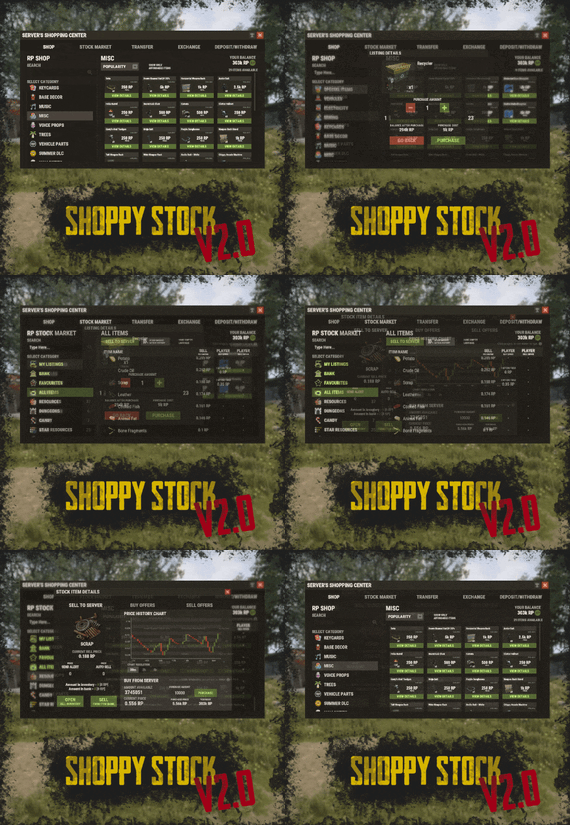
    Shoppy Stock is a powerful and versatile economy system designed to enrich your Rust server with shops, stock markets, transfers, exchanges, and deposit features.
    This plugin makes it easy to create multiple shops with unique currencies, set up dynamic stock markets with item listings, and manage a fully customizable server selling center—plus many more advanced options.
    Plugin package (zip) contains:
    ShoppyStock plugin ShoppyConverter plugin (Converts 1.x config to 2.0 config)  


    Global
    Includes over 17 detailed Rust-themed GUI windows. Optimized for performance—actions are lightweight and won’t burden your server. Highly expandable, limited only by your imagination. Fully customizable popup messages through the PopUp API. Comprehensive command and API support for currency management. Full language support for all messages and items. Supports NoEscape integration. Complete UI color customization. NPC interaction support for shops and stock markets. Page memory feature remembers your position in the shop when reopened. Deposit and withdraw currencies to and from items. Currency exchange between different types. Built-in currency leaderboard. Shops
    Create multiple shops, each using different currencies. Easily import your old currency from other economy plugins. Organize items into categories with custom icons for seamless browsing. Unified search bar across all categories. Buy exactly the amount of items you need. Full custom item support. If currency is item-based, allow deposits into the shop as virtual currency and withdrawals back to items. Granular permission system configurable for each action. Daily or wipe purchase limits. Purchase cooldowns. Configurable discount system. Random offer rotations with customizable listings. Progressive pricing — prices can increase by set values or multipliers on each purchase. Stock Market
    Create multiple markets with different currencies. Favorite items tab for quick access. Automatic listing of all vanilla Rust items with blacklist support. Multiple sorting options for better market management. Buy and sell request creation. Configurable server sell price history. Permission-based limits on how many listings each player can create. Listings can be canceled, refunded, or returned to the market at no cost. Customizable taxes on market actions. Support for extra item info like durability and plant genes. Timed price rolls to adjust prices at set hours. Demand-based pricing that adjusts based on item popularity (DiscordCore required for messages). Advanced selling center with a price calculator using over 15 variables (e.g., amount sold, online player count). Stock Market Broker system—players can store or refund items, set alert prices, and even auto-sell resources while offline. Custom categories and full custom item support. Web API support for price checks or integration into server tools (requires web server). Statistics module for fine-tuning your economy. Timed listings with configurable availability durations. Ability to buy back resources sold to the market. Listing taxes based on listing time. Dynamic price history graphs. Individual configuration for server buy/sell offers per item. Generation of historical price data. Transfer
    Send currencies to other players, whether they’re online or offline. Configurable transfer limits and taxes.  

    The following core permission is static and cannot be changed. However, the configuration files include hundreds of customizable permissions covering nearly every action.
    shoppystock.admin - Grants full access to admin commands and management tools.  

    All commands can be fully customized in the configuration. Below are the default commands included with the plugin:
    /shop or /s — Opens the main Shoppy Stock interface. /adminshop — Opens the admin shop management panel. (Available in version 2.1) /deposit — Opens the currency deposit inventory. /mshop or /goldshop — Opens a specific shop. /market — Opens the stock market interface for a specific currency (defaults to “money”). /sell — Opens the sell inventory to sell items directly to the server (defaults to “money”). /list — Opens the interface to list a new item on the stock market (defaults to “money”). /bank — Opens the bank interface for a specific stock market (defaults to “money”). /stockcode <code> — Displays a private listing using a code shared by the listing owner. updateprices — Console command showing details on rolling or updating item prices in the stock market.  

    Shoppy Stock is packed with powerful features, and configuring everything the first time can feel overwhelming. 
    This guide provides a quick walkthrough to help you get started and understand key parts of the plugin.
    Optional Supported Currency Plugins
    Economics ServerRewards BankSystem IQEconomic  
    Moving from V1 to V2.
    Shoppy Stock V2 has been almost completely rewritten from scratch, reusing less than 10% of the old code.
    The new configuration is redesigned to be more intuitive and feature-rich.
    To help you migrate, use the provided ShoppyConverter, which can convert about 95% of your old configs and data files to the new format.
    After converting, always review your new configs carefully — V2 includes dozens of new options that won’t automatically adjust to your preferred settings.
    How to convert:
    Place ShoppyConverter.cs in your plugins folder. Follow console instructions to move files to the required location. Run the conversion command as instructed. Once converted, place the new files in the correct folders as indicated.  
    Configuration Files
    The plugin’s extensive features are divided across several files and folders:
    /config/ShoppyStock.json
    Main config containing default settings for currencies, shops, stock markets, and global options. /data/ShoppyStock/playersData.json
    Stores global plugin data and player currencies. /data/ShoppyStock/Shops/Configs/<shopName>.json
    Shop configs, including available categories and items. /data/ShoppyStock/Shops/Statistics/
    Data on daily limits, unique purchases, and more. /data/ShoppyStock/StockMarkets/Configs/<stockName>.json
    Stock market configs. /data/ShoppyStock/StockMarkets/Listings/
    Player buy and sell offers. /data/ShoppyStock/StockMarkets/PlayerData/
    Alert data, favorites, banked items, etc. /data/ShoppyStock/StockMarkets/PriceCache/
    Historical price data and current server sell prices. /data/ShoppyStock/StockMarkets/Statistics/
    Data on items sold to the server and total currency earned.  
    Main Config Highlights
    Web API
    You can use the Web API to show market prices on your website.
    Requires web hosting with PHP support.
    Download apiupdate.php by CLICKING HERE.
    Place it in the directory set by your “Web Price API - Link” config.
    Make sure it has permission to create api.html.
    The generated file will be accessible at <Web Price API - Link>/api.html.
     
    Server-Selling Items → Default Sell Amount Calculation (DSAC)
    DSAC helps define the average number of items sold in a period, based on your server’s player activity. The period is an one price roll time.
    Example: a PvE x10 server with ~20–30 players might set wood’s DSAC to 1,800,000 — based on my some calculations, but adjust based on your own stats and server needs.
     
    Always Run Timer on Hour Minute
    Controls when the plugin rolls stock prices.
    For example:
    Values: 0, 30, 60 → rolls at x:00 or x:30. Values: 0, 20, 40, 60 → rolls at x:00, x:20, or x:40.  
    Stock Market - Default Categories
    By default, the stock market includes these categories:
    Favourites MyListings Bank AllItems Use these codenames in your configs to customize display order.
     
    Items - Custom Detail Info (skinId: languageKey)
    You can add custom info tags in listings (similar to showing tool condition or clone genes).
    For example, tag certain items as “Upgrade Ingredients.”
     
    Redeem Inventory Name
    Make sure to create a storage with this name in RedeemStorageAPI — otherwise, items from certain actions could disappear, and errors may occur.
     
    Generating Shop Config With All Vanilla Items
    To automatically add all vanilla RUST items to a shop:
    In /config/ShoppyStock.json, set Generate Config With All Default RUST Items to true in the desired shop section. Delete the existing shop config file in /data/ShoppyStock/Shops/Configs/. Reload the plugin—this will generate a new config containing all default items.  
    Shop Data Config Highlights
    Shop Items - Commands
    Supports few types of dynamic variables in commands:
    {userId} → buyer’s Steam ID {userName} → buyer’s nickname {userPosX}, {userPosY}, {userPosZ} → buyer’s coordinates  

    A collection of answers to common questions about demand systems, price multipliers, stock market trends, and developer API.
     
    Multiplier Events & Demand System
    Q: How does the demand system work? What is “weight”?
    A: The demand system uses “Multiplier Events” defined in the main config. Each event has a weight that determines its chance to be chosen during a price roll. How often demands appear is configured in your stock market file at: /data/ShoppyStock/StockMarket/Configs/<shopName>.json. Make sure names in the main config and stock market config match exactly.
    Q: How do “minimal” and “maximal” work?
    A: These define a range for random price multipliers.
    Example: if minimal is 1.4 and maximal is 1.8, and the original price is 1.4, the final rolled multiplier might be ~1.685 → final price becomes ≈ 2.359.
    If the random roll goes above max or below min, it’s clamped to min/max.
     
    Stock Market - Timestamps & Trends
    Q: What are timestamps used for?
    A: The plugin stores historical price data which appears in charts for players with the correct permission.
    Tip: set a reasonable timestamp retention value even if you don't plan to show players now—this lets you start collecting useful data early.
     
    Data Folder, Stock Market Config
    Q: Blocked Multiplier Listing Keys
    A: Certain items you want excluded from permission price multipliers.
     
    Price Calculator
    Q: Price Change - Price Fluctuation Percentage
    A: Adds random small price changes to keep the market realistic when no other events run.
    Q: Price Change - Same Price Actions Min/Max
    A: Controls how many rolls prices must go up or down in sequence, making trends look more natural.
    Q: Price Change - Chances To Increment Based On Current Price Percentage
    A: It's the chance to run the action listed above. It's made in "<price percentage>": <price increase chance (percentage)> format. It's made to make prices go higher more easily when they are low and harder when they are high.
    Q: Price Drop - Amount Sell Values Penalty Multiplier
    A: When many items are sold fast, price roll becomes negative × penalty multiplier, making it drop quicker.
    Q: Price Drop - Amount Sold Max Price Penalty
    A: If a huge amount of an item (e.g., 10000% of DSAC) is sold, price is locked to e.g., 25% of original value for a period (e.g., 24 price rolls).
    Q: Price Increase - DSAC Not Achieved
    A: When item demand is too low (<100% DSAC sold), price increases faster to encourage farming, e.g., by x1.5.
    Q: Default Sell Amount Calculation - Players Online Multiplier
    A: Automatically scales DSAC based on current player count (checked each price roll). Useful if online population varies greatly.
    Q: Price Multipliers - Minimal Time Distance Between Events
    A: Sets a cooldown between multiplier events to avoid price spikes.
    Q: Price Multipliers - Chance To Appear Based On Sold Amount
    A: Lets multipliers trigger more often when few or many items are sold.
    Q: Price Multiplier Events
    A: Defines how many price rolls the price-increase/decrease event should last.
     
    Server Sell Items
    Q: What is the price parent system?
    A: Lets you set base items (e.g., Metal Ore) and refined items (e.g., Metal Fragments) so that fragments always stay more valuable than ore by a set difference, encouraging refining.
     

    int GetCurrencyAmount(string shopName, BasePlayer player) - Returns player's balance rounded down to integeer. If not found returns 0. int GetCurrencyAmount(string shopName, ulong userId) - Returns player's balance rounded down to integeer. If not found returns 0. float GetCurrencyAmountFloat(string shopName, BasePlayer player) - Returns player's balance. If not found returns 0. float GetCurrencyAmountFloat(string shopName, ulong userId) - Returns player's balance. If not found returns 0. bool TakeCurrency(string shopName, BasePlayer player, int amount) - Takes player currency. Returns true if taken and false if not. bool TakeCurrency(string shopName, BasePlayer player, float amount) - Takes player currency. Returns true if taken and false if not. bool TakeCurrency(string shopName, ulong userId, int amount) - Takes player currency. Returns true if taken and false if not. bool TakeCurrency(string shopName, ulong userId, float amount) - Takes player currency. Returns true if taken and false if not. void GiveCurrency(string shopName, ulong sellerId, int amount) - Gives player currency. void GiveCurrency(string shopName, ulong sellerId, float amount) - Gives player currency. string FormatCurrency(string shopName, BasePlayer player) - Returns player's formatted balance.  

    Video Configuration
    Contains all configuration files shown on video.
    My private configuration created for my purposes.
    Note: many custom item features won’t work directly on your server—they're specific to the author’s private setup.
    Example Configuration.zip
     

    Default Main Config
    CLICK HERE!
    Default Shop Data Config
    CLICK HERE!
    Default Stock Market Data Config
    CLICK HERE!
  4. More information about "ExtraEvents"

    $19.99

    ExtraEvents

    ExtraEvents can run multiple different and custom competitive events for players to win prizes; each event is highly configurable including chat/GameTip messages & items, commands, and/or kits rewards for one or more winners; regularly optimized to be as lightweight & efficient as possible; additional events and features planned.
    The configuration may seem long but it's simply repetitive to allow for greater customization. ExtraEvents comes out of the box running a random event every 1-2 hours with a scrap reward of 100 for the top player and a participation reward of 10 scrap for everyone else who participates in the event! Custom events and rewards can be added.
    Join my Discord for support and updates: https://discord.gg/teSffnDQ7N
    Events Included
    AnimalAnnihilation - Kill animals to win! BarrelBreakers - Break barrels to win! BerryBash - Gather wild berries to win! BotBash - Kill bots to win! CrateClash - Loot crates to win! FishingFrenzy - Catch fish to win! HempHunters - Gather wild hemp to win! MushroomMadness - Gather wild mushrooms to win! OreWar - Mine ore nodes to win! PlayerBattle - Kill players to win! ResourceRumble - Collect resources to win! RoadsignRun - Destroy roadsigns to win! TreeTrimmers - Chop trees to win! TunnelTussle - Kill tunnel dwellers to win! UnderwaterWar - Kill underwater lab scientists to win! Additional Events Included
    HighQualBrawl - Collect high quality metal ore at 3x (configurable) the normal rate MetalMash - Collect metal ore at 3x (configurable) the normal rate ResourceRun - Collect resources at 2x (configurable)  the normal rate! StoneSmash - Collect stones at 3x (configurable) the normal rate SulfurSpree - Collect sulfur ore at 3x (configurable) the normal rate WoodWhirl - Collect wood at 3x (configurable) the normal rate Custom Events Can Be Added!
    Event Types
    destroy - counts destroyed/killed NPCs, players, barrels, roadsigns, etc. loot - counts looted crates & loot containers collect - adds collected resources/entity amounts together (adds total number of entities collected [500 wood, 1000 metal.ore, 10 cloth, etc.]) dispense - counts collected resource/entity types (counts entity types distributed [wood = 1 point, metal.ore = 1 point, cloth = 1 point, etc.]) fish - counts caught fish or killed sharks gather - Adds gathered resources/entity amounts together when picked up from the ground (adds total number of entities collected [10 cloth, 1 mushroom, 1 red.berry, etc.]) Permissions
    extraevents.admin Admin Commands (Console & Chat) (requires extraevents.admin permission)
    extraevents start - Start random event manually (regardless of Minimum Players Online) [/extraevents start] extraevents start EventName - Start event manually (case sensitive (uses Event key/identifier, not DisplayNames)) [/extraevents start EventName] extraevents end - End current event [/extraevents end] Player Chat Commands
    /extraevents ui - Toggle the UI visibility /extraevents image - Toggle event image visiblity independent from UI /extraevents sound - Toggle event sounds ADD CUSTOM EVENTS
    "BoarBrawl": { "Enable Event": true, "Event Name": "BoarBrawl", "Event Description": "Kill boar to win!", "Event Type (destroy, loot, collect, dispense, fish)": "destroy", "Event Type (destroy, loot, collect, dispense, fish, gather)": "destroy", "Event Length (seconds)": 600, "Event Entities": [ "boar" ], "Enable Event Permission": false, "Event Permission": "extraevents.boarbrawl", "Show UI And Notifications To Players Without Event Permission?": false, "Event Image(s)": [ { "Enable Image": true, "Image URL": "https://avatars.cloudflare.steamstatic.com/9df6fd69fc80ebe9387bb7a58ff4ee01d092af11_full.jpg", "Image Transparency (0.0 - 100.0)": 75.0, "Image Anchors Min (x y)": "0.8 0.2", "Image Anchors Max (x y)": "0.83 0.245" } ], "Event Leaderboard": { "Enable Leaderboard UI": true, "UI Anchors Min (x y)": "0.695 0.025", "UI Anchors Max (x y)": "0.83 0.1975", "UI Background Color (r g b a)": "255 255 255 0.2", "UI Text Color (r g b a)": "255 255 255 1.0", "UI Text Outline Color (r g b a)": "0 0 0 0.25", "UI Text Alignment (left, right, center)": "center", "UI Player List Text Alignment (left, right, center)": "center", "UI Pending Participation Message": "No one has played... yet." }, "Event Notifications": { "Enable Chat Notifications": true, "Event Chat Prefix": "", "Event Chat Icon (Steam64 ID)": 0, "Enable GameTip Notifications": false, "GameTip Style (info OR alert OR error)": "info", "GameTip Duration (seconds)": 3.0, "Enable Event Upcoming Notification": false, "Event Upcoming Delay (seconds) (time before event starts after Event Upcoming Notification)": 30, "Event Upcoming": "The <color=purple>{event_name}</color> event will start in {upcoming_announcement_delay} seconds! <color=purple>{event_description}</color>", "Event Starting": "The <color=purple>{event_name}</color> event has started! <color=purple>{event_description}</color>", "Event Starting Sound": "assets/bundled/prefabs/fx/item_unlock.prefab", "Event Ending": "The <color=purple>{event_name}</color> event has ended.", "Event Ending Sound": "assets/bundled/prefabs/fx/item_unlock.prefab", "No Participants": "No one participated in the <color=purple>{event_name}</color> event", "Multiple Winners Notification Delay (seconds)": 4.0 }, "Event Reward(s)": [ { "Enable Reward": true, "Reward Probability %": 100, "Reward Notification": { "Enable Reward Notification": true, "Only Send Reward Notification To Winning Player?": false, "Reward Notification": "<color=purple>{player_name}</color> scored <color=purple>first place</color> in the <color=purple>{event_name}</color> event with <color=purple>{points_scored} points</color> and won <color=purple>{rewards_list}</color>!", "Separate {rewards_list} With Commas?": true }, "Item(s)": [ { "Enable Item": true, "Item Probability %": 100, "Item Display Name": "Scrap", "Change Item Name to Item Display Name in Player Inventory": false, "Item Shortname": "scrap", "Item Skin ID": 0, "Item Amount": 100, "Min Item Amount": 100, "Max Item Amount": 100 } ], "Command(s)": [ { "Enable Command": false, "Command Probability %": 100, "Command Display Name": "VIP Role", "Command": "oxide.usergroup add {player.id} vip" } ], "Kit(s) (plugin required)": [ { "Enable Kit": false, "Kit Probability %": 100, "Kit Display Name": "PVP Kit", "Kit": "pvpkit" } ] } ], "Participation Reward": { "Enable Participation Reward": true, "Give Participation Reward to Event Reward(s) Winner(s)?": false, "Participation Reward Probability %": 100, "Participation Reward Notification": { "Enable Participation Reward Notification": true, "Only Send Participation Reward Notification To Participating Players?": false, "Participation Reward Notification": "Everyone else who participated in the <color=purple>{event_name}</color> event received <color=purple>{rewards_list}</color>!", "Separate {rewards_list} With Commas?": true }, "Participation Reward Item(s)": [ { "Enable Participation Reward Item": true, "Participation Reward Item Probability %": 100, "Participation Reward Item Display Name": "Scrap", "Change Item Name to Participation Reward Item Display Name in Player Inventory": false, "Participation Reward Item Shortname": "scrap", "Participation Reward Item Skin ID": 0, "Participation Reward Min Item Amount": 10, "Participation Reward Max Item Amount": 10 } ], "Participation Reward Command(s)": [ { "Enable Participation Reward Command": false, "Participation Reward Command Probability %": 100, "Participation Reward Command Display Name": "Participant Role", "Participation Reward Command": "oxide.usergroup add {player.id} participant" } ], "Participation Reward Kit(s) (plugin required)": [ { "Enable Participation Reward Kit": false, "Participation Reward Kit Probability %": 100, "Participation Reward Kit Display Name": "Farm Kit", "Participation Reward Kit": "farmkit" } ] } } Add extra winner positions to each event by adding to the Event Reward(s) [] group and extra Rewards by adding to the Item(s) [], Command(s) [], and Kits[] groups.
    Example (First winner receives 100 Scrap, 1 Pookie, and 10,000 RP. Second winner receives 5,000 RP and Farm Kit)
    "Event Reward(s)": [ { "Enable Reward": true, "Reward Probability %": 100, "Reward Notification": { "Enable Reward Notification": true, "Only Send Reward Notification To Winning Player?": false, "Reward Notification": "{player_name} scored first place in the {event_name} event with {points_scored} points and won {rewards_list}!", "Separate {rewards_list} With Commas?": true }, "Item(s)": [ { "Enable Item": true, "Item Probability %": 100, "Item Display Name": "Pookie", "Change Item Name to Item Display Name in Player Inventory": false, "Item Shortname": "pookie.bear", "Item Skin ID": 0, "Item Amount": 1, "Min Item Amount": 1, "Max Item Amount": 1 }, { "Enable Item": true, "Item Probability %": 100, "Item Display Name": "Scrap", "Change Item Name to Item Display Name in Player Inventory": false, "Item Shortname": "scrap", "Item Skin ID": 0, "Item Amount": 100, "Min Item Amount": 100, "Max Item Amount": 100 } ], "Command(s)": [ { "Enable Command": true, "Command Probability %": 100, "Command Display Name": "10,000 RP", "Command": "sr add {player.id} 10000" } ], "Kit(s) (plugin required)": [ { "Enable Kit": false, "Kit Probability %": 100, "Kit Display Name": "PVP Kit", "Kit": "pvpkit" } ] }, { "Enable Reward": true, "Reward Probability %": 100, "Reward Notification": { "Enable Reward Notification": true, "Only Send Reward Notification To Winning Player?": false, "Reward Notification": "{player_name} scored second place in the {event_name} event with {points_scored} points and won {rewards_list}!", "Separate {rewards_list} With Commas?": true }, "Item(s)": [ { "Enable Item": false, "Item Probability %": 100, "Item Display Name": "Scrap", "Change Item Name to Item Display Name in Player Inventory": false, "Item Shortname": "scrap", "Item Skin ID": 0, "Item Amount": 100, "Min Item Amount": 100, "Max Item Amount": 100 } ], "Command(s)": [ { "Enable Command": true, "Command Probability %": 100, "Command Display Name": "5,000 RP", "Command": "sr add {player.id} 5000" } ], "Kit(s) (plugin required)": [ { "Enable Kit": true, "Kit Probability %": 100, "Kit Display Name": "Farm Kit", "Kit": "farmkit" } ] } ] FAQ
    Q: Is there a limit to the number of custom events I can create?
    Add as many custom events as you want! All custom "Event Types" and "Additional Event Types" must have a unique identifier (EX: "OreWar_Metal", "ResourceRumble_Stones", "ScarecrowSniper", etc.), must use the correct "Event Type" (EX: "dispense", "collect", "destroy", etc.), and must target the appropriate "Event Entities" (EX: "metal.ore", "stones", "scarecrow", etc.)
    Q: Can I add custom Additional Event Types? 
    Yes! Same as the "Event Types" you can have as many "Additional Event Types" as you'd like, so long as they have a unique identifier (EX: "ResourceRun_Stones", etc.), use the correct "Event Type" (EX: "multiply"), and target the appropriate "Event Entities" (EX: "metal.ore", "stones", etc.)
    Q: Is there a limit to the number of reward positions?
    Nope, the sky is the limit! The plugin will automatically read any reward position you add to the Event Reward(s)[] group. Give rewards to the top 100 players if you want.
    Q: Is there a limit to the number of items, commands, kits, etc. each player can win?
    Again the sky is the limit! The plugin will read each item[], command[], kit[], etc. you add to the reward position as long as it is valid and enabled. Invalid items, commands, kits, etc. will be attempted and skipped on failure.
    Q: Can I remove an entire event from the config file if I'm not using it?
    No, if you remove an entire event from the configuration file it will re-add that event in its default state on reload. Use "Enable Event": false, to completely disable specific events.
    Q: What is the ExtraEvents.data file? What does it do? Why can't I read it? Can I delete it?
    The ExtraEvents.data file simply stores PlayerIDs for players who have disabled their event UIs & images and that is all. ExtraEvents uses an efficient ProtoBuf method of saving data to optimize performance (originally created by Google) which saves this file in binary and is why your average reader cannot compile it. If you delete the ExtraEvents.data file it will enable the UI and images for all of your players and they would have to disable it again manually.
    Q: What is (r g b a)?
    (r g b a) stands for (red green blue alpha[opacity]) and is a way of formatting colors, specifically for UI elements in our case. You can convert HEX (#FF0000) to RGBA (255 0 0 1.0) using online guides. Support for HEX and English colors coming soon. https://www.w3schools.com/colors/colors_hexadecimal.asp
    Q: Can I add multiple images per event?
    Sure, it will display any image you have in the Event Image(s)[] group.
    Default Config
    { "General Options": { "Chat Prefix": "<color=purple>ExtraEvents:</color>", "Chat Icon (Steam64 ID)": 76561199519603325, "Minimum Players Online to Automatically Start Random Event": 3, "Auto Random Event Start Time Min (seconds)": 3600, "Auto Random Event Start Time Max (seconds)": 7200, "Enable Console Messages": true, "Enable Log File": true, "Chat Command": "extraevents", "Admin Permission": "extraevents.admin", "All Events Permission (optional, overrides individual event permissions if enabled)": "extraevents.all" }, "Event Types": { "AnimalAnnihilation": { "Enable Event": true, "Event Name": "AnimalAnnihilation", "Event Description": "Kill animals to win!", "Event Type (destroy, loot, collect, dispense, fish)": "destroy", "Event Type (destroy, loot, collect, dispense, fish, gather)": "destroy", "Event Length (seconds)": 600, "Event Entities": [ "chicken", "stag", "boar", "wolf", "wolf2", "bear", "polarbear", "crocodile", "panther", "tiger", "snake.entity" ], "Enable Event Permission": false, "Event Permission": "extraevents.animalannihilation", "Show UI And Notifications To Players Without Event Permission?": false, "Event Image(s)": [ { "Enable Image": true, "Image URL": "https://avatars.cloudflare.steamstatic.com/9df6fd69fc80ebe9387bb7a58ff4ee01d092af11_full.jpg", "Image Transparency (0.0 - 100.0)": 75.0, "Image Anchors Min (x y)": "0.8 0.2", "Image Anchors Max (x y)": "0.83 0.245" } ], "Event Leaderboard": { "Enable Leaderboard UI": true, "UI Anchors Min (x y)": "0.695 0.025", "UI Anchors Max (x y)": "0.83 0.1975", "UI Background Color (r g b a)": "255 255 255 0.2", "UI Text Color (r g b a)": "255 255 255 1.0", "UI Text Outline Color (r g b a)": "0 0 0 0.25", "UI Text Alignment (left, right, center)": "center", "UI Player List Text Alignment (left, right, center)": "center", "UI Pending Participation Message": "No one has played... yet." }, "Event Notifications": { "Enable Chat Notifications": true, "Event Chat Prefix": "", "Event Chat Icon (Steam64 ID)": 0, "Enable GameTip Notifications": false, "GameTip Style (info OR alert OR error)": "info", "GameTip Duration (seconds)": 3.0, "Enable Event Upcoming Notification": false, "Event Upcoming Delay (seconds) (time before event starts after Event Upcoming Notification)": 30, "Event Upcoming": "The <color=purple>{event_name}</color> event will start in {upcoming_announcement_delay} seconds! <color=purple>{event_description}</color>", "Event Starting": "The <color=purple>{event_name}</color> event has started! <color=purple>{event_description}</color>", "Event Starting Sound": "assets/bundled/prefabs/fx/item_unlock.prefab", "Event Ending": "The <color=purple>{event_name}</color> event has ended.", "Event Ending Sound": "assets/bundled/prefabs/fx/item_unlock.prefab", "No Participants": "No one participated in the <color=purple>{event_name}</color> event", "Multiple Winners Notification Delay (seconds)": 4.0 }, "Event Reward(s)": [ { "Enable Reward": true, "Reward Probability %": 100, "Reward Notification": { "Enable Reward Notification": true, "Only Send Reward Notification To Winning Player?": false, "Reward Notification": "<color=purple>{player_name}</color> scored <color=purple>first place</color> in the <color=purple>{event_name}</color> event with <color=purple>{points_scored} points</color> and won <color=purple>{rewards_list}</color>!", "Separate {rewards_list} With Commas?": true }, "Item(s)": [ { "Enable Item": true, "Item Probability %": 100, "Item Display Name": "Scrap", "Change Item Name to Item Display Name in Player Inventory": false, "Item Shortname": "scrap", "Item Skin ID": 0, "Item Amount": 100, "Min Item Amount": 100, "Max Item Amount": 100 } ], "Command(s)": [ { "Enable Command": false, "Command Probability %": 100, "Command Display Name": "VIP Role", "Command": "oxide.usergroup add {player.id} vip" } ], "Kit(s) (plugin required)": [ { "Enable Kit": false, "Kit Probability %": 100, "Kit Display Name": "PVP Kit", "Kit": "pvpkit" } ] } ], "Participation Reward": { "Enable Participation Reward": true, "Give Participation Reward to Event Reward(s) Winner(s)?": false, "Participation Reward Probability %": 100, "Participation Reward Notification": { "Enable Participation Reward Notification": true, "Only Send Participation Reward Notification To Participating Players?": false, "Participation Reward Notification": "Everyone else who participated in the <color=purple>{event_name}</color> event received <color=purple>{rewards_list}</color>!", "Separate {rewards_list} With Commas?": true }, "Participation Reward Item(s)": [ { "Enable Participation Reward Item": true, "Participation Reward Item Probability %": 100, "Participation Reward Item Display Name": "Scrap", "Change Item Name to Participation Reward Item Display Name in Player Inventory": false, "Participation Reward Item Shortname": "scrap", "Participation Reward Item Skin ID": 0, "Participation Reward Min Item Amount": 10, "Participation Reward Max Item Amount": 10 } ], "Participation Reward Command(s)": [ { "Enable Participation Reward Command": false, "Participation Reward Command Probability %": 100, "Participation Reward Command Display Name": "Participant Role", "Participation Reward Command": "oxide.usergroup add {player.id} participant" } ], "Participation Reward Kit(s) (plugin required)": [ { "Enable Participation Reward Kit": false, "Participation Reward Kit Probability %": 100, "Participation Reward Kit Display Name": "Farm Kit", "Participation Reward Kit": "farmkit" } ] } }, "BarrelBreakers": { "Enable Event": true, "Event Name": "BarrelBreakers", "Event Description": "Break barrels to win!", "Event Type (destroy, loot, collect, dispense, fish)": "destroy", "Event Type (destroy, loot, collect, dispense, fish, gather)": "destroy", "Event Length (seconds)": 600, "Event Entities": [ "loot-barrel-1", "loot-barrel-2", "loot_barrel_1", "loot_barrel_2", "oil_barrel" ], "Enable Event Permission": false, "Event Permission": "extraevents.barrelbreakers", "Show UI And Notifications To Players Without Event Permission?": false, "Event Image(s)": [ { "Enable Image": true, "Image URL": "https://avatars.cloudflare.steamstatic.com/9df6fd69fc80ebe9387bb7a58ff4ee01d092af11_full.jpg", "Image Transparency (0.0 - 100.0)": 75.0, "Image Anchors Min (x y)": "0.8 0.2", "Image Anchors Max (x y)": "0.83 0.245" } ], "Event Leaderboard": { "Enable Leaderboard UI": true, "UI Anchors Min (x y)": "0.695 0.025", "UI Anchors Max (x y)": "0.83 0.1975", "UI Background Color (r g b a)": "255 255 255 0.2", "UI Text Color (r g b a)": "255 255 255 1.0", "UI Text Outline Color (r g b a)": "0 0 0 0.25", "UI Text Alignment (left, right, center)": "center", "UI Player List Text Alignment (left, right, center)": "center", "UI Pending Participation Message": "No one has played... yet." }, "Event Notifications": { "Enable Chat Notifications": true, "Event Chat Prefix": "", "Event Chat Icon (Steam64 ID)": 0, "Enable GameTip Notifications": false, "GameTip Style (info OR alert OR error)": "info", "GameTip Duration (seconds)": 3.0, "Enable Event Upcoming Notification": false, "Event Upcoming Delay (seconds) (time before event starts after Event Upcoming Notification)": 30, "Event Upcoming": "The <color=purple>{event_name}</color> event will start in {upcoming_announcement_delay} seconds! <color=purple>{event_description}</color>", "Event Starting": "The <color=purple>{event_name}</color> event has started! <color=purple>{event_description}</color>", "Event Starting Sound": "assets/bundled/prefabs/fx/item_unlock.prefab", "Event Ending": "The <color=purple>{event_name}</color> event has ended.", "Event Ending Sound": "assets/bundled/prefabs/fx/item_unlock.prefab", "No Participants": "No one participated in the <color=purple>{event_name}</color> event", "Multiple Winners Notification Delay (seconds)": 4.0 }, "Event Reward(s)": [ { "Enable Reward": true, "Reward Probability %": 100, "Reward Notification": { "Enable Reward Notification": true, "Only Send Reward Notification To Winning Player?": false, "Reward Notification": "<color=purple>{player_name}</color> scored <color=purple>first place</color> in the <color=purple>{event_name}</color> event with <color=purple>{points_scored} points</color> and won <color=purple>{rewards_list}</color>!", "Separate {rewards_list} With Commas?": true }, "Item(s)": [ { "Enable Item": true, "Item Probability %": 100, "Item Display Name": "Scrap", "Change Item Name to Item Display Name in Player Inventory": false, "Item Shortname": "scrap", "Item Skin ID": 0, "Item Amount": 100, "Min Item Amount": 100, "Max Item Amount": 100 } ], "Command(s)": [ { "Enable Command": false, "Command Probability %": 100, "Command Display Name": "VIP Role", "Command": "oxide.usergroup add {player.id} vip" } ], "Kit(s) (plugin required)": [ { "Enable Kit": false, "Kit Probability %": 100, "Kit Display Name": "PVP Kit", "Kit": "pvpkit" } ] } ], "Participation Reward": { "Enable Participation Reward": true, "Give Participation Reward to Event Reward(s) Winner(s)?": false, "Participation Reward Probability %": 100, "Participation Reward Notification": { "Enable Participation Reward Notification": true, "Only Send Participation Reward Notification To Participating Players?": false, "Participation Reward Notification": "Everyone else who participated in the <color=purple>{event_name}</color> event received <color=purple>{rewards_list}</color>!", "Separate {rewards_list} With Commas?": true }, "Participation Reward Item(s)": [ { "Enable Participation Reward Item": true, "Participation Reward Item Probability %": 100, "Participation Reward Item Display Name": "Scrap", "Change Item Name to Participation Reward Item Display Name in Player Inventory": false, "Participation Reward Item Shortname": "scrap", "Participation Reward Item Skin ID": 0, "Participation Reward Min Item Amount": 10, "Participation Reward Max Item Amount": 10 } ], "Participation Reward Command(s)": [ { "Enable Participation Reward Command": false, "Participation Reward Command Probability %": 100, "Participation Reward Command Display Name": "Participant Role", "Participation Reward Command": "oxide.usergroup add {player.id} participant" } ], "Participation Reward Kit(s) (plugin required)": [ { "Enable Participation Reward Kit": false, "Participation Reward Kit Probability %": 100, "Participation Reward Kit Display Name": "Farm Kit", "Participation Reward Kit": "farmkit" } ] } }, "BerryBlast": { "Enable Event": true, "Event Name": "BerryBlast", "Event Description": "Gather wild berries to win!", "Event Type (destroy, loot, collect, dispense, fish)": "gather", "Event Type (destroy, loot, collect, dispense, fish, gather)": "gather", "Event Length (seconds)": 600, "Event Entities": [ "black.berry", "blue.berry", "green.berry", "red.berry", "white.berry", "yellow.berry" ], "Enable Event Permission": false, "Event Permission": "extraevents.berryblast", "Show UI And Notifications To Players Without Event Permission?": false, "Event Image(s)": [ { "Enable Image": true, "Image URL": "https://avatars.cloudflare.steamstatic.com/9df6fd69fc80ebe9387bb7a58ff4ee01d092af11_full.jpg", "Image Transparency (0.0 - 100.0)": 75.0, "Image Anchors Min (x y)": "0.8 0.2", "Image Anchors Max (x y)": "0.83 0.245" } ], "Event Leaderboard": { "Enable Leaderboard UI": true, "UI Anchors Min (x y)": "0.695 0.025", "UI Anchors Max (x y)": "0.83 0.1975", "UI Background Color (r g b a)": "255 255 255 0.2", "UI Text Color (r g b a)": "255 255 255 1.0", "UI Text Outline Color (r g b a)": "0 0 0 0.25", "UI Text Alignment (left, right, center)": "center", "UI Player List Text Alignment (left, right, center)": "center", "UI Pending Participation Message": "No one has played... yet." }, "Event Notifications": { "Enable Chat Notifications": true, "Event Chat Prefix": "", "Event Chat Icon (Steam64 ID)": 0, "Enable GameTip Notifications": false, "GameTip Style (info OR alert OR error)": "info", "GameTip Duration (seconds)": 3.0, "Enable Event Upcoming Notification": false, "Event Upcoming Delay (seconds) (time before event starts after Event Upcoming Notification)": 30, "Event Upcoming": "The <color=purple>{event_name}</color> event will start in {upcoming_announcement_delay} seconds! <color=purple>{event_description}</color>", "Event Starting": "The <color=purple>{event_name}</color> event has started! <color=purple>{event_description}</color>", "Event Starting Sound": "assets/bundled/prefabs/fx/item_unlock.prefab", "Event Ending": "The <color=purple>{event_name}</color> event has ended.", "Event Ending Sound": "assets/bundled/prefabs/fx/item_unlock.prefab", "No Participants": "No one participated in the <color=purple>{event_name}</color> event", "Multiple Winners Notification Delay (seconds)": 4.0 }, "Event Reward(s)": [ { "Enable Reward": true, "Reward Probability %": 100, "Reward Notification": { "Enable Reward Notification": true, "Only Send Reward Notification To Winning Player?": false, "Reward Notification": "<color=purple>{player_name}</color> scored <color=purple>first place</color> in the <color=purple>{event_name}</color> event with <color=purple>{points_scored} points</color> and won <color=purple>{rewards_list}</color>!", "Separate {rewards_list} With Commas?": true }, "Item(s)": [ { "Enable Item": true, "Item Probability %": 100, "Item Display Name": "Scrap", "Change Item Name to Item Display Name in Player Inventory": false, "Item Shortname": "scrap", "Item Skin ID": 0, "Item Amount": 100, "Min Item Amount": 100, "Max Item Amount": 100 } ], "Command(s)": [ { "Enable Command": false, "Command Probability %": 100, "Command Display Name": "VIP Role", "Command": "oxide.usergroup add {player.id} vip" } ], "Kit(s) (plugin required)": [ { "Enable Kit": false, "Kit Probability %": 100, "Kit Display Name": "PVP Kit", "Kit": "pvpkit" } ] } ], "Participation Reward": { "Enable Participation Reward": true, "Give Participation Reward to Event Reward(s) Winner(s)?": false, "Participation Reward Probability %": 100, "Participation Reward Notification": { "Enable Participation Reward Notification": true, "Only Send Participation Reward Notification To Participating Players?": false, "Participation Reward Notification": "Everyone else who participated in the <color=purple>{event_name}</color> event received <color=purple>{rewards_list}</color>!", "Separate {rewards_list} With Commas?": true }, "Participation Reward Item(s)": [ { "Enable Participation Reward Item": true, "Participation Reward Item Probability %": 100, "Participation Reward Item Display Name": "Scrap", "Change Item Name to Participation Reward Item Display Name in Player Inventory": false, "Participation Reward Item Shortname": "scrap", "Participation Reward Item Skin ID": 0, "Participation Reward Min Item Amount": 10, "Participation Reward Max Item Amount": 10 } ], "Participation Reward Command(s)": [ { "Enable Participation Reward Command": false, "Participation Reward Command Probability %": 100, "Participation Reward Command Display Name": "Participant Role", "Participation Reward Command": "oxide.usergroup add {player.id} participant" } ], "Participation Reward Kit(s) (plugin required)": [ { "Enable Participation Reward Kit": false, "Participation Reward Kit Probability %": 100, "Participation Reward Kit Display Name": "Farm Kit", "Participation Reward Kit": "farmkit" } ] } }, "BotBash": { "Enable Event": true, "Event Name": "BotBash", "Event Description": "Kill bots to win!", "Event Type (destroy, loot, collect, dispense, fish)": "destroy", "Event Type (destroy, loot, collect, dispense, fish, gather)": "destroy", "Event Length (seconds)": 600, "Event Entities": [ "Scientist", "scientistnpc_roam", "scientistnpc_patrol", "scientistnpc_junkpile_pistol", "scientistnpc_peacekeeper", "scientistnpc_excavator", "scientistnpc_full_any", "scientistnpc_full_lr300", "scientistnpc_oilrig", "scientistnpc_cargo", "scientistnpc_cargo_turret_any", "scientistnpc_cargo_turret_lr300", "scientistnpc_heavy", "scientistnpc_full_shotgun", "scientistnpc_outbreak", "scarecrow", "zombie", "npc_underwaterdweller", "npc_tunneldweller" ], "Enable Event Permission": false, "Event Permission": "extraevents.botbash", "Show UI And Notifications To Players Without Event Permission?": false, "Event Image(s)": [ { "Enable Image": true, "Image URL": "https://avatars.cloudflare.steamstatic.com/9df6fd69fc80ebe9387bb7a58ff4ee01d092af11_full.jpg", "Image Transparency (0.0 - 100.0)": 75.0, "Image Anchors Min (x y)": "0.8 0.2", "Image Anchors Max (x y)": "0.83 0.245" } ], "Event Leaderboard": { "Enable Leaderboard UI": true, "UI Anchors Min (x y)": "0.695 0.025", "UI Anchors Max (x y)": "0.83 0.1975", "UI Background Color (r g b a)": "255 255 255 0.2", "UI Text Color (r g b a)": "255 255 255 1.0", "UI Text Outline Color (r g b a)": "0 0 0 0.25", "UI Text Alignment (left, right, center)": "center", "UI Player List Text Alignment (left, right, center)": "center", "UI Pending Participation Message": "No one has played... yet." }, "Event Notifications": { "Enable Chat Notifications": true, "Event Chat Prefix": "", "Event Chat Icon (Steam64 ID)": 0, "Enable GameTip Notifications": false, "GameTip Style (info OR alert OR error)": "info", "GameTip Duration (seconds)": 3.0, "Enable Event Upcoming Notification": false, "Event Upcoming Delay (seconds) (time before event starts after Event Upcoming Notification)": 30, "Event Upcoming": "The <color=purple>{event_name}</color> event will start in {upcoming_announcement_delay} seconds! <color=purple>{event_description}</color>", "Event Starting": "The <color=purple>{event_name}</color> event has started! <color=purple>{event_description}</color>", "Event Starting Sound": "assets/bundled/prefabs/fx/item_unlock.prefab", "Event Ending": "The <color=purple>{event_name}</color> event has ended.", "Event Ending Sound": "assets/bundled/prefabs/fx/item_unlock.prefab", "No Participants": "No one participated in the <color=purple>{event_name}</color> event", "Multiple Winners Notification Delay (seconds)": 4.0 }, "Event Reward(s)": [ { "Enable Reward": true, "Reward Probability %": 100, "Reward Notification": { "Enable Reward Notification": true, "Only Send Reward Notification To Winning Player?": false, "Reward Notification": "<color=purple>{player_name}</color> scored <color=purple>first place</color> in the <color=purple>{event_name}</color> event with <color=purple>{points_scored} points</color> and won <color=purple>{rewards_list}</color>!", "Separate {rewards_list} With Commas?": true }, "Item(s)": [ { "Enable Item": true, "Item Probability %": 100, "Item Display Name": "Scrap", "Change Item Name to Item Display Name in Player Inventory": false, "Item Shortname": "scrap", "Item Skin ID": 0, "Item Amount": 100, "Min Item Amount": 100, "Max Item Amount": 100 } ], "Command(s)": [ { "Enable Command": false, "Command Probability %": 100, "Command Display Name": "VIP Role", "Command": "oxide.usergroup add {player.id} vip" } ], "Kit(s) (plugin required)": [ { "Enable Kit": false, "Kit Probability %": 100, "Kit Display Name": "PVP Kit", "Kit": "pvpkit" } ] } ], "Participation Reward": { "Enable Participation Reward": true, "Give Participation Reward to Event Reward(s) Winner(s)?": false, "Participation Reward Probability %": 100, "Participation Reward Notification": { "Enable Participation Reward Notification": true, "Only Send Participation Reward Notification To Participating Players?": false, "Participation Reward Notification": "Everyone else who participated in the <color=purple>{event_name}</color> event received <color=purple>{rewards_list}</color>!", "Separate {rewards_list} With Commas?": true }, "Participation Reward Item(s)": [ { "Enable Participation Reward Item": true, "Participation Reward Item Probability %": 100, "Participation Reward Item Display Name": "Scrap", "Change Item Name to Participation Reward Item Display Name in Player Inventory": false, "Participation Reward Item Shortname": "scrap", "Participation Reward Item Skin ID": 0, "Participation Reward Min Item Amount": 10, "Participation Reward Max Item Amount": 10 } ], "Participation Reward Command(s)": [ { "Enable Participation Reward Command": false, "Participation Reward Command Probability %": 100, "Participation Reward Command Display Name": "Participant Role", "Participation Reward Command": "oxide.usergroup add {player.id} participant" } ], "Participation Reward Kit(s) (plugin required)": [ { "Enable Participation Reward Kit": false, "Participation Reward Kit Probability %": 100, "Participation Reward Kit Display Name": "Farm Kit", "Participation Reward Kit": "farmkit" } ] } }, "CrateClash": { "Enable Event": true, "Event Name": "CrateClash", "Event Description": "Loot crates to win!", "Event Type (destroy, loot, collect, dispense, fish)": "loot", "Event Type (destroy, loot, collect, dispense, fish, gather)": "loot", "Event Length (seconds)": 600, "Event Entities": [ "crate_basic", "crate_elite", "crate_normal", "crate_normal_2", "crate_normal_2_food", "crate_normal_2_medical", "crate_underwater_basic", "crate_underwater_advanced", "crate_tools", "crate_mine", "minecart", "vehicle_parts", "hiddenhackablecrate", "codelockedhackablecrate", "codelockedhackablecrate_oilrig", "supply_drop", "bradley_crate", "heli_crate", "crate_ammunition", "crate_fuel", "crate_medical", "crate_food_1", "crate_food_2", "foodbox", "loot_trash", "trash-pile-1", "tech_parts_1", "tech_parts_2", "wagon_crate_normal", "wagon_crate_normal_2", "wagon_crate_normal_2_food", "wagon_crate_normal_2_medical", "giftbox_loot", "presentdrop", "xmastunnellootbox", "crate_basic_jungle" ], "Enable Event Permission": false, "Event Permission": "extraevents.crateclash", "Show UI And Notifications To Players Without Event Permission?": false, "Event Image(s)": [ { "Enable Image": true, "Image URL": "https://avatars.cloudflare.steamstatic.com/9df6fd69fc80ebe9387bb7a58ff4ee01d092af11_full.jpg", "Image Transparency (0.0 - 100.0)": 75.0, "Image Anchors Min (x y)": "0.8 0.2", "Image Anchors Max (x y)": "0.83 0.245" } ], "Event Leaderboard": { "Enable Leaderboard UI": true, "UI Anchors Min (x y)": "0.695 0.025", "UI Anchors Max (x y)": "0.83 0.1975", "UI Background Color (r g b a)": "255 255 255 0.2", "UI Text Color (r g b a)": "255 255 255 1.0", "UI Text Outline Color (r g b a)": "0 0 0 0.25", "UI Text Alignment (left, right, center)": "center", "UI Player List Text Alignment (left, right, center)": "center", "UI Pending Participation Message": "No one has played... yet." }, "Event Notifications": { "Enable Chat Notifications": true, "Event Chat Prefix": "", "Event Chat Icon (Steam64 ID)": 0, "Enable GameTip Notifications": false, "GameTip Style (info OR alert OR error)": "info", "GameTip Duration (seconds)": 3.0, "Enable Event Upcoming Notification": false, "Event Upcoming Delay (seconds) (time before event starts after Event Upcoming Notification)": 30, "Event Upcoming": "The <color=purple>{event_name}</color> event will start in {upcoming_announcement_delay} seconds! <color=purple>{event_description}</color>", "Event Starting": "The <color=purple>{event_name}</color> event has started! <color=purple>{event_description}</color>", "Event Starting Sound": "assets/bundled/prefabs/fx/item_unlock.prefab", "Event Ending": "The <color=purple>{event_name}</color> event has ended.", "Event Ending Sound": "assets/bundled/prefabs/fx/item_unlock.prefab", "No Participants": "No one participated in the <color=purple>{event_name}</color> event", "Multiple Winners Notification Delay (seconds)": 4.0 }, "Event Reward(s)": [ { "Enable Reward": true, "Reward Probability %": 100, "Reward Notification": { "Enable Reward Notification": true, "Only Send Reward Notification To Winning Player?": false, "Reward Notification": "<color=purple>{player_name}</color> scored <color=purple>first place</color> in the <color=purple>{event_name}</color> event with <color=purple>{points_scored} points</color> and won <color=purple>{rewards_list}</color>!", "Separate {rewards_list} With Commas?": true }, "Item(s)": [ { "Enable Item": true, "Item Probability %": 100, "Item Display Name": "Scrap", "Change Item Name to Item Display Name in Player Inventory": false, "Item Shortname": "scrap", "Item Skin ID": 0, "Item Amount": 100, "Min Item Amount": 100, "Max Item Amount": 100 } ], "Command(s)": [ { "Enable Command": false, "Command Probability %": 100, "Command Display Name": "VIP Role", "Command": "oxide.usergroup add {player.id} vip" } ], "Kit(s) (plugin required)": [ { "Enable Kit": false, "Kit Probability %": 100, "Kit Display Name": "PVP Kit", "Kit": "pvpkit" } ] } ], "Participation Reward": { "Enable Participation Reward": true, "Give Participation Reward to Event Reward(s) Winner(s)?": false, "Participation Reward Probability %": 100, "Participation Reward Notification": { "Enable Participation Reward Notification": true, "Only Send Participation Reward Notification To Participating Players?": false, "Participation Reward Notification": "Everyone else who participated in the <color=purple>{event_name}</color> event received <color=purple>{rewards_list}</color>!", "Separate {rewards_list} With Commas?": true }, "Participation Reward Item(s)": [ { "Enable Participation Reward Item": true, "Participation Reward Item Probability %": 100, "Participation Reward Item Display Name": "Scrap", "Change Item Name to Participation Reward Item Display Name in Player Inventory": false, "Participation Reward Item Shortname": "scrap", "Participation Reward Item Skin ID": 0, "Participation Reward Min Item Amount": 10, "Participation Reward Max Item Amount": 10 } ], "Participation Reward Command(s)": [ { "Enable Participation Reward Command": false, "Participation Reward Command Probability %": 100, "Participation Reward Command Display Name": "Participant Role", "Participation Reward Command": "oxide.usergroup add {player.id} participant" } ], "Participation Reward Kit(s) (plugin required)": [ { "Enable Participation Reward Kit": false, "Participation Reward Kit Probability %": 100, "Participation Reward Kit Display Name": "Farm Kit", "Participation Reward Kit": "farmkit" } ] } }, "FishingFrenzy": { "Enable Event": true, "Event Name": "FishingFrenzy", "Event Description": "Catch fish to win!", "Event Type (destroy, loot, collect, dispense, fish)": "fish", "Event Type (destroy, loot, collect, dispense, fish, gather)": "fish", "Event Length (seconds)": 600, "Event Entities": [ "fish", "fish.herring", "fish.yellow_perch", "fish.brown_trout", "fish.anchovy", "fish.sardine", "simpleshark", "fish.troutsmall", "fish.catfish", "fish.salmon", "fish.orangeroughy" ], "Enable Event Permission": false, "Event Permission": "extraevents.fishingfrenzy", "Show UI And Notifications To Players Without Event Permission?": false, "Event Image(s)": [ { "Enable Image": true, "Image URL": "https://avatars.cloudflare.steamstatic.com/9df6fd69fc80ebe9387bb7a58ff4ee01d092af11_full.jpg", "Image Transparency (0.0 - 100.0)": 75.0, "Image Anchors Min (x y)": "0.8 0.2", "Image Anchors Max (x y)": "0.83 0.245" } ], "Event Leaderboard": { "Enable Leaderboard UI": true, "UI Anchors Min (x y)": "0.695 0.025", "UI Anchors Max (x y)": "0.83 0.1975", "UI Background Color (r g b a)": "255 255 255 0.2", "UI Text Color (r g b a)": "255 255 255 1.0", "UI Text Outline Color (r g b a)": "0 0 0 0.25", "UI Text Alignment (left, right, center)": "center", "UI Player List Text Alignment (left, right, center)": "center", "UI Pending Participation Message": "No one has played... yet." }, "Event Notifications": { "Enable Chat Notifications": true, "Event Chat Prefix": "", "Event Chat Icon (Steam64 ID)": 0, "Enable GameTip Notifications": false, "GameTip Style (info OR alert OR error)": "info", "GameTip Duration (seconds)": 3.0, "Enable Event Upcoming Notification": false, "Event Upcoming Delay (seconds) (time before event starts after Event Upcoming Notification)": 30, "Event Upcoming": "The <color=purple>{event_name}</color> event will start in {upcoming_announcement_delay} seconds! <color=purple>{event_description}</color>", "Event Starting": "The <color=purple>{event_name}</color> event has started! <color=purple>{event_description}</color>", "Event Starting Sound": "assets/bundled/prefabs/fx/item_unlock.prefab", "Event Ending": "The <color=purple>{event_name}</color> event has ended.", "Event Ending Sound": "assets/bundled/prefabs/fx/item_unlock.prefab", "No Participants": "No one participated in the <color=purple>{event_name}</color> event", "Multiple Winners Notification Delay (seconds)": 4.0 }, "Event Reward(s)": [ { "Enable Reward": true, "Reward Probability %": 100, "Reward Notification": { "Enable Reward Notification": true, "Only Send Reward Notification To Winning Player?": false, "Reward Notification": "<color=purple>{player_name}</color> scored <color=purple>first place</color> in the <color=purple>{event_name}</color> event with <color=purple>{points_scored} points</color> and won <color=purple>{rewards_list}</color>!", "Separate {rewards_list} With Commas?": true }, "Item(s)": [ { "Enable Item": true, "Item Probability %": 100, "Item Display Name": "Scrap", "Change Item Name to Item Display Name in Player Inventory": false, "Item Shortname": "scrap", "Item Skin ID": 0, "Item Amount": 100, "Min Item Amount": 100, "Max Item Amount": 100 } ], "Command(s)": [ { "Enable Command": false, "Command Probability %": 100, "Command Display Name": "VIP Role", "Command": "oxide.usergroup add {player.id} vip" } ], "Kit(s) (plugin required)": [ { "Enable Kit": false, "Kit Probability %": 100, "Kit Display Name": "PVP Kit", "Kit": "pvpkit" } ] } ], "Participation Reward": { "Enable Participation Reward": true, "Give Participation Reward to Event Reward(s) Winner(s)?": false, "Participation Reward Probability %": 100, "Participation Reward Notification": { "Enable Participation Reward Notification": true, "Only Send Participation Reward Notification To Participating Players?": false, "Participation Reward Notification": "Everyone else who participated in the <color=purple>{event_name}</color> event received <color=purple>{rewards_list}</color>!", "Separate {rewards_list} With Commas?": true }, "Participation Reward Item(s)": [ { "Enable Participation Reward Item": true, "Participation Reward Item Probability %": 100, "Participation Reward Item Display Name": "Scrap", "Change Item Name to Participation Reward Item Display Name in Player Inventory": false, "Participation Reward Item Shortname": "scrap", "Participation Reward Item Skin ID": 0, "Participation Reward Min Item Amount": 10, "Participation Reward Max Item Amount": 10 } ], "Participation Reward Command(s)": [ { "Enable Participation Reward Command": false, "Participation Reward Command Probability %": 100, "Participation Reward Command Display Name": "Participant Role", "Participation Reward Command": "oxide.usergroup add {player.id} participant" } ], "Participation Reward Kit(s) (plugin required)": [ { "Enable Participation Reward Kit": false, "Participation Reward Kit Probability %": 100, "Participation Reward Kit Display Name": "Farm Kit", "Participation Reward Kit": "farmkit" } ] } }, "HempHunters": { "Enable Event": true, "Event Name": "HempHunters", "Event Description": "Gather wild hemp to win!", "Event Type (destroy, loot, collect, dispense, fish)": "gather", "Event Type (destroy, loot, collect, dispense, fish, gather)": "gather", "Event Length (seconds)": 600, "Event Entities": [ "cloth" ], "Enable Event Permission": false, "Event Permission": "extraevents.hemphunters", "Show UI And Notifications To Players Without Event Permission?": false, "Event Image(s)": [ { "Enable Image": true, "Image URL": "https://avatars.cloudflare.steamstatic.com/9df6fd69fc80ebe9387bb7a58ff4ee01d092af11_full.jpg", "Image Transparency (0.0 - 100.0)": 75.0, "Image Anchors Min (x y)": "0.8 0.2", "Image Anchors Max (x y)": "0.83 0.245" } ], "Event Leaderboard": { "Enable Leaderboard UI": true, "UI Anchors Min (x y)": "0.695 0.025", "UI Anchors Max (x y)": "0.83 0.1975", "UI Background Color (r g b a)": "255 255 255 0.2", "UI Text Color (r g b a)": "255 255 255 1.0", "UI Text Outline Color (r g b a)": "0 0 0 0.25", "UI Text Alignment (left, right, center)": "center", "UI Player List Text Alignment (left, right, center)": "center", "UI Pending Participation Message": "No one has played... yet." }, "Event Notifications": { "Enable Chat Notifications": true, "Event Chat Prefix": "", "Event Chat Icon (Steam64 ID)": 0, "Enable GameTip Notifications": false, "GameTip Style (info OR alert OR error)": "info", "GameTip Duration (seconds)": 3.0, "Enable Event Upcoming Notification": false, "Event Upcoming Delay (seconds) (time before event starts after Event Upcoming Notification)": 30, "Event Upcoming": "The <color=purple>{event_name}</color> event will start in {upcoming_announcement_delay} seconds! <color=purple>{event_description}</color>", "Event Starting": "The <color=purple>{event_name}</color> event has started! <color=purple>{event_description}</color>", "Event Starting Sound": "assets/bundled/prefabs/fx/item_unlock.prefab", "Event Ending": "The <color=purple>{event_name}</color> event has ended.", "Event Ending Sound": "assets/bundled/prefabs/fx/item_unlock.prefab", "No Participants": "No one participated in the <color=purple>{event_name}</color> event", "Multiple Winners Notification Delay (seconds)": 4.0 }, "Event Reward(s)": [ { "Enable Reward": true, "Reward Probability %": 100, "Reward Notification": { "Enable Reward Notification": true, "Only Send Reward Notification To Winning Player?": false, "Reward Notification": "<color=purple>{player_name}</color> scored <color=purple>first place</color> in the <color=purple>{event_name}</color> event with <color=purple>{points_scored} points</color> and won <color=purple>{rewards_list}</color>!", "Separate {rewards_list} With Commas?": true }, "Item(s)": [ { "Enable Item": true, "Item Probability %": 100, "Item Display Name": "Scrap", "Change Item Name to Item Display Name in Player Inventory": false, "Item Shortname": "scrap", "Item Skin ID": 0, "Item Amount": 100, "Min Item Amount": 100, "Max Item Amount": 100 } ], "Command(s)": [ { "Enable Command": false, "Command Probability %": 100, "Command Display Name": "VIP Role", "Command": "oxide.usergroup add {player.id} vip" } ], "Kit(s) (plugin required)": [ { "Enable Kit": false, "Kit Probability %": 100, "Kit Display Name": "PVP Kit", "Kit": "pvpkit" } ] } ], "Participation Reward": { "Enable Participation Reward": true, "Give Participation Reward to Event Reward(s) Winner(s)?": false, "Participation Reward Probability %": 100, "Participation Reward Notification": { "Enable Participation Reward Notification": true, "Only Send Participation Reward Notification To Participating Players?": false, "Participation Reward Notification": "Everyone else who participated in the <color=purple>{event_name}</color> event received <color=purple>{rewards_list}</color>!", "Separate {rewards_list} With Commas?": true }, "Participation Reward Item(s)": [ { "Enable Participation Reward Item": true, "Participation Reward Item Probability %": 100, "Participation Reward Item Display Name": "Scrap", "Change Item Name to Participation Reward Item Display Name in Player Inventory": false, "Participation Reward Item Shortname": "scrap", "Participation Reward Item Skin ID": 0, "Participation Reward Min Item Amount": 10, "Participation Reward Max Item Amount": 10 } ], "Participation Reward Command(s)": [ { "Enable Participation Reward Command": false, "Participation Reward Command Probability %": 100, "Participation Reward Command Display Name": "Participant Role", "Participation Reward Command": "oxide.usergroup add {player.id} participant" } ], "Participation Reward Kit(s) (plugin required)": [ { "Enable Participation Reward Kit": false, "Participation Reward Kit Probability %": 100, "Participation Reward Kit Display Name": "Farm Kit", "Participation Reward Kit": "farmkit" } ] } }, "MushroomMadness": { "Enable Event": true, "Event Name": "MushroomMadness", "Event Description": "Gather wild mushrooms to win!", "Event Type (destroy, loot, collect, dispense, fish)": "gather", "Event Type (destroy, loot, collect, dispense, fish, gather)": "gather", "Event Length (seconds)": 600, "Event Entities": [ "mushroom" ], "Enable Event Permission": false, "Event Permission": "extraevents.mushroommadness", "Show UI And Notifications To Players Without Event Permission?": false, "Event Image(s)": [ { "Enable Image": true, "Image URL": "https://avatars.cloudflare.steamstatic.com/9df6fd69fc80ebe9387bb7a58ff4ee01d092af11_full.jpg", "Image Transparency (0.0 - 100.0)": 75.0, "Image Anchors Min (x y)": "0.8 0.2", "Image Anchors Max (x y)": "0.83 0.245" } ], "Event Leaderboard": { "Enable Leaderboard UI": true, "UI Anchors Min (x y)": "0.695 0.025", "UI Anchors Max (x y)": "0.83 0.1975", "UI Background Color (r g b a)": "255 255 255 0.2", "UI Text Color (r g b a)": "255 255 255 1.0", "UI Text Outline Color (r g b a)": "0 0 0 0.25", "UI Text Alignment (left, right, center)": "center", "UI Player List Text Alignment (left, right, center)": "center", "UI Pending Participation Message": "No one has played... yet." }, "Event Notifications": { "Enable Chat Notifications": true, "Event Chat Prefix": "", "Event Chat Icon (Steam64 ID)": 0, "Enable GameTip Notifications": false, "GameTip Style (info OR alert OR error)": "info", "GameTip Duration (seconds)": 3.0, "Enable Event Upcoming Notification": false, "Event Upcoming Delay (seconds) (time before event starts after Event Upcoming Notification)": 30, "Event Upcoming": "The <color=purple>{event_name}</color> event will start in {upcoming_announcement_delay} seconds! <color=purple>{event_description}</color>", "Event Starting": "The <color=purple>{event_name}</color> event has started! <color=purple>{event_description}</color>", "Event Starting Sound": "assets/bundled/prefabs/fx/item_unlock.prefab", "Event Ending": "The <color=purple>{event_name}</color> event has ended.", "Event Ending Sound": "assets/bundled/prefabs/fx/item_unlock.prefab", "No Participants": "No one participated in the <color=purple>{event_name}</color> event", "Multiple Winners Notification Delay (seconds)": 4.0 }, "Event Reward(s)": [ { "Enable Reward": true, "Reward Probability %": 100, "Reward Notification": { "Enable Reward Notification": true, "Only Send Reward Notification To Winning Player?": false, "Reward Notification": "<color=purple>{player_name}</color> scored <color=purple>first place</color> in the <color=purple>{event_name}</color> event with <color=purple>{points_scored} points</color> and won <color=purple>{rewards_list}</color>!", "Separate {rewards_list} With Commas?": true }, "Item(s)": [ { "Enable Item": true, "Item Probability %": 100, "Item Display Name": "Scrap", "Change Item Name to Item Display Name in Player Inventory": false, "Item Shortname": "scrap", "Item Skin ID": 0, "Item Amount": 100, "Min Item Amount": 100, "Max Item Amount": 100 } ], "Command(s)": [ { "Enable Command": false, "Command Probability %": 100, "Command Display Name": "VIP Role", "Command": "oxide.usergroup add {player.id} vip" } ], "Kit(s) (plugin required)": [ { "Enable Kit": false, "Kit Probability %": 100, "Kit Display Name": "PVP Kit", "Kit": "pvpkit" } ] } ], "Participation Reward": { "Enable Participation Reward": true, "Give Participation Reward to Event Reward(s) Winner(s)?": false, "Participation Reward Probability %": 100, "Participation Reward Notification": { "Enable Participation Reward Notification": true, "Only Send Participation Reward Notification To Participating Players?": false, "Participation Reward Notification": "Everyone else who participated in the <color=purple>{event_name}</color> event received <color=purple>{rewards_list}</color>!", "Separate {rewards_list} With Commas?": true }, "Participation Reward Item(s)": [ { "Enable Participation Reward Item": true, "Participation Reward Item Probability %": 100, "Participation Reward Item Display Name": "Scrap", "Change Item Name to Participation Reward Item Display Name in Player Inventory": false, "Participation Reward Item Shortname": "scrap", "Participation Reward Item Skin ID": 0, "Participation Reward Min Item Amount": 10, "Participation Reward Max Item Amount": 10 } ], "Participation Reward Command(s)": [ { "Enable Participation Reward Command": false, "Participation Reward Command Probability %": 100, "Participation Reward Command Display Name": "Participant Role", "Participation Reward Command": "oxide.usergroup add {player.id} participant" } ], "Participation Reward Kit(s) (plugin required)": [ { "Enable Participation Reward Kit": false, "Participation Reward Kit Probability %": 100, "Participation Reward Kit Display Name": "Farm Kit", "Participation Reward Kit": "farmkit" } ] } }, "OreWar": { "Enable Event": true, "Event Name": "OreWar", "Event Description": "Mine ore nodes to win!", "Event Type (destroy, loot, collect, dispense, fish)": "dispense", "Event Type (destroy, loot, collect, dispense, fish, gather)": "dispense", "Event Length (seconds)": 600, "Event Entities": [ "sulfur.ore", "metal.ore", "stones" ], "Enable Event Permission": false, "Event Permission": "extraevents.orewar", "Show UI And Notifications To Players Without Event Permission?": false, "Event Image(s)": [ { "Enable Image": true, "Image URL": "https://avatars.cloudflare.steamstatic.com/9df6fd69fc80ebe9387bb7a58ff4ee01d092af11_full.jpg", "Image Transparency (0.0 - 100.0)": 75.0, "Image Anchors Min (x y)": "0.8 0.2", "Image Anchors Max (x y)": "0.83 0.245" } ], "Event Leaderboard": { "Enable Leaderboard UI": true, "UI Anchors Min (x y)": "0.695 0.025", "UI Anchors Max (x y)": "0.83 0.1975", "UI Background Color (r g b a)": "255 255 255 0.2", "UI Text Color (r g b a)": "255 255 255 1.0", "UI Text Outline Color (r g b a)": "0 0 0 0.25", "UI Text Alignment (left, right, center)": "center", "UI Player List Text Alignment (left, right, center)": "center", "UI Pending Participation Message": "No one has played... yet." }, "Event Notifications": { "Enable Chat Notifications": true, "Event Chat Prefix": "", "Event Chat Icon (Steam64 ID)": 0, "Enable GameTip Notifications": false, "GameTip Style (info OR alert OR error)": "info", "GameTip Duration (seconds)": 3.0, "Enable Event Upcoming Notification": false, "Event Upcoming Delay (seconds) (time before event starts after Event Upcoming Notification)": 30, "Event Upcoming": "The <color=purple>{event_name}</color> event will start in {upcoming_announcement_delay} seconds! <color=purple>{event_description}</color>", "Event Starting": "The <color=purple>{event_name}</color> event has started! <color=purple>{event_description}</color>", "Event Starting Sound": "assets/bundled/prefabs/fx/item_unlock.prefab", "Event Ending": "The <color=purple>{event_name}</color> event has ended.", "Event Ending Sound": "assets/bundled/prefabs/fx/item_unlock.prefab", "No Participants": "No one participated in the <color=purple>{event_name}</color> event", "Multiple Winners Notification Delay (seconds)": 4.0 }, "Event Reward(s)": [ { "Enable Reward": true, "Reward Probability %": 100, "Reward Notification": { "Enable Reward Notification": true, "Only Send Reward Notification To Winning Player?": false, "Reward Notification": "<color=purple>{player_name}</color> scored <color=purple>first place</color> in the <color=purple>{event_name}</color> event with <color=purple>{points_scored} points</color> and won <color=purple>{rewards_list}</color>!", "Separate {rewards_list} With Commas?": true }, "Item(s)": [ { "Enable Item": true, "Item Probability %": 100, "Item Display Name": "Scrap", "Change Item Name to Item Display Name in Player Inventory": false, "Item Shortname": "scrap", "Item Skin ID": 0, "Item Amount": 100, "Min Item Amount": 100, "Max Item Amount": 100 } ], "Command(s)": [ { "Enable Command": false, "Command Probability %": 100, "Command Display Name": "VIP Role", "Command": "oxide.usergroup add {player.id} vip" } ], "Kit(s) (plugin required)": [ { "Enable Kit": false, "Kit Probability %": 100, "Kit Display Name": "PVP Kit", "Kit": "pvpkit" } ] } ], "Participation Reward": { "Enable Participation Reward": true, "Give Participation Reward to Event Reward(s) Winner(s)?": false, "Participation Reward Probability %": 100, "Participation Reward Notification": { "Enable Participation Reward Notification": true, "Only Send Participation Reward Notification To Participating Players?": false, "Participation Reward Notification": "Everyone else who participated in the <color=purple>{event_name}</color> event received <color=purple>{rewards_list}</color>!", "Separate {rewards_list} With Commas?": true }, "Participation Reward Item(s)": [ { "Enable Participation Reward Item": true, "Participation Reward Item Probability %": 100, "Participation Reward Item Display Name": "Scrap", "Change Item Name to Participation Reward Item Display Name in Player Inventory": false, "Participation Reward Item Shortname": "scrap", "Participation Reward Item Skin ID": 0, "Participation Reward Min Item Amount": 10, "Participation Reward Max Item Amount": 10 } ], "Participation Reward Command(s)": [ { "Enable Participation Reward Command": false, "Participation Reward Command Probability %": 100, "Participation Reward Command Display Name": "Participant Role", "Participation Reward Command": "oxide.usergroup add {player.id} participant" } ], "Participation Reward Kit(s) (plugin required)": [ { "Enable Participation Reward Kit": false, "Participation Reward Kit Probability %": 100, "Participation Reward Kit Display Name": "Farm Kit", "Participation Reward Kit": "farmkit" } ] } }, "PlayerBattle": { "Enable Event": true, "Event Name": "PlayerBattle", "Event Description": "Kill other players to win!", "Event Type (destroy, loot, collect, dispense, fish)": "destroy", "Event Type (destroy, loot, collect, dispense, fish, gather)": "destroy", "Event Length (seconds)": 600, "Event Entities": [ "player" ], "Enable Event Permission": false, "Event Permission": "extraevents.playerbattle", "Show UI And Notifications To Players Without Event Permission?": false, "Event Image(s)": [ { "Enable Image": true, "Image URL": "https://avatars.cloudflare.steamstatic.com/9df6fd69fc80ebe9387bb7a58ff4ee01d092af11_full.jpg", "Image Transparency (0.0 - 100.0)": 75.0, "Image Anchors Min (x y)": "0.8 0.2", "Image Anchors Max (x y)": "0.83 0.245" } ], "Event Leaderboard": { "Enable Leaderboard UI": true, "UI Anchors Min (x y)": "0.695 0.025", "UI Anchors Max (x y)": "0.83 0.1975", "UI Background Color (r g b a)": "255 255 255 0.2", "UI Text Color (r g b a)": "255 255 255 1.0", "UI Text Outline Color (r g b a)": "0 0 0 0.25", "UI Text Alignment (left, right, center)": "center", "UI Player List Text Alignment (left, right, center)": "center", "UI Pending Participation Message": "No one has played... yet." }, "Event Notifications": { "Enable Chat Notifications": true, "Event Chat Prefix": "", "Event Chat Icon (Steam64 ID)": 0, "Enable GameTip Notifications": false, "GameTip Style (info OR alert OR error)": "info", "GameTip Duration (seconds)": 3.0, "Enable Event Upcoming Notification": false, "Event Upcoming Delay (seconds) (time before event starts after Event Upcoming Notification)": 30, "Event Upcoming": "The <color=purple>{event_name}</color> event will start in {upcoming_announcement_delay} seconds! <color=purple>{event_description}</color>", "Event Starting": "The <color=purple>{event_name}</color> event has started! <color=purple>{event_description}</color>", "Event Starting Sound": "assets/bundled/prefabs/fx/item_unlock.prefab", "Event Ending": "The <color=purple>{event_name}</color> event has ended.", "Event Ending Sound": "assets/bundled/prefabs/fx/item_unlock.prefab", "No Participants": "No one participated in the <color=purple>{event_name}</color> event", "Multiple Winners Notification Delay (seconds)": 4.0 }, "Event Reward(s)": [ { "Enable Reward": true, "Reward Probability %": 100, "Reward Notification": { "Enable Reward Notification": true, "Only Send Reward Notification To Winning Player?": false, "Reward Notification": "<color=purple>{player_name}</color> scored <color=purple>first place</color> in the <color=purple>{event_name}</color> event with <color=purple>{points_scored} points</color> and won <color=purple>{rewards_list}</color>!", "Separate {rewards_list} With Commas?": true }, "Item(s)": [ { "Enable Item": true, "Item Probability %": 100, "Item Display Name": "Scrap", "Change Item Name to Item Display Name in Player Inventory": false, "Item Shortname": "scrap", "Item Skin ID": 0, "Item Amount": 100, "Min Item Amount": 100, "Max Item Amount": 100 } ], "Command(s)": [ { "Enable Command": false, "Command Probability %": 100, "Command Display Name": "VIP Role", "Command": "oxide.usergroup add {player.id} vip" } ], "Kit(s) (plugin required)": [ { "Enable Kit": false, "Kit Probability %": 100, "Kit Display Name": "PVP Kit", "Kit": "pvpkit" } ] } ], "Participation Reward": { "Enable Participation Reward": true, "Give Participation Reward to Event Reward(s) Winner(s)?": false, "Participation Reward Probability %": 100, "Participation Reward Notification": { "Enable Participation Reward Notification": true, "Only Send Participation Reward Notification To Participating Players?": false, "Participation Reward Notification": "Everyone else who participated in the <color=purple>{event_name}</color> event received <color=purple>{rewards_list}</color>!", "Separate {rewards_list} With Commas?": true }, "Participation Reward Item(s)": [ { "Enable Participation Reward Item": true, "Participation Reward Item Probability %": 100, "Participation Reward Item Display Name": "Scrap", "Change Item Name to Participation Reward Item Display Name in Player Inventory": false, "Participation Reward Item Shortname": "scrap", "Participation Reward Item Skin ID": 0, "Participation Reward Min Item Amount": 10, "Participation Reward Max Item Amount": 10 } ], "Participation Reward Command(s)": [ { "Enable Participation Reward Command": false, "Participation Reward Command Probability %": 100, "Participation Reward Command Display Name": "Participant Role", "Participation Reward Command": "oxide.usergroup add {player.id} participant" } ], "Participation Reward Kit(s) (plugin required)": [ { "Enable Participation Reward Kit": false, "Participation Reward Kit Probability %": 100, "Participation Reward Kit Display Name": "Farm Kit", "Participation Reward Kit": "farmkit" } ] } }, "ResourceRumble": { "Enable Event": true, "Event Name": "ResourceRumble", "Event Description": "Collect resources to win!", "Event Type (destroy, loot, collect, dispense, fish)": "collect", "Event Type (destroy, loot, collect, dispense, fish, gather)": "collect", "Event Length (seconds)": 600, "Event Entities": [ "sulfur.ore", "metal.ore", "hq.metal.ore", "stones", "wood", "cloth", "leather" ], "Enable Event Permission": false, "Event Permission": "extraevents.resourcerumble", "Show UI And Notifications To Players Without Event Permission?": false, "Event Image(s)": [ { "Enable Image": true, "Image URL": "https://avatars.cloudflare.steamstatic.com/9df6fd69fc80ebe9387bb7a58ff4ee01d092af11_full.jpg", "Image Transparency (0.0 - 100.0)": 75.0, "Image Anchors Min (x y)": "0.8 0.2", "Image Anchors Max (x y)": "0.83 0.245" } ], "Event Leaderboard": { "Enable Leaderboard UI": true, "UI Anchors Min (x y)": "0.695 0.025", "UI Anchors Max (x y)": "0.83 0.1975", "UI Background Color (r g b a)": "255 255 255 0.2", "UI Text Color (r g b a)": "255 255 255 1.0", "UI Text Outline Color (r g b a)": "0 0 0 0.25", "UI Text Alignment (left, right, center)": "center", "UI Player List Text Alignment (left, right, center)": "center", "UI Pending Participation Message": "No one has played... yet." }, "Event Notifications": { "Enable Chat Notifications": true, "Event Chat Prefix": "", "Event Chat Icon (Steam64 ID)": 0, "Enable GameTip Notifications": false, "GameTip Style (info OR alert OR error)": "info", "GameTip Duration (seconds)": 3.0, "Enable Event Upcoming Notification": false, "Event Upcoming Delay (seconds) (time before event starts after Event Upcoming Notification)": 30, "Event Upcoming": "The <color=purple>{event_name}</color> event will start in {upcoming_announcement_delay} seconds! <color=purple>{event_description}</color>", "Event Starting": "The <color=purple>{event_name}</color> event has started! <color=purple>{event_description}</color>", "Event Starting Sound": "assets/bundled/prefabs/fx/item_unlock.prefab", "Event Ending": "The <color=purple>{event_name}</color> event has ended.", "Event Ending Sound": "assets/bundled/prefabs/fx/item_unlock.prefab", "No Participants": "No one participated in the <color=purple>{event_name}</color> event", "Multiple Winners Notification Delay (seconds)": 4.0 }, "Event Reward(s)": [ { "Enable Reward": true, "Reward Probability %": 100, "Reward Notification": { "Enable Reward Notification": true, "Only Send Reward Notification To Winning Player?": false, "Reward Notification": "<color=purple>{player_name}</color> scored <color=purple>first place</color> in the <color=purple>{event_name}</color> event with <color=purple>{points_scored} points</color> and won <color=purple>{rewards_list}</color>!", "Separate {rewards_list} With Commas?": true }, "Item(s)": [ { "Enable Item": true, "Item Probability %": 100, "Item Display Name": "Scrap", "Change Item Name to Item Display Name in Player Inventory": false, "Item Shortname": "scrap", "Item Skin ID": 0, "Item Amount": 100, "Min Item Amount": 100, "Max Item Amount": 100 } ], "Command(s)": [ { "Enable Command": false, "Command Probability %": 100, "Command Display Name": "VIP Role", "Command": "oxide.usergroup add {player.id} vip" } ], "Kit(s) (plugin required)": [ { "Enable Kit": false, "Kit Probability %": 100, "Kit Display Name": "PVP Kit", "Kit": "pvpkit" } ] } ], "Participation Reward": { "Enable Participation Reward": true, "Give Participation Reward to Event Reward(s) Winner(s)?": false, "Participation Reward Probability %": 100, "Participation Reward Notification": { "Enable Participation Reward Notification": true, "Only Send Participation Reward Notification To Participating Players?": false, "Participation Reward Notification": "Everyone else who participated in the <color=purple>{event_name}</color> event received <color=purple>{rewards_list}</color>!", "Separate {rewards_list} With Commas?": true }, "Participation Reward Item(s)": [ { "Enable Participation Reward Item": true, "Participation Reward Item Probability %": 100, "Participation Reward Item Display Name": "Scrap", "Change Item Name to Participation Reward Item Display Name in Player Inventory": false, "Participation Reward Item Shortname": "scrap", "Participation Reward Item Skin ID": 0, "Participation Reward Min Item Amount": 10, "Participation Reward Max Item Amount": 10 } ], "Participation Reward Command(s)": [ { "Enable Participation Reward Command": false, "Participation Reward Command Probability %": 100, "Participation Reward Command Display Name": "Participant Role", "Participation Reward Command": "oxide.usergroup add {player.id} participant" } ], "Participation Reward Kit(s) (plugin required)": [ { "Enable Participation Reward Kit": false, "Participation Reward Kit Probability %": 100, "Participation Reward Kit Display Name": "Farm Kit", "Participation Reward Kit": "farmkit" } ] } }, "RoadsignRun": { "Enable Event": true, "Event Name": "RoadsignRun", "Event Description": "Destroy roadsigns to win!", "Event Type (destroy, loot, collect, dispense, fish)": "destroy", "Event Type (destroy, loot, collect, dispense, fish, gather)": "destroy", "Event Length (seconds)": 600, "Event Entities": [ "roadsign1", "roadsign2", "roadsign3", "roadsign4", "roadsign5", "roadsign6", "roadsign7", "roadsign8", "roadsign9" ], "Enable Event Permission": false, "Event Permission": "extraevents.roadsignrun", "Show UI And Notifications To Players Without Event Permission?": false, "Event Image(s)": [ { "Enable Image": true, "Image URL": "https://avatars.cloudflare.steamstatic.com/9df6fd69fc80ebe9387bb7a58ff4ee01d092af11_full.jpg", "Image Transparency (0.0 - 100.0)": 75.0, "Image Anchors Min (x y)": "0.8 0.2", "Image Anchors Max (x y)": "0.83 0.245" } ], "Event Leaderboard": { "Enable Leaderboard UI": true, "UI Anchors Min (x y)": "0.695 0.025", "UI Anchors Max (x y)": "0.83 0.1975", "UI Background Color (r g b a)": "255 255 255 0.2", "UI Text Color (r g b a)": "255 255 255 1.0", "UI Text Outline Color (r g b a)": "0 0 0 0.25", "UI Text Alignment (left, right, center)": "center", "UI Player List Text Alignment (left, right, center)": "center", "UI Pending Participation Message": "No one has played... yet." }, "Event Notifications": { "Enable Chat Notifications": true, "Event Chat Prefix": "", "Event Chat Icon (Steam64 ID)": 0, "Enable GameTip Notifications": false, "GameTip Style (info OR alert OR error)": "info", "GameTip Duration (seconds)": 3.0, "Enable Event Upcoming Notification": false, "Event Upcoming Delay (seconds) (time before event starts after Event Upcoming Notification)": 30, "Event Upcoming": "The <color=purple>{event_name}</color> event will start in {upcoming_announcement_delay} seconds! <color=purple>{event_description}</color>", "Event Starting": "The <color=purple>{event_name}</color> event has started! <color=purple>{event_description}</color>", "Event Starting Sound": "assets/bundled/prefabs/fx/item_unlock.prefab", "Event Ending": "The <color=purple>{event_name}</color> event has ended.", "Event Ending Sound": "assets/bundled/prefabs/fx/item_unlock.prefab", "No Participants": "No one participated in the <color=purple>{event_name}</color> event", "Multiple Winners Notification Delay (seconds)": 4.0 }, "Event Reward(s)": [ { "Enable Reward": true, "Reward Probability %": 100, "Reward Notification": { "Enable Reward Notification": true, "Only Send Reward Notification To Winning Player?": false, "Reward Notification": "<color=purple>{player_name}</color> scored <color=purple>first place</color> in the <color=purple>{event_name}</color> event with <color=purple>{points_scored} points</color> and won <color=purple>{rewards_list}</color>!", "Separate {rewards_list} With Commas?": true }, "Item(s)": [ { "Enable Item": true, "Item Probability %": 100, "Item Display Name": "Scrap", "Change Item Name to Item Display Name in Player Inventory": false, "Item Shortname": "scrap", "Item Skin ID": 0, "Item Amount": 100, "Min Item Amount": 100, "Max Item Amount": 100 } ], "Command(s)": [ { "Enable Command": false, "Command Probability %": 100, "Command Display Name": "VIP Role", "Command": "oxide.usergroup add {player.id} vip" } ], "Kit(s) (plugin required)": [ { "Enable Kit": false, "Kit Probability %": 100, "Kit Display Name": "PVP Kit", "Kit": "pvpkit" } ] } ], "Participation Reward": { "Enable Participation Reward": true, "Give Participation Reward to Event Reward(s) Winner(s)?": false, "Participation Reward Probability %": 100, "Participation Reward Notification": { "Enable Participation Reward Notification": true, "Only Send Participation Reward Notification To Participating Players?": false, "Participation Reward Notification": "Everyone else who participated in the <color=purple>{event_name}</color> event received <color=purple>{rewards_list}</color>!", "Separate {rewards_list} With Commas?": true }, "Participation Reward Item(s)": [ { "Enable Participation Reward Item": true, "Participation Reward Item Probability %": 100, "Participation Reward Item Display Name": "Scrap", "Change Item Name to Participation Reward Item Display Name in Player Inventory": false, "Participation Reward Item Shortname": "scrap", "Participation Reward Item Skin ID": 0, "Participation Reward Min Item Amount": 10, "Participation Reward Max Item Amount": 10 } ], "Participation Reward Command(s)": [ { "Enable Participation Reward Command": false, "Participation Reward Command Probability %": 100, "Participation Reward Command Display Name": "Participant Role", "Participation Reward Command": "oxide.usergroup add {player.id} participant" } ], "Participation Reward Kit(s) (plugin required)": [ { "Enable Participation Reward Kit": false, "Participation Reward Kit Probability %": 100, "Participation Reward Kit Display Name": "Farm Kit", "Participation Reward Kit": "farmkit" } ] } }, "TreeTrimmers": { "Enable Event": true, "Event Name": "TreeTrimmers", "Event Description": "Chop trees to win!", "Event Type (destroy, loot, collect, dispense, fish)": "dispense", "Event Type (destroy, loot, collect, dispense, fish, gather)": "dispense", "Event Length (seconds)": 600, "Event Entities": [ "wood" ], "Enable Event Permission": false, "Event Permission": "extraevents.treetrimmers", "Show UI And Notifications To Players Without Event Permission?": false, "Event Image(s)": [ { "Enable Image": true, "Image URL": "https://avatars.cloudflare.steamstatic.com/9df6fd69fc80ebe9387bb7a58ff4ee01d092af11_full.jpg", "Image Transparency (0.0 - 100.0)": 75.0, "Image Anchors Min (x y)": "0.8 0.2", "Image Anchors Max (x y)": "0.83 0.245" } ], "Event Leaderboard": { "Enable Leaderboard UI": true, "UI Anchors Min (x y)": "0.695 0.025", "UI Anchors Max (x y)": "0.83 0.1975", "UI Background Color (r g b a)": "255 255 255 0.2", "UI Text Color (r g b a)": "255 255 255 1.0", "UI Text Outline Color (r g b a)": "0 0 0 0.25", "UI Text Alignment (left, right, center)": "center", "UI Player List Text Alignment (left, right, center)": "center", "UI Pending Participation Message": "No one has played... yet." }, "Event Notifications": { "Enable Chat Notifications": true, "Event Chat Prefix": "", "Event Chat Icon (Steam64 ID)": 0, "Enable GameTip Notifications": false, "GameTip Style (info OR alert OR error)": "info", "GameTip Duration (seconds)": 3.0, "Enable Event Upcoming Notification": false, "Event Upcoming Delay (seconds) (time before event starts after Event Upcoming Notification)": 30, "Event Upcoming": "The <color=purple>{event_name}</color> event will start in {upcoming_announcement_delay} seconds! <color=purple>{event_description}</color>", "Event Starting": "The <color=purple>{event_name}</color> event has started! <color=purple>{event_description}</color>", "Event Starting Sound": "assets/bundled/prefabs/fx/item_unlock.prefab", "Event Ending": "The <color=purple>{event_name}</color> event has ended.", "Event Ending Sound": "assets/bundled/prefabs/fx/item_unlock.prefab", "No Participants": "No one participated in the <color=purple>{event_name}</color> event", "Multiple Winners Notification Delay (seconds)": 4.0 }, "Event Reward(s)": [ { "Enable Reward": true, "Reward Probability %": 100, "Reward Notification": { "Enable Reward Notification": true, "Only Send Reward Notification To Winning Player?": false, "Reward Notification": "<color=purple>{player_name}</color> scored <color=purple>first place</color> in the <color=purple>{event_name}</color> event with <color=purple>{points_scored} points</color> and won <color=purple>{rewards_list}</color>!", "Separate {rewards_list} With Commas?": true }, "Item(s)": [ { "Enable Item": true, "Item Probability %": 100, "Item Display Name": "Scrap", "Change Item Name to Item Display Name in Player Inventory": false, "Item Shortname": "scrap", "Item Skin ID": 0, "Item Amount": 100, "Min Item Amount": 100, "Max Item Amount": 100 } ], "Command(s)": [ { "Enable Command": false, "Command Probability %": 100, "Command Display Name": "VIP Role", "Command": "oxide.usergroup add {player.id} vip" } ], "Kit(s) (plugin required)": [ { "Enable Kit": false, "Kit Probability %": 100, "Kit Display Name": "PVP Kit", "Kit": "pvpkit" } ] } ], "Participation Reward": { "Enable Participation Reward": true, "Give Participation Reward to Event Reward(s) Winner(s)?": false, "Participation Reward Probability %": 100, "Participation Reward Notification": { "Enable Participation Reward Notification": true, "Only Send Participation Reward Notification To Participating Players?": false, "Participation Reward Notification": "Everyone else who participated in the <color=purple>{event_name}</color> event received <color=purple>{rewards_list}</color>!", "Separate {rewards_list} With Commas?": true }, "Participation Reward Item(s)": [ { "Enable Participation Reward Item": true, "Participation Reward Item Probability %": 100, "Participation Reward Item Display Name": "Scrap", "Change Item Name to Participation Reward Item Display Name in Player Inventory": false, "Participation Reward Item Shortname": "scrap", "Participation Reward Item Skin ID": 0, "Participation Reward Min Item Amount": 10, "Participation Reward Max Item Amount": 10 } ], "Participation Reward Command(s)": [ { "Enable Participation Reward Command": false, "Participation Reward Command Probability %": 100, "Participation Reward Command Display Name": "Participant Role", "Participation Reward Command": "oxide.usergroup add {player.id} participant" } ], "Participation Reward Kit(s) (plugin required)": [ { "Enable Participation Reward Kit": false, "Participation Reward Kit Probability %": 100, "Participation Reward Kit Display Name": "Farm Kit", "Participation Reward Kit": "farmkit" } ] } }, "TunnelTussle": { "Enable Event": true, "Event Name": "TunnelTussle", "Event Description": "Kill tunnel dwellers to win!", "Event Type (destroy, loot, collect, dispense, fish)": "destroy", "Event Type (destroy, loot, collect, dispense, fish, gather)": "destroy", "Event Length (seconds)": 600, "Event Entities": [ "npc_tunneldweller" ], "Enable Event Permission": false, "Event Permission": "extraevents.tunneltussle", "Show UI And Notifications To Players Without Event Permission?": false, "Event Image(s)": [ { "Enable Image": true, "Image URL": "https://avatars.cloudflare.steamstatic.com/9df6fd69fc80ebe9387bb7a58ff4ee01d092af11_full.jpg", "Image Transparency (0.0 - 100.0)": 75.0, "Image Anchors Min (x y)": "0.8 0.2", "Image Anchors Max (x y)": "0.83 0.245" } ], "Event Leaderboard": { "Enable Leaderboard UI": true, "UI Anchors Min (x y)": "0.695 0.025", "UI Anchors Max (x y)": "0.83 0.1975", "UI Background Color (r g b a)": "255 255 255 0.2", "UI Text Color (r g b a)": "255 255 255 1.0", "UI Text Outline Color (r g b a)": "0 0 0 0.25", "UI Text Alignment (left, right, center)": "center", "UI Player List Text Alignment (left, right, center)": "center", "UI Pending Participation Message": "No one has played... yet." }, "Event Notifications": { "Enable Chat Notifications": true, "Event Chat Prefix": "", "Event Chat Icon (Steam64 ID)": 0, "Enable GameTip Notifications": false, "GameTip Style (info OR alert OR error)": "info", "GameTip Duration (seconds)": 3.0, "Enable Event Upcoming Notification": false, "Event Upcoming Delay (seconds) (time before event starts after Event Upcoming Notification)": 30, "Event Upcoming": "The <color=purple>{event_name}</color> event will start in {upcoming_announcement_delay} seconds! <color=purple>{event_description}</color>", "Event Starting": "The <color=purple>{event_name}</color> event has started! <color=purple>{event_description}</color>", "Event Starting Sound": "assets/bundled/prefabs/fx/item_unlock.prefab", "Event Ending": "The <color=purple>{event_name}</color> event has ended.", "Event Ending Sound": "assets/bundled/prefabs/fx/item_unlock.prefab", "No Participants": "No one participated in the <color=purple>{event_name}</color> event", "Multiple Winners Notification Delay (seconds)": 4.0 }, "Event Reward(s)": [ { "Enable Reward": true, "Reward Probability %": 100, "Reward Notification": { "Enable Reward Notification": true, "Only Send Reward Notification To Winning Player?": false, "Reward Notification": "<color=purple>{player_name}</color> scored <color=purple>first place</color> in the <color=purple>{event_name}</color> event with <color=purple>{points_scored} points</color> and won <color=purple>{rewards_list}</color>!", "Separate {rewards_list} With Commas?": true }, "Item(s)": [ { "Enable Item": true, "Item Probability %": 100, "Item Display Name": "Scrap", "Change Item Name to Item Display Name in Player Inventory": false, "Item Shortname": "scrap", "Item Skin ID": 0, "Item Amount": 100, "Min Item Amount": 100, "Max Item Amount": 100 } ], "Command(s)": [ { "Enable Command": false, "Command Probability %": 100, "Command Display Name": "VIP Role", "Command": "oxide.usergroup add {player.id} vip" } ], "Kit(s) (plugin required)": [ { "Enable Kit": false, "Kit Probability %": 100, "Kit Display Name": "PVP Kit", "Kit": "pvpkit" } ] } ], "Participation Reward": { "Enable Participation Reward": true, "Give Participation Reward to Event Reward(s) Winner(s)?": false, "Participation Reward Probability %": 100, "Participation Reward Notification": { "Enable Participation Reward Notification": true, "Only Send Participation Reward Notification To Participating Players?": false, "Participation Reward Notification": "Everyone else who participated in the <color=purple>{event_name}</color> event received <color=purple>{rewards_list}</color>!", "Separate {rewards_list} With Commas?": true }, "Participation Reward Item(s)": [ { "Enable Participation Reward Item": true, "Participation Reward Item Probability %": 100, "Participation Reward Item Display Name": "Scrap", "Change Item Name to Participation Reward Item Display Name in Player Inventory": false, "Participation Reward Item Shortname": "scrap", "Participation Reward Item Skin ID": 0, "Participation Reward Min Item Amount": 10, "Participation Reward Max Item Amount": 10 } ], "Participation Reward Command(s)": [ { "Enable Participation Reward Command": false, "Participation Reward Command Probability %": 100, "Participation Reward Command Display Name": "Participant Role", "Participation Reward Command": "oxide.usergroup add {player.id} participant" } ], "Participation Reward Kit(s) (plugin required)": [ { "Enable Participation Reward Kit": false, "Participation Reward Kit Probability %": 100, "Participation Reward Kit Display Name": "Farm Kit", "Participation Reward Kit": "farmkit" } ] } }, "UnderwaterWar": { "Enable Event": true, "Event Name": "UnderwaterWar", "Event Description": "Kill underwater lab scientists to win!", "Event Type (destroy, loot, collect, dispense, fish)": "destroy", "Event Type (destroy, loot, collect, dispense, fish, gather)": "destroy", "Event Length (seconds)": 600, "Event Entities": [ "npc_underwaterdweller" ], "Enable Event Permission": false, "Event Permission": "extraevents.underwaterwar", "Show UI And Notifications To Players Without Event Permission?": false, "Event Image(s)": [ { "Enable Image": true, "Image URL": "https://avatars.cloudflare.steamstatic.com/9df6fd69fc80ebe9387bb7a58ff4ee01d092af11_full.jpg", "Image Transparency (0.0 - 100.0)": 75.0, "Image Anchors Min (x y)": "0.8 0.2", "Image Anchors Max (x y)": "0.83 0.245" } ], "Event Leaderboard": { "Enable Leaderboard UI": true, "UI Anchors Min (x y)": "0.695 0.025", "UI Anchors Max (x y)": "0.83 0.1975", "UI Background Color (r g b a)": "255 255 255 0.2", "UI Text Color (r g b a)": "255 255 255 1.0", "UI Text Outline Color (r g b a)": "0 0 0 0.25", "UI Text Alignment (left, right, center)": "center", "UI Player List Text Alignment (left, right, center)": "center", "UI Pending Participation Message": "No one has played... yet." }, "Event Notifications": { "Enable Chat Notifications": true, "Event Chat Prefix": "", "Event Chat Icon (Steam64 ID)": 0, "Enable GameTip Notifications": false, "GameTip Style (info OR alert OR error)": "info", "GameTip Duration (seconds)": 3.0, "Enable Event Upcoming Notification": false, "Event Upcoming Delay (seconds) (time before event starts after Event Upcoming Notification)": 30, "Event Upcoming": "The <color=purple>{event_name}</color> event will start in {upcoming_announcement_delay} seconds! <color=purple>{event_description}</color>", "Event Starting": "The <color=purple>{event_name}</color> event has started! <color=purple>{event_description}</color>", "Event Starting Sound": "assets/bundled/prefabs/fx/item_unlock.prefab", "Event Ending": "The <color=purple>{event_name}</color> event has ended.", "Event Ending Sound": "assets/bundled/prefabs/fx/item_unlock.prefab", "No Participants": "No one participated in the <color=purple>{event_name}</color> event", "Multiple Winners Notification Delay (seconds)": 4.0 }, "Event Reward(s)": [ { "Enable Reward": true, "Reward Probability %": 100, "Reward Notification": { "Enable Reward Notification": true, "Only Send Reward Notification To Winning Player?": false, "Reward Notification": "<color=purple>{player_name}</color> scored <color=purple>first place</color> in the <color=purple>{event_name}</color> event with <color=purple>{points_scored} points</color> and won <color=purple>{rewards_list}</color>!", "Separate {rewards_list} With Commas?": true }, "Item(s)": [ { "Enable Item": true, "Item Probability %": 100, "Item Display Name": "Scrap", "Change Item Name to Item Display Name in Player Inventory": false, "Item Shortname": "scrap", "Item Skin ID": 0, "Item Amount": 100, "Min Item Amount": 100, "Max Item Amount": 100 } ], "Command(s)": [ { "Enable Command": false, "Command Probability %": 100, "Command Display Name": "VIP Role", "Command": "oxide.usergroup add {player.id} vip" } ], "Kit(s) (plugin required)": [ { "Enable Kit": false, "Kit Probability %": 100, "Kit Display Name": "PVP Kit", "Kit": "pvpkit" } ] } ], "Participation Reward": { "Enable Participation Reward": true, "Give Participation Reward to Event Reward(s) Winner(s)?": false, "Participation Reward Probability %": 100, "Participation Reward Notification": { "Enable Participation Reward Notification": true, "Only Send Participation Reward Notification To Participating Players?": false, "Participation Reward Notification": "Everyone else who participated in the <color=purple>{event_name}</color> event received <color=purple>{rewards_list}</color>!", "Separate {rewards_list} With Commas?": true }, "Participation Reward Item(s)": [ { "Enable Participation Reward Item": true, "Participation Reward Item Probability %": 100, "Participation Reward Item Display Name": "Scrap", "Change Item Name to Participation Reward Item Display Name in Player Inventory": false, "Participation Reward Item Shortname": "scrap", "Participation Reward Item Skin ID": 0, "Participation Reward Min Item Amount": 10, "Participation Reward Max Item Amount": 10 } ], "Participation Reward Command(s)": [ { "Enable Participation Reward Command": false, "Participation Reward Command Probability %": 100, "Participation Reward Command Display Name": "Participant Role", "Participation Reward Command": "oxide.usergroup add {player.id} participant" } ], "Participation Reward Kit(s) (plugin required)": [ { "Enable Participation Reward Kit": false, "Participation Reward Kit Probability %": 100, "Participation Reward Kit Display Name": "Farm Kit", "Participation Reward Kit": "farmkit" } ] } } }, "Additional Event Types": { "HighQualBrawl": { "Enable Event": true, "Event Name": "HighQualBrawl", "Event Description": "Collect high quality metal ore at 3x the normal rate!", "Event Type (multiply)": "multiply", "Event Length (seconds)": 600, "Event Multiplier": 3.0, "Event Entities": [ "hq.metal.ore" ], "Enable Event Permission": false, "Event Permission": "extraevents.highqualbrawl", "Show UI And Notifications To Players Without Event Permission?": false, "Event Image(s)": [ { "Enable Image": true, "Image URL": "https://avatars.cloudflare.steamstatic.com/9df6fd69fc80ebe9387bb7a58ff4ee01d092af11_full.jpg", "Image Transparency (0.0 - 100.0)": 75.0, "Image Anchors Min (x y)": "0.8 0.2", "Image Anchors Max (x y)": "0.83 0.245" } ], "Event UI": { "Enable UI": true, "UI Anchors Min (x y)": "0.695 0.025", "UI Anchors Max (x y)": "0.83 0.1975", "UI Background Color (r g b a)": "255 255 255 0.2", "UI Text Color (r g b a)": "255 255 255 1.0", "UI Text Outline Color (r g b a)": "0 0 0 0.25", "UI Text Alignment (left, right, center)": "center" }, "Event Notifications": { "Enable Chat Notifications": true, "Event Chat Prefix": "", "Event Chat Icon (Steam64 ID)": 0, "Enable GameTip Notifications": false, "GameTip Style (info OR alert OR error)": "info", "GameTip Duration (seconds)": 3.0, "Enable Event Upcoming Notification": false, "Event Upcoming Delay (seconds) (time before event starts after Event Upcoming Notification)": 30, "Event Upcoming": "The <color=purple>{event_name}</color> event will start in {upcoming_announcement_delay} seconds! <color=purple>{event_description}</color>", "Event Starting": "The <color=purple>{event_name}</color> event has started! <color=purple>{event_description}</color>", "Event Starting Sound": "assets/bundled/prefabs/fx/item_unlock.prefab", "Event Ending": "The <color=purple>{event_name}</color> event has ended.", "Event Ending Sound": "assets/bundled/prefabs/fx/item_unlock.prefab" } }, "MetalMash": { "Enable Event": true, "Event Name": "MetalMash", "Event Description": "Collect metal ore at 3x the normal rate!", "Event Type (multiply)": "multiply", "Event Length (seconds)": 600, "Event Multiplier": 3.0, "Event Entities": [ "metal.ore" ], "Enable Event Permission": false, "Event Permission": "extraevents.metalmash", "Show UI And Notifications To Players Without Event Permission?": false, "Event Image(s)": [ { "Enable Image": true, "Image URL": "https://avatars.cloudflare.steamstatic.com/9df6fd69fc80ebe9387bb7a58ff4ee01d092af11_full.jpg", "Image Transparency (0.0 - 100.0)": 75.0, "Image Anchors Min (x y)": "0.8 0.2", "Image Anchors Max (x y)": "0.83 0.245" } ], "Event UI": { "Enable UI": true, "UI Anchors Min (x y)": "0.695 0.025", "UI Anchors Max (x y)": "0.83 0.1975", "UI Background Color (r g b a)": "255 255 255 0.2", "UI Text Color (r g b a)": "255 255 255 1.0", "UI Text Outline Color (r g b a)": "0 0 0 0.25", "UI Text Alignment (left, right, center)": "center" }, "Event Notifications": { "Enable Chat Notifications": true, "Event Chat Prefix": "", "Event Chat Icon (Steam64 ID)": 0, "Enable GameTip Notifications": false, "GameTip Style (info OR alert OR error)": "info", "GameTip Duration (seconds)": 3.0, "Enable Event Upcoming Notification": false, "Event Upcoming Delay (seconds) (time before event starts after Event Upcoming Notification)": 30, "Event Upcoming": "The <color=purple>{event_name}</color> event will start in {upcoming_announcement_delay} seconds! <color=purple>{event_description}</color>", "Event Starting": "The <color=purple>{event_name}</color> event has started! <color=purple>{event_description}</color>", "Event Starting Sound": "assets/bundled/prefabs/fx/item_unlock.prefab", "Event Ending": "The <color=purple>{event_name}</color> event has ended.", "Event Ending Sound": "assets/bundled/prefabs/fx/item_unlock.prefab" } }, "ResourceRun": { "Enable Event": true, "Event Name": "ResourceRun", "Event Description": "Collect resources at 2x the normal rate!", "Event Type (multiply)": "multiply", "Event Length (seconds)": 600, "Event Multiplier": 2.0, "Event Entities": [ "sulfur.ore", "metal.ore", "hq.metal.ore", "stones", "wood", "cloth", "leather" ], "Enable Event Permission": false, "Event Permission": "extraevents.resourcerun", "Show UI And Notifications To Players Without Event Permission?": false, "Event Image(s)": [ { "Enable Image": true, "Image URL": "https://avatars.cloudflare.steamstatic.com/9df6fd69fc80ebe9387bb7a58ff4ee01d092af11_full.jpg", "Image Transparency (0.0 - 100.0)": 75.0, "Image Anchors Min (x y)": "0.8 0.2", "Image Anchors Max (x y)": "0.83 0.245" } ], "Event UI": { "Enable UI": true, "UI Anchors Min (x y)": "0.695 0.025", "UI Anchors Max (x y)": "0.83 0.1975", "UI Background Color (r g b a)": "255 255 255 0.2", "UI Text Color (r g b a)": "255 255 255 1.0", "UI Text Outline Color (r g b a)": "0 0 0 0.25", "UI Text Alignment (left, right, center)": "center" }, "Event Notifications": { "Enable Chat Notifications": true, "Event Chat Prefix": "", "Event Chat Icon (Steam64 ID)": 0, "Enable GameTip Notifications": false, "GameTip Style (info OR alert OR error)": "info", "GameTip Duration (seconds)": 3.0, "Enable Event Upcoming Notification": false, "Event Upcoming Delay (seconds) (time before event starts after Event Upcoming Notification)": 30, "Event Upcoming": "The <color=purple>{event_name}</color> event will start in {upcoming_announcement_delay} seconds! <color=purple>{event_description}</color>", "Event Starting": "The <color=purple>{event_name}</color> event has started! <color=purple>{event_description}</color>", "Event Starting Sound": "assets/bundled/prefabs/fx/item_unlock.prefab", "Event Ending": "The <color=purple>{event_name}</color> event has ended.", "Event Ending Sound": "assets/bundled/prefabs/fx/item_unlock.prefab" } }, "StoneSmash": { "Enable Event": true, "Event Name": "StoneSmash", "Event Description": "Collect stones at 3x the normal rate!", "Event Type (multiply)": "multiply", "Event Length (seconds)": 600, "Event Multiplier": 3.0, "Event Entities": [ "stones" ], "Enable Event Permission": false, "Event Permission": "extraevents.stonesmash", "Show UI And Notifications To Players Without Event Permission?": false, "Event Image(s)": [ { "Enable Image": true, "Image URL": "https://avatars.cloudflare.steamstatic.com/9df6fd69fc80ebe9387bb7a58ff4ee01d092af11_full.jpg", "Image Transparency (0.0 - 100.0)": 75.0, "Image Anchors Min (x y)": "0.8 0.2", "Image Anchors Max (x y)": "0.83 0.245" } ], "Event UI": { "Enable UI": true, "UI Anchors Min (x y)": "0.695 0.025", "UI Anchors Max (x y)": "0.83 0.1975", "UI Background Color (r g b a)": "255 255 255 0.2", "UI Text Color (r g b a)": "255 255 255 1.0", "UI Text Outline Color (r g b a)": "0 0 0 0.25", "UI Text Alignment (left, right, center)": "center" }, "Event Notifications": { "Enable Chat Notifications": true, "Event Chat Prefix": "", "Event Chat Icon (Steam64 ID)": 0, "Enable GameTip Notifications": false, "GameTip Style (info OR alert OR error)": "info", "GameTip Duration (seconds)": 3.0, "Enable Event Upcoming Notification": false, "Event Upcoming Delay (seconds) (time before event starts after Event Upcoming Notification)": 30, "Event Upcoming": "The <color=purple>{event_name}</color> event will start in {upcoming_announcement_delay} seconds! <color=purple>{event_description}</color>", "Event Starting": "The <color=purple>{event_name}</color> event has started! <color=purple>{event_description}</color>", "Event Starting Sound": "assets/bundled/prefabs/fx/item_unlock.prefab", "Event Ending": "The <color=purple>{event_name}</color> event has ended.", "Event Ending Sound": "assets/bundled/prefabs/fx/item_unlock.prefab" } }, "SulfurSpree": { "Enable Event": true, "Event Name": "SulfurSpree", "Event Description": "Collect sulfur ore at 3x the normal rate!", "Event Type (multiply)": "multiply", "Event Length (seconds)": 600, "Event Multiplier": 3.0, "Event Entities": [ "sulfur.ore" ], "Enable Event Permission": false, "Event Permission": "extraevents.sulfurspree", "Show UI And Notifications To Players Without Event Permission?": false, "Event Image(s)": [ { "Enable Image": true, "Image URL": "https://avatars.cloudflare.steamstatic.com/9df6fd69fc80ebe9387bb7a58ff4ee01d092af11_full.jpg", "Image Transparency (0.0 - 100.0)": 75.0, "Image Anchors Min (x y)": "0.8 0.2", "Image Anchors Max (x y)": "0.83 0.245" } ], "Event UI": { "Enable UI": true, "UI Anchors Min (x y)": "0.695 0.025", "UI Anchors Max (x y)": "0.83 0.1975", "UI Background Color (r g b a)": "255 255 255 0.2", "UI Text Color (r g b a)": "255 255 255 1.0", "UI Text Outline Color (r g b a)": "0 0 0 0.25", "UI Text Alignment (left, right, center)": "center" }, "Event Notifications": { "Enable Chat Notifications": true, "Event Chat Prefix": "", "Event Chat Icon (Steam64 ID)": 0, "Enable GameTip Notifications": false, "GameTip Style (info OR alert OR error)": "info", "GameTip Duration (seconds)": 3.0, "Enable Event Upcoming Notification": false, "Event Upcoming Delay (seconds) (time before event starts after Event Upcoming Notification)": 30, "Event Upcoming": "The <color=purple>{event_name}</color> event will start in {upcoming_announcement_delay} seconds! <color=purple>{event_description}</color>", "Event Starting": "The <color=purple>{event_name}</color> event has started! <color=purple>{event_description}</color>", "Event Starting Sound": "assets/bundled/prefabs/fx/item_unlock.prefab", "Event Ending": "The <color=purple>{event_name}</color> event has ended.", "Event Ending Sound": "assets/bundled/prefabs/fx/item_unlock.prefab" } }, "WoodWhirl": { "Enable Event": true, "Event Name": "WoodWhirl", "Event Description": "Collect wood at 3x the normal rate!", "Event Type (multiply)": "multiply", "Event Length (seconds)": 600, "Event Multiplier": 3.0, "Event Entities": [ "wood" ], "Enable Event Permission": false, "Event Permission": "extraevents.woodwhirl", "Show UI And Notifications To Players Without Event Permission?": false, "Event Image(s)": [ { "Enable Image": true, "Image URL": "https://avatars.cloudflare.steamstatic.com/9df6fd69fc80ebe9387bb7a58ff4ee01d092af11_full.jpg", "Image Transparency (0.0 - 100.0)": 75.0, "Image Anchors Min (x y)": "0.8 0.2", "Image Anchors Max (x y)": "0.83 0.245" } ], "Event UI": { "Enable UI": true, "UI Anchors Min (x y)": "0.695 0.025", "UI Anchors Max (x y)": "0.83 0.1975", "UI Background Color (r g b a)": "255 255 255 0.2", "UI Text Color (r g b a)": "255 255 255 1.0", "UI Text Outline Color (r g b a)": "0 0 0 0.25", "UI Text Alignment (left, right, center)": "center" }, "Event Notifications": { "Enable Chat Notifications": true, "Event Chat Prefix": "", "Event Chat Icon (Steam64 ID)": 0, "Enable GameTip Notifications": false, "GameTip Style (info OR alert OR error)": "info", "GameTip Duration (seconds)": 3.0, "Enable Event Upcoming Notification": false, "Event Upcoming Delay (seconds) (time before event starts after Event Upcoming Notification)": 30, "Event Upcoming": "The <color=purple>{event_name}</color> event will start in {upcoming_announcement_delay} seconds! <color=purple>{event_description}</color>", "Event Starting": "The <color=purple>{event_name}</color> event has started! <color=purple>{event_description}</color>", "Event Starting Sound": "assets/bundled/prefabs/fx/item_unlock.prefab", "Event Ending": "The <color=purple>{event_name}</color> event has ended.", "Event Ending Sound": "assets/bundled/prefabs/fx/item_unlock.prefab" } } }, "Version": { "Major": 1, "Minor": 13, "Patch": 1 } }  


  5. More information about "Heli Signals"

    $19.99

    Heli Signals

    Heli Signals allows players with permission to call an Attack Helicopter to their location with a custom Supply Signal, where it will engage players and patrol, allowing players to fight it to win the valuable Heli crates.
    The plugin comes with 8 default heli profiles, Easy, Medium, Hard and Elite, with a duplicate profile of each set up for calling multiple helis at once for each tier. In addition there is also 2 Wave Heli profiles, which will call in a wave of different helis one after the other. Each default profile has it's own custom supply signal skin (below). Server owners can add as many profiles as they like in the config by copying and pasting an existing profile within the config and editing to suit. This may require the server owner to create their own custom skin for the inventory item.
    If you are setting up Multi heli signals, set the global and player limit in the config accordingly to accommodate higher numbers of helicopters per player.
    There is also an option to have a BotReSpawn profile spawn at the crash site, just set the BotReSpawn profile name in the config.
    IMPORTANT:
    Each heli profile or wave profile in the config MUST have its own unique name and skin ID, otherwise you will have issues.
    NOTE ABOUT SHOPS:
    The profile name in the config should match the Custom Supply Signal name which the shop gives the player. The Helicopter Name is separate  and can be set independently from the Signal item. Also, when giving players items from shop plugins, if available, I always recommend  adding the item to the shop using custom name, skinID etc, rather than the console command, but either will work.
    NOTE ABOUT DEEP SEA:

    There are config options to allow or disallow calling a Heli Signal while in the Deep Sea. There is also a config option to retire a players active Heli Signals if they teleport to Deep Sea. If you allow players to teleport to Deep Sea with active helis and you have return to player set to true, the heli will eventually (after a good few minutes of flying) reach the players location in the Deep Sea.
     
    Plugin default Supply Signal Skin ID's to add items to various shops, loot plugins, kits etc are:
    Heli Signal (Easy) :  2920175997
    Heli Signal (Medium) :  2920176079
    Heli Signal (Hard) :  2920176050
    Heli Signal (Elite) :  2920176024
    Heli Signal (Expert) :  3099117081
    Heli Signal (Nightmare) :  3099117372


    Multi Heli (Easy) :  3083234542
    Multi Heli (Medium) :  3083234833
    Multi Heli (Hard) :  3083234755
    Multi Heli (Elite) :  3083234647
    Multi Heli (Expert) :  3099124338
    Multi Heli (Nightmare) :  3099124426


    Heli Wave Signal :  3099117224
    Heli Wave Signal (Normal):  3104667036
    Heli Wave Signal (Hard):  3104666951

     
    Default Permissions:
    helisignals.admin (to use give|hsclearcd command) helisignals.buy (to use /hsbuy command) helisignals.bypasscooldown helisignals.easy helisignals.medium helisignals.hard helisignals.elite helisignals.easy_multi helisignals.medium_multi helisignals.hard_multi helisignals.elite_multi helisignals.wave_normal helisignals.wave_hard Please note: Permissions above are with default config, permission for each Heli profile can be customised in the config.
    Commands (Prefix with / to use in game):
    hsgive <Profile ShortName> <Steam64ID> <Amount> hsbuy list hsbuy <Profile Shortname> hsreport (Get details of all active helis) hsretire (Retire all a player or their teams called Helis, no refunds) hsclearcd (clear all cooldowns) hsclearcd <SteamID|Name> (clear cooldown for player) (Buy and Retire command customisable in config)
     
    Please note correct usage for Supply Signal name and Helicopter display name. These values CAN be different if you wish:

     
    Loot Options:
    Use the loot item example entries in the default config to create custom loot tables for crates.
    How to Add Loot Table Items (Example):
     
    For Other Developers:
    The following hook is available to use in your plugins to check custom Supply Signals or Patrol Helicopters to avoid conflict with your plugins:
    object IsHeliSignalObject(ulong skinID)
    This will return true if the item is a Bradley Drop item/entity, or null if not.
    Call it directly without referencing the plugin:
    if (Interface.Call("IsHeliSignalObject", skinID) != null) return true; // IsHeliSignalObject Or reference my plugin and call like this:
    [PluginReference] Plugin HeliSignals; if (HeliSignals.Call("IsHeliSignalObject", skinID) != null) return true; // IsHeliSignalObject To return some basic info about a Heli Signal object:

    object GetHeliSignalData(Patrolhelicopter heli)

    Returns object as Dictionary<string, object>.

    Returned data is:
    ["heliProfile"] // string - Actual heli profile (from config) ["heliName"] // string - Heli display name ["skinId"] // ulong ["heliId"] // ulong (Net.ID.Value) ["owner"] // BasePlayer ["lastAttacker"] // BasePlayer ["calledPosition"] // Vector3 ["callingTeam"] // List Example usage:
    var hdata = HeliSignals.Call("GetHeliSignalData", heli) as Dictionary<string, object>; string _heliProfile = hdata["heliProfile"]; string _heliName = hdata["heliName"]; string _heliSkin = hdata["skinId"]; string _owner = hdata["owner"]; etc  
2.3m

Downloads

Total number of downloads.

10.5k

Customers

Total customers served.

152.2k

Files Sold

Total number of files sold.

3.2m

Payments Processed

Total payments processed.

×
×
  • Create New...

Important Information

We have placed cookies on your device to help make this website better. You can adjust your cookie settings, otherwise we'll assume you're okay to continue.