
SLATE's Wishlist
-
$45.90
CHRONUS
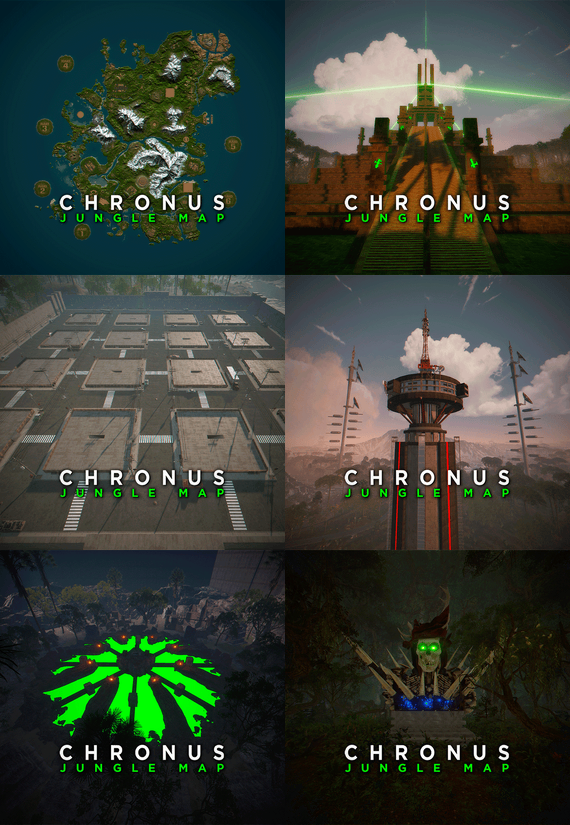
CHRONUS - Jungle Map is a planet with an intense Jungle biome. Get ready to explore a world full of ancient monuments inspired by the Aliens saga. Build on monuments located in the sky, sea and land. Use the RAID Islands for your favorite events.
- HISTORY
LONG AGO, A RACE CALLED CHRONERS
WERE FORCED TO ABANDON THEIR HOME PLANET.
EXPLORERS AND INSEMINATORS OF WORLDS,
THE CRONERS FOUND A PLANET WITH A PRIMITIVE HUMANOID SPECIES.
PRIMITIVES AND CRONERS MINGLED WITH A SINGLE GOAL,
TO DEFEAT TIME, EXPLORE SPACE AND FIND THE TRUE CREATORS.
THE REASON FOR THE EXTINCTION OF BOTH RACES IS UNKNOWN,
BUT IN AN ANCIENT TEMPLE THEY LEFT EVIDENCE OF A THIRD SPECIES.
- FEATURES
• Size: 5000.
• Objects: 114875.
• Map protection plugin included.
• The map can be edited: Yes.
- CONTAINS ALL OFFICIAL MONUMENTS
Apartment complex • Ziggurat temple • Jungle ruins • Radtown • Ferry Terminal • Nuclear missile silo • Large oil platform • Small oil platform • Submarine laboratories • Harbor • Large fishing villages • Fishing villages • Launch site • Satellite dish • The Dome • HQM Quarry • Stone quarry • Sulfur quarry • Arctic Research Base • Sewer Branch • Train yard • Junkyard • Abandoned military bases • Military tunnel • Caves • Large barns • Ranch • Bandit camp • Power plant • Swamp • Airfield • Giant excavation • Outpost • Lighthouse
- PREFABS AND CUSTOM MONUMENTS
• Bradley Arena, A great battle against Helldivers style tanks.
• Train Stations, With waiting room, loot and NPC, with secondary rail respawn.
• Temple of Rebirth, A temple where players will start their adventure (respawn room).
• Air Plataforms, Construction area.
• Power Towers, Construction area.
• Cuesta Verde, Residential Construction area (Inspired by the movie Poltergeist).
• Underwater Train Station.
• Power Towers, Construction area.
• Mars Attacks, An arena with NPCs and loot (Inspired by the movie Mars Attacks).
• Arena Dome, Contains NPCs, loot, walls for players to cover their backs, and several towers for players to shoot from above.
• Heli Tower, A public self-defense tower against patrol helicopters.
• Volcanic Research, A volcano with parkour, puzzles, loot and NPCs.
• Crater, Area with resources and zombies.
• Six islands for events, Located around the map. You can use the islands for the Raidable Bases plugin.
• Custom rivers.
• Chrons Temple, This Custom Monument with a touch of the movie Alien challenges you with a variety of tests and traps you'll have to overcome to get the loot from the Chrons Temple.
• Facehugger, Creatures from the Aliens saga.
• Alien eggs, Eggs from the Aliens saga.
- TIPS
• If you want your players to respawn on the beaches, remove the Temple of Rebirth respawn points with Rust Edit.
• Equip yourself with a rock, pickaxe or jackhammer to be able to leave Chrons Temple.
• Have fun 🙂
-

$10.00
Bank Heist
Spawns custom bank hesits at specified locations.
Optional Plugins
Kits umod
Part 1: Optional Bank Prefab Setup
Part 2: Bank Plugin Setup
Custom Prefabs:
Prefab name should be labled as "bankheist" or "bankheist_1" for multiple banks.
Permission
bankheist.manage // Allow admins to setup bank events bankheist.worker // Stop guards attacking bank workers Commands
1. /bse <type>, spawn prefab entity of type for setup 2. /blp create|remove|update <profile-name>, manage bank loot profiles 3. /bgp create|remove|update|stationary <profile-name>, manage bank guard profiles 4. /bdp create|remove|update <profile-name>, manage bank door profiles 5. /bhm create|remove <bank-name>, create or remove a bank 6. /bhm parent <bank-name> <monument-name>, setup a parent monument for the bank 7. /bhm <guard|loot|door> profile <bank-name> <id> <profile-name>, setup profile for a door or loot to use 8. /bhm <guard|loot|door> remove <bank-name> <id>, remove entity from a specified bank 9. /bhm <guard|loot|door> create <bank-name>, create entity for the specified bank 10. /bhm mmr <bank-name> <radius>, map marker radius 11. /bhm pdr <bank-name> <radius>, player detection radius 12. /bhm tbr <bank-name> <seconds>, seconds before bank will reset 13. /bhm ato <bank-name> <seconds>, seconds before alarm will disable 0 = until bank reset 14. /bhm debug <bank-name> <option>, enable debug information options: loot, door, guard, info, everything 15. /bhm monuments Data
{ "BankEntries": [ { "bank display name": "Test Bank", "parent monument name": null, "time between resets": 1800.0, "alarm timeout seconds": 120.0, "alarm disable when all crates are looted": true, "spawn position": { "x": -668.1162, "y": 24.8576756, "z": 15.70411 }, "spawn rotation": { "x": 0.0, "y": 0.0, "z": 0.0 }, "player detection origin": { "x": 0.0, "y": 0.0, "z": 0.0 }, "player detection radius": 100.0, "map marker origin": { "x": 0.0, "y": 0.0, "z": 0.0 }, "map marker radius": 100.0, "map marker opacity": 0.6, "map marker ready color": "#2eff74", "map marker reset color": "#ff2e2e", "map marker outline color": "#ffffff", "loot spawn group entries": [ { "Id": 3177, "Prefab": "assets/prefabs/deployable/chinooklockedcrate/codelockedhackablecrate.prefab", "Profile": "loot1", "Position": { "x": -0.04071045, "y": 0.04530716, "z": 0.196435928 }, "Rotation": { "x": -0.00194311875, "y": 283.140167, "z": 359.913574 } } ], "door spawn group entries": [ { "Id": 3593, "Prefab": "assets/prefabs/building/wall.frame.garagedoor/wall.frame.garagedoor.prefab", "Profile": "door1", "Position": { "x": 1.49249268, "y": 0.166625977, "z": -6.467394 }, "Rotation": { "x": 0.0, "y": 13.3333187, "z": 0.0 } }, { "Id": 9537, "Prefab": "assets/prefabs/building/wall.frame.garagedoor/wall.frame.garagedoor.prefab", "Profile": "door1", "Position": { "x": 4.67230225, "y": 0.354122162, "z": 5.18401432 }, "Rotation": { "x": 0.0, "y": 13.3333187, "z": 0.0 } } ], "npcs spawn group entries": [ { "Id": 1765, "Prefab": null, "Profile": "guard1", "Position": { "x": 3.79986572, "y": -0.289468765, "z": -7.350936 }, "Rotation": { "x": 0.0, "y": 0.0, "z": 0.0 } }, { "Id": 1227, "Prefab": null, "Profile": "guard1", "Position": { "x": 7.863037, "y": -0.0256900787, "z": 4.15430927 }, "Rotation": { "x": 0.0, "y": 0.0, "z": 0.0 } }, { "Id": 2957, "Prefab": null, "Profile": "guard1", "Position": { "x": 1.5680542, "y": 0.0291461945, "z": 4.185258 }, "Rotation": { "x": 0.0, "y": 0.0, "z": 0.0 } }, { "Id": 3914, "Prefab": null, "Profile": "guard1", "Position": { "x": -0.6699219, "y": 0.08488846, "z": -3.12963676 }, "Rotation": { "x": 0.0, "y": 0.0, "z": 0.0 } } ] } ] } Loot Profiles Example
{ "ProfileEntries": { "loot1": { "MinItems": 2, "MaxItems": 5, "SkinId": 0, "HackableSeconds": 60.0, "LootItems": [ { "Shortname": "shotgun.m4", "ItemName": null, "SkinID": 0, "MinAmount": 1, "MaxAmount": 1, "IsBlueprint": false }, { "Shortname": "rifle.m39", "ItemName": null, "SkinID": 0, "MinAmount": 1, "MaxAmount": 1, "IsBlueprint": false }, { "Shortname": "rifle.semiauto", "ItemName": null, "SkinID": 0, "MinAmount": 1, "MaxAmount": 1, "IsBlueprint": false }, { "Shortname": "military flamethrower", "ItemName": null, "SkinID": 0, "MinAmount": 1, "MaxAmount": 1, "IsBlueprint": false }, { "Shortname": "weapon.mod.extendedmags", "ItemName": null, "SkinID": 0, "MinAmount": 1, "MaxAmount": 1, "IsBlueprint": false }, { "Shortname": "smg.2", "ItemName": null, "SkinID": 0, "MinAmount": 1, "MaxAmount": 1, "IsBlueprint": false }, { "Shortname": "smg.thompson", "ItemName": null, "SkinID": 0, "MinAmount": 1, "MaxAmount": 1, "IsBlueprint": false }, { "Shortname": "homingmissile.launcher", "ItemName": null, "SkinID": 0, "MinAmount": 1, "MaxAmount": 1, "IsBlueprint": false }, { "Shortname": "rifle.bolt", "ItemName": null, "SkinID": 0, "MinAmount": 1, "MaxAmount": 1, "IsBlueprint": false }, { "Shortname": "rifle.l96", "ItemName": null, "SkinID": 0, "MinAmount": 1, "MaxAmount": 1, "IsBlueprint": false }, { "Shortname": "ammo.rocket.basic", "ItemName": null, "SkinID": 0, "MinAmount": 100, "MaxAmount": 100, "IsBlueprint": false }, { "Shortname": "ammo.rocket.hv", "ItemName": null, "SkinID": 0, "MinAmount": 100, "MaxAmount": 100, "IsBlueprint": false }, { "Shortname": "ammo.rifle.explosive", "ItemName": null, "SkinID": 0, "MinAmount": 1000, "MaxAmount": 1000, "IsBlueprint": false }, { "Shortname": "ammo.rocket.mlrs", "ItemName": null, "SkinID": 0, "MinAmount": 100, "MaxAmount": 100, "IsBlueprint": false }, { "Shortname": "ammo.rocket.fire", "ItemName": null, "SkinID": 0, "MinAmount": 100, "MaxAmount": 100, "IsBlueprint": false }, { "Shortname": "submarine.torpedo.straight", "ItemName": null, "SkinID": 0, "MinAmount": 100, "MaxAmount": 100, "IsBlueprint": false }, { "Shortname": "rifle.ak", "ItemName": null, "SkinID": 0, "MinAmount": 1, "MaxAmount": 1, "IsBlueprint": false }, { "Shortname": "hmlmg", "ItemName": null, "SkinID": 0, "MinAmount": 1, "MaxAmount": 1, "IsBlueprint": false }, { "Shortname": "smg.mp5", "ItemName": null, "SkinID": 0, "MinAmount": 1, "MaxAmount": 1, "IsBlueprint": false }, { "Shortname": "rifle.sks", "ItemName": null, "SkinID": 0, "MinAmount": 1, "MaxAmount": 1, "IsBlueprint": false }, { "Shortname": "rocket.launcher", "ItemName": null, "SkinID": 0, "MinAmount": 1, "MaxAmount": 1, "IsBlueprint": false }, { "Shortname": "lmg.m249", "ItemName": null, "SkinID": 0, "MinAmount": 1, "MaxAmount": 1, "IsBlueprint": false } ] } } } Door Profiles Example
{ "ProfileEntries": { "Test": { "Health": 10000.0, "SkinId": 0 } } } Guard Profiles Example
{ "ProfileEntries": { "Test": { "Version": 0.0, "Prefab": "assets/rust.ai/agents/npcplayer/humannpc/scientist/scientistnpc_heavy.prefab", "Names": "Bank Guard", "Gender": 0, "SkinTone": 0, "Underwear": 0, "WearItems": [ { "ShortName": "jumpsuit.suit.blue", "SkinID": 0 } ], "BeltItems": [ { "ShortName": "pistol.prototype17", "Amount": 1, "SkinID": 0, "Mods": [], "Ammo": "ammo.pistol" }, { "ShortName": "syringe.medical", "Amount": 4, "SkinID": 0, "Mods": [], "Ammo": null }, { "ShortName": "smg.mp5", "Amount": 1, "SkinID": 0, "Mods": [], "Ammo": "ammo.pistol" } ], "Kit": "", "DestroyTrapsOnDeath": false, "Health": 100.0, "InstantDeathIfHitHead": false, "RoamRange": 10.0, "ChaseRange": 80.0, "SenseRange": 40.0, "ListenRange": 20.0, "DamageRange": 80.0, "ShortRange": 10.0, "AttackLengthMaxShortRangeScale": 2.0, "AttackRangeMultiplier": 1.0, "CheckVisionCone": false, "VisionCone": 286.0, "HostileTargetsOnly": false, "DisplaySashTargetsOnly": false, "IgnoreSafeZonePlayers": true, "IgnoreSleepingPlayers": true, "IgnoreWoundedPlayers": true, "NpcAttackMode": 2, "NpcSenseRange": 40.0, "NpcDamageScale": 1.0, "NpcWhitelist": "FrankensteinPet,14922524", "NpcBlacklist": "11162132011012", "AnimalAttackMode": 0, "AnimalSenseRange": 20.0, "AnimalDamageScale": 1.0, "AnimalWhitelist": "", "AnimalBlacklist": "11491311214163", "DamageScale": 0.75, "CanTurretTarget": true, "DamageScaleFromTurret": 0.5, "DamageScaleToTurret": 1.0, "AimConeScale": 2.0, "DisableRadio": false, "SleepDistance": 100.0, "Speed": 5.0, "AreaMask": 1, "AgentTypeID": -1372625422, "BaseOffSet": 0.0, "HomePosition": "", "MemoryDuration": 10.0, "States": [ "RoamState", "ChaseState", "CombatState" ], "LootPreset": "Default-Npc-KpucTaJl", "CratePrefab": "", "IsRemoveCorpse": true, "GroupAlertEnabled": false, "GroupAlertRadius": 40.0, "GroupAlertReceivers": "", "HeadDamageScale": 1.0, "BodyDamageScale": 1.0, "LegDamageScale": 1.0, "CanRunAwayWater": true, "CanSleep": true, "CanRaid": false, "Stationary": false, "UseUnderGround": false } } } Configuration
{ "enable notifications": true, "enable visible bubble": true, "enable visible marker": true, "enable alarm trigger": true, "enable eliminate guards": true, "enable zone messages": true, "prevent worker looting bank": true, "prevent teleport from bank": false, "blocked zone commands": [ "home", "tpr", "kit", "bandit", "outpost" ], "spawnable prefabs": { "vault-door": "assets/bundled/prefabs/modding/asset_store/bankheist_package/bankheist_vol03/prefabs/door.vault.static.prefab", "garage-door": "assets/prefabs/building/wall.frame.garagedoor/wall.frame.garagedoor.prefab", "single-door": "assets/prefabs/building/door.hinged/door.hinged.toptier.prefab", "double-door": "assets/prefabs/building/door.double.hinged/door.double.hinged.toptier.prefab", "elite-crate": "assets/bundled/prefabs/radtown/crate_elite.prefab", "crate-normal": "assets/bundled/prefabs/radtown/crate_normal.prefab", "crate-normal_2": "assets/bundled/prefabs/radtown/crate_normal_2.prefab", "hackable-crate": "assets/prefabs/deployable/chinooklockedcrate/codelockedhackablecrate.prefab" } }
-
.thumb.gif.05113dee792cbac4b545fb97e0f97be2.gif)
$45.00
Gravity
It's time for anomalies. Scientists from cobalt conducted large experiments on gravity and something went wrong, they created a machine that threw anomalies on the island in the form of weightlessness zones, some monuments changed their current appearance and location, and the railway took off into the air along with garbage and loot. You will have to try to survive in new conditions that you have not experienced before. Good luck fighters, I hope you can handle the controls in the gravitational field. Beware Of Rocket Launchers!!!
I present to your attention an optimized custom map with an unusual game concept for your server. Thanks to the excellent plugin developer Adem, this map with an unusual gameplay has appeared. Incredible landscapes are waiting for you at high altitude and all this in zero gravity, you can build not only on the ground, but also in zero gravity on flying islands. Also, so that you won't be bored in zero gravity, there are a lot of loot and ore, as well as places to build bases.
Attention, the map is unusual, I recommend watching it and testing it on our test server, how to get to it, you can read below
Now I'll tell you a little bit about the Gravity plugin:
1. This plugin creates zero gravity zones, when you enter this zone you get a message on the screen to enter zero gravity, press the space bar, also if you want to leave the zero gravity zone, fly out of its radius and you will have a countdown timer (fly close to the surface of the earth or over water so as not to break your legs and not to die).
2. He also creates flying and floating objects that move and create more atmosphere.
3. The plugin does gravity on trains and on your foundations so that you can easily build a base, if you have a full-fledged house with a roof, then there will be no weightlessness inside the house.
4. Create loot, ore and crates that you can customize yourself in the plugin. There are many settings in the plugin, you can manage loot yourself, and so on.
Features:
Prefab Count: ~15к prefabs Size: 4000 A lot of interesting locations to explore Railway A large number of places for the construction of foundations in the form of unusual rocks, caves, landscape, underwater and icebergs Custom ways to overcome distances on boats and tugboat Custom plugin Gravity (by Adem) The atmosphere of weightlessness This map is constantly supported and updated for the current version of the game with all updates!
How can I view the map?
You can do this in our Discord server by submitting a request for an invitation to our servers. There you will be given the rights of an "administrator” and without any difficulties you will be able to fly around the map and fully familiarize yourself with it.
Custom Monuments:
Flying Laboratory Mining Outpost in zero gravity Supermarket in zero gravity Gas Station in zero gravity Power Plant in the rift Water Treatment in the rift Train Home Lighthouse in zero gravity The Dome in zero gravity a huge area in the air with zero gravity, a lot of loot, ore and places to build bases Custom point Zipline interesting places to build a base marked X Monument Facepunch:
Launch Site RadTown Missile Silo Junkyard Harbor 1 and 2 Arctic Research Base Satellite Dish Train Yard Abandoned Military Base Airfield Sewer Branch Oil Rig 1, 2 Bandit Camp Outpost Giant Excavator Pit Military Tunnel Ranch Fishing Village 1,2 Underwater Lab Railway HQM, Sulfur, Stone Quarry Roadside Monument Water Well Ziggurat -
$9.99
Quick Loot
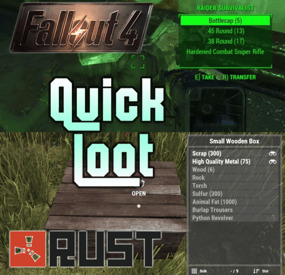
Adds a "quick loot" panel similar to that found in games such as Starfield and Fallout 4. This allows players to quickly view and loot items from containers without needing to open them first. Includes additional features such as item tracking and sorting.
View and loot items without needing to open a container Live updating quick loot panel when looking at a container Item tracking, which allows players to track certain items which will highlight them if they appear in a container Ability to sort items in the quick loot panel Customizable hotkeys Highly configurable UI
Install the plugin on your server Assign yourself (or your group) your desired permissions. For this tutorial I recommend assigning yourself all the permissions EXCEPT quickloot.ignorelocks. Once permissions are assigned, use the /ql command to open the quick loot settings menu. In the settings menu, follow the instructions for setting up key bindings, for this tutorial I recommend using the example keybindings. Each player WILL need to do this step themselves, but they will only have to do it once. Once key binding are setup, simply look at a container that you can open that has multiple items in it, the quick loot panel should appear. If you setup your keybindings according to the example, use the up and down arrow keys to page through items. You can "track" an item by paging over an item in the quick loot panel and pressing the right arrow key (if using example keybinds). Items you are tracking will appear highlighted at the top of the quick loot panel if they exist in the container. You can untrack these items by repressing the same key. You can "take" an item by paging over an item in the quick loot panel and pressing the left arrow key (if using example keybinds). This will loot the entire stack, if you want to loot a single item from the stack, hold down the sprint key (shift by default) while pressing the loot key.
/ql - Displays the Quick Loot settings menu. Requires the quickloot.menu permission.
These are commands that can be bound to keybindings. To do so press F1 then type "bind <key> <command>". For example if you want to bind the quick loot toggle to the "o" key, you can do "bind o ql.toggle". Rust plugins unfortunately cannot bind keys automatically. Each player will need to setup keybindings themselves, but once they do, they won't have to do it again. There are instructions for this in the /ql settings menu.
ql.close - Closes the quick loot settings menu. ql.down - Selects the next item in the quick loot panel. ql.up - Selects the previous item in the quick loot panel. ql.sort - Cycles to the next item sort mode. ql.loot - Loots the selected item from the quick loot panel. Hold "sprint" to select single items instead of a stack. ql.track - Tracks the selected item. Tracked items appear at the top of the quick loot panel if they exist in the container. ql.toggle - Toggles the visibility of the quick loot panel. You can click here for a list of key identifiers to use.
To try out the plugin, I recommend assigning players all the permissions EXCEPT "quickloot.ignorelocks".
quickloot.storage.take - View and take items from storage containers, such as chests, furnaces, and other deployables. quickloot.storage.view - Only view items in storage containers, such as chests, furnaces, and other deployables. quickloot.barrels.take - View and take items from roadside barrels. quickloot.barrels.view - Only view items from roadside barrels. quickloot.crates.take - View and take items from naturally spawned crates. quickloot.crates.take - Only view items from naturally spawned crates. quickloot.tracking - Ability to track items, so that they will appear highlighted in the quick loot panel. quickloot.menu - Needed to use the /ql command and open the Quick Loot settings menu. quickloot.ignorelocks - Locked containers will no longer prevent you from viewing or taking items from them. Nice for admins.
You can customize how the quick loot panel looks with a variety of options. To do so you will need to create a style preset. By default, this plugin auto-generates a few of them that you can use for reference. They are located within the "oxide/data/QuickLoot/styles" folder. To create a new style preset, simply copy one of them existing ones and edit the values. The load this preset, set the "StylePreset" property in the config file to the name of the preset file you created. I HIGHLY recommend creating your own preset instead of editing an existing one, because the existing ones may be overwritten if you have "GenerateDefaultStyles" set to "true" in the config.
Feel free to share your created presets in the discussion forum!
Q: I loaded the plugin, but the quick loot menu doesn't appear when I look at a container.
A: You need to assign yourself (or your group) the permissions in order to use the quick loot features.
Q: Hotkeys are not working for me.
A: Rust does not allow plugins to automatically bind keys for players. Each player will need to bind hotkeys themselves. The /ql command will provide instructions for how to do this.
Q: How can I loot a single item at a time instead of the entire stack?
A: You can hold down the "sprint" key (shift by default) to switch to single looting mode.
Q: Can I put items into the container via the quick loot panel?
A: Inserting items into a container is not currently a feature of this plugin.
Q: How do I change the look of the quick loot panel?
A: See the customization section.
Q: Some images are not loading, how do I fix this?
A: The images I provided for this plugin are hosted through Imgur, which means under peak load times, sometimes may not load correctly. I recommend hosting the images yourself and setting the URL in the config to avoid this issue.
Q: The quick loot panel is overlapping with the UI of another plugin.
A: You can change the position of the quick loot panel in style preset. Please see the customization section for more info.
Q: I have another plugin that uses the "/ql" command and it is conflicting with this one.
A: You can change this command in the configuration file. Make sure to update the localization text as well if you change it.
-
$14.99
Item Insurance
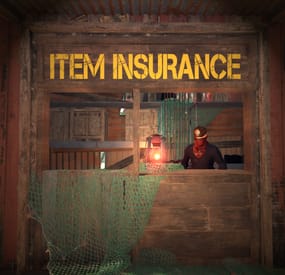
Allow players can insure lost items to be retrieved for a price. This is a feature that is present in many extraction and survival multiplayer games like Escape from Tarkov, Dark and Darker and now you can bring it to your Rust server as well! If an item is insured and you drop it (from death or otherwise) then as long as no one else loots it - you can request to have it "retrieved" by your insurer and returned to you. A UI that matches seamlessly with vanilla rust is included and many configuration options are available to balance and fine-tune this plugin for your server. Please refer to the documentation section as that will likely answer most of your questions!
Documentation:
A full readme including permissions, commands, and config options is available in this google doc link.
Disclaimer:
Like all of my plugins - this plugin is sold as is. I will be happy to take feature requests into consideration but make no guarantees about which ones get implemented. Please refer to the feature list before you make your purchase!