
Nobby's Wishlist
-
$15.00
BoatControl
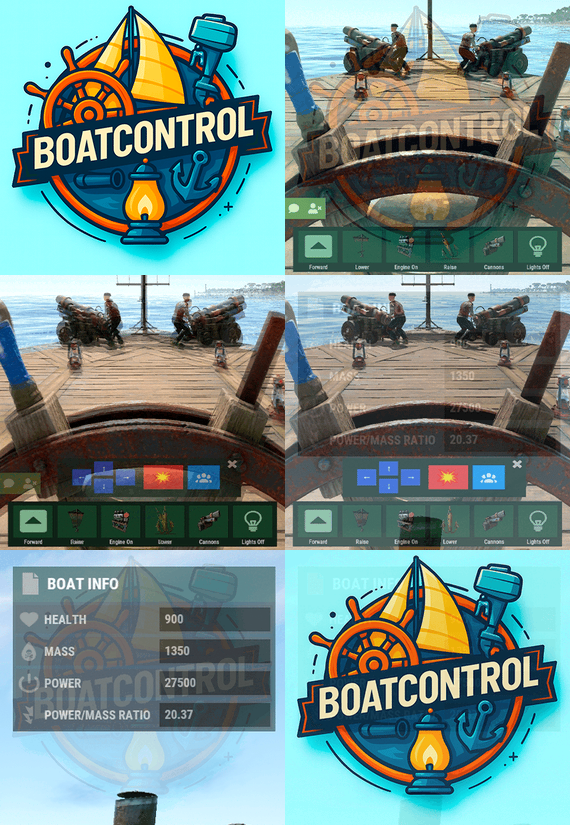
BoatControl is a Rust server plugin that completely enhances boat handling. When taking the helm, a user-friendly CUI interface appears, allowing players to raise/lower sails and anchors, start/stop engines, and switch navigation direction forward or backward.
The plugin also supports automatic reloading when the player has ammunition, cannon firing with configurable cooldown (or bypass via permission), and toggling all torches and lanterns without fuel consumption. Additionally, players can control navigation using W/S and fire cannons with the left mouse click.
Want to try it before you buy it?
You can try it by accessing the Staging server: connect staging.rustspain.com (provided the server is online, as it's my test server).
Video Update 1.0.0
Features
Displays a CUI interface when taking the helm that allows you to:
Raise / lower sails. Raise / lower anchors. Turn engines on / off. Change the navigation direction forward / backward (engines and sails reverse accordingly). Reload (if the player has ammunition in their inventory, with a permission to bypass this). Fire cannons with a cooldown (or without it if you have the bypass permission).
Turn all torches and lamps on/off (In the settings you can decide whether you want them to consume fuel or not).
Allows enabling boat editing anywhere.
Blocks edit mode within safe zones.
Blocks the ability to activate the anchor within safe zones.
Allows you to view the list of authorized players (similar to BetterTC).
Sail Configuration System: Displays a window similar to the config menu showing all sails placed on the boat. Each sail shows its health amount below it. Added a button that allows upgrading sails by levels (thrust power). Everything is configurable, including upgrade costs (in-game resources, RP, or Economy). This allows admins to add as many levels as they want in the config.
Engine Configuration System: Displays a window similar to the config menu showing all engines placed on the boat. Each engine shows its fuel amount and health below it. Added the ability to refuel engines using fuel from the player’s inventory. Added another button that allows upgrading engines by levels (fuel efficiency and engine power). Everything is configurable, including upgrade costs (in-game resources, RP, or Economy). This allows admins to add as many levels as they want in the config. Important: There is a maximum speed limit in the game. I have been testing ways to increase the speed, but I still need to continue researching and testing to find the best way to increase it.
Automatic repair system: If damage is received during repair, it will stop. If the player runs out of materials in their inventory, it will stop. If the player disconnects, it will also stop. Note: The boat health system is unusual and does not work like a normal building, so the system simulates repairs at different points on the boat depending on the percentage of health lost. That is why you will not hear the actual damaged entity being repaired.
BetterTC Integration: If you have BetterTC installed with version 1.6.2 or higher, the automatic Wallpaper placement system will be enabled. Facepunch will add wallpaper support for Boats starting in March; you can test it meanwhile on staging.
You can also change the navigation direction using the W and S keys, and fire the cannons with the left mouse click.
I'm open to further improving this plugin over time. If you'd like to see any features integrated, please mention them in the discussion section.
Ideas I've tried but haven't been able to implement:
Modifying the build area (net size) to make it larger. It doesn't seem possible to change this. Making the engines work without fuel consumption. I managed to do this in an initial test, but then FacePunch changed something and it's no longer possible. I'll try to see if I can adjust fuel consumption to make it more economical. The maximum number of engines and sails cannot be increased. Or at least not easily; it could be done with commands and strange contraptions, but it wouldn't be entirely convenient.
Permissions
boatcontrol.use – Enables the functionality for the player when mounting the boat’s helm. boatcontrol.bypassammo – Allows you to fire cannons without using real ammunition from your inventory. Free ammo! (not recommended to give to regular players) boatcontrol.bypasscannoncooldown – Allows you to fire cannons with no cooldown. Maximum bombardment! boatcontrol.edit allows enabling boat editing anywhere. boatcontrol.cannonuse If the player doesn’t have it enabled, the option to control cannons won’t appear in the interface. Not having this permission will not block manual/vanilla use. boatcontrol.authlist Shows the list of players authorized to the Boat, similar to BetterTC. boatcontrol.deleteauth Allows authorized players to remove player permissions individually. boatcontrol.sailconfig Allows players to open and manage the Sail Configuration menu for boats. boatcontrol.sailupgrade Allows players to upgrade sails (thrust power) according to the configured upgrade levels. boatcontrol.engineconfig Allows players to open and manage the Engine Configuration menu for boats. boatcontrol.engineupgrade Allows players to upgrade engines (fuel efficiency and engine power) according to the configured upgrade levels. boatcontrol.wallpaper Allows players to use the wallpaper placement system on boats. (Requires BetterTC version 1.6.2 or higher.) boatcontrol.repair Allows players to use the automatic boat repair system. boatcontrol.repair.nocost Allows players to repair boats without consuming materials Dynamic repair permissions (speed adjustment) Allows admins to grant specific permissions defined in the config to adjust boat speed limits.
Commands
It currently has no chat or console commands.
Configuration
DEFAULT CONFIGURATION
{ "Enable WASD Direction": true, "Enable Cannon Fire Key (Left Mouse Button)": true, "Cannon Aim Step (degrees per click)": 5.0, "Cannon Fire Cooldown": 5.0, "Cannon Crew": { "Enable": true, "Names": [ "Seaman", "Deckhand", "Bosun", "Gunner", "Quartermaster", "Navigator", "Sailor", "Crewman", "Mate", "Boatswain", "Cannoneer", "Buccaneer", "Mariner", "Sea Dog", "Old Salt" ], "Health": 100.0, "MaxCannons": 0, "Wear": { "burlap.shirt": 1380044819, "burlap.trousers": 1380047706, "burlap.shoes": 2215057317, "hat.boonie": 965553937 }, "RequireOperate": true, "ToggleCrewCooldown": 30.0, "NoCorpse": true }, "Lights": { "Enable Light Toggle Key (R)": true, "Light Toggle Cooldown": 1.0, "Require Fuel For Lights": false, "Light Items (shortnames)": [ "tunalight", "lantern", "torchholder", "largecandles", "smallcandles", "jackolantern.angry", "jackolantern.happy", "chineselantern", "chineselanternwhite" ] }, "Impact Force Physics": { "Enable Impact Physics": true, "Impact Force (default: 100, range: 50-500)": 100.0, "Enable Debug Logging": false }, "Alert Chat": true, "Alert Notify Plugin": false, "Notify: select what notification type to be used": { "error": 0, "info": 0 }, "Color Prefix Chat": "#f74d31", "GUI": { "GUI Windows Belt": { "BG Color Primary": "0.10 0.15 0.10 1", "BG Color Secundary": "0.2 0.30 0.2 0.80", "Button Active Color": "0.2 0.6 0.2 0.80", "Button Inactive Color": "0.2 0.30 0.2 0.80", "OffsetMin": "-200 15", "OffsetMax": "181 79", "AnchorMin": "0.5 0", "AnchorMax": "0.5 0" }, "GUI Windows Info": { "BG Color Primary": "0.10 0.10 0.10 0.8", "BG Color Secundary": "0.2 0.30 0.2 0.80", "Button Active Color": "0.2 0.6 0.2 0.80", "Button Inactive Color": "0.2 0.30 0.2 0.80", "OffsetMin": "-115 -100", "OffsetMax": "115 100", "AnchorMin": "0.902 0.8104", "AnchorMax": "0.902 0.8104" }, "GUI Windows Cannons Menu": { "BG Color Primary": "0.10 0.15 0.10 1", "BG Color Secundary": "0.2 0.30 0.2 0.80", "Button Active Color": "0.2 0.6 0.2 0.80", "Button Inactive Color": "0.2 0.30 0.2 0.80", "OffsetMin": "-140 85", "OffsetMax": "140 185", "AnchorMin": "0.5 0", "AnchorMax": "0.5 0" } }, "Show Info Window": true, "Boat Edit Damage Cooldown (seconds)": 30.0, "Block Anchor in Safe Zone": true, "Block Boat Edit in Safe Zone": true, "Config Version": "1.2.0", "Repair Cooldown After Recent Damage (seconds)": 30.0, "Cooldown Frequency Repair (larger number is slower)": { "boatcontrol.use": 2.0, "boatcontrol.vip": 1.0 }, "Repair Costs (ItemShortName: Amount per block/component)": { "lowgradefuel": 4, "wood": 75 }, "Engine Upgrades": { "Enable Engine Upgrades": true, "Upgrade Levels": [ { "Level": 1, "Display Name": "Tier 1", "Fuel Efficiency Multiplier (1.0 = normal, 0.5 = half fuel consumption)": 0.9, "Power Multiplier (1.0 = normal, 2.0 = double power)": 2.0, "Upgrade Cost": { "Resource Costs (ItemShortName: Amount)": { "scrap": 100, "lowgradefuel": 50 }, "ServerRewards Points": 0, "Economics Money": 0.0 } }, { "Level": 2, "Display Name": "Tier 2", "Fuel Efficiency Multiplier (1.0 = normal, 0.5 = half fuel consumption)": 0.8, "Power Multiplier (1.0 = normal, 2.0 = double power)": 4.0, "Upgrade Cost": { "Resource Costs (ItemShortName: Amount)": { "scrap": 250, "lowgradefuel": 100, "metal.fragments": 300 }, "ServerRewards Points": 0, "Economics Money": 0.0 } }, { "Level": 3, "Display Name": "Tier 3", "Fuel Efficiency Multiplier (1.0 = normal, 0.5 = half fuel consumption)": 0.65, "Power Multiplier (1.0 = normal, 2.0 = double power)": 8.0, "Upgrade Cost": { "Resource Costs (ItemShortName: Amount)": { "scrap": 500, "lowgradefuel": 200, "metal.fragments": 500, "metal.refined": 25 }, "ServerRewards Points": 0, "Economics Money": 0.0 } }, { "Level": 4, "Display Name": "Tier 4", "Fuel Efficiency Multiplier (1.0 = normal, 0.5 = half fuel consumption)": 0.65, "Power Multiplier (1.0 = normal, 2.0 = double power)": 16.0, "Upgrade Cost": { "Resource Costs (ItemShortName: Amount)": { "scrap": 1000, "lowgradefuel": 300, "metal.fragments": 1500, "metal.refined": 100 }, "ServerRewards Points": 0, "Economics Money": 0.0 } } ], "Currency Type (Resources, ServerRewards, Economics)": "Resources" }, "Sail Upgrades": { "Enable Sail Upgrades": true, "Upgrade Levels": [ { "Level": 1, "Display Name": "Tier 1", "Thrust Multiplier (1.0 = normal, 2.0 = double thrust)": 1.5, "Upgrade Cost": { "Resource Costs (ItemShortName: Amount)": { "scrap": 75, "cloth": 100 }, "ServerRewards Points": 10, "Economics Money": 0.0 } }, { "Level": 2, "Display Name": "Tier 2", "Thrust Multiplier (1.0 = normal, 2.0 = double thrust)": 2.0, "Upgrade Cost": { "Resource Costs (ItemShortName: Amount)": { "scrap": 150, "cloth": 200, "leather": 50 }, "ServerRewards Points": 15, "Economics Money": 0.0 } }, { "Level": 3, "Display Name": "Tier 3", "Thrust Multiplier (1.0 = normal, 2.0 = double thrust)": 2.5, "Upgrade Cost": { "Resource Costs (ItemShortName: Amount)": { "scrap": 300, "cloth": 300, "leather": 100, "metal.fragments": 200 }, "ServerRewards Points": 20, "Economics Money": 0.0 } }, { "Level": 4, "Display Name": "Tier 4", "Thrust Multiplier (1.0 = normal, 2.0 = double thrust)": 3.0, "Upgrade Cost": { "Resource Costs (ItemShortName: Amount)": { "scrap": 600, "cloth": 500, "leather": 200, "metal.fragments": 500 }, "ServerRewards Points": 30, "Economics Money": 0.0 } } ], "Currency Type (Resources, ServerRewards, Economics)": "ServerRewards" } } For any problem, doubt, suggestion or assistance do not hesitate to contact me by Discord ninco90
- #boat
- #controller
- (and 8 more)
-

$12.90
Nintondo Safe Zone
Safe zone for your Rust server with this classic Nintendo console.
It contains all the amenities of Outpost. Mario, Luigi, Donkey Kong and enemy characters. You can also find loot, npcs and traps. -
$9.99$8.99Deep Sea Options
Deep Sea Options is a single config control plugin for Rust’s new Deep Sea feature.
It lets server owners fully control when Deep Sea opens, what spawns inside it, what vehicles can enter, and how access rules are enforced. You can also configure if players can build inside deep sea.
🏗️ Building Control
Enforce building allowed / blocked inside Deep Sea * Limit how many foundations a player can build in Deep Sea * Buildings persist restart, as long as the deep sea isnt being closed.
🌊 Deep Sea Behavior Control
Configure defaults:
Whether the deep sea should always remain open, be on timers, or disabled Whether deepsea will auto open on server wipe (facepunch disables this by default) Control all phase timers GameTip messages to announce deep sea openinig/closing
🏝️ Deep Sea Content Control
Configure procedural spawns:
Island counts Ghost Ships counts RHIB counts Control:
count spacing radius minimum distance between spawns distance from Deep Sea edges Settings are grouped and explained in the config
📦 Loot spawn
Configurable respawn option for crates/ore/npc Respawn for scientist boat groups
🚁 Access & Teleport Rules
Control:
Allow all vehicles (including planes and helis) or only an allow-listed set players can enter without a boat flying (noclip/admin) players can bypass checks NPC passengers are allowed on vehicles Prevent or allow “vehicle stacking” (boats/helis on deck)
Chat Commands
/deepsea status Shows current Deep Sea state
/deepsea open Opens deep sea if not alrady open
/deepsea close Closes current Deep Sea
Console Commands
dso open - to open the deepsea through the plugin
dso close - to close the deepsea through the plugin
dso forceclose - to force close the deepsea in case you need it closed but 'AlwaysOpen' is reopening it
Note if you make changes to some config values (such as the procedural spawns, you will need to close the deep sea and reopen.)
Config options:
=== GENERAL CONTROLS === Control - Schedule If ON: Plugin controls when Deep Sea opens/closes and how long it stays open. Control - Content If ON: Plugin controls how many islands, ghost ships, RHIB patrol groups, and initial loot scale Deep Sea uses. Control - Travel Rules If ON: Plugin controls who/what is allowed to use Deep Sea portals (vehicles, NPCs, players without vehicle, etc). Control - Building If ON: Plugin controls whether players can build while inside Deep Sea. Force Apply On Reload If ON: When plugin reloads, it forces Deep Sea to close and reopen so spawn changes apply immediately. If OFF: Changes apply next time Deep Sea opens normally. === SCHEDULE SETTINGS === Mode Vanilla = Normal Rust Deep Sea cycle. AlwaysOpen = Deep Sea never closes. Disabled = Deep Sea never opens. Plugin keeps pushing the next opening far into the future. Open Time Seconds How long Deep Sea stays open before closing. Cooldown Seconds How long Deep Sea stays closed before opening again. Final Phase Seconds End-of-cycle phase used for weather / atmosphere effects. Radiation Warning Phase Seconds When time left is below this, new entry is normally blocked unless late entry is allowed. AlwaysOpen - Keep Time Left Around Seconds In AlwaysOpen mode, plugin keeps the remaining open time around this value. AlwaysOpen - Refill When Below Seconds If time left drops below this, it refills back up to the target above. Disabled - Push Next Opening To Seconds In Disabled mode, pushes next open time far into the future. Entrance Portal Direction Forces the entrance portal direction. 0 = Map-based 1 = North 2 = East 3 = South 4 = West Set Open On Server Wipe If ON: Plugin controls the vanilla wipe setting. Open On Server Wipe Only used if above is ON. If enabled, Deep Sea is allowed to auto-open on server wipe. Set Generation Pacing If ON: Plugin controls Deep Sea generation pacing values. Increasing these delays can help if you experience long lag spikes when Deep Sea is opening. Entities Spawn Interval Seconds Only used if above is ON. Controls delay between general Deep Sea entity spawns during generation. Lower = faster generation. Spawn Groups Spawn Interval Seconds Only used if above is ON. Controls delay between Deep Sea spawn-group waves during generation. Lower = faster generation. NavMesh Spawn Interval Seconds Only used if above is ON. Controls delay between Deep Sea island navmesh generation steps. Lower = faster generation. === CONTENT SPAWNING === These control placement spacing for each Deep Sea content type. Islands / Ghost Ships / RHIB Groups all use the same logic: Count How many spawn each time Deep Sea opens. Spacing Size General spacing radius. Bigger = more spread out. Edge Buffer How far from the outer Deep Sea border spawns must stay. Bigger = more toward the center. Minimum Spacing Hard minimum distance between spawns. Overrides spacing size if larger. Loot Initial Loot Scale Controls the initial vanilla Deep Sea loot population multiplier when Deep Sea generates. 1.0 = vanilla amount. Higher = more initial loot spawned. Lower = less initial loot spawned. === RESPAWN (CRATES / NPCs / HACKABLES / RHIBS) === Enable Respawn System If ON: Plugin respawns eligible Deep Sea crates, ores, island scientists, hackable crates, and optional RHIB/PT boat patrol groups. Enable Debug Logging If ON: Plugin prints debug messages for entity removal, queueing, cleanup, and respawning. Check Interval Minutes How often the respawn system runs. Min Distance From Players To Allow Respawn Entities only respawn if no players are within this distance. Respawn Hackable Crates Via Ghostship If ON: Hackable crates respawn through ghost ship crate spawning. Hackable Crates Count How many hackable crates the plugin wants available through ghost ship spawning. Respawn RHIB Patrol Groups When None Remain If ON: Plugin maintains Deep Sea RHIB/PT patrol groups by checking current live patrol boats and respawning missing groups up to the configured boat count. === TRAVEL RULES === Allow Any Vehicle If ON: Any vehicle can use the portal. Allowed Vehicle Prefabs If Allow Any Vehicle is OFF, only vehicles matching these prefab names/partial names are allowed. If Any Vehicle, Require Boat Type Only? If ON: Even allowed vehicles must still be boat-type vehicles. Allow Players Without Vehicle If ON: Players can teleport without standing on a vehicle. Allow Noclip Players If ON: Flying/admin players bypass normal vehicle checks. Allow Non-Player Passengers (NPCs) If OFF: Vehicles with NPC passengers cannot teleport. Allow Non-Player Entity Teleport (NPCs) If ON: NPC player-type entities themselves can teleport. Allow Entry During Radiation Warning Phase If ON: Players can still enter even when Deep Sea is near closing. Modify DeepSea Portal Height? If ON: Plugin enlarges the Deep Sea portal height to help high-flying or tall custom vehicles enter more reliably. Ignore Extra Vehicle Onboard Check If ON: Skips checks for extra vehicles being carried/on top of another vehicle, such as helicopters on boats. Log Entry/Exit If ON: Logs allow/deny travel decisions for debugging. === BUILDING === Allow Building In Deep Sea If OFF: Players cannot build inside Deep Sea. If ON: Building is allowed. DeepSea - Limit Foundations If ON: Limits how many foundations each player can place inside Deep Sea only. DeepSea - Max Foundations Per Player Maximum number of foundations a player can place inside Deep Sea. DeepSea - GameTip: Show Remaining On Successful Place If ON: When a player places a foundation in Deep Sea, shows how many they can still place. DeepSea - GameTip: Show Message When Denied If ON: When a player hits the Deep Sea foundation limit, shows a GameTip. === NOTIFICATIONS === GameTip - Deep Sea Opening If ON: Shows a GameTip when Deep Sea starts opening. GameTip - Deep Sea Opened If ON: Shows a GameTip when Deep Sea is fully open. GameTip - Deep Sea Closing If ON: Shows a GameTip when Deep Sea starts closing. GameTip - Deep Sea Closed If ON: Shows a GameTip when Deep Sea is fully closed.
-
$5.00
Radio Station Trailer
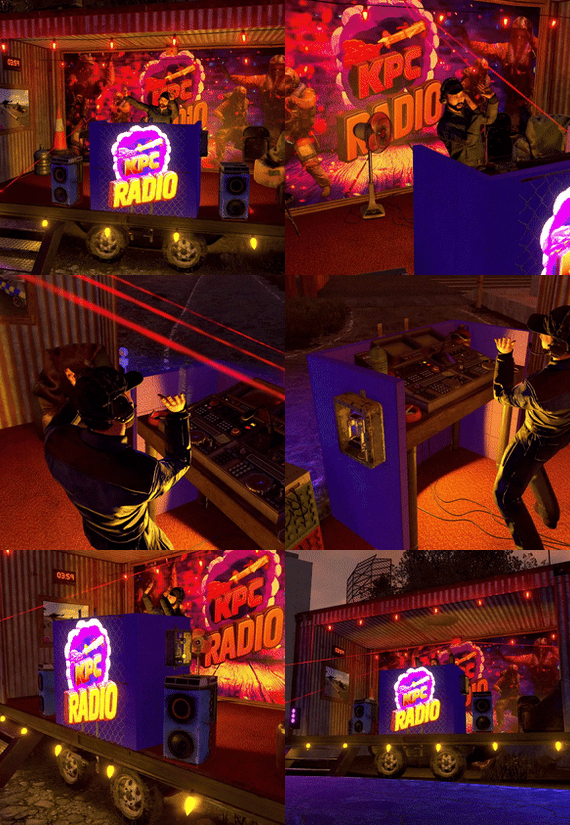
A small pop-up Radio Station built inside a shipping container on the back of a trailer. 83 prefabs total, no masks included.
Feel free to make it your own by swapping out any materials, a couple of the Tiled Metal Cubes also look good as the container shell, and there are multiple Tiled Dev Cubes to switch out the colour of the DJ booth. There are also a few options of Tiled Cloth Cubes for various floor colours.
Featuring:
* Fully hooked up lights & speakers from the boombox
* 3 pictureframes and 1 neon sign for your logos to be added (using a plugin like SignArtist/AutoSigns etc)
* 3 mountable chairs & a detailed DJ Booth
* Options to plug in more lights/lazers using the Connected Speaker outputs
A cool feature of hooking up the boombox directly to connected speakers in RustEdit is that they output full quality sound instead of the regular tinny sound! I haven't tested extreme distances but it seems you can plug them in way beyond the in game limits and have a huge spead of good quality audio.
I would reccomend installing the RustEdit DLL to prevent deployables being able to be destroyed.
- #radio station
- #trailer
- (and 5 more)
-

$17.90
Dead Loops Racetrack ▀▄▀▄▀▄
Deadloops is the result of dozens of attempts, endless testing, and pure suffering — transformed into a dynamic racing track capable of operating fully autonomously without the use of any plugins.
To complete the track, you will need a two-module car equipped with Tier 3 parts, which can be found on the road near the Junkyard.
The island itself is a separate, highly detailed area filled with its own easter eggs, secrets, and loot.
In addition, the track supports several custom vehicles, making races even faster, more chaotic, and far more dynamic.
Deadloops consists of 1,164 prefabs, allowing for a dense, optimized, and highly detailed environment filled with unique elements and atmospheric details.
Recommended installation height: -19.349Need help? Contact me here or on Discord - m1t1ngg
- #racetrack
- #deadloop
- (and 3 more)