
AlaEddineYahia's Wishlist
-
$30.00
Crafting Panel
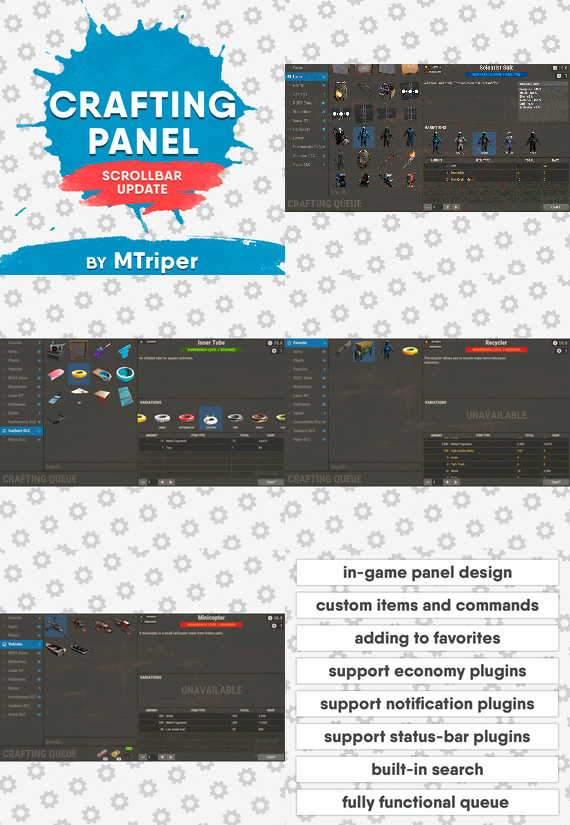
This plugin provides a beautiful and convenient crafting panel for your server. Its design and mechanics are as similar as possible to the in-game Rust crafting panel. Add crafting of any custom items, commands, permissions and anything else you like.
Features
The design is ~90% similar to the design of Rust's in-game crafting panel. Support for any custom items and commands. Ability to unlock all DLC items in the in-game crafting menu. The plugin only registers permissions for items that you have specified to it. Thus, preventing the creation of a large number of permissions. Customizable sound effects, notifications in the status bar on the right, and text notifications in popular plugins. The plugin can take and give out items from inventory, game backpack and Backpacks plugin, depending on the fullness of any of them. Ability to add item variations (just look at the screenshots). Supports work with skill plugins. Supports work with economy plugins. The player can choose whether to craft or buy an item. Add items to favorites, built-in search, fully functional queue and more. Scrollbar support. Ability to use item crafting cooldown.
*All the sections and items shown in the screenshots are an example of configuring the plugin. You will need to create sections yourself and add items there.
Supported plugins:
SkillTree - allows you to use bonuses such as: Craft_Speed, Craft_Refund, Craft_Duplicate. Also allows you to give bonuses when crafting and take away when crafting is canceled. Backpacks - plugin can take and give items in an additional backpack. ItemRetriever - plugin can take crafting ingredients from all containers that are connected to the player (including inventory, game backpack, Backpacks plugin, and any other plugin that uses ItemRetriever as Suppliers). Player DLC API - plugin allows you to check whether an item or skin belongs to a specific player. ZLevelsRemastered - allows you to use the craft speed bonus. Economics, ServerRewards, IQEconomic - these plugins are used to purchase items with the currency of these plugins. Notify, GUIAnnouncements, NCP - these plugins are used to display notifications. SimpleStatus, AdvancedStatus - these plugins are used to display notifications in the status bar at the bottom right of the screen.
Permissions
The plugin has immutable and generated permissions.
The immutable ones include:
craftingpanel._use – is responsible for opening the panel. If there is no permission, the panel will not open. craftingpanel._admin – give this permission only to administrators. It adds an additional "Give yourself" button to get items from the panel for free. This permission is also needed to use the givecraft command (about it below). craftingpanel._instant – all player crafts will be instant. craftingpanel._death – crafting queue will not be reset when the player dies. craftingpanel._disconnect – when a player leaves the server, the craft queue will not be reset. craftingpanel._economics – allows you to purchase items for the currency of the selected economy plugin. If the player does not have permission, the cost panel will still be displayed, but the player will not be able to make a purchase. craftingpanel._workbench - allows you to reduce crafting time by having a workbench of a higher level than necessary for crafting. craftingpanel._bonuses – allows the player to access the crafting bonuses from the "Crafting bonuses" section. craftingpanel._unlockdlc - if a player has this permission, he can craft all DLC items in the in-game crafting menu. If you revoke this permission, all DLC items will become unavailable again. craftingpanel._nocooldown - allows you to disable the cooldown of all items. The generated permissions are created by the plugin itself, here's how it works:
craftingpanel.section.vehicles- this is permission for the "vehicles" section. craftingpanel.vehicles.minicopter - this is permission for the item "minicopter" in the "vehicles" section. craftingpanel.vehicles.snowmobile.tomaha - this is permission for the item "snowmobile" in the "vehicles" section and in "tomaha" variation.
Commands
givecraft steamid/nickname section item 5 skin
steamid/nickname – steamid or nickname of your choice. section – section name from the Section permission [required] field. item – item name from the Item permission [required] field. 5 – how much of the current item to give out (craft multiplier). skin - name of the item from the Ingredients section, Item permission [required] fields. All arguments of this command are required. If your item has an empty "Variations" section or you want a default item, specify "default" in place of skin.
resetcooldowns steamid/nickname section item - resets the cooldown of a specific item from a specific player.
resetcooldowns steamid/nickname - resets the cooldown of all items from a specific player.
resetcooldowns all section item - resets the cooldown of a specific item for all players
resetcooldowns all - resets the cooldown of all items from all players
steamid/nickname – steamid or nickname of your choice. section – section name from the Section permission [required] field. item – item name from the Item permission [required] field.
General settings
Allow panel scaling when the interface is scaled? - if this setting is enabled, the craft panel will be resized depending on the game interface scale (setting "user interface scale"). If the setting is disabled, the panel will always be the same size, regardless of the player interface scale.
Remember the last selected section and item? - plugin will remember the last selected section, item and variation the next time the panel is opened by the player.
Enable multilingual mode? – if your server has players from different countries, this mode allows you to customize translation for other languages. When you enable this mode, the plugin will write all the data that needs to be translated to the lang - file. These include: section names, item names, item descriptions, item properties, item variation names, and ingredient names. The lang - file consists of a pair: key - value. The key is a unique name, with the help of which the plugin understands what phrase to use.
Section translation:
section.*section permission* – key template for section name translation. For example: "section.favorite": "Favorite" – Favorite section.
Translation of item information:
*section permission*.*item permission*.name – key template for item name translation. For example: "sunburn.innertube.name": "Inner Tube" – item name.
*section permission*.*item permission*.description – key template for item description translation. For example: "sunburn.innertube.description": " Inflatable lap for water fun." – item description.
*section permission*.*item permission*.properties – key template for item properties translation. For example: "sunburn.innertube.properties ": "Any properties ..." – item properties.
*section permission*.*item permission*.variations.*variation permission* – key template for variation name translation. For example: "sunburn.innertube.variations.zebra": "ZEBRA" – variation name.
Translation of ingredient names:
*ingredient shortname *.*ingredient skinId* - key template for ingredient name translation. For example: "wood.0": "Wood" – ingredient name.
Use the PlayerDLCAPI plugin to check whether items and skins belong to the player? – The plugin will check each item and skin in the panel for belonging to the player (i.e. whether they are in his Steam inventory).
Allow work with the Backpacks plugin? – plugin can take and give items in an additional backpack (Backpacks by WhiteThunder).
Allow work with the ItemRetriever plugin? – this plugin provides advanced functionality for interacting with player containers:
If the ItemRetriever plugin is enabled, the CraftingPanel will take crafting ingredients from all containers that are connected to the player (including inventory, game backpack, Backpacks plugin, and any other plugin that uses ItemRetriever as Suppliers).
If the ItemRetriever plugin is disabled, the CraftingPanel will take items with the next priority (if the item is not found, it goes to the next container): Backpacks plugin (if enabled) -> game backpack -> inventory.
The CraftingPanel plugin is fully in charge of giving out items (since ItemRetriever only allows you to take items from the player), it gives out items with the next priority (if the container is full, it moves on to the next one): inventory -> game backpack -> Backpacks plugin (if enabled) -> drop item.
Reset cooldown on crafting items for all players during the wipe? - the plugin will reset all cooldowns when the server is wiped.
Delete player data from the Data file if they have not logged into the server for so many days – this setting is added to prevent the plugin from keeping in memory the settings of all players who have ever visited your server.
Effect at the start/end/canceling – game effects that will be played at the start of crafting/completion of crafting/cancellation of crafting (effects list, plugin for playing effects).
Specify a plugin to work with the economy – specify one plugin from the list or leave the field empty to disable work with economy.
Crafting bonuses
This section allows you to customize crafting bonuses when using one of the supported plugins. Each of these plugins has its own settings.
Amount of experience will depend on crafting time? – if this setting is disabled, then the given/taken experience will be the same (which are specified in the settings above). If this setting is enabled, the experience will be calculated using the following formula: calculated experience = crafting time * experience from the settings above. It should be taken into account that to calculate the experience for a crafted item, the full crafting time is taken (which is specified in the item's setting), and to calculate the experience for crafting cancellation, the time left to create the item is taken.
The ZLevelsRemastered plugin does not have a full-fledged api for interaction with crafting bonuses, so the work with it is not fully implemented (no rewards are given in economy plugins, permission of this plugin is not taken into account, etc.).
Notification settings
Notification type (Chat, GameTips, Notify, GUIAnnouncements) – if this section is enabled, you must specify the type/plugin to notify the player of different warnings.
Chat – notification to regular chat. GameTips – notification in the in-game Rust tooltips (blue or red at the bottom of the screen). Notify – notification in the Notify plugin by Mevent. GUIAnnouncements – notification in the GUIAnnouncements plugin by JoeSheep. Just below that are the customization fields for the specific type of notification.
Game Status Settings
Game status is a notification that is shown at the bottom right of the screen (like in-game crafting). The plugin can show 3 types of game status:
Current craft – it's the blue panel with the gear. It is displayed while the crafting process is in progress. Giving item – it's the green panel with the down arrow. It is displayed when a player is given a craft item. Dropping item – it's the red panel with the cross. It is displayed when the items given by the plugin do not fit in the inventory and drop out near the player. Crafting Panel working with Rust's in-game status and two plugins (SimpleStatus, AdvancedStatus) that have slightly advanced features.
Rust – is the in-game status built into the game. It does not require any additional plugins, but it cannot show the Current craft (blue panel with a gear). SimpleStatus – this plugin displays customizable statuses. It can show Current craft and Giving item. But cannot display Dropping item due to limitations in its operation. AdvancedStatus - this plugin displays customizable statuses. It works with all of the above status types.
Section settings
Section name – the displayed section name on the menu button.
Section permission [required] – be sure to fill in these fields and make sure they are all unique. Because it is by this field that the plugin understands which section it is currently working with. If you specify "favorite" here, the plugin will use this section to display the player's favorite items (don't add items to it, the plugin will delete them anyway).
Register this permission? – if enabled, the plugin will register a permission with the above name. In this case this section will be shown only to those players who have this permission.
Section item settings
Item name [required] – required field. The name of the item is displayed only in this plugin. If you need to create an item with the same name, you will find this setting below.
Item permission [required] – required field. Make sure that each item in the section has a unique field. Because by this field the plugin understands which item in the current section it is currently working with.
Register this permission? - if enabled, the plugin will register permission with the above name. Keep in mind that the current item will still be shown to all players, but they will not be able to craft it (this is also notified by the icon on the top left of the information section).
Item description – item description, is not passed to the item when crafting, only displayed in the panel of this plugin.
Item properties – if the item has some characteristics (e.g., damage, radiation protection, etc.) you can specify them here. This data is displayed in a separate panel in the information section of the item.
Item shortname – if you are using the command as a craft result, leave this field empty.
Check this item with the PlayerDLCAPI plugin? - this setting disables the verification of the item by the Player DLC API plugin.
Create an item with the default name (true) or the above name (false)? – if true, the plugin will create an item with the default game name (which refers to the current shortname), otherwise it will set the name from the Item name field.
Item skinId – if the item is custom, specify the required skinId, otherwise set it to 0.
Item image [optional] – if as a result of craft, you have to execute some command, you can specify a link to a picture related to this command.
Console commands executed after crafting (%steamid%, %username%, %amount%) [optional] – if you need to execute some commands as a result of crafting, you can list them with commas in this field. In the command you can specify %steamid% and %username%, the plugin will replace them with the data of the current player. The plugin can also replace %amount% with the amount per craft (next setting). If the command gives some custom game item and you know its shortname and skinid you can specify them in the fields above. This way you don't need to additionally save the image of this item to the hosting and specify its link.
Amount per craft – number of items given out per craft.
Max craft multiplier - maximum allowable craft multiplier. The craft multiplier (selected by the player in the Ingredients section) is how many times an item will be dispensed or how many times commands will be executed. If Amount per craft = 3, and the player chose multiplier = 2, he will receive 2 * 3 = 6 items.
Crafting time [sec] – time to craft the item. It can be set to 0, then the item will be crafted instantly.
Show notification in game status (if they are enabled)? – if a command from another plugin is used to give a custom item and that plugin displays game status, duplication of game statuses may occur. Therefore, it is possible to disable the display of game status for a particular item. Keep in mind that this only disables the Giving item status.
Apply craft bonuses (if they are enabled)? – allows you to apply craft bonuses (from the "Crafting bonuses" section) to this item.
Crafting cost in the economy plugin [0 - disable] – the value of the current item in your economy server currency. The customization works if you specified one of the supported economy plugins at the beginning.
Item Variation settings
In the in-game Rust crafting panel this section is called Skins, here it is called Variations. This is done because here it can include not only skins, but any items or commands related to the parent item. For example, you have several modular car presets, with different types of modules, but they are all related to modular cars. Therefore, you can specify them in one item - "Modular car". The settings in this section are similar to the parent item, except for the crafting ingredients. They will be the same as the parent item.
Item Ingredient settings
Resource name [required] – required field. Is used to display the name of the ingredient in the plugin panel (it is not taken into account when taking ingredients from the player). When canceling the craft, the plugin can set this ingredient to the specified name, you will find this setting below.
Use this resource in ingredients? – enables or disables this resource for use in ingredients.
Resource shortname [required] – required field. Shortname of the item that the plugin will look for from the player for crafting.
Resource skinId – if it's a custom item, give its skinId, otherwise set it to 0.
Return an item with the default name (true) or the above name (false)? – when the craft is canceled, if true, the plugin will create an ingredient with the default game name (which refers to the current shortname), otherwise it will set the name from the Resource name field.
Plugin Config
Example of plugin configuration in English:
Example of plugin configuration in Russian.
If you need Russian config, open it (CraftingPanel.cs) before loading the plugin, and at the top set the variable "isRus = true". Then save and upload this file to your server
- #craft
- #craft menu
- (and 17 more)
-

$24.99
Treasure Trails
By imthenewguy in Plugins
Bring the iconic "Clue Scroll" experience from Old School RuneScape directly into Rust! Treasure Trails adds a dynamic, multi-stage reward system that encourages players to explore the map, engage in diverse activities, and hunt for high-tier loot through a series of challenging tasks.
How It Works
Discovery: Players find Clue Scrolls as rare drops from loot sources (barrels & crates), and can effortlessly be added to shops, custom loot plugins etc. The Hunt: Each scroll contains a specific task. Upon completion, the player is granted the next "step" in the trail. The Reward: After completing a set number of steps, the player receives a Reward Casket. Opening a casket grants customizable loot and can even trigger server commands.
Key Features
Fully Customizable Steps: Server owners have total control. Design unique tasks for every step of the trail to fit your server's theme. Dynamic Loot Tables: Reward your players with rare items, blueprints, or currency. Command Integration: Caskets aren't just for items—run any console command upon opening (e.g., granting VIP ranks, economic rewards, server rewards, item perk rewards etc). Immersive Experience: Keeps players moving across the map and interacting with the world in ways they normally wouldn't.
Every trail is a unique journey.
Players will encounter several distinct types of challenges, each requiring a different set of skills to overcome.
Players are given a list of specific clothing or armor pieces they must equip.
Once dressed correctly, they must locate and speak to a specific NPC to receive their next step.
The scroll displays a static image of a location or a hand-drawn style map with a red X.
These clues only appear if the corresponding monument or landmark exists on your current map seed.
Navigate to the exact spot marked on the image to progress.
A scrambled name or phrase appears on the scroll.
Solve the anagram to figure out which NPC the clue is referring to, then find and speak with them.
A direct question regarding Rust lore, game mechanics, or server-specific trivia.
Input or provide the correct answer through the clue interface to unlock the next stage.
A cryptic poem or mysterious description of an NPC.
Use logic and map knowledge to deduce who the riddle describes and track them down.
The clue provides a specific set of world coordinates or grid references.
Players must use their map and compass to reach the exact location.
These commands require the treasuretrails.admin permission to be assigned.
Type: Console
Command: tt.giveclue <target>
Description: Gives a clue scroll to the specified target.
Type: Chat
Command: tt.next
Description: Skips the current clue step.
Type: Chat
Command: tt.rewards
Description: Generates a reward cache.
Type: Chat
Command: tt.showcoordinates
Description: Shows nearby coordinates that the coordinate clues can use.
Type: Chat
Command: tt.addnpc <profile>
Description: Adds an Npc with the specified profile at the player's current location (case sensitive).
Type: Chat
Command: tt.addmonumentnpc <profile>
Description: Adds an Npc with the specified profile at the player's location, and register their position to the closest monument. These Npcs will automatically spawn at this monument at the same relative position if it exists on the map.
Type: Chat
Command: tt.map.pos
Description: Prints the closes monument, the player's local position to that monument, and the monument's custom name (if it's a custom monument).
Type: Chat
Command: tt.shownpcs
Description: Shows all Treasure Trail registered Npcs on the map.
Permissions
- treasuretrail.admin - required to run administrative commands.
- treasuretrail.loot - required to find treasure trail clues from loot sources such as crates, barrels etc.
- #scavenger
- #hunt
- (and 9 more)
-
$14.99
Sound Library Api
Sound Library Api allows you to store & play recorded sounds for players, attach them to npcs, trigger them via in-game events
Use Sound Library API Encoder which allows you to convert any audio file to our own format (after converting the file, rename it and move it to /data/SoundLibraryApi):
Sound Library Encoder
Configuration:
{ "Scheduled message interval (seconds)": 900.0, "Audio events": { "ScheduledMessage": { "Enable audio event": true, "Global audio event (set false in order to be heard only by the player that triggered the audio event)": true, "Audio files": [ "placeholder1", "placeholder2" ] }, "Welcome": { "Enable audio event": true, "Global audio event (set false in order to be heard only by the player that triggered the audio event)": false, "Audio files": [ "placeholder1", "placeholder2" ] }, "PatrolHelicopter": { "Enable audio event": true, "Global audio event (set false in order to be heard only by the player that triggered the audio event)": true, "Audio files": [ "placeholder1", "placeholder2" ] }, "Airdrop": { "Enable audio event": true, "Global audio event (set false in order to be heard only by the player that triggered the audio event)": true, "Audio files": [ "placeholder1", "placeholder2" ] }, "CargoShip": { "Enable audio event": true, "Global audio event (set false in order to be heard only by the player that triggered the audio event)": true, "Audio files": [ "placeholder1", "placeholder2" ] }, "Chinook": { "Enable audio event": true, "Global audio event (set false in order to be heard only by the player that triggered the audio event)": true, "Audio files": [ "placeholder1", "placeholder2" ] }, "CrateHack": { "Enable audio event": true, "Global audio event (set false in order to be heard only by the player that triggered the audio event)": false, "Audio files": [ "placeholder1", "placeholder2" ] }, "MissionStarted": { "Enable audio event": true, "Global audio event (set false in order to be heard only by the player that triggered the audio event)": false, "Audio files": [ "placeholder1", "placeholder2" ] }, "MissionFinished": { "Enable audio event": true, "Global audio event (set false in order to be heard only by the player that triggered the audio event)": false, "Audio files": [ "placeholder1", "placeholder2" ] }, "MissionFailed": { "Enable audio event": true, "Global audio event (set false in order to be heard only by the player that triggered the audio event)": false, "Audio files": [ "placeholder1", "placeholder2" ] }, "DeepSeaEnter": { "Enable audio event": true, "Global audio event (set false in order to be heard only by the player that triggered the audio event)": false, "Audio files": [ "placeholder1", "placeholder2" ] }, "DeepSeaLeave": { "Enable audio event": true, "Global audio event (set false in order to be heard only by the player that triggered the audio event)": false, "Audio files": [ "placeholder1", "placeholder2" ] }, "DeepSeaOpened": { "Enable audio event": true, "Global audio event (set false in order to be heard only by the player that triggered the audio event)": true, "Audio files": [ "placeholder1", "placeholder2" ] }, "DeepSeaClosed": { "Enable audio event": true, "Global audio event (set false in order to be heard only by the player that triggered the audio event)": true, "Audio files": [ "placeholder1", "placeholder2" ] }, "FishCaught": { "Enable audio event": true, "Global audio event (set false in order to be heard only by the player that triggered the audio event)": false, "Audio files": [ "placeholder1", "placeholder2" ] }, "RouletteWin": { "Enable audio event": true, "Global audio event (set false in order to be heard only by the player that triggered the audio event)": false, "Audio files": [ "placeholder1", "placeholder2" ] }, "RouletteLoss": { "Enable audio event": true, "Global audio event (set false in order to be heard only by the player that triggered the audio event)": false, "Audio files": [ "placeholder1", "placeholder2" ] }, "ShopFrontTradeComplete": { "Enable audio event": true, "Global audio event (set false in order to be heard only by the player that triggered the audio event)": false, "Audio files": [ "placeholder1", "placeholder2" ] }, "FeedbackReport": { "Enable audio event": true, "Global audio event (set false in order to be heard only by the player that triggered the audio event)": false, "Audio files": [ "placeholder1", "placeholder2" ] }, "PlayerReport": { "Enable audio event": true, "Global audio event (set false in order to be heard only by the player that triggered the audio event)": false, "Audio files": [ "placeholder1", "placeholder2" ] } } } Language:
{ "NoPermission": "<color=#e3e3e3>You do not have permission to use this command</color>", "AlreadyRecording": "<color=#e3e3e3>You're already recording. Please save or cancel your previous recording before starting a new one.</color>", "InvalidAddSyntax": "<color=#e3e3e3>Invalid Syntax. Ex: <color=#de8732>/sl add soundname</color></color>", "AddAlreadyExists": "<color=#e3e3e3>This sound already exists. </color><color=#e3e3e3>Please add <color=#de8732>overwrite</color> to your arguments to allow overwriting an existing sound.</color><color=#e3e3e3>Ex: <color=#de8732>sl add {{0}} overwrite</color></color>", "AddRecording": "<color=#e3e3e3>You can now start recording.\n</color><color=#e3e3e3>The recording will automatically start once your start sending audio.\n</color><color=#e3e3e3>Once you have completed you can use <color=#de8732>/sl save</color> or <color=#de8732>/sl cancel</color>.\n</color><color=#e3e3e3>You can listen to your recording using <color=#de8732>/sl play</color>\n</color><color=#e3e3e3>If you want to rerecord your recording use <color=#de8732>/sl reset</color></color>", "NotRecording": "<color=#e3e3e3>You're not currently recording.</color>", "RecordingSaved": "<color=#e3e3e3>We have saved your recording as '{0}'</color>", "CanceledRecording": "<color=#e3e3e3>We have canceled your recording</color>", "ResetRecording": "<color=#e3e3e3>Your recording has been reset.</color>", "PlayInvalidSyntax": "<color=#e3e3e3>Invalid Syntax. Ex: <color=#de8732>/sl play soundname</color> - to play the sound with the given name.</color>", "NoSoundFileFound": "<color=#e3e3e3>No sound file found with name '{0}'</color>", "HelpText": "<color=#e3e3e3>Allows players to record sound that can be played back to a player\n<color=#de8732>/sl add soundname</color> - to start the creation of a new sound.\n<color=#de8732>/sl npc add hookActionType fileName</color> - to add one or more filenames to a human npc (hook action types are: <color=#de8732>OnUseNPC/OnEnterNPC/OnLeaveNPC/OnHitNPC</color>)\n<color=#de8732>/sl npc remove hookActionType fileName</color> - to remove a filename from a human npc (hook action types are: <color=#de8732>OnUseNPC/OnEnterNPC/OnLeaveNPC/OnHitNPC</color>)\n<color=#de8732>/sl save</color> - to save your recorded sound.\n<color=#de8732>/sl reset</color> - to clear your current recording.\n<color=#de8732>/sl cancel</color> - to cancel your recording and not save.\n<color=#de8732>/sl play</color> - to player your current recording back to you.\n<color=#de8732>/sl</color> - to view this help text again.</color>", "AudioMessagesHelpText": "<color=#e3e3e3><color=#66B2FF>/audio send playerName audioName</color> - Sends an audio message to a player</color>\n<color=#e3e3e3><color=#66B2FF>/audio sendall audioName</color> - Sends an audio message to everyone on the server\n<color=#e3e3e3><color=#66B2FF>/audio sendlooped playerName audioName 2 (loop times amount)</color> - Sends a looped audio message to a player\n<color=#e3e3e3><color=#66B2FF>/audio sendalllooped audioName 2 (loop times amount)</color> - Sends a looped audio message to everyone on the server\n<color=#e3e3e3><color=#66B2FF>/audio files</color> - Shows a list of all audio files on the server\n<color=#e3e3e3><color=#66B2FF>/sl</color> - Shows the help page for the Sound Library API\n<color=#e3e3e3><color=#66B2FF>/audio help</color> - Shows these help messages", "PlayingText": "<color=#e3e3e3>Playing the file with the name of <color=#de8732>{0}</color></color>", "PlayingAudioMessageText": "<color=#e3e3e3>Playing the file with the name of <color=#66B2FF>{0}</color></color>", "InvalidTarget": "<color=#e3e3e3>Invalid target, try using his steamid/name</color>", "NullFileName": "<color=#e3e3e3>This file name is null, use /audio files</color>", "AvailableFileNames": "<color=#e3e3e3>Available files:\n<color=#66B2FF>{0}</color></color>", "FileNameNotFound": "<color=#e3e3e3><color=#66B2FF>{0}</color> does not exist, use <color=#66B2FF>/audio files</color></color>", "NpcNotFound": "<color=#e3e3e3>Couldn't find any human npc, make sure you have created one using <color=#de8732>/npc_add</color> and you are looking at it!</color>", "InvalidHookActionType": "<color=#e3e3e3><color=#de8732>{0}</color> is invalid, list of hook action types:<color=#de8732>\nOnUseNPC\nOnEnterNPC\nOnLeaveNPC\nOnHitNPC</color></color>", "NpcSoundAdded": "<color=#e3e3e3><color=#de8732>{0}</color> was added and will play when <color=#66B2FF>{1}</color> is triggered</color>", "NpcSoundRemoved": "<color=#e3e3e3><color=#de8732>{0}</color> was removed from this NPC!</color>", "FileNameAlreadyAdded": "<color=#e3e3e3><color=#de8732>{0}</color> was already added to this NPC!</color>" } Human NPC Integration example:
{ "Npc Data": { "303133854": { "Action type of the npc & Filenames that are played": { "OnUseNPC": [ "testing", "testing" ] } }, "986905907": { "Action type of the npc & Filenames that are played": { "OnEnterNPC": [ "testing" ] } }, "1543143931": { "Action type of the npc & Filenames that are played": { "OnHitNPC": [ "messagesound" ] } }, "1205925446": { "Action type of the npc & Filenames that are played": { "OnUseNPC": [ "testing", "pop" ], "OnHitNPC": [ "testing" ] } }, "45461627": { "Action type of the npc & Filenames that are played": { "OnUseNPC": [ "messagesound" ], "OnHitNPC": [ "messagesound" ] } }, "942954162": { "Action type of the npc & Filenames that are played": { "OnHitNPC": [ "waveeffect", "messagesound" ], "OnEnterNPC": [ "messagesound" ] } } } }
Human NPC Integration Video:
Permissions:
soundlibraryapi.use - In order to use /sl
soundlibraryapi.audio - In order to use /audio
Console Command:
audio.message
-

$24.99
Item Perks
By imthenewguy in Plugins
Item Perks is a plugin that enhances everyday weapons, tools and armour with over 50 different types of perks.
Items with perks can be obtained a variety of ways, including:
Finding them randomly in crates or barrels during your morning scrap farm. Randomly crafting an enhanced version of your equipment while you roof camp noobs from your base. Recycling enhanced equipment and finding enhancement kits stuck in the teeth of the recycler. Using a console or chat command that can be ran through seedy plugin traders like GUIShop.
The plugin gives a large amount of control to server owners when it comes to implementation. You can:
Enable/disable perks, or modify the minimum and maximum values that they roll when applied to gear. Blacklist or whitelist items to each perk, so they will be exclusively excluded or included (based on the list you choose). Adjust the weight of each perk, so it is more or less likely to be seen on gear., or adjust the chances amount of perks that items can potentially have. Fully adjust or disable the chance for item drops to be found, or enable the enhancement kit system so players can recycle gear. So much more (watch the configuration section of the video below to see the full extent).
There are over 50 perks included with the plugin. The following list will describe briefly what each perk does.
Name: Prospector Description: This perk increases your mining yield when mining stone, metal and sulfur nodes. Name: Lumberjack Description: This perk increases your woodcutting yield when chopping living or dead trees. Name: Butcher Description: This perk increases the resources gained from skinning humans and animals. Name: Horticulture Description: This perk increases the amount of resources gained when harvesting grown plants. Name: Forager Description: This perk increases the amount of resources gained when picking up map generated collectibles. Name: Angler Description: This perk increases the amount of fish you receive upon a successful catch. Name: BeastBane Description: This perk increases the damage dealt to animals. Name: ScientistBane Description: This perk increases the damage dealt to scientists. Name: FlakJacket Description: This perk reduces the damage received from explosions. Name: Elemental Description: This perk reduces damage from received from cold and heat sources. Name: Scavenger Description: This perk provides you with a chance to find additional scrap from crates and barrels. Name: Manufacture Description: This perk increases the speed of your crafting. Name: Durable Description: This peark reduces the durability damage of all equipped items. Name: BeastWard Description: This perk reduces the damage received from animals. Name: ScientistWard Description: This perk reduces the damage received from scientists. Name: Builder Description: This perk provides you with a chance for your building upgrades to be free. Name: Thrifty Description: This perk provides you with a chance for your crafting components to be refunded upon a successful craft. Name: Fabricate Description: This perk provides you with a chance to duplicate an item upon a successful craft. Name: Pharmaceutical Description: This perk increases the amount of healing received from all sources. Name: MeleeWard Description: This perk reduces the damage received from melee weapons. Name: Academic Description: This perk provides you with a chance to receive a scrap refund when researching an item at the research bench. Name: FallDamage Description: This perk reduces the impact damage received from falling. Name: Lead Description: This perk reduces the damage from radiation. Name: Smasher Description: This perk will provide you with a chance to instantly destroy barrels with any amount of damage. Name: Environmentalist Description: This perk will increase the speed of recyclers that you activate. Name: Smelter Description: This perk will increase the smelting speed of furnaces you activate. Name: Paramedic Description: This perk provides players that you revive with additional health. Name: Prepper Description: This perk provides you with a chance to not consume food when eating. Name: Regeneration Description: This perk will passively regenerate you. Name: SharkWard Description: This perk will reduce the amount of damage received from sharks. Name: SharkBane Description: This perk will increase the amount of damage dealt to sharks. Name: Deforest Description: This perk provides you with a chance to cut down nearby trees when successfully cutting a tree down. Name: BlastMine Description: This perk provides you with a chance to mine out nearby nodes when successfully mining out a node. Name: Tanner Description: This perk provides you with a chance to skin nearby corpses when successfully skinning out a corpse. Name: Vampiric Description: This perk will heal you for a percentage of the damage dealt to certain enemies. Name: Reinforced Description: This perk will reduce the the amount of damage that your vehicles receive when mounted. Name: ComponentLuck Description: This perk will provide you with a chance to receive additional components when looting barrels and crates. Name: ElectronicsLuck Description: This perk will provide you with a chance to receive additional electronics when looting barrels and crates. Name: UncannyDodge Description: This perk provides you with a chance to dodge incoming damage, reducing it to 0. Name: LineStrength Description: This perk increases the tensile strength of your fishing line. Name: HealShare Description: This perk will share healing effects with nearby players. Name: Attractive Description: This perk will provide you with a chance to automatically pick up components when destroying barrels. Name: WoodcuttingLuck Description: This perk provides you with a chance to find a random item when you cut down a tree. Name: MiningLuck Description: This perk provides you with a chance to find a random item when you mine out a node. Name: SkinningLuck Description: This perk provides you with a chance to find a random item when you skin out a corpse. Name: FishingLuck Description: This perk provides you with a chance to find a random item when you catch a fish. Name: Sated Description: This perk will increase the amount of calories and hydration you receive from food and water sources. Name: IronStomach Description: This perk provides you with a chance to negate negative effects when consuming food. Name: TreePlanter Description: This perk will provide a chance for a tree to instantly regrow when cut down. Name: RockCycler Description: This perk will provide a chance for a node to instantly respawn when mined out. Name: BradleyDamage Description: This perk increases the damage dealt to Bradley Tanks. Name: HeliDamage Description: This perk increases the damage dealt to Patrol Helicopters. Name: Thorns Description: This perk reflects a % of the damage done back to the attacker
Command: ipgive
Type: console/chat
Parameters: <target ID/Name> <optional: shortname> <optional: perks>
Description: Gives the target player an enhanced item. If shortname is specified, it will base the enhancement off of that item. If perks are specified, it will add only those perks to the item.
Command: ipgivekit
Type: console/chat
Parameters: <target ID/Name> <perk>
Description: Gives an enhancement kit to the target.
itemperks.use - Required to receive any benefit from enhanced items. itemperks.loot - Required to loot enhanced items from crates and barrels. itemperks.craft - Required for a chance to received enhanced versions of crafted gear. itemperks.admin - Required to use admin commands. itemperks.enhance - Required to add enhancement kits to items via the workbench. itemperks.recycle - Required to receive enhancement kits from recycling enhanced items.
IPAPI_CreateItem - creates and returns an enhanced item using the details fed into the method. If shortname is left blank, it will pick a random valid item. If api_perks is null it will pick random perk(s) and add them.
Returns Item
[HookMethod("IPAPI_CreateItem")] public object IPAPI_CreateItem(string shortname = null, ulong skin = 0, Dictionary<string, float> api_perks = null) { List<KeyValuePair<Perk, float>> perks = Pool.GetList<KeyValuePair<Perk, float>>(); foreach (var perk in api_perks) { Perk _perk; if (parsedEnums.TryGetValue(perk.Key, out _perk)) perks.Add(new KeyValuePair<Perk, float>(_perk, perk.Value)); } var result = CreateItem(shortname, skin, perks); Pool.FreeList(ref perks); // Returns an Item class return result; } Example usage:
[ChatCommand("testipapi")] void TestIPAPI(BasePlayer player) { Dictionary<string, float> perks = new Dictionary<string, float>() { ["Prospector"] = 1f, ["Lumberjack"] = 1f, ["Butcher"] = 1f, ["Horticulture"] = 0.5f }; var item = (Item)ItemPerks.Call("IPAPI_CreateItem", "hammer.salvaged", (ulong)2830083288, perks); if (item == null) { Puts("Failed"); return; } item.name = "tool of the trade"; player.GiveItem(item); }
- #items
- #enhancement
- (and 6 more)
-

$19.99
Epic Loot
By imthenewguy in Plugins
Epic Loot is a plugin that adds additional RPG style loot to crates, NPC corpses, barrels and crafting.
There is a configurable chance that an enhanced piece with varying set types and modifiers will appear in a loot crate, barrel or corpse.
Players also have a chance to receive an enhanced version of their crafted items, rather than the plain old vanilla armor/weapon/tool.
Wearing more than 1 of the same type of item will provide the user with a set bonus. Depending on the set type, they may get access to higher mining yields, more damage to scientists or even access to exclusive loot tables that proc while gathering.
The plugin is incredibly configurable, supports language conversions and allows users to modify and design their own set bonuses.
There are currently 24 different set types and 27 unique set bonuses!
Set types are added to the name of the item and are responsible for providing the user with a buff.
Miners, - Increases the wearers mining yield. Lumberjacks, - Increases the wearers woodcutting yield. Skinners, - Increases the wearers skinning yield. Farmers, - Increases the wearers farming yield. Foragers, - Increases the wearers collection yield. Fishermans, - Increases the wearers fishing yield. Assassins, - Increases damage done to players. Demo, - Decreases damage from explosives. Elemental - Reduces cold and fire damage. Scavengers - Offers the wearer a chance to obtain additional scrap from barrels and crates. Transporters - Reduces the fuel costs for helicopters and boats. Crafters - Increases crafting speed. Reinforced - Reduces durability loss on all equipped items. Tamers - Reduces damage taken from animals. Hunters - Increase damage done to animals. Operators - Increases damage done to humanoid NPCs. Jockeys - Increases speed of the wearers mounted horse. Raiders - Offers the wearer a chance for their fired rocket/thrown explosive to be refunded. Builders - Offers the wearer a chance for their building/upgrade costs to be refunded. Assemblers - Offers the wearer a chance for their crafting materials to be refunded. Fabricators - Offers the wearer a chance for an additional crafted item to be produced. Medics - Increases healing received. Knights - Decreases damage received from melee attacks. Barbarians - Increased damage done with melee attacks. Smelting - Chance to receive a refined ore, instead of a raw ore, while mining. InstantMining - Chance to instantly mine the rest of a node out on hit. InstantWoodcutting - Chance to instantly cut down the rest of the tree on hit. Regrowth - Chance for the felled tree to respawn. InstantSkinning - Chance to instantly skin the rest of an animal on hit. InstantCook - Chance to receive cooked meat instead of raw meat while skinning. PVPCrit - Chance to critically damage a player, adding an additional 10-30% damage. Reflexes - Reduces damage taken from PVP. IncreasedBoatSpeed - Increases the speed of all watercraft. FreeVehicleRepair - Removes the repair cost for repairing vehicles of all kinds. Survivalist - Increases calories and hydration from all food sources. Researcher - Chance to receive your scrap back while researching. Feline - Reduces fall damage. Lead, - Reduces radiation damage. Gilled - Underwater breathing. Smasher - % Chance to destroy barells and roadsigns instantly. WoodcuttersLuck - Access to a loot table for woodcutting. MinersLuck - Access to a loot table for mining. SkinnersLuck - Access to a loot table for skinning. RockCycle - Chance to spawn a new rock once mined out. Attractive - Chance for loot to be instantly moved to your inventory. FishersLuck - Access to a loot table for fishing. TeamHeal - Shares heals with nearby team mates. HealthShot - Heals team mates for damage that would have been done when shot. BulletProof - Reduces the damage received from bullets. FishingRodModifier - Adjusts the tensile strenght of the cast fishing rod, making it harder to snap the line. UncannyDodge - Chance to dodge a projectile and negate its damage.
When a user wears enough pieces of the same set, they will get access to extra set bonuses, depending on the number of pieces worn.
Any of the buffs from the set types can be added as set bonuses to any set. You can also add the BonusMultiplier set bonus if you want to increase the set bonus percentage based on the number of pieces worn.
BonusMultiplier - Add an additional bonus on top of the existing modifier.
Type: chat
Command: genitem
Parameters: <optional: item shortname> <optional: set type> <optional: tier>
Usage:
/genitem pants miners s - will spawn a pair of pants with the miners set type and a random modifier from s tier range. /genitem transporters c - will spawn a random item with the transporters set type and a random modifier from the c tier range. /genitem pants b - will spawn a pair of pants with a random set type and a random modifier from the b tier range. /genitem pants - will spawn a pair of pants with a random set type and a random set modifier.
Type: console
Command: genitem
Parameters: <target name/steam ID> <optional: item shortname> <optional: set type> <optional: tier>
Usage:
/genitem "new guy" pants miners s - will spawn a pair of pants with the miners set type and a random modifier from s tier range. /genitem "new guy" transporters c - will spawn a random item with the transporters set type and a random modifier from the c tier range. /genitem "new guy" pants b - will spawn a pair of pants with a random set type and a random modifier from the b tier range. /genitem 76561197988695317 pants - will spawn a pair of pants with a random set type and a random set modifier.
Type: chat
Command: eladdskin
Parameters: <set type> <item shortname>
Usage:
/eladdskin Transporters pants 2533474346 - Adds the specified skin ID to the list of skins for the transporters pants.
Type: chat
Command: givescrappercurrency
Parameters: <quantity>
Usage:
/givescrappercurrency 100 - gives 100 scrapper currency to the player.
Type: console
Command: givescrappercurrency
Parameters: <target name/ID> <quantity>
Usage:
givescrappercurrency new 100 - gives new guy 100 scrapper currency.
Type: console
Command: elprintitems
Parameters: none
Usage:
/elprintitems - will print a list of items that can be enhanced into console.
Type: chat
Command: el
Parameters: none
Usage:
/el - opens up the EpicLoot menu.
Type: chat
Command: reseticonpositions
Parameters: none
Usage:
/reseticonpositions - forces all player icon positions to be set to the default config value.
Type: console
Command: genspecificitem
Parameters: <target id> <item shortname> <buff> <value> <tier> <skin>
Usage:
/genspecificitem - Create a specific item for the target player.
epicloot.use - Required to access the menu.
epicloot.admin - Required to use the genitem commands.
epicloot.drop - Required for items to drop from crates, barrels and corpses.
epicloot.salvage - Required to access the salvager menu.
epicloot.enhance - Required to access the enhancement menu.
epicloot.enhance.free - Enhancements have no cost.
epicloot.craft - Required to randomly craft epic loot items.
void GenerateItem(BasePlayer player, string type = null, List<string> item_shortname = null, string tier = null, bool msg = false) Type must be a set type (miners, transporters etc).
Item_shortname can contain a number of item shortnames. The hook will pick a random item from the list.
Tier must be either s, a, b or c.
- #enhanced
- #custom loot
- (and 7 more)