

Gd.Kenni
-
Posts
45 -
Joined
-
Last visited
-
Days Won
1
Content Type
Profiles
Warranty Claims
Downloads
Forums
Store
Support
DOWNLOADS EXTRA
Services
Everything posted by Gd.Kenni
-
 A first node has no parent, as in my example, so if you can't unlock it, either you don't have the resources, or the branch before this node contains a node that hasn't been unlocked. Refer to the configuration generated when the plugin is launched It's not possible for my plugin to interfere with the official techtree, I'm not modifying anything in the basic game.
 -
Changed Status from Pending to Closed Changed Fixed In to Next Version
- 1 reply
-
- 1
-

-
The blueprint can be learned from the official tree, the research table and the custom techtree. But it must be an item and not a url. "Name": "A1", "Parent": "", "Image URL or Item": { "Type": "Item", "Value": { "Item ID": 1608640313, "Skin ID": 0 } }, I don't understand your problem, I think it's just a matter of understanding the configuration.
-
If you learn about a blueprint from the research table or the official techtree, the item will be unlocked in the plugin tree. The bps check is performed in the background so as not to affect the opening of the display. A blueprint learned by the research table will be directly taken into account. A blueprint learned by the official techtree will have to be verified when the display is opened. Rust 2025-02-25 19-19-34.mp4
-
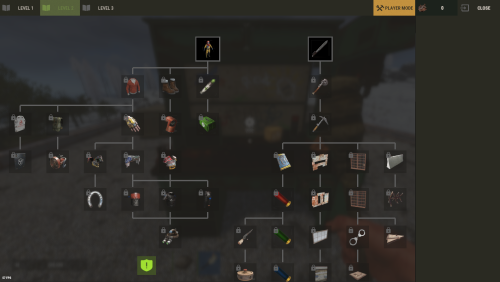 The plugin is not designed to recreate the Rust techtree; you can assign chat commands, console commands and economic rewards, but this requires the reward to be unlocked on the plugin's techtree. If you want a special feature, I can try to integrate it but I need to know exactly what behavior to ask for. Does this answer your question?
 -
Version 2.0.4
60 downloads
The plugin has been revamped. Customize the Techtree however you like. It will replace the vanilla one by default, but this option can be changed in the configuration. You have two options: Replace the vanilla tech tree and customize it. Keep the vanilla tech tree and create a completely customized tech tree. Feature TechTree customizable TechTree by Workbenchlevel Multiple rewards (ChatCommand / ConsoleCommand / Economics) Item custom support Reward if tree is all unlocked (in datafiles) No command to open Automatic replace the vanilla tree or press the Use key R on the Workbench to open Multilingual support CUI Editor CUI Editor Permissions techtree.use // Grants permission to use the tech tree techtree.unlock.free // Grants permission to unlock everything for free techtree.unlock.instant // Grants permission to bypass unlock time techtree.unlock.path // Grants permission to unlock the entire branch up to the unlocked node Information Default vanilla tree are created on plugin load Automatic import of new nodes added by Facepunch Vanilla blueprints are managed directly by the plugin. To manage custom blueprints, please use the available APIs. If you want to remove a vanilla node from your TechTree, you must first backlist it, otherwise it will be automatically added back the next time the plugin is reloaded. An option is available for this. I recommend modifying the tree only when players are not using it to avoid synchronization issues. General Settings { "Settings": { "Wipe Player Data at Wipe": true, "Time For Unlock Node": 1.0, "Selected Theme": "Default", "Use Permissions ?": false, "Use Economics ?": false, "Replace tree vanilla ? Open with [R] if false": true } } Techtree Data ID: ID of the node. Vanilla ID: default ID for facepunch Parent: List of parent node required to unlock this node. Image URL or Item: Image used, via URL or in-game item (ID/Skin). Type: Type of Image (URL or Item). Value: Url (string) if URL or ItemID and SkinID if Item. Grid Position: Node position on the grid (x, y). Player Info: information displayed on the UI Name: In-game name for this node. Lang: Dictionary for multilingual support Description: Short description of the node. Lang: Dictionary for multilingual support Price: Cost to unlock this node. Curency: Resource needed to pay the price (ID/Skin). ItemID SkinID Rewards: List of rewards obtained after unlocking. Type: Type of reward (ChatCommand, ConsoleCommand or Economics). Value: Value or command associated with the reward (string). "TechTree": [ { "ID": 40046421, "Vanilla ID": 84, "Parent": [ 1865581242 ], "Image URL or Item": { "Type": "Item", "Value": { "Item ID": 2090395347, "Skin ID": 0 } }, "Grid Position": { "x": 3.5, "y": 6.5 }, "Player Info": { "Ingame Name": { "Lang": {} }, "Description": { "Lang": {} } }, "Price": 30, "Curency": { "Item ID": -932201673, "Skin ID": 0 }, "Rewards": [ { "Type": "ChatCommand", "Value": "say Congratulations!" }, { "Type": "ConsoleCommand", "Value": "c.grant user playerID perm.use" }, { "Type": "Economics", "Value": "6500" } ] }, ], "Extra": { "Reward On All Node Unlocked": [ { "Type": "ChatCommand", "Value": "say Congratulations, you all unlocked!" }, { "Type": "Economics", "Value": "20000" } ] } Image configuration exemple With URL : "Image URL or Item": { "Type": "Url", "Value": "https://imgur.com/SRGgaKX.png" }, With ITEM : "Image URL or Item": { "Type": "Item", "Value": { "Item ID": -1966748496, "Skin ID": 0 } }, Lang { "CLOSE": "Close", "EDITMODE": "Edit mode", "PLAYERMODE": "Player mode", "SAVE": "Save", "ADD": "Add", "REMOVE": "Remove", "MODIFY": "Modify", "CANCEL": "Cancel", "CONFIRM": "Confirm", "SELECT": "Select", "NONE": "None", "GRIDSETTING": "Grid Setting", "NOTAVAILABLE": "Not yet available", "TOTALREQUIRED": "Total required", "OPEN": "[R] OPEN", "Workbench_1": "LEVEL 1", "Workbench_2": "LEVEL 2", "Workbench_3": "LEVEL 3", "Engineering": "ENGINEERING", "NO PERM": "You don't have permission.", "EXCLUDE": "Exclude from vanilla sync", "EXCLUDED_NODES": "Excluded Nodes", "NO_EXCLUDED_NODES": "No excluded nodes", "EXCLUDE_RESTORED": "{0} nodes restored", "EXCLUDE_ADDED": "{0} nodes excluded", "EXCLUDE_ALL": "Exclude All", "CLEAR_ALL": "Clear All", "DELETE_ALL_NODES": "Delete All Nodes", "UPDATE_GRID": "Update Grid", "NODES_DELETED": "{0} nodes deleted", "RESET_TO_VANILLA": "Reset to Vanilla", "ARE_YOU_SURE": "Are you sure ?", "DISABLE_FUTURE_IMPORTS": "Disable future vanilla imports", "FUTURE_IMPORTS_DISABLED": "Future vanilla imports are now disabled", "FUTURE_IMPORTS_ENABLED": "Future vanilla imports are now enabled", "OPEN_BUTTON": "Open tech tree", "SAVING_APPLY_TOOLTIP": "Saving apply", "RESET_VANILLA_TOOLTIP": "Tech tree reset to vanilla defaults", "EXCLUDE_TOOLTIP": "Excludes this vanilla node from automatic imports. Useful for permanently removing a vanilla node from your tech tree.", "REWARD_TOOLTIP": "Use the “playerID” tag in your command if you need to specify a player. ex: c.grant user playerID perm.use.", "LANG_TOOLTIP": "“Default” will use the default text for the item; otherwise, the added language will be used.", "DISABLE_IMPORTS_TOOLTIP": "Prevents any new vanilla nodes from being automatically imported. Useful for freezing the configuration or preventing Facepunch updates.", } Api (Dictionary<string, object>) API_GetPlayerData(BasePlayer player) // Return key "workbench" and Dictionary value { string, List<int> } (bool) API_SetPlayerData(BasePlayer player, Dictionary<string, object> apiData) // Return bool (bool) API_ClearPlayerWorkbenchData(BasePlayer player, Workbench workbench) // Return bool (bool) API_ClearPlayerData(BasePlayer player) // Return bool Hook // Called before a tech tree node is unlocked. private object OnNodeUnlock(Workbench workbench, Dictionary<string, object> node, BasePlayer player) { Puts("OnNodeUnlock has been called!"); return null; } // Called before a tech tree node is unlocked. private object OnNodeUnlock(BasePlayer player, Dictionary<string, object> node, Dictionary<string, object> treeData) { Puts("OnNodeUnlock has been called!"); return null; } // Called when a tech tree node is unlocked. private void OnNodeUnlocked(Workbench workbench, Dictionary<string, object> node, BasePlayer player) { Puts("OnNodeUnlocked has been called!"); } // Called when a tech tree node is unlocked. // Same behavior as OnNodeUnlocked but returns the list of notes directly. private void OnPathNodeUnlocked(Workbench workbench, List<object> nodes, BasePlayer player) { Puts("OnPathNodeUnlocked has been called!"); } Api and Hook Doc Dictionary<string, object> node: "id" : int "vanillaId" : int? "price" : int "parents" : List<int> "isVanilla" : bool "currency" : Dictionary<string, object> => "itemId" : int "skinId" : ulong Dictionary<string, object> treeData: "workbench" : Workbench "nodes" : List<Dictionary<string, object>> Dictionary<string, object> playerData: "workbench" : Dictionary<string, object> "Workbench_1" : List<int> "Workbench_2" : List<int> "Workbench_3" : List<int> "Engineering" : List<int> ########### Dictionary<string, object> API_GetPlayerData(BasePlayer player) return: { "workbench" : { "Workbench_1" : [123, 456, 789], "Workbench_2" : [111, 222], "Workbench_3" : [], "Engineering" : [333] } } Usage: [PluginReference] Plugin TechTree; var playerData = TechTree?.Call("API_GetPlayerData", player) as Dictionary<string, object>; ########### bool API_SetPlayerData(BasePlayer player, Dictionary<string, object> apiData) return: bool usage: var data = TechTree?.Call("API_GetPlayerData", player) as Dictionary<string, object>; var workbench = data["workbench"] as Dictionary<string, object>; workbench["Workbench_1"] = new List<object> { 123, 456 }; workbench["Engineering"] = new List<object>(); bool success = (bool)TechTree?.Call("API_SetPlayerData", player, data); Contact Send me a private message on Codefling Send me a message on Discord: gd.kenni$14.99 -
 What kind of administration needs to know the player's code? If you need to intervene, a simple "ent unlock” command is more than enough, isn't it?
 -
 Would it be possible to add an option in the config file so that an item spawn is mandatory? For example, if I add the scrap, it will necessarily be in a crate If there was this option, it would be perfect
 -
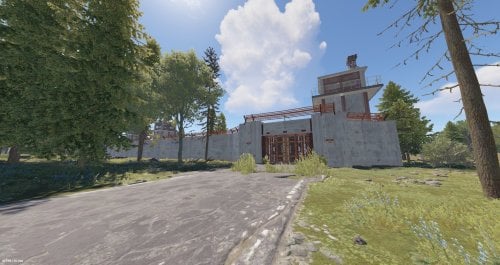
Version 1.2.0
9 downloads
Penitentiary is a beautiful custom Rust monument inspired by the Prison Simulator video game. Prefab: ~ 4200 1 red door with fuse 2 green doors 1 desk with credit card 1 Chinook drop point __________ This monument is thought Vanilla pvp but can very well be used for Pve or Rp after some minor modifications. Electricity operational, which can be controlled. 36 cell. Some parts of the monument are radioactive. No NPCs. Changes can be made if requested. __________$7.50-
- 2
-

-
- #custom prefab
- #custom monument
- (and 2 more)
-
 Very good plugin
