

ninco90
-
Posts
788 -
Joined
-
Last visited
-
Days Won
5
Content Type
Profiles
Warranty Claims
Downloads
Forums
Store
Services
Downloads Plus Support
DOWNLOADS EXTRA
Reels
Everything posted by ninco90
-

Loading a gun with restricted ammo breaks gun
ninco90 replied to dustyhansen's Support Report in Support
This is an old well-known mistake on the subject of weapons. Sometimes these can become blocked in the way you tell me. This is a problem that happens in all ammo locking add-ons. I was trying to patch it but couldn't, I don't have any way to reset the type of ammunition that a gun has inside. To do this, what I recommend to players is that they keep the broken weapons and have an admin replace them, or when the era of unlocking that ammunition arrives then they will be able to use it without problems. -
Airdrops, Chinook, Patrol Heli, Cargo Broken
ninco90 replied to dustyhansen's Support Report in Support
Hello! Please send me your configuration to review. -
Keep in mind that the plugin does not integrate direct support for blocking tank generation. So when the server loads the tank that is generated will appear, but if you then set it to execute the command: bradley.enable false what will happen is that it will not be generated again if it is destroyed but it will be generated at each start of the server . I do not know if I explain myself very well. Since running this command does not remove the existing bradley if I remember correctly. The same thing happens with car vehicles, during the server startup the server can spawn some, then what happens is that the plugin disables further generation but does not eliminate the existing vehicles. (or maybe with cars, I would have to check it)
-
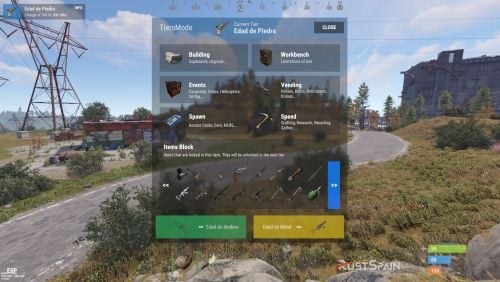 The level change is automatic and I seem to remember that it is not possible to force it manually. Well, you could reduce the time each tier lasts so that it changes sooner if you want to test
 -
It just won't let you put it on the belt. It will be locked to you, so you will never be able to equip it until its use is unlocked.
-
 Is this compatible with existing clan plugins or is it a new clan system that instead of being managed from the server is managed from Discord?
 -
The level system is global, it works for all players equally. It is not a system that establishes levels according to the player, that would mean worse server performance. As for the second question, yes, you can configure so that tier 1 can only improve wood. In tier 2 to stone and in tier 3 to metal for example.
-
 Hello, first of all, congratulations for the work done. I just bought it because it looks very good, however now that I am testing it calmly and reviewing it in depth there are several points that I consider can be improved: Languages. (Texts) Many texts are not translatable in the LANG, ideally everything could be translated. Buttons that protrude from their limiting space. For example, the Apply to Inventory button and the Manage Outfits slightly protrude a few pixels from the top. They do not stay within the black band. On the other hand, similarly the Weapons, Clothing, Deployables, Tools, Construction category buttons do not have even a minimum of margin with respect to the black container that frames them. This could be fixed by making those buttons slightly smaller. It would also be interesting to set a different color for the pagination buttons. Thank you very much, I hope for some of these changes in future updates if possible. Lastly, I noticed something strange with the interface scaling change. Tell you that Facepunch added a new parent for GUIs called: "OverlayNonScaled" With this you can make the plugin always look the same regardless of the player's interface scale. All the best!
 -

Version 1.0.1
28 downloads
Rust / Server Plugins Tugboat Not Safe Eject tugboats from fishing village safe zones. Prevent players from using fishing villages as anti-raid parking for their tugboats. Automatically turn approaching boats away, apply gradual damage to boats that remain inside, or enable both modes together. Automatic expulsion Configurable damage No permissions or commands 01 / Video demo See Tugboat Not Safe in action Watch the demonstration of tugboat safe-zone enforcement. Watch on YouTube 02 / Operating modes Two ways to enforce your safe-zone rules Mode: Expulsion When a tugboat tries to enter the configured fishing village area, the plugin turns it 180 degrees and reverses its velocity, redirecting it away from the zone. Enable this mode to discourage entry immediately. When chat notices are enabled and a driver is present, the driver receives an expulsion notice. Mode: Damage Use gradual damage to discourage tugboats from remaining inside the area, including boats that manage to get past expulsion. A configurable grace period gives players time to leave before damage begins. Set the warning time before the first damage tick. Choose the interval between damage ticks and the amount of health removed per tick. Damage stops after the tugboat leaves the configured area. A configurable prefab effect plays at the boat when damage is applied. The two modes have separate configuration switches and can be enabled together. With damage mode alone, the driver receives an entry warning with the grace period and an exit confirmation when chat notices are enabled. With both modes enabled, the entry notice is the expulsion notice. Damage alerts are sent to the driver while damage is being applied. 03 / Zone controls Configure the area and its feedback Automatic fishing village detection: enforcement areas are created around fishing village monument positions when the plugin initializes. Configurable radius: set the size of the spherical enforcement area around each fishing village. This plugin-defined area follows the configured radius; it is not copied from the game's safe-zone boundary. Optional visible boundary: display the zone boundary to help check coverage and adjust your radius. Chat notices: enable or disable driver notifications. English and Spanish (es-ES) messages are included and can be customized through the plugin language files. Destroyed tugboat cleanup: configure a delay for removing tugboats destroyed by the damage system inside the enforced area. Set it to 0 to keep the game's default tugboat decay behavior. Debug logging: enable diagnostic output for zone entry, removal from zone tracking and the damage system. Coverage is centered on fishing villages. This configuration does not add enforcement to Outpost, Bandit Camp or arbitrary custom safe zones. 04 / Configuration Set the rules for your server No permissions or chat commands are required. Configure the plugin through TugboatNotSafe.json in your server's plugin configuration directory, then reload the plugin to apply your changes. The example below enables both modes, uses a 75-radius zone, gives a 60-second grace period and applies 100 damage every 15 seconds. It also sets a 20-second destroyed-tugboat cleanup delay. { "Global Config": { "Debug": false, "Notice in the Chat": true, "Zone Radius": 75.0, "Show Zone Boundary": false, "Mode: Expulsion (Eject tugboats when they try to enter the fishing village)": true, "Mode: Damage (Gradually damage Tugboats within the fishing village)": true, "Warning Time Before Damage": 60.0, "Time Between Damage": 15.0, "Amount Damage": 100.0, "Time in seconds to eliminate a destroyed Tugboat (Only in Safe Zone) [0.0 = Decay Default Tugboat]": 20.0, "Effects Prefab": "assets/prefabs/npc/patrol helicopter/damage_effect_debris.prefab" } } Setting What it controls Debug Enable diagnostic console logging. Notice in the Chat Send notices to the tugboat driver when one is present. Zone Radius Radius of each fishing village enforcement area. Show Zone Boundary Display the enforcement boundary. Mode: Expulsion (Eject tugboats when they try to enter the fishing village) Turn entering tugboats around and reverse their velocity. Mode: Damage (Gradually damage Tugboats within the fishing village) Apply periodic damage to tugboats remaining inside. Warning Time Before Damage Grace period in seconds before damage begins. Time Between Damage Seconds between damage ticks. Amount Damage Health removed per damage tick. Time in seconds to eliminate a destroyed Tugboat (Only in Safe Zone) [0.0 = Decay Default Tugboat] Cleanup delay in seconds. This example uses 20; the code default is 0, preserving normal game decay. Effects Prefab Prefab effect played at the tugboat on a damage tick. 05 / Support Keep safe-zone parking under control Choose expulsion, gradual damage or both, and tune the area, timing and feedback to suit your server. For problems, questions, suggestions or assistance, contact ninco90 on Discord. Tugboat Not Safe — original product artwork.$8.00- 1 review
-
- 1
-

-

Version 1.1.1
9 downloads
Adds radiation when Oil Rig is complete. Are you tired of your players staying in the Oil Rig? What other players tell you that he hasn't respawned for several hours? Would you like players to get kicked once they loot the hackalle box? This is your plugin! FUNCTIONING The operation of the plugin is simple, when a player opens the hackable box to loot it, a countdown will begin warning that the radiation is about to appear. (This time is configurable). Once this time has elapsed, the radiation will appear little by little until it reaches the established maximum. The radiation will cease to exist once the Oil Rig spawns the hackable box. SETTING It does not use any permissions, nor chat commands. Simply configure the settings provided by the plugin in the config to your liking. Configuration Example: { "Global Config": { "Debug": true, "Notice in the Chat": true, "Notice in GUI": true, "GUI Duration": 15.0, "Time for Radiation (Seconds)": 100.0, "Alarm Sound": true, "Alarm Duration ON": 250.0, "Radiation Power": 100.0, "Radiation Scale Time (Seconds to reach 100% of setting)": 100.0, "Oil Rig Radius": 200.0, "Sphere Show": true } }$10.00 -
Please, if I take time to respond, feel free to talk on discord, since I am more active there. My discord: ninco90#6219 Regarding your last question, there is no option to advance levels by players, this plugin is made to work globally equalizing the level among all players. Check that you have the Image Library config correctly. We keep in touch on discord!
-
Changed Status from Pending to Not a Bug
-
Hi, try to reload the images from imageLibrary using the image refresh command that this plugin has. Then reload the TiersMode plugin. Sometimes it takes a while to load all the images, but it should work fine.
-
UPDATE: I just added an additional plugin within the download that will handle alerts from other plugins. Currently working and tested with Convoy. Sputnik support has also been added. For the rest of the plugins, I would have to add and test them.
-
The plugin incorporates a Hook so that other plugins can use it and launch alerts with the same aesthetics as the plugin: The example of use would be the following: SendAlert(string title, string description, string color, string img, bool sound = false) However, the problem with this is the number of plugins that exist, but if you are interested in some specific ones, you could add your Hooks.
-
Version 1.3.7
245 downloads
Rust / Server Plugins TiersMode Tier-Based ProgressionRust Plugin A new stage. New possibilities. Your wipe, at your pace. Create a staged progression system for your Rust server. Decide when players can access building grades, items, events, vendors and vehicles, and adjust crafting and gathering as the wipe progresses. 4 default tiers Add and customize your own stages Per-tier rules Building, events, access and rates In-game editing Manage blocked items with /tier edit 01 / Video demo See TiersMode in action Watch the video demo for a look at TiersMode. Watch on YouTube 02 / Progression Set the pace of your wipe Add a tier-based game mode to an existing modded server or build a new server around staged progression. TiersMode generates four tiers by default, and you can create additional stages and configure each one independently. Give every tier its own name, icon URL and color. Set stage duration in minutes: 60 for one hour, or 1,440 for one day. Customize what becomes available as your server moves through the tiers. 03 / Player information Keep players informed as the server progresses On-screen counter. Display the current tier and the time remaining until the next stage. Tier information window. Enable or disable the information screen and control whether players can view upcoming tiers. Configurable modal alerts. Notify players about restrictions, tier changes and events such as airdrops, Cargo Ship arrivals or Oil Rig respawns. Custom announcements. Send a server-wide modal message with /tieralert. Chat messages. Configure alert notifications and a welcome message explaining the game mode. Discord announcements. Announce wipe starts and tier changes using the Discord Messages plugin. Server title. Optionally update the server title using the configured tier placeholder. 04 / Building & workbenches Control building progression and research Tool cupboard limits. Set a maximum number of cupboards per player or allow unlimited placement. Cupboard destruction alerts. Optionally notify the server when a player destroys another player's tool cupboard. Building grades. Set the maximum upgrade level allowed in each tier. Workbench research. Allow or block research through workbenches by tier. Workbench placement. Allow all workbenches, block placement, or permit only the workbenches specified for that stage. 05 / Events & trading Decide when major events and services become available Server events Enable or disable Cargo Ship, Oil Rig, Chinook, Patrol Helicopter, Airdrop and Bradley APC events for each tier. Vendors and public trading Control helicopter, boat and horse vendors, drone use and public monument vending machines. 06 / Spawns & vehicles Unlock cards and vehicles stage by stage Keycard spawns. Choose which access cards can spawn in each tier. Start with green cards and introduce blue and red cards later. Car spawns. Choose which modular car sizes can appear around the map, or disable car spawns for a tier. Vehicle access. Allow or block MLRS, Workcart and Locomotive use independently. 07 / Rates & gathering Match crafting and resource rates to each tier Configure crafting speed, research time and recycling time independently for each stage. Keep vanilla values or adjust the pace as progression advances. The integrated gather system supports Dispenser Gather, Dispenser Bonus, Collectible Pickup, Growable Gathered, Survey Gather, Quarry Gather and Excavator Gather. Use one gather system for these rates: disable TiersMode's gather system if another gather plugin controls them, or remove the overlapping plugin before enabling the integrated system. 08 / Restrictions & automation Edit blocked items in game and run commands per tier Use /tier edit to manage the items blocked by each stage through the administrative interface, without manually searching for their names in the configuration. Block crafting of items restricted in the current tier. Prevent placement of specified deployables when the player lacks building privilege. Run your configured server commands when a tier loads, including on tier changes and server restarts. Use tier commands to enable or disable other plugins, trigger their events, or apply your own stage-specific server setup. 09 / Commands Player and administrator commands Command Purpose /tier Open the tier information window when enabled. /tier edit Open the blocked-item editor. Requires tiersmode.admin. /tieralert textmsg Send a custom modal alert to online players. Requires tiersmode.admin. 10 / Permissions Fine-tune access and bypass permissions Permission Purpose tiersmode.admin Access the tier editor and custom alert command. Assign to administrators only. tiersmode.bypass.use_workcart Bypass the Workcart use restriction. tiersmode.bypass.use_locomotive Bypass the Locomotive use restriction. tiersmode.bypass.use_mlrs Bypass the MLRS use restriction. tiersmode.bypass.limit_cupboard Bypass the tool cupboard limit. tiersmode.bypass.block_items Bypass item restrictions. tiersmode.bypass.block_place_no_building Bypass specified deployable restrictions without building privilege. tiersmode.bypass.upgrade Bypass the maximum building upgrade level. tiersmode.bypass.block_place_all_workbench Bypass workbench placement restrictions. tiersmode.bypass.block_research Bypass workbench research restrictions. tiersmode.bypass.block_vending_helis Bypass helicopter vendor restrictions. tiersmode.bypass.block_vending_boat Bypass boat vendor restrictions. tiersmode.bypass.block_vending_horses Bypass horse vendor restrictions. tiersmode.instant_research Instant research. tiersmode.alerts.block Disable alerts for the player. tiersmode.instant_recycler Instant recycling. 11 / Default configuration Four tiers to use as your starting point This example uses four stages: Wood Age, Stone Age, Metal Age and Explosive Age. Each lasts 1,440 minutes, with progressively higher building grades and different events, rates and restrictions. Tier names in the configuration are customizable and appear in Spanish in this example. Adjust the server title, image URLs, Discord webhook placeholder and server commands for your own setup. Discord announcements require the Discord Messages plugin when enabled. { "Automatic Server Title": { "Enabled Auto Changue": true, "Base title to modify": "RustSpain.com | Tiers Mode ({0})" }, "GUI Config": { "On-Screen GUI Counter": true, "Counter Config": { "Color Title": "1.0 1.0 1.0 0.70", "Color Subtitle": "1.0 1.0 1.0 0.70", "Color Button": "0.46 0.46 0.46 0.49", "Show Icon/Color": true, "Show Button Info": true }, "Enabled Alert Modal": true, "Modal Config": { "Duration Show": 10.0, "Color Title": "1.0 1.0 1.0 0.70", "Color Description": "1.0 1.0 1.0 0.70", "Sound Alert": true, "Prefab Sound": "assets/prefabs/tools/pager/effects/beep.prefab" }, "Enabled Alert Modal Changue Tier": true, "Modal Changue Config": { "Duration Show": 15.0, "Color Title": "1.0 1.0 1.0 0.70", "Color Description": "1.0 1.0 1.0 0.70", "Sound Alert": true, "Prefab Sound": "assets/bundled/prefabs/fx/item_unlock.prefab" }, "Enabled Alert Modal Events": true, "Modal Events Config": { "Duration Show": 15.0, "Color Title": "1.0 1.0 1.0 0.70", "Color Description": "1.0 1.0 1.0 0.70", "Sound Alert": true, "Prefab Sound": "assets/prefabs/tools/pager/effects/vibrate.prefab" }, "Enabled Custom Alert Modal": true, "Modal Custom Config": { "Duration Show": 15.0, "Color Title": "1.0 1.0 1.0 0.70", "Color Description": "1.0 1.0 1.0 0.70", "Sound Alert": true, "Prefab Sound": "assets/prefabs/tools/pager/effects/vibrate.prefab" }, "Windows Info Config": { "Show GUI Info Window on Enter": true, "Show GUI Info use Command": true, "Show Previous Tier Button": true, "Show Next Tier Button": true, "Color Title": "1.00 1.00 1.00 1.00", "Color Text": "0.90 0.90 0.90 1.00", "Color Header Info": "0.0 0.0 0.0 1.0", "Color Button Close": "0.20 0.20 0.20 0.80" } }, "Messages": { "Enabled Chat": true, "Enabled Welcome Chat": true, "Use Discord Message Plugin": true, "Webhook Channel Announcement Change of Stag": "Put here your Webhook of the Channel where you want to announce the changes of Tiers." }, "Tiers": [ { "Tier Name": "Edad de Madera", "Tier Icon URL": "https://img.rustspain.com/tiers/1.png", "Tier Color": "0.17 0.75 0.42 0.50", "Duration of the tier in Minutes": 1440, "Cupboards": { "Limit Maximum Placed Cupboards": true, "Maximum Cupboards per player": 3, "Global Alert for Destruction of Cupboard": false, "Config Destruction Alert": { "Show Name of the player who destroyed it in the info": true, "Show Position in info": true }, "Maximum Upgrade Level (1 = Wood, 2 = Stones, 3 = Metal, 4 = HQ)": 1 }, "Workbench": { "Allow research from Workbench": false, "Allow Place All Workbench": false, "Allow placing only the following workbenches": [ "assets/prefabs/deployable/tier 1 workbench/workbench1.deployed.prefab" ] }, "Events": { "Cargoship": false, "Oil Rig": false, "Chinook": false, "Patrol Helicopter": true, "Airdrop": true, "Bradley APC": false }, "Sellers": { "Helicopter Sale": false, "Boat Sales": false, "Horse Sales": false, "Use of Drones": false, "Use of Public Vending Machine (Rads)": false }, "Spawn": { "Spawn Cards": [ "keycard_green_pickup" ], "Spawn Vehicles (Cars)": [], "Use Vehicle MLRS": false, "Use Vehicle Workcart": true, "Use Vehicle Locomotive": true }, "Speed": { "Crafting Rate (1.0 = Vanilla | 0.0 = Instant)": 1.0, "Research Seconds (10.0 = Vanilla | 0.0 = Instant)": 10.0, "Recycler Seconds (5.0 = Vanilla | 0.0 = Instant)": 5.0, "Gather System (If you use another plugin for the Gather disable this or remove the other one)": false, "Gather Config (Setting 0.0 will disable this option and it will work as vanilla)": { "DispenserGather": 0.0, "DispenserBonus": 1.0, "CollectiblePickup": 0.0, "GrowableGathered": 0.0, "SurveyGather": 0.0, "QuarryGather": 0.0, "ExcavatorGather": 0.0 } }, "Lists": { "Items lock Craft": true, "Items lock": [ "shotgun.waterpipe", "shotgun.pump", "pistol.semiauto", "pistol.revolver", "rifle.semiauto", "maxhealthtea", "radiationresisttea", "healingtea", "ammo.rifle", "ammo.shotgun.fire", "ammo.shotgun", "ammo.shotgun.slug" ], "Deployable lock without Building Permissions": false, "Items lock without Building Permissions": { "trap.bear": "assets/prefabs/deployable/bear trap/beartrap.prefab", "trap.landmine": "assets/prefabs/deployable/landmine/landmine.prefab" }, "Server Commands": [ "o.unload Backpack", "o.unload TheStorm" ] } }, { "Tier Name": "Edad de Piedra", "Tier Icon URL": "https://img.rustspain.com/tiers/2.png", "Tier Color": "0.06 0.58 0.86 0.50", "Duration of the tier in Minutes": 1440, "Cupboards": { "Limit Maximum Placed Cupboards": true, "Maximum Cupboards per player": 5, "Global Alert for Destruction of Cupboard": false, "Config Destruction Alert": { "Show Name of the player who destroyed it in the info": true, "Show Position in info": true }, "Maximum Upgrade Level (1 = Wood, 2 = Stones, 3 = Metal, 4 = HQ)": 2 }, "Workbench": { "Allow research from Workbench": false, "Allow Place All Workbench": false, "Allow placing only the following workbenches": [ "assets/prefabs/deployable/tier 1 workbench/workbench1.deployed.prefab" ] }, "Events": { "Cargoship": true, "Oil Rig": false, "Chinook": true, "Patrol Helicopter": true, "Airdrop": true, "Bradley APC": false }, "Sellers": { "Helicopter Sale": false, "Boat Sales": true, "Horse Sales": true, "Use of Drones": false, "Use of Public Vending Machine (Rads)": false }, "Spawn": { "Spawn Cards": [ "keycard_green_pickup", "keycard_blue_pickup" ], "Spawn Vehicles (Cars)": [ "2module_car_spawned.entity" ], "Use Vehicle MLRS": false, "Use Vehicle Workcart": false, "Use Vehicle Locomotive": false }, "Speed": { "Crafting Rate (1.0 = Vanilla | 0.0 = Instant)": 0.6, "Research Seconds (10.0 = Vanilla | 0.0 = Instant)": 8.0, "Recycler Seconds (5.0 = Vanilla | 0.0 = Instant)": 4.0, "Gather System (If you use another plugin for the Gather disable this or remove the other one)": true, "Gather Config (Setting 0.0 will disable this option and it will work as vanilla)": { "DispenserGather": 1.5, "DispenserBonus": 1.5, "CollectiblePickup": 1.5, "GrowableGathered": 1.5, "SurveyGather": 1.5, "QuarryGather": 1.5, "ExcavatorGather": 1.5 } }, "Lists": { "Items lock Craft": true, "Items lock": [ "weapon.mod.8x.scope", "rifle.bolt", "hmlmg", "pistol.python", "smg.thompson", "shotgun.double", "roadsign.gloves", "roadsign.kilt", "hazmatsuit.arcticsuit", "explosives", "submarine.torpedo.straight", "ammo.rocket.basic", "ammo.rocket.hv", "ammo.rifle.incendiary", "ammo.pistol.fire", "ammo.rocket.fire", "ammo.rifle.hv", "ammo.pistol.hv" ], "Deployable lock without Building Permissions": true, "Items lock without Building Permissions": { "trap.bear": "assets/prefabs/deployable/bear trap/beartrap.prefab", "trap.landmine": "assets/prefabs/deployable/landmine/landmine.prefab" }, "Server Commands": [ "o.unload Backpack", "o.unload TheStorm" ] } }, { "Tier Name": "Edad de Metal", "Tier Icon URL": "https://img.rustspain.com/tiers/3.png", "Tier Color": "0.87 0.75 0.05 0.50", "Duration of the tier in Minutes": 1440, "Cupboards": { "Limit Maximum Placed Cupboards": false, "Maximum Cupboards per player": 5, "Global Alert for Destruction of Cupboard": false, "Config Destruction Alert": { "Show Name of the player who destroyed it in the info": true, "Show Position in info": true }, "Maximum Upgrade Level (1 = Wood, 2 = Stones, 3 = Metal, 4 = HQ)": 3 }, "Workbench": { "Allow research from Workbench": false, "Allow Place All Workbench": false, "Allow placing only the following workbenches": [ "assets/prefabs/deployable/tier 1 workbench/workbench1.deployed.prefab", "assets/prefabs/deployable/tier 2 workbench/workbench2.deployed.prefab" ] }, "Events": { "Cargoship": true, "Oil Rig": true, "Chinook": true, "Patrol Helicopter": true, "Airdrop": true, "Bradley APC": true }, "Sellers": { "Helicopter Sale": true, "Boat Sales": true, "Horse Sales": true, "Use of Drones": false, "Use of Public Vending Machine (Rads)": true }, "Spawn": { "Spawn Cards": [ "keycard_green_pickup", "keycard_blue_pickup", "keycard_red_pickup" ], "Spawn Vehicles (Cars)": [ "2module_car_spawned.entity", "3module_car_spawned.entity", "4module_car_spawned.entity" ], "Use Vehicle MLRS": false, "Use Vehicle Workcart": false, "Use Vehicle Locomotive": false }, "Speed": { "Crafting Rate (1.0 = Vanilla | 0.0 = Instant)": 0.3, "Research Seconds (10.0 = Vanilla | 0.0 = Instant)": 6.0, "Recycler Seconds (5.0 = Vanilla | 0.0 = Instant)": 3.0, "Gather System (If you use another plugin for the Gather disable this or remove the other one)": true, "Gather Config (Setting 0.0 will disable this option and it will work as vanilla)": { "DispenserGather": 2.0, "DispenserBonus": 2.0, "CollectiblePickup": 2.0, "GrowableGathered": 2.0, "SurveyGather": 2.0, "QuarryGather": 2.0, "ExcavatorGather": 2.0 } }, "Lists": { "Items lock Craft": true, "Items lock": [ "rifle.l96", "lmg.m249", "multiplegrenadelauncher", "pistol.m92", "shotgun.spas12", "rifle.m39", "explosive.timed", "weapon.mod.muzzlebrake", "weapon.mod.muzzleboost", "chainsaw", "jackhammer", "weapon.mod.extendedmags", "ammo.rocket.mlrs", "ammo.grenadelauncher.he", "ammo.grenadelauncher.buckshot", "ammo.grenadelauncher.smoke", "ammo.rifle.explosive" ], "Deployable lock without Building Permissions": false, "Items lock without Building Permissions": { "trap.bear": "assets/prefabs/deployable/bear trap/beartrap.prefab", "trap.landmine": "assets/prefabs/deployable/landmine/landmine.prefab" }, "Server Commands": [ "o.load Backpack", "o.unload TheStorm" ] } }, { "Tier Name": "Edad Explosiva", "Tier Icon URL": "https://img.rustspain.com/tiers/4.png", "Tier Color": "0.80 0.26 0.13 0.50", "Duration of the tier in Minutes": 1440, "Cupboards": { "Limit Maximum Placed Cupboards": false, "Maximum Cupboards per player": 5, "Global Alert for Destruction of Cupboard": false, "Config Destruction Alert": { "Show Name of the player who destroyed it in the info": true, "Show Position in info": true }, "Maximum Upgrade Level (1 = Wood, 2 = Stones, 3 = Metal, 4 = HQ)": 4 }, "Workbench": { "Allow research from Workbench": true, "Allow Place All Workbench": true, "Allow placing only the following workbenches": [ "assets/prefabs/deployable/tier 1 workbench/workbench1.deployed.prefab", "assets/prefabs/deployable/tier 2 workbench/workbench2.deployed.prefab", "assets/prefabs/deployable/tier 3 workbench/workbench3.deployed.prefab" ] }, "Events": { "Cargoship": true, "Oil Rig": true, "Chinook": true, "Patrol Helicopter": true, "Airdrop": true, "Bradley APC": true }, "Sellers": { "Helicopter Sale": true, "Boat Sales": true, "Horse Sales": true, "Use of Drones": true, "Use of Public Vending Machine (Rads)": true }, "Spawn": { "Spawn Cards": [ "keycard_green_pickup", "keycard_blue_pickup", "keycard_red_pickup" ], "Spawn Vehicles (Cars)": [ "2module_car_spawned.entity", "3module_car_spawned.entity", "4module_car_spawned.entity" ], "Use Vehicle MLRS": true, "Use Vehicle Workcart": false, "Use Vehicle Locomotive": false }, "Speed": { "Crafting Rate (1.0 = Vanilla | 0.0 = Instant)": 0.0, "Research Seconds (10.0 = Vanilla | 0.0 = Instant)": 4.0, "Recycler Seconds (5.0 = Vanilla | 0.0 = Instant)": 2.0, "Gather System (If you use another plugin for the Gather disable this or remove the other one)": true, "Gather Config (Setting 0.0 will disable this option and it will work as vanilla)": { "DispenserGather": 3.0, "DispenserBonus": 3.0, "CollectiblePickup": 3.0, "GrowableGathered": 3.0, "SurveyGather": 3.0, "QuarryGather": 3.0, "ExcavatorGather": 3.0 } }, "Lists": { "Items lock Craft": true, "Items lock": [], "Deployable lock without Building Permissions": true, "Items lock without Building Permissions": { "trap.bear": "assets/prefabs/deployable/bear trap/beartrap.prefab", "trap.landmine": "assets/prefabs/deployable/landmine/landmine.prefab", "water.catcher.large": "assets/prefabs/deployable/water catcher/water_catcher_large.prefab", "water.catcher.small": "assets/prefabs/deployable/water catcher/water_catcher_small.prefab" }, "Server Commands": [] } } ] } 12 / Language & support Make the game mode fit your community Language files are generated in English by default. A Spanish translation is available on request. For questions, problems, suggestions or help with your setup, contact ninco90 on Discord. A custom configuration service is also available for an additional fee if you would like the game mode configured around your server's preferences. Give every stage of your wipe its own rules Start with the four default tiers, adjust the timing and unlocks, and build a progression experience around your community.$45.00 -
- 1. I have never bought your complement. - 2. I did not buy it basically because I saw that it had not been updated since March and it was too expensive for our budget. - 3. Given the lack of response around here I finally decided to continue building my own version since since I saw the first new person we came up with the idea to incorporate a UKN-style viewer for the administration of my servers. - 4. Sorry to tell you, we are not the only developers who have made a reverse viewer either. - 5. From what I see now it seems that you recently released an update, I am glad for that that you are back in business. Greetings.
-
I was thinking of purchasing this add-on before programming one of my own. Now that facepunch is going to integrate a more decent first person camera I thought it would be great if while specifying players to see their UKN-style rollback pattern, which your plugin already does using a command. I wonder how difficult it will be to make it compatible so that it automatically activates on the player you are viewing. I don't know if there are any kind of hooks in oxide that can help with this task, but I certainly think it is an interesting feature to incorporate. I leave it there in case you want to give it a spin and implement it if you see it possible. Otherwise I will try to find out on my own once I buy it later.
