
ninco90
-
Posts
775 -
Joined
-
Last visited
-
Days Won
5
Content Type
Profiles
Warranty Claims
Downloads
Forums
Store
Services
Downloads Plus Support
DOWNLOADS EXTRA
Reels
Everything posted by ninco90
-
Changed Status from Pending to Closed
-
Changed Status from Pending to Closed
-
this is already solved.
-
can you play this, record it and send it please?
-
Version 1.5.9
194 downloads
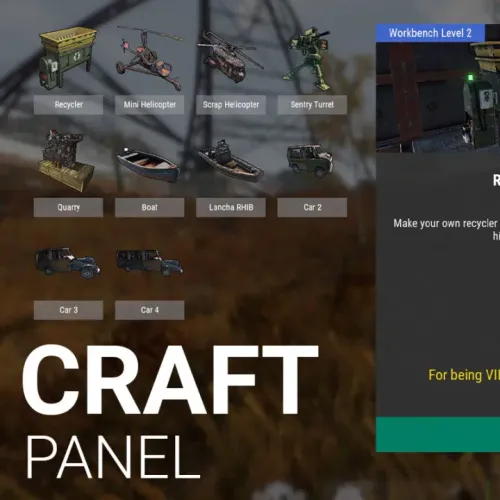
Rust / Server Plugins Craft Panel Custom CraftingRust Plugin Your recipes. Your rewards. One simple crafting panel. Give players a clear, customizable interface for crafting your server's items and rewards. Define the required ingredients, show what each recipe needs, and deliver either a game item or a reward through a command from another plugin. Custom recipes Ingredients and crafting results Permission control Panel and recipe access VIP discounts Configure discounts per recipe 01 / Video demo See Craft Panel in action Watch the video demo for a look at Craft Panel's crafting interface. Watch on YouTube 02 / How it works Turn ingredients into the rewards you choose Craft Panel lets you configure the ingredients needed to obtain each item. A recipe can create a game item directly or execute a command provided by a third-party plugin. Recipes that use commands from other plugins require those plugins to be installed and configured. Craft Panel provides the crafting interface; the configured plugin supplies the command-based reward. Install ImageLibrary to load the panel's recipe images and icons. 03 / Player interface Three clear areas for every recipe Recipe list Players browse a scrollable list and select the recipe they want to craft. Item information Give each recipe a full title, a header image and a description. Configure whether it needs a workbench and which level is required. Required ingredients Show the items and quantities players need to craft the selected recipe. Selecting another recipe updates the information and ingredient panels without rebuilding the entire interface. 04 / Configuration Make the panel fit your server Panel appearance. Customize the panel title and the colors of buttons, text and background. Recipe presentation. Set names, descriptions, images and icons for your items. Sound effects. Enable or disable sounds, or replace the three configured sound prefabs. Workbench access. Configure the button shown when opening a workbench and the permission required to see it. Recipe visibility. Choose whether players can see recipes they do not have permission to craft. New recipes. Duplicate an existing recipe entry and customize its settings. Basic plugin configuration knowledge is recommended. 05 / Permissions & command Control who can craft what Players open the panel with /craft. The default general access permission is craftpanel.use. Recipe access also requires the permission configured for that individual item. Default permission Purpose craftpanel.use Access to /craft craftpanel.btnworkbench Show the crafting button in the workbench Examples of per-item access permissions craftpanel.rhib.use craftpanel.boat.use craftpanel.supercard.use Use the permission names defined in your own recipe configuration. 06 / VIP benefits Set discounts for individual recipes Assign a VIP permission to a recipe and set its discount percentage. Each recipe can also define a separate no-cost permission. Recycler recipe example Access: craftpanel.recycler.use VIP: craftpanel.recycler.vip with a 10% discount No cost: craftpanel.recycler.nocost 07 / Configuration example Start with two example recipes The example below includes a recycler and a mini helicopter recipe. Both use commands from other plugins. Adjust the commands, permissions, images and ingredient costs for your server before using them. { "Custom": { "Title": "Craft Panel", "ID Item Default": 1, "Show even if you don't have permissions (you won't be able to craft)": true, "Show button when opening Workbench": true, "Sound Effects": true, "Sound Prefab 1": "assets/prefabs/tools/keycard/effects/swipe.prefab", "Sound Prefab 2": "assets/bundled/prefabs/fx/build/promote_toptier.prefab", "Sound Prefab 3": "assets/prefabs/misc/xmas/presents/effects/wrap.prefab", "Permission Use /craft": "craftpanel.use", "Permission to show the Button in the Workbench": "craftpanel.btnworkbench", "Color Title": "1.00 1.00 1.00 0.43", "Color Button List": "0.3 0.40 0.3 0.60", "Color Title Item": "0.2 0.30 0.2 0.60", "Color Scrollbar": "0.15 0.25 0.15 0.8", "Color Button Craft": "0.80 1.00 0.50 0.10", "Color Background Panel": "0.2 0.23 0.2 0.40", "Color Text VIP": "0.90 0.80 0.04 1.00", "Color Text Amount": "1.00 1.00 1.00 1.00", "Color Text Amount VIP": "0.90 0.80 0.04 1.00", "GUI Button Close - Color": "0.90 0.20 0.20 0.50", "GUI Button Close - Font Size": 20, "GUI Button Close - AnchorMin": "0.45 0.7", "GUI Button Close - AnchorMax": "0.55 0.725", "Img Block Item": "https://img.rustspain.com/craftpanel/block.png" }, "Craft": [ { "ID": 1, "Enabled": true, "Short Name": "Recycler", "Full Name": "Recycler at Home", "Img Full": "https://i.imgur.com/wdVWxDB.jpg", "Img Icon": "https://i.imgur.com/Vgcfs3n.png", "Description": "Make your own recycler to install it on your base. You can collect it by hitting with the hammer.", "Description Font Size": 13, "Craft Result": { "Command (keep empty to create item)": "recycler.give {steamID}", "Shortname": "", "Name Default": false, "Amount": 0, "Skin ID": 0 }, "Permission Use": "craftpanel.recycler.use", "Permission VIP": "craftpanel.recycler.vip", "Permission No Cost": "craftpanel.recycler.nocost", "VIP discount: 10 = 10%": 10, "Require Workbench? 0 = NOT, 1 = Level 1,...": 2, "Items": [ { "Item": "metal.fragments", "Amount": 50000, "Skin ID": 0 }, { "Item": "metal.refined", "Amount": 300, "Skin ID": 0 }, { "Item": "gears", "Amount": 50, "Skin ID": 0 }, { "Item": "fuse", "Amount": 10, "Skin ID": 0 }, { "Item": "techparts", "Amount": 15, "Skin ID": 0 } ] }, { "ID": 2, "Enabled": true, "Short Name": "Mini Helicopter", "Full Name": "Mini Helicopter", "Img Full": "https://i.imgur.com/vnZND1c.jpg", "Img Icon": "https://i.imgur.com/qg9aIGz.png", "Description": "Because having your own Helicopters whenever you want is cool too.nCraft your Helis, put them away and take them out when you need them.", "Description Font Size": 13, "Craft Result": { "Command (keep empty to create item)": "portablevehicles.give {steamID} minicopter", "Shortname": "", "Name Default": false, "Amount": 0, "Skin ID": 0 }, "Permission Use": "craftpanel.miniheli.use", "Permission VIP": "craftpanel.miniheli.vip", "Permission No Cost": "craftpanel.miniheli.nocost", "VIP discount: 10 = 10%": 25, "Require Workbench? 0 = NOT, 1 = Level 1,...": 0, "Items": [ { "Item": "metal.fragments", "Amount": 5000, "Skin ID": 0 }, { "Item": "propanetank", "Amount": 10, "Skin ID": 0 }, { "Item": "gears", "Amount": 10, "Skin ID": 0 }, { "Item": "roadsigns", "Amount": 5, "Skin ID": 0 }, { "Item": "sheetmetal", "Amount": 10, "Skin ID": 0 } ] } ] } 08 / Your ideas Help shape the next crafting feature Have a suggestion for Craft Panel? Share the improvement you would like to see. A configurable crafting duration is an idea for a future improvement.$15.00- 21 comments
- 1 review
-
- 2
-

-
- #craft
- #craft menu
- (and 4 more)
-
 This add-on will allow your players to upgrade their bases from the closet. The only plugin you can keep is /bgrade if you want to keep the ability for players to directly upgrade to a certain grade. However, for everything else this plugin can cover your needs.
- 451 comments
-
- 1
-
-
- #builder
- #automation
- (and 9 more)
-
Changed Status from Pending to No Response
-
Changed Status from Pending to Closed
-
Function GiveTo() if (itemType.Contains("{")) { string[] shortnameSplit = itemType.Split('{'); itemType = shortnameSplit[0]; } if (itemType.Contains("'")) itemType = itemType.Replace("'", ""); As an idea, it is not the best way to do it but I solved it that way. Then simply add a few single quotes to the item name in the data (Categories and Items). Example ... "apple", "'military flamethrower'", "apple", ... At least it works
-
In other words you want an option to be added to the config so that only the TC Owner and Admin can eliminate authorized players, correct?
-
Hello! Can you update carbon and try again? It should be resolved in the latest carbon update. Thank you so much!
-
You can give them the following permission so that they can change skin without consuming resources: bettertc.reskin.nocost I don't understand what you mean by the position of the interface. How do you want to modify it?
- 451 comments
-
- 1
-

-
- #builder
- #automation
- (and 9 more)
-
Hello! Were these players added manually from the new option to authorize TC players? If a player adds players to the list that do not exist on the server, the server is not able to recognize the name of said player, therefore it will show unknown. It will only load the name of the players who have been active in the wipe in question.
-
Changed Status from Pending to No Response
-
Hello! How can I get this problem replicated? I would need some context to try to figure out if I can fix it. Thank you very much: D
-
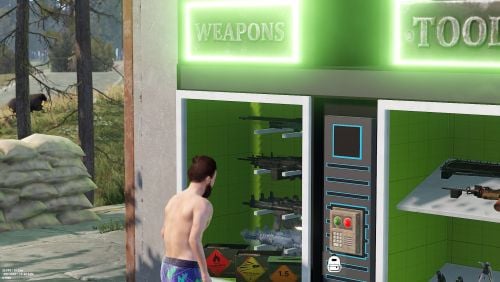 I just saw the new update. I would recommend adding individual machine variants. Some buyers may be interested in having a separate model, although with a little experience it can be separated and left as 1. However, the idea is very good.
 -
I just bought it. I really like the idea, I hope to see more variants soon
-
You may need to assign some permissions. Don't see the bettertc.upskin permission? Once you have the entire list of skins (by clicking on the blue button on the interface) you should see all the skins and that permission.
-
If your base is made of wood you can only reskin it to legacy wood. If you have a stone base, then you can reskin it to adobe, bricks or brutalist. This by clicking on the spray can. What do you want to improve from wood to stone with adobe? Then you will have to use the upgrade option.
- 451 comments
-
- 1
-
-
- #builder
- #automation
- (and 9 more)
-
Changed Status from Pending to Closed
-
Use plugin Xperience?
-
You don't want the button to be reflected on players who don't have permissions, you mean? I have no intention of doing that, as I prefer to show that the option exists so that players can see it and be interested in it. This can benefit VIPS sales.