

H8M3
-
Posts
26 -
Joined
-
Last visited
Content Type
Profiles
Warranty Claims
Downloads
Forums
Store
Services
Downloads Plus Support
DOWNLOADS EXTRA
Reels
Everything posted by H8M3
-
Version 5.0.0
8 downloads
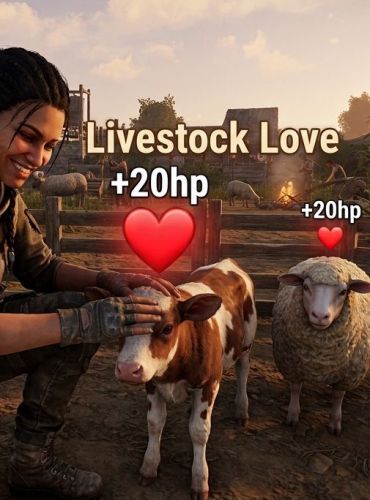
Livestock Love Livestock Love is a fully customizable Rust plugin that lets players safely interact with, pet, and feed farm animals! Bring a little warmth to your base's ranch or farm while helping your livestock recover from damage. When a player approaches an animal and presses their Reload key (R), their character plays a friendly wave animation, and the animal momentarily pauses to accept the love—instantly healing them and displaying a happy chat notification. Features Simple Interaction: Just look at any target livestock and press R to pet and feed them. Synchronized Healing: Instantly restores health (configurable, defaults to +20 HP) to hurt animals. Smart Interventions: Temporarily pauses the animal's movement so they don't wander off mid-interaction. Per-Animal Cooldowns: Built-in anti-spam cooldown protection per player and animal. Custom UI Chat Alerts: Integration with ImageLibrary to show a cute calf avatar right next to the plugin's chat messages. Fully Customizable: Easily tweak heal amounts, cooldown timers, max petting distance, and chat colors directly inside your JSON config. Commands & Interaction Unlike traditional plugins that clutter the chat bar, Livestock Love keeps gameplay seamless with an intuitive hotkey control: Press [R] (Reload Key): Look at a piece of livestock within petting range (3.5 meters by default) and press your reload key to pet, calm, and heal them. Permissions To prevent unauthorized players or stowaways from interacting with your farm animals, ensure you assign the correct permission: livestocklove.use — Required for non-admin players to use the petting and feeding system. (Note: Server Administrators bypass this permission check automatically). Supported Animals The plugin automatically detects and interacts with the following short prefab types: Cows & Bulls Calves & Lambs Sheep & Rams Horses Chickens Configuration File (/oxide/config/LivestockPetting.json) When the plugin is loaded for the first time, a configuration file will be generated automatically. You can modify these values to customize the experience to fit your server's style or economy. Default ConfigurationFree -
 Id be Open to suggestions. there seem to still be a few mini glitches ive noticed. and im trying to resolve those issues. If you notice anything please let me know.
 -
Version 1.7.3
22 downloads
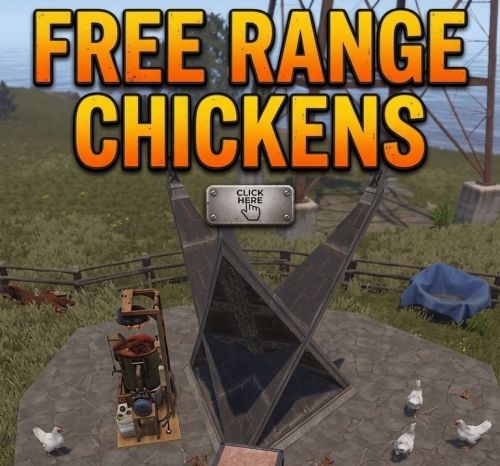
Brought to you by H8M3 and AI (mostly AI) Introducing Free Range Chickens— (Pair this plugin with EggHopper) TURN EGGS INTO LIVESTOCK... INSTANTLY! No more waiting around for coops. Toss or drop a standard chicken egg onto the ground inside your Tool Cupboard (TC) zone, and watch it burst into a live, fully tracked chicken right before your eyes! RESTRAINED BOUNDARY PROTECTION Your chickens are smart, but the server is smarter. Our background tracking matrix checks your livestock every single second. If a chicken tries to escape your compound or wander past your TC borders, the boundary system handles it instantly. DYNAMIC SUNRISE YIELDS Wake up to a fresh harvest! Every single morning at game sunrise, your flock runs a customized 70% rolling chance to lay fresh, harvestable eggs directly onto your base floors. REFINED LIFECYCLE AGING Farming isn't static! Your chickens live an interactive lifecycle. To keep your farm active and highly engaging, chickens naturally age over time and stop laying eggs once they complete the first 25% of their total lifespan. Manage your flock, harvest the elders, and keep your production lines moving! THIEF-PROOF ANTI-GRIEFING Keep your hard work secure. If an enemy player or roamer gets into your compound, they can't touch your flock! The plugin blocks all incoming damage from unauthorized players. Only players authorized on your base TC have permission to harvest your livestock! FreeRangeChickens Configuration Guide Chicken & Spawning Settings Max Chickens Per Zone (Default: 10) (i recommend not changing this above 10. i personally use 5) The absolute maximum number of chickens allowed to exist at one time inside a single Tool Cupboard (TC) area. Lifespan In Game Days (Default: 50.0) How many in-game Rust days a chicken will live before it naturally dies of old age. RustDay Length In Minutes (Default: 45.0) How long a full day/night cycle lasts on your server in real-world minutes. Ensure this matches your server's time settings so chicken lifespans calculate accurately. Safe Spawn Height Offset (Default: 1.2) How high (in meters) above the dropped egg the chicken will physically spawn. This prevents chickens from getting stuck inside the ground or floors. Boundary Check Interval (Default: 1.0) How often (in seconds) the system checks if a chicken has wandered outside of the TC area. If they escape, they are killed instantly. Egg Laying Mechanics Egg Lay Chance Percent (Default: 70.0) The percent chance that a chicken will successfully lay an egg when the sun rises each morning. Egg Lay Cutoff Percentage (Default: 25.0) The point in a chicken's life where it gets "too old" and stops laying eggs. For example, at 25%, a chicken that lives for 450 minutes will stop laying eggs after its first 112.5 minutes. Item Drop Amount (Default: 1) The number of eggs a chicken drops at a time when it successfully lays. Technical Prefabs & Identifiers Chicken Prefab (Default: "assets/rust.ai/agents/chicken/chicken.prefab") The internal Rust file path for the chicken asset. Do not change unless you want to spawn something else (like bears). EggShortname (Default: "egg") The item shortname for the item that triggers hatching and laying. Chicken Coop Prefab Snippet (Default: "chickencoop") A safety check keyword. Eggs dropped inside or by a vanilla Chicken Coop will be ignored by this plugin so they don't break vanilla mechanics. Chat & Message Customization Chat Command (Default: "farmcheck") The command players type in game chat (e.g., /farmcheck) to see their current chicken count. Message Prefix (Default: "[Chicken Farm]") The text tag that shows up at the beginning of every chat message sent by this plugin. Laying Message (Default: "Your chickens cluck happily...") The broadcast message sent to players when their chickens successfully lay eggs. MsgNotInsideTc The error message sent if a player tries to run the chat command outside of a TC zone. MsgFarmStatusHeader / MsgChickensInZone / MsgAvailableCapacity The text labels used to build the status menu when checking a farm. Color Codes (Hex Formats) ColorPrefix (Default: "#ffa500" - Orange) The color of the [Chicken Farm] tag in chat. ColorStatusFull (Default: "#ff4d4d" - Red) The color the chicken counter turns when a TC zone has reached its maximum capacity. ColorStatusAvailable (Default: "#4df3ff" - Cyan) The color the chicken counter turns when there is still room left for more chickens to hatch.Free -
Version 3.2.0
16 downloads
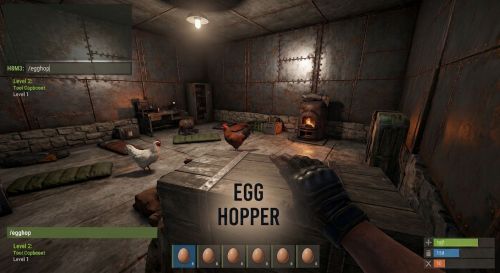
EggHopper (Made for FreeRangeChickens Plugin) Tired of cleaning up loose Wild Laid eggs or lagging out your server? EggHopper is an automated, server-friendly utility that automatically gathers dropped and laid eggs within a 30-meter radius and deposits them directly into a designated storage box. With built-in lag prevention and customizable capacity caps, it’s the perfect companion mod for custom farming servers and poultry enthusiasts! Key Features Smart Radius Gathering: Scans a generous 30-meter radius around your assigned hopper box to vacuum up loose eggs seamlessly. Simple In-Game Setup: Players don't need to mess with coordinates or complex menus. Just look at any standard storage box with TC authorization and type /egghop to instantly turn it into an active hopper. Anti-Spam Safety Buffer: Newly laid eggs must sit on the ground for at least 5 seconds before being collected. This prevents collection glitches and ensures compatibility with hatching plugins. Server Performance Protections: Features a Configurable Box Cap to ensure hoppers don't overflow your server's entities. Automatically deletes world items if the box is full to prevent server-wide floor lag. Utilizes optimized Facepunch.Pool memory allocation to guarantee zero performance drops, even on high-population servers. How It Works (Player Guide) Ensure you have Building Privilege in the area. Stand close and look directly at the storage box you want to use. Open your chat box and type: text /egghop Done! The plugin will confirm the link. Any loose eggs dropped nearby will now safely route to your box after 5 seconds. To unassign a box and return it to a normal container, simply look at it and type /egghop again. Configuration & Customization The configuration file is incredibly lightweight and easy to manage for server owners: json { "MaxEggsInBox": 120 } Use code with caution. MaxEggsInBox: The maximum total number of eggs allowed inside the hopper box at any given time. Once this limit is hit, the hopper will safely clean up any additional nearby ground entities to protect server frames. Perfect Compatibility EggHopper pairs beautifully alongside FreeRangeChickens, allowing server owners to create fully automated, high-yield chicken farms that practically run themselves without risking server performance!Free -
Version 1.2.3
28 downloads
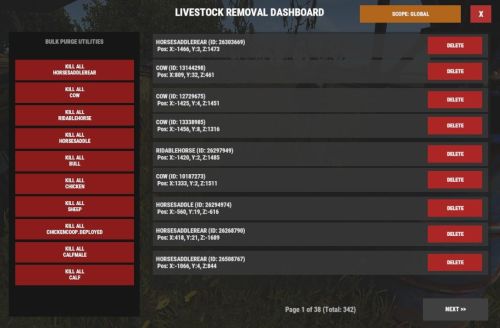
Livestock Manager (v1.2.3) Developer: Ai and H8M3 (Mostly Ai) Description: Provides a clean, high-performance in-game CUI dashboard to view, paginate, and bulk-delete livestock entities with instant Area or Global filtering. NOTE: This utility has the Ability to remove Livestock from the ENTIRE MAP. Its intended mostly for Test servers. Chat Command /lrd Description: Opens the main livestock management interface on your screen. Permission Required: livestockmanager.admin (or server administrator status). Console Commands These console commands are executed automatically when you interact with the UI elements. They can also be triggered directly from the client F1 console or your server's RCON console: livestock.ui.close Description: Safely destroys the CUI layout and frees up your screen pointer. livestock.ui.page <number> Description: Changes the active listing page. Examples: livestock.ui.page 1 moves to the next page; livestock.ui.page -1 returns to the previous page. livestock.ui.delete <NetworkID> Description: Kills a specific livestock entity instantly by its server network ID. Example: livestock.ui.delete 1234567 livestock.ui.killall <shortname> Description: Purges active entities matching that specific animal prefab type. Respects your active UI scope filter (Build Area vs. Global Map). Example: livestock.ui.killall horse or livestock.ui.killall chicken livestock.ui.togglefilter Description: Alternates the dashboard scope back and forth between your local Build Area and a Global Map query. Permissions & Setup To give a group or player access to run the chat dashboard, use your server terminal or F1 console to grant the custom Oxide permission string: oxide.grant group admin livestockmanager.admin Use code with caution. (Alternatively, you can grant it to an individual player using: oxide.grant user <Name/SteamID> livestockmanager.admin)Free -
Version 1.6.2
36 downloads
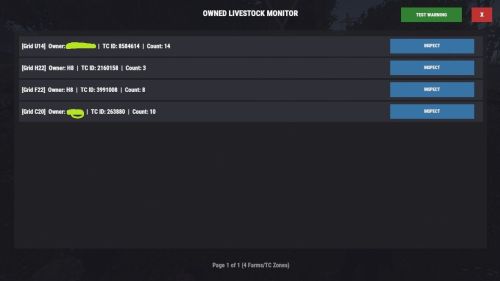
What is Owned Livestock Tracker? Made with the help of AI Owned Livestock Tracker is the ultimate administrative and performance-control utility for Rust server owners who want to manage player-owned livestock, ranching loops, and animal farms. Large-scale animal farms are notorious for causing server-side entity lag and frame drops; this plugin acts as an automated custodian to protect your server's performance while keeping players fully informed. Key Capabilities Automated Population Control: It continuously tracks animal densities around Tool Cupboard (TC) zones. If a player’s farm exceeds your configured threshold, the plugin automatically culls the excess down to a stable line, intelligently targeting the oldest entities first. Performance Protection: Instead of constantly draining server resources by scanning the map, it uses an optimized, event-driven framework that only triggers when animals are spawned or killed. Admin Dashboard HUD: Admins gain access to a sleek, fully interactive, native in-game UI menu. From this menu, you can see a paginated list of every farm on the server, who owns it, what grid it is in, and exactly how many animals are there. Targeted Moderation: Within the UI, admins can "inspect" any specific TC zone, view a list of every animal inside it, instantly kill individual animals by network ID, or wipe an entire problematic lag-source using a "Purge All" button. Discreet Admin Slaughter Logs: To prevent offline griefing or unmonitored animal slaughter, the plugin broadcasts a real-time message to active administrators and authorized moderators when an animal is killed, logging who did it and the exact map grid where it happened—completely hidden from regular players. Player-Friendly Notifications: When the automated system culls an overcrowded farm, it displays a professional, immersive full-screen warning UI to the base owner when they are online, explaining the server limit so they understand exactly why it happened without needing to open an admin support ticket. Command Directory Chat Commands /ol Permission: ownedlivestocktracker.admin / Server Admin Description: Launches the main overview administration matrix dashboard. This maps out active zones, showing coordinates, current ownership links, and aggregated livestock entities grouped under Tool Cupboards. Console Commands ownedtracker.ui.testwarning Permission: Admin Only Description: Instantly fires a sandbox version of the LivestockWarningUI modal onto your screen, simulating a population threshold violation in Grid A1 so you can inspect the design layout. ownedtracker.ui.close Description: Safely terminates the root dashboard UI and flushes active navigation state references from server memory. ownedtracker.ui.closewarning Description: Destroys the automated population overflow warning notification wrapper on the target player's screen. ownedtracker.ui.page <1 / -1> Description: Handles grid pagination navigation by shifting your dashboard list view index offset forward or backward. ownedtracker.ui.inspect <tcId> Description: Swaps view perspectives from global server zones into a localized inspection window targeting a specific Tool Cupboard's network asset ID. ownedtracker.ui.delete <netId> Description: Issues a direct server invocation to instantly cull and kill a specific tracked livestock entity by its Network ID. ownedtracker.ui.purgeuser <tcId> Description: Runs an iterative filter scan on active server entities to slaughter every matching livestock animal currently bound to that specific Tool Cupboard radius zone. Configuration & Customization Guide Upon your first launch, a configuration file will automatically be generated in your server files under oxide/config/OwnedLivestockTracker.json. Open this file to easily scale limits, adjust colors, or fine-tune entity definitions to match your server's needs: { "MaxPopulationCap": 50, "TargetCullCount": 35, "WarningPanelColor": "0.15 0.05 0.05 0.98", "MainPanelColor": "0.08 0.08 0.1 0.98", "TrackedPrefabs": [ "cow", "bull", "calf", "sheep", "lamb", "chicken", "horse", "scarecrowrowsheep", "chicken.population.item" ] } Use code with caution. Property Explanations: MaxPopulationCap (int) — The maximum number of allowed tracked animals inside a single Tool Cupboard radius zone before an automated server cleanup triggers. TargetCullCount (int) — The safe baseline target the system drops the animal population down to during an intervention. WarningPanelColor (string) — The RGBA background color format used to render the full-screen limit warning popup for players. MainPanelColor (string) — The RGBA background color layout configuration used to render the administrative overview dashboard grid. TrackedPrefabs (List) — A customized collection of lowercase prefab string targets monitored by the tracking engine. You can seamlessly add or remove custom animal mod prefabs here.Free -
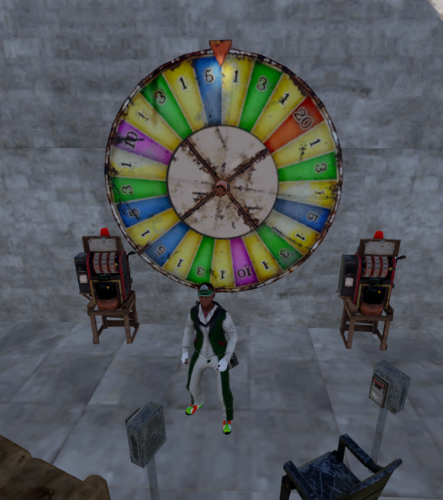 i've used this for awhile now, i like it overall. what i like the most is being the server owner i can just give myself any amount of scrap, play all the numbers and will big. the announcement always makes folks come to the casino to try their luck. biggest prize so far was a 20 match off 40k
 -
 love this plugin. fixed it myself to work for (oct) . i'm still interested in keeping the island map and stuff i build there if you can get around to it. (like if i reboot server it all goes away) or i could try i guess, just not sure where to start with that modification. Ill replace my copy with whatever you update later, but yeah im still interested in those addition's. hmu
 -
 pretty sure this needs an update
 -
 hi, this mod works fine, i was just wondering how i can disable this mod and get the keys back. I removed the plugin but its still disabled
 -
 the blue fliter doesnt stop the navmesh spam anyway, only a reboot ever does. im looking forward to trying this on my server. 80% of games now are coded using ai help, i dont see a problem, i can always just ask an ai to fix this code for me if it ever stops. seems sort of easy. not sure why theres an argument. ill be back with an actual review in a couple weeks. thanks.
 -
 had to, neither worked without both having the id, i mean i guess i could have just hosted the photo, but what difference does it make
 -
{ "Grade": 2, "SkinID": 10472, "SkinName": "Crypt", "SkinImageUrl": "https://dl.scalbox.com/Rust/Plugins/BuildingSkin/Crypt_skin.png" }
-
{ "Grade": 2, "SkinID": 10472, "SkinName": "Crypt", "SkinImageUrl": "https://dl.scalbox.com/Rust/Plugins/BuildingSkin/Crypt_skin.png" } just add this to your config
-
Anyway to make it keep the same deepsea map after a reboot or whatnot? also is there any way to spawn the deepsea map smaller? Thanks
-
well. i bought a different version than this when deepsea opened. it constantly reset DS , but other than that it worked ok. i guess. But i wanted to try this version. Installed it just about a week ago. maybe less. i did add a f1 command to help me out a wee bit. "deepsea.wipeduration 2500000" so far i have to give it 5 star. I REALLY like the chat Ui for in/out yada yadda. most of the settings work correctly at my end with the exception of island count. im not sure if its me or the mod, but im running a custom map with many many many islands for the mainland so its not really an issue im going to look into Atm. Thanks for the share !
-
i decided to try this one out. the other one , well its been makin me mad, hopefully this ones more stable. so far it seems good. but ill come back in a week or so and give a review on what i think.. thanks
-
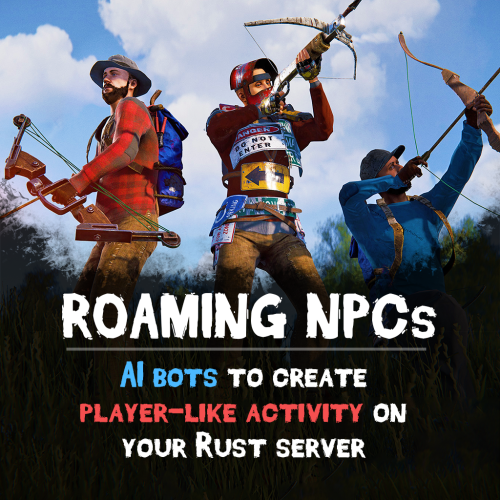 I really like the roaming npc, makes my empty server feel like it has players, srt of @ least the npc's are having fun when im at work.
 -
Will this work with the paid version of deepsea options or would there be conflicts? Id like to try it if it doesnt mess my server up.
-
ok yeah i may have been in vanish at the time, i forget, thnx ill see if i have any more issues.
-
trying to goto deepsea after your last update and i just get stuck with a terrain vio and booted off my server