.thumb.jpg.dc3a4b6a2286e4cb7b6cc7cb17e28e3c.jpg)
.thumb.png.6340e6ab92f9d700c9d5bc3a8274c0c6.png)
Livestock Manager (v1.2.3)
Developer: Ai and H8M3 (Mostly Ai)
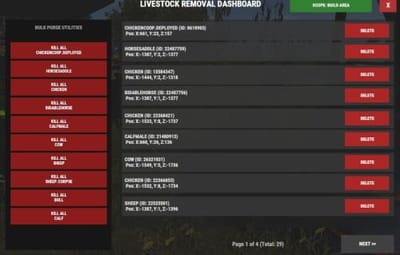
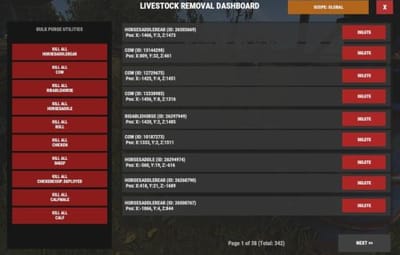
Description: Provides a clean, high-performance in-game CUI dashboard to view, paginate, and bulk-delete livestock entities with instant Area or Global filtering.
NOTE: This utility has the Ability to remove Livestock from the ENTIRE MAP.
Its intended mostly for Test servers.
 Chat Command
/lrd
Description: Opens the main livestock management interface on your screen.
Permission Required: livestockmanager.admin (or server administrator status).
 Console Commands
These console commands are executed automatically when you interact with the UI elements. They can also be triggered directly from the client F1 console or your server's RCON console:
livestock.ui.close
Description: Safely destroys the CUI layout and frees up your screen pointer.
livestock.ui.page <number>
Description: Changes the active listing page.
Examples: livestock.ui.page 1 moves to the next page; livestock.ui.page -1 returns to the previous page.
livestock.ui.delete <NetworkID>
Description: Kills a specific livestock entity instantly by its server network ID.
Example: livestock.ui.delete 1234567
livestock.ui.killall <shortname>
Description: Purges active entities matching that specific animal prefab type. Respects your active UI scope filter (Build Area vs. Global Map).
Example: livestock.ui.killall horse or livestock.ui.killall chicken
livestock.ui.togglefilter
Description: Alternates the dashboard scope back and forth between your local Build Area and a Global Map query.
 Permissions & Setup
To give a group or player access to run the chat dashboard, use your server terminal or F1 console to grant the custom Oxide permission string:
oxide.grant group admin livestockmanager.admin
Use code with caution.
(Alternatively, you can grant it to an individual player using: oxide.grant user <Name/SteamID> livestockmanager.admin)