
 What is Owned Livestock Tracker?
Made with the help of AI
Owned Livestock Tracker is the ultimate administrative and performance-control utility for Rust server owners who want to manage player-owned livestock, ranching loops, and animal farms. Large-scale animal farms are notorious for causing server-side entity lag and frame drops; this plugin acts as an automated custodian to protect your server's performance while keeping players fully informed.
 Key Capabilities
Automated Population Control: It continuously tracks animal densities around Tool Cupboard (TC) zones. If a player’s farm exceeds your configured threshold, the plugin automatically culls the excess down to a stable line, intelligently targeting the oldest entities first.
Performance Protection: Instead of constantly draining server resources by scanning the map, it uses an optimized, event-driven framework that only triggers when animals are spawned or killed.
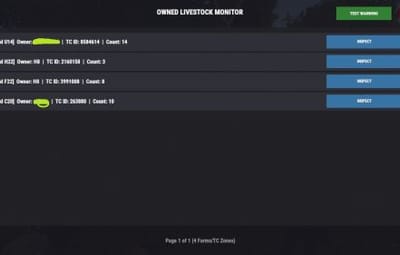
Admin Dashboard HUD: Admins gain access to a sleek, fully interactive, native in-game UI menu. From this menu, you can see a paginated list of every farm on the server, who owns it, what grid it is in, and exactly how many animals are there.
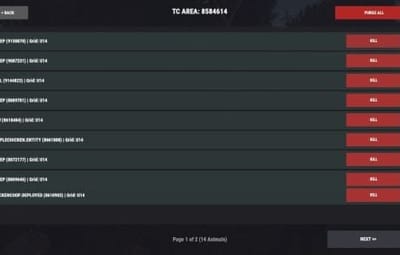
Targeted Moderation: Within the UI, admins can "inspect" any specific TC zone, view a list of every animal inside it, instantly kill individual animals by network ID, or wipe an entire problematic lag-source using a "Purge All" button.
Discreet Admin Slaughter Logs: To prevent offline griefing or unmonitored animal slaughter, the plugin broadcasts a real-time message to active administrators and authorized moderators when an animal is killed, logging who did it and the exact map grid where it happened—completely hidden from regular players.
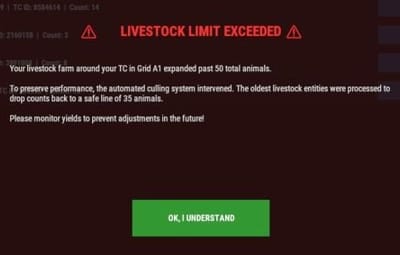
Player-Friendly Notifications: When the automated system culls an overcrowded farm, it displays a professional, immersive full-screen warning UI to the base owner when they are online, explaining the server limit so they understand exactly why it happened without needing to open an admin support ticket.
 Command Directory
 Chat Commands
/ol
Permission: ownedlivestocktracker.admin / Server Admin
Description: Launches the main overview administration matrix dashboard. This maps out active zones, showing coordinates, current ownership links, and aggregated livestock entities grouped under Tool Cupboards.
 Console Commands
ownedtracker.ui.testwarning
Permission: Admin Only
Description: Instantly fires a sandbox version of the LivestockWarningUI modal onto your screen, simulating a population threshold violation in Grid A1 so you can inspect the design layout.
ownedtracker.ui.close
Description: Safely terminates the root dashboard UI and flushes active navigation state references from server memory.
ownedtracker.ui.closewarning
Description: Destroys the automated population overflow warning notification wrapper on the target player's screen.
ownedtracker.ui.page <1 / -1>
Description: Handles grid pagination navigation by shifting your dashboard list view index offset forward or backward.
ownedtracker.ui.inspect <tcId>
Description: Swaps view perspectives from global server zones into a localized inspection window targeting a specific Tool Cupboard's network asset ID.
ownedtracker.ui.delete <netId>
Description: Issues a direct server invocation to instantly cull and kill a specific tracked livestock entity by its Network ID.
ownedtracker.ui.purgeuser <tcId>
Description: Runs an iterative filter scan on active server entities to slaughter every matching livestock animal currently bound to that specific Tool Cupboard radius zone.
 Configuration & Customization Guide
Upon your first launch, a configuration file will automatically be generated in your server files under oxide/config/OwnedLivestockTracker.json. Open this file to easily scale limits, adjust colors, or fine-tune entity definitions to match your server's needs:
{ "MaxPopulationCap": 50, "TargetCullCount": 35, "WarningPanelColor": "0.15 0.05 0.05 0.98", "MainPanelColor": "0.08 0.08 0.1 0.98", "TrackedPrefabs": [ "cow", "bull", "calf", "sheep", "lamb", "chicken", "horse", "scarecrowrowsheep", "chicken.population.item" ] }
Use code with caution.
 Property Explanations:
MaxPopulationCap (int) — The maximum number of allowed tracked animals inside a single Tool Cupboard radius zone before an automated server cleanup triggers.
TargetCullCount (int) — The safe baseline target the system drops the animal population down to during an intervention.
WarningPanelColor (string) — The RGBA background color format used to render the full-screen limit warning popup for players.
MainPanelColor (string) — The RGBA background color layout configuration used to render the administrative overview dashboard grid.
TrackedPrefabs (List) — A customized collection of lowercase prefab string targets monitored by the tracking engine. You can seamlessly add or remove custom animal mod prefabs here.

.thumb.png.6340e6ab92f9d700c9d5bc3a8274c0c6.png)