


-
Posts
2,232 -
Joined
-
Last visited
-
Days Won
18
Content Type
Profiles
Warranty Claims
Downloads
Forums
Store
Services
Downloads Plus Support
DOWNLOADS EXTRA
Reels
Everything posted by ZEODE
-
Hey, thanks for the reply, in order for me to be able to help further can you please try and answer all my questions in more detail, providing the specific details I requested? For instance, what do you mean by reinstaling? Did you delete the data file first? If you can be more specific I can likely help you better. Thanks.
-

Version 2.0.2
875 downloads
Simple plugin to allow anyone using Server Rewards to wipe player RP with server wipe, which is a feature not available natively within the Server Rewards plugin. Config Options: "Reset ServerRewards player RP on wipe": true/false Enable/disable clearing RP on new save (wipe) "Backup player RP before wiping": true/false Enable/disable backup player RP data before clearing (backs up to "/data/ServerRewards/backups/player_balances_yyyy-MM-dd_HH-mm-ss.json") "Call 'server.save' after wiping so SR writes new data to disk immediately (protects against server crash)": true/false Enable/disable immediate server save after clearing RP so Server Rewards writes the new data to disk immediately. If disabled it is written on the next natural server save. Enabling protects against server crashes that would then cause RP clearing to fail. Permissions: serverrewardswipe.admin - To use clearrpdata command below Additional console command available to trigger a RP wipe at any time while server is running: clearrpdata Default Config: { "Options": { "Reset ServerRewards player RP on wipe": true, "Backup player RP before wiping": true, "Call 'server.save' after wiping so SR writes new data to disk immediately (protects against server crash)": false }, "Version": { "Major": 2, "Minor": 0, "Patch": 0 } }Free -
Changed Status from Pending to Can't Reproduce Changed Fixed In to 1.2.3
-
Hi, thanks for the report. I am unable to reproduce this error. Can I ask if you were using a previous version of the plugin or was it a fresh install of the latest version? What is the chat message when you try and throw these nades? Are there any error messages in the server console? Did you try unloading the plugin, deleting the data file and reloading it? Are the Bradley and Heavy perms added successfully to you?
-

Required components not listed properly
ZEODE replied to BetterDeadThanZed's Support Report in Support
Changed Status from Pending to Not a Bug Changed Fixed In to 1.1.11 -
Also broken for me, same error when using server rewards.
-
Changed Status from Work in Progress to Closed
-
Changed Status from Pending to Work in Progress Changed Fixed In to Next Version
-
Never mind, I realise my error. I have added some error checking which will stop these errors. I will update it later today after I check a couple more things. It shouldn't stop the plugin functioning for now though I imagine?
-
Please provide any more details of when this error occurred if possible? Which grenade was it? Who was using it? etc? Also, did this error happen when someone was using a NPC Grenades or at another time?
-
All sorted, let me know how you get on or if any issues.
-
Changed Status from Pending to Closed Changed Fixed In to 1.2.1
-
Hey, thanks for the report. I have been busy with work and family. I will try and look at this over the next couple days on my test server and let you know.
-
Version 1.1.11
648 downloads
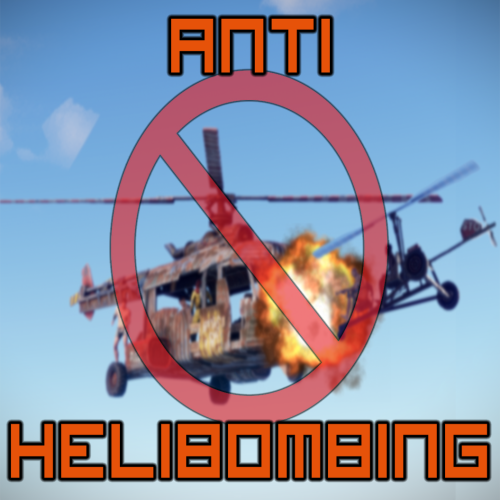
This plugin prevents collision damage to players helicopters within safe zones such as Outpost, Bandit Camp, etc by "Helibombing". There are options for helicopter spawn protection timer or to simply block all collision damage within safe zones. If you get helibombed while under protection, just stay seated and ride it out. You will not die as the heli will not blow up! What is Helibombing? Helibombing is a form of griefing, where players crash their helicopters into others to make them crash and blow up, often killing the other player in the process. This can be abused within Safe Zones, where players would otherwise be protected from damage by others. How does it work? Block all damage - does just that. Regardless of any other config options, all collision damage in safe zones is blocked. Collision cooldown timer - Any collision that happens inside a safe zone will provide protection for the specified time even if the player gets knocked out of the safe zone. Spawn protection timer - Gives newly spawned helicopters at safe zones protection for a set time, giving players a chance to take off and fly away from the safe zone safely. If a player without spawn protection bombs another with, only the attacking player will take damage. (Note: Block all damage option must be disabled to use spawn protection.) Kick player option - When enabled, any player who is involved in a number of collisions over the collision threshold will get kicked from the server. There is also an config option to block crush damage from Scrap Heli to players within safe zones, where other players fly their Scrap Heli and land it on top of players to kill them. Helicopter collisions within Safe Zones are logged by the plugin. Use the universal chat/console commands to see if certain players are helibombing regularly. Limitations Limitations within the game means the plugin cannot differentiate collisions between other vehicles, terrain, monuments or buildings. It also cannot recognise who was the aggressor and who was the victim of helibombing, both pilots (players) involved will be logged regardless. Use the logged data with caution before taking action against players, likewise keep this in mind if deciding to use the auto kick option! Permissions antihelibombing.admin (to use commands) antihelibombing.blacklist (players heli will always take damage, for very naughty boys - sorry Oblivion! ) antihelibombing.kickprotect (protect players from auto kick) Easy Config Block ALL heli damage in Safe Zones (overrides spawn protection) Use collision cooldown timer (prevent damage outside Safe Zone due to collision inside) Collision cooldown time (seconds) Use heli spawn protection cooldown timer Spawn protection cooldown time (seconds) Kick players who break the Safe Zone collision threshold Safe Zone collision threshold (example: 20) Block crush damage to players from Scrap Heli in safe zones Clear player collision data on wipe Use chat prefix Chat prefix Commands /ahb <Steam64ID> (View logged collision data for that player) /ahb.clear (Clear all player data) /ahb.clear <Steam64ID> (Clear all logged collision data for that player) (For console commands remove the " / " prefix.) Shout out to Oblivion! (Don't hate me! )Free -
 Yeah thanks, I'm not sure what happened, I saw a load of duplicates and some that seemed broken. I tried deleting them. Not sure if it was something I did? Thanks though.
 -
I have added an option in the latest update to block damage to player bases by Bradley
-
Bots are runing away ,dont shoot owner if there is a turret
ZEODE replied to copcopekcro's Support Report in Support
Changed Fixed In from 1.1.18 to 1.1.17 -
Bots are runing away ,dont shoot owner if there is a turret
ZEODE replied to copcopekcro's Support Report in Support
Changed Status from Work in Progress to Closed Changed Fixed In from 1.1.17 to 1.1.18 -
Changed Status from Gremlins to Closed Changed Fixed In from 1.1.17 to 1.1.18
-
There must have been an issue with the site when I uploaded the latest version. Should be available now, 132KB file.
-
Changed Status from Pending to Not a Bug Changed Fixed In to 1.1.18
-
This shouldn't happen anymore since I added another error check. But without knowing more about the other plugins you use for NPC I can't say what exactly caused the error. But it should not happen again, but you might find that there is an issue where corpse loot of my plugin NPC isn't as you expect. For any other issues, please open a Support Request in the Support section, not the Discussion section. Thanks.
-
Hi, I have no plans to add more functionality to this plugin at the moment. I have a lot on in my personal life so can't dedicate the time to develop it right now. Thanks for your suggestion though.
-
This error is occurring when you kill a NPC and the loot is populated into the corpse by the plugin. Do you have another plugin which alters loot of NPC corpses at all? It's odd though because I have a check in my code to only change corpse loot on the plugins own spawned NPC's.
-
Can you tell me any details of when and how this happens? Using the pickup command or hammer hit? etc
