

-
Posts
38 -
Joined
-
Last visited
Content Type
Profiles
Warranty Claims
Downloads
Forums
Store
Services
Downloads Plus Support
DOWNLOADS EXTRA
Everything posted by Khaled
-
 i'll add tiered permissions in an upcoming update so you can fully control access per group
 -
Yes, permission tiers are possible (ammo only / toggle / full control) i can add that the link distance (3.0) is only for binding the box, After that, everything works by building ID, not distance and yes, it works with large bases (multi-floor, 50+ turrets). It’s optimized, but better to keep normal/slow settings for stability
-
 The problem, along with other issues related to the main interface, has been resolved, and an update will be released accordingly
- 22 comments
-
- 1
-

-
- #fuel
- #minicopter
- (and 4 more)
-
 You can access the support server via Discord and share a video on the support channel to receive appropriate assistance
 -
Thank you for your comment, but I didnt understand exactly what you meant
-
metal.refined = HQM
-
Version 1.0.4
11 downloads
Recycler Station adds a deployable recycling station that allows players to recycle items directly from their base The station uses a simple system with two containers: INPUT - where players place recyclable items OUTPUT - where all recycled resources are automatically moved Items placed in the INPUT box are processed automatically by the recycler, creating a smooth and hands-free recycling workflow The system is designed to feel natural in Rust while improving convenience for players and server owners - Features - Dedicated INPUT and OUTPUT boxes - Safe pause handling when OUTPUT is blocked or full - Protected station parts - Tool Cupboard range and authorization checks - Purchase support for Resources, Economics, or ServerRewards - EN and RU language support - Permissions - recyclerstation.use - Commands - /rs buy - /rs help - Admin Commands - /rs give <player> [amount] - /rs remove - Config { "Debug": false, "UseVanillaSpeed": true, "CustomSpeedMultiplier": 1.0, "OutputResumeDelaySeconds": 8.0, "Purchase": { "Enabled": true, "UseResources": true, "UseEconomics": false, "UseServerRewards": false, "MaxPurchasesPerPlayer": 100, "ResourcesCost": [ { "Shortname": "scrap", "Amount": 500 }, { "Shortname": "metal.fragments", "Amount": 5000 }, { "Shortname": "metal.refined", "Amount": 50 }, { "Shortname": "gears", "Amount": 10 } ], "EconomicsCost": 2500.0, "ServerRewardsCost": 800 } } Need Support :$19.99 -
Changed Status from Work in Progress to Fixed
-
Changed Status from Pending to Work in Progress Changed Fixed In to Next Version
-
The update will be released within minutes
-
Thanks for the screenshot. The numbers shown here represent total accumulated hook time since server start, not real-time usage Because of that, higher values are expected on servers with longer uptime or more player activity From this screenshot, "FuelMonitor" appears to be operating within normal ranges and does not stand out as a performance concern.
-
Version 1.0.1
8 downloads
Smart Turret Supply & Defense Management TurretStock is a lightweight automation plugin that helps players manage their base defenses per building using a single linked storage box. Each base works independently, with no cross-base interference, no global toggles, and no unnecessary UI clutter. The plugin is designed for clean gameplay and serious servers, giving players simple and reliable control over their turrets without adding lag or complexity. How it works Each building can be linked to one storage box. That box becomes the supply and control point for all defenses in that building only. Players can own multiple bases, and each base remains fully isolated. Power Control Server owners can choose whether turrets must be powered by electricity or can operate without power. This allows full control over how defenses behave, while keeping the system simple and balanced. (Auto Turret only) Key Features • Each base works separately (no cross-base issues) • One linked storage box per base • Turrets can work with or without electricity (server option) • Automatically supplies turrets, SAM sites, shotgun traps, and flame turrets • Smart ammo and weapon selection with balanced distribution • UI only shows when opening the linked box • Optimized for large servers and high player counts Commands /ts link – Link a storage box to the building /ts unlink – Unlink the storage box Permissions turretstock.use – Allows players to use the plugin turretstock.admin – Administrative access Example Config: { "General": { "LinkDistance": 3.0 }, "Power": { "TurretsWorkWithoutElectricity (true = ignore power)": true }, "Behavior": { "DefenseRefillMode (Slow | Normal | Fast)": "Normal" }, "Limits": { "AutoTurretAmmo": 128, "SamSiteRockets": 12, "ShotgunTrapShells": 24, "FlameTurretFuel": 200 } }$19.99 -
Yes, thats possible. With the next update, an optional permission-based config option will be added, allowing the fuel gauge to be available to VIP players only if enabled
- 22 comments
-
- 1
-
-
- #fuel
- #minicopter
- (and 4 more)
-
Yes, this has already been addressed. The issue was caused by the UI reading a scaled fuel value instead of the actual fuel amount on the new Naval boats. This has been fixed so the UI now displays the real fuel amount correctly (e.g. 25,000 instead of 2,500). The fix is included in the latest update. Thanks for reporting it
- 22 comments
-
- 2
-

-
-
- #fuel
- #minicopter
- (and 4 more)
-
The vehicle gauge settings are located under: Vehicle Gauge Rules in the config file. Make sure you're checking the latest generated config after reloading the plugin. If you don’t see the section, delete the old config file and reload the plugin to generate a fresh one with the new settings included.
- 22 comments
-
- 1
-
-
- #fuel
- #minicopter
- (and 4 more)
-
The update was released today If you have any questions or issues, you can post them on the Discord server for faster communication.
-
Good morning Thank you for the suggestion! Yes, you can already reposition the Fuel Gauge to avoid it blocking your view while shooting — the UI position is fully adjustable, so you can move it to a more comfortable area on your screen. Additionally, in the upcoming update, I’ll be adding full control over which vehicle types display the fuel gauge. This will allow you to enable or disable it per vehicle (for example: boats, subs, cars, etc.), giving you complete flexibility based on your server’s needs. Thanks again for the valuable feedback , improvements like this help refine the experience for everyone!
- 22 comments
-
- 1
-
-
- #fuel
- #minicopter
- (and 4 more)
-
Thank you for your kind words and continued support i truly appreciate it. im happy to let you know that the latest update has now been released, and it includes all the features and improvements you previously mentioned. Your feedback played an important role in shaping this update, so thank you again for taking the time to share your thoughts. if you have any further suggestions or ideas after testing the new version, I’d be glad to hear them. Thanks again for your support!
- 22 comments
-
- 1
-
-
- #fuel
- #minicopter
- (and 4 more)
-
Hello CoreSnap, Currently, FuelMonitor is designed to work only with the default Rust fuel type, which is (Low Grade Fuel). The plugin detects and calculates fuel based solely on the item shortname (lowgradefuel). It does not check or differentiate fuel by skinID, so if another plugin uses different skinIDs of Low Grade Fuel as “tiers,” FuelMonitor will still treat all of them as standard Low Grade Fuel without distinction. If a plugin uses a completely different fuel item (a different shortname), FuelMonitor will not detect or count it at all. Best Regards.
-
 Hi ALiEN JiM, Thank you for the detailed report you’re absolutely right. At the moment, the plugin applies its ammo capacity logic whenever a weapon is equipped, which can override additional ammo provided by extended magazines, SkillTree perks, or other plugins. In setups like yours where ammo is already handled elsewhere, this behavior is understandably undesirable. To address this, I’ll be adding an option to completely disable the ammo capacity system. When disabled, the plugin will no longer modify weapon ammo or magazine capacity at all, allowing external systems to function without interference while still keeping all damage-related features active. This option will be available in an upcoming update, and once enabled, the plugin will not touch ammo values in any situation. Thank you again for bringing this up feedback like this helps improve compatibility and overall server experience. Best regards, Khaled
 -
Thank you for your interest in Fuel Monitor and for the great questions. At the moment, the plugin focuses on providing a clean and lightweight visual fuel indicator (bar, color changes, blinking, and an “OUT OF FUEL” warning). However, I’d like to confirm that the points you mentioned are already planned and added to the plugin’s to-do list for upcoming updates: Customizable fuel thresholds (full / low / empty), including proper support for modded servers with higher fuel capacities. UI customization options, including moving the fuel bar on the screen, adjusting its size, and customizing colors. Optional sound alerts for low fuel and out-of-fuel states. These improvements are part of the planned roadmap and will be introduced progressively in future versions. If you have any additional suggestions or specific use cases, feel free to share them i actively use community feedback to shape upcoming updates. Thanks again for your interest!
-
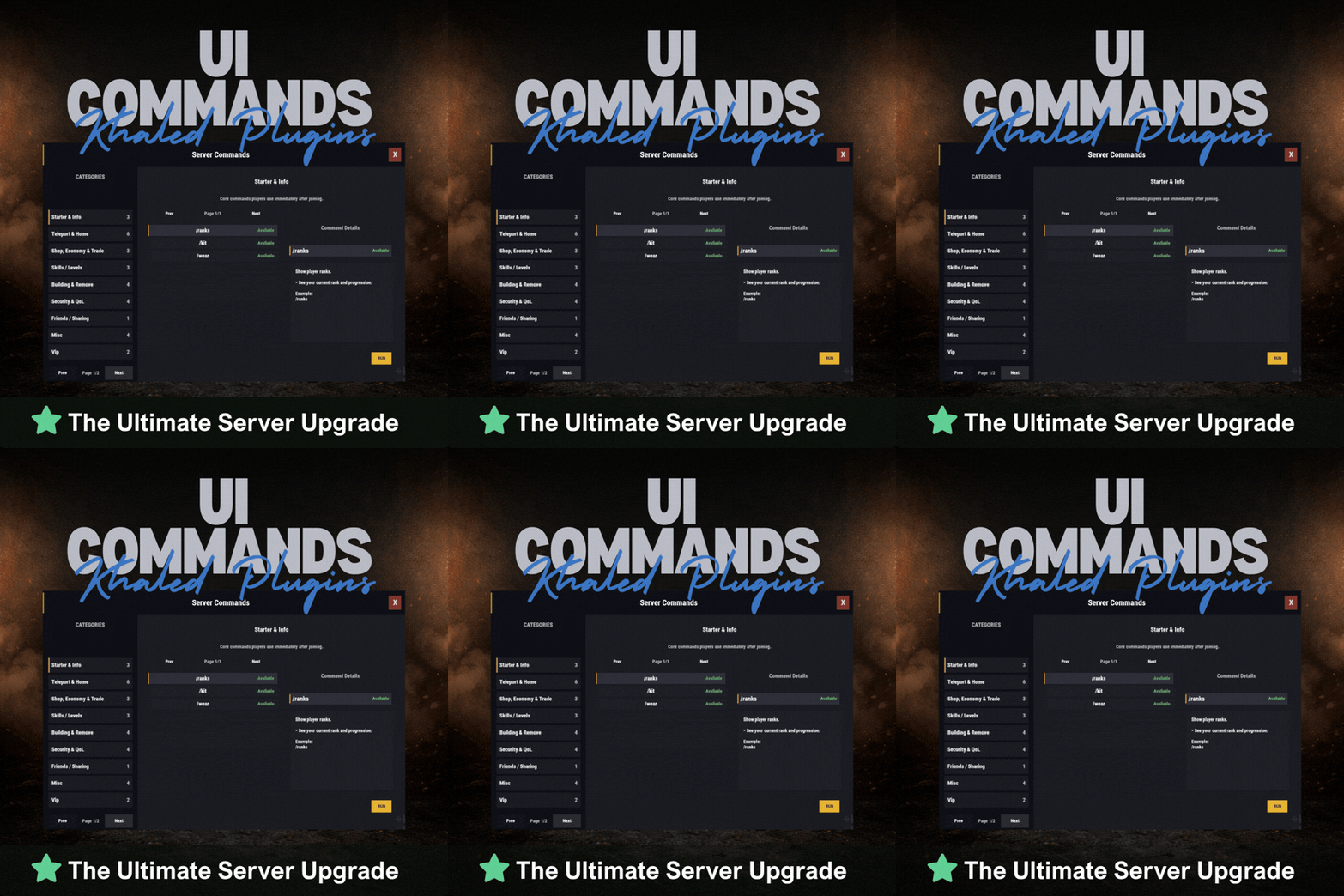
Version 1.0.1
8 downloads
UICommands – In-Game Command Browser for Rust Servers UICommands makes it easy for players to find and use server commands without memorizing anything or spamming chat. All commands are displayed in a clean, in-game interface, neatly organized into categories with clear explanations. Players can quickly see what each command does, whether it’s available to them, and how to use it — all in one place. Features - Clean and modern in-game UI - Commands neatly organized by category - Shows whether commands are available or locked - Detailed command info panel with usage examples - RUN button for supported commands - Simple, smooth, and easy to use Why Players Like It - No need to remember commands - Quick access to everything the server offers - Easy to understand, even for new players - Less confusion, more gameplay Why Server Owners Use It - Fewer repeated questions in chat - Better presentation of server features - Helps new players get started faster - Clean and professional look Permissions UICommands is a great fit for any Rust server that wants a simple, organized, and player-friendly way to show commands in-game. Config: { "General": { "Open Commands": [ "cmds", "commands" ], "Rows Per Page": 6, "Close UI when prompting for input": true }, "Categories": [ { "Id": "starter", "Title": "Starter & Info", "Description": "Core commands players use immediately after joining.", "Sort Order": 0, "Required Permission (optional)": null, "Commands": [ { "Command": "/ranks", "Description": "Show player ranks.", "Benefit / Why Use It": "See your current rank and progression.", "Usage Example (optional)": "/ranks", "Required Permission (optional)": null, "Admin Only (optional)": false, "VIP Only (optional)": false, "Allow RUN (optional, override)": true, "Tags (optional)": [] }, { "Command": "/kit", "Description": "Starter kit.", "Benefit / Why Use It": "Get essential items to start playing.", "Usage Example (optional)": "/kit", "Required Permission (optional)": null, "Admin Only (optional)": false, "VIP Only (optional)": false, "Allow RUN (optional, override)": true, "Tags (optional)": [] }, { "Command": "/wear", "Description": "Change your underwear.", "Benefit / Why Use It": "Quickly change your character underwear.", "Usage Example (optional)": "/wear", "Required Permission (optional)": null, "Admin Only (optional)": false, "VIP Only (optional)": false, "Allow RUN (optional, override)": true, "Tags (optional)": [] } ] }, { "Id": "teleport", "Title": "Teleport & Home", "Description": "Teleport requests, homes, towns and utilities.", "Sort Order": 10, "Required Permission (optional)": null, "Commands": [ { "Command": "/sethome <name>", "Description": "Set home at your base.", "Benefit / Why Use It": "Save a home location for quick teleport.", "Usage Example (optional)": "/sethome main", "Required Permission (optional)": null, "Admin Only (optional)": false, "VIP Only (optional)": false, "Allow RUN (optional, override)": false, "Tags (optional)": [] }, { "Command": "tphelp", "Description": "Teleport help.", "Benefit / Why Use It": "View teleport commands and usage.", "Usage Example (optional)": "tphelp", "Required Permission (optional)": null, "Admin Only (optional)": false, "VIP Only (optional)": false, "Allow RUN (optional, override)": true, "Tags (optional)": [] }, { "Command": "/town", "Description": "Teleport to Bandit Town.", "Benefit / Why Use It": "Quick access to Bandit Town.", "Usage Example (optional)": "/town", "Required Permission (optional)": null, "Admin Only (optional)": false, "VIP Only (optional)": false, "Allow RUN (optional, override)": true, "Tags (optional)": [] }, { "Command": "/outpost", "Description": "Teleport to Outpost.", "Benefit / Why Use It": "Quick access to Outpost.", "Usage Example (optional)": "/outpost", "Required Permission (optional)": null, "Admin Only (optional)": false, "VIP Only (optional)": false, "Allow RUN (optional, override)": true, "Tags (optional)": [] }, { "Command": "/where", "Description": "Teleport to your death location.", "Benefit / Why Use It": "Return to your death spot quickly.", "Usage Example (optional)": "/where", "Required Permission (optional)": null, "Admin Only (optional)": false, "VIP Only (optional)": false, "Allow RUN (optional, override)": true, "Tags (optional)": [] }, { "Command": "/tpr <PlayerName>", "Description": "Request teleport to a player.", "Benefit / Why Use It": "Send a teleport request to another player.", "Usage Example (optional)": "/tpr Khaled", "Required Permission (optional)": null, "Admin Only (optional)": false, "VIP Only (optional)": false, "Allow RUN (optional, override)": false, "Tags (optional)": [] } ] }, { "Id": "shop", "Title": "Shop, Economy & Trade", "Description": "Server shop and purchases.", "Sort Order": 20, "Required Permission (optional)": null, "Commands": [ { "Command": "/s", "Description": "Shop.", "Benefit / Why Use It": "Open the server shop.", "Usage Example (optional)": "/s", "Required Permission (optional)": null, "Admin Only (optional)": false, "VIP Only (optional)": false, "Allow RUN (optional, override)": true, "Tags (optional)": [] }, { "Command": "/buy", "Description": "Transport license.", "Benefit / Why Use It": "Purchase transport license.", "Usage Example (optional)": "/buy", "Required Permission (optional)": null, "Admin Only (optional)": false, "VIP Only (optional)": false, "Allow RUN (optional, override)": true, "Tags (optional)": [] }, { "Command": "/buyraid", "Description": "Buy a Raidable Base.", "Benefit / Why Use It": "Purchase a raidable base event.", "Usage Example (optional)": "/buyraid", "Required Permission (optional)": null, "Admin Only (optional)": false, "VIP Only (optional)": false, "Allow RUN (optional, override)": true, "Tags (optional)": [] } ] }, { "Id": "skills", "Title": "Skills / Levels", "Description": "Leveling and skills commands (server dependent).", "Sort Order": 30, "Required Permission (optional)": null, "Commands": [ { "Command": "/st", "Description": "Open skill tree (shortcut).", "Benefit / Why Use It": "Quick access to the skill tree.", "Usage Example (optional)": "/st", "Required Permission (optional)": null, "Admin Only (optional)": false, "VIP Only (optional)": false, "Allow RUN (optional, override)": true, "Tags (optional)": [] }, { "Command": "/skills", "Description": "Open skills UI.", "Benefit / Why Use It": "View and manage your skills.", "Usage Example (optional)": "/skills", "Required Permission (optional)": null, "Admin Only (optional)": false, "VIP Only (optional)": false, "Allow RUN (optional, override)": true, "Tags (optional)": [] }, { "Command": "/skill", "Description": "Open crafting menu.", "Benefit / Why Use It": "Access crafting skill menu (if supported).", "Usage Example (optional)": "/skill", "Required Permission (optional)": null, "Admin Only (optional)": false, "VIP Only (optional)": false, "Allow RUN (optional, override)": true, "Tags (optional)": [] } ] }, { "Id": "building", "Title": "Building & Remove", "Description": "Upgrade, remove and building utilities.", "Sort Order": 40, "Required Permission (optional)": null, "Commands": [ { "Command": "/up <1-4>", "Description": "Upgrade building tier.", "Benefit / Why Use It": "Upgrade building parts quickly.", "Usage Example (optional)": "/up 4", "Required Permission (optional)": null, "Admin Only (optional)": false, "VIP Only (optional)": false, "Allow RUN (optional, override)": false, "Tags (optional)": [] }, { "Command": "/down <1-4>", "Description": "Downgrade building tier.", "Benefit / Why Use It": "Downgrade building parts quickly.", "Usage Example (optional)": "/down 2", "Required Permission (optional)": null, "Admin Only (optional)": false, "VIP Only (optional)": false, "Allow RUN (optional, override)": false, "Tags (optional)": [] }, { "Command": "/remove", "Description": "Remove buildings.", "Benefit / Why Use It": "Remove building parts if enabled.", "Usage Example (optional)": "/remove", "Required Permission (optional)": null, "Admin Only (optional)": false, "VIP Only (optional)": false, "Allow RUN (optional, override)": true, "Tags (optional)": [] }, { "Command": "/bskin", "Description": "Building skins.", "Benefit / Why Use It": "Change building skins (if enabled).", "Usage Example (optional)": "/bskin", "Required Permission (optional)": null, "Admin Only (optional)": false, "VIP Only (optional)": false, "Allow RUN (optional, override)": true, "Tags (optional)": [] } ] }, { "Id": "security", "Title": "Security & QoL", "Description": "Locking, turrets and helpful quality-of-life commands.", "Sort Order": 50, "Required Permission (optional)": null, "Commands": [ { "Command": "/autolock", "Description": "Auto lock boxes & doors.", "Benefit / Why Use It": "Automatically apply locks to your base items.", "Usage Example (optional)": "/autolock", "Required Permission (optional)": null, "Admin Only (optional)": false, "VIP Only (optional)": false, "Allow RUN (optional, override)": true, "Tags (optional)": [] }, { "Command": "/lockturret", "Description": "Lock turret (requires codelock).", "Benefit / Why Use It": "Protect your turret from unauthorized access.", "Usage Example (optional)": "/lockturret", "Required Permission (optional)": null, "Admin Only (optional)": false, "VIP Only (optional)": false, "Allow RUN (optional, override)": true, "Tags (optional)": [] }, { "Command": "/carturret", "Description": "Spawn your car.", "Benefit / Why Use It": "Quickly spawn your vehicle (server dependent).", "Usage Example (optional)": "/carturret", "Required Permission (optional)": null, "Admin Only (optional)": false, "VIP Only (optional)": false, "Allow RUN (optional, override)": true, "Tags (optional)": [] }, { "Command": "Quarry lock", "Description": "Locking a quarry engine.", "Benefit / Why Use It": "Protect the quarry engine with a code lock.", "Usage Example (optional)": "Craft a codelock, go to the quarry engine and press E.", "Required Permission (optional)": null, "Admin Only (optional)": false, "VIP Only (optional)": false, "Allow RUN (optional, override)": false, "Tags (optional)": [] } ] }, { "Id": "social", "Title": "Friends / Sharing", "Description": "Friends and access control.", "Sort Order": 60, "Required Permission (optional)": null, "Commands": [ { "Command": "/friend <add/remove playername>", "Description": "Add or remove a friend from your base.", "Benefit / Why Use It": "Control who can interact with your base features.", "Usage Example (optional)": "/friend add Khaled", "Required Permission (optional)": null, "Admin Only (optional)": false, "VIP Only (optional)": false, "Allow RUN (optional, override)": false, "Tags (optional)": [] } ] }, { "Id": "misc", "Title": "Misc", "Description": "Skins, signs and other utilities.", "Sort Order": 70, "Required Permission (optional)": null, "Commands": [ { "Command": "/skin", "Description": "Skins.", "Benefit / Why Use It": "Open skins menu (if enabled).", "Usage Example (optional)": "/skin", "Required Permission (optional)": null, "Admin Only (optional)": false, "VIP Only (optional)": false, "Allow RUN (optional, override)": true, "Tags (optional)": [] }, { "Command": "/sili", "Description": "Sign image URL.", "Benefit / Why Use It": "Paste an image URL into a sign (if enabled).", "Usage Example (optional)": "/sili <url>", "Required Permission (optional)": null, "Admin Only (optional)": false, "VIP Only (optional)": false, "Allow RUN (optional, override)": false, "Tags (optional)": [] }, { "Command": "/sil", "Description": "Sign image URL (shortcut).", "Benefit / Why Use It": "Paste an image URL into a sign (if enabled).", "Usage Example (optional)": "/sil <url>", "Required Permission (optional)": null, "Admin Only (optional)": false, "VIP Only (optional)": false, "Allow RUN (optional, override)": false, "Tags (optional)": [] }, { "Command": "/recycler.craft", "Description": "Craft your recycler.", "Benefit / Why Use It": "Craft and place a recycler (if enabled).", "Usage Example (optional)": "/recycler.craft", "Required Permission (optional)": null, "Admin Only (optional)": false, "VIP Only (optional)": false, "Allow RUN (optional, override)": true, "Tags (optional)": [] } ] } ], "Debug: Print Config Summary On Load": false } Need Support?$13.99 -
Version 4.5.0
63 downloads
FuelMonitor is a lightweight and fully customizable Rust plugin that displays a clean, modern fuel HUD while driving fuel-powered vehicles. The plugin features a real-time updating fuel bar, low fuel popup notifications, sound alerts when fuel is running low, and a clear OUT OF FUEL warning when the tank is empty. FuelMonitor now also includes a built-in speedometer, allowing players to view their current speed directly from the HUD, with support for both Km/h and MPH display modes. An in-game Admin Settings UI is included, allowing server owners to manage the plugin directly in-game through a clean and safe workflow. With the settings panel, admins can: - Preview changes live before applying them - Adjust the Global Max Fuel value - Reposition the main Fuel UI using Move Mode - Reposition popup warning notifications using Warning Move Mode - Customize all UI colors - Enable or disable the speedometer - Switch speed units between Km/h and MPH FuelMonitor also includes a dedicated Vehicles tab inside the Admin Settings UI, allowing full per-vehicle customization. Server owners can create and manage vehicle-specific profiles for all supported vehicles, including: - Enable or disable the HUD per vehicle - Enable or disable warning sounds per vehicle - Set a custom max fuel value per vehicle - Choose whether low fuel warnings use Amount or Percent mode - Configure custom low fuel warning thresholds - Configure custom fuel bar gradient thresholds - Preview each vehicle profile live before applying changes - Reset a single vehicle profile or apply one vehicle profile to all vehicles All changes are handled through a safe pending workflow with Apply / Cancel controls, ensuring nothing is pushed live until the admin confirms it. Once applied, changes affect all players server-wide. #Admin Commands : /fui FuelMonitor works automatically in the background, is performance-friendly, and requires no player commands. Need Support?$8.99- 22 comments
- 3 reviews
-
- 2
-
-
- #fuel
- #minicopter
- (and 4 more)
-
At the moment, C4 and individual rocket support are not included. These features are planned and will be introduced in future updates.
-
Version 1.1.3
13 downloads
WeaponControl is an advanced combat balancing plugin for Rust. It allows server owners to fully control weapon damage, magazine capacity, and explosive damage using a clean in-game UI. Key Features : • Weapon damage multipliers • Magazine capacity control • Full explosive damage support (C4, Satchel, Beancan, Molotov, Catapult explosives) • Separate profiles: Default / VIP I / VIP II / VIP III • Automatic weapon detection • Dedicated Explosives configuration tab • Live in-game UI editor Explosives System : Take full control over explosive damage: • Supports C4, Satchel, Beancan, Molotov • Supports Catapult explosives (Propane, Fire Bomb, Scattershot) • Independent explosive multipliers • Per-profile explosive balancing • Accurate projectile and heat damage detection VIP System (Optional) : Flexible VIP system with priority-based tiers. Each VIP level can have its own: • Weapon damage values • Magazine capacity values • Explosive damage values Includes full control over affected entities and blacklist support. In-Game UI : Manage everything directly in-game: • Separate tabs for Weapons & Explosives • Search and sort items • Apply global presets • Edit values live • Safely apply or discard changes • Admin change summary confirmation Performance & Compatibility • Optimized for PVP and PVE servers • Lightweight and server-friendly • Accurate damage detection for projectiles and fire-based explosives • Compatible with Oxide and Carbon Need Support :$14.99