
Jump to content

Martian

Creator
  • Posts

    838
  • Joined

  • Last visited

  • Days Won

    9

Everything posted by Martian

  1. Martian

    Dungeon Events

    I just released an update to prevent this issue.
  2. Martian

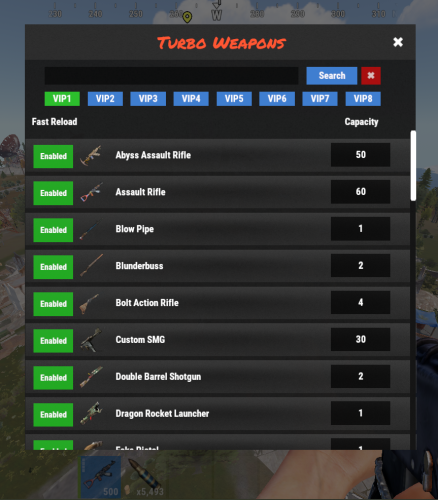
    Dungeon Events

    Changed Status from Pending to Work in Progress

  3. Martian

    Dungeon Events

    Good evening, Thanks for purchasing Dungeon Events! To get it working, you’ll need to enable the Halloween dungeon, as the Christmas dungeon is currently disabled. I’m waiting for Facepunch to fix a bug with it. Let me know if you need any help setting it up!
  4. Martian

    Quarry Computer

    { "Use LangAPI Plugin": true, "Use Notify Plugin": true, "RP Image URL": "https://i.ibb.co/C22VZDj/money.png", "Allow Team Access": true, "Allow Friends Access": true, "Give Quarry Command": [ "gq", "givequarry" ], "Drop Quarry Item on Destruction": true, "No Upgrades (Level 1)": { "Fuel Configuration": { "Shortname": "diesel_barrel", "Resource Extraction Interval In Seconds": 3600, "Fuel Required Per Extraction": 1 }, "Storage Slots": { "Fuel": 1, "Resources": 6 }, "Resources Output Per Extraction": [ { "Shortname": "crude.oil", "Amount": 4 }, { "Shortname": "stones", "Amount": 35 }, { "Shortname": "metal.ore", "Amount": 7 }, { "Shortname": "sulfur.ore", "Amount": 7 } ] }, "Upgrades (Level 2+)": [ { "Fuel Configuration": { "Shortname": "lowgradefuel", "Resource Extraction Interval In Seconds": 30, "Fuel Required Per Extraction": 50 }, "Storage Slots": { "Fuel": 3, "Resources": 12 }, "Resources Output Per Extraction": [ { "Shortname": "crude.oil", "Amount": 6 }, { "Shortname": "stones", "Amount": 50 }, { "Shortname": "metal.ore", "Amount": 10 }, { "Shortname": "sulfur.ore", "Amount": 10 } ], "Required Items To Upgrade": [ { "Shortname": "Economics", "Amount": 25000 }, { "Shortname": "scrap", "Amount": 1000 }, { "Shortname": "pumpkin", "Amount": 100 } ] }, { "Fuel Configuration": { "Shortname": "charcoal", "Resource Extraction Interval In Seconds": 20, "Fuel Required Per Extraction": 100 }, "Storage Slots": { "Fuel": 6, "Resources": 24 }, "Resources Output Per Extraction": [ { "Shortname": "crude.oil", "Amount": 10 }, { "Shortname": "hq.metal.ore", "Amount": 10 }, { "Shortname": "metal.ore", "Amount": 30 }, { "Shortname": "stones", "Amount": 100 }, { "Shortname": "sulfur.ore", "Amount": 25 } ], "Required Items To Upgrade": [ { "Shortname": "scrap", "Amount": 5000 }, { "Shortname": "pumpkin", "Amount": 1000 }, { "Shortname": "cloth", "Amount": 10000 }, { "Shortname": "red.berry", "Amount": 1000 }, { "Shortname": "bone.fragments", "Amount": 1000 } ] }, { "Fuel Configuration": { "Shortname": "charcoal", "Resource Extraction Interval In Seconds": 20, "Fuel Required Per Extraction": 100 }, "Storage Slots": { "Fuel": 6, "Resources": 24 }, "Resources Output Per Extraction": [ { "Shortname": "crude.oil", "Amount": 10 }, { "Shortname": "hq.metal.ore", "Amount": 10 }, { "Shortname": "metal.ore", "Amount": 30 }, { "Shortname": "stones", "Amount": 100 }, { "Shortname": "sulfur.ore", "Amount": 25 } ], "Required Items To Upgrade": [ { "Shortname": "scrap", "Amount": 5000 }, { "Shortname": "pumpkin", "Amount": 1000 }, { "Shortname": "cloth", "Amount": 10000 }, { "Shortname": "red.berry", "Amount": 1000 }, { "Shortname": "bone.fragments", "Amount": 1000 } ] } ], "Keep Upgrades On Remove Quarry": true, "Profiles": { "Default (No Permission)": { "Quarry Limit": 1 }, "VIP (quarrycomputer.vip Permission)": { "Quarry Limit": 1 } }, "Item Name": "Quarry Computer", "UI Configuration": { "Font (DroidSansMono.ttf / PermanentMarker.ttf / RobotoCondensed-Bold.ttf / RobotoCondensed-Regular.ttf)": "DroidSansMono.ttf", "Header": { "Background Color": "0.4 0.4 0.4 0.95", "Font Color": "1 1 1 1", "Close Button": { "Background Color": "1 0 0 1", "Font Color": "1 1 1 0.5", "Font Size": 13 } }, "Background Color": "0.6 0.6 0.6 0.95", "Line Color": "1 1 1 1", "Left Panel": { "Shadow Color": "0 0 0 0.97", "Font Color": "1 1 1 1", "Background Color": "0 0 1 1", "Remove Button": { "Background Color": "0.6 0.6 0.6 0.95", "Font Color": "1 0 0 1", "Font Size": 14 }, "Start Stop Button": { "Background Color": "0.6 0.6 0.6 0.95", "Font Color": "0 1 0 1", "Font Size": 14 }, "Stop Stop Button": { "Background Color": "0.6 0.6 0.6 0.95", "Font Color": "1 0 0 1", "Font Size": 14 } }, "Right Panel": { "Shadow Color": "0 0 0 0.97", "Font Color": "1 1 1 1", "Background Color": "0.5 0 0 1", "Upgrade Button": { "Background Color": "0.6 0.6 0.6 0.95", "Font Color": "0 1 0 1", "Font Size": 14 } }, "Popup": { "Overlay Color": "0 0 0 0.9", "Shadow Color": "0 0 0 0.85", "Border Color": "1 1 1 1", "Background Color": "0 0 0 1", "Button Color": "0.6 0.6 0.6 0.95", "Confirm Button Color": "0 1 0 1", "Cancel Button Color": "1 0 0 1" } }, "Version": { "Major": 1, "Minor": 4, "Patch": 0 } }
  5. Martian

    Quarry Computer

    No, the levels are that way:
  6. Martian

    Conflict with Skill Tree plugin

    Don't worry, I'm at work right now, but in a few hours, I'll take a look at it. I'll find a solution.
  7. Martian

    Conflict with Skill Tree plugin

    Changed Status from Pending to Work in Progress

  8. Martian

    Conflict with Skill Tree plugin

    Hello! I will try to adjust this issue. I don't currently have the other plugin, but I will try to get in touch with the developer.
  9. Martian

    Weapons Turbo

    I plan to look into implementing this feature this week.
  10. Martian

    Quarry Computer

    1.4.0 - What's New Level-Specific Fuel Configuration Fuel requirements, extraction intervals, and specific fuel types are now tied directly to the quarry's level. This allows for more customization and progression as you upgrade your quarry.
  11. Changed Status from Work in Progress to Fixed Changed Fixed In to 1.0.3
  12. Fixed in new version!
  13. Could you please clarify what exactly happens for users in the 'default' group who do not have the permissions? Are the Extended Magazines simply not functioning at all? Any additional details would be helpful!
  14. Hello! I'll take a look today to see what might be causing the issue. Do you have any console logs or error messages that could help? Also, please confirm if you have the permission turboweapons.fastreload, which enables faster reload times for weapons, and turboweapons.customcapacity, which customizes weapon capacity to specified values. Thank you!
  15. Changed Status from Pending to Work in Progress
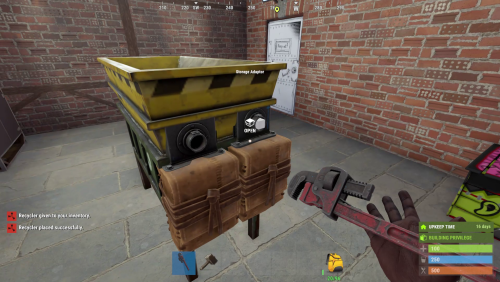
  16. Hi! Buy Commands /buyindustrialrecycler Permission: industrialrecycler.buyindustrial /buyrecycler Permission: industrialrecycler.buystandard
  17. Check if it's different in your shop; I think that might be the issue.
  18. Version 3.9.21

    4,381 downloads

    Dungeon Events adds fully procedural dungeon raids to your Rust server, creating high-replayability PvE content with unique layouts every time. Each dungeon is dynamically generated with randomized rooms, corridors, NPCs, bosses, animals, auto turrets, loot crates, custom visuals, and portal access. Whether you want automated world events or private player-purchased dungeon runs, this plugin gives you full control over difficulty, rewards, access, and cleanup. Perfect for servers that want challenging, customizable, and rewarding endgame-style PvE content. Main Features Procedural Dungeon Generation - Every dungeon is generated dynamically, so each run feels different. Multiple Difficulty Tiers - Create fully customizable tiers such as Easy, Normal, Medium, Hard, Nightmare, Impossible, or anything you want, with per-tier rooms, size, limits, cooldowns, rewards, visuals, and purchase settings. Custom NPCs, Bosses & Animals - Configure NPCs, bosses, and dungeon animals with custom health, damage, gear, names, movement limits, attack distance, loot, prefab chances, speed, sense range, and spawn limits. Auto Turrets - Add dangerous turret encounters with configurable health, weapons, and behavior. Visual Customization - Customize dungeon building grades, skins, container colors, garage door skins, dungeon lights, marker names, marker colors, and dungeon time-of-day overrides per tier. Custom Per-Tier Loot System - Each dungeon tier has its own data files for NPC loot, boss loot, and loot box rewards, making it easy to create different reward pools for every difficulty. Buyable Private Dungeons - Let players purchase their own dungeon using Economics, ServerRewards, or a custom item like scrap. Access Control - Lock dungeons to the buyer or first player, with optional support for teams and friends. Portal Protection Bubble - Protect the portal area with configurable radius, build/deploy rules, vehicle protection, and optional damage blocking to help reduce portal camping on PvP servers. Anti-Abuse Dungeon Rules - Block selected commands inside dungeons, prevent unwanted pickup/build/deploy actions, prevent backpack drops, teleport players outside on death, and optionally close dungeon doors when a player dies. Auto Spawn & Manual Spawn - Spawn dungeons automatically, by admin command, player purchase, or console/RCON. Smart Spawn Checks - Avoid bad locations, terrain issues, safe zones, rocks, monuments, and plugin-controlled areas. Advanced Spawn Control - Configure global and per-tier active dungeon limits, buy cooldowns, auto-spawn delay, post-wipe tier unlocks, dungeon height, map marker settings, and retry behavior when a valid location cannot be found. Automatic Cleanup - Remove dungeons when inactive, expired, or fully cleared. Per-Entity & Clear Rewards - Reward players for NPCs, animals, turrets, loot boxes, and full dungeon clears using Economics, ServerRewards, and SkillTree XP, including optional SkillTree XP team sharing. Live Dungeon UI & Map Markers - Show remaining time, entity counts, and map markers for active dungeons. Commands All default chat and console command names can be customized in the config. Admin /createdungeon <tierName> /removeinactivedungeons /removealldungeons /forceremovealldungeons /de.removenearest /de.reloadconfig /de.toggle Players /buydungeon /buydungeon <tierName> /removedungeon Console buydungeon <tierName> <playerID> spawnrandomdungeon spawnfixeddungeon <tierName> spawnfixeddungeon <tierName> <playerID> Permissions dungeonevents.admin dungeonevents.buy dungeonevents.enter Per-Tier Loot Configuration Dungeon Events uses separate data files for loot configuration, making it much easier to manage rewards for each difficulty tier. Each tier has its own loot files inside: oxide/data/DungeonEvents/<TierName>/ Available loot files per tier: npc_loot.json - Loot dropped by regular dungeon NPCs. boss_loot.json - Loot dropped by dungeon bosses. lootbox.json - Loot spawned inside dungeon loot containers. This allows you to create completely different reward pools for each tier. For example, Easy dungeons can have basic loot, while Hard, Nightmare, or Impossible dungeons can have much stronger rewards. If a tier loot file is empty, the plugin can fall back to the default loot file: oxide/data/DungeonEvents/Default_Loot.json Hooks void OnDungeonSpawn(ulong OwnerID, Vector3 Position, string Grid, string TierName) void OnDungeonDespawn(ulong OwnerID, Vector3 Position, string Grid, string TierName) void OnDungeonWin(ulong playerID, string tierName) Supported Integrations Economics ServerRewards Friends Notify NightVision ZoneManager Duelist RaidableBases AbandonedBases RestoreUponDeath SkillTree Languages EN PT-BR DE ES RU If you want a powerful, replayable PvE dungeon system with deep customization and strong plugin integration, Dungeon Events is built to deliver exactly that. The plugin includes a deep configuration system where you can customize tiers, room counts, room sizes, dungeon visuals, loot tables, NPCs, bosses, animals, turrets, portal protection, access rules, cooldowns, active dungeon limits, spawn validation, auto-removal conditions, command blocking, economy settings, SkillTree XP rewards, map markers, and more.
    $25.00
  19. Martian

    Unable to grant permissions

    Changed Status from Pending to Fixed Changed Fixed In to 2.4.1
  20. Martian

    Unable to grant permissions

    Hi suhturhn, I apologize for the inconvenience you're experiencing with the permission issues regarding the recycler. Here is a description of how to use the specified permissions: Permission Get Recycler ("recyclerbox.get"): This permission allows the user to get the recycler box. Permission Transform Recycler ("recyclerbox.transform"): This permission enables users to transform a regular box in an the recycler box into other forms or materials. Permission Use VirtualRecycler ("recyclerbox.virtual"): With this permission, users can utilize a virtual recycler. Permission Recycler Delay1 ("recyclerbox.delay1"): This permission introduces a delay factor when using the recycler. Permission Recycler Delay2 ("recyclerbox.delay2"): Similar to Delay1, this permission enforces a different time delay when interacting with the recycler. If you continue to face issues, let me know, and I can assist you further!
  21. Martian

    Quarry Computer

    Update is out.
  22. Martian

    TugBoat

    Update is out.
  23. @Snaplatack @drdbug Update is out.
  24. Martian

    Quarry Computer

    I can change the image in the plugin, or I can create a setting to allow you to input a URL for the image as well. I'll look into that tomorrow.
  25. Hi Evergreen, I'm glad to hear that everything is working well for you! Regarding your request for recycling loss and recycling time adjustments, I want to be transparent that I can't promise these changes will be implemented, as they would require significant alterations from the current functionality of the plugin. There are other plugins that can work alongside mine to achieve similar effects, such as Recycle Manager from umod. However, I won't disregard your request and may consider implementing it in the future. Thank you for your understanding!

About Us

Codefling is the largest marketplace for plugins, maps, tools, and more, making it easy for customers to discover new content and for creators to monetize their work.

Downloads
2.5m
Total downloads
Customers
11.2k
Customers served
Files Sold
160.2k
Total sales
Payments
3.4m
Processed total
×
×
  • Create New...

Important Information

We have placed cookies on your device to help make this website better. You can adjust your cookie settings, otherwise we'll assume you're okay to continue.