
-
Posts
23 -
Joined
-
Last visited
Content Type
Profiles
Warranty Claims
Downloads
Forums
Store
Services
Downloads Plus Support
DOWNLOADS EXTRA
Reels
Everything posted by XeusDev
-
I have tested evrething, its working well you have to set Discord weebhook url to check banstats and Configuration for Discord Weebhook Url! to do plugin works If the player didnt connected to you server once, you cant warn him or ban him. only with banid steamid name reason.
-
Good experience working with Crash, works fast, good and with big quality recommend 100%
-
- 1
-

-
 Oh no! I'll fix it right away. Thanks for letting me know.
- 8 comments
-
- 1
-

-
- #group
- #permissions
- (and 2 more)
-
 U have it in the main page there is a text: Commands section
 -
No problem
-
Hello! Its compatible with carbon! i have uploaded the plugin to Carbon and its working well. Also if you buy plugin and its not working you can always get you money back contacting with codefling team. Or ask the developer to fix it!
-
Version 1.2.1
38 downloads
Advanced Player Verification and On-Screen Notification System for Rust Servers CheckPlayers allows administrators to send on-screen notifications instructing players to join your Discord and complete a verification process. It helps ensure players respond to verification requests in real time, improving server security and moderation efficiency. Discord Integration - Log all verification start/end events directly to a Discord channel. - Simply add your Discord webhook URLs to the config file, then run: oxide.reload CheckPlayers - All player check events will now be logged automatically. Data & Behavior If a player disconnects during an active PC Check, the plugin can automatically ban them, send notifications, and log the event to Discord (fully configurable). Commands Section Chat & Console Commands: 1. check <name/steamid> → Starts a PC Check for the player. 2. checkok <name/steamid> → Ends the PC Check. 3. cancelcheck <name/steamid> → Cancels an ongoing PC Check. Chat Command: 4. /contact MyDiscord#5125 → The player sends their Discord contact directly to admins/mods via the configured webhook. Permissions Oxide Permissions: oxide.grant group admin checkplayers.use oxide.grant group CustomGroup checkplayers.use Cabron Permissions: c.grant group admin checkplayers.use c.grant group CustomGroup checkplayers.use Default Configuration { "Send logs if one pc check starts? (Requires DiscordApi plugin!)": true, "Discord WeebHook to log: Calls player to check": "", "Discord WeebHook to receive the player discord contact": "", "Send logs if ends pc check?": true, "Discord WeebHook to log: end checks": "", "Ban the player if he disconnects from the server during a pc check?": true, "Ban reason if player leave during PC Check": "Disconnected during PC Check", "Send Messages if player disconnects from the server during the PC Check?": true, "Discord WeebHook to log: leaves from the server when called the player to check": "" } Kick/Ban Message Default disconnect-ban message: You are banned from this server (Disconnected during PC Check) → This can be fully customized in the configuration file.$4.99 -
Changed Status from Pending to Not a Bug Changed Fixed In to 1.0.2
-
iTS API to use it for developers there is an small explain in the page.
-
 Good plugin
- 21 comments
-
- 1
-
-
- #status
- #simplestatus
- (and 1 more)
-
 Good plugin GJ!
 -
Just for groups
- 8 comments
-
- 1
-
-
- #group
- #permissions
- (and 2 more)
-
Version 1.0.3
322 downloads
This plugin allows to send to discord weebhook messages to discord weebhooks works like API. Messages can be sent normal or embed Add reference to the plugin: [PluginReference] Plugin DiscordApi; How to send: private string DiscordWeebHookUrl = "URL HERE" string message = $"YOU MESSAGE`"; send messages: DiscordApi?.Call("API_SendMessage", DiscordWeebHookUrl , Message, this); Embed: string EmbedTitle = "Title"; int EmbedColor = 16711680; -> Color string Empty = ""; string json = $"[{{\"name\":\"Message One\",\"value\":\"Example: {something} \",\"inline\":true}},\n{{\"name\":\"2n Message\",\"value\":\"3rd message: {Something}\",\"inline\":true}}]"; call to send: DiscordApi?.Call("API_SendEmbeddedMessage", DiscordWeebHookUrl, EmbedTitle, EmbedColor , json, Empty, this);Free-
- 1
-
-
- #plugin
- #rust plugin
- (and 3 more)
-
Version 1.1.2
31 downloads
Advanced Timed Permission Management System for Groups Timed Group Permissions allows you to assign permissions to any group for a limited amount of time! You can easily give, revoke, or extend timed permissions — all fully controlled by simple commands. Discord Integration - You can log all permission grants, revokes, and extensions directly to a Discord channel. - Simply add your Discord webhook URL to the config file, then run the command: - oxide.reload TimedGroupPermissions That’s it! Your actions will now be logged automatically to Discord. Data Storage To check which groups currently have timed permissions assigned, open the file: data/TimedGroupPermissions.json Commands Section Chat & Console Commands: 1. givegroupperm <group> <permission> <time> → Give a timed permission to a group. 2. extendgrouptimeperm <group> <permission> <time> → Extend the duration of an existing timed permission. 3. revokegroupperm <group> <permission> → Revoke a permission from a group. 4. viewgroupperm <group> → View all active timed permissions for that group. Example output: [Timed Group Permissions] Permissions for group 'admin': - kits.donadiscord (Expires in 23 hour(s) 59 minute(s) 39 second(s)) Examples givegroupperm admin minicopter.infinitefuel 10d → Gives the group “admin” the permission “minicopter.infinitefuel” for 10 days. extendgrouptimeperm admin minicopter.infinitefuel 10d → Extends the permission “minicopter.infinitefuel” for the group “admin” by an additional 10 days. revokegroupperm admin minicopter.infinitefuel → Removes the permission “minicopter.infinitefuel” from the group “admin”. ------------------------------------------------------------ Default Configuration { "Send messages to Discord Webhook? (Requires DiscordAPI plugin)": true, "Discord Webhook URL": "https://discord.com/api/webhooks/..." } Summary: Timed Group Permissions is the perfect solution for managing temporary permissions on your server. Reward VIP groups, event teams, or temporary staff roles — all with automatic expiration and Discord logging.$10.00- 8 comments
-
- 1
-

-
- #group
- #permissions
- (and 2 more)
-
Changed Status from Work in Progress to Closed
-
FIXED!
-
Changed Status from Pending to Work in Progress Changed Fixed In to 1.1.0
-
Version 2.1.0
21 downloads
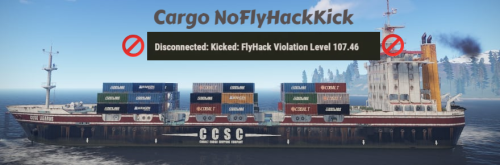
About Cargo Ship Fly Hack Disabler This plugin disable flyhack detection if some one enter to cargo, in some devblogs the cargo kicks the players for flyhack in cargo. How it works? When you put this plugin in you server is gonna check the players if they are in the cargo, if they are in it it will disable flyack detection for them When some one enter in cargo example: [CargoShip Flyhack Disabler] Flyhack detection paused for [TT] Xeus97 When some one leave from cargo example: [CargoShip Flyhack Disabler] Flyhack detection resumed for [TT] Xeus97 No config files easy setup!$2.00 -

Version 1.5.2
96 downloads
BanSystem Ultra Advanced Ban, Warning, and IP Protection System for Your Server BanSystem Ultra is a powerful moderation plugin designed to give you complete control over player management. It allows you to ban players temporarily or permanently by SteamID or IP address, automatically detecting and blocking alternate accounts that share the same IP. Intelligent Ban System Automatic IP & SteamID Bans: When a player is banned, their IP address is automatically added to the ban list. If another player connects using a banned IP, they will be instantly blocked. This prevents ban evasion and multiple account abuse. Multi-IP Detection: The plugin scans your ban data for repeated IPs. If multiple accounts share the same banned IP, all of them will be automatically banned — perfect for catching alternate accounts. Team Ban Option: If a player receives a permanent ban, you can configure the plugin to also ban their entire team. Ideal for competitive or clan-based servers where team accountability matters. Warning System Manage player behavior with a fully configurable warning system: - Issue warnings with customizable reasons. - Automatically ban players temporarily or permanently after reaching a set number of warnings. - Configure how many warnings trigger a ban and how long the ban should last. Example: 3 warnings → 1-day ban 6 warnings → 7-day ban 10 warnings → permanent ban All of this is fully adjustable in the configuration file. Ban History Every banned player receives a detailed entry in the Ban History database, including: - Ban reason - Ban date and duration - Total ban count To clear the ban history, simply delete the file: oxide/data/BanSystemUltra/BanHistory.json Commands Ban Commands Console only!: To use that commands ingame press F1 and type the command there!. banplayer <steamid> <time> <reason> → Temporary ban banplayer <steamid> <reason> → Permanent ban Native rust commands: ban playername or steamid reason → Permanent ban if player is online banid steamid64 PlayerName Reason → If Player is disconnected. Examples: Console and Chat Commands: banplayer 76561198200022991 30d24h60m "Bug Abusing" banplayer 76561198200022991 "Cheating" Native rust commands: ban Playername Cheating → if player is online banid SteamId PlayerName Cheating → If player is offline. Check players Ban Stats: Console: banstats <steamid> - Sends the player’s ban statistics to your configured Discord webhook. Warn Commands: warn <steamid> <reason> Example: warnplayer 76561198200022991 "Racism" - If the player reaches the maximum number of warnings (defined in config), they will be automatically banned with the last warning’s reason. Example Ban Message: Connection Rejected – You are banned from this server for 7 days (Reason: Racism) Default Configuration { "Send Mesages to DiscordWeebhook? Requieres DiscordApi plugin!": true, "Configuration for Discord Weebhook Url!": "YOUR DISCORD WEBHOOK URL", "Ban the player during the connection if his banned IP is detected in the data? (It will search all the data if there is any banned IP like the player's)": true, "Use messages in Embed? (false = normal / true = Embed)": true, "Ban player team if the player gets permanent ban? (Bans full team permanently aswell)": true, "Use permanent bans via warnings?": true, "Number of maximum warns after permanent ban": 10, "Use temporary bans via warnings?": true, "Ban duration after X warnings (Warnings - ban days (in days))": { "3": 1, //-> 3 Warns 1 day ban "6": 7, //-> 6 Warns 7 days ban "8": 14 //-> 8 Warns 14 days ban }, "Discord weebhook url to check banstats": "DISCORD WEEBHOK URL FOR BAN STATS", "Send messages to chat about: Warns, bans and unbans?": true, "Config Version (DON'T MODIFY)": "1.5.1" }$10.00