-
Posts
582 -
Joined
-
Last visited
-
Days Won
8
Content Type
Profiles
Warranty Claims
Downloads
Forums
Store
Services
Downloads Plus Support
DOWNLOADS EXTRA
Reels
Support Center
Everything posted by Brad Copp
-
Changed Status from Pending to Work in Progress
-
 Hello, updated with this option. Thank you for the suggestion.
 -
 Wow! Thanks for doing this, Much better than my sloppy sample config
-
- 2
-

-
- #karuza vehicle
- #karuza
- (and 6 more)
-
Changed Status from Work in Progress to Fixed
-
Changed Status from Pending to Work in Progress Changed Fixed In to Next Version
-
Hi, I will add that
-
After updating from 2.0.1 to 2.0.4 Auto Pickup doesnt work, with error in console. All players affected. It worked 1 time, then not working, even after plugin reload. (18:29:33) | Failed executing chat command 'pnpc' in 'PersonalNPC v2.0.4 by walkinrey' [callback] (Collection was modified; enumeration operation may not execute.) at bool System.Collections.Generic.List<CollectibleEntity>+Enumerator.MoveNextRare() at bool System.Collections.Generic.List<CollectibleEntity>+Enumerator.MoveNext() at CollectibleEntity[] Oxide.Plugins.PersonalNPC+PlayerBotController.GetPickupResourcesInRadius(bool wood, bool metal, bool sulfur, bool stone, bool hemp, bool corn, bool mushroom, bool pumpkin, bool berries, bool potato) in D:/TCAFiles/Users/filipz/7365906/carbon/plugins/PersonalNPC.cs:line 5425 at bool Oxide.Plugins.PersonalNPC+PlayerBotController.StartAutoMode() in D:/TCAFiles/Users/filipz/7365906/carbon/plugins/PersonalNPC.cs:line 5150 at void Oxide.Plugins.PersonalNPC+BotAutoMode.EnableMode(bool disable) in D:/TCAFiles/Users/filipz/7365906/carbon/plugins/PersonalNPC.cs:line 3272 at void Oxide.Plugins.PersonalNPC.chatCommand(BasePlayer player, string command, string[] args) in D:/TCAFiles/Users/filipz/7365906/carbon/plugins/PersonalNPC.cs:line 2545 at object System.Reflection.RuntimeMethodInfo.Invoke(object obj, BindingFlags invokeAttr, Binder binder, object[] parameters, CultureInfo culture) PersonalNPC.json
-
Changed Status from Pending to Work in Progress
-
Followed up in the game4freak thread you created. Happy to work with vis to figure this out. In the meantime, if you have a specific display name or at least a tag in the name for the raidable boat NPCs, you can exclude them in the config
-
Thanks, that's the plan, just got the idea with the water wheel first , as found it a little underwhelming outside of vanilla gameplay
-
Version 1.0.10
163 downloads
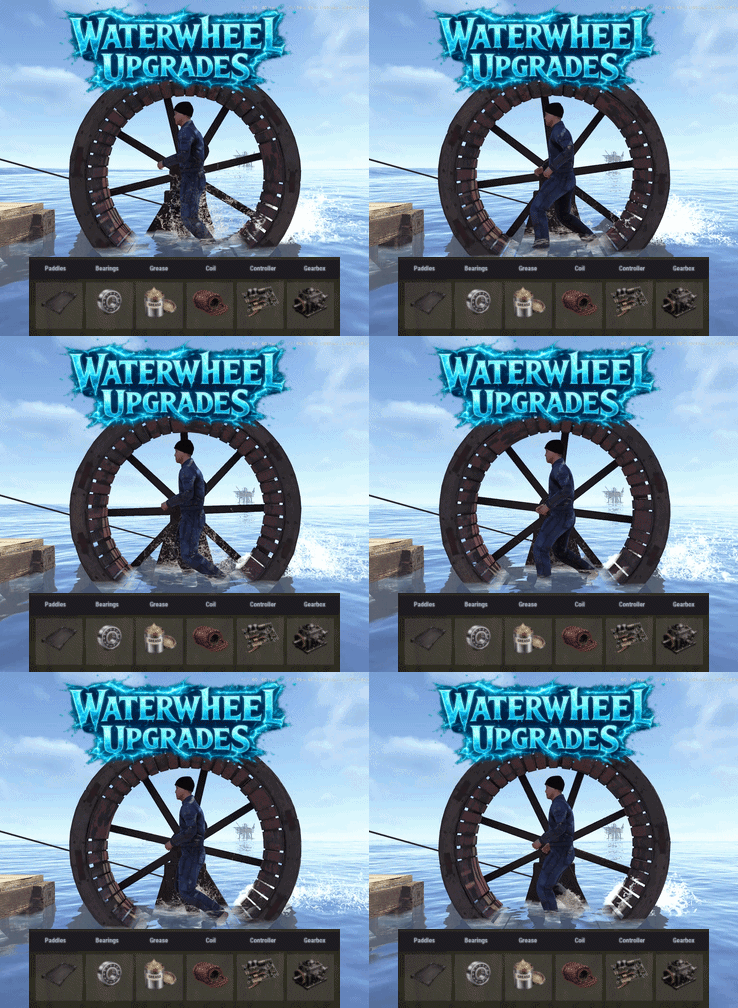
Water Wheel Upgrades adds a part based upgrade system to the new electrical waterwheels, allowing it's performance to be improved. Each part type has 3 tiers. Players can open an upgrade interface by right clicking on the wheel while holding a hammer, install custom parts by dragging them into specific slots, and improve both in-water and manual wheel performance through a simple interface. Each upgrade part affects the wheel’s stats, allowing you to tune in water output, manual output, efficiency, movement behavior, and metabolism costs. Parts are matched to their proper module slots, upgrades are saved per wheel, and all changes are applied directly to the entity in a lightweight, persistent system. The plugin also includes optional loot crate support, letting you control whether upgrade parts can appear in loot containers and set per container drop chances for each tier. Alternatively the parts can be added to any of your existing systems such as shops or crafting plugins. The upgrade parts are all configured in the config, with unique icons and stats, allowing you to quickly deploy this functionality to yourt server. As with most of my content, localization is possible with a default English lang file being included. The part shortname and skins are all pre-configured but can be modified, or replaced with items from my Custom Item Manager Permissions: waterwheelupgrades.use - Allows players to open and use the waterwheel upgrade interface. waterwheelupgrades.admin - Allows access to the admin part giving command. Commands: /wwpart - Admin chat command to give yourself all of the available parts for testing or adding to shops. Optionally can specify amount if you need more than one of each. Pre-Configured Parts: Paddles Bearings Grease Coil Controller Gearbox Default Config:$17.99 -
 Yes
Yes -

cates and locked crates just keep respawning
Brad Copp replied to Mathew Richards's Support Report in Support
In the meantime do /deepsea forceclose After 10 mins, /deepsea open and see how it goes -
cates and locked crates just keep respawning
Brad Copp replied to Mathew Richards's Support Report in Support
Thanks for the report, i will investigate this asap -
Makes sense, it did cross my mind , thanks !
-
{ "Default Skins": { "box.wooden.large": 3588571100, "furnace": 3588586960, "door.hinged.wood": 3590994485, "door.hinged.metal": 3591005762, "door.double.hinged.wood": 3639526071, "largebackpack": 3639503723, "box.wooden": 3639515678 }, "Change Crafted Item Skins": true, "Change Placed Item Skins": true, "Version": { "Major": 1, "Minor": 0, "Patch": 0 } }
-
Not sure what it is, but some things will fail to skin on deployed - in my case, the small woodbox. If it's crafted, the skin is applied to it immediately. If an unskinned wood box is deployed, it doesnt skin. The large wood box for example skins fine on deploy

-
Hi Stormo, the plugin does not touch any loot in crates so it's probably caused by something else. If you need to roll everything back to vanilla without restarting, run these commands in console after closing deep sea deepsea.wipecooldownmax 5400 deepsea.wipecooldownmin 5400 deepsea.wipeduration 10800 deepsea.wipeendphaseduration 1800 deepsea.wiperadiationphaseduration 300
-
 Did you have a chance to check this? Tried using the provided API but it acts as if didnt exist - specifically OnSkillsXPEarned This is my test method, with Skills plugin correctly referenced private object OnSkillsXPEarned(BasePlayer player, float amount) { if (player == null) return null; Puts($"OnSkillsXPEarned fired: {player?.displayName} amount={amount}"); if (amount <= 0f) return null; if (_ignoreEarnHookOnce.Remove(player.userID)) return null; if (!TryGetActiveTimedBooster(player.userID, out var booster)) return null; var bonus = amount * (booster.Percent / 100f); if (bonus <= 0f) return null; _ignoreEarnHookOnce.Add(player.userID); Skills?.Call("API_AddPlayerXP", player.userID, bonus); if (_config.NotifyBonusEarned) Player.Message(player, $"<color=#b6ff7a>Bonus XP earned:</color> <color=#ffffff>{bonus:0.##}</color>", null, _config.ChatIcon); return null; }
 -
It should definitely exist, its in the code for the last 2-3 versions
-
Changed Status from Pending to Work in Progress
-
Hi Stormo, something about the implementation of deepsea causes things to spawn even if they already exist. Im already aware of this. Will look into the crates problem too. For now, try tunning /deepsea dedupe This should clean up most or all duplicates
-
 Hi walkinrey Did you ever have time to look at this again ?