Khan
-
Posts
1,149 -
Joined
-
Days Won
10
Content Type
Profiles
Warranty Claims
Downloads
Forums
Store
Services
Downloads Plus Support
DOWNLOADS EXTRA
Reels
Support Center
Everything posted by Khan
-
I apologize, you are correct it indeed is a new bug. Working on a patch now
-
Changed Status from Pending to Fixed Changed Fixed In to 2.9.91
-
please update to latest, latest is 2.9.91. You appear to be on an older version
-
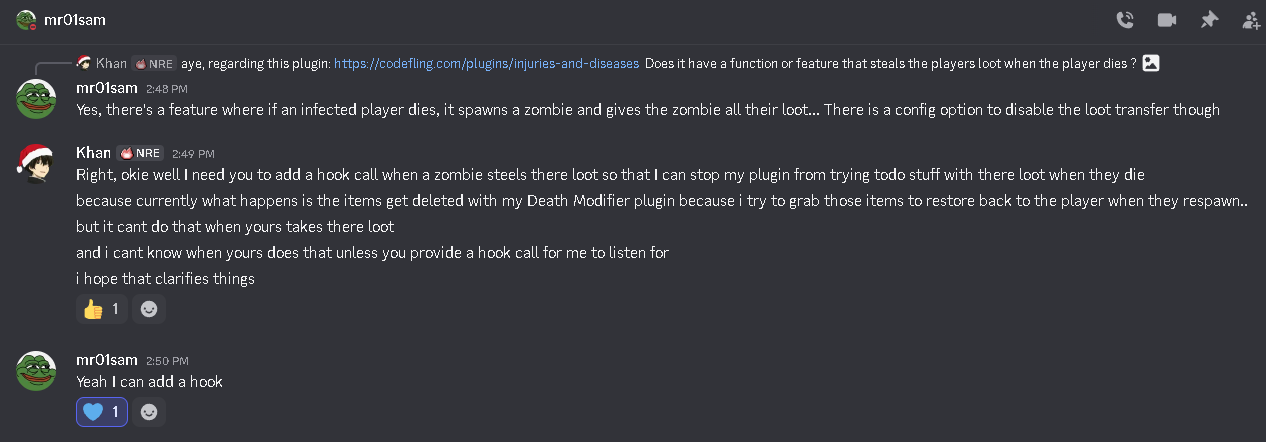
Hello, Thank you for bringing this to my attention. After looking into the behavior you described, I was able to confirm that the issue occurs when the "Injuries And Diseases" plugin transfers the player's inventory to a spawned zombie on death. Because that plugin removes the items from the player before my plugin processes the death event, my plugin cannot access the inventory it expects to restore later, which results in the items effectively disappearing. I have already reached out to the developer of the "Injuries And Diseases" plugin, and we are currently working together to resolve this interaction. They have confirmed that they will be adding a hook that will allow my plugin to detect when a zombie takes the player's inventory so it can properly handle that situation. In the meantime, there is also a configuration option in the "Injuries And Diseases" plugin that disables the loot transfer to zombies, which will prevent this behavior from occurring until the compatibility update is released. Once the hook is added on their side, I will include compatibility support in the next update of Death Modifier so both plugins can function together correctly. I appreciate you reporting this, as it helped identify the interaction between the two plugins. Please let me know if you would like assistance adjusting the configuration in the meantime.

-
Changed Status from Pending to Not a Bug
-
Oxide already prevents duplicate command registrations internally. Commands are stored in a dictionary, and attempting to register the same command again simply results in a warning rather than creating another entry. Because of this, duplicate command registration cannot cause the error you referenced. The error Symbol table grew beyond unsigned short indicates that tens of thousands of unique strings are being inserted into Rust’s internal symbol table. This typically occurs when something repeatedly generates dynamic strings (for example entity names, or other identifiers) until the 16-bit symbol limit is exceeded. Stack Modifier does not generate dynamic commands, permissions, or entity names, and therefore cannot produce this error. In other words, Stack Modifier does not and cannot cause the issue you are experiencing. I would recommend checking other plugins or reviewing your server logs to identify what is generating excessive unique symbols.
-
First, Oxide already handles all command and permission registrations for plugins internally. Adding a manual guard like the one suggested would not resolve the error you mentioned. Second, there are no server logs provided in your report. Without the actual crash log or stack trace from the server, there’s no way to determine what is occurring on your end. Third, command duplication would not cause a server crash. Even if a command were registered more than once, Oxide handles that safely and it would not produce the error you referenced. If you're encountering a crash, please provide the full server logs around the time of the crash so the issue can actually be investigated.
-
Changed Status from Pending to Closed
-
Changed Status from Pending to Closed
-
Yes that error very clearly states it's occurring in a method that I don't touch ( OnMaxstackable ) and it's a harmony patch created by Epic Loot there's nothing I can do to fix that. Please reach out to imthenewguy with a support ticket report. EpicLoot+Item_MaxStackable_Patch
-
 @AlaEddineYahia Added that and a few other things.
 -
Changed Status from Pending to Fixed Changed Fixed In to 1.1.3
-
I honestly didn't think anyone was still using this thing. One sec /
-
Changed Status from Pending to Fixed Changed Fixed In to 1.1.6
-
Changed Status from Not a Bug to Fixed Changed Fixed In to 2.9.7
-
Changed Status from Pending to Not a Bug
-
Turns out that was DLC items.
-
stacks don't revert back to vanilla unless something happened to the config file, please send the current config file you have and the server log from when it wiped the config file.
-
If you happen to use a plugin on umod called Corpse Location please make sure you remove it as it is bricking player save data and causing server crashes. Regarding recyclers, they are working just fine for me, are you by chance using a mod for them? Additionally if you use a plugin on umod called Backpacks by whitethunder please make sure you are on the latest update since that also causes bugs with stacking if you are not on version 3.17.2
-
 @FreezerGaming This plugin does not have that functionality built into it, the best you could do is edit these settings here "Currency Settings": { "Sets default currency, 0 = disabled, 1 = Economics, 2 = ServerRewards": 0, "Sets price": 15.0, "Sets Increment penalty to apply only when they purchase a revive instead of adding for each death.": false, "Sets Increment penalty for quick repeated use, 0 = disabled": 5.0, "Resets Cost Increment after x seconds, 0 = disabled": 1800 }, You could set the base price from 15 to 0. This would make it so that the first use is free. You could then set the increment penalty to true & set the penalty price. Then simply set the reset cost timer. That's about as close as you can get to doing what you want. At the moment, I would have todo a feature update to better support what your wanting todo with it. So basically at the moment, no it cannot do what you are asking.
 -
Changed Status from Pending to Closed
-
This issue is from a umod plugin called Corpse Location on umod. https://umod.org/plugins/corpse-location You need to update to latest 2.4.0 and wipe your server.
-
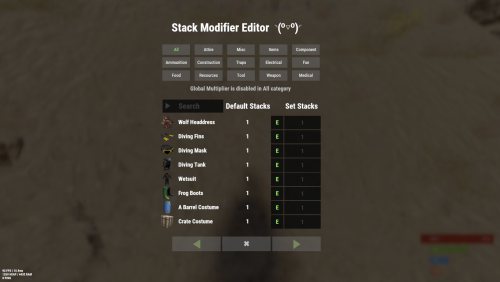 @Rust Admin 2.9.6 It's no longer in beta and is the latest release for live server use.
- 208 comments
-
- 1
-

-
- #stacks
- #rust stacks
- (and 22 more)