Mike6FO
-
Posts
192 -
Joined
-
Last visited
Content Type
Profiles
Warranty Claims
Downloads
Forums
Store
Services
Downloads Plus Support
DOWNLOADS EXTRA
Reels
Everything posted by Mike6FO
-
Think I found it. BetterNPCNames. Not sure why it was only affecting this and not other NPC plugins though. Will get rid of it and bring skins back. Thanks
-
Ok, I'll look at it tomorrow and see if I can figure out what is causing it. Thank you.
-
Not sure why the quote but no response. I was looking for a way to keep their skins applied to their clothing, but not have them drop those skinned items in order to be compliant with the new ToS. Currently, when they die, they drop their equipped gear (with skins) and their configured loot. The loot isn't skinned, only their kits. Was hoping for a new config option to not drop their equipped gear but only the configured loot.
-
I'll just remove all skins from their kits cause I still need them to drop their configured (in the plugin) loot profiles.
-
Is there a way (or can it be added) to not drop their kits but only the loot tables we have defined?
-
No sir, just the ones that come with the plugin. I also see that 1.0.4 1.0.5 got released, just grabbed it to update. I'll keep trying to replicate it on my end also. Thank you!
-
Had a player get kicked with this message as they opened the menu while looking at ceiling. Second time it happened to them. They reconnected and were able to use it fine. Have seen other similar messages in console logs, but couldn't get more info from those folks as to what they were doing at the time. I haven't been able to replicate it myself. RPC Error in CLIENT_ChangeSkin: Object reference not set to an instance of an object. at WallpaperPlanner.%4724dd4f49a4e0983d092fef6790f52abf19e8c1 (BaseEntity+%e25d1665e13e2e8bfdec4130e427206f51fd5f69 %aa91c87ea24a820d6667e925f8c35cdbc77c4459) [0x00000] in <00000000000000000000000000000000>:0 at WallpaperPlanner.%ed5d04a58ac6e1eea8177543202752b6b75a6310 (BasePlayer %539928421f6c95676d9f28db954afe7d58e177fc, System.UInt32 %482b0e69372ffa1b0f08e44dba65b3cf4902c2bd, %bb8313f8f3e494d3fe3fc589489c7c7e206e2734 %aa91c87ea24a820d6667e925f8c35cdbc77c4459) [0x00000] in <00000000000000000000000000000000>:0 at BaseEntity.%cfa31f64000c04fc8c0137138017e03deebea77e (System.UInt32 %2ef6037671e4a7789f664c0cb56787fa13c09593, %bb8313f8f3e494d3fe3fc589489c7c7e206e2734 %6599c91381525851fb3fb8cdff3be791bafd37c2) [0x00000] in <00000000000000000000000000000000>:0 at Client.%63f95f02b0b591492d7092ac88aa64f468739e95 (%bb8313f8f3e494d3fe3fc589489c7c7e206e2734 %bc2a6363b2bed28955271d9875f02a35401413c1) [0x00000] in <00000000000000000000000000000000>:0 at %afc530b839f0dd197b74f75625decd1c6c7c8144.%5f39dc8f607092560addbad2b1df1a788e417dfd (%2815a0ff13472e347b940ea51473cbec7454fb6b %a81c11a2871aa42d5cf11fb0ea94655ff720156a) [0x00000] in <00000000000000000000000000000000>:0 at %c2012cb4c1b9dab2594d877f4281a00cb89549b8.%9834a596d650f8f92e0d588a44943c8b08991f4d () [0x00000] in <00000000000000000000000000000000>:0 at Client.Update () [0x00000] in <00000000000000000000000000000000>:0
-
Still crashing for me. Same error after force wipe. Runs fine at first, but tosses out those errors constantly if you try to /atrainstop
-
I know this is old, but sounds like you have another plugin that's loading after EventManager that is using /em. For me it was TommyGun's payback. HTH
-
 Awesome! Thanks ZEODE!
 -
Any way to either lock the NPCs to the player/team when they spawn? Or a way to disable them from spawning? Just worried about them attacking other players on PvE if they get too close.
-
It appears to be if Player1 attacks Convoy near Player2's base and Player2's auto turrets try to attack the NPCs. Since Player2 isn't the owner, they (the turrets) aren't able to kill the NPCs (shouldn't be able to) but it does flood console with the error. So 'mostly' cosmetic. HTH,
-
As a temp fix, try reverting back to 2.6.8. Some of the changes from FP didn't get pushed out this wipe. 2.6.8 is working for me after update.
-
.thumb.png.bcb832e22f0a48b6833fee517e444bff.png) Hi Mevent. Will you be able to provide a renamed version of this like M&B did? To prevent conflicts with EventManager from uMod.
Hi Mevent. Will you be able to provide a renamed version of this like M&B did? To prevent conflicts with EventManager from uMod.- 343 comments
-
- 1
-

-
- #eventmanager
- #manager
- (and 5 more)
-
Still happening with 2.6.3. I was able to scan around under Bradley using remover tool in admin mode and remove several C4 from it. It started moving again once I cleared them. Can't really see them, just have to slowly scan around for them.
-
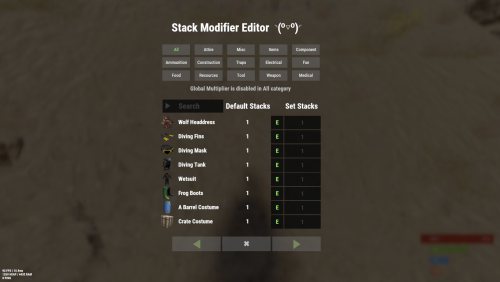
KeyNotFoundException: The given key '2083256995' was not present in the dictionary. at System.Collections.Generic.Dictionary`2[TKey,TValue].get_Item (TKey key) [0x0001e] in <f98723dd4586469db5213ec59da723ca>:0 at Oxide.Plugins.StackModifier+<ModifyStacks>d__23.MoveNext () [0x000bb] in <a1c5020c30474a688cdddccb93daaf04>:0 at UnityEngine.SetupCoroutine.InvokeMoveNext (System.Collections.IEnumerator enumerator, System.IntPtr returnValueAddress) [0x00026] in <470ec865e9cd405cbc45cdbc22bb3c0c>:0 Stacks seem to be working, but can't go past Salvaged sword in the editor. Guessing it's the new handmade smg?
-
 Removed. Sorry, should have been done as a ticket.
- 208 comments
-
- 1
-
-
- #stacks
- #rust stacks
- (and 22 more)
-
May have finally found the issue. Found RF C4 left behind on the tracks after it got stuck again. Was able to duplicate the issue. Also placed some down before the tracks. A bradley did pick one up as it was driving over and then became stuck on the tracks down the road.
-
EDIT: Disregard...will do new ticket.
-
I've tried many times to duplicate this on my test box (same map), but can't. Haven't had any more reports on live either. So I'm going with it was a fluke and not an issue anymore.
-
Generated on RustMaps then 2 custom monuments added. I'll DM you the link to map and config file.