
Kalvi
-
Posts
73 -
Joined
-
Last visited
Content Type
Profiles
Warranty Claims
Downloads
Forums
Store
Support
DOWNLOADS EXTRA
Services
Everything posted by Kalvi
-

Version 1.2.0
180 downloads
Plugin that changes the icon in all messages from other plugins. Does not change players' avatars Command /changeicon <SteamID>: Sets the new SteamID as the icon for system messages. Uses permission "changeicon.admin” /changeicon reload: Reloads the configuration file. Uses permission "changeicon.admin” Permission changeicon.admin Configuration file { "User SteamID": 76561198272553228 } Lang { "NoPermission": "<color=#FF0000>You do not have permission to use this command.</color>", "IconChanged": "<color=#00FF00>Steam ID has been changed to: {0}</color>", "InvalidSteamID": "<color=#FF0000>Invalid Steam ID.</color>", "ConfigReloaded": "<color=#00FF00>Configuration reloaded.</color>", "Usage": "<color=#FFFF00>Usage: /changeicon <SteamID> or /changeicon reload</color>" }Free -
![More information about "VoteDay [NO UPDATE]"](https://codefling.com/uploads/monthly_2024_07/obraz_2024-07-23_212800470.thumb.png.ed04c7fd2007656dfc1ee5c6d54c15e0.png)
Version 1.2.0
799 downloads
The plugin adds the ability to skip nights by voting with the /voteday command. Additionally, the command can be used by people who have permission. Every day at 19:00 in-game time the voting is turned on, if the voting is successful the time is switched to 8:00 am. Command /voteday: Starts voting for skipping the night if voting is not already in progress. Requires the "voteday.use” permission. /voteday reload: Reloads the plugin configuration. Requires "voteday.admin” permission. /voteday set timevote <seconds>: Sets the voting time in seconds and saves it to the configuration file. Requires the "voteday.admin” permission. /voteday set requiredpercentage <percentage>: Sets the required percentage of votes (ranging from 1 to 100) and writes it to the configuration file. Requires the "voteday.admin” permission. Permission voteday.use: Allows the player to participate in voting. voteday.admin: Allows the player to reload the plugin configuration and change the voting settings. Configuration file { "VoteDuration": 180.0, "RequiredPercentage": 50 } Lang { "VoteStarted": "<color=#FFFF00>Vote to skip the night has started! You have {0} seconds to vote. Type /voteday to vote. {1} votes are needed to pass.</color>", "VoteCount": "<color=#00FF00>{0} players voted yes out of {1}.</color>", "VotePassed": "<color=#00FF00>The vote passed! {0} players voted yes out of {1}. Skipping to day.</color>", "VoteFailed": "<color=#FF0000>The vote failed. {0} players voted yes out of {1}. The night will continue.</color>", "NoPermission": "<color=#FF0000>You do not have permission to use this command.</color>", "AlreadyVoting": "<color=#FF0000>A vote is already in progress.</color>", "AlreadyVoted": "<color=#FF0000>You have already voted.</color>", "ConfigReloaded": "<color=#00FF00>Configuration reloaded successfully.</color>", "InvalidCommand": "<color=#FF0000>Invalid command usage. Use /voteday set timevote <seconds> or /voteday set requiredpercentage <percentage>.</color>", "VoteDurationSet": "<color=#00FF00>Vote duration set to {0} seconds.</color>", "RequiredPercentageSet": "<color=#00FF00>Required vote percentage set to {0}%.</color>", "InvalidPercentage": "<color=#FF0000>Invalid percentage. Please enter a value between 1 and 100.</color>" }Free -
 Very cool plugin for a low price, I recommend for the fast support
 -
Look your discord, i send message
-
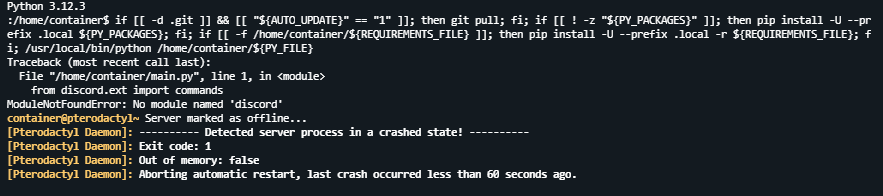
How to solve this problem? I want to host the bot on pterodactyl.io panel
-
 Very cool plug-in however, communication with the author is non-existent. I asked several questions, asked for a rank on discord for having bought the plugin and got no answer and I've been waiting for 7 days.