Jump to content
Message added by Mevent,

Thanks for your interest in my plugin!

If you have any questions or issues with the plugin, please contact me.
For support related questions, please create a thread in the Support Section or send a direct message to my profile @MeventSupport.

Thanks!

86 Screenshots
  • 694.6k
  • 20.5k
  • 108.52 kB
  • Update details
    v2.5.3
    Released
    Download size 108.52 kB
    Total versions 134
    Typical update pace About every 6 days
    Freshness Updated yesterday

This area is for discussion and questions. Please use the support area for reporting issues or getting help.

Recommended Comments


Aussie4life

Posted (edited)

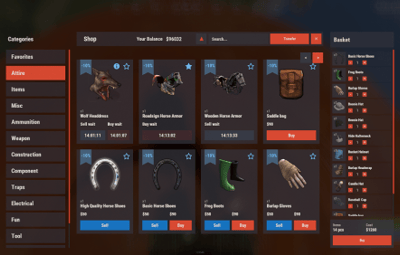
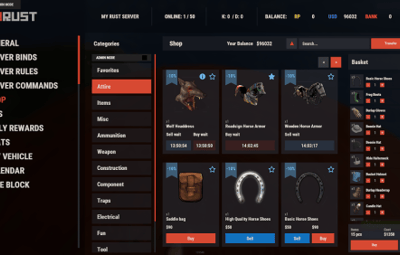
I dont know if im just missing something or if im stupid. Im trying to get the updated version of the shop to look like the old version. ive managed to change the size of the category window and its position. ive even figured out which value to change to move the content items around. but no matter what i do, i cant seem to get the main window black background to stretch the same amount as the title bar. Any help would be appreciated. This is where ive gotten to


image.png.263d7c1c2046685def11975bfd72a359.png

Edited by Aussie4life
Mevent

Posted

2 minutes ago, Aussie4life said:

I dont know if im just missing something or if im stupid. Im trying to get the updated version of the shop to look like the old version. ive managed to change the size of the category window and its position. ive even figured out which value to change to move the content items around. but no matter what i do, i cant seem to get the main window black background to stretch the same amount as the title bar. Any help would be appreciated.

pm me on Discord: mevent

  • Like 1
KingSharp

Posted

Could you make it so when editing prices you don't get sent back to page 1 every time you edit an item.

Sulfur

Posted

18 hours ago, KingSharp said:

Could you make it so when editing prices you don't get sent back to page 1 every time you edit an item.

I'm with your on this option i want it to get added so i can edit prices on the go without clicking a million times

Mevent

Posted

18 hours ago, KingSharp said:

Could you make it so when editing prices you don't get sent back to page 1 every time you edit an item.


12 minutes ago, LuminCC said:

I'm with your on this option i want it to get added so i can edit prices on the go without clicking a million times

I'll be adding this soon. I'm finally back from vacation, and I'm starting work on the plugins 🙂 

  • Love 1
Zand3rs

Posted

Please, could try and fix so the shop does not close when you click somewhere else than the buttons. 
If you click between 2 categories it closes. 
If you click on a image the shop ui also closes.. 
 

Mevent

Posted

3 minutes ago, Zand3rs said:

Please, could try and fix so the shop does not close when you click somewhere else than the buttons. 
If you click between 2 categories it closes. 
If you click on a image the shop ui also closes.. 
 

Thanks for the signal! I'll check it out!

TheLoginator

Posted

Soo when i go to download the update from the main webpage it gives me 84 files to download with no versions listed, just letting you know this is very confusing.

Love the plugin 


image.png.19a3559aa4abc65af7ac20592aa84f83.png

Mevent

Posted

2 hours ago, TheLoginator said:

Soo when i go to download the update from the main webpage it gives me 84 files to download with no versions listed, just letting you know this is very confusing.

Love the plugin 


image.png.19a3559aa4abc65af7ac20592aa84f83.png


👀 
I just wanted to roll back the Shop update before everyone downloaded it.....
@Deathwe need your help

Andres S

Posted (edited)

first one on top is version1.0.0 😄

last on bottom is 2.0.2 version. 
so if you want latest, scoll down and download last file 😉


Edited by Andres S
Mevent

Posted

1 hour ago, Andres S said:

first one on top is version1.0.0 😄

last on bottom is 2.0.2 version. 
so if you want latest, scoll down and download last file 😉


I feel like I broke the site with one click 😂😂😂


  • Haha 2
CrazyRust

Posted

I also have the problem that when the gui closes I click on the half, not exactly on the icons.

Sulfur

Posted

8 hours ago, CrazyRust said:

I also have the problem that when the gui closes I click on the half, not exactly on the icons.

He is aware of this bug and i am sure it will be in the next update, for now you will have to put up with it like me, honestly i have kind of ignored it

OvO

Posted (edited)

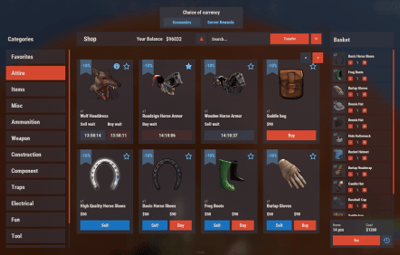
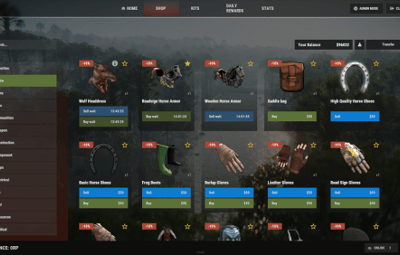
Can't economic payments be displayed on one panel?

Choose different currencies for payment, reflected in the shopping cart instead of being divided into two panels

Edited by 29xglllli
MeventSupport

Posted

9 hours ago, 29xglllli said:

Can't economic payments be displayed on one panel?

Choose different currencies for payment, reflected in the shopping cart instead of being divided into two panels

Hi! What do you mean? 

OvO

Posted


Sorry, my English is not good. As shown in the picture, different currencies are displayed together on one panel


5bb57cac-e6d9-4ca8-8ded-c415670bc32e.png

  • Like 1
MeventSupport

Posted

1 hour ago, 29xglllli said:


Sorry, my English is not good. As shown in the picture, different currencies are displayed together on one panel


5bb57cac-e6d9-4ca8-8ded-c415670bc32e.png

Right now there is no such thing, because the plugin was originally designed to work with the item cart, and it would be weird to have currency switching in the cart 🙂 .

But in case the item cart is disabled, I plan to add the ability to change currency!

Mike6FO

Posted

Anyway to get Shop to follow the "NoShop" flag for ZoneManager zones?  I'm guessing that's something that really needs to be handled by ZoneManager, but figured I'd ask.

xxxproms

Posted

@MeventPlease update the example of connecting the IQEconomic plugin, I did everything according to the instructions, but the balance with this plugin does not work, and in your example the config differs from the config that is currently generated by your store.

"Economy": {
    "Type (Plugin/Item)": "Plugin",
    "Plugin name": "IQEconomic",
    "Balance add hook": "API_SET_BALANCE",
    "Balance remove hook": "API_GET_BALANCE",
    "Balance show hook": "API_REMOVE_BALANCE",
    "ShortName": "",
    "Display Name (empty - default)": "",

    "Skin": 0,
    "Title": {
      "Message": "IQEconomic",
      "Use localized messages?": false,
      "Localized messages": {
        "en": "IQEconomic",
        "fr": "IQEconomic"
      }
    },


ReiNasc

Posted

Good afternoon.
I am using an ATM plugin with "paper" feature, iteID "-1779183908" and money skinID "916068443". Can I configure purchases in this plugin for this feature?
Thank you for your attention.

MeventSupport

Posted

3 minutes ago, š½éšУ said:

Good afternoon.
I am using an ATM plugin with "paper" feature, iteID "-1779183908" and money skinID "916068443". Can I configure purchases in this plugin for this feature?
Thank you for your attention.

Hello!  Yes of course 

MatthiasBM

Posted

So Weird One Not Happening With Every player in fact only been brought to my attention by one so far but for some reason when say they enter any Shop Tab i have set up it loads the first page no problems they click for the next page they see it for a split second and then the page shows This page again only happening to this one player and has not effected anyone else so far but thought it may be strange behaviour i verified by watching their screen as i thought maybe user error but no just seem to happen to this one player it works normally for everyone else any suggestions?image.png.b685b88f883d3a7bb1a915a1e14608ef.png

MooDDang

Posted

Hello, thank you for the plugin update.

However, I'm having difficulties configuring the settings. I want to prevent users from deciding the payment method for specific items.

How exactly should I format the {} section for the payment methods?

I tried replacing {} with 0, {0}, "0", {"0"}, {"0":price}, and various other formats, but it keeps returning errors.

Could you please explain how to properly set up payment methods for each item?


       "Currencies": {
            "Enabled": true,
            "Enabled currency for buying items (key - economy ID, if you use economy by default use 0)": {},
            "Currency for selling items (key - economy ID, if you use economy by default use 0)": {}
          }

how do i do this config?

image.png

MeventSupport

Posted

On 10/6/2024 at 5:00 AM, MooDDang said:

Hello, thank you for the plugin update.

However, I'm having difficulties configuring the settings. I want to prevent users from deciding the payment method for specific items.

How exactly should I format the {} section for the payment methods?

I tried replacing {} with 0, {0}, "0", {"0"}, {"0":price}, and various other formats, but it keeps returning errors.

Could you please explain how to properly set up payment methods for each item?


       "Currencies": {
            "Enabled": true,
            "Enabled currency for buying items (key - economy ID, if you use economy by default use 0)": {},
            "Currency for selling items (key - economy ID, if you use economy by default use 0)": {}
          }

how do i do this config?

image.png

Hi! Here is an example of the "Currency" setting: https://pastebin.com/KY10EdiZ

MeventSupport

Posted

On 10/5/2024 at 11:17 PM, MatthiasBM said:

So Weird One Not Happening With Every player in fact only been brought to my attention by one so far but for some reason when say they enter any Shop Tab i have set up it loads the first page no problems they click for the next page they see it for a split second and then the page shows This page again only happening to this one player and has not effected anyone else so far but thought it may be strange behaviour i verified by watching their screen as i thought maybe user error but no just seem to happen to this one player it works normally for everyone else any suggestions?image.png.b685b88f883d3a7bb1a915a1e14608ef.png

Hello! Are you getting any errors in the console?

Create an account or sign in to comment

You need to be a member in order to leave a comment

Create an account

Sign up for a new account in our community. It's easy!

Register a new account

Sign in

Already have an account? Sign in here.

Sign In Now
  • Like 13
  • Sad 1
  • Love 8

Mevent's Collection

User Feedback

About Us

Codefling is the largest marketplace for plugins, maps, tools, and more, making it easy for customers to discover new content and for creators to monetize their work.

Downloads
3m
Total downloads
Customers
12k
Customers served
Files Sold
170.5k
Total sales
Payments
3.7m
Processed total
×
×
  • Create New...

Important Information

We have placed cookies on your device to help make this website better. You can adjust your cookie settings, otherwise we'll assume you're okay to continue.