Jump to content

13 Screenshots

  • 220.5k
  • 8.5k
  • 52.47 kB
  • Update details
    v4.3.3
    Released
    Download size 52.47 kB
    Total versions 66
    Typical update pace About every 5 days
    Freshness Updated today

This area is for discussion and questions. Please use the support area for reporting issues or getting help.

Recommended Comments


Mankus

Posted

14 minutes ago, MeventSupport said:

you need to use version 3.3.9

Ok, thank you for the message.

Are you telling me that version 3.3.9 uploaded within the last 30 minutes should fix the configuration and data file problems? 
I'll be sure to test it out and send any feedback.

Thank you for your time. 
 

hid333

Posted

I'm considering purchasing it.
Is it still possible to implement the feature previously mentioned in the Discussion, such as unloading plugins on days that are not targeted for execution based on weekday events?
Currently, I use a custom cron-like plugin that executes commands on each day of the week and at each time, but if it's possible to purchase commands, or at least just unload, I'd like to migrate some of my settings to this. If anyone knows of anything about this, please let me know.

MeventSupport

Posted

9 hours ago, hid333 said:

I'm considering purchasing it.
Is it still possible to implement the feature previously mentioned in the Discussion, such as unloading plugins on days that are not targeted for execution based on weekday events?
Currently, I use a custom cron-like plugin that executes commands on each day of the week and at each time, but if it's possible to purchase commands, or at least just unload, I'd like to migrate some of my settings to this. If anyone knows of anything about this, please let me know.

Why unload plugins if these events just don't run? O.o

Mankus

Posted

On 8/12/2025 at 2:19 PM, MeventSupport said:

you need to use version 3.3.9

Hi, 

The same problem is still happening in v.3.3.9 
Any suggestions ?

Infinite blank events lists with only "Mevent" listed and no events or other creators can be added.
 

EventsManager bug.jpg

MeventSupport

Posted

On 8/16/2025 at 12:07 PM, Malkizid said:

Hi, 

The same problem is still happening in v.3.3.9 
Any suggestions ?

Infinite blank events lists with only "Mevent" listed and no events or other creators can be added.
 

EventsManager bug.jpg

at what point exactly you are creating an empty list, what error that new ones are not added.

Erase all old data, delete everything related to the plugin

Mankus

Posted (edited)

7 minutes ago, MeventSupport said:

at what point exactly you are creating an empty list, what error that new ones are not added.

Erase all old data, delete everything related to the plugin

Hi, thanks for the reply.
I must remind you, that I'm not doing any of this. This all happens by itself.

please note: on every version update,
all data has been erased and all traces of the plugin.
To prevent any data mismatch or configuraiton change issues, as you suggested - so this is not the cause.

Lets go to start again. 
Running in Oxide.
1) All plugin data is removed. /plugins   /data  /lang   
2) Plugin is freshly installed in an empty test server. 
3) The plugin works, generally.  
4) Nothing is modified.  
5) The plugin does all of this by itself, adds this data on every server restart until its unusable.

The same happens on the live server I'm configuring it on too. 
With no input from myself or an administrator.  

I honestly don't know why but its not a plugin conflict and its not a data access issue.

Do you have any other suggestions as to what I could do to troubleshoot this ?

Thanks in advance,

Regards,
Manky

Edited by Malkizid
MeventSupport

Posted

18 hours ago, Malkizid said:

Hi, thanks for the reply.
I must remind you, that I'm not doing any of this. This all happens by itself.

please note: on every version update,
all data has been erased and all traces of the plugin.
To prevent any data mismatch or configuraiton change issues, as you suggested - so this is not the cause.

Lets go to start again. 
Running in Oxide.
1) All plugin data is removed. /plugins   /data  /lang   
2) Plugin is freshly installed in an empty test server. 
3) The plugin works, generally.  
4) Nothing is modified.  
5) The plugin does all of this by itself, adds this data on every server restart until its unusable.

The same happens on the live server I'm configuring it on too. 
With no input from myself or an administrator.  

I honestly don't know why but its not a plugin conflict and its not a data access issue.

Do you have any other suggestions as to what I could do to troubleshoot this ?

Thanks in advance,

Regards,
Manky

Send me your plugin as an archive, along with your folder with the date and your config, please 

  • Like 1
Mankus

Posted

5 hours ago, MeventSupport said:

Send me your plugin as an archive, along with your folder with the date and your config, please 

I'll set put in a request and send a dm with the data as soon as I can.
Thanks.

  • Love 1
MatthiasBM

Posted

Event Manager Has Stopped Working Randomly Today Was Working Fine up until now its not starting events 

hid333

Posted

On 8/13/2025 at 6:24 PM, MeventSupport said:

Why unload plugins if these events just don't run? O.o

This is simply because it saves server resources and
I thought it would be possible to manage events that do not use event helpers and do not have individual settings to disable automatic event triggering for each plugin.

MeventSupport

Posted

2 hours ago, hid333 said:

This is simply because it saves server resources and
I thought it would be possible to manage events that do not use event helpers and do not have individual settings to disable automatic event triggering for each plugin.

It’s not really a good idea to unload or reload plugins during server runtime. On high-population servers this is almost never done, because reloading requires recompiling the plugin, which is very resource-heavy and can cause lag spikes or even crashes. A safer approach is to simply let the plugin stay loaded — if events are not scheduled to run, they won’t consume resources in the background.

  • Like 1
Kleementin

Posted

Does this plugin take care of cargo heli and patrol heli killing themselves after some time when stuck?

This is an old still existing issue that Facepunch won't fix.

MeventSupport

Posted

On 8/24/2025 at 8:18 PM, MatthiasBM said:

Event Manager Has Stopped Working Randomly Today Was Working Fine up until now its not starting events 

Hi! 👋


Your EventsManager likely stopped due to one of these common issues:


Quick Fixes:

1. Player Count Settings - Open EventsManager UI (command: /em) and check minimum/maximum player requirements for your events

2. Reset Data - Use console command: eventmanager.reset.default

3. Reload Plugin - Use: oxide.reload EventsManager


Check: Make sure all event plugins are loaded and your server meets the player count requirements set in the UI.


If still broken, share your player count and any console errors! 😊

MeventSupport

Posted

On 8/26/2025 at 6:24 PM, Kleementin said:

Does this plugin take care of cargo heli and patrol heli killing themselves after some time when stuck?

This is an old still existing issue that Facepunch won't fix.

No, EventsManager doesn't handle stuck helicopter cleanup. This plugin only schedules and starts events - it doesn't control what happens during the events themselves.


EventsManager simply:

- Triggers event commands at scheduled times

- Manages event timing and player count requirements through the UI (/em)


For helicopter cleanup, you'll need:

- The individual event plugins to handle their own helicopter management

- Or a separate helicopter cleanup plugin


EventsManager is purely a scheduler - it starts events but doesn't manage their mechanics or cleanup stuck objects.


Hope this clarifies! 😊

MOTH

Posted

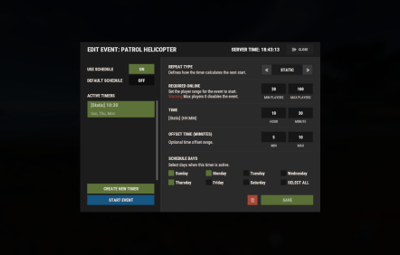
Can you please explain I don't understand the static, like the time and the offset time I have a little trouble understanding, sorry.image.png.3d6fcfcfe6874ae062b36904e92f2e6b.png

MeventSupport

Posted

On 8/29/2025 at 7:14 PM, MOTH said:

Can you please explain I don't understand the static, like the time and the offset time I have a little trouble understanding, sorry.image.png.3d6fcfcfe6874ae062b36904e92f2e6b.png

Hi! 👋


Sure! Let me explain EventsManager timing in simple terms:


Event Types:


1. Static Events 📅

- Run at specific times (like 15:30 every day)

- Example: "Daily restart at 6:00 AM"


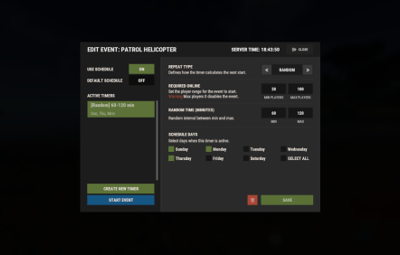
2. Every Events ⏰

- Run every X minutes repeatedly

- Example: "Airdrop every 30 minutes"


Time Offset Explained:

- Offset Min/Max: Adds random delay to events

- Example: Event set for 15:00 with offset 5-15 minutes = runs between 15:05-15:15

- Why use it? Prevents events from being too predictable!

RR_Tappi

Posted

Do I need to disable automatic starting for all events so that the Event Manager handles the starting, etc.?

RR_Tappi

Posted

1 hour ago, Wile E. said:

In a word, yes. Automatic starting needs to be disabled for any Events you want EventsManager to control.

Ok 🙂 Thank You 

Mbesailor

Posted

Morning, just a question, on the config file. 

  "Disable vanilla auto events?": false,
  "Allowed list of vanilla events": [
    "event_f15e"

the section where it says Disable vanilla auto events, i have set to false, however, if i just want the vanilla brad to come in auto, do I place that in the allowed list while i have the vanilla events set to false.

MeventSupport

Posted

22 hours ago, Mbesailor said:

Morning, just a question, on the config file. 

  "Disable vanilla auto events?": false,
  "Allowed list of vanilla events": [
    "event_f15e"

the section where it says Disable vanilla auto events, i have set to false, however, if i just want the vanilla brad to come in auto, do I place that in the allowed list while i have the vanilla events set to false.

In that case, you need to change "false" to "true" and add all events except Bradley to the allowed list, and configure his autospawn in the plugin UI

Sovereign_Skies

Posted

I have 

  "Disable vanilla auto events?": true,

but Bradley continues to spawn normally, and I have no other plugins that manipulate Bradley. How do I disable that from spawning and control via Events Manager?

Mevent

Posted

5 hours ago, Sovereign_Skies said:

I have 

  "Disable vanilla auto events?": true,

but Bradley continues to spawn normally, and I have no other plugins that manipulate Bradley. How do I disable that from spawning and control via Events Manager?

Hi! Make sure you haven't added it to the "Allowed list of vanilla events"

Sovereign_Skies

Posted

11 hours ago, Mevent said:

Hi! Make sure you haven't added it to the "Allowed list of vanilla events"

Thanks for getting back to me. I have confirmed it is *not* in the list of allowed vanilla events. I did see this in the console on plugin reload:
 

[EventsManager] Vanilla events are disabled: event_roadbradley


Bear Grills

Posted

17 hours ago, Sovereign_Skies said:

Thanks for getting back to me. I have confirmed it is *not* in the list of allowed vanilla events. I did see this in the console on plugin reload:
 

[EventsManager] Vanilla events are disabled: event_roadbradley


Is launch site bradley an "event"? I think its more of an NPC, not sure this would stop the regular bradley respawning at launch site, I could be wrong though.

The road bradley is the end of wipe event iirc.

Sovereign_Skies

Posted

5 hours ago, Bear Grills said:

Is launch site bradley an "event"? I think its more of an NPC, not sure this would stop the regular bradley respawning at launch site, I could be wrong though.

The road bradley is the end of wipe event iirc.

This is the first time I'm trying to schedule everything like this and my first time modifying Bradley, so I'm not sure. I will look into it more. Thanks for the insight, you're probably right.

Create an account or sign in to comment

You need to be a member in order to leave a comment

Create an account

Sign up for a new account in our community. It's easy!

Register a new account

Sign in

Already have an account? Sign in here.

Sign In Now
  • Like 5
  • Love 10

Mevent's Collection

User Feedback

About Us

Codefling is the largest marketplace for plugins, maps, tools, and more, making it easy for customers to discover new content and for creators to monetize their work.

Downloads
3.1m
Total downloads
Customers
12.2k
Customers served
Files Sold
172.5k
Total sales
Payments
3.8m
Processed total
×
×
  • Create New...

Important Information

We have placed cookies on your device to help make this website better. You can adjust your cookie settings, otherwise we'll assume you're okay to continue.