
Xenia87's Wishlist
-
.thumb.gif.473157f6844989d096c05bd9f3c4501b.gif)
$49.90
Atlanta: The Walking Dead
The world has changed. The island in the ocean has become a haven for evil spirits, the surviving inhabitants call them the Walking Dead. Once the blooming and fragrant city of Atlanta was the center of this island, now it is a dead city with its inhabitants. There are very few people left who are opposed by the walking dead, but every day there are more and more of them, the dead people turn into zombies and there is no stopping it. I present to your attention my new map with incredible detail of monuments and their features, the plug-ins included will give even more atmosphere of the lost world of the zombie apocalypse. On the map you will find a large number of roads, railways, tunnels and rivers. You will also love the many unique places to build bases for your players. I tried very hard to create this map, I hope you like it, Thank you. Good luck surviving in Atlanta!
Attention: The Train Home plugin shown in the video does not come with the map, it is sold separately
Features:
Prefab Count: ~71к prefabs Size: 4500 A lot of interesting locations to explore Marketplaces, Helicopter Salesman and recycler have been added to fishing villages Railway A large number of places for the construction of foundations in the form of unusual rocks, caves, landscape, underwater and icebergs Custom ways to overcome distances on boats and tugboat Custom plugin Event Prison Alert (by KpuctaJL) Custom plugin Map Skinner (by Adem) Custom plugin Npc Moving Control (by Adem) Realistic zombies on the map The atmosphere of the zombie apocalypse This map is constantly supported and updated for the current version of the game with all updates!
How can I view the map?
You can do this in our Discord server by submitting a request for an invitation to our servers. There you will be given the rights of an "administrator” and without any difficulties you will be able to fly around the map and fully familiarize yourself with it.
Custom Monuments:
Atlanta City Alexandria Woodbury Prison Police Department Harrison Hospital Railway Depot Herschel Farm Hilltop Strange Swamp Lonely Wandered Nomads Camp Gang of Survivors Convoy Desert Gas Station Ore Mine Farmers Camp Laundry Motel Old Cave Monument Train Home Custom point Zipline interesting places to build a base marked X Monument Facepunch:
Apartment Complex Launch Site Ferry Terminal Missile Silo Junkyard Harbor 1 and 2 Arctic Research Base Satellite Dish Airfield Bandit Camp Outpost Giant Excavator Pit Water Treatment Military Tunnel The Dome Ranch Fishing Village 1,2,3 (Modified version) Lighthouse Underwater Lab Railway HQM, Sulfur, Stone Quarry Roadside Monument RadTown Water Well -
$69.69
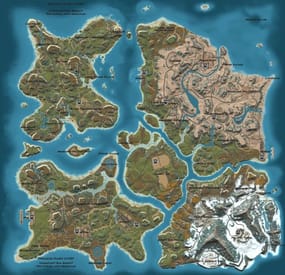
Synecdoche
Welcome to SYNECDOCHE!
Synecdoche (noun) Sin-eck-doh-key: A figure of speech in which a part is made to represent the whole.
Crafted over the course of years, this map offers something extraordinarily rare in this community. Custom monuments are amazing and fun to explore! I've seen so much hard work go into them and people have made some really cool stuff. However, custom monuments are only a small part of the level design in Rust.
A Map Focused on Detail, no matter where you are:
But who would be insane enough to do such a thing? And how would it be possible? A 4k Rust map is 16 square kilometers. To make this feel like a real place, and give each space the attention to detail it needs demands thousands of hours working with consistent standards. This is why almost all of the maps aside from a handful on these sites will choose to use some form of procedural generation, and what makes synecdoche so uncommon. Every square meter was hand crafted with care, to make a place that feels alive and fantastical. it's what makes the map feel so beautiful.
Still Not Convinced?
Well, here's some of the feedback we've gotten from the community!
Where Reality Meets Fantasy
Each and every spot on the map was precisely manicured to feel unique and significant. Every rock has its purpose, and every nook and cranny was deliberately sculpted to inspire exploration. There are no locations on the map that were forgotten or left behind. Each location plays its part to represent the world as a whole.
Information and Specifics:
This map includes only vanilla monuments and can be run under the community tab. It does not require any 3rd party dependencies, not even the RustEdit Oxide DLL. However, you will need to place the included Harmony mod in you harmony folder to prevent Cargoship from leaving the map while it docks at the northern harbor.
Size: 4096 x 4096
Entity Count: ~68,000
Prefab Count: ~16,000
Can Edit: True
Required Plugins:
Block CargoShip Egress (Included with Map Download) Monuments
Junkyard Trainyard Outpost Bandit Camp Fishing Village (X3) Missile Silo Arctic Research Base Military Base (X2) Airfield Water Treatment Plant Sewer Branch (X2) Satellite Dish The Dome Harbor (X3) Military Tunnel Launch Site Power Plant Mining outpost (X7) Oxum's Gas Station Supermarket (X3) Lighthouse (X5) Abandoned Cabins Oil Rigs (large and small) Caves Underground train system Aboveground train system Underwater Labs (X2) Featured Videos:
- #map
- #synecdoche
- (and 8 more)
-
$49.90
Badlands
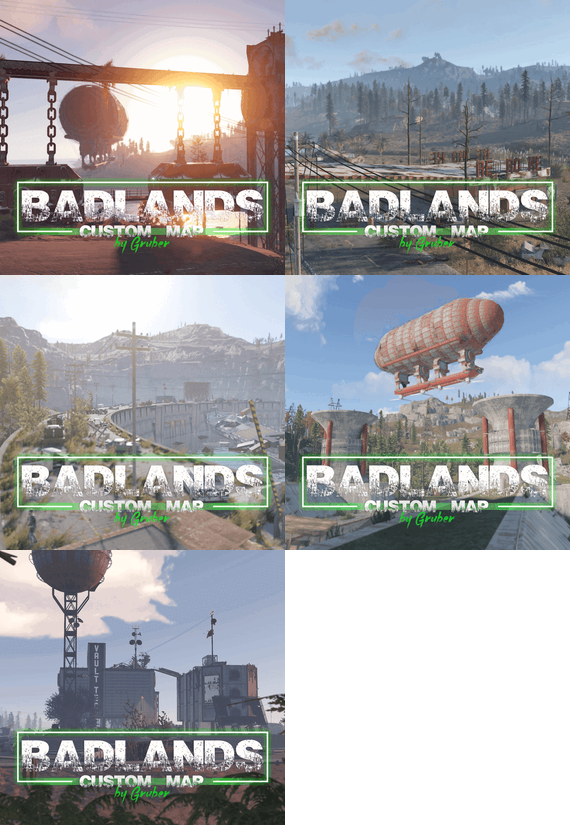
Nuclear war, what could be worse than that. War is a harbinger of death. I present to your attention a map in the post-nuclear world. Nuclear bombs were dropped long ago on this once beautiful island, radiation destroyed most of the living world, craters formed and a handful of people were able to take refuge in shelters. You are one of the lucky ones who have been in the shelter for a long time, you were born in the shelter and do not know what is happening on the surface.
In the craters formed after the missile strike, they served as excellent places for the construction of cities and factories, the remaining technologies allowed the surviving population to develop. On this map you will find many custom monuments in an unusual style, and the music plugin from KpucTaJl will add to you the atmosphere of the old world. Monorails run along the entire outskirts of the island, which fit very well into the atmosphere.
Remember, the wasteland does not spare anyone, good luck! I express my gratitude to STAR for providing the DELTA monument.
Description 2
Size: 4000к
Prefab Count: ~60к
Operation of the "SoundRustEdit" plugin
In some moments there is a radio that plays and the music changes, there are 12 different songs from the Fallout game in the plugin
How can I view the map?
You can do this in our Discord server by submitting a request for an invitation to our servers. There you will be given the rights of an "administrator” and without any difficulties you will be able to fly around the map and fully familiarize yourself with it.
Discord Server: https://discord.gg/UpUXuxs4Vx
Custom monuments:
Sunctuary Vault 103 Concord City Camp in Pit Vault 118 General Atomics Robotics Opencast Mine Large Dam Rad Farm Radar Vault Tec Barge Village Junk Town Olivia Station Open Air Cinema Diner Starline Restaurant Mobile Station Red Rocket (2 options) Monorails and railway tracks Many islands, for those who like to live far from the mainland Places to build (some can only be accessed by air transport) Monuments from Facepunch:
Apartment Complex Launch Site Nuclear Missile Silo Outpost Ferry Terminal Junkyard Water Treatment Plant Train Yard Airfield Military Tunnel Power Plant Giants Excavator OilRig (2) Harbor Bandit Camp Sewer Branch Lighthouse Fishing Village Ranch The Dome Satellite Dish Roadsite Monument Underground Tunnels Arctic Research Base Underwater Lab Ziggurat Required Dependencies:https://github.com/k1lly0u/Oxide.Ext.RustEdit
This map is constantly supported and updated for the current version of the game with all updates!
-
$9.99$8.49Deep Sea Options
Deep Sea Options is a single config control plugin for Rust’s new Deep Sea feature.
It lets server owners fully control when Deep Sea opens, what spawns inside it, what vehicles can enter, and how access rules are enforced. You can also configure if players can build inside deep sea.
🏗️ Building Control
Enforce building allowed / blocked inside Deep Sea * Limit how many foundations a player can build in Deep Sea * Buildings persist restart, as long as the deep sea isnt being closed.
🌊 Deep Sea Behavior Control
Configure defaults:
Whether the deep sea should always remain open, be on timers, or disabled Whether deepsea will auto open on server wipe (facepunch disables this by default) Control all phase timers GameTip messages to announce deep sea openinig/closing
🏝️ Deep Sea Content Control
Configure procedural spawns:
Island counts Ghost Ships counts RHIB counts Control:
count spacing radius minimum distance between spawns distance from Deep Sea edges Settings are grouped and explained in the config
📦 Loot spawn
Configurable respawn option for crates/ore/npc Respawn for scientist boat groups
🚁 Access & Teleport Rules
Control:
Allow all vehicles (including planes and helis) or only an allow-listed set players can enter without a boat flying (noclip/admin) players can bypass checks NPC passengers are allowed on vehicles Prevent or allow “vehicle stacking” (boats/helis on deck)
Chat Commands
/deepsea status Shows current Deep Sea state
/deepsea open Opens deep sea if not alrady open
/deepsea close Closes current Deep Sea
Console Commands
dso open - to open the deepsea through the plugin
dso close - to close the deepsea through the plugin
dso forceclose - to force close the deepsea in case you need it closed but 'AlwaysOpen' is reopening it
Note if you make changes to some config values (such as the procedural spawns, you will need to close the deep sea and reopen.)
Config options:
=== GENERAL CONTROLS === Control - Schedule If ON: Plugin controls when Deep Sea opens/closes and how long it stays open. Control - Content If ON: Plugin controls how many islands, ghost ships, RHIB patrol groups, and initial loot scale Deep Sea uses. Control - Travel Rules If ON: Plugin controls who/what is allowed to use Deep Sea portals (vehicles, NPCs, players without vehicle, etc). Control - Building If ON: Plugin controls whether players can build while inside Deep Sea. Force Apply On Reload If ON: When plugin reloads, it forces Deep Sea to close and reopen so spawn changes apply immediately. If OFF: Changes apply next time Deep Sea opens normally. === SCHEDULE SETTINGS === Mode Vanilla = Normal Rust Deep Sea cycle. AlwaysOpen = Deep Sea never closes. Disabled = Deep Sea never opens. Plugin keeps pushing the next opening far into the future. Open Time Seconds How long Deep Sea stays open before closing. Cooldown Seconds How long Deep Sea stays closed before opening again. Final Phase Seconds End-of-cycle phase used for weather / atmosphere effects. Radiation Warning Phase Seconds When time left is below this, new entry is normally blocked unless late entry is allowed. AlwaysOpen - Keep Time Left Around Seconds In AlwaysOpen mode, plugin keeps the remaining open time around this value. AlwaysOpen - Refill When Below Seconds If time left drops below this, it refills back up to the target above. Disabled - Push Next Opening To Seconds In Disabled mode, pushes next open time far into the future. Entrance Portal Direction Forces the entrance portal direction. 0 = Map-based 1 = North 2 = East 3 = South 4 = West Set Open On Server Wipe If ON: Plugin controls the vanilla wipe setting. Open On Server Wipe Only used if above is ON. If enabled, Deep Sea is allowed to auto-open on server wipe. Set Generation Pacing If ON: Plugin controls Deep Sea generation pacing values. Increasing these delays can help if you experience long lag spikes when Deep Sea is opening. Entities Spawn Interval Seconds Only used if above is ON. Controls delay between general Deep Sea entity spawns during generation. Lower = faster generation. Spawn Groups Spawn Interval Seconds Only used if above is ON. Controls delay between Deep Sea spawn-group waves during generation. Lower = faster generation. NavMesh Spawn Interval Seconds Only used if above is ON. Controls delay between Deep Sea island navmesh generation steps. Lower = faster generation. === CONTENT SPAWNING === These control placement spacing for each Deep Sea content type. Islands / Ghost Ships / RHIB Groups all use the same logic: Count How many spawn each time Deep Sea opens. Spacing Size General spacing radius. Bigger = more spread out. Edge Buffer How far from the outer Deep Sea border spawns must stay. Bigger = more toward the center. Minimum Spacing Hard minimum distance between spawns. Overrides spacing size if larger. Loot Initial Loot Scale Controls the initial vanilla Deep Sea loot population multiplier when Deep Sea generates. 1.0 = vanilla amount. Higher = more initial loot spawned. Lower = less initial loot spawned. === RESPAWN (CRATES / NPCs / HACKABLES / RHIBS) === Enable Respawn System If ON: Plugin respawns eligible Deep Sea crates, ores, island scientists, hackable crates, and optional RHIB/PT boat patrol groups. Enable Debug Logging If ON: Plugin prints debug messages for entity removal, queueing, cleanup, and respawning. Check Interval Minutes How often the respawn system runs. Min Distance From Players To Allow Respawn Entities only respawn if no players are within this distance. Respawn Hackable Crates Via Ghostship If ON: Hackable crates respawn through ghost ship crate spawning. Hackable Crates Count How many hackable crates the plugin wants available through ghost ship spawning. Respawn RHIB Patrol Groups When None Remain If ON: Plugin maintains Deep Sea RHIB/PT patrol groups by checking current live patrol boats and respawning missing groups up to the configured boat count. === TRAVEL RULES === Allow Any Vehicle If ON: Any vehicle can use the portal. Allowed Vehicle Prefabs If Allow Any Vehicle is OFF, only vehicles matching these prefab names/partial names are allowed. If Any Vehicle, Require Boat Type Only? If ON: Even allowed vehicles must still be boat-type vehicles. Allow Players Without Vehicle If ON: Players can teleport without standing on a vehicle. Allow Noclip Players If ON: Flying/admin players bypass normal vehicle checks. Allow Non-Player Passengers (NPCs) If OFF: Vehicles with NPC passengers cannot teleport. Allow Non-Player Entity Teleport (NPCs) If ON: NPC player-type entities themselves can teleport. Allow Entry During Radiation Warning Phase If ON: Players can still enter even when Deep Sea is near closing. Modify DeepSea Portal Height? If ON: Plugin enlarges the Deep Sea portal height to help high-flying or tall custom vehicles enter more reliably. Ignore Extra Vehicle Onboard Check If ON: Skips checks for extra vehicles being carried/on top of another vehicle, such as helicopters on boats. Log Entry/Exit If ON: Logs allow/deny travel decisions for debugging. === BUILDING === Allow Building In Deep Sea If OFF: Players cannot build inside Deep Sea. If ON: Building is allowed. DeepSea - Limit Foundations If ON: Limits how many foundations each player can place inside Deep Sea only. DeepSea - Max Foundations Per Player Maximum number of foundations a player can place inside Deep Sea. DeepSea - GameTip: Show Remaining On Successful Place If ON: When a player places a foundation in Deep Sea, shows how many they can still place. DeepSea - GameTip: Show Message When Denied If ON: When a player hits the Deep Sea foundation limit, shows a GameTip. === NOTIFICATIONS === GameTip - Deep Sea Opening If ON: Shows a GameTip when Deep Sea starts opening. GameTip - Deep Sea Opened If ON: Shows a GameTip when Deep Sea is fully open. GameTip - Deep Sea Closing If ON: Shows a GameTip when Deep Sea starts closing. GameTip - Deep Sea Closed If ON: Shows a GameTip when Deep Sea is fully closed.
-

$9.90
Auto Loot Npc Corpse
AutoLootNpcCorpse allows players with permission to automatically move items from the corpses of NPCs to the player's inventory.
Players will not need to the location of the corpse and loot it
And support to set the list of items that will not be loot automatically in the config.
Supports vanilla human npcs, and 99% of plugin npcs, like using NPCSpawn's plugins, BotReSpawn...
Permission
AutoLootNpcCorpse.use - Permission to use Commands
/lootnpc - Enable / disable auto loot npc corpse Config
{ "Block Items (shortname)": [ "keycard_green" ] }