By
Mevent
in Plugins
Introducing MultiEvents, the ultimate event management plugin for your Rust server! Seamlessly create, manage, and display events with a beautiful, customizable interface that engages your players. With support for multiple event types, easy integration with other plugins, and a powerful visual editor, MultiEvents is the perfect solution to enhance your server's community experience and keep players coming back for more.
⭐️ Features of Multi Events
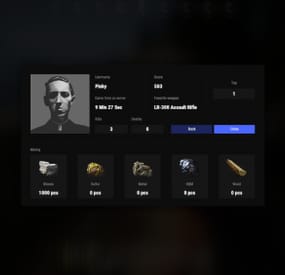
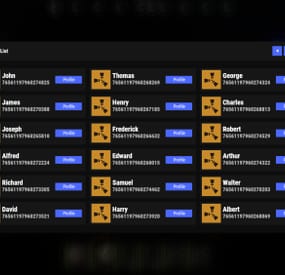
Beautiful, fully customizable UI with multiple template options (Fullscreen, ServerPanel V1, ServerPanel V2) for a tailored player experience.
In-game visual editor for creating and customizing event interfaces, allowing for real-time adjustments without coding.
Support for event categories, descriptions, icons, and banners to enhance event visibility and player engagement.
Integrated event notifications system to alert players about upcoming and ongoing events, ensuring maximum participation.
Event inventory management with customizable permissions, providing control over player access and participation.
Image library support for custom graphics and icons, enabling a unique and branded event presentation.
Multi-language support with easy localization, making the plugin accessible to a global player base.
ServerPanel integration for seamless menu access, enhancing user interaction and ease of use.
Developer-friendly API for plugin integration, allowing for extended functionality and customization.
Pre-loaded with diverse events such as CollectionResources, FoundationDrop, HelicopterPet, HuntAnimal, KingOfHill, LookingLoot, and SpecialCargo, each offering unique gameplay experiences.
Advanced configuration options in JSON format, providing flexibility in event setup and management.
Optimized for performance, ensuring smooth operation even with large player bases and extensive data.
🏆 Included Events
MultiEvents comes pre-loaded with several exciting events ready to use on your server:
CollectionResources - Collect resources and compete with other players! The more resources you collect, the higher your score. Use different tools to get multipliers for your gathering. Top players will receive valuable rewards!
FoundationDrop - Players spawn on a platform made of foundations. The foundations begin to degrade and fall away one by one. Players must survive by jumping between foundations. The last player standing wins! When only one foundation remains, players receive weapons and radiation appears to speed up the finale.
HelicopterPet - Try to get the attention of the patrol helicopter! The more it focuses on you, the more points you earn. Get points when the helicopter orbits around you and even more when it's attacking. The player with the most points at the end wins! Be careful though - this isn't your friendly neighborhood chopper!
HuntAnimal - Hunt animals across the map to earn points! Different animals are worth different amounts - chickens are worth 1 point, while bears are worth 10 points. Wolves, boars, horses, and deer are worth 4 points each. The player with the most points at the end of the event wins!
KingOfHill - Race to the highest point! Your score is based on the highest elevation you reach. Stay on solid ground - no flying, swimming, or using vehicles. The player who reaches the highest point and maintains their position wins! Watch your step and keep climbing!
LookingLoot - Search for loot across the map! Earn points by looting containers and barrels. Most items are worth 1 point each, but special items like scrap and gears are worth 2 points. The player who collects the most valuable loot wins! Be quick - containers can only be looted once!
SpecialCargo - Deliver the special cargo from one monument to another! A random player will be chosen to carry the cargo. The carrier must reach the destination monument marked on the map while avoiding other players. If the carrier dies, a new random player becomes the carrier. Teleportation is disabled for the carrier. Successfully deliver the cargo to win!
Each event is fully customizable through the visual editor and comes with default settings ready to play immediately after installation!
🚀 Expansion Packs & Add‑ons
Enhance MultiEvents with premium expansion packs and our large‑scale raid framework. Pre‑configured, fully customizable, and designed to plug directly into your server.
✨ MultiEvents Pack 1
Barrels, PvP Player Battle, NPC Missile Silo, Pumpkin Picker, Vehicle Hunter.
View on Codefling →
🌟 MultiEvents Pack 2
Another set of competitive and gathering‑focused events to diversify rotations.
View on Codefling →
💠 MultiEvents Pack 3
Corn Collector, Gold Rush (with rare items), Mushroom Madness, NPC Underwater Lab, Patrol Helicopter Hit.
View on Codefling →
🏰 OPERATION FORTRESS
Large‑scale PvE raid framework with handcrafted bases, waves, and rewards — a perfect complement to your event ecosystem.
View on Codefling →
🖼️ Showcase
Fullscreen Template
ServerPanel V1 Template
ServerPanel V2 Template
📬 Video Overview
🎮 Commands
/events - Opens the events menu for players
🛡️ Permissions
multievents.edit - Permission to edit events
🗒️ Visual Editor
MultiEvents includes a robust visual editor that simplifies the process of creating and customizing events. No coding is required—use the intuitive interface to adjust settings, modify colors, add text, and configure event elements directly in-game. This allows for quick and efficient event setup, ensuring your server's events are both engaging and visually appealing.
📚 FAQ
Q: Can I integrate MultiEvents with other plugins?
A: Yes! MultiEvents has an API that allows other plugins to register and manage events. It also integrates with ServerPanel for menu access.
Q: How do I add MultiEvents to the ServerPanel menu?
A: Follow these simple steps:
1. Open ServerPanel menu in-game and click "+ADD CATEGORY" button
2. Set these exact parameters:
Type: Plugin
Plugin Name: MultiEvents
Plugin Hook: API_OpenPlugin
3. Click "SAVE" button to create the category
Q: How do I add custom images for my events?
A: MultiEvents supports an image library. Upload your images to your server, and reference them in the plugin configuration or through the visual editor.
Q: Does MultiEvents support multiple languages?
A: Yes, MultiEvents has built-in localization support. You can customize all text elements in the editor and add translations for different languages.
Q: How do I configure rewards in MultiEvents?
A: Rewards can be configured in two ways. If you want rewards to drop into a custom inventory UI, you need to set up items in the inventory settings and assign them unique IDs. Then, reference these IDs in the event configuration. If you prefer to give rewards directly to the player's in-game inventory, simply specify the rewards directly within the event settings.
Q: How do I set up rewards (Item, Command, Plugin, Kit) and what placeholders are available?
A: Types: Item (ShortName, Amount, DisplayName, Skin), Command (Command string), Plugin (Plugin Name, Hook, Amount), Kit (Kit name). Placeholders for Command: %steamid%, %username%. Multiple commands are separated by | (line breaks are also supported).
Give an item: "Type": "Item", "ShortName": "stones", "Amount": 2500, "DisplayName": "Stones", "Skin": 0
Give a kit: "Type": "Kit", "Kit": "vip_starter"
Run commands: "Type": "Command", "Command (%steamid%)": "inventory.giveto %steamid% scrap 1000|oxide.usergroup add %steamid% vip"
Add BankSystem balance (via Plugin): "Type": "Plugin", "Plugin": "BankSystem", "Hook": "Deposit", "Amount": 2500
Q: What are the recommended sizes for event images?
A: For optimal display, event banners should be 390x349 pixels, and event icons should be 64x64 pixels.
💻 Developer API
MultiEvents provides a developer-friendly API for integration with other plugins:
void API_RegisterEvent(string eventId, JObject data) - Register a new event with MultiEvents
API_RegisterEvent Parameters:
eventId (string): unique identifier for the event.
data (JObject): JSON object containing event details.
JObject Structure:
title (string, required): The title of the event.
description (string, optional): A brief description of the event.
commandToStart (string, required): The command to start the event.
commandToStop (string, required): The command to stop the event.
bannerURL (string, optional): URL for the event's banner image.
icon (string, optional): URL for the event's icon image.
scrollElements (JArray, optional): Custom UI elements for the event's scroll view.
Creating UI Elements for scrollElements:
The scrollElements parameter allows you to add custom UI elements to your event description. Each element is defined as a JObject with specific properties based on its type.
Common Properties:
type (string): "label", "image", "panel", or "button"
color (string): HEX color code (e.g., "#FFFFFF")
alpha (float): Opacity from 0 to 100
position (JObject): Element position and dimensions
Type-Specific Properties:
Text Elements: text (JArray of strings), textColor (HEX), fontSize (int), font (string)
Image Elements: image (string URL)
Button Elements: text, textColor, fontSize, command (string)
Panel Elements: cursorEnabled (bool)
Example of UI Elements:
var customScrollElements = new JArray
{
// Label example
new JObject
{
["type"] = "label",
["text"] = new JArray
{
"Duration: <color=#D74933>10 mins</color>",
"Reward: <color=#D74933>100 scrap, Jackhammer, Python Revolver</color>"
},
["textColor"] = "#E2DBD3",
["alpha"] = 100f,
["fontSize"] = 14,
["font"] = "robotocondensed-regular.ttf",
["align"] = "MiddleLeft",
["position"] = new JObject
{
["anchorMinX"] = 0f,
["anchorMinY"] = 1f,
["anchorMaxX"] = 1f,
["anchorMaxY"] = 1f,
["offsetMinX"] = 0f,
["offsetMinY"] = -200f,
["offsetMaxX"] = 0f,
["offsetMaxY"] = -140f
}
},
// Image example
new JObject
{
["type"] = "image",
["image"] = "https://example.com/image.png",
["color"] = "#FFFFFF",
["alpha"] = 100f,
["position"] = new JObject
{
["anchorMinX"] = 0f,
["anchorMinY"] = 1f,
["anchorMaxX"] = 0f,
["anchorMaxY"] = 1f,
["offsetMinX"] = 0f,
["offsetMinY"] = -234f,
["offsetMaxX"] = 42f,
["offsetMaxY"] = -192f
}
},
// Button example
new JObject
{
["type"] = "button",
["text"] = "Click Me",
["textColor"] = "#FFFFFF",
["color"] = "#D74933",
["alpha"] = 100f,
["fontSize"] = 14,
["command"] = "customcommand {user}",
["position"] = new JObject
{
["anchorMinX"] = 0.5f,
["anchorMinY"] = 0f,
["anchorMaxX"] = 0.5f,
["anchorMaxY"] = 0f,
["offsetMinX"] = -60f,
["offsetMinY"] = 20f,
["offsetMaxX"] = 60f,
["offsetMaxY"] = 50f
}
}
};
Example Usage:
MultiEvents.Call("API_RegisterEvent", "CollectionResources", new JObject
{
["title"] = "Collection Resources",
["description"] = "Collect resources and compete with other players! The more resources you collect, the higher your score. Use different tools to get multipliers for your gathering. Top players will receive valuable rewards!",
["commandToStart"] = "collectionresources.start",
["commandToStop"] = "collectionresources.stop",
["bannerURL"] = "https://gitlab.com/TheMevent/PluginsStorage/raw/main/Images/MultiEvents/CollectionResources.png",
["icon"] = "https://gitlab.com/TheMevent/PluginsStorage/raw/main/Images/MultiEvents/Icons/CollectionResources.png",
["scrollElements"] = customScrollElements
});
(hook) OnEventStart(string eventName) - Hook called when an event begins
(hook) OnEventEnd(string eventName) - Hook called when an event ends
bool API_PlayerHideNotify(ulong userId) - Allows hiding event notifications for a specific player. Returns a boolean indicating whether notifications are hidden for the player.
string GetBannerUrlByEventId(string eventId) - Retrieves the banner URL for a specific event by its ID. This is useful when you need to reference an event's banner in your custom UI.
🧪 TEST SERVER
Join our test server to view and experience all our unique features yourself!
Copy the IP Address below to start playing!
connect 194.147.90.239:28015
Elevate your server's event management with MultiEvents - the complete solution for creating engaging and visually stunning events that will keep your players excited and coming back for more!