
SLATE's Wishlist
-
$24.99
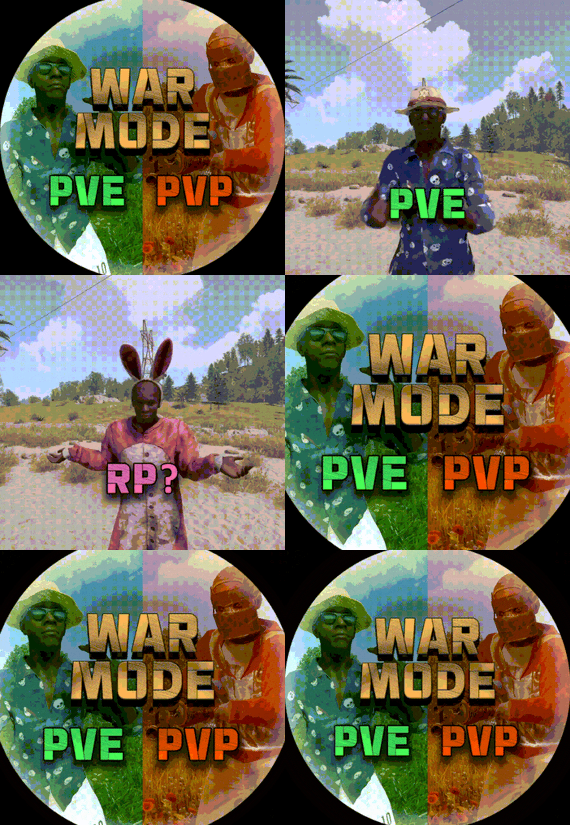
War Mode PVP/PVE
Allows both PVE and PVP players to exist on a server at the same time. PVE players will have certain configurable protections and restrictions. You can have players use a command to flag themselves as PVP/PVE or you can assign it to them when they first spawn. If you have ZoneManager you can also designate specific zones to force player's to be PVE or PVP. Plugin is also compatible with SimpleStatus.
Note: Video is outdated, see documentation for a full list of new features!
Documentation:
A full readme including permissions, commands, and config options is available in this google doc link.
Disclaimer:
Like all of my plugins - this plugin is sold as is. I will be happy to take feature requests into consideration but make no guarantees about which ones get implemented. Please refer to the feature list before you make your purchase!
Developer API:
API Methods
// Returns the mode of the given entity. Also takes into account if the entity is in a forced mode zone. string GetEntityMode(BaseEntity entity); // Returns the group name for the given mode. For example if given 'pve' will return 'warmodepve' string GetModeGroup(string modeId); // Returns the target type for a given entity. Target types are the category that an entity falls into. // For example, if given a BasePlayer entity, it will return 'players'. If given a horse entity is will // return 'horses'. string GetEntityTargetType(BaseEntity entity); Hooks - place these in your plugin and WarMode will call them.
// Called when a player's mode has been updated or config changes have ocurred that may affect the mode. private void WarMode_PlayerModeUpdated(string userid, string modeId) // Used to override WarMode logic for taking damage. // If true/false is returned then WarMode logic will be skipped. Return null to continue WarMode logic. private object CanEntityTakeDamage(BaseCombatEntity target, HitInfo info) // Used to override WarMode logic for targeting. // If true/false is returned then WarMode logic will be skipped. Return null to continue WarMode logic. private object CanEntityBeTargeted(BasePlayer target, BaseEntity attacker, bool skipVendingCheck) // Used to override WarMode logic for triggering a trap. // If true/false is returned then WarMode logic will be skipped. Return null to continue WarMode logic. private object CanEntityTrapTrigger(BaseTrap trap, BasePlayer basePlayer) // Used to override WarMode logic for looting an entity. // If true/false is returned then WarMode logic will be skipped. Return null to continue WarMode logic. private object CanEntityLoot(BasePlayer looter, BaseEntity target, bool skipVendingCheck)
FREE Extension Plugins:
War Mode Admin Panel
Use the /warmode.config or /wmc command to open a panel that allows admins to update mode rules in game without having to reload the pluign. Requires the warmode.admin permission to use.
I HIGHLY recommend you use this extension!
WarModeAdminPanel.cs
War Mode Spawn UI
Provides a UI that is shown to players when they first spawn that prompts them to choose whether they want to be PVP or PVE. Also supports custom modes. Localization and config options available. This can also be configured to appear when players use the /flag command.
WarModeSpawnUI.cs
War Mode Rules UI
Using the /rules command (which is configurable) players can see a list of what restrictions they have for their current mode. These ruling will update dynamically based on your config settings.
WarModeRulesUI.cs
War Mode Badges
Customizable UI elements that will appear on the player's HUD to indicate what their current mode is.
WarModeBadges.cs
-

$6.99
Guess The Number Event
V2 Update
Features
Automatic Events: Events run at configurable intervals
Simple Gameplay: Players just type their guess directly in chat
Prize System: Winners claim customizable rewards
Sound Effects: Special sounds for winning and claiming prizes
Leaderboard: Track and display top winners
Admin Controls: Manually start events
Commands
Guessing: Just type a number in chat when event is active
/claim: Claim your prizes if you won the previous event
/startevent: Admins can manually start an event
/leaderboard: View the top winners
/eventstatus: Check if an event is active and see details
Configuration
The plugin is highly customizable with the following options:
{ "PrizeCommands": [ "inventory.give {player.id} wood 100" ], "GuessRangeMin": 0, "GuessRangeMax": 10, "EventIntervalMinutes": 15, "EventDurationMinutes": 10, "CorrectGuessSound": "assets/prefabs/misc/halloween/lootbag/effects/gold_open.prefab", "ClaimPrizeSound": "assets/prefabs/misc/xmas/presents/effects/unwrap.prefab", "SteamApiKey": "", "ClaimCommand": "claim" } Multiple Prize Example:
You can configure multiple prizes to be awarded to winners:
{ "PrizeCommands": [ "inventory.give {player.id} wood 100", "inventory.give {player.id} stone 75", "inventory.give {player.id} metal.fragments 50", "inventory.give {player.id} scrap 25" ], "GuessRangeMin": 0, "GuessRangeMax": 10, "EventIntervalMinutes": 15, "EventDurationMinutes": 10, "CorrectGuessSound": "assets/prefabs/misc/halloween/lootbag/effects/gold_open.prefab", "ClaimPrizeSound": "assets/prefabs/misc/xmas/presents/effects/unwrap.prefab", "SteamApiKey": "", "ClaimCommand": "claim" }
-
.thumb.gif.adec26ee7eb38920883767a8a783c768.gif)
$29.99$18.59Zombie Hunter Reanimated
Unlock another (Frightening) lane of economic gameplay with Zombie Hunter.
Celebrating 2 years since drop we are here with Version 2.0.0 of Zombie Hunter.
This is a complete rewrite for features, spawn flex, QOL and Much more.
Get licensed, hunt Zombies, sell brains and profit.
Zombies spawn automatically & Randomly at FP Monuments.
You can also save your own custom spawn points via command.
Set a License fee so players have to "Legally" cash out Zombie Brains. The license is optional and the command name is configurable for shop integration.
Build as many Zombie tiers as you want. Each tier has its own settings for Aura - Stats - Combat Settings - Weapon (Melee Only) - Outfit - Marker. You can easily make a High Tier Target stand out from a Low Tier.
Per tier Aura effects let zombies deal radiation, heat, cold, electric or poison effects on nearby players.
An aura can also emit and players are notified when in range.
Top Zombie Hunters leaderboard broadcasts at your interval or players can see it via command.
Players cash out at the Zombie Hunter Cashout Npc. The Npc now features a UI that tries to match the native feel.
Within config you can set the sell amounts via the steps.
Use Economics, Server Rewards, or pay out items to your players.
Discord webhook can track all sales.
View Config below for more info.
ZombieHunter.Admin ZombieHunter.LifetimeLicense
Admin Commands /spawnzombiehunter requires Admin permission and spawns a Zombie Hunter NPC at your current position. /removezombiehunter requires Admin permission and removes the Zombie Hunter NPC you are currently looking at. /az saves a custom spawn point in the data file for zombies to spawn at. Player Commands /buyzl lets a player purchase a Zombie Hunter License if they have sufficient funds. The license requirement can be disabled or bypassed in the config. The command name is configurable. Console / Shop buyzl can also be used as a console command targeting a specific player's Steam ID, which makes it usable for shop plugins to sell licenses to your players. Usage: buyzl id
OnZombieActive() - Called when the field changes from no zombies to atleast one. OnZombieInactive() - Called when no zombies are on the field. OnZombieHunterKill(BasePlayer player) - Called when a player kills a ZH Zombie. OnZombieHunterTrade(BasePlayer player) - Called when a player trades with the Npc. HasZombieLicense(ulong playerID) - Checks if the player has a valid license. GetZombieStats() Returns a Dictionary<ulong, int> - Determines player stats.
{ "Spawn Zombies On Plugin Reload?": false, "Amount to Spawn On Plugin Reload? (Must be less than Max Active Zombies)": 1, "Announce Top Zombie Hunters To Chat Every x Seconds (0 To Disable)": 600, "Enable Spawn Time Restriction?": false, "What time to allow Zombies to Spawn?": 18, "What time should we be over for the Zombies to stop Spawning?": 5, "Clear Kill Counters on Wipe?": false, "Discord Webhook URL": "INSERT_WEBHOOK_URL", "Enable Skill Tree Xp Gain?": false, "Require License for Xp Gain?": true, "Enable Monument Spawns?": true, "Monument Exclusion List - ShortPrefab": [ "tunnel-entrance", "substations" ], "Enable Custom Spawns?": false, "Clear Custom Spawns File On Wipe?": false, "Chat Icon": 0, "Maximum Active Zombies": 3, "Drop Zombie Brains In Pouch?": true, "Base Item for the Zombie Brains?": "blood", "Brains Marketable to the Zombie NPC?": true, "Console Command to Purchase a Zombie License? (For GUI Shops)": "buyzl", "Chat Command to Purchase a Zombie License?": "buyzl", "Require a Zombie License To Cash In Drops to the Zombie Hunter NPC?": true, "Price to Purchase a Zombie Hunter License?": 10000, "Lose Zombie Hunter License on Death?": true, "Clear Licenses on Wipe?": false, "Dynamic Spawn at this Monument": "assets/bundled/prefabs/autospawn/monument/medium/bandit_town.prefab", "Dynamic Spawn Points (Relative to Monument)": [ { "x": 6.74, "y": 1.4, "z": -40.78 }, { "x": -25.3, "y": 2.02, "z": -3.45 } ], "Dynamic Spawn Rotation Correction": 45.0, "Dynamic Spawn Of The Zombie Hunter NPC Enabled?": true, "Economy Plugin - 1 Economics - 2 Server Rewards - 3 Items": 1, "Item Economy Shortname (If Economy Plugin = 3)": "scrap", "Item Economy Skin (If Economy Plugin = 3)": 0, "Item Economy Custom Display Name": "", "Quick Sell Quantity Buttons (max 3 visible)": [ 1, 5, 25 ], "NPC Interaction Cooldown In Seconds": 3.0, "NPC Kit Enabled?": false, "NPC Kit Name?": "", "Amount of Time In Seconds Between Zombie Spawns": 750, "Amount of Time In Seconds for a Zombie to Despawn": 1240, "Enable Spawn SFX?": true, "Enable Despawn SFX?": true, "Announce to Chat When Zombie is Active?": true, "Announce to Chat When Zombie is Claimed?": true, "Enable Bonus Damage In Blight Zones?": false, "Blight Zone Damage Multiplier": 2.0, "Enable Bonus Loot On Death In Blight Zones?": false, "Blight Zone Loot Multiplier": 2.0, "Enable Bonus Health For Zombies Spawned In Blight Zones?": false, "Blight Zone Health Multiplier": 2.0, "Enable Bonus Skill Tree XP For Kills In Blight Zones?": false, "Blight Zone XP Multiplier": 2.0, "Enable Marker Manager from UMOD, To Mark Zombies?": true, "Enable Marker Manager from UMOD, To Mark NPC Location?": true, "Zombie Tiers": [ { "Zombie Name": "Low Tier Zombie", "Skill Tree Xp Value": 100.0, "Zombie Clothing Options": [ { "Shortname": "gloweyes", "Skin": 0 }, { "Shortname": "hat.boonie", "Skin": 818908416 }, { "Shortname": "attire.hide.skirt", "Skin": 807540775 }, { "Shortname": "tshirt", "Skin": 876665516 }, { "Shortname": "burlap.gloves", "Skin": 827694932 }, { "Shortname": "wood.armor.pants", "Skin": 0 } ], "Zombie Total Health": 150, "Zombie Damage Scaling": 1.0, "Seconds Between Attacks": 2.0, "Sense Range": 20.0, "Weapon to Equip?": "longsword", "Weapon Skin ID": 924880337, "Equip Beancans?": true, "Amount of Beancans to Equip?": 5, "Zombie Drop Name": "Low Tier Zombie Brain", "Zombie Drop Skin": 3254396871, "Is the Drop Marketable to the Zombie Hunter NPC?": true, "Sale Price?": 1000.0, "Min Item Drop": 1, "Max Item Drop": 3, "Min Brains Per Kill": 1, "Max Brains Per Kill": 1, "Marker Style": { "Radius": 0.3, "Color": "4E7334", "Outline": "606060", "Alpha": 0.75 }, "Zombie Optional Drops": [ { "Shortname": "humanmeat.spoiled", "Skin": 0, "Custom Name": "", "Amount Min": 3, "Amount Max": 10, "Chance to Drop": 20.0 }, { "Shortname": "ammo.shotgun.slug", "Skin": 0, "Custom Name": "", "Amount Min": 5, "Amount Max": 30, "Chance to Drop": 30.0 }, { "Shortname": "radiationremovetea.advanced", "Skin": 0, "Custom Name": "", "Amount Min": 1, "Amount Max": 2, "Chance to Drop": 40.0 } ], "Aura Effects": [ { "Effect Type (None, Radiation, Heat, Cold, Electric, Poison)": "Radiation", "Enable Proximity Aura?": false, "Enable On Attack Effect?": false, "Aura Radius": 5.0, "Proximity Damage Per Tick": 2.0, "Proximity Duration (seconds)": 8.0, "Proximity Tick Rate (seconds)": 1.0, "Proximity Check Interval (seconds)": 3.0, "On Attack Damage": 5.0, "Enable Aura Sphere?": false, "Aura Sphere Color (Blue, Green, Red, Purple)": "Green" } ] }, { "Zombie Name": "Mid Tier Zombie Target", "Skill Tree Xp Value": 200.0, "Zombie Clothing Options": [ { "Shortname": "hat.gas.mask", "Skin": 0 }, { "Shortname": "tshirt", "Skin": 965885061 }, { "Shortname": "attire.hide.pants", "Skin": 2960205521 }, { "Shortname": "burlap.gloves.new", "Skin": 0 }, { "Shortname": "jacket", "Skin": 834233801 }, { "Shortname": "gloweyes", "Skin": 0 } ], "Zombie Total Health": 225, "Zombie Damage Scaling": 1.5, "Seconds Between Attacks": 1.5, "Sense Range": 30.0, "Weapon to Equip?": "longsword", "Weapon Skin ID": 924880337, "Equip Beancans?": true, "Amount of Beancans to Equip?": 5, "Zombie Drop Name": "Mid Tier Zombie Brain", "Zombie Drop Skin": 3254397311, "Is the Drop Marketable to the Zombie Hunter NPC?": true, "Sale Price?": 2000.0, "Min Item Drop": 1, "Max Item Drop": 3, "Min Brains Per Kill": 1, "Max Brains Per Kill": 1, "Marker Style": { "Radius": 0.4, "Color": "a64242", "Outline": "606060", "Alpha": 0.8 }, "Zombie Optional Drops": [ { "Shortname": "humanmeat.spoiled", "Skin": 0, "Custom Name": "", "Amount Min": 3, "Amount Max": 10, "Chance to Drop": 30.0 }, { "Shortname": "scrap", "Skin": 0, "Custom Name": "", "Amount Min": 120, "Amount Max": 230, "Chance to Drop": 30.0 }, { "Shortname": "maxhealthtea.advanced", "Skin": 0, "Custom Name": "", "Amount Min": 10, "Amount Max": 15, "Chance to Drop": 40.0 } ], "Aura Effects": [ { "Effect Type (None, Radiation, Heat, Cold, Electric, Poison)": "Radiation", "Enable Proximity Aura?": false, "Enable On Attack Effect?": false, "Aura Radius": 7.0, "Proximity Damage Per Tick": 3.0, "Proximity Duration (seconds)": 10.0, "Proximity Tick Rate (seconds)": 1.0, "Proximity Check Interval (seconds)": 3.0, "On Attack Damage": 8.0, "Enable Aura Sphere?": false, "Aura Sphere Color (Blue, Green, Red, Purple)": "Green" } ] }, { "Zombie Name": "High Tier Zombie Target", "Skill Tree Xp Value": 300.0, "Zombie Clothing Options": [ { "Shortname": "gloweyes", "Skin": 0 }, { "Shortname": "pants", "Skin": 2228727332 }, { "Shortname": "attire.hide.vest", "Skin": 0 }, { "Shortname": "mask.bandana", "Skin": 2839354901 }, { "Shortname": "attire.hide.poncho", "Skin": 2949395842 }, { "Shortname": "hat.boonie", "Skin": 2963365014 }, { "Shortname": "shoes.boots", "Skin": 1669982744 } ], "Zombie Total Health": 325, "Zombie Damage Scaling": 2.0, "Seconds Between Attacks": 1.0, "Sense Range": 40.0, "Weapon to Equip?": "longsword", "Weapon Skin ID": 924880337, "Equip Beancans?": true, "Amount of Beancans to Equip?": 5, "Zombie Drop Name": "High Tier Zombie Brain", "Zombie Drop Skin": 3254397772, "Is the Drop Marketable to the Zombie Hunter NPC?": true, "Sale Price?": 3200.0, "Min Item Drop": 1, "Max Item Drop": 3, "Min Brains Per Kill": 1, "Max Brains Per Kill": 1, "Marker Style": { "Radius": 0.6, "Color": "39FF14", "Outline": "000000", "Alpha": 0.9 }, "Zombie Optional Drops": [ { "Shortname": "metal.refined", "Skin": 0, "Custom Name": "", "Amount Min": 200, "Amount Max": 500, "Chance to Drop": 30.0 }, { "Shortname": "scrap", "Skin": 0, "Custom Name": "", "Amount Min": 440, "Amount Max": 600, "Chance to Drop": 30.0 }, { "Shortname": "supertea", "Skin": 0, "Custom Name": "", "Amount Min": 1, "Amount Max": 1, "Chance to Drop": 40.0 } ], "Aura Effects": [ { "Effect Type (None, Radiation, Heat, Cold, Electric, Poison)": "Radiation", "Enable Proximity Aura?": false, "Enable On Attack Effect?": false, "Aura Radius": 10.0, "Proximity Damage Per Tick": 5.0, "Proximity Duration (seconds)": 12.0, "Proximity Tick Rate (seconds)": 1.0, "Proximity Check Interval (seconds)": 3.0, "On Attack Damage": 12.0, "Enable Aura Sphere?": false, "Aura Sphere Color (Blue, Green, Red, Purple)": "Green" } ] } ], "NPC Weapon": "rifle.ak", "NPC Weapon Skin": 3047277939, "Marker Settings": { "Zombie Hunter NPC Marker Style": { "Radius": 0.3, "Color": "038C7F", "Outline": "606060", "Alpha": 0.75 }, "Zombie Hunter NPC Marker Display Name": "Zombie Hunter Cashout" }, "NPC Clothing Options": [ { "Shortname": "pants", "Skin": 2630171764 }, { "Shortname": "hoodie", "Skin": 2630170972 }, { "Shortname": "shoes.boots", "Skin": 547978997 }, { "Shortname": "coffeecan.helmet", "Skin": 1894381558 }, { "Shortname": "roadsign.jacket", "Skin": 1894379005 }, { "Shortname": "roadsign.kilt", "Skin": 1894376712 } ] }
{ "NoPerms": "[<color=#4E7334>Zombie Hunter</color>] You do not have permission to run this <color=#312E8C>Command</color>!", "NoBrains": "You have no <color=#4E7334>Zombie Brains</color> on you that I can pay you for. \nBe safe out there, please come back soon!", "Cooldown": "[<color=#4E7334>Zombie Hunter</color>] :angry: Wait <color=#a642b5>{0}</color> second(s)!, I think I heard a <color=#4E7334>Zombie</color>...", "SellSuccess": "[<color=#4E7334>Zombie Hunter</color>] :eyes: \n\n I can afford to give you {0} for your <color=#038C7F>{1}x</color> <color=#a642b5>{2}</color>(s).", "SellAllSuccess": "[<color=#4E7334>Zombie Hunter</color>] :eyes: \n\n Sold everything marketable: <color=#038C7F>{1}</color> brain(s) for {0}.", "SaleDisabled": "[<color=#4E7334>Zombie Hunter</color>] <color=#038C7F>Sales</color> are Disabled in the Config, Enable and Try again.", "NoLicense": "[<color=#4E7334>Zombie Hunter</color>] :eyebrow: Are you out there Hunting Zombies without a <color=#038C7F>License</color>? \nUse <color=#038C7F>/{0}</color> to purchase one.", "AlreadyLicensed": "[<color=#4E7334>Zombie Hunter</color>] You already have a <color=#312E8C>Zombie Hunter License</color>.", "BuySuccess": "[<color=#4E7334>Zombie Hunter</color>] <color=#312E8C>Zombie Hunter License</color> Obtained. \nYou were charged {0}, Stay Safe, <color=#312E8C>{1}</color>!", "InsufficientFunds": "[<color=#4E7334>Zombie Hunter</color>] You don't have enough funds to purchase a <color=#4E7334>Zombie Hunter License</color>. \nIt costs {0}.", "Despawn": "[<color=#4E7334>Zombie Hunter</color>] The <color=#038C7F>{0}</color> has <color=#312E8C>escaped</color> our hunting parties.", "ZombieSpotted": "[<color=#4E7334>Zombie Hunter</color>]\n\n A <color=#038C7F>{0}</color> has been seen attacking a local near <color=#038C7F>{1}</color>.", "ZombieEliminated": "[<color=#4E7334>Zombie Hunter</color>] The <color=#038C7F>{0}</color> was <color=#4E7334>Eliminated</color> by <color=#312E8C>{1}</color>!", "ZombieDrop": "[<color=#4E7334>Zombie Hunter</color>] The <color=#038C7F>{0}</color> dropped a pouch! Open it and deliver the <color=#038C7F>Zombie Brain</color> to the Zombie Hunter for your Reward!", "Revoked": "[<color=#4E7334>Zombie Hunter</color>] Your <color=#038C7F>Zombie License</color> has been <color=#038C7F>Revoked</color> be wary of Death next time!", "AuraWarning": "[<color=#4E7334>Zombie Hunter</color>] You are caught in <color=#ff7c35>{0}</color>'s aura! <color=#ff4535>Get out before it's too late!</color>", "BlightedZombieEliminated": "[<color=#4E7334>Zombie Hunter</color>] The <color=#39FF14>blighted</color> <color=#ff4444>{0}</color> was <color=#c0c0c0>purged</color> by <color=#ffd700>{1}</color>!" }
-
.thumb.png.9a12c819d22cdd6f03dc06bee65f43d1.png)
$7.26
Static Trader
By Raul-Sorin Sorban in Plugins
A plugin that allows players to trade items at long distances across the map. Server owners can also set fees that scale based on the distance between the two players that are trading.
FEATURES
Customizable commands Intuitive UI (can modify the position offset) Trading fees based on distance Oxide group cooldowns ServerRewards, Economics or custom bank support Notification effects & success SFX UI player list which you can quickly send trade invites of your team or server players, with pagination and input filter Language support
PERMISSIONS
StaticTrader.use: To allow anyone to send trading requests to anyone. Players without this permission that have been sent a request to, can still accept the trade.
COMMANDS (CONFIGURABLE)
Following commands are chat and console commands.
trade <player> atrade [<player>]: Accept pending trade. <player> input is optional, can exclude if there aren't more than one pending trades. dtrade [<player>]: Decline pending trade. <player> input is optional, can exclude if there aren't more than one pending trades. ltrade: Opens the player list UI on which you can browse or search through and click on them to request a trade with them.
RULES
Can('t) trade while building blocked. Can('t) trade while combat blocked. Can('t) trade while raid blocked.
CONFIG
-
$10.00
TC Limiter
About TC Limiter
This plugin prevent the abuse use of the ToolCupboards, if limitations are set. Also extra TCs can be added based on permission and players also can bypass the configuration. I recommend to use the plugin only from the start of the wipe, otherwise it will have no effect on the previously placed TC-s and only track from the newly placed ones.
Permissions
tclimiter.admin - Permission for admins or other players to bypass the TC limit.
tclimiter.clearpermissions - For wipe usage, you can clear the previously set EXTRA permissions with the combination of the "/wipetc" chat command.
tclimiter.extra_* - Based on the configured extra allowed TC, additional permissions will be created.
Configuration
The settings and options for this plugin can be configured in the TCLimiter.json file under the oxide/config directory. The use of a JSON editor or validation site such as jsonlint.com is recommended to avoid formatting issues and syntax errors.
Example Configuration:
{ "minimum_allowed_TC": 1, "extra_TC_to_allow": 2 } Commands
/tclist - list available TC number /wipetc - use it for clear up the given EXTRA permission before/after wipe. Localization
English language file generated by default, texts supported by the language files.