
Paladin's Wishlist
-
$40.00
Loot Table & Stacksize GUI
By The_Kiiiing in Plugins
Say goodbye to configuration and data files. This plugin lets yo edit the loot of (almost) every lootable object directly over a custom UI. It also includes a graphical stack size editor thus making it ideal for anyone who is not familiar with editing config files.
Do not use in combination with any other stack size controller or loot plugin.
New with version 2.2.16: Use AI to edit loot configurations
Loottable configuration guide for AI agents.md.txt
You can now use AI or a regular text editor to edit your loot configs. To enable this feature, set "Use json loot configs from folder config/Loottable" to true in the config file. Then use the command
loottable dump_json to migrate your existing configuration.
Make sure to give the configuration guide to your AI agent so it knows what to do.
Loottable configuration guide for AI agents.md.txt
Russian lang file (файл русского языка)
You can now enjoy the interface of Loottable in Russian. Just download the file and place it in the /oxide/lang/ru/ folder
Loottable.json
DISCLAIMER: Translations are provided by the community and I can not guarantee for their accuracy
NEW with version 2.2.7:
You can now add new items to all your configurations with the click of a button on the settings page. This only works for items that have been newly added with the last rust update. Amount and drop chance will be set to the vanilla values. This can also be done via command loottable add_new_items
NEW with version 2.1.16:
Improved item search
You can now search for hidden items by adding h: to the start of your search (e.g. the search h:cable will show the cable tunnel item which is hidden by default). This works in both item editor and stack size controller. Full support for CustomItemDefinitions
NEW with version 2.1.7: Direct Loot Refresh
Players with the permission loottable.test can use a button to directly refresh the loot in the crate they are currently looting.
Features:
User friendly GUI - no need to edit config files Loot configuration for every prefab in the game Stack size controller supports individual stack sizes for every prefab Support for custom items Support for third party plugins Fully backwards compatible with version 1.x.x Default config included for every prefab Configuration for Smelting Speed, Recycler Speed and Efficiency Supply Drop configuration
Supported prefabs:
Crates, Barrels NPCs Trees, Ores, Animal corpses Excavator, Quarries Christmas Presents, Eggs, Loot Bags Collectables like Hemp, Corn, etc.
Additional Configuration:
Smelting Speed Supply Drop Recycler Speed / Efficiency
Commands:
loottable - Open the Loottable UI loottable reload - Manually refresh loot loottable remove_dlc_items - Remove all DLC items from your loot configs. This action can not be undone loottable add_new_items - Add all new items from this months rust update to your configurations. This action can not be undone
Permission:
loottable.edit - Required to use the Loottable UI
Required Dependencies (Oxide only):
Image Library: https://umod.org/plugins/image-library
Translations:
This plugin fully supports translation. Out of the box only english is included. For item names to be translated, the plugin https://umod.org/plugins/rust-translation-api is required. English translations are located in /oxide/lang/en/Loottable.json
For Developers:
Loot Api:
Developers can use the Loot Api to register loot profiles for custom NPCs or other plugin related loot.
It is highly recommended to use the provided wrapper to access the API. Documentation is also included:
https://gist.github.com/TheKiiiing/53a37e8bbb48d8a24c8e8b21b9da37ac
Loot Api Example:
void OnLoottableInit() { LoottableApi.ClearPresets(); LoottableApi.CreatePresetCategory(this, "Crates"); LoottableApi.CreatePreset(this, "c_locked", "Locked Crate", "crate_hackable"); LoottableApi.CreatePreset(this, "c_elite", "Elite Crate", "crate_elite"); LoottableApi.CreatePreset(this, "c_military", "Military Crate", "crate_military"); LoottableApi.CreatePreset(this, "c_normal", "Normal Crate", "crate_normal"); LoottableApi.CreatePresetCategory(this, "NPCs"); LoottableApi.CreatePreset(this, true, "npc_cargo", "Cargo Ship NPC", "npc_militunnel"); LoottableApi.CreatePreset(this, true, "npc_control", "Control Center NPC", "npc_militunnel"); } void SpawnNpc() { // Spawn NPC here ScientistNPC npc; // Assign a loot preset to the NPC LoottableApi.AssignPreset(this, scientist, "npc_control"); } void SpawnCrate() { // Spawn crate here LootContainer crate; // Assign a preset to the crate if (LoottableApi.AssignPreset(this, container, "c_locked")) { // The container has been filled with loot return; } else { // The container is not handled by Loottable // Default loot logic goes here } } The resulting configuration page would look like this:
Custom Items API:
Developers can use the Custom Items Api to add a custom item to the Loottable item list. If an item is marked as persistent it will remain in the custom item list until it is removed by ClearCustomItems. All non-persistent items will be removed after the plugin that registered them has been unloaded.
(void) AddCustomItem(Plugin plugin, int itemId, ulong skinId) (void) AddCustomItem(Plugin plugin, int itemId, ulong skinId, bool persistent) //(v1.0.27 or higher) (void) AddCustomItem(Plugin plugin, int itemId, ulong skinId, string customName) (void) AddCustomItem(Plugin plugin, int itemId, ulong skinId, string customName, bool persistent) //(v1.0.27 or higher) (void) ClearCustomItems(Plugin plugin) //(v1.0.27 or higher)
Hooks:
(void) OnLoottableInit() This hook is called when Loottable is ready to receive API calls. This happens either on server boot or when the plugin is loaded. Use this hook to register custom items and loot presets.
(object) OnContainerPopulate(LootContainer container) This hook is called every time a loot container is about to be populated with loot. Returning a non-null value prevents the plugin from spawning loot into that crate.
(object) OnCorpsePopulate(LootableCorpse corpse) This hook is called every time an npc corpse is about to be populated with loot. Returning a non-null value prevents the plugin from spawning loot into that corpse.
(object) OnCustomAirdrop(SupplySignal signal) This hook is called every time a custom supply drop is about to be delivered. Returning a non-null value will cancel the custom supply drop.
Outdated documentation for Version 1:
New with version 1.0.27:
Custom Items can now be created and edited directly in the GUI. They can be created from any existing item and modified in the Item Select menu
You can now create and load backups of your configuration. Commands (F1 or Server Console):
loottable.backup load <name> - Load backup with the given name from the backups folder (will wipe your current configuration) loottable.backup create <name> - Create backup of everything with the given name Backups will be created in the data/Loottable/backups folder. To load a backup, the backup file needs to be present in that folder. When creating backups in the in-game console, the permission loottable.debug is required.
IMPORTANT: DO NOT LOAD BACKUPS FORM SOURCES YOU DO NOT TRUST, they might cause harm to your server
New with version 1.0.16:
Custom Items:
Now you can add custom items used by other plugins directly to your loot table. Other plugins can can register these items using the api (documentation below).
Screenshots:
Overview of crates and their current loot table
Stacksize Editor
Commands:
loottable - Open the editor loottable refresh - Manually refresh crate loot loottable flags - List available flags (explained below) loottable flags <name> <1|0> - Enable / disable a certain flag loottable reload_vanilla_profiles - Manually re-download vanilla loot profiles (only for debuging)
Permission:
loottable.edit - Required to use the editor
Flags:
There are flags to disable some limits in the editor. Only enable these flags if you really need to as they might cause unexpected behavior of the editor. There are currently 3 flags available:
Debug If enabled, the Debug flag provides more detailed information about errors and other actions in the editor. Don't enable this flag unless you want your console full of spam.
UnlockGatherMultiplier allows you to use gahter multipliers less than one and higher than 1000. Note that multipliers less than one might lead to unexpected results in some cases.
DisableItemLimit Probably the safest flag to use is DisableItemLimit as it simply lets you set stack sizes and every other item amount in the editor as high as 2,147,483,647 which is the biggest possible value of a 32-bit integer.
UnlockFurnaceMultiplier lets you use any value as the furnace speed multiplier. Don't enable this flag unless you know what you are doing, since the default value range from 0.1 to 100 should cover most use cases and larger values might impact server performance.
UnlockItemMultiplier unlocks the multiplier when multiplying a loot table.
DisableStackingHooks will disable all stacking related hooks. Enable if you encounter problems when stacking items.
RefreshLootOnExit controls if all crates get refreshed after closing the editor or when reloading the plugin. Enable this only for testing, there might be an increase in entities.
Refer to the Commands section for more information about enableing flags.
Vanilla Configurations:
Since version 1.0.7 there are vanilla loot profiles available for most crates and NPCs. These profiles can be loaded using the "Load default loot table" button at the top center of the editor.
DISCLAIMER:
The vanilla loot profiles in the editor might not exactly match the vanilla loot distribution of the game as it uses a completely different loot distribution system than Rust. These profiles rather serve as a reference point for custom loot profiles.
Important for Carbon users:
In order for this plugin to work with carbon, Harmony references need to be enabled. This can be done with the following command:
c.harmonyreference 1
Required Dependencies (Oxide only):
Image Library: https://umod.org/plugins/image-library
Custom Items API:
Add a custom item to the item list. If an item is marked as persistent it will remain in the custom item list until it is removed by ClearCustomItems. All non-persistent items will be removed after the plugin that registered them has been unloaded.
(void) AddCustomItem(Plugin plugin, int itemId, ulong skinId) (void) AddCustomItem(Plugin plugin, int itemId, ulong skinId, bool persistent) //(v1.0.27 or higher) (void) AddCustomItem(Plugin plugin, int itemId, ulong skinId, string customName) (void) AddCustomItem(Plugin plugin, int itemId, ulong skinId, string customName, bool persistent) //(v1.0.27 or higher) (void) ClearCustomItems(Plugin plugin) //(v1.0.27 or higher) Example:
Its recommended to delay the call a little bit to make sure Loottable is loaded
private void Init() { timer.In(1f, () => { Loottable?.Call("AddCustomItem", this, -946369541, 2664651800, "High Quality Fuel"); }); }
Hooks:
(object) OnContainerPopulate(LootContainer container) This hook is called every time a loot container is about to be populated with loot. Returning a non-null value prevents the plugin from spawning loot into that crate.
(object) OnCorpsePopulate(LootableCorpse corpse) This hook is called every time an npc corpse is about to be populated with loot. Returning a non-null value prevents the plugin from spawning loot into that corpse.
(object) OnCustomAirdrop(SupplySignal signal) This hook is called every time a custom supply drop is about to be delivered. Returning a non-null value will cancel the custom supply drop.
- #loot
- #customloot
- (and 13 more)
-
$11.99
NPC Health Bar
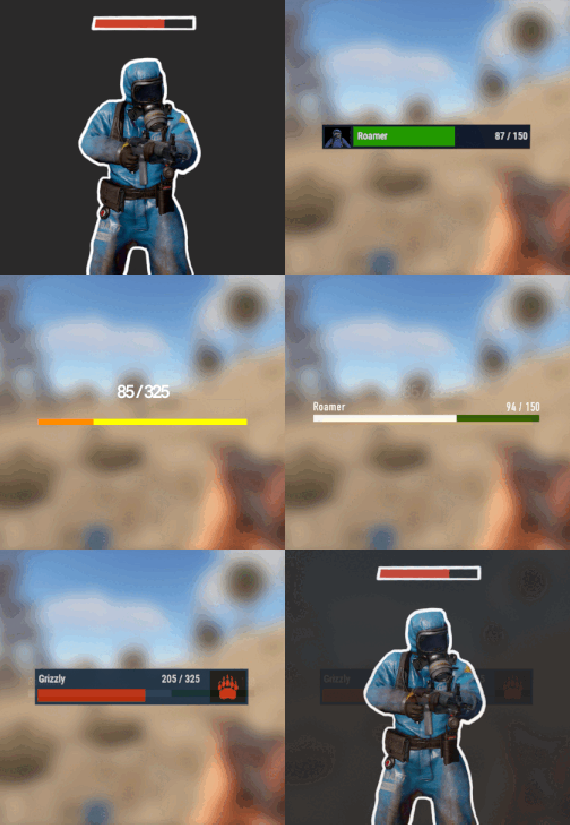
NPC Health Bar is plugin compatible with all NPCs in Rust game, to provide its Health status info.
This also comes with few, already custom made, layouts that can be used straight away upon provided configuration file have been copied and pasted.
Nonetheless, these layouts and its parameters are customizable.
USE
/npcbar - opens up a menu to set up Your health bar
Features
health info text in-game EDIT MODE for players to resize, move and choose their own layout in some layout cases, also NPC name text Images , that are being made custom for some layout options or Images of your own customizable names of entities customizable position of the bar itself
Setup
- Copy and paste file into the .../oxide/plugins directory , configuration file will be created after first load of plugin, but main changes can be made through in-game Options menu or Edit mode menu.
-

$6.99
Black Market - NPC Trader
Black Market
Rotating NPC Black Market Trader
Bring a High Stake, black market trader to your server. A mysterious NPC trader spawns and broadcasts their arrival and vanishes after a configurable amount of time. Players interact with a modern CUI shop to buy limited Stock, and players can get top teir items by completing delivery style contracts to the Black market ai.
Why should you buy this?
Works on PVP, PVE, Vanilla+, Modded and RP Servers Fully Configurable Stock, Missions, Cooldowns, spawn settings, marker, warnings, bodyguards, messages and sounds. Clean UI with pagination, cooldown indicators, affordability states and a live balance display
Features
Trader System
Random Spawns with configurable interval + lifetime of NPC Base Safe Spawning (avoids construction + deployed entities so it wont appear inside bases) Flat ground checking (extra slops checks to reduce awkward spawns) Trader is non-lootable and cannot be damaged Contracts/Missions
Players accept jobs and turn in required items to unlock higher-tiered purchases Active contracts shown in a dedicated UI section Admins can reset players progress Map Marker + Countdown Warnings
Optional map marker for trader location Optional departure warnings (configurable warning times) Bodyguards (Optional)
Enable guards, set count/health/prefab/radius Hostile or passive behaviour toggle in config Permissions
blackmarketai.use (optional gate, config controlled)
blackmarketai.admin
blackmarketai.vip (reduced cooldowns)
blackmarketai.nocooldown (bypass all cooldowns)
Commands
player
/bm info - trader status /bm missions - view active missions Admin (blackmarketai.admin)
/bm spawn - force spawn trader /bm despawn - remove all black market traders /bm tp - teleport to trader /bm reset [Name] - reset a player (or all players if no name is included) /bm stats - Npc trader stats Developer Hooks (for integration)
CanBlackMarketTrade(player, position) OnBlackMarketPurchase(player, itemShortname, quantity, costAmount) OnBlackMarketPurchaseComplete(player, itemShortname, quantity) OnBlackMarketMissionAccepted(player, missionId) OnBlackMarketMissionCompleted(player, missionId) OnBlackMarketTraderSpawned(position, grid) OnBlackMarketTraderDespawned(position)
-

$19.99$15.99Airfield Event
Adds an airfield event to your server! A cargo plane lands on the airfield and drops airdrops, boxes. Strong NPCs, Bradley and a patrol helicopter will protect the crates
You can also set up custom loot using the "SimpleLootTable" plugin
Features:
Easy to set up. Excellent customization options in the config
Commands(admin only):
afestart - force the event to start
afestart {steamID/name} - the event will be reserved for one player
afefast - quick landing of a cargo plane, for testing settings
afefast {steamID/name} - quick landing of a cargo plane, the event will be reserved for one player
afestop - cause the event to end
afe_addcustom - adds a custom landing place for a cargo plane. You must stand on level ground and look in the direction where the cargo plane will move(do not forget to set in the config file "Use a custom place to land a cargo plane": true)
Hooks:
void AirfieldEventStarted() - called when the event starts
void AirfieldEventEnded() - called when the event has ended
AirfieldEventWinner(BasePlayer player) - called at the end of the event, returns the event winner
AirfieldEvent config:
{ "PVE mode (crates can only be looted by the player who first dealt damage to the NPC)": false, "Time after which the owner of the event will be deleted if he left the dome or left the server (for PVE mode)": 300, "Give event ownership to the owner's teammates if he is no longer the owner. Only if teammates are within the event radius (for PVE mode)": true, "Radius for event(for PVE mode)": 380, "Create a dome for PVE mode": false, "Dome transparency (the higher the value, the darker the dome, recommended 4)": 4, "Dome offset": { "x": 0.0, "y": 0.0, "z": 30.0 }, "Do not allow other players into the event(only for PVE mode if there is a dome)": false, "Allow admin to be in event dome (only for PVE mode if there is a dome)": true, "Triggering an event by timer (disable if you want to trigger the event only manually)": true, "Minimum time to event start(in seconds)": 3600, "Maximum time to event start(in seconds)": 7200, "Event duration(In seconds. Time is calculated from the moment the cargo is dropped by the plane at the airfield)": 3600, "End the event early if all crates were completely looted and all NPCs were killed(including Bradley and Heli)": true, "Minimum number of online players to trigger an event": 1, "Minimum drops amount(minimum number of cargo spawns after plane landing, should not be less than 1)": 2, "Maximum drops amount(maximum number of cargo spawns after plane landing, should not be less than 1, maximum 10)": 4, "Minimum crates amount(spawn every cargo drop)": 1, "Maximum crates amount(spawn every cargo drop)": 1, "Crate simple loot table name(plugin SimpleLootTable is required)": "", "Minimum number of items in a crate(plugin SimpleLootTable is required)": 0, "Maximum number of items in a crate(plugin SimpleLootTable is required)": 0, "Remove crates after being looted by a player(in seconds)": 300, "Extend event duration if NPCs, Heli or Bradley is attacked (if less time left, extend to set time (in seconds))": 600, "Crates timer(in seconds)": 900, "Minimum airdrops amount(spawn every cargo drop)": 1, "Maximum airdrops amount(spawn every cargo drop)": 1, "Airdrop simple loot table name(plugin SimpleLootTable is required)": "", "Minimum number of items in an airdrop(plugin SimpleLootTable is required)": 0, "Maximum number of items in an airdrop(plugin SimpleLootTable is required)": 0, "Minimum NPCs amount(spawn every cargo drop)": 1, "Maximum NPCs amount(spawn every cargo drop)": 2, "NPCs type(NPCs prefab, experimental setting, it is not known how the NPCs will behave) 0 - tunneldweller; 1 - underwaterdweller; 2 - excavator; 3 - full_any; 4 - lr300; 5 - mp5; 6 - pistol; 7 - shotgun; 8 - heavy; 9 - junkpile_pistol; 10 - oilrig; 11 - patrol; 12 - peacekeeper; 13 - roam; 14 - roamtethered; 15 - bandit_guard; 16 - cargo; 17 - cargo_turret_any; 18 - cargo_turret_lr300; 19 - ch47_gunner": 8, "NPCs health(0 - default)": 0, "NPCs damage multiplier": 1.0, "NPCs accuracy(the lower the value, the more accurate, 0 - maximum accuracy)": 2.0, "NPCs attack range": 75.0, "Radius of chasing the player(NPCs will chase the player as soon as he comes closer than the specified radius, must be no greater than the attack range)": 60.0, "Minimum distance to NPC damage": 75.0, "Forcibly immobilize an NPC": false, "Method of distribution of kits for NPCs(1 - sequentially, 2 - repeating, 3 - randomly)": 1, "List of kits for NPC(requires Kits plugin)": [ "kit1", "kit2", "kit3" ], "Default displayName for NPC(for SimpleKillFeed/DeathNotes plugin)": "Airfield NPC", "List of displayNames for each NPC(for SimpleKillFeed/DeathNotes plugin)": [ "Airfield NPC1", "Airfield NPC2", "Airfield NPC3" ], "Chance of an NPC throwing a grenade(0-100%) Only if the NPC loses sight of the player, if the player is in a vehicle, if the player is trying to search crates": 50, "NPC grenade damage scale": 1.0, "Will the NPC take damage from a collision with a car": true, "Will NPCs attack zombies": true, "Remove NPC corpses": false, "Patrol helicopter spawn chance (0 - 100%)": 50, "Call the helicopter only after activating the hackable crate": false, "How long the helicopter will patrol the airfield (in minutes)": 5, "Helicopter damage multiplier": 1.0, "Helicopter health": 10000.0, "Helicopter main rotor health": 900.0, "Helicopter tail rotor health": 500.0, "The patrol helicopter will not patrol the airfield if it has found a target": true, "Spawns a helicopter right on the airfield(if false, then the helicopter will arrive from afar in a few seconds)": false, "Helicopter patrol range": 150, "Event marker on the map(will spawn a marker immediately after the start of the event)": false, "If true, spawn the marker only after the plane lands": true, "Event marker name": "Airfield event", "Display on the marker how much time is left until the end of the event": true, "Event marker transparency(0-1)": 0.75, "Event marker radius": 0.5, "Event marker color.R(0-1)": 1.0, "Event marker color.G(0-1)": 0.0, "Event marker color.B(0-1)": 0.0, "Use a custom place to land a cargo plane": false, "Custom place position": { "x": 0.0, "y": 0.0, "z": 0.0 }, "Custom place rotation": { "x": 0.0, "y": 0.0, "z": 0.0 }, "Use custom navmesh (enable if using custom airfield and getting NPC navmesh error)": false, "BradleyAPC spawn chance (0 - 100%) If you are not using a custom map, correct operation of BradleyAPC is not guaranteed. Use the default airfield or a landing spot that is similar to the default airfield": 50, "BradleyAPC bullet damage": 7.0, "BradleyAPC health": 1000.0, "Notification type for the Notify plugin (-1 does not use Notify)": -1, "Notice message type (0 or 1, -1 do not use notice messages)": -1, "SteamID for chat message icon": 0, "Number of points for the winner(only for ServerRewards plugin)": 0, "Number of skill points for the winner(only for Skill Tree plugin)": 0, "Drone Ban Radius (0 - not used)": 0.0, "Damage drones take when near an event(every 5 seconds)": 50.0 }
-
.thumb.png.a167af6d204c8731865ddb8c7651fe66.png)
$12.69
Static Lootables
By Raul-Sorin Sorban in Plugins
Ever wondered why Rust has so many desks, toilets, boxes and even washing machines but you've never been able to see the hidden secrets inside? Now you can!
With Static Lootables you can turn those boring props into loot containers filled with all sorts of goodies. Loot containers that aren't normally supposed to be looted. For best experience, have the UI scale set to 1.
Lootables are being refilled based on each individual configuration set.
Compatible with Static Lootables:
Lootables.Ext
$5.26
Prefab creator that directly works with Static Lootables in order to create custom lootable definitions for your servers!
This plugin provides more than there already is.
See it in action here.
or get it as a bundle! ->
Editor
This plugin now has an integrated editor that allows anyone with the permission to customize the loot that can be found in-game in defined static lootables.
Scroll to the bottom of this page to see it in action.
Modify lootables using all the tools in-game. Update global settings to your liking on the fly.
Dependencies
ImageLibrary (Required) QuickSort ZoneManager
Permissions
StaticLootables.admin: Use the MMB when not holding any item to privately print the name of the object in front of you to chat. StaticLootables.editor: Allows players with the permission to use the /sledit command, which gives them the power to create/update/delete lootables using the editor.
Features
Highly customizable and intuitive system. ZoneManager inclusion / exclusion (per lootable prefab OR global settings). Parented filtering. Locked container system. Hacking system. Interaction icons (with template), customized text and opening container effects. Individual lootable container refilling rates. Consistent support & open to suggestions. Very user-friendly editor for server owners to modify or customize lootables. Unique System: create lootables that only apply on one or more prefabs. Integrated API for manipulating lootable definitions.
Get the default loot-tables
They will be updated in the future. Add StaticLootables.json to your oxide/config folder.
Updated on 23th of October, 2021 #13 (OLD): StaticLootables.json
Updated on 9th of July, 2023 (NEW): StaticLootables.json
To create your own custom icons, you can use this template: staticlootables_template.zip
Please make sure you maintain the margins as weird artifacts will show up if the icons are touching the edges of the icon, in-game.
Lootable Objects
Supermarket Cash Register (locked, 500 HP) Toilets Cardboard Boxes Lockers (closed models are locked, 50 HP) File Cabinets (locked, 50 HP) Desks (locked, 250 HP) Kitchen Fridges Electrical Boxes Washing Machine Trash Bag Gas Pumps Toolboxes (locked, 100 HP) Plant Pots Type-writers Kitchen Cooker (Underwater Labs) Pickup Truck (Rusty), Sedan A (Junkyard), Compact Car C (all locked, 75 HP), can be accessed anywhere but Junkyard Barge Coal Metal Crate (B) (locked, 500 HP; hackable, 120s, code resets every 300m) NEW Pallet Stacks (A-through-C) NEW Bin NEW Vodka Bottle Your suggestions are welcome!
If there are any ideas in regards to prefabs or possible loot to find in them, use the Discussion tab to let me know about it so I add it for everyone to use.
Hacking
This is how Hackable containers work and why they're an OP mini-game:
Hacking one will give you the PIN which will allow you to use with the container for a couple of hours 'till it becomes obsolete and resets. If one has hacked a container, the next hack will double in the amount of time taken. X3 for the third hack, and so on. The PIN can be shared within the team so they can come back every a couple a minutes and loot the hacked box. Press R when looking at an unlocked hacked container to pull up the PIN dialog.
API
Be creative!
Information
Here's to clarify how config properties work and what they mean.
General Settings
Distance: The maximum distance between the player and container. ItemAmountMultiplier: The multiplier for the amount of the items found in containers. LootableHealthMultiplier: The multiplier of the (maximum) health of locked lootable containers. ShadowOpacity: The white glow behind the text which highlights the text more in the dark. ShowLockedLootableApproximateCount: Shows the amount next to the health bar of containers. (e.g ~2 ITEMS APPX.) DamageMultiplierMinimum: The minimum damage dealt to the locked containers by melee weapons. Maximum does the same but for maximum. DamageCUIRefreshRate: The refresh rate for the CUI when containers are being hit at a high rate (with a jackhammer for example). Recommended 0.5. EnforcedFilters: It disallows all definitions from being lootable if their path contain the parent names in this array. EnforcedInZone: It only allows definitions to be lootable only within the zone(s) defined in this array. EnforcedNotInZone: It only allows definitions to be lootable when they're out of the zone(s) defined in this array. Interaction Settings
Icon: The icon of the interaction definition. Text: The text of the interaction definition. OpenEffect: The (usually sound) effect of the interaction definition. Definition Settings
PrefabFilter: The prefab name used by the definition to set this definition as lootable. InteractionIndex: The index of the interaction defined in the Interactions array. It starts at 0. ContainerSize: The slot count of the container non-relative to the contents defined in the contents array. AllowStack: Can items in the container stacked. Mainly used if you have 2 or more slots that have the same kind of item. Liquid: Marks the container as liquid. If this is set to true, no matter the contents defined, only liquid objects (water, salt water, blood?) can get in. Lock: Health: The maximum health of a container. Set to null if you wanna disable it. (e.g "Lock": null) Hack: Wait Time: The time in seconds! players have to wait for the initial hacking attempt. Code Resetting Rate: The time in minutes! until the hack resets the PIN and goes down an increment for how many times has been hacked used for the Wait Time multiplier. Rule: Refill Rate: The rate in minutes! until the container gets wiped from the server & memory is being freed for server resource reasons. OnlyIfParentFilter: It allows all definitions to be lootable if their path contain the parent names in this array. OnlyIfNotParentFilter: It disallows all definitions from being lootable if their path contain the parent names in this array. OnlyIfInZone: It only allows definitions to be lootable only within the zone(s) defined in this array. OnlyIfNotInZone: It only allows definitions to be lootable when they're out of the zone(s) defined in this array. Contents: ShortName: The short name of the item definition. CustomName: The in-game name of the item. SkinId: The skin of the ID. UseRandomSkins: Use the RandomSkins array to create more variety on what skinned items are used. SkinId: The skin of the ID. RandomSkins: The skin ID array used in replacement of SkinID when UseRandomSkins is true. MinimumAmount: The minimum range used for the item amount randomisation. MaximumAmount: The maximum range used for the item amount randomisation. ConditionMinimumAmount: The minimum range used for the item condition / durability randomisation. ConditionMaximumAmount: The maximum range used for the item condition / durability randomisation. SpawnChanceTimes: How many times in the SpawnChanceScale will it be likely for the item to be spawned. SpawnChanceScale: The scale of the odds for the item to be spawned. Contents: It's recursive, has the exact same content structure as this property.
Installation
Download the config which can be found above on this page. Put it in the oxide/config folder. Put StaticLootables.cs file in oxide/plugins. You're good to go! FOR BEST ENTERTAINMENT, USE THE DEFAULT SETTINGS OF THE PLUGIN.
Screenshots
Videos
* The annoying flicker has been fixed in the live version, this was recorded while testing.