
MARKUS's Wishlist
-
$41.95$31.95OPERATION FORTRESS
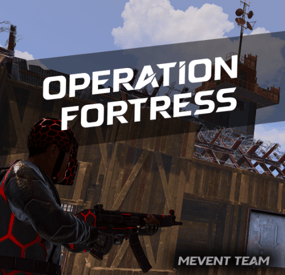
Introducing OperationFortress, the ultimate PvE base assault event plugin for Rust servers! Experience intense tactical combat as you and your team infiltrate a heavily fortified enemy base at the Airfield monument. With dynamic NPC encounters, strategic tower captures, and epic boss battles, OperationFortress delivers an immersive military operation experience that will challenge even the most skilled players.
⭐ Features of Operation Fortress
Epic Base Assault: Infiltrate a heavily fortified enemy base at the Airfield monument with multiple defensive towers and strategic positions. Dynamic Tower System: Capture 6 strategically placed guard towers, each with unique NPC defenders and electric switches to disable the base's security system. Intelligent NPC Combat: Face off against elite enemy forces with advanced AI, including snipers, assault troops, machine gunners, and grenadiers. Boss Battle: Confront the powerful "Fortress" commander in the main base with enhanced health and elite weaponry. Reinforcement System: Experience dynamic combat as enemy reinforcements spawn after capturing towers, adding intensity to the operation. Rich Loot System: Collect valuable rewards from captured towers, defeated NPCs, and the commander's personal safe. PvE Mode Integration: Seamless integration with PvE mode systems for fair loot distribution and team-based gameplay. Customizable Difficulty: Adjust the number of required towers to access the main base, event duration, and NPC configurations. Visual Markers: Clear map markers show tower status, base location, and event progress for easy navigation. Automatic Scheduling: Set up automatic event scheduling with customizable intervals and preparation times. Team Support: Full support for team-based gameplay with shared loot rights and coordinated assaults. Performance Optimized: Efficient NPC spawning and cleanup systems ensure smooth gameplay even with large player bases.
📊 Event Overview
Operation Fortress transforms the Airfield monument into a hostile military installation controlled by the "Fortress" faction. Players must work together to:
Capture Guard Towers: Infiltrate and secure 6 strategically positioned guard towers, each defended by elite NPC forces. Disable Security System: Activate electric switches in captured towers to disable the base's security system and gain access to the main facility. Assault Main Base: Breach the heavily fortified main base located in one of the Airfield's large hangars. Eliminate Commander: Face off against the powerful "Fortress" commander and his elite bodyguards in an epic final battle. Secure Rewards: Collect valuable loot from defeated enemies, captured positions, and the commander's personal safe.
🖼️ Showcase
🎮 Commands
operation.start - Manually start the Operation Fortress event (requires admin permissions) operation.stop - Stop the current Operation Fortress event (requires admin permissions)
🛡️ Permissions
operationfortress.start - Permission to start Operation Fortress events operationfortress.stop - Permission to stop Operation Fortress events
📚 FAQ
Q: Can players use their own weapons and equipment?
A: Yes! Players use their own weapons, armor, and equipment during the event. No special gear is provided, making it a true test of player preparation and skill.
Q: How does the loot system work?
A: Loot is collected manually from defeated NPCs, captured towers, and the commander's safe. The PvE mode integration ensures fair loot distribution among team members based on damage contribution.
Q: Can the event be played solo?
A: Yes! The event is designed to scale with player count. Solo players can complete the operation, though it will be more challenging. Team play is recommended for optimal experience.
Q: How often does the event occur?
A: The event can be configured to run automatically at customizable intervals, or it can be started manually by administrators using the provided commands.
Q: What happens if players fail to complete the event?
A: If the event timer expires or all players are eliminated, the event ends automatically. Players can attempt the operation again when it becomes available.
Q: Does the event interfere with other Airfield activities?
A: The plugin includes options to disable other NPCs and events at the Airfield during Operation Fortress to prevent conflicts and ensure smooth gameplay.
Q: Can I customize the NPC types and weapons?
A: Yes! The plugin includes extensive NPC configuration options, allowing you to customize health, weapons, behavior patterns, and reinforcement types for each tower and the main base.
Q: How does the PvE mode integration work?
A: The plugin integrates with PvE mode systems to ensure fair loot distribution among team members. Players who contribute more damage to NPCs have priority access to loot, while still allowing team coordination.
📡 Plugin Integration
OperationFortress is designed to work seamlessly with other popular Rust plugins:
PvE Mode: Full integration for fair loot distribution and team-based gameplay NpcSpawn: Utilizes advanced NPC spawning and AI systems for realistic enemy encounters Notify/UINotify: Integrated notification system for event announcements and player updates BetterNpc: Compatible with enhanced NPC systems for improved AI behavior MonumentOwner: Integration with monument ownership systems for enhanced gameplay
🧪 TEST SERVER
Join our test server to experience Operation Fortress firsthand!
Copy the IP Address below to start playing!
connect 194.147.90.239:28015
🛠️ API / Hooks
OnOperationFortressStart()
Triggered when the Operation Fortress event starts. OnOperationFortressStop()
Triggered when the Operation Fortress event stops (ends or is canceled). OnOperationFortressEnter(BasePlayer player)
Triggered when a player enters the event zone. OnOperationFortressLeave(BasePlayer player)
Triggered when a player leaves the event zone or dies inside it. OnOperationFortressWin(BasePlayer player)
Triggered when the boss is defeated and the victory chest is opened. player is the boss killer/owner.- #event
- #rust event
- (and 1 more)
-
$7.99
Scavenger Hunt Event
Adds an exciting event to your server. The loot crate spawns in a random location on the map. Players must find it using a special compass. Whoever finds this crate first will get all the loot.
The plugin is easy to set up and has great customization.
The ImageLibrary plugin is required!
Commands (admin only):
/sch_start - starts an event
/sch_stop - ends an event
Hooks:
void ScavengerHuntStarted() // called when the event starts
void ScavengerHuntEnded() // called when the event ends
Config:
{ "Autostart event": true, "End the event immediately after someone finds a crate": false, "Minimum time to event start(in seconds)": 3000, "Maximum time to event start(in seconds)": 5000, "Minimum amount of online players to trigger the event": 1, "Crate prefab": "assets/prefabs/deployable/large wood storage/box.wooden.large.prefab", "Crate skin": 0, "Event duration": 600, "Minimum number of items in a crate": 6, "Maximum number of items in a crate": 12, "Simple loot table name": "exampleTable", "Pre-event message time(in seconds)": 60, "Icon AnchorMin": "0.02 0.92", "Icon AnchorMax": "0.07 0.994", "North icon": "https://www.dropbox.com/scl/fi/dmlczi87fw4ux0o20ms0q/n.png?rlkey=maq5ekwcntoeqd0t937m5wu83&dl=1", "South icon": "https://www.dropbox.com/scl/fi/vyoox8pfq5b1lmz0bndlo/s.png?rlkey=2tt0w8316ocdw0i1coa1mf5a5&dl=1", "West icon": "https://www.dropbox.com/scl/fi/xutae5br16r7exu4zh6hw/w.png?rlkey=gl5flroo8qyjr51jzy8uvjsnz&dl=1", "East icon": "https://www.dropbox.com/scl/fi/fcr2098qkogvsszqvx3sz/e.png?rlkey=ggpa9s5b365whylal3fvhbj2e&dl=1", "NorthWest icon": "https://www.dropbox.com/scl/fi/wzjw4j9ibqu12hrk8512w/nw.png?rlkey=brghws41sce0hzrr6uegmfesb&dl=1", "NorthEast icon": "https://www.dropbox.com/scl/fi/fn81s0hu7m04jnqahy4h6/ne.png?rlkey=knj8jm0irj2twpxy5oe37zadu&dl=1", "SouthWest icon": "https://www.dropbox.com/scl/fi/lfwonxiy1t8rycv2hn6wg/sw.png?rlkey=wz54crb9mxg4wqtpe8mkqo6xm&dl=1", "SouthEast icon": "https://www.dropbox.com/scl/fi/ih3hmg54zne0nx5ekrsed/se.png?rlkey=vrkb07b50i1tanz5y4wuryt0j&dl=1", "The number of points the player will receive if he opens the crate first (only for ServerRewards plugin)": 0, "Maximum water depth at which a crate can spawn": 0.5, "Display distance to crate": true, "Distance panel font size": 14.0, "Distance panel font color": "1 1 1 1", "Distance panel AnchorMin": "0.02 0.9", "Distance panel AnchorMax": "0.07 0.92", "Notification type for messages(only for Notify plugin, -1 do not use Notify)": -1, "SteamID for chat message icon": 0, "Own loot table for crate": { "useOwnLootTable": true, "minAmount": 2, "maxAmount": 4, "itemsList": [ { "name": "metal.fragments", "dropChance": 100, "minAmount": 50.0, "maxAmount": 300.0, "displayName": "", "skinID": 0 }, { "name": "metal.refined", "dropChance": 100, "minAmount": 5.0, "maxAmount": 10.0, "displayName": "", "skinID": 0 }, { "name": "scrap", "dropChance": 100, "minAmount": 10.0, "maxAmount": 20.0, "displayName": "", "skinID": 0 }, { "name": "techparts", "dropChance": 50, "minAmount": 1.0, "maxAmount": 2.0, "displayName": "", "skinID": 0 } ] } }
-
$14.00
Gas Station Plus
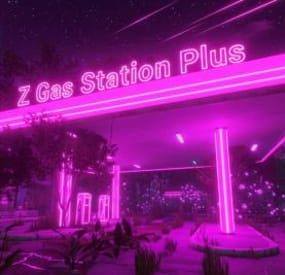
Tired of the roadside gas stations being nothing more than decorative monuments? ZGasStationPlus breathes new life into these locations, turning them into fully functional, automated service points for all players. This plugin adds a dynamic open/closed schedule, automatic vehicle repair, and free refueling, all complemented by immersive visual cues. It's a lightweight, "set it and forget it" addition that enhances the player experience and adds real utility to a classic Rust monument, now with a convenient admin command for easy management.
- Automated Vehicle Services: When a gas station is open, it will automatically service any vehicles parked within its designated area.
- Free Refueling: Automatically adds Low Grade Fuel to vehicles up to a configurable maximum amount.
- Free Repairs: Automatically repairs damaged vehicle modules, getting your players back on the road faster.
Dynamic Operating Hours:
Configure the exact in-game hour the gas stations open and how many hours they remain operational.
Services are only active during opening hours, encouraging players to plan their pit stops.
Immersive Visual Enhancements:
Custom Neon Signs: The plugin spawns fully customizable neon signs on each gas station. The text and color automatically change to reflect the "OPEN" or "CLOSED" status.
Functional Lighting: Industrial lights are also spawned, which automatically turn on when the station opens and switch off when it closes, providing a clear visual indicator from a distance.
Admin Convenience Command:
Includes the /zgas chat command for easy administration.
Admins with the ZGasStationPlus.Admin permission can use this command to instantly teleport to a random gas station, making it simple to check on them or verify settings.
Highly Configurable:
Easily adjust fuel amounts, repair rates, service radius, and operating hours directly from the configuration file.
Customize the text and color for the "OPEN" and "CLOSED" neon signs to match your server's theme.
Seamless Integration:
The plugin automatically detects all gas station monuments on your map upon server start.
All spawned entities (lights, signs) are protected from player damage, ensuring they remain functional without admin intervention.
Config:
{ "CheckIntervalInSeconds": 5.0, "FuelAmountPerInterval": 10, "MaxFuelAmount": 500, "RepairAmountPerInterval": 20.0, "OpeningHour": 6.0, "OpenDurationHours": 12.0, "VehicleCheckRadius": 10.0, "Enable car lift?": true, "Enable Vending machines?": true, "Enable Extra barrels? (0 = disable)": 20, "Enable HeliCrate?": true, "Enable BradleyCrate?": true, "NeonSettings": { "Enabled": true, "TextSize": 14, "Open": { "Text": "OPEN\nFree FUEL", "Color (Hex)": "#66ff66" }, "Closed": { "Text": "CLOSED", "Color (Hex)": "#ff6666" } } } Permission:
ZGasStationPlus.Admin
Chat command:
/zgas
Update: 1.1.0
- added autospawn Loots
- added Car lift (works in opening time)
- added VendingMachines
all configurable
I guarantee the functionality of the plugin as described. However, I cannot take responsibility for conflicts or issues arising from incompatibility with third-party plugins or themes. Please take this into account before purchasing. I will list all known compatibility details in the product description.
-
$7.00
Custom Item Loot Limit
This plugin helps you to add limited edition custom items to lootable chests. The plugin will automatically add the name of the item to the , which is the third item found from the limit. Like a serial number. In the config file you can set the limit number of custom items and which crates to spawn in, with what percentage chance.
When a player finds a limit series item, the contents of the chest will be emptied with only the item and an effect to indicate to the player that something valuable has been found.
Console command:
customitemdatawipe (deletes the plugin data file and spawns the emulated items in the crates again.)
The command only works in the server console!
Video:
Config:
{ "Version": { "Major": 1, "Minor": 0, "Patch": 0 }, "Spawn custom items in the crates?": false, "Custom Items Settings": [ { "ShortName": "bleach", "The item limit": 5, "SkinID": 3371773425, "Displayname": "Water", "Spawns the crate": [ { "PrefabPath": "assets/bundled/prefabs/radtown/crate_normal_2.prefab", "SpawnChance": 40.0, "Item Amount": 1 }, { "PrefabPath": "assets/bundled/prefabs/radtown/crate_basic.prefab", "SpawnChance": 50.0, "Item Amount": 1 } ] }, { "ShortName": "bleach", "The item limit": 6, "SkinID": 3328031963, "Displayname": "Biopon", "Spawns the crate": [ { "PrefabPath": "assets/bundled/prefabs/radtown/crate_normal_2.prefab", "SpawnChance": 30.0, "Item Amount": 1 }, { "PrefabPath": "assets/bundled/prefabs/radtown/crate_basic.prefab", "SpawnChance": 50.0, "Item Amount": 1 } ] } ] }
-
$5.00
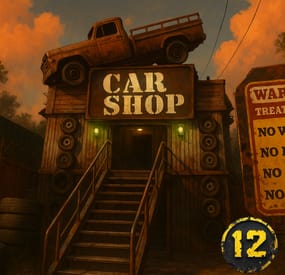
Car Shop
🚗 Welcome to the Car Shop! 🚗
"We don’t sell cars… we sell adventures that may or may not start.”
We’ve built you the ultimate post-apocalyptic dealership, two flavors to choose from depending on how spicy you like your looting and roleplay:
- One🔋 Green Card Puzzle Edition (610 prefabs)
Think you’ve got the brains and the brawn?
🔑 1 Fuse + 1 Green Card entry 🎖️ 2 Military Crates (because you deserve shiny loot after working that hard) 📦 3 Normal Crates (variety is the spice of life, and also of loot) 🛢️ Bonus barrels for smashing therapy Perfect for raiders who want a little action before picking out their next four-wheeled death trap.
- One 🛒 Vendor Edition (598 prefabs)
Not in the mood for puzzles? Just wanna buy a car without having to solve a Rubik’s Cube with bullets flying over your head?
📦 1 Normal Crate 🛢️ Some barrels (because barrels are basically currency at this point) 🏪 Space ready for your Car Vendor, slap him down and boom, you’re running the hottest dealership in the wasteland. No keys, no codes, no puzzles. Just pure, oily capitalism.
- One generated map with both prefabs
💥 Why do you need the Car Shop?
Because walking is for losers, horses smell, and minicopters crash. A true wasteland champion rolls up in style, preferably in a beat-up, half-rusted vehicle you “bought” fair and square at the Car Shop.
So stop running around like a peasant and start cruising like a legend.
The Car Shop --> 12g approved, apocalypse certified.
Want help!? Join OUR DISCORD