
ELF's Wishlist
-
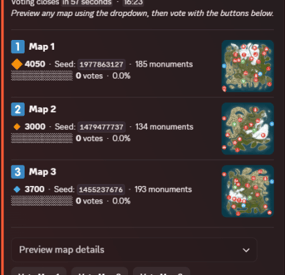
$40.00$34.00Rust Map Vote Discord Bot
By Storption in Discord Bots
🗺️ Map Vote Bot 🗺️
MapVote is a self-hosted Discord bot that lets your Rust community vote on the next wipe map. Built for server owners who want a clean, reliable voting system.
✨ What's New in v3.2.0
Custom Map Generation — Generate brand-new maps on demand via RustMaps' custom map generation API, using a saved config you've built on RustMaps' website. Available both for wipe schedule auto-pick and for manually creating a vote. Requires a RustMaps Premium (or higher) subscription.
Customizable size icons — Set your own Small/Medium/Large emoji and the size cutoffs that define them, applied consistently across every vote message, result, search, and preview.
Clearer monument breakdowns — Monument lists are now grouped into categories (Military & Endgame, Loot tiers, Ocean, Safe Zones, Resources, and more) instead of one long list.
🗳️ Features
- Persistent admin dashboard with tabbed navigation (Overview, Vote, Automation, History, Settings)
- Live vote tracking with animated progress bars
- 2–5 maps per vote
- Standard maps (any size/seed), custom RustMaps.com maps, and brand-new generated maps
- Custom map generation via RustMaps' saved configs — for wipe schedule auto-pick and manual vote creation alike (requires a RustMaps Premium or higher subscription)
- Detailed map info — biomes, islands, rivers, monuments (grouped by category), and more
- Automatic winner determination with random or runoff tie-breaking
- Customizable size icons and thresholds for how maps are labeled Small/Medium/Large
- Wipe schedule automation — weekly, biweekly, and monthly (by Nth weekday or last weekday)
- Auto-pick maps from RustMaps based on size, biome, terrain, and monument filters
- Per-vote voter role gating — restrict who can vote per session
- Live vote editing without ending the vote
- Paginated vote history with winner links, vote counts, and win-rate stats
- Vote and dashboard message recovery on deletion
- 24-hour advance reminder when a scheduled wipe has no maps set
- All votes and config stored in SQLite — nothing is lost on restart
- Full multi-guild support
⚙️ Commands
/setup Create or move the admin dashboard to a channel
/search Browse RustMaps with filters — size range, biomes, terrain, monuments (available to all members)
🔐 Restricting Access
/setup requires Administrator by default. You can grant it to specific roles without giving them full admin — go to Server Settings > Integrations > MapVote and configure per-command role access.
/search is available to all members by default and can be restricted the same way.
📋 Requirements
Node.js 24+
Discord bot token
RustMaps.com API key
🚀 Setup
Download and extract the files
Run npm install
Fill in your TKN & RUSTMAPS_API_KEY in the .env file
(Optional — only if generating custom maps under an organization's RustMaps account rather than your personal one in the .env)
RUSTMAPS_ORG_ID=OptionalOrgIdHere
Run npm start
Use /setup #your-admin-channel to create the dashboard
Need help? Join the support server: Click Here
🔄 Updating
Stop the bot
Delete the src/ folder
Copy in the new src/ folder and overwrite package.json, CHANGELOG, and README.md files
Delete the node_modules/ folder and package-lock.json file
Run npm install
Start the bot (npm start)
Your .env and db/ files are not touched — all settings and data are preserved.
- #discordbot
- #rustmaps
- (and 1 more)
-

$6.99
Black Market - NPC Trader
Black Market
Rotating NPC Black Market Trader
Bring a High Stake, black market trader to your server. A mysterious NPC trader spawns and broadcasts their arrival and vanishes after a configurable amount of time. Players interact with a modern CUI shop to buy limited Stock, and players can get top teir items by completing delivery style contracts to the Black market ai.
Why should you buy this?
Works on PVP, PVE, Vanilla+, Modded and RP Servers Fully Configurable Stock, Missions, Cooldowns, spawn settings, marker, warnings, bodyguards, messages and sounds. Clean UI with pagination, cooldown indicators, affordability states and a live balance display
Features
Trader System
Random Spawns with configurable interval + lifetime of NPC Base Safe Spawning (avoids construction + deployed entities so it wont appear inside bases) Flat ground checking (extra slops checks to reduce awkward spawns) Trader is non-lootable and cannot be damaged Contracts/Missions
Players accept jobs and turn in required items to unlock higher-tiered purchases Active contracts shown in a dedicated UI section Admins can reset players progress Map Marker + Countdown Warnings
Optional map marker for trader location Optional departure warnings (configurable warning times) Bodyguards (Optional)
Enable guards, set count/health/prefab/radius Hostile or passive behaviour toggle in config Permissions
blackmarketai.use (optional gate, config controlled)
blackmarketai.admin
blackmarketai.vip (reduced cooldowns)
blackmarketai.nocooldown (bypass all cooldowns)
Commands
player
/bm info - trader status /bm missions - view active missions Admin (blackmarketai.admin)
/bm spawn - force spawn trader /bm despawn - remove all black market traders /bm tp - teleport to trader /bm reset [Name] - reset a player (or all players if no name is included) /bm stats - Npc trader stats Developer Hooks (for integration)
CanBlackMarketTrade(player, position) OnBlackMarketPurchase(player, itemShortname, quantity, costAmount) OnBlackMarketPurchaseComplete(player, itemShortname, quantity) OnBlackMarketMissionAccepted(player, missionId) OnBlackMarketMissionCompleted(player, missionId) OnBlackMarketTraderSpawned(position, grid) OnBlackMarketTraderDespawned(position)
-
$14.99
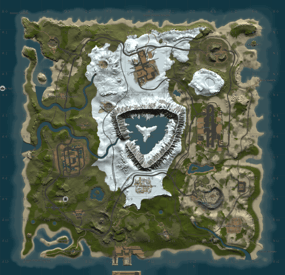
CREO: Custom Map
Custom map. Size 2000. Prefab count: +-8000.
6 Custom building places, marked X on the map
Custom monuments:
Medium-Large Warehouse, Train station Facepunch monuments:
The dome Train Yard JunkYard Outpost Large Barn Quarries(HQM, Sulfur, Stone) Airfield Lighthouse Large Fishing Village Fishing Village Arctic Research Base Underwater Lab Harbor Giant Excavator Oxum's Gas Station Abandoned Supermarket Abandoned Military Base Small Oil Rig. Oil Rig Official Discord Community
Join the official Discord server for support, update news, and discussions about my current and upcoming map projects.
Link:https://discord.gg/SXvUvDWv3E
-
$5.00
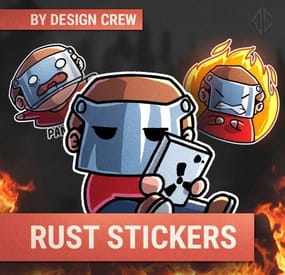
RUST STICKERS
By DesignCrew in Graphics
We decided to create stickerS. you can use in your project.
You can use them on social media, Discord, Telegram, or on the server.
It's all up to you!
- #rust sticker
- #sticker
- (and 7 more)
-
$19.99
NexusCheatRadar
By WinterChild84 aka Nexus84 in Plugins
💬DISCORD💬 🌐WEBSITE🌐 🖥️RCON🖥️
RCON is a separate product — NCR works completely standalone without it.
What it actually does
No anticheat plugin can go unmonitored and be 100% accurate, they have and will always need admin verification .. as cheats get more advanced detection must adapt , it wont happen automatically but the morre advanced cheats can sometimes slide right through so we update as we find and never share what we know
NCR runs quietly in the background on your server. It watches player behaviour across 9 detection categories, builds a risk profile for every player it sees, and sends a Discord alert with all the relevant info when something looks off. You get the data, you make the call.
What makes it different from a normal anticheat plugin is the network layer. Every server running NCR is connected. When someone who's already been flagged or banned somewhere else joins your server, you find out immediately on join — before they've done anything.
9 behavioural detection systems running in the background
Risk profiles that persist across disconnects, wipes, and server changes
Cross-server intelligence — flagged players carry their history to your server
Discord alerts with full context so you can make an informed call
Free web portal — public player lookup + private server owner dashboard
Admin report panel for submitting and managing reports in-game
F7 Cheat Report intercept , so you can see with ease what players are reporting suspected cheaters
remember every server is diffrent and your config must be adjusted to suit your server (there may at times be features that are set in a test setting so check thresholds and adjust as needed )
💡 For the full cross-server experience — shared violation history, network bans, IP cross-referencing, and join intelligence — enable the Web section in config. The web portal is completely free.
Detection Systems
Every system can be toggled on or off individually. Tuning is always required — every server is different. What works on a 2x will not work on vanilla, and a high-pop server needs different thresholds again. The config is built with this in mind, but expect to spend some time adjusting values to your environment.
ESP / Wallhack — Tracks how often a player is locking onto targets through walls and structures they can't actually see. Runs continuously, not just during fights.
Aimbot — Looks for snap patterns and alignment that just don't happen with a mouse. Compares across multiple engagements before flagging anything.
No-Recoil — Checks recoil compensation per weapon over sustained fire. Accounts for attachments, ping, and burst patterns so legit players don't get caught.
Speed Hack — Catches movement beyond server limits. SkillTree speed bonuses, vehicle movement, and dismount frames are all handled to keep noise low.
Wall Loot — Detects looting through player-built walls. Only fires when the blocking geometry is player-owned — world crates and terrain never trigger it.
Freecam / Debug Cam — Catches anyone using spectator or debug camera modes while still alive in the game world.
NoClip / Fly — Flags movement through solid geometry or flying without a valid surface. Teleport plugins are accounted for automatically.
Strafe / Backpedal — Picks up on movement bot behaviour — perfectly timed strafes and backpedal speeds that aren't physically possible.
Privilege Escalation — Watches for players trying to run admin commands they don't have access to, or attempting to grab permissions at runtime.
Risk Profiles
Every player gets a risk profile the first time NCR sees them. It builds up over time — each detection type contributes its own score into an overall risk level. Scores decay naturally so one old incident doesn't follow someone forever, but a pattern absolutely will.
Leaving and rejoining doesn't reset anything. The profile lives on the network, not on your server.
Per-category scoring with individual probability weights
Scores decay over time — isolated old incidents fade
Steam data pulled on every join — VAC bans, game bans, account age, library size
ServerArmour cross-referenced automatically
Watchlist for players you want to keep an eye on — whitelist for players you've cleared
Discord Alerts
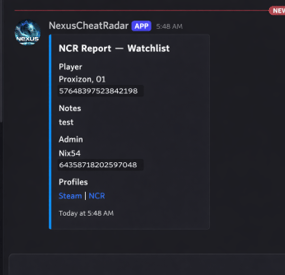
When something gets flagged you get a full embed in Discord — not just "player X did something suspicious." You get the player's name, Steam ID, current risk level, exactly what was detected and at what confidence, their IP with country and VPN/proxy flags, and a link to their Steam profile.
There's a button to share the violation to the network and one to dismiss it. Nothing ever goes to the public network without you clicking the button. Everything stays private to your server unless you choose to share it.
You can set up a separate webhook channel for each detection type — ESP, Aimbot, No-Recoil, Speed, WallLoot, Freecam, NoClip, Strafe, Privilege, Bans, Join Reports, and Toxic Reports.
NCR Web Portal
Free — no extra subscription needed.
Public lookup — no account needed
Anyone can search a Steam ID and see that player's risk score, violation history, ban status, VAC history, account age, name aliases, and which NCR servers they've shown up on. There's a live feed showing recent bans and violations across the network as they happen.
Server owner dashboard — Steam login, no passwords
All your linked servers with live online/offline status
Live player list — who's on your server vs. other NCR servers right now
Recent violations, ban history, and IP intelligence per server
Detection charts and full player lookup with network-wide history
Team management — add admins and mods with their own Steam logins, granular permissions per role, fully separate from Oxide permissions
💡 To unlock the full network experience — shared history, network bans, IP cross-referencing, and join alerts for flagged players — enable the Web section in config and link your server. Set Enabled: true under Web, then grab your server key from the config file and enter it in the portal after signing in with Steam.
Nexus RCON
Nexus RCON Pro is a separate web-based console panel that connects to your Rust servers over RCON. It's built to work alongside NCR but is completely optional — NCR has no dependency on it and works fine without it.
If you do run both together, RCON gets a dedicated NCR tab that gets detections in real time and lets you act on them — ban, dismiss, share to network — without leaving the panel.
Live RCON console per server in the browser
Dedicated NCR tab — real-time detections, one-click actions
Player list, Permissions, ban management, plugin list
Multi-server support from a single dashboard — no software to install
⚠️ Nexus RCON is a separate subscription. NCR works completely independently — you don't need it to use any of NCR's features.
In-Game Report Panel
There's a built-in admin UI for submitting and managing reports directly from inside Rust. Open it with /ncr.report or via the radar strip button.
Report type selection and player search by name or Steam ID
Reports logged to the network database and forwarded to your Discord
There is leveled permissions control what each admin/moderator role can submit
Admin Commands
/ncrToggle the radar HUD overlay
/ncr.lookupFull player history, risk profile, and Steam data
/ncr.riskPer-category risk score breakdown
/ncr.incidentsLast 8 detections on a specific player
/ncr.historyFull violation history for a player
/ncr.watch / .unwatchAdd or remove a player from the watchlist
/ncr.watchlistView everyone currently on the watchlist
/ncr.statsServer-wide detection stats and top risk scores
/ncr.resetClear a player's risk score and local history
/ncr.ban / .unbanIssue or lift a ban with Discord embed and network log
/ncr.webshareManually push a violation to the public network
/ncr.reportOpen the admin report panel
/ncr.testSend a test alert to Discord
ncr.link / ncr.unlinkLink or unlink your server from the web portal (console)
Main permission: nexuscheatradar.admin
Report panel: .report.mod .report.admin .report.kick .report.tempban .report.serverban .report.networkban
Getting Started
Takes about 5 minutes.
Drop NexusCheatRadar.cs into oxide/plugins/
Start the server — config generates at oxide/config/NexusCheatRadar.json
Add your Discord webhook URLs and Steam Web API key. Set Enabled: true under the Web section
Grant the permission: oxide.grant group admin nexuscheatradar.admin
Reload: oxide.reload NexusCheatRadar
Go to the web portal, head to the Servers tab, and click Setting Up a New Server. Copy your server key from the config file and paste it in, then sign in with Steam — it will link to your account automatically
Test your Discord: /ncr.test
Works With
Oxide / uMod and Carbon
Rust (PC) — no required dependencies
False positive handling built in for SkillTree, Backpacks, RaidableBases, Kits, KitController, ServerKits, and teleport plugins
━━━━━━━━━━━━━━━━━━━━━━━━━━━━━━━━━━━━━━━━━━━━━━━
◈ TROUBLESHOOTING
━━━━━━━━━━━━━━━━━━━━━━━━━━━━━━━━━━━━━━━━━━━━━━━
No Discord alerts arriving?
» Check webhook URLs are correctly pasted — no trailing spaces
» Confirm Discord.Enabled is true in config
» Make sure the detection module is enabled
» Run ncr.testmode <steamid> true to simulate
Too many false positives?
» Raise threshold values in ESP, Aimbot, or NoRecoil config sections
» Increase shot/sample count requirements before alerts fire
» Whitelist high-ping players by SteamID
» Enable SuppressStrafeForSkillTree if using skill tree plugins
Radar or UI not showing?
» Grant nexuscheatradar.admin permission via Oxide
» Toggle with /ncr.radar — requires admin flag or the permission node
» Verify it loaded: oxide.reload NexusCheatRadar
Plugin fails to load?
» Delete the config file — NCR will regenerate it cleanly on next load
» Check oxide/logs for the specific error line
» Confirm you're on a compatible Oxide/uMod build
» Set AutoNormalizeConfigLists to true
━━━━━━━━━━━━━━━━━━━━━━━━━━━━━━━━━━━━━━━━━━━━━━━
https://nexuscheatradar-6yt.pages.dev
━━━━━━━━━━━━━━━━━━━━━━━━━━━━━━━━━━━━━━━━━━━━━━━