
Bypunder's Wishlist
-
$15.00
Sortify
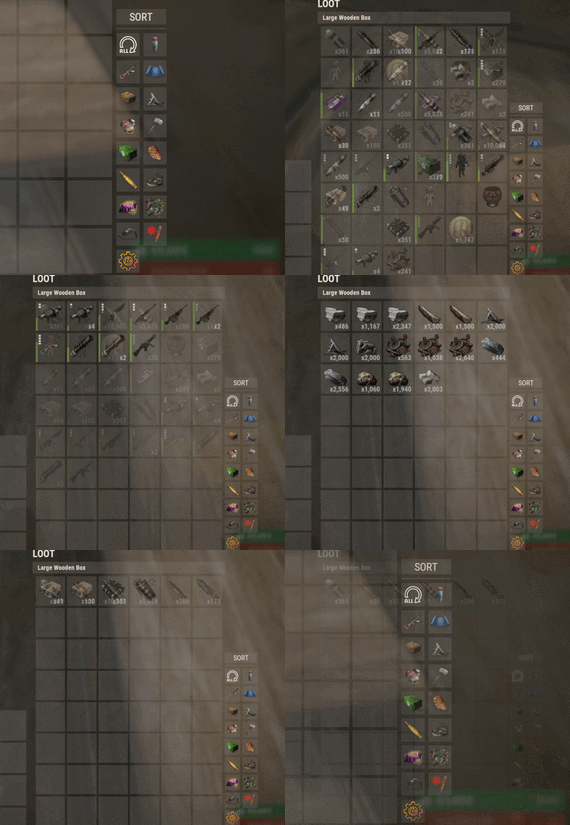
Introducing Sortify, the best plugin for making it easy to sort and filter boxes and containers from various plugins, all without the need for complex integrations. Sortify offers an intuitive solution to easily categorize your items, all within an elegant and efficient Rust-style user interface.
Key Features:
Custom Categories: With Sortify, you can create and customize your own categories to suit your unique needs. Rust style user interface: The plugin has a minimalistic and aesthetic Rust style user interface. Ease of Use: Sortify is designed with ease of use in mind. Whether you're a beginner or an experienced user, you'll find Sortify incredibly easy to use. It does not require complex training or any action on the part of the player, which allows the player to immediately begin organizing elements effectively.
Permissions:
sortify.allow - permission to use the plugin
Video at moment version 1.0.0 (after the sorting scheme was changed, see gif):
- #sorting
- #filtering
- (and 6 more)
-
$45.00$41.95Ultimate Leaderboard
Introducing UltimateLeaderboard, the most advanced and comprehensive leaderboard system designed for Rust servers! Elevate your server competitive spirit by tracking an extensive range of player statistics—everything from kills and deaths to resources gathered, items crafted, structures built, and more. Featuring a sleek, customizable user interface and seamless integration with popular plugins, UltimateLeaderboard is the perfect addition to engage your players and showcase their achievements.
⭐ Features of Ultimate Leaderboard
Track a wide variety of player statistics, including kills, deaths, resources gathered, items crafted, structures built, and more. Fully customizable leaderboard—choose which stats to display and tailor it to your server unique style. Intuitive and visually appealing user interface for players to view their stats and compare rankings. Seamless integration with plugins like ServerPanel for enhanced displays, and Notify/UINotify for in-game alerts. Flexible data storage options: choose between JSON, SQLite, or MySQL to suit your server needs. Two reward systems: post-wipe awards that give actual items, kits, and money to top players when they connect, plus an optional companion plugin UltimateLeaderboardTop for real-time privilege management based on current rankings. Players can pick up their awards on demand with a claim command instead of receiving them on connect. Scheduled top announcements, posted to chat and to a Discord webhook. Custom Titles system that automatically displays achievement-based chat titles for top performers (requires BetterChat plugin). Optimized for high performance, ensuring smooth operation even with large player bases and extensive data. Configurable templates. Optional real-time database updates for integrations (e.g., Discord Bot).
🖼️ Showcase
Fullscreen Template
ServerPanel V1 (V1.1)
ServerPanel V2
📨 Video Overview
🎮 Commands
/leaderboard or /stats - Opens the leaderboard interface for players to view stats and rankings. /leaderboard <steamid> - Opens another player's profile (requires ultimateleaderboard.profile permission). /leaderboard.hide - Allows players to hide themselves from the leaderboard (requires ultimateleaderboard.hide.self permission). /claimreward or /claim - Lets players collect awards that are waiting for them. Disabled by default; turn it on under Awards → Claim Reward in the config, where you can also rename the commands. leaderboard.manage hide <steamid> - Console command to hide a player from the leaderboard (server console only). leaderboard.wipe - Console command to reset all leaderboard data (server console only). leaderboard.migrate <migration_id> - Console command to perform database migrations (server console only). Available:
— leaderboard.migrate 1 adds HiddenFromLeaderboard column to PlayerStats table (upgrade from v1.1.7 to v1.1.8)
— leaderboard.migrate 2 migrates BodyHits data to the new format (upgrade to v1.5.10) leaderboard.find.short.prefab <search_term> - Console command to search for prefabs containing the specified search term (server console only). Useful for finding correct prefab names for configuration. leaderboard.manage - Console command to manage player statistics (server console only). Use leaderboard.manage help for detailed usage information.
🛡️ Permissions
ultimateleaderboard.use - grants players access to leaderboard commands and interface. This one is optional: it is whatever name you put in Permission to use plugin in the config, and an empty value leaves the leaderboard open to everyone. ultimateleaderboard.profile - allows players to view other players' profiles using the leaderboard command. ultimateleaderboard.hide.self - allows players to hide themselves from the leaderboard using the /leaderboard.hide command. ultimateleaderboard.ignore.titles - stops the plugin from giving this player a custom chat title. Tabs, categories, and award categories each take their own permission field in the config, so you can lock individual parts of the interface to a group without touching the permissions above.
⚙️ Web Config Editor
Easily manage your UltimateLeaderboard settings with our web-based configuration editor. This tool allows you to adjust plugin configurations through a user-friendly interface, eliminating the need to manually edit files on your server.
P.S. To access the web config editor, you must be part of the "UltimateLeaderboard" group in our Discord server. Join us at https://discord.gg/mevent and request the group to get started.
📚 FAQ
Q: How do I install UltimateLeaderboard?
A: Download the UltimateLeaderboard.cs file, place it in your oxide/plugins directory, and restart your server or reload the plugin using the Oxide command oxide.reload UltimateLeaderboard.
Q: Can I choose which statistics to track and display?
A: Yes! The plugin allows you to customize tracked statistics and leaderboard displays via the configuration file. You can enable or disable specific stats like kills, resources, or events to suit your server.
Q: What data storage options are available?
A: UltimateLeaderboard supports JSON, SQLite, and MySQL. You can select your preferred storage method in the config file, offering flexibility for small or large servers.
Q: How do I set up the awards system?
A: In the configuration file, define award categories (e.g., most kills, top gatherer) and their criteria. The plugin will automatically track and assign awards to top players based on your settings.
Q: Where can I configure the UI?
A: UI is now template-driven. Use configurable templates stored at oxide/data/UltimateLeaderboard/Templates.
Q: What languages does the plugin come in?
A: The archive ships English and Russian files in the lang folder. Copy them to oxide/lang (or carbon/lang for Carbon) and the plugin picks up each player's client language. Any text you edit in those files is kept on reload, and new keys from an update are added around it.
Q: What happens to the data on a server wipe?
A: By default, data wipes with a new save file, but you can disable this in the config (Wipe data on new save) to persist stats across wipes if desired.
Q: How do I add UltimateLeaderboard to the ServerPanel menu?
A: Follow these simple steps:
1. Open ServerPanel menu in-game and click "+ADD CATEGORY" button
2. Set these exact parameters:
Type: Plugin Plugin Name: UltimateLeaderboard Plugin Hook: API_OpenPlugin 3. Click "SAVE" button to create the category
Q: I see black images with Rust logo or get error 429 when loading images. What should I do?
A: These issues occur when there are problems downloading images from the internet. The UltimateLeaderboard plugin sends images to ImageLibrary but is not responsible for the downloading process itself. Error 429 typically occurs due to rate limits imposed by image hosting services like Imgur (see HTTP 429 documentation for more details). To fix this, enable Offline Image Mode which will use local images instead:
Enable the mode in config: Open "oxide/config/UltimateLeaderboard.json" (or "carbon/config/UltimateLeaderboard.json" for Carbon) Set "Enable Offline Image Mode": true Set up the images: Create folder "TheMevent" in "oxide/data" (or "carbon/data" for Carbon) Download PluginsStorage (click "CODE" → "Download ZIP") Extract the ZIP and copy all contents to the "TheMevent" folder Reload the plugin: Type o.reload UltimateLeaderboard (Oxide) or c.reload UltimateLeaderboard (Carbon) Note: If you want to add your own custom images, place them in the "TheMevent" folder and reference them with the "TheMevent/" prefix. For example: "TheMevent/Icon1.png", "TheMevent/MyCustomIcon.jpg", etc.
Q: What's the difference between UltimateLeaderboard awards and UltimateLeaderboardTop?
A: UltimateLeaderboardTop is a companion plugin that automatically manages player privileges based on leaderboard positions.
Main Plugin Awards: Gives actual rewards (kits, money, commands) to top players after wipe - rewards are given once when player connects. UltimateLeaderboardTop: Continuously manages privileges (VIP groups, permissions) as players enter/exit top positions in real-time. To display awards in UI while using UltimateLeaderboardTop:
Configure awards in UltimateLeaderboard config Configure awards in UltimateLeaderboardTop config Set "Automatically give rewards after the wipe": false Q: Can UltimateLeaderboardTop give items/kits to players?
A: No, UltimateLeaderboardTop is designed only for reversible actions (permissions, groups, etc.). Since items can't be taken back from players when they leave top positions, item rewards are not supported. Use the main plugin's awards system for item rewards instead.
Q: How do I configure rewards for top players?
A: There are two reward systems available:
UltimateLeaderboard Awards (Post-Wipe Rewards):
Configure in the main plugin's config file under "Awards Settings":
Set award categories (e.g., "Most Kills", "Top Gatherer") Define criteria: loot type, prefab, and minimum amount required Set rewards: commands to execute (give items, kits, money, etc.) Awards are given once when top players connect after a wipe UltimateLeaderboardTop (Real-time Privileges):
Configure in UltimateLeaderboardTop.json:
Set leaderboard types to monitor (kills, points, playtime, etc.) Define top positions (1st, 2nd, 3rd, etc.) Configure "Enter place commands" (given when player reaches position) Configure "Exit place commands" (executed when player loses position) Use for permissions, groups, temporary privileges Example UltimateLeaderboardTop configuration:
{ "Loot type": "Kill", "Prefab": "kills", "Places settings": { "1": { "Enter place commands": ["o.usergroup add %steamid% vip"], "Exit place commands": ["o.usergroup remove %steamid% vip"] } } } Q: What are Custom Titles and how do they work?
A: Custom Titles automatically display achievement-based titles in chat for top players. For example, top killers get "[Killer]" title, top builders get "[Builder]" title, etc. Requires BetterChat plugin to work. Titles are updated automatically based on leaderboard positions and can be configured with priority system and limits.
Q: Why don't I see my statistics updated immediately on the leaderboard?
A: The leaderboard is cached and refreshes periodically (configurable interval) to minimize server load and ensure optimal performance. This means statistics may take a few minutes to appear on the leaderboard after the action is performed. The caching system helps maintain smooth server operation even with large player bases and extensive statistics tracking.
Q: How can I track multiple similar items or entities with one statistic?
A: You can combine multiple prefabs using the pipe symbol | in the prefab field. For example, to track all types of scientists as one "NPC Kills" statistic, use: npc_tunneldweller|npc_underwaterdweller|scientistnpc_arena|scientistnpc_bradley. This is useful for grouping similar items, resources, or entities into a single tracked category.
Q: How do I find the correct prefab names for items, entities, or events?
A: There are several ways to find prefab names:
In-game console command: Use leaderboard.find.short.prefab <search_term> in the server console to search for prefabs containing your search term. For example: leaderboard.find.short.prefab scientist will show all prefabs containing "scientist". F1 console spawn command: In-game, open F1 console and use the spawn command to see available entity prefabs. Type spawn followed by part of the name to see matching options. Item shortnames: For items, use their shortname (e.g., "stones", "metal.ore", "wood"). You can find these by examining items in your inventory or using item-related commands. Plugin documentation: Check the "Custom Prefabs" and "Available Loot Types" sections in this plugin's description for comprehensive lists of supported prefabs and loot types. Q: How can I output the sum of all values by type of statistics (for example, all kills, all loot collected)?
A: Use the prefab total_sum for the desired LootType. For example, to show the total number of all player kills, specify the LootType Kill and the prefab total_sum in the column or block settings. It works for any type: Kill, Gather, Craft, Event, and others.
Q: How does the leaderboard scoring system work?
A: The leaderboard uses a points-based scoring system. Points are earned from in-game actions, and each action has:
Loot Type - The category of action (e.g., Kill, Gather, Construction, Craft, Event) Prefab/Short Name - The specific item or entity (e.g., "kills", "stones", "helicopter", "supply_drop") Score Value - The points awarded for this action (configured in Loot Settings) When a player performs an action:
The plugin looks up the score for that action type + prefab combination Multiplies the score by the action value (usually 1 per action) Adds it to the player's total Points Example scores (from config):
Player kills: +1.0 point per kill Deaths: -1.0 point per death Gathering stone: +0.1 point per stone Supply drop looted: +3.0 points Bradley crate: +5.0 points Helicopter kill: +15.0 points Bradley kill: +10.0 points How to become top player:
Perform actions that have scores configured in Loot Settings Accumulate the most total Points The leaderboard ranks players by their Points value (or other tracked stats) Q: What award types are available and how do I configure them?
A: UltimateLeaderboard supports 7 award types:
Command - Execute console commands. Supports %steamid% placeholder. Use | to separate multiple commands.
Example: "Command (%steamid%)": "inventory.giveto %steamid% rifle.ak 1|oxide.usergroup add %steamid% vip" Kit - Give kits from Kits plugin. Requires Kits plugin to be loaded.
Example: "Type": "Kit", "Kit Name": "vip_starter" ServerRewards - Add reward points. Requires ServerRewards plugin.
Example: "Type": "ServerRewards", "Amount": 1000 Economics - Deposit money via Economics plugin.
Example: "Type": "Economics", "Amount": 5000 BankSystem - Deposit money to player's bank account.
Example: "Type": "BankSystem", "Amount": 2500 GameStores - Add balance via GameStoresRUST plugin.
Example: "Type": "GameStores", "Amount": 100 MoscowOVH - Add balance via RustStore plugin (Moscow OVH integration).
Example: "Type": "MoscowOVH", "Amount": 50
💻 Custom Prefabs
UltimateLeaderboard supports advanced custom prefabs for granular statistics tracking and display:
total_play_time - Total playtime (in seconds) current_playtime - Current session duration kdr - Kill/Death ratio points - Internal points system longest_kill_distance - Longest kill distance record total_hits - Total player hits total_resources - Total resources gathered total_items_crafted - Items crafted events_won - Event victories structures_built - Structures built upgrades_performed - Building upgrades name/nickname - Player display name clan_tag - Player clan tag formatted_total_playtime - Human-readable playtime (Xd Xh Xm) kd - K/D formatted as "Kills/Deaths" favorite_resource - Most gathered resource favorite_crafted_item - Most crafted item favorite_event - Most won event favorite_building_material - Preferred building material favorite_weapon - Most used weapon total_quests_completed - Total completed quests total_sum - Sum of all values for the selected LootType. For example, using total_sum with LootType Kill will show the total number of all kills for the player (across all kill categories). Works for any LootType: Kill, Gather, Craft, Event, etc.
📊 Available Loot Types
None Construction Medical Event
Available prefabs: Convoy Sputnik Caravan GasStationEvent AirEvent SatDishEvent Triangulation WaterEvent HarborEvent FerryTerminalEvent ArcticBaseEvent JunkyardEvent SupermarketEvent PowerPlantEvent ArmoredTrainEvent SurvivalArena KillBoss PaintballTeam PaintballFFA GunGame ZombieInfection TugboatPirates SpaceEvent AbandonedBase DungeonEvent FlyingCargoEvent AirfieldEvent FishingContest CargoPlaneCrash GuardedCrate OperationFortress F15CrashEvent Shipwreck LighthouseEvent ZigguratEvent Gather Kill
Available custom prefabs: helisignals_{skin} - Tracks helicopter kills from HeliSignals (e.g., "helisignals_2920175997") bradleydrops_{skin} - Tracks bradley kills from BradleyDrops (e.g., "bradleydrops_2905355269") roadbradley_{profile} - Tracks bradley kills from RoadBradley (e.g., "roadbradley_easy") helicopter - Tracks helicopter kills Custom NPC support: horde_npc - For NPCs from ZombieHorde plugin raidbase_npc - For NPCs from Raidable Bases plugin For NPCs from NpcSpawn use NPC name as key (BossMonster, BetterNpc, NPCs from events, etc.) Other entity prefabs can be found in-game by using the "spawn" command in the F1 console Consume Raid Death
Available custom prefabs: Custom NPC support: horde_npc - For NPCs from ZombieHorde plugin raidbase_npc - For NPCs from Raidable Bases plugin For NPCs from NpcSpawn use NPC name as key (BossMonster, BetterNpc, NPCs from events, etc.) Craft Crate LootItems Fishing Puzzle
Available prefabs: keycard_1 keycard_2 keycard_3 Custom Upgrade ShotFired ExplosiveUsed RecycleItem BodyHits WeaponUsed RaidableBases
Available prefabs: easy medium hard expert nightmare RaidableBoats
Available prefabs: easy medium hard nightmare Economy
Available prefabs: ShoppyStock Economics IQEconomic Quest EconomyBalance
Available prefabs: Economics ServerRewards BankSystem IQEconomic Gambling
Available prefabs: BlackjackDeposit BlackjackWon SlotDeposit SlotWon PockerDeposit PockerWon WheelDeposit WheelWon SkillTree
Available prefabs: xp - Experience points earned level - Skill tree level reached Trivia MixingTable
📡 API for Developers
UltimateLeaderboard provides a comprehensive API for developers to integrate with other plugins and extend functionality:
📊 Methods
JArray API_GetUltimateLeaderboardUsers(int offset, int limit, int? columnIndex = null) - Get leaderboard users with pagination float API_GetPlayerStat(ulong playerId, string lootType, string shortname) - Get specific player statistic bool API_IsHiddenFromLeaderboard(ulong playerId) - Check if player is hidden from leaderboard void API_OnItemGather(ulong player, string shortname, int amount) - Add gather statistics for a player void API_OnEventWin(ulong userID, string eventName, int amount = 1) - Record event wins for a player void API_GetTopPlayers(int lootType, string prefab, int limit, Action<JObject> callback) - Get the top players for a loot type and prefab; the result arrives in the callback bool API_HasPendingRewards(ulong playerId) - Check whether a player has awards waiting to be collected bool API_ClaimRewards(BasePlayer player) - Give a player the awards waiting for them 🎣 Hooks
void OnUltimateLeaderboardContent(BasePlayer player, string categoryType, CuiElementContainer container) - Called when displaying custom category content void OnUltimateLeaderboardCached() - Called when leaderboard data is cached and ready object CanUltimateLeaderboardAddPoints(ulong userId, string lootType, string prefab, float points) - Called before points are added to a player. Return a non-null value to block the points; the statistic itself is still recorded. lootType is the LootType name, for example "Kill", "Gather" or "Crate".- #ultimateleaderboard
- #leaderboard
- (and 22 more)
-
$29.95$21.95Wipe Schedule
The ultimate solution for RUST server owners. Our plugin gives you complete control over scheduling server events, allowing you to create unique schedules that automatically adapt to your needs.
🌟 Features of Wipe Schedule
Handy built-in editor: Manage events directly in-game through an intuitive and user-friendly interface. Customizable calendar commands: Set up custom commands, so players can easily open the calendar and view upcoming events. Multi-language support: Localize the plugin for your audience by translating all interface text into any language. Customization flexibility: Add events with individual descriptions, dates, and times — perfect for wipes, tournaments, or special server events. Easy integration: Quick and easy installation with Server Panels. Flexible week display: Choose between two calendar week formats — Monday-first (ISO standard) or Sunday-first (American style) to match your server's preferences. Recurring events: Say goodbye to the hassle of manually scheduling events every week! Create events that automatically repeat on a set schedule:|
✔️ Weekly events.
✔️ Repeats every X days.
✔️ Monthly and annual events. Complex combinations: Combine different repeat types to build unique and fully customizable schedules.
🎮 Commands
/wipe: Open the calendar interface (for players) wipeschedule.time (console): Displays current plugin time with configured timezone offset. Useful for verifying timezone settings. (RCON/Server console only)
🔒 Permissions
wipeschedule.admin: Grants full access to create, edit, and delete scheduled events through the in-game interface.
📨 Video Overview
⚙️ Web Config Editor
Easily manage your WipeSchedule settings with our web-based configuration editor. This tool allows you to adjust plugin configurations through a user-friendly interface, eliminating the need to manually edit files on your server.
P.S. To access the web config editor, you must be part of the "WipeSchedule" group in our Discord server. Join us at https://discord.gg/mevent and request the group to get started.
🧪 Test Server
Join our test server to experience all our unique features firsthand!
Copy the IP address below to start playing!
connect 155.103.86.38:28015
📚 FAQ
Q: Where can I see an example of a config?
A: Config
Q: How do I add WipeSchedule to the ServerPanel menu?
A: Follow these simple steps:
1. Open ServerPanel menu in-game and click "+ADD CATEGORY" button
2. Set these exact parameters:
Type: Plugin Plugin Name: WipeSchedule Plugin Hook: API_OpenPlugin 3. Click "SAVE" button to create the category
Q: How can I hide the bottom panel with "/info" command and event color markers?
A: To hide the bottom information panel, edit the UI configuration file located at oxide/data/WipeSchedule/SetupUI and set "Show panel with /info command and event color markers?": false in the Schedule section. The file name depends on your template: UIFullScreen.json for full screen mode, UIMenuV1.json for ServerPanel template V1, or UIMenuV2.json for ServerPanel template V2.
Q: How do I set the calendar to start the week on Monday?
A: By default, the calendar week starts on Monday (ISO standard). If you need to change it, edit the plugin configuration file and set "Start calendar week on Sunday": false to keep Monday as the first day, or set it to true to use Sunday-first format (American style).
- #wipe schedule
- #wipe
- (and 4 more)
-
$14.99
Server Hud
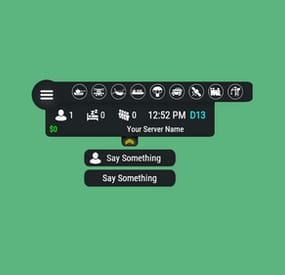
Server HUD · Rust · Oxide · CARBON Your chat is «is heli up?» twelve times an hour Put the answer on screen. Online count, clock, grid square, balance, and a live bar of every event running — Bradley, heli, cargo, airdrop, both oil rigs. Nine events out of the box, set up entirely from a panel in game. How it goes From install to the event you added yourself MINUTE ONE Install and it's on screen It doesn't wait for the next wipe to be useful Install mid-wipe and the heli that's already flying is on the bar. ImageLibrary is the only other plugin you need. Nine events on by default. Bradley, Patrol Heli, CH47, Cargo Ship, Airdrop, Harbor cargo, both Oil Rigs, Deep Sea. Rigs turn red while the crate is being hacked. Players see the fight starting from across the map. Icons are just URLs. Fetched and cached for you. First install reloads once to pick them up — expected, not a fault. No file to edit first. Defaults draw a finished HUD with your server name in it. FROM THEN ON Every player, every day The numbers your chat keeps asking for Updated as they change. A player standing still costs you nothing. K12 or X:-1204 Z:842 Grid square or raw coordinates. Your choice, your colour. Online, sleeping, queue. Admins can be left out of the count. Clock in each player's own format. 12- or 24-hour from their game language, or force one. Two balances, side by side. Economics, ServerRewards or ShoppyStock. Only what's live. One switch hides idle events instead of showing a wall of grey. Info messages on rotation. A random line from your list, any corner, any width. IN THE WAY The player decides Four states, and the choice is remembered Your logo is the button: full panel → events only → hidden. One command removes it entirely. Still set that way after a reconnect. Streamers keep coordinates off camera. One permission drops the position readout. CCTV and drones get a clean screen. Hides on mount, back on dismount, switchable. Any corner, any scale. Pixel offsets, one scale value, and a toggle to show it over the inventory. MONTHS LATER All of it, from in game The config file is optional One command opens an admin panel over every setting there is. Change it, it saves, everyone online sees it. Events from other plugins. A name, an icon, and the hooks it fires. Convoy, Sputnik, Armored Train and Harbor come pre-filled. Adding one rewrites a marked block in the plugin file and reloads it. A drop-down of command buttons. Any chat or console command, own icon, own permission, closes itself after use. Updates don't reset your settings. New events land with defaults; a section you deleted comes back. Or edit the file. Auto reload picks it up the moment you save. The look See it running, then make it yours Every icon is a URL in the config. Take a pack, or draw your own from the blank template. Free custom HUD icons Free Custom HUD icons Paid Server HUD custom icon pack Paid While you're not looking Built to be left alone ✓ A typo in the config won't take the HUD down — it falls back to defaults and says so ✓ Switching a counter off stops the work behind it, not just the display ✓ An economy you enabled but never installed shows 0, and the HUD carries on ✓ Unloading clears every panel off every screen — nothing stuck until relog Reference One chat command, five words after it Setup is admins only. Menu buttons take whatever permission you name in the config. Chat /h Show the command list Chat /h open Full panel — counters, clock, position, balance, events Chat /h events Event bar only Chat /h hide Hide the panels, keep the logo button Chat /h close Remove it entirely Chat /h setup Settings panel — admins only Perm hud.streamer Hides the position readout from whoever holds it Hook object CanHudChangeState(BasePlayer player, string currentState, string nextState) Fires before a state change. Return non-null to stop it. API string API_PlayerHudState(string playerId) Returns full, events, hidden or closed for a player. Straight answers Asked before buying Can players turn it off? Full panel, event bar only, or gone entirely — their choice, and it survives a reconnect. Do I have to edit the config file? No, the in-game panel covers all of it. If you prefer a text editor, auto reload picks the file up as you save. I stream — my coordinates are on screen. Grant yourself the streamer permission. The position readout goes, everything else stays. Can I add an event from another plugin? Yes — name it, give it an icon, and name the hooks it fires. Most plugins list those in their own description. What if I run no economy plugin? Leave it off and the HUD closes the gap. Enable it without the plugin and you get a 0, not a broken HUD. Does it block CCTV and drones? It hides itself in a Computer Station and comes back on dismount. One toggle if you'd rather it stayed. 9 events out of the box 4 states, chosen per player 2 economy balances at once 1 dependency — ImageLibrary -
$40.00
Loot Table & Stacksize GUI
By The_Kiiiing in Plugins
Say goodbye to configuration and data files. This plugin lets yo edit the loot of (almost) every lootable object directly over a custom UI. It also includes a graphical stack size editor thus making it ideal for anyone who is not familiar with editing config files.
Do not use in combination with any other stack size controller or loot plugin.
New with version 2.2.16: Use AI to edit loot configurations
You can now use AI or a regular text editor to edit your loot configs. To enable this feature, set "Use json loot configs from folder config/Loottable" to true in the config file. Then use the command
loottable dump_json to migrate your existing configuration.
Make sure to give the configuration guide to your AI agent so it knows what to do.
Loottable AI Agent Guide.md.txt
Russian lang file (файл русского языка)
You can now enjoy the interface of Loottable in Russian. Just download the file and place it in the /oxide/lang/ru/ folder
Loottable.json
DISCLAIMER: Translations are provided by the community and I can not guarantee for their accuracy
NEW with version 2.2.7:
You can now add new items to all your configurations with the click of a button on the settings page. This only works for items that have been newly added with the last rust update. Amount and drop chance will be set to the vanilla values. This can also be done via command loottable add_new_items
NEW with version 2.1.16:
Improved item search
You can now search for hidden items by adding h: to the start of your search (e.g. the search h:cable will show the cable tunnel item which is hidden by default). This works in both item editor and stack size controller. Full support for CustomItemDefinitions
NEW with version 2.1.7: Direct Loot Refresh
Players with the permission loottable.test can use a button to directly refresh the loot in the crate they are currently looting.
Features:
User friendly GUI - no need to edit config files Loot configuration for every prefab in the game Stack size controller supports individual stack sizes for every prefab Support for custom items Support for third party plugins Fully backwards compatible with version 1.x.x Default config included for every prefab Configuration for Smelting Speed, Recycler Speed and Efficiency Supply Drop configuration
Supported prefabs:
Crates, Barrels NPCs Trees, Ores, Animal corpses Excavator, Quarries Christmas Presents, Eggs, Loot Bags Collectables like Hemp, Corn, etc.
Additional Configuration:
Smelting Speed Supply Drop Recycler Speed / Efficiency
Commands:
loottable - Open the Loottable UI loottable reload - Manually refresh loot loottable remove_dlc_items - Remove all DLC items from your loot configs. This action can not be undone loottable add_new_items - Add all new items from this months rust update to your configurations. This action can not be undone
Permission:
loottable.edit - Required to use the Loottable UI
Required Dependencies (Oxide only):
Image Library: https://umod.org/plugins/image-library
Translations:
This plugin fully supports translation. Out of the box only english is included. For item names to be translated, the plugin https://umod.org/plugins/rust-translation-api is required. English translations are located in /oxide/lang/en/Loottable.json
For Developers:
Loot Api:
Developers can use the Loot Api to register loot profiles for custom NPCs or other plugin related loot.
It is highly recommended to use the provided wrapper to access the API. Documentation is also included:
https://gist.github.com/TheKiiiing/53a37e8bbb48d8a24c8e8b21b9da37ac
Loot Api Example:
void OnLoottableInit() { LoottableApi.ClearPresets(); LoottableApi.CreatePresetCategory(this, "Crates"); LoottableApi.CreatePreset(this, "c_locked", "Locked Crate", "crate_hackable"); LoottableApi.CreatePreset(this, "c_elite", "Elite Crate", "crate_elite"); LoottableApi.CreatePreset(this, "c_military", "Military Crate", "crate_military"); LoottableApi.CreatePreset(this, "c_normal", "Normal Crate", "crate_normal"); LoottableApi.CreatePresetCategory(this, "NPCs"); LoottableApi.CreatePreset(this, true, "npc_cargo", "Cargo Ship NPC", "npc_militunnel"); LoottableApi.CreatePreset(this, true, "npc_control", "Control Center NPC", "npc_militunnel"); } void SpawnNpc() { // Spawn NPC here ScientistNPC npc; // Assign a loot preset to the NPC LoottableApi.AssignPreset(this, scientist, "npc_control"); } void SpawnCrate() { // Spawn crate here LootContainer crate; // Assign a preset to the crate if (LoottableApi.AssignPreset(this, container, "c_locked")) { // The container has been filled with loot return; } else { // The container is not handled by Loottable // Default loot logic goes here } } The resulting configuration page would look like this:
Custom Items API:
Developers can use the Custom Items Api to add a custom item to the Loottable item list. If an item is marked as persistent it will remain in the custom item list until it is removed by ClearCustomItems. All non-persistent items will be removed after the plugin that registered them has been unloaded.
(void) AddCustomItem(Plugin plugin, int itemId, ulong skinId) (void) AddCustomItem(Plugin plugin, int itemId, ulong skinId, bool persistent) //(v1.0.27 or higher) (void) AddCustomItem(Plugin plugin, int itemId, ulong skinId, string customName) (void) AddCustomItem(Plugin plugin, int itemId, ulong skinId, string customName, bool persistent) //(v1.0.27 or higher) (void) ClearCustomItems(Plugin plugin) //(v1.0.27 or higher)
Hooks:
(void) OnLoottableInit() This hook is called when Loottable is ready to receive API calls. This happens either on server boot or when the plugin is loaded. Use this hook to register custom items and loot presets.
(object) OnContainerPopulate(LootContainer container) This hook is called every time a loot container is about to be populated with loot. Returning a non-null value prevents the plugin from spawning loot into that crate.
(object) OnCorpsePopulate(LootableCorpse corpse) This hook is called every time an npc corpse is about to be populated with loot. Returning a non-null value prevents the plugin from spawning loot into that corpse.
(object) OnCustomAirdrop(SupplySignal signal) This hook is called every time a custom supply drop is about to be delivered. Returning a non-null value will cancel the custom supply drop.
Outdated documentation for Version 1:
New with version 1.0.27:
Custom Items can now be created and edited directly in the GUI. They can be created from any existing item and modified in the Item Select menu
You can now create and load backups of your configuration. Commands (F1 or Server Console):
loottable.backup load <name> - Load backup with the given name from the backups folder (will wipe your current configuration) loottable.backup create <name> - Create backup of everything with the given name Backups will be created in the data/Loottable/backups folder. To load a backup, the backup file needs to be present in that folder. When creating backups in the in-game console, the permission loottable.debug is required.
IMPORTANT: DO NOT LOAD BACKUPS FORM SOURCES YOU DO NOT TRUST, they might cause harm to your server
New with version 1.0.16:
Custom Items:
Now you can add custom items used by other plugins directly to your loot table. Other plugins can can register these items using the api (documentation below).
Screenshots:
Overview of crates and their current loot table
Stacksize Editor
Commands:
loottable - Open the editor loottable refresh - Manually refresh crate loot loottable flags - List available flags (explained below) loottable flags <name> <1|0> - Enable / disable a certain flag loottable reload_vanilla_profiles - Manually re-download vanilla loot profiles (only for debuging)
Permission:
loottable.edit - Required to use the editor
Flags:
There are flags to disable some limits in the editor. Only enable these flags if you really need to as they might cause unexpected behavior of the editor. There are currently 3 flags available:
Debug If enabled, the Debug flag provides more detailed information about errors and other actions in the editor. Don't enable this flag unless you want your console full of spam.
UnlockGatherMultiplier allows you to use gahter multipliers less than one and higher than 1000. Note that multipliers less than one might lead to unexpected results in some cases.
DisableItemLimit Probably the safest flag to use is DisableItemLimit as it simply lets you set stack sizes and every other item amount in the editor as high as 2,147,483,647 which is the biggest possible value of a 32-bit integer.
UnlockFurnaceMultiplier lets you use any value as the furnace speed multiplier. Don't enable this flag unless you know what you are doing, since the default value range from 0.1 to 100 should cover most use cases and larger values might impact server performance.
UnlockItemMultiplier unlocks the multiplier when multiplying a loot table.
DisableStackingHooks will disable all stacking related hooks. Enable if you encounter problems when stacking items.
RefreshLootOnExit controls if all crates get refreshed after closing the editor or when reloading the plugin. Enable this only for testing, there might be an increase in entities.
Refer to the Commands section for more information about enableing flags.
Vanilla Configurations:
Since version 1.0.7 there are vanilla loot profiles available for most crates and NPCs. These profiles can be loaded using the "Load default loot table" button at the top center of the editor.
DISCLAIMER:
The vanilla loot profiles in the editor might not exactly match the vanilla loot distribution of the game as it uses a completely different loot distribution system than Rust. These profiles rather serve as a reference point for custom loot profiles.
Important for Carbon users:
In order for this plugin to work with carbon, Harmony references need to be enabled. This can be done with the following command:
c.harmonyreference 1
Required Dependencies (Oxide only):
Image Library: https://umod.org/plugins/image-library
Custom Items API:
Add a custom item to the item list. If an item is marked as persistent it will remain in the custom item list until it is removed by ClearCustomItems. All non-persistent items will be removed after the plugin that registered them has been unloaded.
(void) AddCustomItem(Plugin plugin, int itemId, ulong skinId) (void) AddCustomItem(Plugin plugin, int itemId, ulong skinId, bool persistent) //(v1.0.27 or higher) (void) AddCustomItem(Plugin plugin, int itemId, ulong skinId, string customName) (void) AddCustomItem(Plugin plugin, int itemId, ulong skinId, string customName, bool persistent) //(v1.0.27 or higher) (void) ClearCustomItems(Plugin plugin) //(v1.0.27 or higher) Example:
Its recommended to delay the call a little bit to make sure Loottable is loaded
private void Init() { timer.In(1f, () => { Loottable?.Call("AddCustomItem", this, -946369541, 2664651800, "High Quality Fuel"); }); }
Hooks:
(object) OnContainerPopulate(LootContainer container) This hook is called every time a loot container is about to be populated with loot. Returning a non-null value prevents the plugin from spawning loot into that crate.
(object) OnCorpsePopulate(LootableCorpse corpse) This hook is called every time an npc corpse is about to be populated with loot. Returning a non-null value prevents the plugin from spawning loot into that corpse.
(object) OnCustomAirdrop(SupplySignal signal) This hook is called every time a custom supply drop is about to be delivered. Returning a non-null value will cancel the custom supply drop.
- #loot
- #customloot
- (and 13 more)