
BetterDeadThanZed's Wishlist
-

$30.00
Boss Scorpion
Scorpion - A New Threat on the Ground
Bring a giant mechanical scorpion to your Rust server. With eight animated legs, massive claws, and an armed tail, Scorpion turns roads, monuments, and custom arenas into dangerous boss encounters.
Players face more than a walking target. Scorpion can intercept rockets and throw them back, launch explosive pursuit drones, retaliate with homing missiles, and fire blowdarts from its tail.
Weapons and Defenses
Rocket interception: The tail's ray gun catches incoming rockets, swings them around, and throws them back toward the attacker. Tail blowdart: Attacks nearby players with configurable detection range and cooldown. Explosive pursuit drones: Sends drones after attackers. Claw-launched homing missiles: Retaliates against players who damage it, with separate cooldowns for each attacker. Helicopter defense: Acquires occupied player helicopters and launches homing missile salvos. Attack helicopters receive three missiles, fired one second apart. Rocket-assisted obstacle recovery: Boosts over obstacles when needed to continue its patrol. Electrical damage effects: Tesla effects activate when health falls to one-third. Walking sounds: Alternating footstep effects give its movement a heavy, mechanical presence. Patrols and Path Editor
Build encounters through the in-game editor.
Record custom patrol routes by placing waypoints. Create local paths or link routes to standard and custom monuments. Configure automatic spawning, population, and respawn delays. Enable random road patrols. Use Ring Road patrols to follow the map's largest closed road continuously, without reversing at the end. Adjust individual spawned Scorpions separately from their saved patrol settings. Receive detailed feedback when a route encounters unsuitable ground or an obstacle. Health and Damage
Configure regular bullet and explosive ammunition damage separately, including pistol ammunition. Increase its health to create a tougher encounter while retaining the ammunition damage scaling.
Loot and Rewards
Reward players with configurable Bradley loot crates, adjustable crate fire duration, and optional currency payouts.
Supported integrations include:
AlphaLoot for custom crate loot profiles. LootTable for preset-based crate contents. Economics for money rewards. ServerRewards for reward points. TruePVE support for combat interaction. Optional reward ownership tracks damage by individual player or combines contributions from a Rust team. Damage contributions expire after a configurable period without further damage, allowing another player or team to take over an abandoned encounter.
Crate ownership locks and currency rewards are configurable. Ownership and combined team damage are disabled by default.
In-Game Configuration
The tabbed editor separates movement, combat, damage, rewards, and player/team ownership settings.
Use different settings for defaults, road patrols, saved paths, and individual spawned Scorpions to create encounters suited to different areas of your server.
Commands
All chat commands require server administrator access or the scorpion.admin permission.
Chat Command Description /Scorpion Opens the configuration and patrol editor. /Scorpion spawn Spawns a Scorpion ahead of you using the default settings. /Scorpion remove Removes the nearest Scorpion within 50 metres. /Scorpion path "Patrol 1" Spawns one Scorpion using the named saved path and its settings. /Scorpion spawnpath "Patrol 1" Alternative command for spawning on a saved path. /Scorpion "Patrol 1" Shortcut for spawning on a saved path. Console / RCON Command
Command Description scorpion.spawnpath "Patrol 1" Spawns one Scorpion on the specified saved path. Replace Patrol 1 with your saved path's name or ID. Keep quotation marks around names containing spaces.
Manual path spawning works when the path's automatic spawning is disabled. The manually spawned Scorpion does not respawn after death, and the command does not change the path's automatic spawning settings.
Permission
scorpion.admin - Grants access to Scorpion's commands and editor.
Developer Integration
Other plugins can spawn and despawn Scorpions through API calls, supply custom settings and waypoint paths, retrieve health information, and respond to damage and death hooks.
Give your players a boss that can send their own rockets back at them.
-
$29.99$23.99Scrap Worm
[ ✓ ] Works on any host. The zip includes a small installer plugin: run crashext.install once and restart. [ ✓ ]
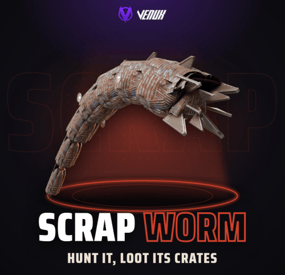
Scrap Worm puts a giant worm made of scrap metal under your map. It hunts inside its own territories, listens for gathering, gunshots and explosions, and breaks out of the ground right under the loudest one. While it is above ground it bites, drags, whips and crushes, and that is the only time you can hurt it.
Its armor takes reduced damage and four glowing cores along its sides take a lot more. Every core you burst strips its segment's armor, which falls behind it as a trail of scrap. Kill it and it collapses into burning heli or Bradley crates and a hackable crate, the top damage dealers get paid, and its plates are left behind for harvesting.
It runs on its own: territories on the map, a hunt on a timer, a boss health bar, chat and Discord announcements. Nothing to install on the client: the worm is built from parts every Rust client already has.
Works on Oxide and Carbon Needs CrashExtensions (included) Automatic event on map territories Top damage rewards Jump to: Features · Screenshots · Trailer · How a hunt goes · Commands · Permissions · Works with · Install · Configuration · Test server · FAQ
🌟 Features
For players
A real boss fight. A worm over 20 metres long breaches out of the ground in a big arc and dives back in. Every breach is different: a low skim, a normal arc or a high leap, at its own pace and heading. It hunts you. Gathering, gunshots and explosions in its territory are noise, and the next breach comes up under the loudest one. Firing a rocket somewhere else can pull it where your team wants it. You see it coming. The ground rumbles, dust kicks up and a ring of dirt marks where it will erupt. Stand in the ring and you take the slam. It fights back. It bites the nearest player in reach and drags them into its mouth, whips anyone near its tail, and runs over whoever is in its way. Weak points. The whole body takes reduced damage. Four glowing cores take a lot more, and each one you burst knocks off a chunk of health and strips that segment's armor plates. Every weapon works. Bullets, rockets and launcher grenades hit the body, and thrown C4 and grenades stick to it and ride along until they go off. Boss health bar. Name, EXPOSED or BURROWING, the four cores and its health, above the hotbar for everyone near the fight. Track it on the map. A red circle shows where it is while it is above ground, and goes away when it dives. Walls matter. Its tail and body do not hit through walls, and charges stuck to it drop off at a wall or where it dives instead of going through. Loot worth the fight. Burning heli or Bradley crates and a hackable crate where it falls, plus scrap plates you can harvest with a pickaxe, a jackhammer or a rock (metal fragments, charcoal and high quality metal by default, anything you like in the config). For server owners
Set and forget. Three territories are placed on your map by itself (open, dry ground away from monuments, the same spots for the whole wipe), shown as circles on the map, and hunts start on a timer with a minimum player count. Your own territories. Add spots by coordinates with their own name and radius. Or somewhere new every time. RandomLocationEachEvent picks a fresh random spot for each event, away from water, slopes and monuments. Scales with the crowd. Health grows with the players around when it spawns, up to a cap you set. Rewards. Economics money and ServerRewards points for the top damage dealers, up to 10 places. Winner commands. Run your own server commands for the top damage player with {steamid}, {name} and {grid}: a kit, a group, a shout. A dead or offline winner gets them when they are back, even after a restart. Debris loot you control. Pick the items, the exact amount per piece, which pieces carry them and an optional fixed amount per hit. PvE friendly. An optional loot lock gives the crates to the top damage dealer's team for as long as you want, and it survives a reload. Bases are safe by default. Building damage is off. Turned on, it only hits inside the territory of the running hunt and goes through normal damage, so raid protection still applies. Players who place a Tool Cupboard in a territory get a warning popup. Announcements. Chat lines for start, kill and leave, to everyone or only nearby, and an optional Discord webhook. NCP and Notify toasts. Show the hunt messages as NCP 2.0 or Notify toasts, with chat as the fallback. The breach line can be turned off. Works with your loot plugins. The crates are the native ones, so BetterLoot and AlphaLoot fill them, and you can pick an AlphaLoot profile. Every number in the config. Size, speed, arc, health, damage taken, every attack, crates, rewards, timers and territories, each with a safe range. Four languages. English, Spanish, Brazilian Portuguese and Russian built in. For developers
Hooks. OnScrapWormStart, OnScrapWormKilled, and two you can veto: OnScrapWormCrush (protect a block) and OnScrapWormRunOver (spare a player). See the FAQ. 📸 Screenshots
Every screen below is Scrap Worm running in Rust.
It breaches out of the ground in a long arc, with the boss bar above the hotbar It erupts under the loudest noise The glowing cores are its weak points Kill it and it bursts into scrap plates Burning crates and scrap debris where it fell 🎥 Trailer
The Scrap Worm trailer (click to play, 44 seconds)
🪱 How a hunt goes
It starts. A hunt picks one of the territories, everybody gets a chat line with the grid, and the circle on the map turns red. It listens. Gathering, gunshots and explosions inside the territory are noise. The next breach comes up under the loudest one, after a rumble and a ring of dirt. It surfaces. For a few seconds it is out of the ground: it bites and drags, whips its tail and crushes what it runs into. Underground it cannot be hurt. You hit it. The body takes 30% of a hit by default, a core takes double. Each burst core strips its segment's armor, and a stripped segment takes much more. It dies. At zero health, or with all four cores burst, it collapses. Burning crates land where it fell (outside a base if it fell inside one), its plates become harvestable debris, chat names the top damage dealer and the rewards are paid. Or it leaves. If nobody is around for 5 minutes, or the 25 minute hunt runs out, it burrows away. The next hunt is scheduled by itself, 90 minutes later by default. 🎮 Commands
Chat, for server owners or a player with scrapworm.admin:
/scrapworm start - start a hunt now in a random territory (or a random spot). /scrapworm spawn - put a worm underground 15 m in front of you, then breach or loop. /scrapworm breach - make it breach once. /scrapworm loop - keep it breaching. /scrapworm stop stops after the current breach. /scrapworm status - its health and cores. /scrapworm territories - list the territories. /scrapworm remove - remove the worm now. Admin
From the server console, RCON or a player with scrapworm.admin:
scrapworm.start - start a hunt now. scrapworm.territories - list the territories with their position and radius. 🛡️ Permissions
scrapworm.admin - the commands above. Server owners can always use them; moderators need this permission. Players need no permission to fight the worm. oxide.grant user YOUR_STEAM_ID scrapworm.admin 🤝 Works with
NCP: free, optional: hunt messages as toasts instead of chat lines Notify: optional: hunt messages as Notify toasts Economics / ServerRewards: optional top damage rewards AlphaLoot: fill the crates from a profile you name BetterLoot: fills the crates by itself (they are the native heli or Bradley crates) TruePVE: works as is: the worm can hurt players, and players can harvest its debris Carbon: same code path as Oxide ImageLibrary: not needed 📦 Install
Install the extension, once per server. Stop the server, copy Oxide.Ext.CrashExtensions.dll into RustDedicated_Data/Managed (Carbon: carbon/extensions) and start it again. The console prints Loaded extension CrashExtensions with its version. An older copy of the DLL is simply overwritten: it is one shared file for all our plugins. Install the plugin. Copy ScrapWorm.cs into oxide/plugins (Carbon: carbon/plugins). It compiles on its own and creates its config. That's it. The first hunt starts 20 minutes after the server is up. To see it now, stand on open, flat ground and type /scrapworm start. ⚙️ Configuration
Everything lives in oxide/config/ScrapWorm.json. Every value has a safe range: a value out of range keeps the plugin unloaded, leaves your file untouched and tells you in the console what to fix. The full list with every default and range is in the Documentation tab and the README.
Config sections (click to expand)
🧪 Test server
Available on our test server. The worm wakes up 5 minutes after the server starts and then every 20 minutes while someone is online. Its two territories, H7 and J2, show on the map: go there, make noise, and it comes for you.
client.connect 91.229.114.54:28015 📚 FAQ
Q: Do players need a client mod?
A: No. The worm is built from scrap helicopter parts every Rust client already has, so it works on any map with no downloads.
Q: Will it wreck my players' bases?
A: Only if you turn it on. Building damage is off by default. Turned on, it only hits inside the territory of the running hunt and goes through normal damage, so raid protection plugins still apply.
Q: Can it hurt players in safe zones?
A: No. Players in a safe zone, sleeping, in noclip or spectating are never targets.
Q: Do I need Economics or ServerRewards?
A: No. They are optional rewards. Without them the worm still drops its crates.
Q: Can I give the winner a kit or a rank?
A: Yes. Put server commands in WinnerCommands, for example inventory.giveto {steamid} scrap 500 or oxide.usergroup add {steamid} wormslayer. Use {steamid} for anything that grants something. If the winner is dead or offline, the commands wait up to 1 hour for them.
Q: Can the messages show as toasts?
A: Yes. Turn on UseNCP (NCP 2.0) or UseNotify (Notify) and pick the type. Players get the chat line whenever a toast can't be shown, and with Notify they need its notify.see permission.
Q: Is it good for PvE?
A: Yes. Turn on the loot lock and the crates belong to the top damage dealer's team for the time you set. With TruePVE the worm still hurts players and players can harvest its debris.
Q: It dies too fast or too slow. What do I change?
A: WormHealth, HealthPerExtraPlayer, BodyDamage and CoreDamage. Any attack can be weakened or turned off by setting its damage to 0.
Q: Does it work on Carbon?
A: Yes. The extension goes into carbon/extensions instead of RustDedicated_Data/Managed, and the plugin into carbon/plugins.
Q: How do I translate it?
A: English, Spanish, Brazilian Portuguese and Russian are built in. Edit oxide/lang/en/ScrapWorm.json, or copy it into another language folder and translate its values: each player reads their own game language.
Q: Does it contact any outside service?
A: It downloads three small health bar pictures once from the Venux CDN, rust-cui.crashplugins.space, which your server then keeps. Nothing about your server or your players is sent. The Discord webhook is the only other request, and only if you fill it in.
Q: Can other plugins react to the worm?
A: Yes. Scrap Worm calls void OnScrapWormStart(Vector3 position, string territory) when a hunt starts and void OnScrapWormKilled(Vector3 position, ulong topDamager) when it dies. Return anything but null from object OnScrapWormCrush(DecayEntity entity) to protect a building block, or from object OnScrapWormRunOver(BasePlayer player) to spare a player from its attacks.
Questions, ideas or bug reports? Use the Support tab of this file or join our Discord.
- #scrapworm
- #worm
- (and 18 more)
-

$30.00
Boss Dragon
Dragon - Rule the Skies
Bring a fire-breathing boss encounter to your Rust server.
Dragon patrols above your map, hunts players, launches explosive fireballs, and rains grenades down during strafing runs. Roaring audio and flame effects bring this flying scrap-metal creature to life.
Fight it from the ground. Bring it down to claim burning loot crates and wreckage.
Features
Explosive fireballs: Configurable damage, explosion radius, horizontal attack range, and cooldown. Strafing attacks: Overhead grenade runs with contact explosions. Anti-air combat: Attacks occupied player helicopters. Retaliation: Responds to attackers and remembers recent threats. Cover pressure: Can continue attacking a player's last known location when they hide. Flare defense: Counters incoming homing missiles with a configurable cooldown. Homing targetability: Choose whether players can lock onto Dragon. Damage effects: Electrical sparks activate at one-third health. Death rewards: Airborne explosion, falling harvestable debris, and configurable Bradley loot crates. Loot integrations: Normal loot, AlphaLoot profiles, or Loot Table presets. Map marker: Optional Patrol Helicopter map marker. Automatic spawning: Maintain between 0 and 5 dragons, with configurable lifetime and respawn delay. Departure behavior: Flies toward the map edge when its lifetime ends. In-game editor: Configure the encounter through /dragon. TruePVE support. Customize the Encounter
Adjust Dragon's health and protection against bullets, explosions, and anti-vehicle damage.
Configure targeting, fire attacks, strafing, flare defense, loot rewards, crate fire duration, and automatic spawning through the in-game editor.
Optional targeting settings include patrol helicopter player threat rules, ignoring players in safe zones, and ignoring vanished players.
Commands
All commands require server administrator access or the dragon.admin permission.
/dragon - Opens the settings editor. /dragon spawn - Spawns a flying dragon above and ahead of you. /dragon leave - Sends the nearest dragon toward the map edge to despawn. /dragon remove - Removes the nearest dragon without death rewards. Additional Admin Commands
/dragon test - Spawns a stationary demonstration with flame bursts and fireballs. /dragon hover - Makes the nearest dragon hold position. /dragon fly - Resumes flight and patrol, ending stationary test mode. Hover, fly, leave, and remove select the nearest fully built dragon within 150 metres.
Permission
dragon.admin - Grants access to Dragon's commands and configuration editor. Server administrators already have access.
Turn your server's skyline into a battlefield.
-

$39.95$27.97Stronghold - Medieval / Primitive Map
Stronghold - Medieval Update has been redesigned from the ground up, gone are the modern aspects and this is a pure primitive gameplay map
Features
Bolakov Castle, Bigger More Detailed with all the aspects of Outpost Goldpit Port, a replacement for Harbour Burg, a replacement for RadTown Medieval Chirch (thats how it was spelt in medieval times) Under Chirch Crypt Beacon Towers, a replacement for lighthouses Waterspinne Lord of the Manor, his house and outbuildings Stone Bridges Market Standard Monuments - None - Fully Custom
Finally, please make yourself aware of the TOS-Restrictions for use.
-
$11.99
Skill Tree Items: Pro
By imthenewguy in Plugins
The Ultimate Expansion for Skill Tree Progression
Skill Tree Items: Pro is a powerful DLC plugin for the Skill Tree system that breathes new life into your server's loot tables. Instead of players just earning XP through grinding, they can now discover unique, consumable items that boost their progression, provide instant rewards, or grant temporary buffs directly from Skill Tree.
Whether it’s a rare XP injection found on a Scientist or a biome-specific gathering boost hidden in an Arctic crate, this plugin adds a layer of excitement and strategy to every lootable object on your map.
Advanced Consumable Types
This plugin introduces four distinct item categories, each fully customizable to fit your server's economy:
XP Boosters: Provide temporary XP multipliers. Go granular with filters for specific gather types, time-of-day restrictions (e.g., "Night Owl" boosts), or biome-specific requirements. XP Injections: Instant gratification. Set up various "vials" or "manuals" that grant a flat or randomized range of XP upon consumption. SP Injections: Extremely rare rewards that grant Skill Points directly, bypass the grind, and give players a reason to hunt for high-tier loot. Temporary Buffs: Grant any buff from the Skill Tree—including Ultimates—for a limited time. These stack with existing skills, allowing players to feel the power of high-level perks early on.
Dynamic Loot Distribution
The core of Skill Tree Items: Pro is its highly sophisticated loot engine. You aren't limited to just crates and barrels; you can inject these items into almost every interaction in Rust.
See a comprehensive list of supported LootSources below.
Granular Configuration
For the power users, the LootProfile system allows for surgical precision. You don't just set "Crates"; you can target specific prefab names, specific NPC profiles, or even the tier of a Raidable Base.
Key Profile Features:
Identifier System: Target specific entities (e.g., only "Elite" crates or a specific Boss from BossMonster). Skin ID Filtering: Require specific skin IDs for the source to trigger. Blacklisting: Exclude specific items or entities from dropping loot. Modifier Integration: Toggle whether player "ItemPerk" modifiers should influence the drop rates. Weight-Based Tables: Use a weighted dictionary system to determine exactly which items drop and how often.
Command: stip.give <target> <profile>
Tyoe: Console
Permission required: skilltreeitemspro.admin
Action: Gives the target player the specified item.
Command: stip.giveall
Tyoe: Chat
Permission required: skilltreeitemspro.admin
Action: Gives the user all items in the config.
Command: stip.moveicon
Tyoe: Chat
Permission required: skilltreeitemspro.admin
Action: Moves the active boost icon for all players.
This is a comprehensive list of loot sources that can be used to setup loot profiles.
Crate: Triggered when a player opens a crate for the first time. Barrel: Triggered when a player breaks a barrel. BossMonster: Triggered when a boss monster is killed by a player. Event: Triggered when an event is completed (Convoy, SurvivalArena, Armored train, Powerplant etc). ScientistNPC: Triggered when a scientist NPC is killed. HumanNPC: Triggered when a human npc, such as a tunner dweller, is killed. BetterNPC: Triggered when a NpcSpawn npc is killed. Woodcutting: Triggered when a tree is fully cut down. Mining: Triggered when a node is fully mined out. Skinning: Triggered when an animal is fully skinned. Foraging: Triggered when the player collects a map collectible (hemp, pumpkins, diesel barrels etc). Farming: Triggered when the player collects a player-grown collectible. Fishing: Triggered when the player catches a fish. Crafting: Triggered when an item is successfully crated. BotReSpawn: Triggered when an BotReSpawn npc is killed. NpcRaider: Triggered when an npc from NpcRaider is killed. RaidableBase: Triggered when a Raidable Base is spawned.
The effect types dictate how the item will behave. You can have any number of effect types attached to an item. For example, you can create an item that gives the player 1000xp with the XPInjection type, gives them a temporary boost with the XPBoost type, and gives them access to the Raiding Ultimate from Skill Tree with the TemporaryBuff type.
XPInjection: Provides the player with an injection of xp when consumed. SPInjection: Provides the player with an injection of skill points when consumed. TemporaryBuff: Provides the player with temporary access to any Skill Tree buff (including ultimates). XPBoost: Provides the player with a temporary xp boost when consumed. XP Source can be set so only the specified xp source provides the bonus. Timeframe can be set, so the player can only get xp during the specified time of day (ie 6pm to 6pm etc). Multiple Biomes can be added to restrict the xp bonus to sources inside of those biome types (ie a player can only gain xp while in the Arctic or Jungle). Biomes: Any, Arid, Temperate, Tundra, Arctic, Jungle.
Here is a list of Skill Tree XP Sources that can be used with the XPBoost effect.
All NodeHit NodeHitFinal TreeHit TreeHitFinal SkinHit SkinHitFinal CollectWildPlant CollectGrownPlant BuildingBlockDeployed FishCaught CatchOrangeRoughy CatchSalmon CatchSmallShark CatchSmallTrout CatchYellowPerch CatchAnchovy CatchHerring CatchSardine CatchTrash Crafting ScientistNormal TunnelDweller UnderwaterDweller ScientistHeavy SmallAnimal MediumAnimal LargeAnimal RoadSign Barrel Scarecrow Mission BradleyAPC LootHackedCrate LootHeliCrate LootBradleyCrate CookingMealXP RaidableBaseCompletion_Easy RaidableBaseCompletion_Medium RaidableBaseCompletion_Hard RaidableBaseCompletion_Expert RaidableBaseCompletion_Nightmare Win_HungerGames Win_ScubaArena Win_Skirmish Gut_Fish default_botrespawn crate_basic crate_elite crate_mine crate_normal crate_normal_2 crate_normal_2_food crate_normal_2_medical crate_tools crate_underwater_advanced crate_underwater_basic crate_ammunition crate_food_1 crate_food_2 crate_fuel crate_medical supply_drop detect_diggable Harbor_Event_Winner Junkyard_Event_Winner PowerPlant_Event_Winner Satellite_Event_Winner Water_Event_Winner Air_Event_Winner Armored_Train_Winner Convoy_Winner SurvivalArena_Winner swipe_card_level_1 swipe_card_level_2 swipe_card_level_3 boss_monster Zombie Raider JetPilot ArcticBaseEvent_Winner GasStationEvent_Winner SputnikEvent_Winner ShipWreckEvent_Winner Triangulation_Winner Caravan_Winner SupermarketEvent_Winner GingerbreadNPC PVP AutoTurret
You can get a list of Skill Tree Buffs from the Skill Tree plugin page.
- #skilltree
- #skill
- (and 10 more)