

-
Posts
24 -
Joined
-
Last visited
Content Type
Profiles
Warranty Claims
Downloads
Forums
Store
Services
Downloads Plus Support
DOWNLOADS EXTRA
Reels
Everything posted by .𝓢𝓶𝓲𝓛𝓮ッ
-
 unfriendly
 -

Version 1.0.0
49 downloads
A complete in-game giveaway system for Rust servers (Oxide/uMod & Carbon compatible). Admins start giveaways with any Rust item or with a free-text custom prize (e.g. a Minicopter). Players enter via chat command or a clickable in-game UI button - no need to alt-tab or check Discord. Features a suspenseful countdown before the winner is drawn, a claim system instead of instant payout, a multilingual chat interface (English/German/Russian) and personal sound feedback for every player. FEATURES Join via chat or button: Players type /giveaway join or click an in-game UI button - both work at the same time Any item: Any Rust item by shortname, including amount and optional skin ID Custom prizes: Give away anything that is not an item (vehicles, ranks, kits, real-life rewards...) by simply typing the prize text. When the winner claims it, all online admins are notified so the prize can be handed out manually Live UI: Every player sees their own panel with the item icon (via ImageLibrary), prize, participant count and countdown, refreshing automatically Suspenseful countdown: Once time runs out, a short "drumroll" countdown plays in chat (3...2...1...) before the winner is announced Claim system: The winner does not receive the prize automatically - they must claim it within a configurable time window (default 5 minutes) using /giveaway claim. If unclaimed in time, the reward is forfeited Participant limit (optional): Set a maximum number of entrants per giveaway Admin participant list: Admins can view a private list of all current entrants at any time Personal sound: When a giveaway starts, every player individually hears a short notification sound (not a world sound - only audible to that player's own client) Multi-language: All chat and UI messages are available in English (default), German and Russian, and automatically match each player's own client language Fully configurable: Duration, participant limit, claim time, sound, UI position/size/colors/font sizes - everything adjustable via the config file Item icons (optional): With the free plugin ImageLibrary installed, the UI automatically displays the actual icon of the item being given away DEPENDENCIES Optional: ImageLibrary https://umod.org/plugins/image-library - required for displaying the item icon in the UI. Without it, the plugin works completely normally, just without the icon. COMMANDS All commands are available via /giveaway or the short form /gw. /giveaway start <item_shortname> <amount> [duration_seconds] [skin_id] - Starts a new giveaway with a Rust item - Permission: giveaways.admin /giveaway custom [duration_seconds] <prize text> - Starts a giveaway with a free-text prize that is not an item - Permission: giveaways.admin /giveaway cancel (alias: stop) - Cancels the running giveaway - Permission: giveaways.admin /giveaway join - Enters the running giveaway - any player /giveaway claim - Claims the won reward (after winning) - any player /giveaway list (alias: participants) - Shows a private list of all current entrants, visible only to the admin - Permission: giveaways.admin Examples: /giveaway start rifle.ak 1 90 - starts a 90-second giveaway for an assault rifle /giveaway custom 90 Minicopter - starts a 90-second giveaway for a Minicopter (handed out manually by an admin) PERMISSIONS giveaways.admin - Allows starting/cancelling giveaways, viewing the participant list and receiving the claim notice for custom prizes oxide.grant group admin giveaways.admin LANGUAGES English (en) - default German (de) Russian (ru)Free -
Version 1.0.1
54 downloads
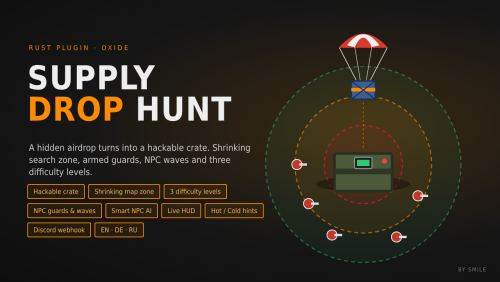
A special supply drop falls somewhere on the map. Only a shrinking circle shows roughly where it is. When it lands, it turns into a hackable crate. Armed NPCs guard it, and as soon as someone starts hacking, more NPCs arrive to defend it. Supply Drop Hunt turns a regular airdrop into a server-wide hunt. It works on PvE and PvP servers, needs no other plugins, and you can configure nearly everything. Features Hidden drop location. The drop lands at a random valid spot. It never lands in water, on monuments, on cliffs, on steep slopes or close to player bases. Shrinking search zone. A circle on the map marks the search area. The drop is somewhere inside it, but never exactly in the middle. The zone shrinks in phases, and each new circle sits inside the previous one. Hackable crate. The drop parachutes down and turns into a hackable crate when it lands. It can't be looted while it is still falling. When a player starts hacking, it is announced in chat and on Discord. The event can't time out while the crate is being hacked. If you prefer, you can switch back to a classic supply drop. Three difficulty levels. Easy, Normal and Hard can spawn at any time, picked at random by chance weight. Each level has its own: circle color hack time loot table NPC guards NPC waves NPC guards and waves. Armed NPCs spawn around the drop. When hacking starts, extra NPC waves arrive to defend the crate. Each group has its own amount, health, name, weapons (one picked at random per NPC), armor and belt items. Built-in NPC AI. No navmesh is needed. The NPCs patrol around the crate and chase players. The hacker is always their first target. They shoot in bursts with spread and don't shoot through walls. They ignore players in noclip, vanish or safe zones. Accuracy, burst size, fire rate, speed and ranges are all configurable. The default Rust AI (navmesh) can be used instead. Live HUD.** Shows the current zone phase, the hack countdown and when the crate is unlocked. Hot/cold hints. Players can type /hunt to get a hint about how close they are (HOT, WARM, COOL or COLD) and whether they are inside the zone. The hint has a cooldown. Custom loot per level. You set the items, amounts, chances and skin IDs, plus the minimum and maximum number of stacks per drop. Automatic events. Events start at a random interval when enough players are online. Admins can also start them manually, optionally with a fixed difficulty. Discord webhook. The plugin posts when an event starts (including the difficulty), when hacking starts, when the drop is found, and when it expires or is destroyed. Messages can be in one language or several languages in a single message. Fully translated. English, German and Russian are included. Each player sees chat and HUD in their own language. Clean and lightweight. The crate, map markers and NPCs are never written to the save file. Everything is removed when the plugin unloads. The plugin does almost nothing between events. How it works A supply drop parachutes down at a random location, and the difficulty is announced. The search zone shrinks every X seconds. With the default config it goes 400 m → 240 m → 80 m. The drop lands and turns into a hackable crate, guarded by NPCs. A player starts hacking. This is announced, and NPC waves start arriving. Once the crate is unlocked, the first player to loot it wins. The win is announced in chat and on Discord. If nobody finds the crate in time, it vanishes. Commands | Command | Description | /hunt - Get a hot/cold hint and see whether you are inside the search zone (with cooldown) | Admins (requires supplydrophunt.admin or admin status) Command /sdh start [level] | Start an event right away, optionally with a fixed level (for example /sdh start hard /sdh stop | Stop the running event and remove the crate, markers and NPCs | /sdh status | Show the phase, zone, the real crate grid, the time left, how many NPCs are alive, the difficulty and the hack state /sdh tp | Teleport to the crate (or to its landing spot while it is still falling) Console / RCON Command | Description supplydrophunt.start [level] | Start an event, optionally with a fixed level supplydrophunt.stop | Stop the running event You can rename both chat commands in the config if they clash with another plugin. Permissions supplydrophunt.admin | Allows the admin commands (server admins have this automatically) oxide.grant group admin supplydrophunt.adminFree -

Version 1.1.6
60 downloads
Never lose a loadout for good. InventoryBackup automatically saves a player's full inventory the moment they die — no matter the cause — and lets you restore it with a single chat command. Perfect for servers that want a safety net against unfair deaths, bugs, exploits, or grief scenarios, without disabling normal looting. Key Features - Backs up on every death — PvP, PvE, NPCs, animals, suicide, fall damage, radiation, drowning, starvation, dehydration, bleeding, poison, explosions, electric shock, Patrol Helicopter, Bradley APC. If a real player dies, it's recorded. - Corpses stay fully lootable — the plugin doesn't touch loot on death. Your server's normal looting/raiding experience is untouched; the backup is purely a safety net. - Zero-duplication restore — /restore moves the items that are still physically in the corpse (and in the separately-dropped equipped backpack) directly into the player's inventory. Already looted something yourself or lost it to another player? Restore accounts for that automatically instead of handing out a duplicate copy. Only if the corpse no longer exists at all (destroyed, despawned, server restarted) does it fall back to recreating the items from the saved backup data. - Handles equipped backpacks correctly — Rust drops an equipped Large/Small Backpack as its own separate object next to the corpse; InventoryBackup finds and restores it too, not just the main corpse. - Full item fidelity — condition/durability, skins, and nested contents (attachments, magazines, ammo) are preserved and recreated exactly. - Two independent Discord webhooks: - Loss webhook — posts an embed for every death: victim, killer (with SteamIDs), death cause, coordinates, timestamp, item count, and the exact /restore <id> command to use. - Command log webhook — separately logs every time /restore is actually used: who ran it, for which player, how many items, how many had to be dropped (full inventory). - Built-in localization — English, German, and Russian chat messages out of the box, automatically served based on each player's client language via Oxide's lang system. - Performance-conscious — O(1) backup lookups, O(1) corpse lookups via a cached reference (with automatic fallbacks), and batched/delayed data saving so busy servers don't take a disk-write hit on every single death. - Configurable backup retention per player, so data files don't grow indefinitely. ------------------------------------------------------------------------------------------------ Chat Commands CommandDescriptionPermission /restore <id>Restores backup <id> to its owner (must be online). Admins can restore any backup; players can only restore their own.inventorybackup.admin (any backup) or inventorybackup.use (own backups only, if enabled in config) /restorelist <player name or SteamID>Lists all backup IDs for a player, with timestamp, item count, and status (open/restored).inventorybackup.admin /backupinfo <id>Shows the full item list of a specific backup.inventorybackup.admin or inventorybackup.use (own backups only) Permissions inventorybackup.admin -> Full access: restore, list, and inspect any player's backups. inventorybackup.use -> Players can restore and inspect only their own backups via /restore and /backupinfo (requires Allow Players To Restore Their Own Backups enabled in the config). ------------------------------------------------------------------------------------------------- Setting up a Discord Webhook 1. In Discord, go to your channel's Edit Channel → Integrations → Webhooks → New Webhook. 2. Copy the webhook URL. 3. Paste it into Discord Webhook URL (and/or Discord Log Webhook URL) in the config. 4. Set the matching Enable... option to true and reload the plugin. Notes - Restoring only works while the target player is online. - A backup can only be restored once — trying again returns "already restored." - If the original corpse (and any separately dropped backpack) is gone by the time /restore runs, the plugin falls back to recreating the items from the saved data, so nothing is ever permanently lost due to a despawned corpse.Free -
 A really cool plugin—easy to configure and great for impromptu events on modded servers, without needing to go through a launch site. The plugin definitely has room for customization and improvements.
 -
Hallo , Ich habe das Problem, dass ich den auf der Plugin-Seite angezeigten Befehl nicht ausführen kann, obwohl ich Admin auf dem Server bin. Kann mir jemand den genauen Befehl nennen bzw. mitteilen, dass ich die Erlaubnis erteilen muss, damit ich die Dinger spawnen kann. lg
-
Have a wonderful day, I saw this plugin and wanted to use it to purge my server, but unfortunately I can't give myself the rights in-game. I give siren.use + steam ID but it doesn't give me the command. Need help. Greetings Levlup
-
 Hallo , kann man das ganz normal auf sein server hinzu fügen ? Was muss ich beachten und wie mache ich das ? da ich in der tgermatik neu bin . Danke für die hilfe. lg