About Giveaways
A complete in-game giveaway system for Rust servers (Oxide/uMod & Carbon compatible). Admins start giveaways with any Rust item or with a free-text custom prize (e.g. a Minicopter). Players enter via chat command or a clickable in-game UI button - no need to alt-tab or check Discord. Features a suspenseful countdown before the winner is drawn, a claim system instead of instant payout, a multilingual chat interface (English/German/Russian) and personal sound feedback for every player.
FEATURES
- Join via chat or button: Players type /giveaway join or click an in-game UI button - both work at the same time
- Any item: Any Rust item by shortname, including amount and optional skin ID
- Custom prizes: Give away anything that is not an item (vehicles, ranks, kits, real-life rewards...) by simply typing the prize text. When the winner claims it, all online admins are notified so the prize can be handed out manually
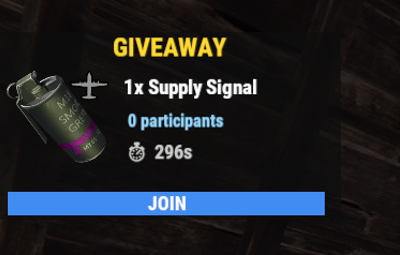
- Live UI: Every player sees their own panel with the item icon (via ImageLibrary), prize, participant count and countdown, refreshing automatically
- Suspenseful countdown: Once time runs out, a short "drumroll" countdown plays in chat (3...2...1...) before the winner is announced
- Claim system: The winner does not receive the prize automatically - they must claim it within a configurable time window (default 5 minutes) using /giveaway claim. If unclaimed in time, the reward is forfeited
- Participant limit (optional): Set a maximum number of entrants per giveaway
- Admin participant list: Admins can view a private list of all current entrants at any time
- Personal sound: When a giveaway starts, every player individually hears a short notification sound (not a world sound - only audible to that player's own client)
- Multi-language: All chat and UI messages are available in English (default), German and Russian, and automatically match each player's own client language
- Fully configurable: Duration, participant limit, claim time, sound, UI position/size/colors/font sizes - everything adjustable via the config file
- Item icons (optional): With the free plugin ImageLibrary installed, the UI automatically displays the actual icon of the item being given away
DEPENDENCIES
Optional: ImageLibrary https://umod.org/plugins/image-library - required for displaying the item icon in the UI. Without it, the plugin works completely normally, just without the icon.
COMMANDS
All commands are available via /giveaway or the short form /gw.
/giveaway start <item_shortname> <amount> [duration_seconds] [skin_id] - Starts a new giveaway with a Rust item - Permission: giveaways.admin
/giveaway custom [duration_seconds] <prize text> - Starts a giveaway with a free-text prize that is not an item - Permission: giveaways.admin
/giveaway cancel (alias: stop) - Cancels the running giveaway - Permission: giveaways.admin
/giveaway join - Enters the running giveaway - any player
/giveaway claim - Claims the won reward (after winning) - any player
/giveaway list (alias: participants) - Shows a private list of all current entrants, visible only to the admin - Permission: giveaways.admin
Examples:
/giveaway start rifle.ak 1 90 - starts a 90-second giveaway for an assault rifle
/giveaway custom 90 Minicopter - starts a 90-second giveaway for a Minicopter (handed out manually by an admin)
PERMISSIONS
giveaways.admin - Allows starting/cancelling giveaways, viewing the participant list and receiving the claim notice for custom prizes
oxide.grant group admin giveaways.admin
LANGUAGES
English (en) - default
German (de)
Russian (ru)