About Supply Drop Hunt Event
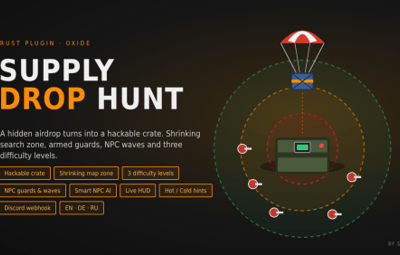
A special supply drop falls somewhere on the map. Only a shrinking circle shows roughly where it is. When it lands, it turns into a hackable crate. Armed NPCs guard it, and as soon as someone starts hacking, more NPCs arrive to defend it.
Supply Drop Hunt turns a regular airdrop into a server-wide hunt. It works on PvE and PvP servers, needs no other plugins, and you can configure nearly everything.
Features
- Hidden drop location. The drop lands at a random valid spot. It never lands in water, on monuments, on cliffs, on steep slopes or close to player bases.
- Shrinking search zone. A circle on the map marks the search area. The drop is somewhere inside it, but never exactly in the middle. The zone shrinks in phases, and each new circle sits inside the previous one.
- Hackable crate. The drop parachutes down and turns into a hackable crate when it lands.
- It can't be looted while it is still falling.
- When a player starts hacking, it is announced in chat and on Discord.
- The event can't time out while the crate is being hacked.
- If you prefer, you can switch back to a classic supply drop.
-
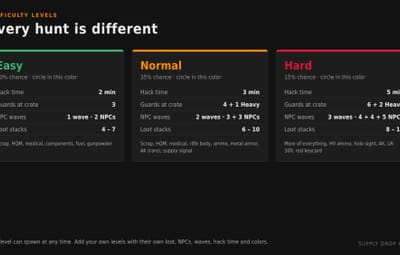
Three difficulty levels. Easy, Normal and Hard can spawn at any time, picked at random by chance weight. Each level has its own:
- circle color
- hack time
- loot table
- NPC guards
- NPC waves
NPC guards and waves. Armed NPCs spawn around the drop. When hacking starts, extra NPC waves arrive to defend the crate. Each group has its own amount, health, name, weapons (one picked at random per NPC), armor and belt items.
-
Built-in NPC AI. No navmesh is needed.
- The NPCs patrol around the crate and chase players.
- The hacker is always their first target.
- They shoot in bursts with spread and don't shoot through walls.
- They ignore players in noclip, vanish or safe zones.
- Accuracy, burst size, fire rate, speed and ranges are all configurable.
- The default Rust AI (navmesh) can be used instead.
- Live HUD.** Shows the current zone phase, the hack countdown and when the crate is unlocked.
-
Hot/cold hints. Players can type
/huntto get a hint about how close they are (HOT, WARM, COOL or COLD) and whether they are inside the zone. The hint has a cooldown. - Custom loot per level. You set the items, amounts, chances and skin IDs, plus the minimum and maximum number of stacks per drop.
- Automatic events. Events start at a random interval when enough players are online. Admins can also start them manually, optionally with a fixed difficulty.
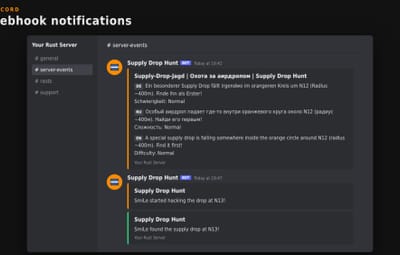
- Discord webhook. The plugin posts when an event starts (including the difficulty), when hacking starts, when the drop is found, and when it expires or is destroyed. Messages can be in one language or several languages in a single message.
- Fully translated. English, German and Russian are included. Each player sees chat and HUD in their own language.
- Clean and lightweight.
- The crate, map markers and NPCs are never written to the save file.
- Everything is removed when the plugin unloads.
- The plugin does almost nothing between events.
How it works
- A supply drop parachutes down at a random location, and the difficulty is announced.
- The search zone shrinks every X seconds. With the default config it goes 400 m → 240 m → 80 m.
- The drop lands and turns into a hackable crate, guarded by NPCs.
- A player starts hacking. This is announced, and NPC waves start arriving.
- Once the crate is unlocked, the first player to loot it wins. The win is announced in chat and on Discord.
- If nobody finds the crate in time, it vanishes.
Commands
| Command | Description |
/hunt - Get a hot/cold hint and see whether you are inside the search zone (with cooldown) |
Admins (requires supplydrophunt.admin or admin status)
Command
/sdh start [level] | Start an event right away, optionally with a fixed level (for example /sdh start hard
/sdh stop | Stop the running event and remove the crate, markers and NPCs |
/sdh status | Show the phase, zone, the real crate grid, the time left, how many NPCs are alive, the difficulty and the hack state
/sdh tp | Teleport to the crate (or to its landing spot while it is still falling)
Console / RCON
Command | Description
supplydrophunt.start [level] | Start an event, optionally with a fixed level
supplydrophunt.stop | Stop the running event
You can rename both chat commands in the config if they clash with another plugin.
Permissions
supplydrophunt.admin | Allows the admin commands (server admins have this automatically)
oxide.grant group admin supplydrophunt.admin