
About Inventory Backup
Never lose a loadout for good. InventoryBackup automatically saves a player's full inventory the moment they die — no matter the cause — and lets you restore it with a single chat command. Perfect for servers that want a safety net against unfair deaths, bugs, exploits, or grief scenarios, without disabling normal looting.
Key Features
- Backs up on every death — PvP, PvE, NPCs, animals, suicide, fall damage, radiation, drowning, starvation, dehydration, bleeding, poison, explosions, electric shock, Patrol Helicopter, Bradley APC. If a real player dies, it's recorded.
- Corpses stay fully lootable — the plugin doesn't touch loot on death. Your server's normal looting/raiding experience is untouched; the backup is purely a safety net.
- Zero-duplication restore — /restore moves the items that are still physically in the corpse (and in the separately-dropped equipped backpack) directly into the player's inventory. Already looted something yourself or lost it to another player? Restore accounts for that automatically instead of handing out a duplicate copy. Only if the corpse no longer exists at all (destroyed, despawned, server restarted) does it fall back to recreating the items from the saved backup data.
- Handles equipped backpacks correctly — Rust drops an equipped Large/Small Backpack as its own separate object next to the corpse; InventoryBackup finds and restores it too, not just the main corpse.
- Full item fidelity — condition/durability, skins, and nested contents (attachments, magazines, ammo) are preserved and recreated exactly.
- Two independent Discord webhooks:
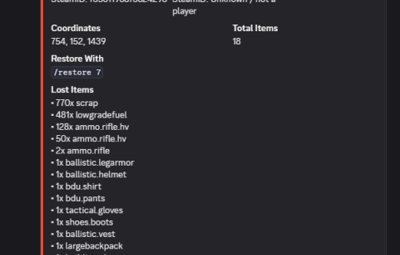
- Loss webhook — posts an embed for every death: victim, killer (with SteamIDs), death cause, coordinates, timestamp, item count, and the exact /restore <id> command to use.
- Command log webhook — separately logs every time /restore is actually used: who ran it, for which player, how many items, how many had to be dropped (full inventory).
- Built-in localization — English, German, and Russian chat messages out of the box, automatically served based on each player's client language via Oxide's lang system.
- Performance-conscious — O(1) backup lookups, O(1) corpse lookups via a cached reference (with automatic fallbacks), and batched/delayed data saving so busy servers don't take a disk-write hit on every single death.
- Configurable backup retention per player, so data files don't grow indefinitely.
------------------------------------------------------------------------------------------------
Chat Commands
CommandDescriptionPermission
/restore <id>Restores backup <id> to its owner (must be online). Admins can restore any backup; players can only restore their own.inventorybackup.admin (any backup) or inventorybackup.use (own backups only, if enabled in config)
/restorelist <player name or SteamID>Lists all backup IDs for a player, with timestamp, item count, and status (open/restored).inventorybackup.admin
/backupinfo <id>Shows the full item list of a specific backup.inventorybackup.admin or inventorybackup.use (own backups only)
Permissions
inventorybackup.admin -> Full access: restore, list, and inspect any player's backups.
inventorybackup.use -> Players can restore and inspect only their own backups via /restore and /backupinfo (requires Allow Players To Restore Their Own Backups enabled in the config).
-------------------------------------------------------------------------------------------------
Setting up a Discord Webhook
1. In Discord, go to your channel's Edit Channel → Integrations → Webhooks → New Webhook.
2. Copy the webhook URL.
3. Paste it into Discord Webhook URL (and/or Discord Log Webhook URL) in the config.
4. Set the matching Enable... option to true and reload the plugin.
Notes
- Restoring only works while the target player is online.
- A backup can only be restored once — trying again returns "already restored."
- If the original corpse (and any separately dropped backpack) is gone by the time /restore runs, the plugin falls back to recreating the items from the saved data, so nothing is ever permanently lost due to a despawned corpse.