-
Posts
63 -
Joined
-
Last visited
Content Type
Profiles
Warranty Claims
Downloads
Forums
Store
Services
Downloads Plus Support
DOWNLOADS EXTRA
Reels
Everything posted by Daemante
-
Pretty sure the issue was Discord permissions. Even though the bot had administrator, the permissions for the category needed to be set to create/manage channels specifically Thanks for your help and patience in troubleshooting the issue ZDEN. Plugin has been tested and is working.
-
Well, I don't think sanitization will help here as the channel name is always the players STEAM64ID which should have no problem conforming to Discords naming convention. I removed the initialization check for the channel as its just making the error too ambiguous. Please check all your config values then upload the attached version and check the console after using the in game chat command. I am not getting the error you are when testing the plugin so it's a bit difficult to troubleshoot. The bot you are using for the admin chats, does it have the correct permissions and server intents; Server Members and Message Content? LiveAdminChat.cs
-

Version 1.3.2
146 downloads
Allows players to open a live admin chat from Rust to Discord to get support. **Please delete the "LiveAdminChat.json" language file in "/oxide/lang/en/" before updating to version 1.3.1.** If you have any errors, please open a support request and I will help you asap. FEATURES: Creates a discord channel in the provided channel category Allows the Rust player and Discord admins to communicate The ability to store the live admin chat as a transcript Allows a lot of customization, including: The command a player uses to respond to the admin chat The chat prefix for messages sent to the player The Steam profile icon for messages sent to the player The default reason for closing chats Whether or not to display the admin's name when sending messages to the player The channel ID where transcripts will be sent to The Discord roles that will be mentioned when a new channel is created Whether or not to close the channel when the player disconnects from the server Setting the in game chat command to start admin chats Defining the cooldown value after the last ticket was closed Setting a custom cooldown value per player DISCORD BOT: For every Rust server you install the plugin on, you should create a separate Discord Bot. Otherwise, the bot seems to get confused and will incorrectly track different parameters. Setup your bot according to the guide on the Discord extension plugin page: https://umod.org/extensions/discord Also make sure your Discord bot has the following permissions in your server for the channel category and transcript channel: View Channels Send Messages Read Message History Embed Links Attach Files Read Message History PERMISSIONS: liveadminchat.use - required to allow players to use the /adminchat command. liveadminchat.bypasscooldown - allows the player to bypass the chat cooldown CHAT COMMANDS: /adminchat - opens a live admin chat with Discord admins. /reply <message> - sends the response from the player to the Discord admins. CONSOLE COMMANDS: Usage: liveadminchat.setcooldown <steam64id> <cooldown_minutes> Usage: liveadminchat.removecooldown <steam64id> Usage: liveadminchat.listcooldowns DISCORD: Admins can provide a reason for closing the chat by typing the reason after !close in the channel. Anything after "!close" will be included in the reason. Example: !close Closed due to no response Admins can set the chat cooldown, in minutes, per player by using !cooldown in the chat channel. If no cooldown is specified when the chat is closed, the cooldown will be set to the "Chat Cooldown (minutes)" value from the config. Example: !cooldown 60 TRANSCRIPTS: If you want to save the player/admin chats as transcripts, add a channel ID to "Transcript Channel ID" in the config. Otherwise, if you do not want transcripts then leave it blank and they won't be created. CONFIG:$2.99 -
Didn't see the support was already added and that you need both plugins. However, if both AdvancedStatus and SimpleStatus are loaded, then the duration or percent of raid protection doesn't display just that raid protection is active/inactive, red for active and green for inactive? If just SimpleStatus is loaded then the percent does show. Although, the config section below for raid protection doesn't seem to work no matter if I change it to duration/percent or show/hide bleed balance, if keeps showing percent and bleed balance; the balance shown is not accurate. "Simple Status Settings": { "Text Value": "duration", "Always Show For Owners": false, "Always Show For Non Owners": false, "Show When Holding Hammer": false, "Show When Attacking": true, "Show Balance Bleed When Attacking": false
-
Hello, is it possible to add support for the AdvancedStatus bar plugin?
-
Oddly, same issue still happening after a wipe; such as force wipe today. Next wipe should be for tomorrow not in 3h 32m. I've already uploaded the update for AdvancedStatus as well hoping that would help but no dice. Thank you,
-
This is for oxide. Attached in the config as requested. WipeStatus.json
-
Works like a charm. Thank you.
-
Works like a charm. Thank you.
-
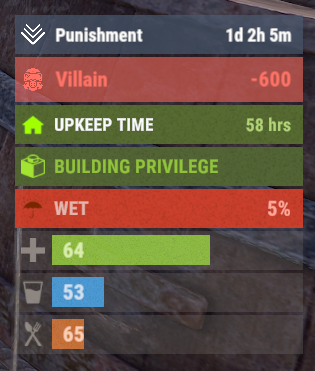 Regarding "Bar - Display Layer" in the config, you may want to consider defaulting to "Under" instead as "Hud" blocks input in menus such as the map screen. Its easy to change as you provided the method but some people may just ignore the link and assume its conflicting and doesn't work. Just my two cents.
 -
Would it be possible to add "every x number of days" to the plugin so that when specifying a date you can also specify when it would reoccur so that you dont need to add a huge list of dates?
-
Ahhh I see. If that note about IsInvisible2 was always there then my apologies for not seeing/reading it. I will do as instructed. Thank you.
-
Again, thank you for the fast response. Will update and report back.
-
Yes that is the godmode plugin. I will update and report back. Thank you for the super quick implementation.
-
Issue remains without FauxAdmin. Seems it does rely on auth level so not sure it will work using godmode plugins.