
Jump to content

IIIaKa

Creator
  • Posts

    2,187
  • Joined

  • Last visited

  • Days Won

    9

Everything posted by IIIaKa

  1. IIIaKa

    Zone Status

    Version 0.1.8

    347 downloads

    The plugin displays the current zone or monument to the player in the status bar. Depends on ZoneManager, MonumentsWatcher and AdvancedStatus plugins. P.S. The settings for each zone or monument are located in the "*SERVER*\oxide\data\ZoneStatus\" folder. The ability to display the player's current monument; The ability to automatically change monuments names when the player switches languages; The ability to display the player's current zone; The ability to enable or disable visibility for each of the zones; The ability to customize the style for each of the zones(in the data file); The ability to specify the order of the bar; The ability to change the height of the bar; The abillity to customize the color and transparency of the background; The ability to set a material for the background; The ability to switch between CuiRawImageComponent and CuiImageComponent for the image; The ability to get images from the local folder(*SERVER*\oxide\data\AdvancedStatus\Images); The abillity to set own image and customize the color and transparency of the image; The abillity to set sprite instead of the image; The ability to customize the color, size, font and outline of the text. { "Is it worth deleting all saved Bar configs upon detecting a Wipe?": false, "Is it worth deleting all saved Monument configs upon detecting a Wipe?": false, "Is it worth deleting all saved Zone configs upon detecting a Wipe?": false, "Is it worth deleting all unused Monuments during initialization?": false, "Is it worth deleting all unused Zones during initialization?": false, "The name of the zone which has no name": "No name zone", "Is it worth enabling the bar display for new monuments?": true, "Is it worth enabling the bar display for new zones?": true, "List of prefix IDs that will share the same settings. Leave null to recreate the default list": [ "cargoship", "deepsea_floatingcity", "deepsea_island_tropical", "ghostship", "desert_military_base_", "gas_station_1", "lighthouse", "station-", "supermarket_1", "swamp_", "underwater_lab_", "warehouse", "entrance_bunker_", "ice_lake_", "power_sub_small_", "power_sub_big_", "jungle_ruins_", "water_well_" ], "Wipe ID": null, "Version": { "Major": 0, "Minor": 1, "Patch": 8 } } P.S. The default status bar configuration can be adjusted in *SERVER*\oxide\data\BarsConfig.json under the key "_default". [PluginReference] private Plugin ZoneStatus; There is 1 method: UpdateZoneSettings UpdateZoneSettings: Used to change bar settings for zones from ZoneManager. To call the UpdateZoneSettings method, you need to pass 3 parameters, 1 of which is optional: <string>zoneID - The Id of the zone; <object[]>args - Array of objects to update; <bool>redraw - Optional. Is it worth redrawing the status bars for players? Defaults to true. Note: It is not necessary to pass all parameters, but the indices are strictly tied to the parameters. object[] args = new object[] { true, //0. Display - Is it worth displaying the status bar for this zone? "#A064A0", //1. Background_Color - Primary HEX color of the status bar. 0.8f, //2. Background_Transparency - Opacity of the primary status bar color. "https://i.imgur.com/mn8reWg.png", //3. Image_Url - Url of the status bar icon. "ZoneStatus_Default", //4. Image_Local - Name of the local image for the status bar. Note: The image must exist.(Leave empty to use Image_Url). false, //5. Image_IsRawImage - True for multicolored images, false for monochromatic images. "#A064A0", //6. Image_Color - Color of the status bar icon. For Image_IsRawImage = false. 1f, //7. Image_Transparency - Opacity of the status bar icon. For Image_IsRawImage = false. "#FFFFFF", //8. Text_Color - Primary text color. "#FFFFFF" //9. SubText_Color - Subtext color. }; ZoneStatus?.Call("UpdateZoneSettings", zoneID, args, true); //Call the API method UpdateZoneSettings with all necessary arguments for updating. Example with incomplete parameters: object[] args = new object[] { null, //0. Display - Skip index 0, as it is reserved for Display. "#A064A0", //1. Background_Color - Primary HEX color of the status bar. 0.8f, //2. Background_Transparency - Opacity of the primary status bar color. null, //3. Image_Url - Skip index 3, as it is reserved for Image_Url. null, //4. Image_Local - Skip index 4, as it is reserved for Image_Local. false, //5. Image_IsRawImage - True for multicolored images, false for monochromatic images. "#A064A0", //6. Image_Color - Color of the status bar icon. For Image_IsRawImage = false. 1f //7. Image_Transparency - Opacity of the status bar icon. For Image_IsRawImage = false. }; ZoneStatus?.Call("UpdateZoneSettings", zoneID, args, true); //Call the API method UpdateZoneSettings with all necessary arguments for updating.
    $3.99
  2. Where should the display of the server name occur? Directly on the server? Or in the browsers of the servers? Servers are not aware of players who have not connected to them.
  3. IIIaKa

    Vanish Status

    Version 0.1.7

    373 downloads

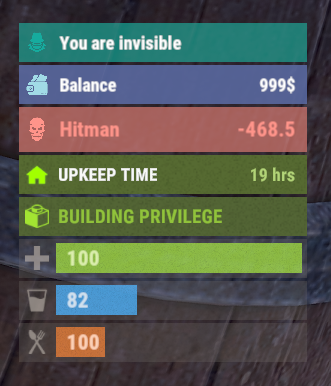
    The plugin displays an invisibility indication in the status bar. Depends on AdvancedStatus plugin. The ability to set a sound effect for disappearance and appearance; The ability to automatically generate language files for different languages(filled in English); The ability to individually toggle the display of status bars; The ability to specify the order of the bar; The ability to change the height of the bar; The abillity to customize the color and transparency of the background; The ability to set a material for the background; The ability to switch between CuiRawImageComponent and CuiImageComponent for the image; The ability to get images from the local folder(*SERVER*\oxide\data\AdvancedStatus\Images); The abillity to set own image and customize the color and transparency of the image; The abillity to set sprite instead of the image; The ability to customize the color, size, font and outline of the text. { "Sound effect played upon disappearance. An empty string disables the effect": "assets/prefabs/npc/patrol helicopter/effects/rocket_fire.prefab", "Sound effect played upon appearance. An empty string disables the effect": "assets/prefabs/npc/patrol helicopter/effects/rocket_fire.prefab", "Status. Bar - Height": 26, "Status. Bar - Order": 10, "Status. Background - Color(Hex or RGBA)": "#15AC9D", "Status. Background - Transparency": 0.7, "Status. Background - Material(empty to disable)": "", "Status. Image - Url": "https://i.imgur.com/3D1JIaU.png", "Status. Image - Local(Leave empty to use Image_Url)": "VanishStatus_Vanish", "Status. Image - Sprite(Leave empty to use Image_Local or Image_Url)": "", "Status. Image - Is raw image": false, "Status. Image - Color(Hex or RGBA)": "#15AC9D", "Status. Image - Transparency": 1.0, "Status. Image Outline - Is it worth enabling an outline for the image?": false, "Status. Image Outline - Color(Hex or RGBA)": "0.1 0.3 0.8 0.9", "Status. Image Outline - Transparency": 1.0, "Status. Image Outline - Distance": "0.75 0.75", "Status. Text - Size": 12, "Status. Text - Color(Hex or RGBA)": "#FFFFFF", "Status. Text - Font(https://umod.org/guides/rust/basic-concepts-of-gui#fonts)": "RobotoCondensed-Bold.ttf", "Status. Text - Offset Horizontal": 0, "Status. Text Outline - Is it worth enabling an outline for the text?": false, "Status. Text Outline - Color(Hex or RGBA)": "#000000", "Status. Text Outline - Transparency": 1.0, "Status. Text Outline - Distance": "0.75 0.75", "Status. SubText - Size": 12, "Status. SubText - Color(Hex or RGBA)": "#FFFFFF", "Status. SubText - Font": "RobotoCondensed-Bold.ttf", "Status. SubText Outline - Is it worth enabling an outline for the sub text?": false, "Status. SubText Outline - Color(Hex or RGBA)": "0.5 0.6 0.7 0.5", "Status. SubText Outline - Transparency": 1.0, "Status. SubText Outline - Distance": "0.75 0.75", "Version": { "Major": 0, "Minor": 1, "Patch": 7 } } EN: { "MsgText": "You are invisible" } RU: { "MsgText": "Вы невидимы" }
    $3.99
  4. IIIaKa

    When loading the plugin

    It's possible, but it will put a heavy load on the server. Because for each tick, it will be necessary to check players in the radius for every player.
  5. Try updating to version 0.1.5
  6. IIIaKa

    please

    Changed Status from Pending to Not a Bug
  7. I meant besides my plugins
  8. IIIaKa

    Console Spam

    Changed Status from Pending to Closed Changed Fixed In to 0.1.5
  9. IIIaKa

    Error lag and crash

    Changed Status from Pending to Closed Changed Fixed In to 0.1.5
  10. IIIaKa

    When loading the plugin

    It shows when you scope with a gun wich have scope mods, or scoping with a binocularus, rocket launcher or mlrs Also it must show to other players when you wave them
  11. IIIaKa

    When loading the plugin

    Please redownload again
  12. IIIaKa

    When loading the plugin

    Try redownload plugin
  13. IIIaKa

    When loading the plugin

    There is must be a comma https://imgur.com/Oogi5WE
  14. IIIaKa

    When loading the plugin

    I'm not sure I understand. Could you clarify?
  15. IIIaKa

    When loading the plugin

    About overlay Simple Status. I dont know what you can do, but if you want in the config you can set "UI. Display rank in the status bar(the AdvancedStatus plugin is required)": false, And set your own position to display "UI. Position - AnchorMin": "1 0.9", "UI. Position - AnchorMax": "1 0.9", "UI. Position - OffsetMin": "-208 -15", "UI. Position - OffsetMax": "-16 15", This way, you can delete AdvancedStatus and display the rank wherever you prefer.
  16. IIIaKa

    When loading the plugin

    In this case you need set it manually in the config file "Banditcamp custom position(xyz, example: '91.96 36.47 558.32'). Leave it blank to use default.": "-35.76 44.14 -74.76"
  17. IIIaKa

    When loading the plugin

    Let me know if this didn't resolve the issue.
  18. IIIaKa

    When loading the plugin

    In case you use the /rep banditzone command, you need to grant yourself the permission reputationmaster.admin and position yourself somewhere in the middle of your bandit zone and type command.
  19. IIIaKa

    When loading the plugin

    As I understood, the plugin couldn't find the bandit camp. I will update the plugin now, and most likely, you will have to set its position manually through the configuration file or using the command /rep banditzone
  20. IIIaKa

    When loading the plugin

    Hi. Are you using a custom map?
  21. IIIaKa

    please

    Hello, thank you for the offer. I'll consider what can be done about it.
  22. Changed Status from Pending to Closed
  23. Hi. What plugins do you have?
  24. IIIaKa

    How to set sprite

    Changed Status from Pending to Closed Changed Fixed In to 0.1.2
  25. IIIaKa

    How to set sprite

    Please try updating both plugins. I've done everything except for displaying the bar when the in-game HUD is turned off.
2.1m

Downloads

Total number of downloads.

9.9k

Customers

Total customers served.

144.2k

Files Sold

Total number of files sold.

3.1m

Payments Processed

Total payments processed.

×
×
  • Create New...

Important Information

We have placed cookies on your device to help make this website better. You can adjust your cookie settings, otherwise we'll assume you're okay to continue.