TheGhostOfChaos
-
Posts
56 -
Joined
-
Last visited
Content Type
Profiles
Warranty Claims
Downloads
Forums
Store
Services
Downloads Plus Support
DOWNLOADS EXTRA
Reels
Everything posted by TheGhostOfChaos
-
 I was working to find a way to build a easy to use and setup plugin so not a big difference tho i had 0 experience with embed messages. Mostly a learning session for me for other projects but its a good and usefull setup lightweight and does not need any dependencies. Rustcord is depending on Discord.dll which this isnt
- 2 comments
-
- 1
-

-
- #f7 report
- #tgoc
- (and 5 more)
-
Version 1.0.0
57 downloads
Every in-game F7 report, delivered to your Discord channel as a clean, readable embed. Players press F7, fill in the report form, and your staff sees it in Discord seconds later — with both Steam profiles, the reason, the reporter's grid location, whether the reported player is still online, and a teleport command your admins can paste straight into F1. No Discord bot, no database, no external service. One webhook URL and you're done. What it does Rust's built-in F7 report menu normally sends reports to Facepunch and nowhere else. This plugin hooks into that same menu and forwards every submitted report to a Discord webhook of your choice, so your moderation team actually gets to see them. Features Rich Discord embeds — clean, scannable layout instead of a wall of text Colour-coded by report reason — cheating, abusive, spam, offensive name, breaking server rules, other. Each one gets its own embed colour and label, fully configurable Clickable Steam profiles for both the reporter and the reported player, with SteamID64 shown for copy-paste Reporter location as both map grid (W2) and raw world coordinates Live status of the reported player — online, sleeping, or offline, plus their position if they're connected Ready-to-paste admin commands — teleportpos for both players, so you can jump straight to the scene Optional role ping so your staff gets notified for every report Anti-spam cooldown per player, with a permission to bypass it Rate-limit safe — reports are queued and re-sent automatically if Discord rate-limits the webhook, so nothing gets lost during a report wave Local logging to the server console and to a log file, as a backup of everything sent Custom branding — bot name, avatar, embed thumbnail and server name all configurable Zero dependencies — no other plugins or extensions required Installation Drop TGOCF7Report.cs into your oxide/plugins/ folder. The plugin compiles automatically and creates oxide/config/TGOCF7Report.json. The console will print the exact config path on load. In Discord, open Server Settings → Integrations → Webhooks, create a webhook for your reports channel and copy its URL. Paste the URL into Discord webhook URL in the config. Run oxide.reload TGOCF7Report. Join the server and run tgocf7report.test in F1 to confirm it arrives. Carbon users: the plugin works as-is, but the config lives in carbon/configs/ instead. Commands CommandWhereAccessDescription tgocf7report.testF1 / in-game consoleAdmin (auth level 1+) or RCONSends a sample report embed to your webhook so you can verify the setup and preview your styling. Must be run in-game, since the embed needs a real player for the location and admin-command fields. There are no chat commands — the plugin listens to the F7 menu, so players don't need to learn anything new. Permissions PermissionDescription tgocf7report.bypassExempts a player from the report cooldown. Useful for staff and trusted players who need to submit several reports in a row. Grant it with: oxide.grant user <name or steamid> tgocf7report.bypass oxide.grant group moderator tgocf7report.bypass Configuration { "Discord webhook URL": "", "Webhook bot name": "TGOC Reports", "Webhook avatar URL (empty = default)": "", "Embed thumbnail URL (empty = none)": "", "Default embed color (decimal)": 15158332, "Role ID to ping (empty = no ping)": "", "Server name shown in embed": "TGOC | Test Server", "Show Steam profile links": true, "Show reporter position / grid": true, "Show reported player online status and position": true, "Show copy-paste admin commands": true, "Cooldown per player in seconds (0 = disabled)": 30.0, "Log reports to server console": true, "Log reports to file": true, "Report type labels": { "cheat": " Cheating", "abusive": " Abusive behaviour", "spam": " Spam", "name": " Offensive name", "break_server_rules": " Breaking server rules", "other": " Other" }, "Report type colors (decimal)": { "cheat": 15158332, "abusive": 15105570, "spam": 10181046, "name": 3447003, "break_server_rules": 16776960, "other": 9807270 } } Options explained Discord webhook URL — the webhook the reports are posted to. Nothing is sent while this is empty. Webhook bot name / avatar URL — override the name and avatar Discord shows for the message. Leave empty to use whatever the webhook itself is configured with. Embed thumbnail URL — a small image in the top-right corner of the embed. Handy for your server logo. Default embed color — fallback colour, used for any report reason that isn't listed in Report type colors. Role ID to ping — the numeric role ID only, no <@&…> wrapper. Leave empty for silent reports. Server name shown in embed — appears in the embed footer next to your hostname. Useful when several servers post to the same channel. Show Steam profile links — turn off if you prefer plain names and IDs without hyperlinks. Show reporter position / grid — includes the reporter's map grid and coordinates. Show reported player online status and position — looks the reported player up on the server and adds their online/sleeping state and location. Show copy-paste admin commands — adds a code block with teleportpos for both players and the reported SteamID. Cooldown per player in seconds — ignores repeat reports from the same player inside this window. Set to 0 to disable. Log reports to server console / to file — mirrors every report locally. The file lands in oxide/logs/TGOCF7Report/. Report type labels — rename or re-emoji any reason. Unknown reasons are auto-formatted (break_server_rules becomes Break server rules). Report type colors — decimal colour per reason. Pick colours with any online "Discord embed colour" picker and use the decimal value. Notes Rust only sends what the player typed into the F7 form, so the plugin can't invent evidence — treat reports as a lead, not proof. Player names are escaped before being sent, so names containing Discord markdown characters can't break the embed layout or inject formatting. Long report messages are truncated to stay within Discord's embed limits. Support Found a bug or want an extra field in the embed? Leave a comment on the file page or open a support topic and I'll take a look. AI Has been used to help debugging some of the errors. Author: TheGhostOfChaosFree- 2 comments
-
- 1
-
-
- #f7 report
- #tgoc
- (and 5 more)
-

Stack size splitting loses half the stack
TheGhostOfChaos replied to TheGhostOfChaos's Support Report in Support
Issue is sorted. I indeed installed a bunch of plugins from my old server which had a stacksize controller with it this was conflicting. Thank you for your assistance -
Stack size splitting loses half the stack
TheGhostOfChaos replied to TheGhostOfChaos's Support Report in Support
Allright ill investigate further thank you for your help. I wasnt sure if that would be as i used your plugin for a while and never had any issues good to know its something else -
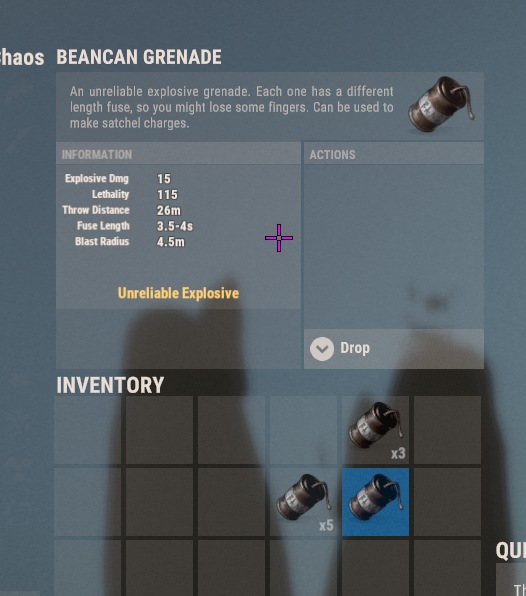
When i split a stack (modified using the stack size manager) it removes half of the items in my inventory. Example Stone: I have 2k stone in my inventory i split it to 1k and 1k 1k stone will be moved fine The other will despawn 999 stones so 1 will be left in my inventory. I dont use any other stacksize managers as i went to this setup as its a great all in one package. Example below shows what happend to a stack of 5 on bean cans.

-
 You can enable Carbon compatibility i run carbon and it works perfectly fine No issues and i love how it works and looks i replaced the command to match Umods AdminRadar since my staff is used to it. Its alot better much more reliable and pretty. I had a few test with it and every feature works unlike AdminRadar which does not allow longer ranges. AdminRadar can be suitable for most owners but if you want a more reliable easier to understand interface use this plugin it is definitly an improvement.
 -
 Awesome thanks, is there an option to use the skins aswel or is that not possible?
 -
No inside the config: "Basement Cell Building Grade (Mostly Cosmetic)": "Stone", I forgot what its called XD
-
Been a while since i last did a bug report. not this time keep up the amazing work havent been able to find a single bug Altough i cant really figure out what i need to name the building on a basement to change it skins Example Jungle or Brick or Metal etc.
-
Changed everything from On to Off but that also doesnt do it
-
Plugin compiles fine the UI shows up but there is no ESP enabled and no way to enable this. Using AdminRadar from Umod to show its not doing anything this is what i am encountering do you know how to fix it?
-
 First off thank you for the idea ill might add that in the future. So the reason i made this for my own use is i have added things in the server i am working on and that i dont want players to be able to use. Example: Convoy or Jackpot. Since i auto restart they get loaded everytime but i work on them almost everyday so adding and removing them would take more then using a plugin to disable them. Since i have alot to do regarding Convoy as i use custom vehicle's its best to keep it unloaded after a restart and load when i have changed alot to see if it improved. So eventough it might seem useless there are some specific moments it is helpfull and since i tought maybe other server owners would need something like this i shared it to help out. And above all of that another big reason i made it. Fun
- 2 comments
-
- 1
-

-
- #performancefriendly
- #servermanagement
- (and 6 more)
-
I want to track Farmed Crafted and Sold drugs using UltimateLeaderboard. Can you make an API available so i can set this up? Thanks in advance
-
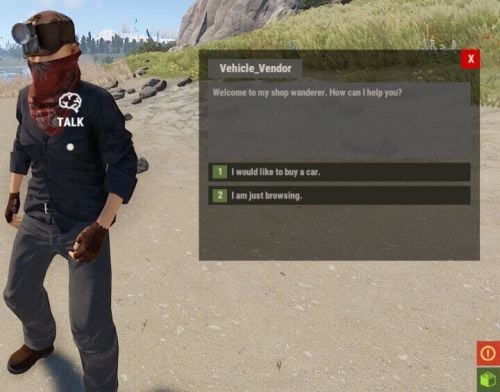 I have been looking for hours lol i didnt notice it and i couldnt get it to work. Makes sense if half the information is there lmfao. Thanks m8
 -
I pulled it out to add with within the comments: "Message": "Here is my 250 cash.", "Needs Permission (null = No)": null, "Player Commands": [ "talking_npc vehicle spawn rowboat $npcName" ], "Server Commands": [], "Next Message (null = Close UI)": 8, "Price": 250, "Currency": { "Item ID": -1779183908, "Skin ID": 2420097877 }, "Insufficient Funds Message (null = Close UI)": 9, "Cooldown": 0, "Server Wide Cooldown": false }, This is how my spawn looks like this is the default one i copied pasted this and set up the required Next Message Insufficient Funds etc. Price and SkinID for Economics. BUt the Player commands have been copied from this setup and used on all
-
"talking_npc vehicle spawn duosub $npcName" "talking_npc vehicle spawn solosub $npcName" "solosub": { "prefab": "assets/content/vehicles/submarine/submarinesolo.entity.prefab", "position": { "x": 4.27357149, "y": 1.14182973, "z": 27.9427643 }, "rotation": { "x": 0, "y": 0.26675415, "z": 0 }, "monument": "assets/bundled/prefabs/autospawn/monument/fishing_village/fishing_village_c.prefab", "fuleAmount": 0, "teamlock": false, "skinID": null }, "duosub": { "prefab": "assets/content/vehicles/submarine/submarineduo.entity.prefab", "position": { "x": 4.27357149, "y": 1.14182973, "z": 27.9427643 }, "rotation": { "x": 0, "y": 0.26675415, "z": 0 }, "monument": "assets/bundled/prefabs/autospawn/monument/fishing_village/fishing_village_c.prefab", "fuleAmount": 0, "teamlock": false, "skinID": null Default conversation file is Boats vendor
-
Included are the Addon file and the Conversation if anyone can help me solve this issue. Also the RHIB and Rowboat do spawn Tugboat doesnt anymore and i can either have the boats or the submarine's spawning but not all.
-
I keep encountering the same wierd issue: Failed to call internal hook 'OnTalkingNpcSpawnCheck' on plugin 'TalkingNpcVehicles v1.4.5' [2930185949] (The given key 'duosub' was not present in the dictionary.) I added the submarine's the way Vanilla rust has them in there NPC. This is done by adding the options within the Conversations and within the Data including the prefab. The names it needs to spawn and from the addon file are correct. It worked then it quit again it really makes no sense to me why this is happening. I did the excact same thing with a helicopter which works perfectly fine but adding submarine's doesnt work at all. chaosboats.json chaosboats.json
-
I am trying to add Submarines to the boat vendor. It doesnt want to spawn them i added the prefab and spawn locations in the data folder. Added conversation aswel. Error in console: Unknown dictionary key (sub1) I named my spawnlogic with the prefab sub1 and sub2 Now the RHIB and rowboat still spawn fine but the tugboat also fails. I did manage to succesfully add another helicopter to my custom airwolf which worked perfectly but with the boats i get alot of issue's.
-
Version 1.0.1
162 downloads
AutoUnload Plugin A simple, lightweight plugin that automatically unloads specified plugins on your Rust server. Configure it once, and it will keep those plugins unloaded either immediately upon starting AutoUnload or every 15 minutes on a timer. It can be used to keep plugins hidden while using an automated restart without having to remove the file's. Warning: Server performance can be hurt when using it on 40+ plugins (depending on plugin size). I highly recommend using it on 15 or less plugins to minimize performance impact. Plugin works with the latest rust version Features: Automatically unload plugins listed in the config file Option to unload plugins instantly when AutoUnload is enabled Automatic unload repeats every 15 minutes Simple configuration by adding plugin names to the config Permissions: autounload.admin — Grants access to all in-game AutoUnload commands Commands: /autounload.enable — Activate the AutoUnload functionality /autounload.disable — Deactivate the AutoUnload functionality /autounload.check — View which plugins are currently being unloaded /autounload.help — Display all available AutoUnload commands A.I. Has been used to identify bugs and clean up my messy work.Free- 2 comments
-
- 1
-
-
- #performancefriendly
- #servermanagement
- (and 6 more)
-
Might be an easy question do you have auto saving enabled on your server? I didnt had any rollback issue's caused by basements. However i did experience a rollback issue that made me lose a few configs (i still dont know why and i cant replicate it)
-
Yeah that would do it ill keep attempting to break the plugin to find more bugs so far there isnt much great job
-
Found out trough console that its blocking it because of the ice lake
-
Idk if its another plugin conflicting that causing this but i started having this issue recently
-
The plugin is awesome and stable. Its in its early stages of development so bugs can happen if you report them Mr01Sam solves them fast so easy 5/5 review. Adds something to the game that really gives alot of fun and allows base owners to do some cool stuff. Great plugin great support its allready worth buying 100% just help finding the bugs and it will be one of the best building plugins for rust servers