About TGOCF7Report
Every in-game F7 report, delivered to your Discord channel as a clean, readable embed.
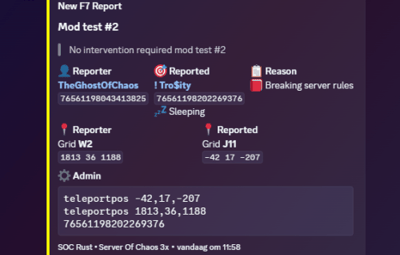
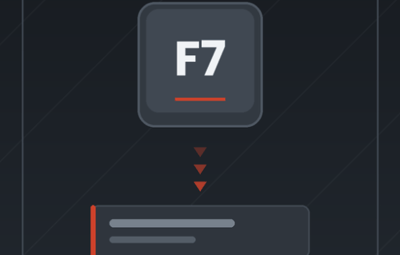
Players press F7, fill in the report form, and your staff sees it in Discord seconds later — with both Steam profiles, the reason, the reporter's grid location, whether the reported player is still online, and a teleport command your admins can paste straight into F1. No Discord bot, no database, no external service. One webhook URL and you're done.
What it does
Rust's built-in F7 report menu normally sends reports to Facepunch and nowhere else. This plugin hooks into that same menu and forwards every submitted report to a Discord webhook of your choice, so your moderation team actually gets to see them.
Features
Rich Discord embeds — clean, scannable layout instead of a wall of text
Colour-coded by report reason — cheating, abusive, spam, offensive name, breaking server rules, other. Each one gets its own embed colour and label, fully configurable
Clickable Steam profiles for both the reporter and the reported player, with SteamID64 shown for copy-paste
Reporter location as both map grid (W2) and raw world coordinates
Live status of the reported player — online, sleeping, or offline, plus their position if they're connected
Ready-to-paste admin commands — teleportpos for both players, so you can jump straight to the scene
Optional role ping so your staff gets notified for every report
Anti-spam cooldown per player, with a permission to bypass it
Rate-limit safe — reports are queued and re-sent automatically if Discord rate-limits the webhook, so nothing gets lost during a report wave
Local logging to the server console and to a log file, as a backup of everything sent
Custom branding — bot name, avatar, embed thumbnail and server name all configurable
Zero dependencies — no other plugins or extensions required
Installation
Drop TGOCF7Report.cs into your oxide/plugins/ folder.
The plugin compiles automatically and creates oxide/config/TGOCF7Report.json. The console will print the exact config path on load.
In Discord, open Server Settings → Integrations → Webhooks, create a webhook for your reports channel and copy its URL.
Paste the URL into Discord webhook URL in the config.
Run oxide.reload TGOCF7Report.
Join the server and run tgocf7report.test in F1 to confirm it arrives.
Carbon users: the plugin works as-is, but the config lives in carbon/configs/ instead.
Commands
CommandWhereAccessDescription
tgocf7report.testF1 / in-game consoleAdmin (auth level 1+) or RCONSends a sample report embed to your webhook so you can verify the setup and preview your styling. Must be run in-game, since the embed needs a real player for the location and admin-command fields.
There are no chat commands — the plugin listens to the F7 menu, so players don't need to learn anything new.
Permissions
PermissionDescription
tgocf7report.bypassExempts a player from the report cooldown. Useful for staff and trusted players who need to submit several reports in a row.
Grant it with:
oxide.grant user <name or steamid> tgocf7report.bypass oxide.grant group moderator tgocf7report.bypass
Configuration
{ "Discord webhook URL": "", "Webhook bot name": "TGOC Reports", "Webhook avatar URL (empty = default)": "", "Embed thumbnail URL (empty = none)": "", "Default embed color (decimal)": 15158332, "Role ID to ping (empty = no ping)": "", "Server name shown in embed": "TGOC | Test Server", "Show Steam profile links": true, "Show reporter position / grid": true, "Show reported player online status and position": true, "Show copy-paste admin commands": true, "Cooldown per player in seconds (0 = disabled)": 30.0, "Log reports to server console": true, "Log reports to file": true, "Report type labels": { "cheat": " Cheating", "abusive": "
 Abusive behaviour", "spam": "
 Spam", "name": "
 Offensive name", "break_server_rules": "
 Breaking server rules", "other": "
 Other" }, "Report type colors (decimal)": { "cheat": 15158332, "abusive": 15105570, "spam": 10181046, "name": 3447003, "break_server_rules": 16776960, "other": 9807270 } }
Options explained
Discord webhook URL — the webhook the reports are posted to. Nothing is sent while this is empty.
Webhook bot name / avatar URL — override the name and avatar Discord shows for the message. Leave empty to use whatever the webhook itself is configured with.
Embed thumbnail URL — a small image in the top-right corner of the embed. Handy for your server logo.
Default embed color — fallback colour, used for any report reason that isn't listed in Report type colors.
Role ID to ping — the numeric role ID only, no <@&…> wrapper. Leave empty for silent reports.
Server name shown in embed — appears in the embed footer next to your hostname. Useful when several servers post to the same channel.
Show Steam profile links — turn off if you prefer plain names and IDs without hyperlinks.
Show reporter position / grid — includes the reporter's map grid and coordinates.
Show reported player online status and position — looks the reported player up on the server and adds their online/sleeping state and location.
Show copy-paste admin commands — adds a code block with teleportpos for both players and the reported SteamID.
Cooldown per player in seconds — ignores repeat reports from the same player inside this window. Set to 0 to disable.
Log reports to server console / to file — mirrors every report locally. The file lands in oxide/logs/TGOCF7Report/.
Report type labels — rename or re-emoji any reason. Unknown reasons are auto-formatted (break_server_rules becomes Break server rules).
Report type colors — decimal colour per reason. Pick colours with any online "Discord embed colour" picker and use the decimal value.
Notes
Rust only sends what the player typed into the F7 form, so the plugin can't invent evidence — treat reports as a lead, not proof.
Player names are escaped before being sent, so names containing Discord markdown characters can't break the embed layout or inject formatting.
Long report messages are truncated to stay within Discord's embed limits.
Support
Found a bug or want an extra field in the embed? Leave a comment on the file page or open a support topic and I'll take a look.
AI Has been used to help debugging some of the errors.
Author: TheGhostOfChaos