

BlackLightning
-
Posts
222 -
Joined
-
Last visited
-
Days Won
3
Content Type
Profiles
Warranty Claims
Downloads
Forums
Store
Services
Downloads Plus Support
DOWNLOADS EXTRA
Reels
Everything posted by BlackLightning
-
I updated my Rust and Oxide to the latest version, but I'm not seeing the issue you are describing. I'm able to open the bags and use them as intended by the plugin without issue. Is there something specific I need to do in order to trigger the issue?
-
Thanks for reporting this issue. I am currently away at work, but I will look at this first thing when I get home in about 10 hours.
-
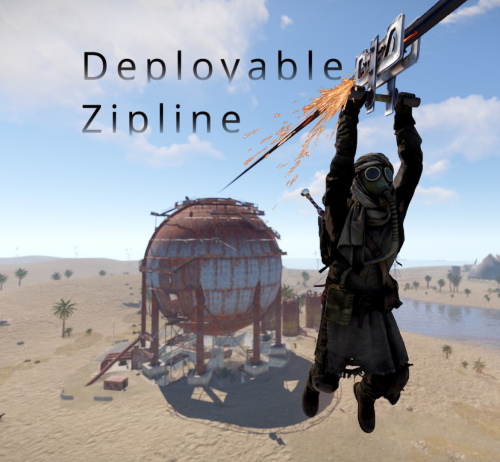 You can use the builtin Rust server commands like this: inventory.giveto <player> crosssbow 1 2793006815 inventory.giveto <player> rope 100 2793158547
 -
Changed Status from Pending to Fixed Changed Fixed In to 1.10.8
- 1 reply
-
- 1
-

-
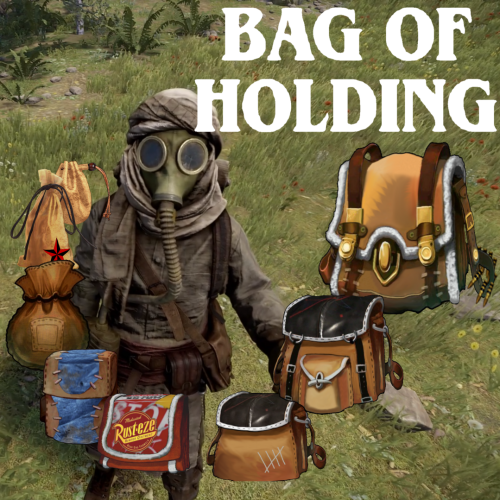 Bag limits have always applied just to the bag's parent container. They never factored in bags inside of other bags. The only exceptions are: 1. Player inventory containers (main, belt, wear) which share a limit despite being technically three separate containers 2. Backpacks plugin on uMod which shares limits across pages despite each page technically being a separate container The main reason it has always worked this way is for simplicity, as some tricky situations can occur otherwise. For example, you might normally be able to pick up a Bag of Holding bag with contents in it, but because it has additional non-empty bags inside it, you are not allowed to pick it up as doing so would exceed your overall limit. The plugin would have to clearly communicate to players what the problem is so that the player can rearrange bags or contents to overcome it. For similar reasons, bag limits inside of bags are also not configurable according to permissions. I understand this isn't ideal because it means you either end up giving players excess capacity (they can have bags both inside and outside the Bag of Holding bag) or less choice (they can only have one bag in the inventory, and they finally break through the limitation when they get a Bag of Holding bag). One way you could try to ease players through the transition would be to have different tiers of Bag of Holding bags, which allows progressively more bags inside of them, allowing players to progress from 1 outer bag to 1 outer bag with 1 inner bag, then 2 inner bags, and so on. However, that is still an opinionated progression as you wouldn't allow multiple bags directly inside the main inventory ever. To mitigate the above concern of allowing too much capacity once a player acquires a Bag of Holding bag, I could potentially make an update that allows you to configure how many bags a specific bag profile counts as, so you could make a Bag of Holding bag count as 5 bags for example.
 -
Changed Status from Pending to Closed
-
I'll go ahead and close this ticket since you indicated in the file comments that you were able to resolve this already by unloading Monument Lock.
-

CanStackItem resulted in a conflict w/ Loottable
BlackLightning replied to 0g.Ghost.7373's Support Report in Support
There's probably nothing that can be done in BagOfHolding. When it returns False (to prevent stacking two items), it's for good reason. Either the item being moved has contents, so allowing that item to stack would delete the contents (very bad), or the two item stacks have different bag profiles, meaning one may have a different capacity than the other (despite being the same skin for instance), so allowing them to stack would change the capacity of one stack. What I would advise to the LootTable maintainer is to enhance the logic in CanStackItem to be more careful. Specifically, if the item being moved has contents, return false (disallow stacking), and if the two items stacks are containers with different capacity, return false (disallow stacking). Theses tips are both called out in the BagOfHolding documentation if you search for "Hook conflict with CanStackItem". -
 Setting a higher value will generally improve performance because it allows the server to do less work (fewer transfers). There isn't much reason to set it below your max stack size.
 -
Helicopters with Floaties Do Not Come to Rest
BlackLightning replied to Kobani's Support Report in Support
Changed Status from Work in Progress to Fixed Changed Fixed In to 1.3.5 -
Helicopters with Floaties Do Not Come to Rest
BlackLightning replied to Kobani's Support Report in Support
Changed Status from Pending to Work in Progress -
Changed Status from Pending to Closed
-
Here are some troubleshooting suggestions. Start with the plugin's default configuration. Obtain the Zipline Tool by running the chat command "/zipline buy". Confirm that the crossbow you were given has the skin from the config ("Zipline Tool" section). It should look something like the image on this workshop page: https://steamcommunity.com/sharedfiles/filedetails/?id=2793006815 Equip the Zipline Tool. Verify that when you equip it, you don't see "You don't have permission to use the Zipline Tool" in that chat. If you do see that message, you need to grant at least one ruleset permission. Instead of that message, you should see something like "[Zipline Tool]: Attack to set start point". If you don't see any message printed in chat when you equip the Zipline Tool, then the plugin is probably not recognizing that item as a Zipline Tool for some reason, though I'm not aware of any reason that would happen if you obtained it via the "/zipline buy" command. You might want to check for any plugin which tries to automatically skin items, which could be altering the crossbow's skin when you receive it.
-
Let's say you set the config to 100k. For an item with 25 max stack size, one full stack can be transferred at once. For an item with 500k max stack size, a full stack will require 5 transfers, so it will take longer.
-
Mini flies super slow when floaties are out
BlackLightning replied to Covfefe's Support Report in Support
Changed Status from Work in Progress to Fixed Changed Fixed In to 1.3.4 -
Does v1.10.1 compile successfully on your server? If so, keep using that for now. There were at least 5 Rust hot fixes. I believe 1.10.2 corresponds to the 5th hot fix.
-
Changed Status from Pending to Not a Bug
-
Tha latest version of the plugin is for the latest Rust hot fix. If you have not updated Rust yet, continue using the previous version of the plugin for now.
-
NullReferenceException after Force Wipe
BlackLightning replied to 0g.Ghost.7373's Support Report in Support
Changed Status from Work in Progress to Fixed Changed Fixed In to 1.10.1 -
Mini flies super slow when floaties are out
BlackLightning replied to Covfefe's Support Report in Support
I have been testing some more. I still can't reproduce the issue on the mainland, but I am seeing some similar behavior in the Deep Sea region. Sometimes the floaties don't even appear, in which case the heli flies like normal, and other times the floaties stay on indefinitely, in which case the heli flies slowly. When I disable batching via the convar buoyancy.use_batching false, then the issue goes away, but I don't necessarily advise that as it could worsen performance. Batching is part of the buoyancy system overhaul so it makes sense that something in there could be going wrong. Doing some debugging, I found that when the heli is in the deep sea, the SubmergedChanged callback gets spammed with the same value (either true or false) over and over, which shouldn't happen unless the actual submerged state is changing. Looking into the Rust code, I found what looks like a coding mistake in the logic that evaluates whether the submerged state has changed for a given Buoyancy object. When it compares the current and previously cached submerged states, the bug allows comparing the current state to the cached state of a completely different buoyancy object. This definitely explains all of the symptoms we are seeing. At this time, it's not clear how to mitigate this issue in the plugin, but I will try to contact Facepunch to fix the issue. -
Mini flies super slow when floaties are out
BlackLightning replied to Covfefe's Support Report in Support
That's certainly an option, but the experience isn't ideal as the heli sinks and rises too fast. You can disable it for your server by setting the "Underwater Drag" option to 0 in the config. That also won't fix the issue (which some users are reported, though you didn't mention) where the floaties are staying visible indefinitely. It seems to stem from the game thinking the helis are still underwater for some reason. My best guess is that the buoyancy system is malfunctioning. -
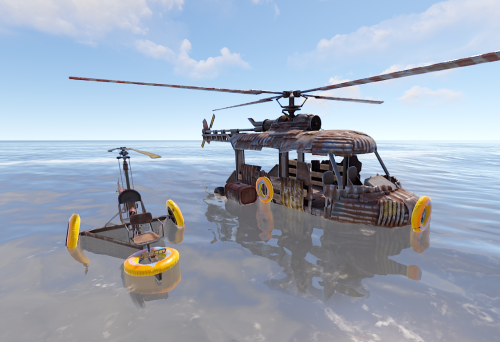 Thanks for reporting this. There's an open support request about a similar issue, though I haven't been able to reproduce it yet. I am currently away and will be able to look further into this in about 8 hours. To minimize impact, you can try adjusting the underwater drag in the config to a lower value like 0.3.
- 38 comments
-
- 2
-

-
- #helicopter
- #minicopter
- (and 7 more)
-
Thanks for reporting this. Unfortunately, I was not able to anticipate the Rust hot fix that caused this and I am not able to get home for probably 6-8 hours so you will have to wait. This means bags will revert to standard halloween loot bags, leading to the contents being lost when players attempts to open them. For now, warn your players to stash their bags somewhere safe and do not attempt to open them.
-
Mini flies super slow when floaties are out
BlackLightning replied to Covfefe's Support Report in Support
Can you help clarify what is the original problem? The support request title and opening comment don't provide much detail, so I want to make sure I understand the symptoms and how to reproduce it. As I said, I cannot reproduce it, which could mean I just don't know what to look for from lack of issue detail. When originally reading the support request, I got the sense that the helis were not returning to normal flight after taking off from the water, for an extended period of time, which of course would be a very big problem if true. That is what I tried and failed to reproduce. For some context, the plugin achieves buoyancy for helicopters by reusing a Rust-defined UnityEngine.Component called Buoyancy, which automatically detects water and applies increased drag when touching water or underwater. The plugin subscribes to the Buoyancy.SubmergedChanged callback to find out when water contact begins and ends in order to determine when to show the floaties. When the helicopter is very close to the water, it's possible for the submerged state to rapidly change, so to prevent the floaties from flickering, the plugin delays hiding them for a few seconds after the last contact with water, but this has no bearing on the drag itself. This means that once you take off from water, the drag should quickly/instantly return to normal even though the floaties may stay visible for a few seconds. -
Mini flies super slow when floaties are out
BlackLightning replied to Covfefe's Support Report in Support
Are you using the official version of the plugin from this website, or a custom and/or pre-release version? There is a pre-release version going around so I wanted to rule that out.