

BlackLightning
-
Posts
220 -
Joined
-
Last visited
-
Days Won
3
Content Type
Profiles
Warranty Claims
Downloads
Forums
Store
Services
Downloads Plus Support
DOWNLOADS EXTRA
Reels
Support Center
Everything posted by BlackLightning
-
It could easily be changed to the "Use" or "Reload" keys. To do that, search the code file for FIRE_THIRD and replace with USE or RELOAD. The "Use" key is not ideal because it's used for things like mounting and picking up the zipline (not to mention many other interactions). The "Reload" key will cause the crossbow to load an arrow if you have one. While I can block the crossbow actually loading an arrow on the server side, I can't block the client-side animation from occurring if you have an arrow. I could make it use the "Light Toggle" or "Change Vehicle Seat" keys, but that will require adding a hook to detect when players run those commands. I could add a command to toggle it, such as "/zipline toggle".
-
 It's stated in the documentation that vehicles do not implement ownership in vanilla Rust, so another plugin must be installed (and correctly configured) to assign ownership. If you are buying the minicopter from Airwolf vendor at Bandit camp, install the Vehicle Vendor Options plugin, assign the vehiclevendoroptions.ownership.minicopter permission, then purchase another minicopter. For vehicles spawned by Vehicle Airdrops, they will already have ownership if dropped by a player-thrown supply signal. Random vehicle airdrops will not have ownership. I'm talking about the plugin by Nikedemos, I don't know about the competitors. For other unowned vehicles (or as an alternative to Vehicle Vendor Options), set the following config options (especially the first option) in the Vehicle Deployed Locks config, then remove and redeploy the lock. "Auto claim unowned vehicles when deploying locks": true, "Auto replace vehicle ownership when deploying locks": true,
- 38 comments
-
- 1
-

-
- #helicopter
- #minicopter
- (and 7 more)
-
The plugin already has a feature to require owner permission to make helis buoyant. You just need to enable it in the config, and grant the corresponding permission. It's all in the documentation. Are you asking for something else?
-
Thank you for reporting this! This was a regression introduced in v1.1.1 due to logic which sets the helicopter to vanilla drag when the plugin adds buoyancy to it (when the heli spawns, or when the plugin loads), which was done as a retroactive mitigation for people who had helis that were permanently slow, which could happen in rare cases when reloading the plugin while helis were currently in water. At the time of that change, I did not anticipate that other plugins would alter heli drag. Edit: This has been fixed in v1.1.2 which uses a different design for ensuring that helis are reset to the correct drag when leaving water. I also fixed a compatibility issue where Vehicle AirDrop helis that land initially in water would be permanently slow after leaving the water.
-
A dynamic inner tube feature has been added in v1.1.0. It will be enabled by default for new installations.
-
When the inner tubes are enabled, they are always displayed. I'll think about making it dynamic so they only appear when you touch water. Plugins that spawn helis should be compatible. Furthermore, if you want to restrict buoyancy to permissions, then that should also work with vehicle spawners, as long as they assign vehicle ownership on spawn (they usually do).
- 38 comments
-
- 1
-
-
- #helicopter
- #minicopter
- (and 7 more)
-
Version 1.3.6
1,191 downloads
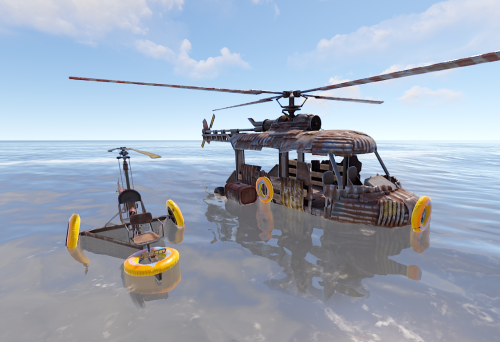
Allows helicopters to float in water. Features Allows Minicopters, Scrap Transport Helicopters, and Attack Helicopters to float in water Optionally requires vehicle owner or pilot permission for vehicles to be buoyant Configurable number, position and rotation of optional decorative inner tubes Configurable number, position, size and force of buoyancy points Configurable underwater drag for when crashing through the water's surface API and hooks allow for more powerful integrations How it works By default, all Minicopters, Scrap Transport Helicopters, and Attack Helicopters will be buoyant, with decorative inner tubes. The inner tubes are indestructible and cannot be picked up. When flying at low to moderate velocity, you can simply land on water and dismount. When flying at high velocity, you may crash through the water's surface, causing the engine to shut off. The vehicle will then slowly rise to the water's surface. You may run out of oxygen if you choose to stay in the vehicle while waiting for it to surface. While piloting a helicopter on the water's surface, you cannot drive it like on ground, but you can turn it in place by holding the down key and pressing left or right. While the decorative inner tubes are configured to be dynamic, they will appear shortly after touching water, and they will disappear a few seconds after leaving water. Permissions This plugin uses the permission system. To assign a permission, use oxide.grant <user or group> <name or steam id> <permission>. To remove a permission, use oxide.revoke <user or group> <name or steam id> <permission>. Optionally, you may require that either the vehicle owner or most recent pilot have permission, in order for the vehicle to be buoyant. To do so, set "Require permission": true for the corresponding vehicle type in the configuration. buoyanthelicopters.owner.minicopter -- Minicopters will be buoyant if owned by a player with this permission. buoyanthelicopters.pilot.minicopter -- Minicopters will be buoyant if the current (or most recent pilot, if no current pilot) has this permission. buoyanthelicopters.owner.scraptransport -- Scrap Transport Helicopters will be buoyant if owned by a player with this permission. buoyanthelicopters.pilot.scraptransport -- Scrap Transport Helicopters will be buoyant if the current (or most recent pilot, if no current pilot) has this permission. buoyanthelicopters.owner.attackhelicopter -- Attack Helicopters will be buoyant if owned by a player with this permission. buoyanthelicopters.pilot.attackhelicopter -- Attack Helicopters will be buoyant if the current (or most recent pilot, if no current pilot) has this permission. Note: If you want to use ownership-based permission, you must be aware that helicopters do not have ownership in vanilla Rust, so for it to work, you must install a plugin which grants vehicle ownership. For example, Vehicle Vendor Options, Claim Vehicle, Vehicle Deployed Locks, Spawn Mini, and Vehicle License all have features which relate to vehicle ownership. If you don't want to deal with vehicle ownership, you can use the pilot-based permissions instead. Configuration The settings and options can be configured in the BuoyantHelicopters file under the config directory. The use of an editor and validator is recommended to avoid formatting issues and syntax errors. Admin debug (true or false) -- Determines whether debug info is shown to nearby admins when a helicopter becomes buoyant. This helps with configuring the buoyancy points. Default: false. The Minicopter, Scrap Transport Helicopter, and Attack Helicopter sections have the following options. Enabled (true or false) -- Determines whether the vehicle type supports buoyancy. Default: true. Require permission (true or false) -- Determines whether the vehicle type requires the vehicle owner or most recent pilot to have permission in order for the vehicle to be buoyant. Default: false. Underwater drag -- Determines how much drag buoyant vehicles have while underwater. Raising this will reduce the speed at which vehicles sink and rise. If you change this value, you will probably also need to adjust the force of each buoyancy point. Default: 2. Buoyancy points -- List of buoyancy points. Position -- Determines the position of the buoyancy point, relative to the vehicle origin. Size -- Determines the size of the buoyancy point. Default: 2. Force -- Determines how much force is applied at the buoyancy point. Decoration Enabled (true or false) -- Determines whether the buoyancy point has a decorative inner tube. Dynamic (true or false) -- Determines whether the decorative inner tube will be displayed only when touching water (and a short time after touching water). Position -- Determines the position of the decorative inner tube, relative to the vehicle origin. Prefab -- Determines the prefab of the decorative inner tube. Default: assets/prefabs/misc/summer_dlc/inner_tube/innertube.deployed.prefab. Rotation angles -- Determines the rotation of the decorative inner tube. Developer API API_IsBuoyant bool API_IsBuoyant(BaseEntity heli) Returns true if the helicopter is buoyant, else returns false. API_AddBuoyancy void API_AddBuoyancy(BaseEntity heli) Makes the helicopter buoyant if it's not already. API_RemoveBuoyancy void API_RemoveBuoyancy(BaseEntity heli) Makes the helicopter not buoyant. Developer Hooks OnVehicleBuoyancyAdd object OnVehicleBuoyancyAdd(BaseEntity heli) Called when buoyancy is about to be added to a helicopter. Return false to cancel. OnVehicleBuoyancyAdded void OnVehicleBuoyancyAdded(BaseEntity heli) Called after buoyancy has been added to a helicopter. OnVehicleBuoyancyRemoved void OnVehicleBuoyancyRemoved(BaseEntity heli) Called after buoyancy has been removed from a helicopter.$7.50- 38 comments
- 3 reviews
-
- 4
-
-

-
- #helicopter
- #minicopter
- (and 7 more)
-

Possible conflict with SkillTree plugin.
BlackLightning replied to Hawkhill's Support Report in Support
I would just stick to something simple that the plugins can do today. One linear progression for player inventory bag limit: 1, 2, 3, 4, 5, 6 bags. Simple and easy to understand for players. You could expand on this, to only unlock being able to carry certain bags, such as the Generic bag or Bag of Holding bag, in later stages. One linear progression for player container bag limits: 1, 2, 3, 4, 5, 6 bags. Only if you want to allow players to store non-empty bags in storage containers. One progression for backpack size: 1, 2, 3, 4, 5, 6, 7, 8 rows. You could go further since Backpacks v3.9 now supports multiple pages. One node for Backpacks keep on death. One node for Backpacks gather mode, in v3.10 beta. One node for Backpacks retrieve mode, from Backpacks v3.10 beta. One linear progression for Backpacks bag limits: 1, 2, 3, 4, 5, 6 bags. By upgrading this, if the player has the keep on death node, this allows players to keep more bags on death, as long as they keep those bags in the backpack. The standalone Backpacks nodes could optionally be added to the other linear progressions, or could become a separate linear progression. -
Possible conflict with SkillTree plugin.
BlackLightning replied to Hawkhill's Support Report in Support
I don't think blocking opening is the way to go as it's too punishing if the bags already have content. I suppose upgrade permissions and bag kits are probably not the best things to use for player-resettable progression. If you stick to bag limits for progression, exploits will be mitigated when players die for instance, since they won't be able to pick back up the bags without emptying them. If their backpack has too many bags, excess should be ejected after some time. One technique you could explore would be to define new categories of bags that can be upgraded to, then create limits around those. For more details, see another recent support thread where I showed how to make a "VIP Bag of Holding" bag. Limits would probably start to get a bit messy though. -
Possible conflict with SkillTree plugin.
BlackLightning replied to Hawkhill's Support Report in Support
Ah, that is a problem I recently surmised could eventually happen. Loading the default config when the config syntax is invalid is standard behavior for many plugins, but in some cases it does not make sense, like for this plugin. When developing the plugin, I was mostly concerned about what happens if the plugin is temporarily unloaded, which is handled by persisting code in the game so that bags still have basic functionality like open and close. I will consider changing the behavior in an upcoming version, to make the plugin just do nothing when the config fails to load. That will allow the existing code from the previous load of the plugin to work somewhat until you resolve the config issue. When changing skins after you have existing bags, I recommend the commands because they will find and update the skins of all bags currently in the game world, though there are some limitations, like they can't find bags that are hidden away by other plugins such as kits, skill tree pouches, and backpacks of disconnected players. -
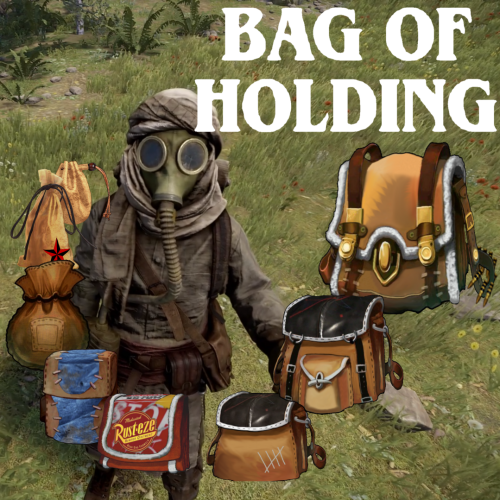 I just tested with Kits v4.4.0 from uMod and didn't have any problems. I added 4 distinct category bags to my inventory, created a kit from them, dropped the bags, redeemed the kit, and opened the bags successfully. If the bags are functioning like halloween loot bags, that means Bag of Holding doesn't recognize them for some reason. For example, if the skins currently configured in the plugin do not match the skins of the bags. Is it possible that you changed the bag skin theme after creating the kit? That could certainly cause this. Similarly, if you are using the tactical or leather bags, then made a syntax error in the config, the plugin will load using the default config which corresponds to the fantasy skins, which could also cause this issue. Have you verified that the bags work when added to your inventory before creating the kit? If so, do the bags only function like halloween loot bags after redeeming the kit?
 -
Possible conflict with SkillTree plugin.
BlackLightning replied to Hawkhill's Support Report in Support
Changed Status from Work in Progress to Closed -
Possible conflict with SkillTree plugin.
BlackLightning replied to Hawkhill's Support Report in Support
I'll be taking a look at gather mode soon to make several improvements. For example, don't gather anything while you are looting a bag, don't gather any item that is transferred between inventory containers (though can't really help the split-drag case at this time), and a "Gather: Existing" mode to only gather items that are already in the bag. -
Possible conflict with SkillTree plugin.
BlackLightning replied to Hawkhill's Support Report in Support
Thanks for the kind words. Once you've had some more time to work the plugin, please consider writing a review. Regarding the ability to upgrade bag limits independently for different bag categories, while I don't see a clear path forward at this time, you've definitely given me something to think about for future updates. Regarding your idea of placing bags inside the Skill Tree pouch (if I understood correctly), the pouch's implementation is pretty basic, especially compared to the Backpacks plugin, so you'll likely find some issues or limitations. For example, while Bag of Holding was being beta tested around 6 months ago, there was an issue where you could not open bags while they were inside the pouch, because as soon as you stopped looting the pouch itself, the Skill Tree plugin would save the pouch items and delete the pouch, therefore invalidating the bag item that you are attempting to open. That meant you could store bags inside the pouch, and even drop items onto the bags while in the pouch, but you could not open the bags without first removing them from the pouch. I don't know if that issue has been resolved, but there will definitely be other issues, though many of them may be minor or go unnoticed for a long time. I strongly suggest using the Backpacks plugin over the Skill Tree pouch for that use case because it is more sophisticated and has better compatibility with Bag of Holding. Furthermore, with the introduction of the permission perk feature, you should be able to provide an upgradable Backpack via the Skill Tree (as a replacement for the pouch). With Backpacks v3.10, you can even implement Gather and Retrieve mode as additional Skill Tree perks which I could definitely see players wanting to use. If you want to expand on using the pouch, another limitation is that there isn't a way to configure bag limits for the pouch specifically, like there is for Backpacks. I actually implemented a feature for that, but it's disabled at the moment because bags in the pouch were not fully functioning during the beta. You can in fact enable that feature by uncommenting the FEATURE_EXTRA_POCKETS_CONFIG compile time flag near the top of the plugin file. Upon enabling that feature, a section called "Extra Pockets bag limits" will be added to the config. Without that feature, bag limits inside the pouch will be determined according to "Container bag limits". If you do end up using that feature, please let me know so I can consider enabling it for all (if the issue where you can't open bags in the pouch is fixed, then I probably will enable that feature). -
Possible conflict with SkillTree plugin.
BlackLightning replied to Hawkhill's Support Report in Support
You can basically make bags require permission by setting bag limits. For example, set the player limits to 0 by default, then raise it for players with permission. This may not be as flexible as you want, though, because you cannot upgrade bag limits in separate linear paths like you can with upgrade permissions. When I was originally envisioning how Bag of Holding would be integrated with Skill Tree, I was only thinking of bag limits, particularly the total bag limit. For example, you could add a node that allows one bag, then upgrades to two, three, four, five, etc. You could have separate nodes for backpack limits and container limits since those are upgradeable independently. -
Possible conflict with SkillTree plugin.
BlackLightning replied to Hawkhill's Support Report in Support
The permissions are incorrect. Missing the bagofholding prefix. For example: "7": { "perms_list": { "bagofholding.upgrade.generic.xxsmall": "12 Slot Backpack", "bagofholding.upgrade.generic.xsmall": "18 Slot Backpack", "bagofholding.upgrade.generic.small": "24 Slot Backpack", "bagofholding.upgrade.generic.medium": "30 Slot Backpack", "bagofholding.upgrade.generic.large": "36 Slot Backpack", "bagofholding.upgrade.generic.xlarge": "42 Slot Backpack", "bagofholding.upgrade.generic.xxlarge": "48 Slot Backpack" } } There is also an issue in your "3" section where the small permission has an extra space before the end quote. I will suggest that Skill Tree be updated to trim such extra spaces automatically. -
Possible conflict with SkillTree plugin.
BlackLightning replied to Hawkhill's Support Report in Support
I don't know of any reason that they would conflict in this regard. The permissions in Bag of Holding are registered the same way as other plugins, and there is no logic in Bag of Holding which prevents granting specific permissions. Are you sure you have designated the correct permissions in the Skill Tree config? Can you attach your config? I also just purchased Skill Tree to see if I can recreate this issue. -
Possible conflict with SkillTree plugin.
BlackLightning replied to Hawkhill's Support Report in Support
Changed Status from Pending to Work in Progress -
Changed Status from Work in Progress to Closed
-
The container bag limits by permission feature has just been released in v1.1.0.
-
Looking at the example config, I don't think that's what I meant. If I understood correctly, you wanted for example, to allow non-VIPs to hold 6 bags inside their Bag of Holding, and to allow VIPs to hold 12 bags inside their Bag of Holding. The steps I described would create a new type of bag called VIP Bag of Holding with the following characteristics. Only VIPs can carry it It can hold 12 inner bags instead of 6 It can be created by upgrading the normal Bag of Holding #1: Create a new Content Ruleset In this example, the vipbagofholding Content Ruleset differs from the original bagofholding Content Ruleset only in the number of bags it can hold. This will later be assigned to the new VIP Bag of Holding Bag Profile to allow that type of bag to hold 12 bags instead of 6. "Bag content rulesets": [ { "Name": "bagofholding", "Allowed item categories": [ "All" ], "Disallowed item categories": [], "Allowed item short names": [], "Disallowed item short names": [], "Allowed skin IDs": [], "Disallowed skin IDs": [], "Bag limits": { "Max total bags": 6, "Max bags by category name": { "bagofholding": 0, "vipbagofholding": 0 } } }, { "Name": "vipbagofholding", "Allowed item categories": [ "All" ], "Disallowed item categories": [], "Allowed item short names": [], "Disallowed item short names": [], "Allowed skin IDs": [], "Disallowed skin IDs": [], "Bag limits": { "Max total bags": 12, "Max bags by category name": { "bagofholding": 0, "vipbagofholding": 0 } } }, ] #2: Create a new Bag Profile In this example, the vipbagofholding Bag Profile differs from the bagofholding Bag Profile in the following ways. Different name Different display name Different category name Different contents ruleset In addition, bagofholding is now upgradable to vipbagofholding. "Bag profiles": [ { "Name": "bagofholding", "Skin ID": 2824136143, "Capacity": 48, "Display name": "Bag of Holding", "Category name": "bagofholding", "Contents ruleset": "bagofholding", "Upgrade": { "To": "vipbagofholding", "Cost": { "Item short name": "scrap", "Item skin ID": 0, "Amount": 0, "Use Economics": false, "Use Server Rewards": false } }, "Recyclable": { "Enabled": false, "Ingredients": [ { "Item short name": "scrap", "Item skin ID": 0, "Amount": 1500, "Item display name": "" } ] } }, { "Name": "vipbagofholding", "Skin ID": 2824136143, "Capacity": 48, "Display name": "VIP Bag of Holding", "Category name": "vipbagofholding", "Contents ruleset": "vipbagofholding", "Recyclable": { "Enabled": false, "Ingredients": [ { "Item short name": "scrap", "Item skin ID": 0, "Amount": 1500, "Item display name": "" } ] } } ] #3: Create a new Bag Limit Permission In this example, default players will be able to hold 3 total bags in their inventory, 0 of which may be a vipbagofholding (this refers to the bag category, not the bag name). Players with the bagofholding.limit.player.vip permission may hold 3 total bags in their inventory, all of which may be a vipbagofholding. "Player bag limits": { "Default limits": { "Max total bags": 3, "Max bags by category name": { "vipbagofholding": 0 } }, "Bag limits by permission": [ { "Permission suffix": "vip", "Max total bags": 3, "Max bags by category name": {} }, { "Permission suffix": "unlimited", "Max total bags": -1, "Max bags by category name": {} } ] },
-
Changed Status from Pending to Work in Progress Changed Fixed In to Next Version
-
I'll describe how to implement the VIP bag approach. Create a new content ruleset. Just copy/paste the bagofholding ruleset, change its name to bagofholdingvip, and configure its bag limits how you want. Create a new bag profile. Just copy/paste the bagofholding profile, change its name to bagofholdingvip, change its content ruleset to bagofholdingvip (or whatever you named it in step 1), and change its display name to "VIP Bag of Holding" so players can tell the difference. You could also change the skin ID if you want to change its appearance. Create a new bag limit permission. Just copy/paste one of the other ones and configure its permission suffix and limits how you want. Make sure to configure this to allow at least 1 VIP Bag of Holding. Then grant that permission to your VIP group. Update the original Bag of Holding profile upgrade target to be the VIP Bag of Holding, with no cost. This will allow players to upgrade from the Bag of Holding to the VIP Bag of Holding if they have permission. Then grant the bagofholding.upgrade.bagofholding permission to your VIPs so they can upgrade from the normal Bag of Holding to the VIP Bag of Holding. You could technically grant this permission to normal players, but the plugin won't allow them to purchase the upgrade while the bag is in their inventory because it would cause them to go beyond their bag limit (limit of 0 VIP bags). If you want to create multiple tiers of VIP bags, you can simply repeat this process for each type of bag. You can also chain the upgrades: vip > elite > legend.
-
Thanks for clarifying. I'm hesitant to implement bag-in-bag limits by anything other than the direct parent bag, primarily because bags can be moved between players and containers, creating potential scenarios for abuse. For example, I could have my friend who is a VIP organize my bags and give them back to me in a state that I could not have possibly created by myself. There are multiple ways to mitigate such abuse, but each solution creates more problems that need to be identified and solved. For example, the plugin could prevent me from picking up a bag that has more inner bags than I am allowed, but then the plugin also needs to communicate to me precisely why it isn't allowed and how to resolve the issue. That may already be a bit of a problem today, but the problem increases as the number and complexity of pickup rejection reasons increases. Alternatively, the plugin could allow me to pick up the bag, but items could be automatically ejected from the bag in the process, but that isn't an ideal experience. Another alternative is to allow the bag to be picked up, and then partially disable bags over the limit, only allowing items to be removed but not added, but this could still be abused to some extent. Perhaps a time limit could be imposed where I am issued a warning that items will be ejected if I do not reconcile the limit within a period of time, which would allow me to help my VIP friend reorganize the loot in their base without disruption, though this would also have to be carefully done so the player cannot simply drop and pick up the bag again to reset the timer. It's also worth noting that there are already approximate solutions available. For example, you could let your players have Backpacks, then configure the Backpack bag limits according to permission. You could also create alternate bag profiles, such as VIP Bag of Holding, which only a VIP can hold, which has different limits defined.
-
I will look into adding this in the next feature update. I will have to think about how this will work with container-prefab specific limits, which is a hidden config option that I assume nobody is using (unless they looked at the code and found it). If I decide to keep that feature, or decide to add it back later if someone asks for it, l will probably implement support for permissions under each container prefab definition. For instance, priority would be Specific Container Permission > Specific Container Default > Generic Container Permission > Generic Container Default. As for your second suggestion, can you clarify? I didn't follow the wording.