Jump to content

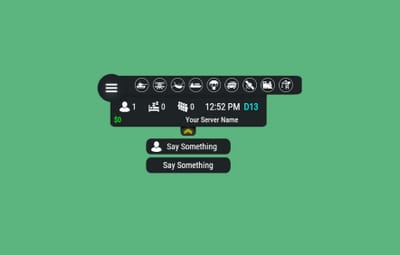
1 Screenshot

  • 373.8k
  • 12.8k
  • 137.15 kB
  • Update details
    v3.3.7
    Released
    Download size137.15 kB
    Total versions62
    Time between versions 1 day
    Typical update pace About every 19 days
    Freshness 365 days ago

This area is for discussion and questions. Please use the support area for reporting issues or getting help.

Recommended Comments


FandangoChristmas

Posted

On 5/19/2024 at 5:37 PM, Yac Vaguer said:

Hey I'm using Carbon and since the last verison I only see the numbers, but nothing else in the hub, I don't see any console error 

Images in the config seems to be fine in the dropbox url 


image.jpeg.0985d84b8388c21b396e3095bc899c65.jpeg

Same issue here after this wipe. Its unusable right now and had to go back to infopanel in the meantime.

AhigaO

Posted

19 minutes ago, FandangoChristmas said:

Same issue here after this wipe. Its unusable right now and had to go back to infopanel in the meantime.

If you delete your sv files, delete imagelibrary data too.

FandangoChristmas

Posted

3 minutes ago, AhigaO said:

If you delete your sv files, delete imagelibrary data too.

Delete the plugins data files? I had already wiped ImageLibrary Data on the server wipe as I always do. I will DM yo in a minute.

hid333

Posted

I would like to grant permissions to each additional menu and restrict the menus that can be displayed for each permission, but is this possible? It would be great if this could be done.

  • Like 1
hid333

Posted

The default streamer permissions work, but
how can I add new permissions?
Even if I add them with the oxide command, they won't work,
and adding "hud.vip" or "vip" from the UI doesn't work,
and they're displayed to all players.

AhigaO

Posted

9 hours ago, hid333 said:

The default streamer permissions work, but
how can I add new permissions?
Even if I add them with the oxide command, they won't work,
and adding "hud.vip" or "vip" from the UI doesn't work,
and they're displayed to all players.

Hud will not create new permissions for you. You must do it with commands or with another plugin. After this enter in Additional Buttons parameter permission to check and all will work good.

  • Like 1
AhigaO

Posted

4 hours ago, humboldt.scott420 said:

You have plans to add weather.

wdym?

Raiven_007

Posted (edited)

Is there new dimensions for width and Length after the new update? I have a custom HUD now and with the 3 new buttons it now needs to be longer than it was before. I am also aware I can just disable the 3 new buttons as well. What would the default dimensions be now? Because I have tried other longer dimensions and it hasn't gotten any longer LoL!

Edited by Raiven_007
  • Like 1
Sergeant7

Posted

Followed the advice above and deleted image library data folder and hud data folder and loaded both after redownloading the .cs files. still won't completely load the hud, I see only 3 of the images and the text and numbers.

Get this goofy af error in console upon loading hud.

Loaded plugin Image Library v2.0.62 by Absolut & K1lly0u [128ms]
[Hud] ImageLibrary not found. You can download the plugin here - https://umod.org/plugins/image-library.
Loading inbuilt skin manifest from GitHub...
 Batch completed! OSI on 2 plugins.
Skin manifest imported successfully


Obviously image library is loaded but hud fails to see it. probably because image library get reloaded when hud loads and hud doesn't wait for image library to load fully.

hid333

Posted

On 6/15/2024 at 2:50 PM, AhigaO said:

Hud will not create new permissions for you. You must do it with commands or with another plugin. After this enter in Additional Buttons parameter permission to check and all will work good.

Understood.
Personally, I would like to create subordinate permissions used by plugins within the plugin itself, but I understand for now.

FreezerGaming

Posted

Is there a way to make the background longer? Like if you look at this screenshot, that little bit of the top bar is hanging off the left of the background.


image.png.8e50372e406961771431ab5f2ddc6f90.png

Oldbtchsgaming

Posted

Quick quest? is there anyway that HUD can keep an accurate count of players pe month? its a monthly server but I have watched the count and I know there HAVE BEEN OVER 100 PLAYERS BUT KEEPS GOING DOWN NOT UP

AhigaO

Posted

13 hours ago, Oldbtchsgaming said:

Quick quest? is there anyway that HUD can keep an accurate count of players pe month? its a monthly server but I have watched the count and I know there HAVE BEEN OVER 100 PLAYERS BUT KEEPS GOING DOWN NOT UP

I don't understand what you're talking about

  • Like 1
Bad Land

Posted

hello. wolud be possible add the option to watch the events icons just when they re active? its very ugly when you do it transparent when is offline and each icon is separated from others..  you know what i mean? thanks!!!!!

Black Drake

Posted

If I may, there is the option to show only active events.  Such that the event that is occurring is the only one that shows.  Check that option out see if it helps you.  


"Main setup": {

    "Overall layer [you will see the hud in your inventory]": true,

    "Show only active events": true,


It may do what you are looking for.  

Bad Land

Posted

12 minutes ago, Black Drake said:

If I may, there is the option to show only active events.  Such that the event that is occurring is the only one that shows.  Check that option out see if it helps you.  


"Main setup": {

    "Overall layer [you will see the hud in your inventory]": true,

    "Show only active events": true,


It may do what you are looking for.  

thanks didnt saw that. so stupid

Black Drake

Posted

It is ok.  I have to read through some things many times to understand it.  happy gaming


  • Love 1
wolvern9

Posted

On 6/24/2024 at 8:37 AM, AhigaO said:

I don't understand what you're talking about

Right now i have 4 people on and it is showing 2 .over the lat 5 months I get around 100 players a month but I have noticed the count went from 82 sleepers  to 65 in just a few days..

AhigaO

Posted

11 hours ago, wolvern9 said:

Right now i have 4 people on and it is showing 2 .over the lat 5 months I get around 100 players a month but I have noticed the count went from 82 sleepers  to 65 in just a few days..

1) if someone kill a sleeper -> sleepers amount decrease
2) Maybe you have enabled function that admins do not count. Check it too

MichuX

Posted

13 hours ago, wolvern9 said:

Right now i have 4 people on and it is showing 2 .over the lat 5 months I get around 100 players a month but I have noticed the count went from 82 sleepers  to 65 in just a few days..

Players who logs in and they have steam offline it doesn't count as a player number. 

I have tested that when I entered as a steam offline and steam online.

Probably not the plugin fault Players who logs as a steam offline

wolvern9

Posted

On 6/26/2024 at 9:24 AM, AhigaO said:

1) if someone kill a sleeper -> sleepers amount decrease
2) Maybe you have enabled function that admins do not count. Check it too

i have it set cannot kill sleepers..and show admin


Hud.json

BetterDeadThanZed

Posted

I've been told that the chinook icon only turns green once the box has been dropped by the chinook. Is this supposed to be that way?

Vodu

Posted

First in .. Travelling Vendor hook?? 😛

Nubenegra

Posted

Hello, I can't see the images, what could it be?


noseveelpanel.png

Create an account or sign in to comment

You need to be a member in order to leave a comment

Create an account

Sign up for a new account in our community. It's easy!

Register a new account

Sign in

Already have an account? Sign in here.

Sign In Now
  • Like 22
  • Sad 2
  • Confused 1
  • Love 17

User Feedback

About Us

Codefling is the largest marketplace for plugins, maps, tools, and more, making it easy for customers to discover new content and for creators to monetize their work.

Downloads
2.4m
Total downloads
Customers
10.7k
Customers served
Files Sold
155.2k
Marketplace sales
Payments
3.3m
Processed total
×
×
  • Create New...

Important Information

We have placed cookies on your device to help make this website better. You can adjust your cookie settings, otherwise we'll assume you're okay to continue.